
Spring Cloud Config
分佈式配置管理系統
作用:配置管理
主要包括:
- Config Server :配置管理服務器,負責從後端存儲中拉取配置信息(如 git,svn,本地文件系統等),並提供 REST API 供客户端使用。
- Config Client:配置客户端,使程序通過 它 連接 Config Server 並動態獲取配置信息。
- 版本控制集成:SCC 默認使用 Git 作為配置存儲的後端,使用 Git 的版本控制功能來管理配置文件。每個環境對應一個特定的版本,通過切換版本號自動獲取對應環境的配置。
Config Server
這是一個程序(要自己搭),步驟:
- 創建項目
- 添加依賴
- 項目啓用Config Server (啓動類上加註解)
- 進行配置-git 倉庫地址,分支選用,配置所在文件夾
- 初始化 Git 倉庫。
Spring Cloud Config 有它的⼀套訪問規則,通過這套規則在瀏覽器上直接訪問就可以。
• /{application}/{profile}/{label}
• /{application}-{profile}.yml
• /{label}/{application}-{profile}.yml
• /{application}-{profile}.properties
• /{label}/{application}-{profile}.properties
• {application}: 微服務的名稱, 對應於配置中的 spring.application.name 屬性。
• {profile}: 當前環境的配置⽂件, 如dev, test, prod等, 對應於 spring.profiles.active
屬性.
• {label}: Git倉庫中的分支, 標籤或提交ID,默認會使用 master分支, {label} 對於回滾到以前的配置版本非常有用。
Config Client
1. 引入依賴
<dependency>
	<groupId>org.springframework.cloud</groupId>
	<artifactId>spring-cloud-starter-config</artifactId>
</dependency>
<dependency>
	<groupId>org.springframework.cloud</groupId>
	<artifactId>spring-cloud-starter-bootstrap</artifactId>
</dependency>
一個是 Config 依賴,一個是 bootstrap 依賴。
Spring Cloud 會創建⼀個 Bootstrap Context , 作為Spring 應用"Application Context" 的父上下文。 在Spring應用啓動的初始化階段, Bootstrap Context 負責從外部源(如Consul)加載配置屬性並解析配置。
Bootstrap屬性具有高優先級, 也就是説在 bootstrap.yml 或 bootstrap.properties 中定義
的配置會優先於 application.yml 或 application.properties 中的配置。
bootstrap.yml 主要用於配置應用啓動時所需的外部依賴和環境, 而 application.yml 用於業
務邏輯相關的配置(如數據庫連接等)
2. 配置 bootstrap 文件
spring:
	profiles:
		active: dev
	application:
		name: product-service
	cloud:
		config:
			uri: http://127.0.0.1:7071 # 指定配置服務端的地址
配置 config server 的地址。
3. 測試——從配置文件中讀取配置
@RequestMapping("/config")
@RestController
public class ConfigController {
	@Value("${data.env}")
	private String env;

	@RequestMapping("/getEnv")
	public String getEnv(){ return "env:"+ env; } }
此處從 server 中讀配置,遵循前面的訪問規則。
4. 多平台配置
spring:
	profiles:
		active: prod

#配置兩個版本的配置,並通過 spring.profiles.active 設置當前使⽤的版本

---
spring:
	config:
		activate:
			on-profile: prod
	application:
		name: product-service
	cloud:
		config:
			uri: http://localhost:7071
---
spring:
	config:
		activate:
			on-profile: dev
	application:
			name: product-service
	cloud:
		config:
			uri: http://localhost:7071
因為開發環境和生產環境,server 的地址是可能不同的。
刷新
只這樣是不夠的,會發現修改 git 中的配置後,讀的配置不會改變。需要重啓,服務才可以。
為了解決反覆重啓這個問題,需要藉助 Actuator提供的功能。
1. 依賴引入:
<dependency>
	<groupId>org.springframework.boot</groupId>
	<artifactId>spring-boot-starter-actuator</artifactId>
</dependency>
2. 端點開啓:
spring-boot-starter-actuator是 Spring Boot 提供的⼀個強大的監控和管理工具,它允
許開發者查看和管理 Spring Boot 應用的各種運行時指標和狀態。核心功能有健康檢查, 收集和展示應用程序的運行指標, 以及端口配置
想要使用,就要開發對應的端點。
#需要開啓的端點, 這⾥主要⽤到的是refresh端點, 只開啓這⼀個就可以, 為了⽅便, 可以開啓所有端點, 除了shutdown端點
management:
	endpoint:
		shutdown:
			enabled: false
	endpoints:
		web:
			exposure:
				include: "*"
/actuator/refresh
3. 註解添加:
添加 @RefreshScope
@RefreshScope
@RequestMapping("/config")
@RestController
public class ConfigController {
	@Value("${data.env}")
	private String env;

	@RequestMapping("/getEnv")
	public String getEnv(){ return "env:"+ env; } }
之後,每當修改後,手動動調一下接口 http://127.0.0.1:9090/actuator/refresh(POST請求)動態刷新 Spring Cloud Config 客户端的配置 (客户端服務接口)
Webhook 使用
當然,之前還是太麻煩了。每次都要手動,太不人性了。所以,引入 webhook 的使用。
webhook 是gitee 提供的,使用後。每次 push 後,gitee 會向遠程 HTTP URL 發送 一個 POST 請求。這就不用手動了。
操作:進入倉庫-管理-webhook-添加 webhook

直接把 http://127.0.0.1:9090/actuator/refresh 填進去是不行的,因為這是 內網的url,gitee 在外網訪問不到,可以填域名 或 外網 url。
這兩種比較麻煩,此處介紹一個簡單的—— 內網穿透 。
cpolar 使用它完成。頁面有提示,根據提示操作即可。
直接使用生成的 url,並測試後,會失敗。
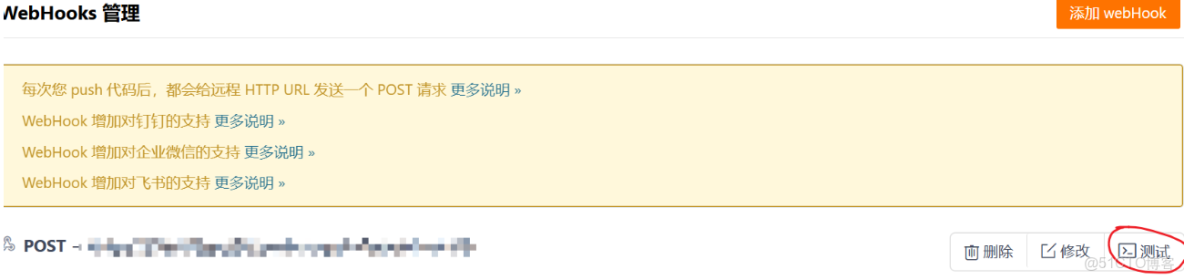
原因:webhook發送post的時候會攜帶其他的信息, 可以通過過濾器把對應的多餘信息去掉。
Filter 、Interceptor區別
直接複製使用:
package com.bite.product.filter;
import jakarta.servlet.*;
import jakarta.servlet.http.HttpServletRequest;
import jakarta.servlet.http.HttpServletRequestWrapper;
import org.springframework.stereotype.Component;
import java.io.ByteArrayInputStream;
import java.io.IOException;
@Component
public class WebHooksFilter implements Filter {

    @Override

    public void init(FilterConfig filterConfig) throws ServletException {

    }

    @Override

    public void destroy() {

    }

    @Override

    public void doFilter(ServletRequest servletRequest, ServletResponse

            servletResponse, FilterChain filterChain) throws IOException,

            ServletException {

        HttpServletRequest httpServletRequest = (HttpServletRequest)

                servletRequest;

        String url = new String(httpServletRequest.getRequestURI());

//檢查url是否以/refresh結尾, 如果不是, 直接把請求傳遞給下⼀個過濾器或者⽬標資源

        if (!url.endsWith("/refresh")) {

            filterChain.doFilter(servletRequest, servletResponse);

            return;

        }

        RequestWrapper requestWrapper = new

                RequestWrapper(httpServletRequest);

        filterChain.doFilter(requestWrapper, servletResponse);

    }

    private class RequestWrapper extends HttpServletRequestWrapper {

        public RequestWrapper(HttpServletRequest request) {

            super(request);

        }

        //重寫了HttpServletRequestWrapper的getInputStream⽅法, 返回了⼀個空的字節數組的ByteArrayInputStream

        @Override

        public ServletInputStream getInputStream() throws IOException {

            byte[] bytes = new byte[0];

            ByteArrayInputStream byteArrayInputStream = new

                    ByteArrayInputStream(bytes);

            ServletInputStream servletInputStream = new ServletInputStream() {

                @Override

                public int read() throws IOException {

                    return byteArrayInputStream.read();

                }

                @

                        Override

                public boolean isFinished() {

                    return byteArrayInputStream.read() == -1 ? true : false;

                }

                @

                        Override

                public boolean isReady() {

                    return false;

                }

                @

                        Override

                public void setReadListener(ReadListener listener) {

                }

            };

            return servletInputStream;

        }

    }

}
Spring Cloud Bus
使用 webhook 是方便了不少,但是一次提交只會刷新一個實例,而實際生產中一般會有多個實例。此時,想要更新每個實例,就要訪問每個實例的 \actuator\refresh 端點,這就很麻煩。
為此引入 Spring Cloud Bus 的使用,只要用其中一個,其餘也會跟着更新。
Spring Cloud Bus 核心是基於消息隊列進行廣播。主要用於集羣環境中傳播分佈式系統的配置變更,以及提供事件驅動的通信機制。
目前 Spring Cloud Bus 支持的消息隊列 有 RabbitMQ 和 Kafka。
依賴引入
<dependency>
	<groupId>org.springframework.cloud</groupId>
	<artifactId>spring-cloud-starter-bus-amqp</artifactId> </dependency>
這裏使用 rabbitmq,如果是 kafka 則將上面的 amqp 換成 kafak。
配置添加
rabbitmq:
  host: 49.235.103.138
  port: 5672
  username: admin
  password: admin
  virtual-host: /
使用 kafka ,則換成對應配置。
測試
啓動多個實例,修改配置中心中的配置,接着訪問任意實例的 /actuator/busrefresh (post 方法),可以觀察到所有實例,都更新了。
加密
配置文件中有時會放一些密碼之類的敏感信息,明文存儲風險很大,而且還是放在git倉庫裏。
因此,就要對這些信息加密。
對稱加密
java 中默認提供的有 一套用於加密,密鑰生成的包 JCE,支持對稱,非對稱等加密。
但是這個默認的長度有限制。如果想要不受限制就到 https://www.oracle.com/java/technologies/javase-jce8-downloads.html 這裏下載不受限的。下好後,將local_policy.jar和US_export_policy.jar兩個文件複製到$JAVA_HOME/jre/lib/security目錄下, 如果之前目錄存在同名jar包, 則覆蓋。
依賴引入
在 config server 服務中添加
<dependency>
	<groupId>org.springframework.cloud</groupId>
	<artifactId>spring-cloud-starter-bootstrap</artifactId> </dependency>
配置
config server 服務中配置密鑰
encrypt:
  key: 123456
測試
訪問 config server 下 \encrypt\status 如果顯示 OK,就説明成功了。
出現"The encryption algorithm is not strong enough",説明沒有配密鑰
出現 "java.lang.UnsupportedOperationException: No encryption for FailsafeTextEncryptor." 説明沒有添加 bootstrap 依賴。
加密解密
啓動 server 後,在命令行中 curl http://127.0.0.1:7071/encrypt -d root 執行此命令,即對 root 進行加密。
結果如下:9c95492304ac3a92e9d8ac2ff530b9bf1a968db65dbd14119c7f755204bba683
執行 `curl http://127.0.0.1:7071/decrypt -d 9c95492304ac3a92e9d8ac2ff530b9bf1a968db65dbd14119c7f755204bba683
就是對 root 加密的結果進行解密,結果為 root。
此處,也可使用postman, 加密對象要放在 body中,選用 raw 下的 text,且使用 POST 方法。
將加密結果放在 配置中心的配置文件中:
data:
    env: product-service-prod3
    password: '{cipher}9c95492304ac3a92e9d8ac2ff530b9bf1a968db65dbd14119c7f755204bba683'
單引號 ‘ ’ 不可省略,且要加上 {cipher}, {cipher} 就是告訴程序這是個加密後的,獲取時要用密鑰解密,之後在發給 client 端。
非對稱加密:
生成密鑰
使用 JDK 中自帶的 keytool。
命令行執行:keytool -genkeypair -keystore D:/config-server.keystore -alias config-server-keyalg RSA -keypass config -storepass config
接着將生成的 .keystore 文件,放在 config server 服務的 resource 文件夾下。
配置
encrypt:
	key-store:
		location: config-server.keystore #keystore⽂件存儲路徑
		alias: config-server
		password: config #密鑰別名#storepass密鑰倉庫
		secret: config #keypass ⽤來保護所⽣成密鑰對中的密鑰
測試
同對稱加密
加密解密
同對稱加密
