

《JUnit in Action》全新第3版封面截圖
寫在前面
作為第二章 JUnit 功能特性掃盲篇的最後一篇自學筆記,我個人對這部分的定位是增長見識、拓寬眼界為主。很多知識點都給人眼前一亮的感覺:原來 JUnit 5 還能這樣用!但是時間精力確實有限,不可能完全展開討論,留下關鍵印象就顯得特別重要了。訣竅在於,記牢典型案例的應用場景。
文章目錄
- 2.13 基於手動硬編碼的字符串數組的參數化測試
- 2.14 基於枚舉類的參數化測試
- 2.15 基於 CSV 文件的參數化測試
- 2.16 動態測試
- 2.17 Hamcrest 框架用法示例
2.13 基於手動硬編碼的字符串數組的參數化測試
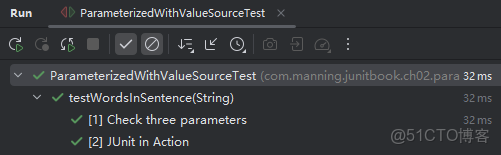
通過組合使用 @ParameterizedTest 註解和 @ValueSource 註解,可以自定義參數化測試用例的展示名稱(默認將 strings 數組中的元素值作為各測試用例的子標題):
class ParameterizedWithValueSourceTest {
private WordCounter wordCounter = new WordCounter();
@ParameterizedTest
@ValueSource(strings = {"Check three parameters", "JUnit in Action"})
void testWordsInSentence(String sentence) {
assertEquals(3, wordCounter.countWords(sentence));
}
}
實測結果:
2.14 基於枚舉類的參數化測試
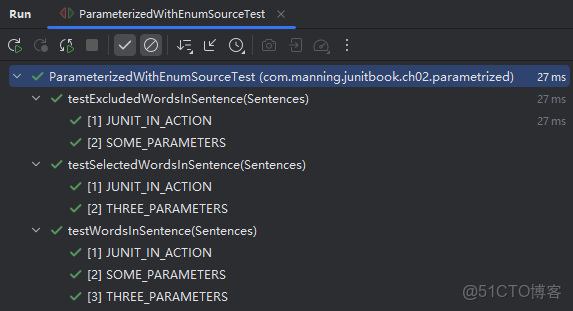
通過組合使用 @ParameterizedTest 註解和 @EnumSource 註解,可以自定義參數化測試用例的展示名稱(能在枚舉註解內設置篩選條件,這個特性讓人眼前一亮):
import static org.junit.jupiter.params.provider.EnumSource.Mode.EXCLUDE;
class ParameterizedWithEnumSourceTest {
private WordCounter wordCounter = new WordCounter();
@ParameterizedTest
@EnumSource(Sentences.class)
void testWordsInSentence(Sentences sentence) {
assertEquals(3, wordCounter.countWords(sentence.value()));
}
@ParameterizedTest
@EnumSource(value = Sentences.class, names = {"JUNIT_IN_ACTION", "THREE_PARAMETERS"})
void testSelectedWordsInSentence(Sentences sentence) {
assertEquals(3, wordCounter.countWords(sentence.value()));
}
@ParameterizedTest
@EnumSource(value = Sentences.class, mode = EXCLUDE, names = {"THREE_PARAMETERS"})
void testExcludedWordsInSentence(Sentences sentence) {
assertEquals(3, wordCounter.countWords(sentence.value()));
}
enum Sentences {
JUNIT_IN_ACTION("JUnit in Action"),
SOME_PARAMETERS("Check some parameters"),
THREE_PARAMETERS("Check three parameters");
private final String sentence;
Sentences(String sentence) {
this.sentence = sentence;
}
public String value() {
return sentence;
}
}
}
實測結果:
2.15 基於 CSV 文件的參數化測試
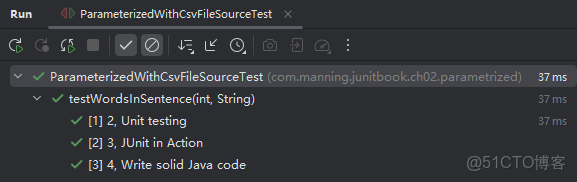
最讓人意外的是 JUnit 5 還能通過 @CsvFileSource 註解直接解析 CSV 文件,並將解析結果以 方法參數的形式 注入參數化測試(例如示例代碼中的 expected 和 sentence)。如果數據量較小,也可以用 @CsvSource 註解手動輸入 CSV 格式的數據源。
這部分內容其實和上一篇的參數注入有所重疊,為了強調 JUnit 在文件解析方面的強大,這裏單列出來以便日後覆盤。查看 @CsvFileSource 註解的源碼還可以瞭解更多配置項,如分隔符的設置等,這裏就不展開了。
示例代碼1:
class ParameterizedWithCsvFileSourceTest {
private WordCounter wordCounter = new WordCounter();
@ParameterizedTest
@CsvFileSource(resources = "/word_counter.csv")
void testWordsInSentence(int expected, String sentence) {
assertEquals(expected, wordCounter.countWords(sentence));
}
}上述代碼中,CSV 文件路徑是相對測試的 CLASSPATH 而言的,即 src/test/resources/。運行結果:
示例代碼2:(手動錄入數據源)
class ParameterizedWithCsvSourceTest {
private final WordCounter wordCounter = new WordCounter();
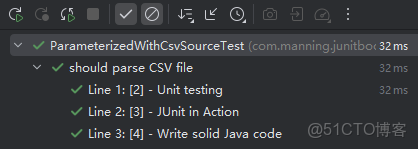
@ParameterizedTest(name = "Line {index}: [{0}] - {1}")
@CsvSource(value = {"2, Unit testing", "3, JUnit in Action", "4, Write solid Java code"})
@DisplayName(value = "should parse CSV file")
void testWordsInSentence(int expected, String sentence) {
assertEquals(expected, wordCounter.countWords(sentence));
}
}
運行結果:
2.16 動態測試
利用工廠模式註解 @TestFactory 可以動態生成多個測試用例。需要注意的是,最核心的測試方法需要返回如下指定類型:
- 一個
DynamicNode型對象(DynamicNode為抽象類,DynamicContainer和DynamicTest是其具體的實現類); - 一個
DynamicNode型數組; - 一個基於
DynamicNode的Stream流; - 一個基於
DynamicNode的Collection集合; - 一個基於
DynamicNode的Iterable可迭代對象; - 一個基於
DynamicNode的Iterator迭代器對象。
示例代碼如下:
class DynamicTestsTest {
private PositiveNumberPredicate predicate = new PositiveNumberPredicate();
@BeforeAll
static void setUpClass() {
System.out.println("@BeforeAll method");
}
@AfterAll
static void tearDownClass() {
System.out.println("@AfterAll method");
}
@BeforeEach
void setUp() {
System.out.println("@BeforeEach method");
}
@AfterEach
void tearDown() {
System.out.println("@AfterEach method");
}
@TestFactory
Iterator<DynamicTest> positiveNumberPredicateTestCases() {
  return asList(
  dynamicTest("negative number", () -> {
  System.out.println("negative number ...");
  assertFalse(predicate.check(-1));
  }),
  dynamicTest("zero", () -> {
  System.out.println("zero ...");
  assertFalse(predicate.check(0));
  }),
  dynamicTest("positive number", () -> {
  System.out.println("positive number ...");
  assertTrue(predicate.check(1));
  })
  ).iterator();
  }
  }
實測結果:
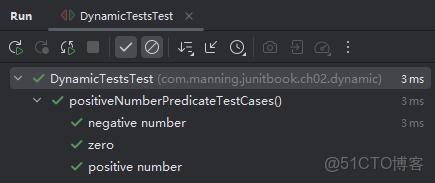
可以看到,各生命週期註解僅對添加了 @TestFactory 工廠註解的外層方法本身生效,對工廠方法中動態生成的測試用例均無效。具體的測試用例行為,由動態測試的第二個參數,即傳入的 Executable 型斷言對象決定。
備忘:意外發現一個 IDEA 控制枱輸出的 Bug
實測發現,
IntelliJ IDEA中的控制枱輸出結果與期望的順序不符,每次在IDEA中運行動態測試,@BeforeAll和@AfterAll註解的輸出結果都在最末尾:### snip ### @BeforeEach method negative number ... zero ... positive number ... @AfterEach method @BeforeAll method @AfterAll method Process finished with exit code 0
但在命令行中的就是正確的順序:
> mvn test -Dtest=DynamicTestsTest ### snip ### [INFO] ------------------------------------------------------- [INFO] T E S T S [INFO] ------------------------------------------------------- [INFO] Running com.manning.junitbook.ch02.dynamic.DynamicTestsTest @BeforeAll method @BeforeEach method negative number ... zero ... positive number ... @AfterEach method @AfterAll method [INFO] Tests run: 3, Failures: 0, Errors: 0, Skipped: 0, Time elapsed: 0.016 s - in com.manning.junitbook.ch02.dynamic.DynamicTestsTest ### snip ###
2.17 Hamcrest 框架用法示例
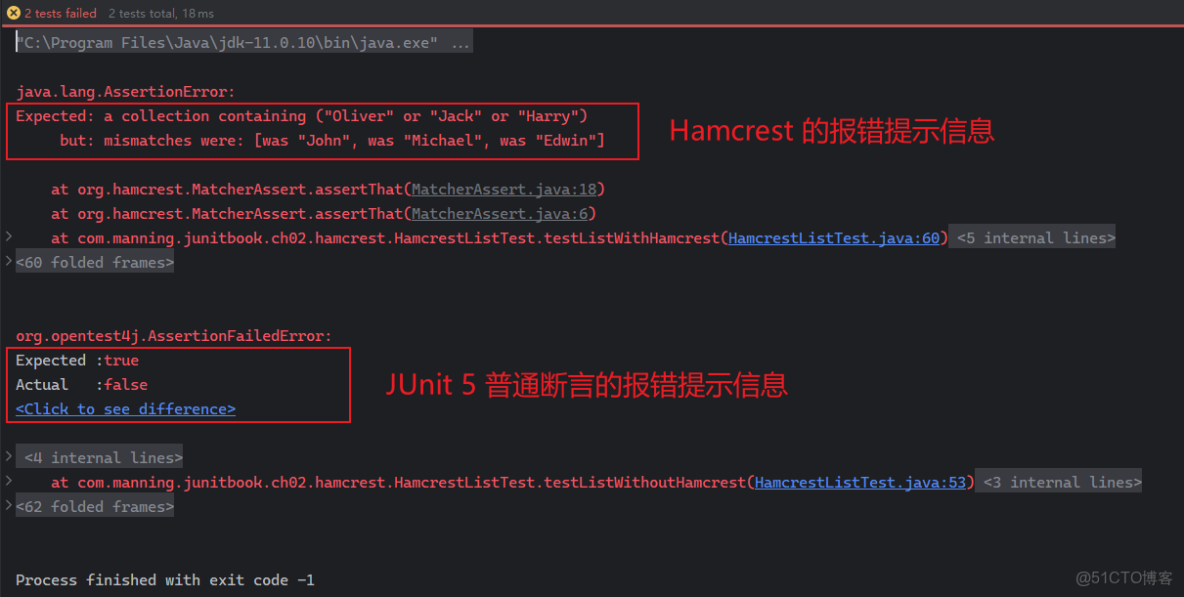
Hamcrest 輔助框架提供了更具聲明式風格的測試斷言方法和組合工具,可以讓代碼可讀性更好,同時報錯信息的提示更加友好。其中會大量涉及 Matcher 對象的組合應用(matcher 又稱為 約束(constraints) 或 判定條件(predicates),相關概念源自 Java、C++、Objective-C、Python、PHP 等編程語言)。
對函數式編程感興趣的朋友不妨多看看 Hamcrest 的源碼,學習學習當中定義的各種輔助 Matcher 是如何構建一個相對完善的測試語義的。畢竟 Java 8 的函數式特性已經發布十餘年了,我本人也在各類項目中有意嘗試這些寫法,但在構築流暢的語義抽象層時經常遭遇巨大阻力,以致於很多項目後期運維難以為繼,可讀性和命名上的一致性都不強。究其原因,一是自身的英語素養還有待加強,二是可供參考的體例不多,三是社區對函數式編程的響應積極性並不高,尤其是在絕大多數中小公司都將代碼重構當成增加項目綜合成本的一大來源,這方面的刻意練習就更少了。
要啓用 Hamcrest 也不難,先新增必要的 Maven 依賴:
<dependency>
<groupId>org.hamcrest</groupId>
<artifactId>hamcrest-library</artifactId>
<version>2.1</version>
<scope>test</scope>
</dependency>
下面通過常規報錯提示和 Hamcrest 提示的效果對比來演示具體用法(報錯信息演示):
public class HamcrestListTest {
private List<String> values;
  @BeforeEach
  public void setUp() {
  values = new ArrayList<>();
    values.add("John");
    values.add("Michael");
    values.add("Edwin");
    }
    @Test
    @DisplayName("List without Hamcrest will intentionally fail to show how failing information is displayed")
    public void testListWithoutHamcrest() {
    assertEquals(3, values.size());
    assertTrue(values.contains("Oliver") || values.contains("Jack") || values.contains("Harry"));
    }
    @Test
    @DisplayName("List with Hamcrest will intentionally fail to show how failing information is displayed")
    public void testListWithHamcrest() {
    assertThat(values, hasSize(3));
    assertThat(values, hasItem(anyOf(
    equalTo("Oliver"),
    equalTo("Jack"),
    equalTo("Harry"))));
    assertThat("The list doesn't contain all the expected objects, in order",
    values,
    contains("Oliver", "Jack", "Harry")
    );
    assertThat("The list doesn't contain all the expected objects",
    values,
    containsInAnyOrder("Jack", "Harry", "Oliver"));
    }
    }
運行結果:
常見的 Hamcrest 靜態工廠方法:
|
工廠方法
|
功能
|
|
|
匹配任意內容,常用於單純提高可讀性。
|
|
|
僅用於提高語句的可讀性
|
|
|
檢查其中的條件是否都滿足
|
|
|
檢查包含的條件是否存在任意一個滿足
|
|
|
反轉目標條件的語義
|
|
|
檢查某對象是否均為另一對象的實例
|
|
|
測試對象的同一性
|
|
|
測試空值、非空值
|
|
|
測試該 |
|
|
測試目標 |
|
|
檢測目標集合中是否存在某個或某些子項
|
|
|
測試目標數值是否接近、
大於、
大於或等於、
小於、
小於或等於某個值
|
|
|
測試某字符串是否與另一字符串相等(忽略大小寫)
|
|
|
測試某字符串是否與另一字符串相等(忽略空白字符)
|
|
|
測試某字符串是否包含指定字符串、或者以指定字符串開頭或結尾
|
不難看到,這些聲明式的工廠方法都是非常簡潔有力的,幾乎不需要額外的註釋。或許這才是函數式編程的正確打開方式吧。
(第二章完)
