
文章目錄
- 故障復現
- Compatibility Matrix
- 根本原因
- 獲取kubelet cadvisor 指標
- 如何解決?
- 創建cadvisor ServiceAccount 和 Namespace
- 創建cadvisor ClusterRole
- 創建cadvisor DaemonSet
- 創建cadvisor Service 和 ServiceMonitor
- 查看cadvisor收集到的指標
- 校驗指標
在 Kubernetes v1.24 版本中,內建組件 dockershim 被移除。 默認的容器運行時從 Docker 切換到了 containerd。如果您的集羣使用 Docker 作為容器運行時,並且您的應用程序依賴於 dockershim 提供的指標,
那麼部署kube-prometheus-stack 監控棧時,會出現容器指標顯示異常的問題。
故障復現
根據kubernetes版本和kube-prometheus的兼容矩陣安裝合適版本的kube-prometheus-stack, 容器指標卻採集不到。
Compatibility Matrix
The following Kubernetes versions are supported and work as we test against these versions in their respective branches. But note that other versions might work!
|
kube-prometheus stack
|
Kubernetes 1.22
|
Kubernetes 1.23
|
Kubernetes 1.24
|
Kubernetes 1.25
|
Kubernetes 1.26
|
Kubernetes 1.27
|
Kubernetes 1.28
|
|
release-0.10 |
✔
|
✔
|
✗
|
✗
|
x
|
x
|
x
|
|
release-0.11 |
✗
|
✔
|
✔
|
✗
|
x
|
x
|
x
|
|
release-0.12 |
✗
|
✗
|
✔
|
✔
|
x
|
x
|
x
|
|
release-0.13 |
✗
|
✗
|
✗
|
x
|
✔
|
✔
|
✔
|
|
main |
✗
|
✗
|
✗
|
x
|
x
|
✔
|
✔
|
比如我的版本是kubernetes 1.26, 那麼我就需要安裝kube-prometheus-stack release-0.13 版本。
如果我的容器運行時是containerd, 那麼正常情況,容器指標顯示是沒有問題的。因為kube-prometheus-stack就是根據標準kubernetes版本去測試的。
但是如果你的容器運行時用了docker, 那麼就會出現容器指標顯示異常的問題。
根本原因
容器的指標是通過kubelet的metrics-endpoint暴露的,路徑為/metrics/cadvisor,由內置cadvisor提供。
本來默認是containerd運行時,如果你的運行時換成了docker,就會採集容器指標變成:
容器的PromSQL查詢語句:
sum(container_memory_working_set_bytes{job="kubelet", metrics_path="/metrics/cadvisor", cluster="$cluster", namespace="$namespace", pod="$pod", container!="", image!=""}) by (container)以docker運行時查詢出來的容器指標,會有多個標籤是空值,如下所示:
container_cpu_usage_seconds_total{container="",cpu="total",id="/kubepods.slice/kubepods-burstable.slice/kubepods-burstable-pod20aada51_3ac1_4ab7_8ec6_87b090585825.slice",image="",name="",namespace="monitoring",pod="node-exporter-v25n7"} 327.638786615 176252734624其中的container, image標籤都是空值,因此面板監控顯示的容器指標就是異常的。
獲取kubelet cadvisor 指標
apiVersion: v1
kind: Secret
metadata:
  name: cadvisor-reader-token
  namespace: default
  annotations:
    kubernetes.io/service-account.name: cadvisor-reader  # 關聯到目標 ServiceAccount
type: kubernetes.io/service-account-token
創建一個ServiceAccount,用於kubelet認證。
# 保存為 custom-kubelet-reader.yaml
apiVersion: rbac.authorization.k8s.io/v1
kind: ClusterRole
metadata:
  name: custom-kubelet-reader
rules:
- apiGroups: [""]
  resources:
  - "nodes/proxy"           # 允許訪問節點代理(包含 cAdvisor 接口)
  - "nodes/metrics"         # 節點 metrics 接口
  - "nodes/stats"           # 節點統計信息(包含容器詳細數據)
  - "nodes/log"             # 節點日誌(可選)
  - "nodes/spec"            # 節點規格(可選)
  verbs: ["get", "list", "watch"]

---
apiVersion: rbac.authorization.k8s.io/v1
kind: ClusterRoleBinding
metadata:
  name: default-cadvisor-reader-binding  # 與之前同名,會覆蓋舊綁定
subjects:
- kind: ServiceAccount
  name: cadvisor-reader
  namespace: default
roleRef:
  kind: ClusterRole
  name: custom-kubelet-reader  # 引用自定義角色
apiGroup: rbac.authorization.k8s.io- get-metrics.sh
# 定義 Secret 名稱(已確認存在)
SECRET_NAME=cadvisor-reader-token

# 提取 Token 並解碼(base64 解碼)
TOKEN=$(kubectl get secret $SECRET_NAME -n default -o jsonpath='{.data.token}' | base64 -d)

curl -k -H "Authorization: Bearer $TOKEN" https://192.168.0.4:10250/metrics/cadvisor
就可以獲取到cadvisor指標了。
如何解決?
需要安裝cadvisor, 來替代kubelet默認提供的cadvisor。
創建cadvisor ServiceAccount 和 Namespace
apiVersion: v1
kind: ServiceAccount
metadata:
  name: cadvisor
  namespace: monitoring
---
apiVersion: v1
kind: Namespace
metadata:
  name: cadvisor
創建cadvisor ClusterRole
apiVersion: rbac.authorization.k8s.io/v1
kind: ClusterRole
metadata:
  labels:
    app: cadvisor
  name: cadvisor
rules:
- apiGroups:
  - policy
  resourceNames:
  - cadvisor
  resources:
  - podsecuritypolicies
  verbs:
  - use
---
apiVersion: rbac.authorization.k8s.io/v1
kind: ClusterRoleBinding
metadata:
  labels:
    app: cadvisor
  name: cadvisor
roleRef:
  apiGroup: rbac.authorization.k8s.io
  kind: ClusterRole
  name: cadvisor
subjects:
- kind: ServiceAccount
  name: cadvisor
  namespace: monitoring
創建cadvisor DaemonSet
apiVersion: apps/v1 # for Kubernetes versions before 1.9.0 use apps/v1beta2
kind: DaemonSet
metadata:
  name: cadvisor
  namespace: monitoring
spec:
  selector:
    matchLabels:
      name: cadvisor
  template:
    metadata:
      labels:
        name: cadvisor
    spec:
      serviceAccountName: cadvisor
      priorityClassName: system-node-critical
      tolerations:
        - key: "CriticalAddonsOnly"
          operator: "Exists"
      containers:
      - name: cadvisor
        image: dockerhub.kubekey.local/cadvisor/cadvisor:v0.45.0
        args:
          - --housekeeping_interval=10s                           # kubernetes default args
          - --max_housekeeping_interval=15s
          - --event_storage_event_limit=default=0
          - --event_storage_age_limit=default=0
          - --enable_metrics=app,cpu,disk,diskIO,memory,network,process
          - --docker_only                                         # only show stats for docker containers
          - --store_container_labels=false
          - --whitelisted_container_labels=io.kubernetes.container.name, io.kubernetes.pod.name,io.kubernetes.pod.namespace


        resources:
          requests:
            memory: 400Mi
            cpu: 400m
          limits:
            memory: 2000Mi
            cpu: 800m
        volumeMounts:
        - name: rootfs
          mountPath: /rootfs
          readOnly: true
        - name: var-run
          mountPath: /var/run
          readOnly: true
        - name: sys
          mountPath: /sys
          readOnly: true
        - name: docker
          mountPath: /var/lib/docker
          readOnly: true
        - name: disk
          mountPath: /dev/disk
          readOnly: true
        ports:
          - name: http
            containerPort: 8080
            protocol: TCP
      automountServiceAccountToken: false
      terminationGracePeriodSeconds: 30
      volumes:
      - name: rootfs
        hostPath:
          path: /
      - name: var-run
        hostPath:
          path: /var/run
      - name: sys
        hostPath:
          path: /sys
      - name: docker
        hostPath:
          path: /var/lib/docker
      - name: disk
        hostPath:
          path: /dev/disk
創建cadvisor Service 和 ServiceMonitor
apiVersion: v1
kind: Service
metadata:
  name: cadvisor
  labels:
    app: cadvisor
  namespace: monitoring
spec:
  selector:
    name: cadvisor
  type: NodePort
  ports:
  - name: cadvisor
    port: 8080
    protocol: TCP
    targetPort: 8080
---
apiVersion: v1
kind: Service
metadata:
  name: cadvisor
  labels:
    app: cadvisor
  namespace: monitoring
spec:
  selector:
    name: cadvisor
  type: NodePort
  ports:
  - name: cadvisor
    port: 8080
    protocol: TCP
    targetPort: 8080
---
apiVersion: monitoring.coreos.com/v1
kind: ServiceMonitor
metadata:
  labels:
    app: cadvisor
  name: cadvisor
  namespace: cadvisor
spec:
  endpoints:
    - metricRelabelings:
        - action: replace
          sourceLabels:
            - container_label_io_kubernetes_pod_name
          targetLabel: pod
        - action: replace
          sourceLabels:
            - container_label_io_kubernetes_container_name
          targetLabel: container
        - action: replace
          sourceLabels:
            - container_label_io_kubernetes_pod_namespace
          targetLabel: namespace
        - action: labeldrop
          regex: container_label_io_kubernetes_pod_name
        - action: labeldrop
          regex: container_label_io_kubernetes_container_name
        - action: labeldrop
          regex: container_label_io_kubernetes_pod_namespace
        - action: replace
          regex: 'k8s_[^_]+_([^_]+)_.*'
          replacement: $1
          sourceLabels:
            - name
          targetLabel: pod
      port: cadvisor
      relabelings:
        - action: replace
          sourceLabels:
            - __meta_kubernetes_pod_node_name
          targetLabel: node
        - action: replace
          replacement: /metrics/cadvisor
          sourceLabels:
            - __metrics_path__
          targetLabel: metrics_path
        - action: replace
          replacement: kubelet
          sourceLabels:
            - job
          targetLabel: job
  namespaceSelector:
    matchNames:
      - monitoring
  selector:
    matchLabels:
      app: cadvisor
給promethues用户足夠的權限獲取cadvisor命名空間下的所有資源:
apiVersion: rbac.authorization.k8s.io/v1
kind: ClusterRole
metadata:
  name: prometheus-all-resources-readonly
rules:
- apiGroups: ["*"]  # 匹配所有 API 組(核心組、apps、networking.k8s.io 等)
  resources: ["*"]  # 匹配所有資源類型(pods、services、endpoints、deployments 等)
  verbs: ["get", "list", "watch"]  # 僅授予只讀操作權限
---
# 綁定到 prometheus-k8s ServiceAccount
apiVersion: rbac.authorization.k8s.io/v1
kind: ClusterRoleBinding
metadata:
  name: prometheus-k8s-all-readonly
subjects:
- kind: ServiceAccount
  name: prometheus-k8s
  namespace: monitoring
roleRef:
  kind: ClusterRole
  name: prometheus-all-resources-readonly
  apiGroup: rbac.authorization.k8s.io
為什麼要創建一個cadvisor命名空間?
這是因為monitoring下的ServiceMonitor對象,Prometheus-Operator監控不到。
查看cadvisor收集到的指標
通過cadvisor的NodePort端口,訪問cadvisor的指標。
http://<cadvisor-node-ip>:<node-port>/metrics我們會看到如下指標:
container_network_receive_bytes_total{container_label_io_kubernetes_container_name="POD",container_label_io_kubernetes_pod_namespace="kube-system",id="/kubepods.slice/kubepods-burstable.slice/kubepods-burstable-pod60538598_0b4c_49c0_9577_c6b600e287d6.slice/docker-5e54348343024541ec3f9dbe65649f77a701f7a8808c84f8fbdfeaa20f625b20.scope",image="gcr.io/pause:3.9",interface="califffbc9ee416",name="k8s_POD_nodelocaldns-8trx7_kube-system_60538598-0b4c-49c0-9577-c6b600e287d6_1"} 5.168659e+07 1762570436207可以看到container、image、namespace字段都有了正確的默認值。
但是pod字段為空,不過我們可以通過name字段來推測它的值,它的組成模式k8s_POD_nodelocaldns-8trx7_kube-system_60538598-0b4c-49c0-9577-c6b600e287d6_1為k8s_$deployment_$pod_name_$namespace_$pod_uid。
那麼此時,我們可以通過給添加metricRelabelings來提取pod字段(yaml已包含):
- metricRelabelings:
        - action: replace
          regex: 'k8s_[^_]+_([^_]+)_.*'
          replacement: $1
          sourceLabels:
            - name
          targetLabel: pod
觀察prometheus是否採集到了cadvisor的指標:
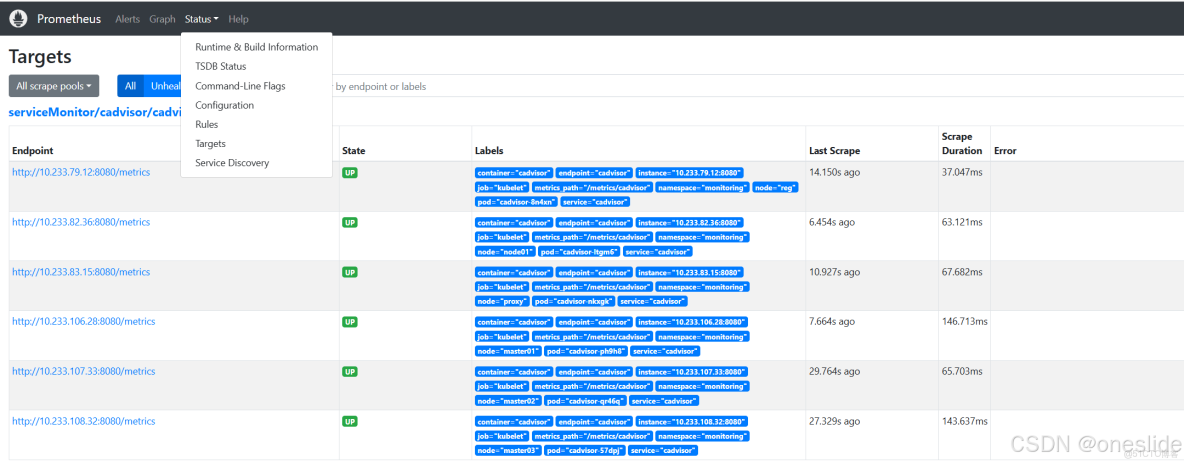
如果已經採集到了,那麼此時我們還有一件事要做,就是找到kubelet的ServiceMonitor對象,刪除默認的採集規則
使用kubectl get servicemonitor -n monitoring kubelet -o yaml來獲取kubelet的ServiceMonitor對象。
刪除路徑為/metrics/cadvisor的採集規則,也就是如下這部分。
- bearerTokenFile: /var/run/secrets/kubernetes.io/serviceaccount/token
      honorLabels: true
      interval: 1m
      metricRelabelings:
        - action: keep
          regex: >-
            container_cpu_usage_seconds_total|container_memory_usage_bytes|container_memory_cache|container_network_.+_bytes_total|container_memory_working_set_bytes|container_cpu_cfs_.*periods_total|container_processes.*|container_threads.*
          sourceLabels:
            - __name__
      path: /metrics/cadvisor
      port: https-metrics
      relabelings:
        - sourceLabels:
            - __metrics_path__
          targetLabel: metrics_path
        - action: labeldrop
          regex: (service|endpoint)
      scheme: https
      tlsConfig:
        insecureSkipVerify: true
校驗指標
Okay,所有準備工作已經完成,現在我們可以進入prometheus的web界面,查看是否採集到了cadvisor的指標。

container_memory_working_set_bytes{container="nfs-client-provisioner", endpoint="cadvisor", id="/kubepods.slice/kubepods-besteffort.slice/kubepods-besteffort-pod3db91060_4f1e_41b0_becc_6f4a69e86319.slice/docker-f1bc1a1d88993cc65eb09ae5b2a7f47cf596c21c7f9990d6523ba1fa997c28ab.scope", image="sha256:932b0bface75b80e713245d7c2ce8c44b7e127c075bd2d27281a16677c8efef3", instance="10.233.82.36:8080", job="kubelet", metrics_path="/metrics/cadvisor", name="k8s_nfs-client-provisioner_nfs-provisioner-nfs-client-provisioner-97d76bf9-jx7h8_default_3db91060-4f1e-41b0-becc-6f4a69e86319_1", namespace="default", node="node01", pod="nfs-provisioner-nfs-client-provisioner-97d76bf9-jx7h8", service="cadvisor"}如圖所示:我們發現prometheus之前採集的指標中為空的label,比如image、container、pod、namespace等都有了正確的值。
查看面板:
CPU & 內存指標顯示正常:
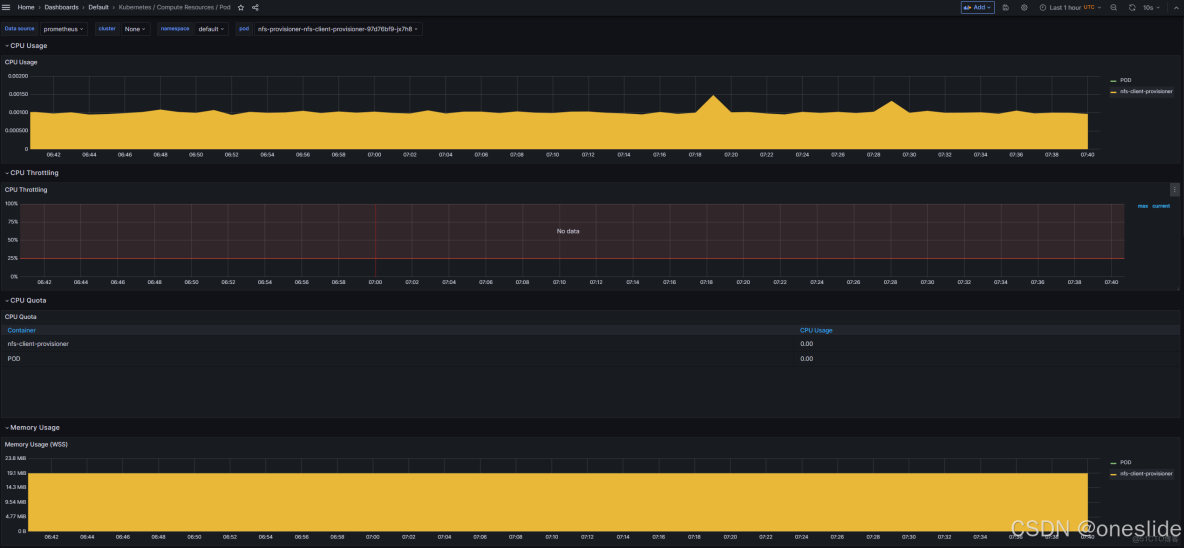
網絡流量指標顯示正常:

