
使用ip netns命令操作network namespace
創建一個network namespace名為nstest。
[root@localhost ~]# ip netns add nstest列出系統中已存在的network namespace
[root@localhost ~]# ip netns list
nstest
刪除一個network namespace
[root@localhost ~]# ip netns delete nstest在network namespace中執行一條命令
[root@localhost ~]# ip netns exec nstest ip addr
1: lo: <LOOPBACK> mtu 65536 qdisc noop state DOWN qlen 1
    link/loopback 00:00:00:00:00:00 brd 00:00:00:00:00:00
命令格式:
ip netns exec [network namespace name] [command]
使用ip命令為network namespace配置網卡。
當使用ip netns add命令創建一個network namespace後,就擁有了一個獨立的網空間,可以根據需求來配置網絡空間,如添加網卡,配置IP,設置路由規則等,當使用ip命令創建一個network namespace時,會默認創建一個迴環設備(loopback interface:lo)。該設備默認不啓動,用最好將其啓動。
[root@localhost ~]# ip netns exec nstest ip link set dev lo up在主機上創建兩張網卡veth-a和veth-b
[root@localhost ~]# ip link add veth-a type veth peer name veth-b將veth-b設備添加到nstest這個network namespace中, veth-a留在主機中
[root@localhost ~]# ip link set veth-b netns nstest現在nstest這個network namespace就有了兩塊網卡lo和veth-b,來驗證一下。
[root@localhost ~]# ip netns exec nstest ip link
1: lo: <LOOPBACK,UP,LOWER_UP> mtu 65536 qdisc noqueue state UNKNOWN mode DEFAULT qlen 1
    link/loopback 00:00:00:00:00:00 brd 00:00:00:00:00:00
4: veth-b@if5: <BROADCAST,MULTICAST> mtu 1500 qdisc noop state DOWN mode DEFAULT qlen 1000
    link/ether 4e:3c:eb:70:76:76 brd ff:ff:ff:ff:ff:ff link-netnsid 0
現在可以為網卡分配IP並啓動網卡了。
在主機上為veth-a配置IP並啓動
[root@localhost ~]# ip addr add 10.0.0.1/24 dev veth-a
[root@localhost ~]# ip link set dev veth-a up
為nstest中的veth-b配置IP並啓動。
[root@localhost ~]# ip netns exec nstest ip addr add 10.0.0.2/24 dev veth-b
[root@localhost ~]# ip netns exec nstest ip link set dev veth-b up
給兩張網卡配置了IP後,會在各自的network namespace中生成一條路由,用ip route或route -a命令查看一下。
[root@localhost ~]# ip route
default via 192.168.1.1 dev ens33 proto static metric 100
10.0.0.0/24 dev veth-a proto kernel scope link src 10.0.0.1
172.17.0.0/16 dev docker0 proto kernel scope link src 172.17.0.1
192.168.1.0/24 dev ens33 proto kernel scope link src 192.168.1.220 metric 100
在nstest network namespce中
[root@localhost ~]# ip netns exec nstest ip route
10.0.0.0/24 dev veth-b proto kernel scope link src 10.0.0.2
這兩條路由表明的意義是目的地址為10.0.0.0/24網絡的IP包分別從veth-a和veth-b發出。現在nstest這個network namespace有了自己的網卡,IP地址,路由表等信息,儼然成了一台小型的虛擬機,測試一下它的連通性,以檢查配置是否正確。
從主機的veth-a網卡ping nstest network namespace的veth-b網卡。
[root@localhost ~]# ping 10.0.0.2
PING 10.0.0.2 (10.0.0.2) 56(84) bytes of data.
64 bytes from 10.0.0.2: icmp_seq=1 ttl=64 time=0.429 ms
64 bytes from 10.0.0.2: icmp_seq=2 ttl=64 time=0.116 ms
^C
--- 10.0.0.2 ping statistics ---
2 packets transmitted, 2 received, 0% packet loss, time 1000ms
rtt min/avg/max/mdev = 0.116/0.272/0.429/0.157 ms
從nstest network namespace的veth-b網卡ping主機的veth-a網卡
[root@localhost ~]# ip netns exec nstest ping 10.0.0.1
PING 10.0.0.1 (10.0.0.1) 56(84) bytes of data.
64 bytes from 10.0.0.1: icmp_seq=1 ttl=64 time=0.108 ms
64 bytes from 10.0.0.1: icmp_seq=2 ttl=64 time=0.053 ms
64 bytes from 10.0.0.1: icmp_seq=3 ttl=64 time=0.070 ms
64 bytes from 10.0.0.1: icmp_seq=4 ttl=64 time=0.051 ms
^C
--- 10.0.0.1 ping statistics ---
4 packets transmitted, 4 received, 0% packet loss, time 3001ms
rtt min/avg/max/mdev = 0.051/0.070/0.108/0.024 ms
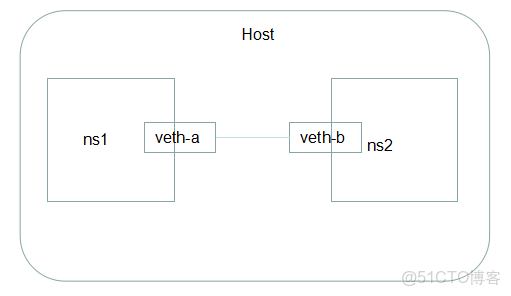
將兩個network namespace連接起來
創建兩個network namespace ns1 ns2
[root@localhost ~]# ip netns add ns1
[root@localhost ~]# ip netns add ns2
創建veth pair設備veth-a,veth-b
[root@localhost ~]# ip link add veth-a type veth peer name veth-b將網卡分別放在兩個naemspace中
[root@localhost ~]# ip link set veth-a netns ns1
[root@localhost ~]# ip link set veth-b netns ns2
啓動兩張網卡。
[root@localhost ~]# ip netns exec ns1 ip link set dev veth-a up
[root@localhost ~]# ip netns exec ns2 ip link set dev veth-b up
分配IP
[root@localhost ~]# ip netns exec ns1 ip addr add 10.0.0.1/24 dev veth-a
[root@localhost ~]# ip netns exec ns2 ip addr add 10.0.0.2/24 dev veth-b
驗證連通
[root@localhost ~]# ip netns exec ns1 ping 10.0.0.2
PING 10.0.0.2 (10.0.0.2) 56(84) bytes of data.
64 bytes from 10.0.0.2: icmp_seq=1 ttl=64 time=0.480 ms
64 bytes from 10.0.0.2: icmp_seq=2 ttl=64 time=0.048 ms
64 bytes from 10.0.0.2: icmp_seq=3 ttl=64 time=0.135 ms
64 bytes from 10.0.0.2: icmp_seq=4 ttl=64 time=0.115 ms
^C
--- 10.0.0.2 ping statistics ---
4 packets transmitted, 4 received, 0% packet loss, time 3002ms
rtt min/avg/max/mdev = 0.048/0.194/0.480/0.168 ms
[root@localhost ~]# ip netns exec ns2 ping 10.0.0.1
PING 10.0.0.1 (10.0.0.1) 56(84) bytes of data.
64 bytes from 10.0.0.1: icmp_seq=1 ttl=64 time=0.097 ms
64 bytes from 10.0.0.1: icmp_seq=2 ttl=64 time=0.108 ms
64 bytes from 10.0.0.1: icmp_seq=3 ttl=64 time=0.112 ms
^C
--- 10.0.0.1 ping statistics ---
3 packets transmitted, 3 received, 0% packet loss, time 1999ms
rtt min/avg/max/mdev = 0.097/0.105/0.112/0.013 ms
通過veth pair設備連接起來的兩個network namespace就好像直接通過網線連接起來的兩台機器
如果有更多的network namespace需要連接,那就有必要引入虛擬網橋了,就如同docker的網絡一樣。
