
BLE 數據收發實戰指南(手機 App ↔ 嵌入式 Linux/BlueZ)
本文面向在手機 App(Android/iOS)與嵌入式 Linux(BlueZ)之間實現 BLE(Bluetooth Low Energy)數據收發的工程實踐,涵蓋基礎概念、接口映射、兩類典型拓撲的完整流程、命令與驗證、常見問題與排查,以及上線建議。
1. 基礎概念與方向
- 角色與職責
Central(中心):負責掃描、連接、發現服務;常發起讀寫與訂閲通知。Peripheral(外設):暴露 GATT 服務/特徵/描述符;常被讀寫並主動上報通知/指示。
- GATT/ATT 數據通道
- 訂閲上報:
notify/indicate由外設主動上報;由CCCD(0x2902)控制。 - 主動交互:
read/write由中心主動發起;外設讀寫回調中處理。
- 關鍵對象(BlueZ D-Bus)
org.bluez.GattService1、org.bluez.GattCharacteristic1、org.bluez.GattDescriptor1- 特徵屬性:
UUID(s)、Service(o)、Value(ay)、Notifying(b)、Flags(as) - 特徵方法:
ReadValue(a{sv} → ay)、WriteValue(ay, a{sv})、StartNotify()、StopNotify()
- CCCD(Client Characteristic Configuration Descriptor)
- 訂閲通知:中心向 CCCD 寫入
0x0001(notify)或0x0002(indicate)。 - 取消訂閲:寫入
0x0000。
2. BlueZ 接口與信號格式(Linux 外設)
- 特徵 Value 類型:
ay(array of bytes)。 - 通知事件通過
PropertiesChanged信號上報,簽名:s a{sv} as
- 正確結構示例:
string "org.bluez.GattCharacteristic1"array [ dict entry( string "Value" variant array of bytes [ 12 34 56 78 ] ) ]array [ ]
- 重要實踐:構造
a{sv}時應直接以ay作為"{sv}"的值,由 D-Bus 框架封裝成單層variant。不要手動g_variant_new_variant(ay)再傳入,否則會出現variant-of-variant(雙層封裝),導致上位機解析異常。
- 參考實現路徑:
vendor/linkric/acs-device-sdk/BluetoothImplementations/BlueZ/src/BlueZLEGattCharacteristic.cpp - 方法:
emitPropertiesChanged()將Value以ay直接放入"{sv}"。
2.1 從發現到數據收發的流程圖(端到端)
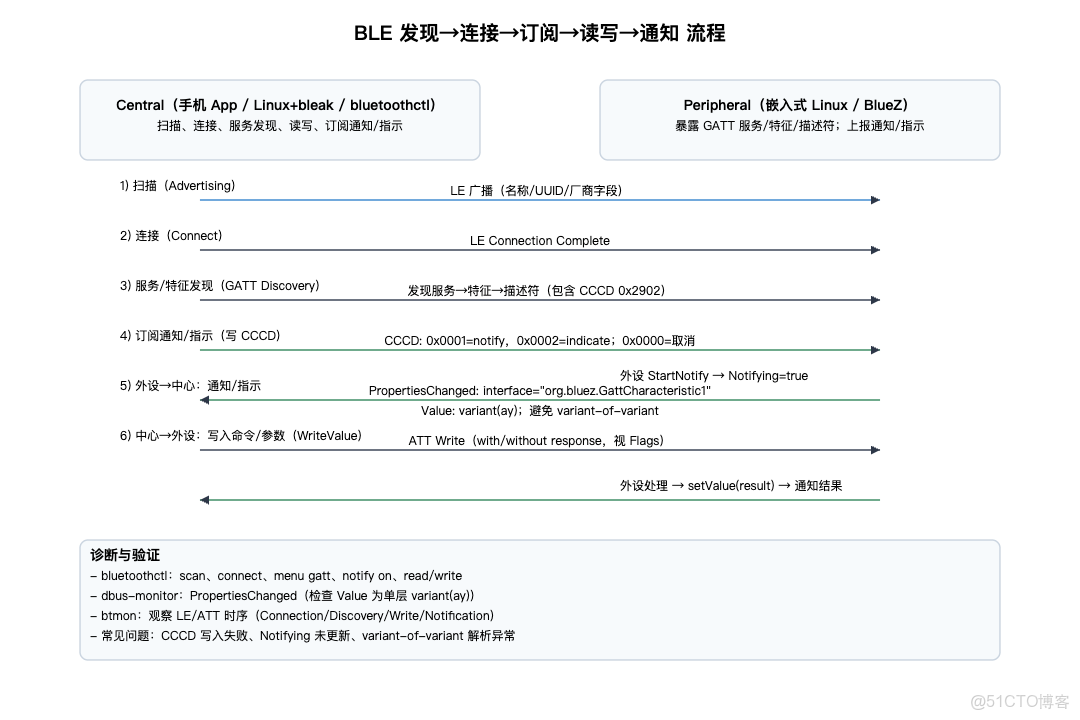
詳細步驟説明(基礎通信過程)
- 發現與連接
- 中心啓用控制器:
btmgmt power on、btmgmt le on - 掃描:
bluetoothctl→scan on,觀察目標設備的廣播(名稱/服務 UUID/廠商字段)。 - 連接:
bluetoothctl connect <MAC>,建立 LE 連接(可在btmon中看到LE Connection Complete)。
- 服務與特徵發現
bluetoothctl→menu gatt→list-attributes查看服務與特徵(GATT/ATT 句柄)。- 手機 App(Android/iOS)在連接後自動進行服務發現(
BluetoothGatt#discoverServices/CBPeripheral#discoverServices),並定位目標特徵與 CCCD(0x2902)。
- 訂閲通知 / 指示
- 中心寫入 CCCD:
- Android:
descriptor.setValue(ENABLE_NOTIFICATION_VALUE/ENABLE_INDICATION_VALUE)→writeDescriptor - iOS:
peripheral.setNotifyValue(true, for: characteristic)
- 外設(Linux/BlueZ)在
StartNotify設定Notifying=true。隨後調用setValue(...)會發出PropertiesChanged,ATT 層表現為 Handle Value Notification/Indication。
- 數據發送(外設→中心)
- 外設側將待發字節流放入特徵的
Value(ay)並觸發PropertiesChanged:
- 信號結構:
s a{sv} as,其中Value必須是variant(ay)的單層封裝。 - 上層解析期望:
array of bytes [...]。
- 中心在回調中接收:
- Android:
onCharacteristicChanged - iOS:
didUpdateValueFor
- 數據寫入(中心→外設)
- 中心構造要寫入的
ay字節流:
- Android:
writeCharacteristic - iOS:
writeValue(data, type: .withResponse/.withoutResponse)
- 外設在
WriteValue中讀取參數並執行業務處理;需要返回結果時,結合通知/指示上報:setValue(result_bytes)。
- 診斷與驗證
- D-Bus 信號:
dbus-monitor --system "interface='org.freedesktop.DBus.Properties',member='PropertiesChanged'" - 低層抓包:
sudo btmon,觀察 ATT 讀寫與通知時序。 - 常見問題:CCCD 寫入失敗、
Notifying未更新、variant-of-variant導致解析異常(務必保證Value的ay僅單層 variant)。
3. 案例 A:手機 App 為 Central,Linux/BlueZ 為 Peripheral
3.1 Linux 側(外設)
- 特徵聲明包含
Flags:notify或indicate。 - 啓用通知:在
StartNotify中設置Notifying=true;之後每次調用setValue(...)都會觸發PropertiesChanged信號(通知)。 - 驗證信號:
dbus-monitor --system "interface='org.freedesktop.DBus.Properties',member='PropertiesChanged'" | grep -A3 /org/bluez/app/service0/chrc1- 低層抓包:
sudo btmon觀察ATT Handle Value Notification/Indication。
- 快速命令(bluetoothctl):
scan on→ 發現並connect <MAC>→menu gatt→ 選擇特徵後notify on。
3.2 手機 App 側(中心)
- Android(
BluetoothGatt)
- 流程:連接→發現服務→查找特徵與
CCCD。 - 訂閲示例:
gatt.setCharacteristicNotification(characteristic, true)- 寫入
CCCD:descriptor.setValue(BluetoothGattDescriptor.ENABLE_NOTIFICATION_VALUE);gatt.writeDescriptor(descriptor)。
- 接收:
onCharacteristicChanged回調中讀取字節數組。
- iOS(
CoreBluetooth)
- 流程:連接→
discoverServices/discoverCharacteristics。 - 訂閲:
peripheral.setNotifyValue(true, for: characteristic)。 - 接收:
peripheral(_:didUpdateValueFor:error:)回調讀取characteristic.value。
3.3 數據幀約定(建議)
- 在字節流首部編碼協議版本與命令字,便於擴展與兼容:
- 示例:
[magic=0x5AA5][ver=0x11][cmd=0x01][len=...][payload][CRC]
4. 案例 B:手機 App 寫入命令(Central→Peripheral),Linux 回傳結果
4.1 手機側(寫入)
- Android:
characteristic.setValue(bytes)→gatt.writeCharacteristic(characteristic);是否需要withResponse視特徵Flags而定。 - iOS:
peripheral.writeValue(data, for: characteristic, type: .withResponse/.withoutResponse)。
4.2 Linux 側(接收與反饋)
- 在特徵的
WriteValue中讀取ay參數,進行業務處理。 - 需要反饋時:在處理完成後
setValue(result_bytes)並確保已訂閲通知(Notifying=true),中心即可收到結果通知。
4.3 驗證
dbus-monitor觀察PropertiesChanged;btmon觀察 ATT 寫入與後續通知時序。
5. 案例 C:Linux 為 Central(BlueZ + 工具/bleak),手機/設備為 Peripheral
5.1 Linux 側(中心)
bluetoothctl快速驗證:
scan on→connect <MAC>→menu gatt→list-attributes- 選擇目標特徵後:
notify on訂閲、read/write <hex bytes>主動交互。
- Python bleak(如需自動化):
- 訂閲:
await client.start_notify(char_uuid, callback) - 寫入:
await client.write_gatt_char(char_uuid, data)
5.2 手機 App(外設)
- 暴露自定義 GATT 服務與特徵,按需支持
notify/indicate與write。 - 快速驗證可用
nRF Connect/LightBlue等通用 App。
6. 驗證與診斷清單
- 控制器啓用:
btmgmt power on、btmgmt le on - 掃描與連接:
bluetoothctl→scan on、connect <MAC> - 訂閲通知:
menu gatt→ 選擇特徵 →notify on - 讀寫測試:
read、write <hex bytes> - D-Bus 信號監控:
dbus-monitor --system "interface='org.freedesktop.DBus.Properties',member='PropertiesChanged'" - 低層抓包:
sudo btmon
7. 常見問題與排查
- 無法訂閲通知
- 特徵
Flags未包含notify/indicate;CCCD 寫入失敗;外設未維護Notifying狀態。
- 收到空數據或長度異常
getValue()返回空數組;寫入處理未更新m_value;兩端編碼約定不一致。
variant-of-variant解析異常
- 構造
a{sv}時應直接傳入ay,讓框架封裝單層variant;不要手動g_variant_new_variant(ay)再加入"{sv}"。
- 連接穩定性與功耗
- 廣播與連接參數(interval/latency/supervision timeout)需與手機端適配;高頻上報場景建議限流與降採樣。
8. 上線建議
- 建立“金路徑”腳本:用
bluetoothctl與btmon固化驗證步驟,更新後快速回歸。 - 手機側先用通用 App(
nRF Connect/LightBlue)快速驗證,再集成到自研 App。 - 為數據幀定義清晰的協議文檔與測試用例,確保兩端編碼一致。
本文章為轉載內容,我們尊重原作者對文章享有的著作權。如有內容錯誤或侵權問題,歡迎原作者聯繫我們進行內容更正或刪除文章。
