
這裏所説的宏是指通過一系列鍵盤組合鍵和可以插入自定義內容。下面介紹怎麼編寫一個自己的宏:
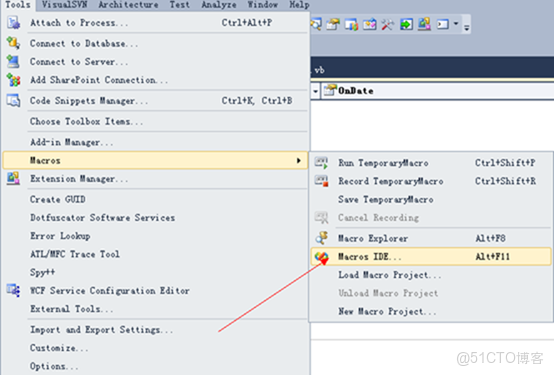
1、在Visual Studio 2010中按Alt+F11打開宏IDE:
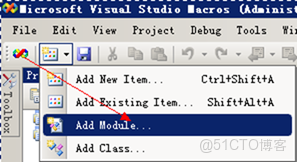
2、打開後選擇添加模塊:
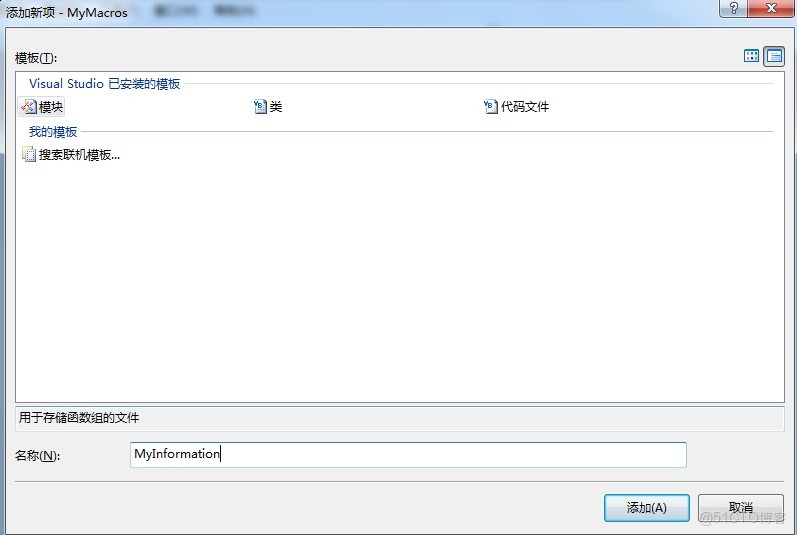
3、在彈出的窗口中輸入名稱後確定添加:
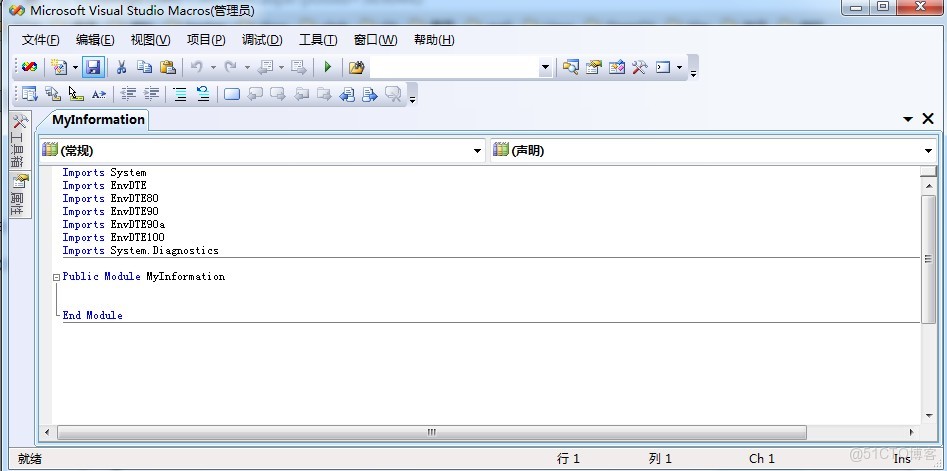
4、出現如下頁面即可進行編輯:
5、在Public Module MyInformation中添加如下代碼:
(1)FileSign函數:添加作者信息


1 Public Sub FileSign()
 2         Dim DocSel As EnvDTE.TextSelection
 3         DocSel = DTE.ActiveDocument.Selection
 4
 5         '活動點移到文件開頭
 6         DTE.ActiveDocument.Selection.StartOfDocument()
 7
 8         If DocSel.FindPattern("Last modified", vsFindOptions.vsFindOptionsRegularExpression) Then
 9             '找到Last modified字符串,説明已經添加過作者信息,只更新Last modified和Filename信息
10             DocSel.SelectLine()
11             DocSel.Delete()
12             DocSel.SelectLine()
13             DocSel.Delete()
14             DocSel.Text = "//  Last modified : " + Date.Today.ToString("yyyy-MM-dd") + " " + TimeOfDay.Hour.ToString("00") + ":" + TimeOfDay.Minute.ToString("00")
15             DocSel.NewLine()
16             DocSel.Text = "//  Filename      : " + DTE.ActiveDocument.Name
17             DocSel.NewLine()
18         Else
19             '沒有找到Last modified字符串,添加全部信息
20             DTE.ActiveDocument.Selection.StartOfDocument()
21             DocSel.Text = "//=================================================================="
22             DocSel.NewLine()
23             DocSel.Text = "//  Author        : vitah"
24             DocSel.NewLine()
25             DocSel.Text = "//  Mail          : linw1225@163.com"
26             DocSel.NewLine()
27             DocSel.Text = "//  Last modified : " + Date.Today.ToString("yyyy-MM-dd") + " " + TimeOfDay.Hour.ToString("00") + ":" + TimeOfDay.Minute.ToString("00")
28             DocSel.NewLine()
29             DocSel.Text = "//  Filename      : " + DTE.ActiveDocument.Name
30             DocSel.NewLine()
31             DocSel.Text = "//  Description   :"
32             DocSel.NewLine()
33             DocSel.Text = "//"
34             DocSel.NewLine()
35             DocSel.Text = "//=================================================================="
36             DocSel.NewLine()
37             DocSel.NewLine()
38         End If
39
40         DocSel.MoveToLineAndOffset(7, 5)  '活動點移動到Description處,填寫描述信息
41     End Sub
FileSign
(2)FuncSign函數:添加函數註釋


1  Public Sub FuncSign()
 2         Dim DocSel As EnvDTE.TextSelection
 3         DocSel = DTE.ActiveDocument.Selection
 4         DocSel.NewLine()
 5         DocSel.Text = "//=================================================================="
 6         DocSel.NewLine()
 7         DocSel.Text = "//  Function       : "
 8         DocSel.NewLine()
 9         DocSel.Text = "//  Description    : "
10         DocSel.NewLine()
11         DocSel.Text = "//  Calls          : "
12         DocSel.NewLine()
13         DocSel.Text = "//  Called By      : "
14         DocSel.NewLine()
15         DocSel.Text = "//  Table Accessed : "
16         DocSel.NewLine()
17         DocSel.Text = "//  Table Updated  : "
18         DocSel.NewLine()
19         DocSel.Text = "//  Input          : "
20         DocSel.NewLine()
21         DocSel.Text = "//  Output         : "
22         DocSel.NewLine()
23         DocSel.Text = "//  Return         : "
24         DocSel.NewLine()
25         DocSel.Text = "//  Others         : "
26         DocSel.NewLine()
27         DocSel.Text = "//=================================================================="
28     End Sub
FuncSign
添加完成後保存:
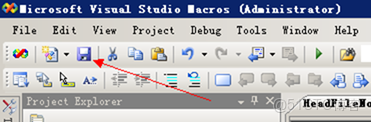
6、保存後可以關閉宏IDE,進入Visual Studio 2010主界面—>工具—>選項—>環境—>鍵盤項,進入如下頁面:
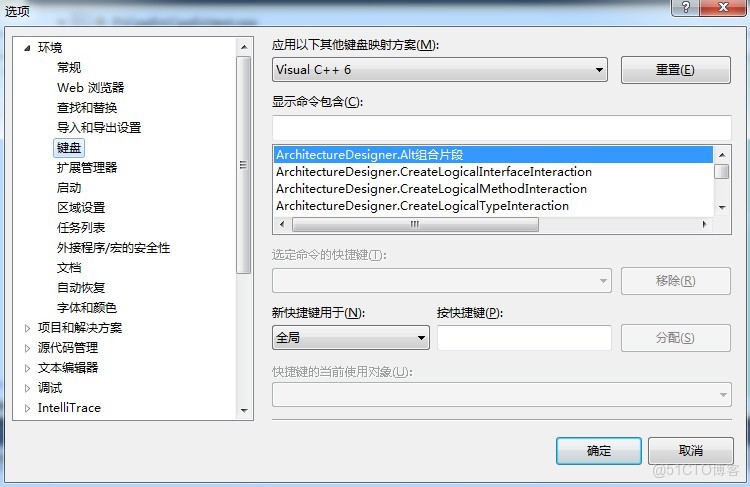
7、接着可以為剛才編寫的宏映射鍵盤快捷鍵(在此只演示添加作者信息的函數FileSign的設置操作,函數FuncSign設定與之類似):
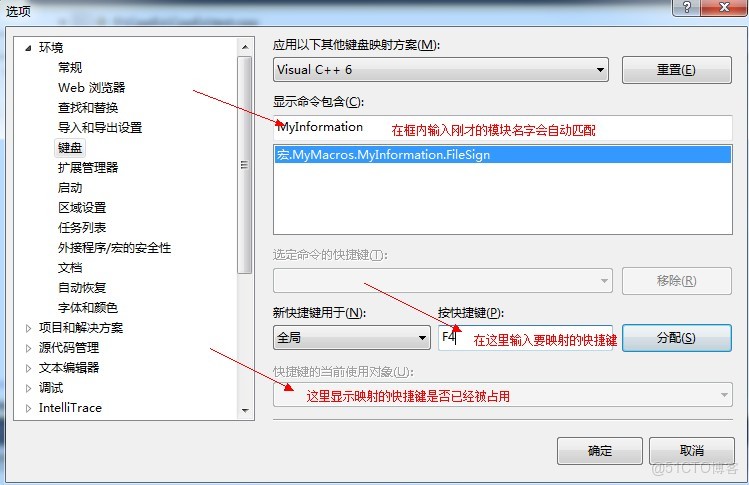
輸入快捷鍵後,點擊分配按鈕,若快捷鍵沒有被佔用則下面的“快捷鍵的當前使用對象”框內容為空,可以點擊確定完成宏的映射設置;
8、完成後,即可驗證本次宏的編寫是否正確。
注:
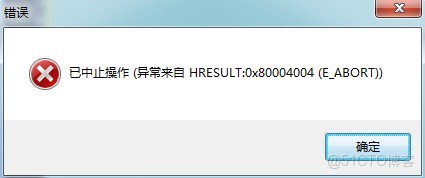
本文中的代碼適用於C/C++文件,且註釋必須是每行行首添加“//”,若是在首行行首和末行行末各添加“/*”和“*/”會出現如下問題:
當代碼文件的第一行不是空白行時,會出現如下錯誤;若代碼文件第一行為空,則顯示正常。
本文章為轉載內容,我們尊重原作者對文章享有的著作權。如有內容錯誤或侵權問題,歡迎原作者聯繫我們進行內容更正或刪除文章。
