
一、説明
1、elasticsearch版本:6.2.4 。
jdk版本:1.8(該升級趕緊升級吧,現在很多技術都是最低要求1.8)。
jest版本:5.3.3。
2、一些不錯的文章
二、前提:
1、最好已經大概看過es的官方文檔,附上文檔地址:
2、知道自己需要的es命令:
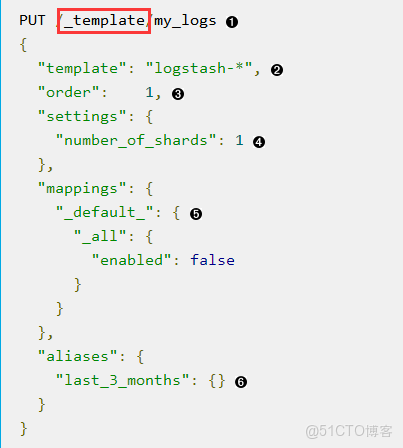
比如想用jest進行索引模版的相關操作,需要知道操作模版的命令是“template” 等等。然後能在官方文檔裏查到相關命令的詳細操作。
簡單説就是現在已經知道怎麼在 es裏進行相關操作了。現在想要用jest進行實現。
三、開始:
1、pom依賴:

2、jest初始化,這裏就不説了。直接開始操作了,簡單説幾個命令拋磚引玉:
www.elastic.co/guide/cn/elasticsearch/guide/cn/index-templates.html
_template”。
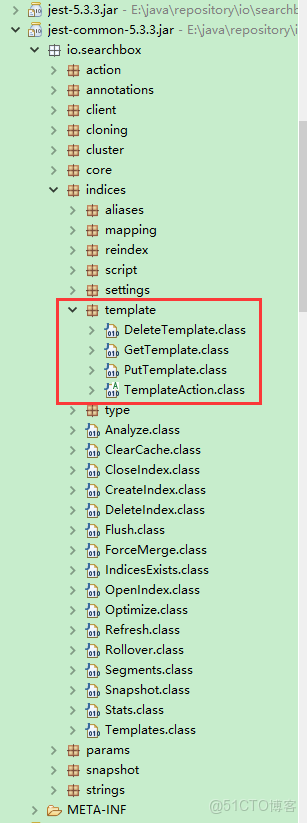
現在在jest的jar包裏找 “template”相關的類
其實寫到這 大概應該知道啥意思了。補張圖:
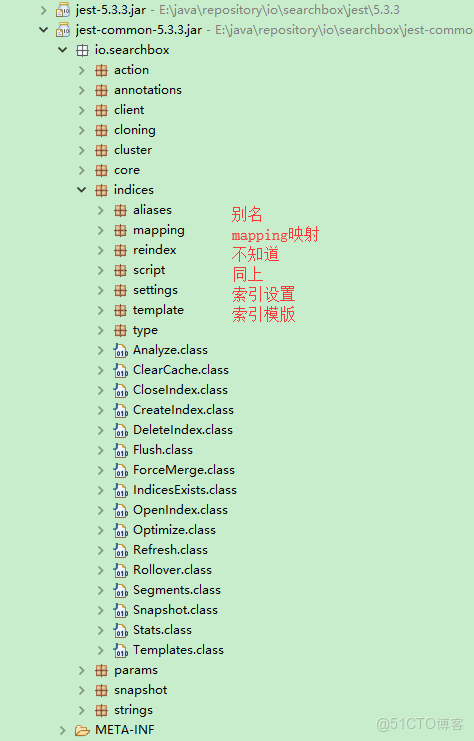
寫的有點亂,以後整理吧。
-------------------------2018-07-17------------------------------------
附上自己的代碼實現(index的一些操作)。數據操作之後整理完,再發。
public void createIndex(String index) {
    try {
        JestResult jestResult = jestClient.execute(new CreateIndex.Builder(index).build());
        System.out.println("createIndex:{}" + jestResult.isSucceeded());
    } catch (IOException e) {
        e.printStackTrace();
    }
}
刪除index
public void deleteIndex(String index) {
    try {
        JestResult jestResult = jestClient.execute(new DeleteIndex.Builder(index).build());
        System.out.println("deleteIndex result:{}" + jestResult.isSucceeded());
    } catch (IOException e) {
        e.printStackTrace();
    }

}

設置index的mapping(設置數據類型和分詞方式)
public void createIndexMapping(String index, String type, String mappingString) {
    //mappingString為拼接好的json格式的mapping串
    PutMapping.Builder builder = new PutMapping.Builder(index, type, mappingString);
    try {
        JestResult jestResult = jestClient.execute(builder.build());
        System.out.println("createIndexMapping result:{}" + jestResult.isSucceeded());
        if (!jestResult.isSucceeded()) {
            System.err.println("settingIndexMapping error:{}" + jestResult.getErrorMessage());
        }
    } catch (IOException e) {
        e.printStackTrace();
    }
}
獲取index的mapping
public String getMapping(String indexName, String typeName) {
        GetMapping.Builder builder = new GetMapping.Builder();
        builder.addIndex(indexName).addType(typeName);
        try {
            JestResult result = jestClient.execute(builder.build());
            if (result != null && result.isSucceeded()) {
                return result.getSourceAsObject(JsonObject.class).toString();
            }
        } catch (Exception e) {
            e.printStackTrace();
        }
        return null;
    }

獲取索引index設置setting
public boolean getIndexSettings(String index) {
        try {
            JestResult jestResult = jestClient.execute(new GetSettings.Builder().addIndex(index).build());
            System.out.println(jestResult.getJsonString());
            if (jestResult != null) {
                return jestResult.isSucceeded();
            }
        } catch (IOException e) {
            e.printStackTrace();
        }
        return false;
    }

更改索引index設置setting
public boolean updateIndexSettings(String index) {
        String source;
        XContentBuilder mapBuilder = null;
        try {
            mapBuilder = XContentFactory.jsonBuilder();
            mapBuilder.startObject().startObject("index").field("max_result_window", "1000000").endObject().endObject();
            source = mapBuilder.string();
            JestResult jestResult = jestClient.execute(new UpdateSettings.Builder(source).build());
            System.out.println(jestResult.getJsonString());
            if (jestResult != null) {
                return jestResult.isSucceeded();
            }
        } catch (IOException e) {
            e.printStackTrace();
        }
        return false;
    }
獲取索引 別名
public boolean getIndexAliases(String index) {
        try {
            JestResult jestResult = jestClient.execute(new GetAliases.Builder().addIndex(index).build());
            System.out.println(jestResult.getJsonString());
            if (jestResult != null) {
                return jestResult.isSucceeded();
            }
        } catch (IOException e) {
            e.printStackTrace();
        }
        return false;
    }
添加索引別名
public void addAlias(List<String> index, String alias) {
    try {
        AddAliasMapping build = new AddAliasMapping.Builder(index, alias).build();
        JestResult jestResult = jestClient.execute(new ModifyAliases.Builder(build).build());
        System.out.println("result:" + jestResult.getJsonString());
    } catch (IOException e) {
        e.printStackTrace();
    }
}
獲取索引模版
public void getTemplate(String template) {
    try {
        JestResult jestResult = jestClient.execute(new GetTemplate.Builder(template).build());
        System.out.println("result:" + jestResult.getJsonString());
    } catch (IOException e) {
        e.printStackTrace();
    }

}
添加索引模版
public void putreturnreportTemplate() {
    String source;
    XContentBuilder mapBuilder = null;
    try {
        mapBuilder = XContentFactory.jsonBuilder();
        mapBuilder.startObject().field("template", "df_returnreport*").field("order", 1)//
                .startObject("settings").field("number_of_shards", 5)//五個分片
                .startObject("index").field("max_result_window", "1000000")//一次查詢最大一百萬
                .endObject()//
                .endObject()//
                .startObject("mappings")//

                .startObject("df_returnreport")//type名
                .startObject("properties")//
                .startObject("id").field("type", "long").endObject()//
                .startObject("username").field("type", "keyword").endObject()//
                .startObject("content").field("type", "text").field("analyzer", "ik_max_word").endObject()//
                .startObject("returntime").field("type", "date").field("format", "yyyy-MM-dd HH:mm:ss").endObject()//
                .startObject("gateway").field("type", "integer").endObject()//
                .endObject()//
                .endObject()//

                .endObject()//
                .startObject("aliases").startObject("df_returnreport").endObject().endObject()//別名
                .endObject();//
        source = mapBuilder.string();
        JestResult jestResult = jestClient.execute(new PutTemplate.Builder("my_returnreport", source).build());
        System.out.println("result:" + jestResult.getJsonString());
    } catch (IOException e) {
        e.printStackTrace();
    }
}
索引優化
public void optimizeIndex() {
    Optimize optimize = new Optimize.Builder().build();
    jestClient.executeAsync(optimize, new JestResultHandler<JestResult>() {
        public void completed(JestResult jestResult) {
            System.out.println("optimizeIndex result:{}" + jestResult.isSucceeded());
        }
        public void failed(Exception e) {
            e.printStackTrace();
        }
    });
}
清理緩存
public void clearCache() {
    try {
        ClearCache clearCache = new ClearCache.Builder().build();
        jestClient.execute(clearCache);
    } catch (IOException e) {
        e.printStackTrace();
    }
}
本文章為轉載內容,我們尊重原作者對文章享有的著作權。如有內容錯誤或侵權問題,歡迎原作者聯繫我們進行內容更正或刪除文章。
