
更新:原帖內容有點過時了
直接用buildroot,換上國內源,一鍵製作所有東西。
make raspberrypi3_64_defconfig
make
然後去output/images文件夾找 sdcard.img 就行了,直接刻錄到sd卡,樹莓派3b就能運行。
其他關於buildroot的使用介紹,網上已經很多
安裝必須的包:直接複製運行即可,apt包管理器自動跳過已安裝的。
sudo apt install git bc bison flex libssl-dev makesudo apt install build-essential
1. 下載源碼,網址是國內鏡像,github不FQ太慢了。分支我只選了 rpi-4.11.y,總共150MB左右,整個git 幾個G,沒必要全部下載。第二行的 rpi-4.11.y 可以改成你希望的文件夾名,下載完如果沒有代碼只有 .git 就 git checkout
git clone https://gitee.com/zhangshengping/raspberrypi-linux.git --branch rpi-4.11.y \
          --single-branch --depth 1 rpi-4.11.y
下載編譯器 工具鏈
git clone https://gitee.com/ipcun/raspberrypi_tools.git ~/tools實際用的只是這個:
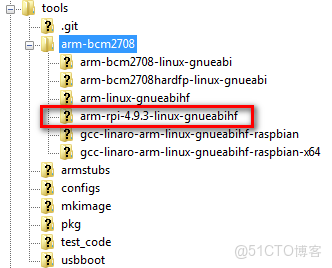
2. 將工具鏈加入環境變量(讓系統能找到它)
本次生效:
export PATH=$PATH:$HOME/tools/arm-bcm2708/arm-rpi-4.9.3-linux-gnueabihf/bin永久生效: $HOME 就是~ arm-linux-gnueabihf 是一個軟鏈接,實際上指向 arm-rpi-4.9.3-linux-gnueabihf
echo PATH=\$PATH:~/tools/arm-bcm2708/arm-linux-gnueabihf/bin >> ~/.bashrc
      source ~/.bashrc
3. 編譯
切換到源碼目錄,我的路徑是~/rpi-4.11.y
For Pi 2, Pi 3, Pi 3+, or Compute Module 3: bcm2709_defconfig
kernel8.img:64位的Raspberry Pi 3和Raspberry Pi 4;
kernel7l.img:32位的Raspberry Pi 4(使用LPAE);
kernel7.img:32位的Raspberry Pi 4、Raspberry Pi 3和Raspberry Pi 2(未使用LPAE);
kernel.img:其他版本的樹莓派。
cd ~/rpi-4.11.yKERNEL=kernel7配置內核:可以一切默認:
make ARCH=arm CROSS_COMPILE=arm-linux-gnueabihf- menuconfig編譯: $(nproc) 獲取你的cpu最大支持線程,全速編譯
make ARCH=arm \
    CROSS_COMPILE=arm-linux-gnueabihf- \
    -j $(nproc)\
    zImage dtbs modules
4. 獲取內核鏡像和設備樹
編譯生成的各種最終文件的區別可以參考:
zImage:
~/rpi-4.11.y/arch/arm/boot/zImage
dtb:
~/rpi-4.11.y/arch/arm/boot/dts/bcm2710-rpi-2-b.dtb
用zImage 就可以啓動qemu。當然解壓成 kernel7.img 也可以。
官網教程沒説:怎麼用zImage製作kernel.img,就是:
~/rpi-4.11.y/scripts/mkknlimg ~/rpi-4.11.y/arch/arm/boot/zImage
~/rpi-4.11.y/scripts/
kernel7.img
5. qemu配置
qemu和樹莓派鏡像下載等,請參考:
windows .bat 腳本
cd C:\Program Files\qemu

qemu-system-arm.exe ^
-M raspi2 ^
-cpu cortex-a7 ^
-dtb C:\\store\qemu-rpi-kernel\bcm2710-rpi-2-b.dtb ^
-kernel C:\store\qemu-rpi-kernel\zImage ^
-drive id=hd-root,format=raw,file=C:\store\qemu-rpi-kernel\2019-09-26-raspbian-buster-lite.img ^
-m 1024 ^
-show-cursor ^
-append "rw earlyprintk=ttyAMA0,115200 loglevel=8 console=ttyAMA0,115200 root=PARTUUID=6c586e23-02 rootfstype=ext4 rootwait" ^
-serial mon:stdio

