
目錄
延遲隊列
修改配置
擴展 RabbitMQ 工具類
發送延遲消息(生產者)
消費延遲消息(消費者)
has_consumers()
重新執行隊列
總結
延遲隊列
修改配置
在Fastadmin 使用RabbitMQ隊列基礎上實現,
在application/config.php中在基礎配置上,添加死信交換機和隊列配置。
如下:
// +----------------------------------------------------------------------
// | Rabbitmq設置
// +----------------------------------------------------------------------
'rabbitmq'               => [
    // 基礎配置
    // RabbitMQ主機
    'host'      => '127.0.0.1',
    // 端口
    'port'      => 5672,
    // 用户名(默認guest,僅本地訪問)
    'user'      => 'guest',
    // 密碼
    'password'  => 'guest',
    // 虛擬主機
    'vhost'     => '/',
    // 心跳檢測時間(秒)
    'heartbeat' => 60,
    // 默認隊列名稱
    'queue'     => [
        'default' => 'fastadmin_default_queue',
    ],
    // 延遲隊列相關配置
    'delay' => [
        // 臨時隊列(消息在此過期)
        'temp_queue' => 'fastadmin_temp_queue',
        // 死信交換機
        'dlx_exchange' => 'fastadmin_dlx_exchange',
        // 死信隊列(最終消費隊列)
        'dlx_queue' => 'fastadmin_dlx_queue',
        // 死信路由鍵
        'dlx_routing_key' => 'dlx_key'
    ]
],
擴展 RabbitMQ 工具類
修改 application/common/library/RabbitMQ.php,添加聲明死信交換機、隊列的方法:
<?php
namespace app\common\library;

use PhpAmqpLib\Connection\AMQPStreamConnection;
use PhpAmqpLib\Exchange\AMQPExchangeType;
use PhpAmqpLib\Message\AMQPMessage;
use PhpAmqpLib\Wire\AMQPTable;
use think\Config;

class RabbitMQ
{
    protected $connection;  // 連接對象

    protected $channel;     // 通道對象

    protected $config;      // 配置參數

    protected $delayConfig; // 延遲隊列配置 -- 新增

    public function __construct()
    {
        $this->config = Config::get('rabbitmq');
        $this->delayConfig = $this->config['delay']; // -- 新增
        $this->connect();
    }

    // 建立連接
    protected function connect()
    {
        try {
            $this->connection = new AMQPStreamConnection(
                $this->config['host'],
                $this->config['port'],
                $this->config['user'],
                $this->config['password'],
                $this->config['vhost'],
                false,
                'AMQPLAIN',
                null,
                'en_US',
                $this->config['heartbeat'],
                null
            );
            $this->channel = $this->connection->channel();
        } catch (\Exception $e) {
            throw new \Exception("RabbitMQ連接失敗:" . $e->getMessage());
        }
    }

    // 聲明死信交換機和死信隊列(最終消費的隊列) --新增
    public function declareDlx()
    {
        $dlxExchange = $this->delayConfig['dlx_exchange'];
        $dlxQueue = $this->delayConfig['dlx_queue'];
        $dlxRoutingKey = $this->delayConfig['dlx_routing_key'];

        // 1. 聲明死信交換機(類型 direct)
        $this->channel->exchange_declare(
            $dlxExchange,
            AMQPExchangeType::DIRECT, // 直連交換機
            false,
            true, // 持久化
            false
        );

        // 2. 聲明死信隊列(消費者監聽此隊列)
        $this->channel->queue_declare(
            $dlxQueue,
            false,
            true, // 持久化
            false,
            false
        );

        // 3. 綁定死信隊列到死信交換機(通過路由鍵)
        $this->channel->queue_bind(
            $dlxQueue,
            $dlxExchange,
            $dlxRoutingKey
        );
    }

    // 聲明臨時隊列(消息在此過期,過期後進入死信隊列) --新增
    public function declareTempQueue()
    {
        $tempQueue = $this->delayConfig['temp_queue'];
        $dlxExchange = $this->delayConfig['dlx_exchange'];
        $dlxRoutingKey = $this->delayConfig['dlx_routing_key'];

        // 1. 強制轉換為字符串
        $dlxExchange = (string)$dlxExchange;
        $dlxRoutingKey = (string)$dlxRoutingKey;

        // 2. 用 AMQPTable 顯式包裝 arguments
        $arguments = new AMQPTable([
            'x-dead-letter-exchange' => $dlxExchange,
            'x-dead-letter-routing-key' => $dlxRoutingKey
        ]);

        // 3. 聲明臨時隊列(使用包裝後的 arguments)
        $this->channel->queue_declare(
            $tempQueue,
            false, // passive
            true,  // durable
            false, // exclusive
            false, // auto_delete
            false, // nowait
            $arguments // 傳入 AMQPTable 對象
        );
    }

    // 發送延遲消息(單位:秒) --新增
    public function sendDelayMessage($data, $delaySeconds, $tempQueue = null)
    {
        $this->declareDlx(); // 確保死信交換機和隊列存在
        $this->declareTempQueue(); // 確保臨時隊列存在

        $queue = $tempQueue ?: $this->delayConfig['temp_queue'];
        $message = new AMQPMessage(
            json_encode($data, JSON_UNESCAPED_UNICODE), [
                'delivery_mode' => AMQPMessage::DELIVERY_MODE_PERSISTENT,
                'expiration' => (string)($delaySeconds * 1000) // TTL:毫秒(必須是字符串)
            ]
        );

        // 發送消息到臨時隊列(消息過期後進入死信隊列)
        $this->channel->basic_publish($message, '', $queue);
    }

    // 消費死信隊列(處理延遲消息) --新增
    public function consumeDlx($callback)
    {
        $this->declareDlx();
        $dlxQueue = $this->delayConfig['dlx_queue'];

        $this->channel->basic_consume(
            $dlxQueue,
            '',
            false,
            false,
            false,
            false,
            $callback
        );

        // 3.x 版本循環監聽
        while ($this->channel->is_consuming()) {
            $this->channel->wait();
        }
    }

    // 聲明隊列(確保隊列存在)
    public function declareQueue($queueName = null)
    {
        $queue = $queueName ?: $this->config['queue']['default'];
        // 參數:隊列名、是否持久化、是否排他、是否自動刪除、其他參數
        $this->channel->queue_declare($queue, false, true, false, false);
        return $queue;
    }

    // 發送消息到隊列
    public function send($data, $queueName = null)
    {
        $queue = $this->declareQueue($queueName);
        $message = new AMQPMessage(
            json_encode($data, JSON_UNESCAPED_UNICODE),
            ['delivery_mode' => AMQPMessage::DELIVERY_MODE_PERSISTENT]  // 消息持久化
        );
        $this->channel->basic_publish($message, '', $queue);
    }

    // 消費消息(回調處理)
    public function consume($callback, $queueName = null)
    {
        $queue = $this->declareQueue($queueName);
        // 參數:隊列名、消費者標籤、是否自動確認、是否排他、是否本地、是否阻塞、回調函數
        $this->channel->basic_consume($queue, '', false, false, false, false, $callback);

        // 循環監聽消息
        while ($this->channel->has_consumers()) {
            $this->channel->wait();
        }
    }

    // 關閉連接
    public function close()
    {
        if ($this->channel) {
            $this->channel->close();
        }
        if ($this->connection) {
            $this->connection->close();
        }
    }

    // 析構函數自動關閉連接
    public function __destruct()
    {
        $this->close();
    }
}
發送延遲消息(生產者)
在application/api/Demo控制器中調用 sendDelay 發送延遲消息:
// 示例:延遲 10 秒處理消息
public function sendDelay()
{
    try {
        $rabbitMQ = new RabbitMQ();
        $data = [
            'id'        => 456,
            'content'   => '這條消息將在10秒後被處理',
            'send_time' => date('Y-m-d H:i:s')
        ];
        $rabbitMQ->sendDelayMessage($data, 10); // 延遲10秒
        return '延遲消息發送成功';
    } catch (\Exception $e) {
        return '發送失敗:' . $e->getMessage();
    }
}
消費延遲消息(消費者)
修改命令行消費者 application/common/command/RabbitMQConsumer.php,添加延遲消息處理邏輯:
<?php
namespace app\common\command;

use app\common\library\RabbitMQ;
use think\console\Command;
use think\console\Input;
use think\console\Output;
use think\Log;

class RabbitMQConsumer extends Command
{
    // 配置命令
    protected function configure()
    {
        $this->setName('rabbitmq:consumer')  // 命令名:php think rabbitmq:consumer
        ->setDescription('RabbitMQ消費者,處理隊列消息');
    }

    // 執行命令
    protected function execute(Input $input, Output $output)
    {
        $output->writeln('延遲消息消費者啓動,等待延遲消息...');
        try {
            $rabbitMQ = new RabbitMQ();
            $callback = function ($msg) use ($output) {
                $output->writeln('收到延遲消息:' . $msg->body);
                $data = json_decode($msg->body, true);
                // 處理邏輯(如:10秒後發送郵件、更新狀態等)
                $output->writeln('處理延遲消息:' . $data['id'] . ',當前時間:' . date('Y-m-d H:i:s'));
                $msg->ack(); // 確認處理
            };
            // 消費死信隊列(延遲消息)
            $rabbitMQ->consumeDlx($callback);
        } catch (\Exception $e) {
            $output->writeln('消費者異常:' . $e->getMessage());
        }
    }
}
has_consumers()
執行隊列後報錯:
[think\exception\ThrowableError]
Fatal error: Call to undefined method PhpAmqpLib\Channel\AMQPChannel::has_consumers()
查找源碼:
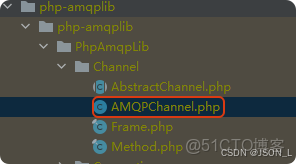
在AMQPChannel.php中未找到has_consumers方法,
考慮使用is_consuming方法替代如下:
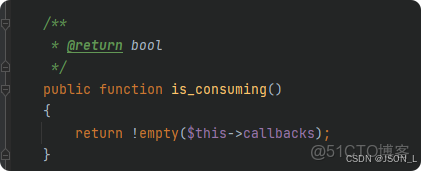
修改RabbitMQ.php中消費死信隊列中循環監聽方法has_consumers為is_consuming。
如下:
// 消費死信隊列(處理延遲消息) --新增
public function consumeDlx($callback)
{
    $this->declareDlx();
    $dlxQueue = $this->delayConfig['dlx_queue'];

    $this->channel->basic_consume(
        $dlxQueue,
        '',
        false,
        false,
        false,
        false,
        $callback
    );

    // 3.x 版本循環監聽
    while ($this->channel->is_consuming()) {
        $this->channel->wait();
    }
}
重新執行隊列

開始發送測試延遲消息

效果如下:

注意:
如果中間出現錯誤還可以登錄RabbitMq後台把之前創建的隊列(queue)刪除了重新試試。
總結
Fastadmin中使用rabbitmq實現延遲隊列,中間遇到一點問題也解決了。
本文章為轉載內容,我們尊重原作者對文章享有的著作權。如有內容錯誤或侵權問題,歡迎原作者聯繫我們進行內容更正或刪除文章。
