
NPB 2.0:架構革新與自動化賦能
從專用硬件設備到容器化部署,從手工配置到自動化下發,NPB技術正經歷着從“功能實現”到“運維友好”的深刻轉型。在NPB 2.0架構中,星融元將NPB組件容器化運行於交換機之上,並深度融合Ansible自動化工具,實現了網絡策略的快速、標準化部署。
什麼是Ansible?

Ansible作為一款開源自動化工具,以其無代理、聲明式的特點,成為跨平台配置管理的理想選擇。結合星融元開發的Ansible Collection for AsterNOS,用户可直接通過Playbook調用SONiC設備的CLI接口,完成複雜的網絡策略配置,極大提升了運維的一致性與可靠性。
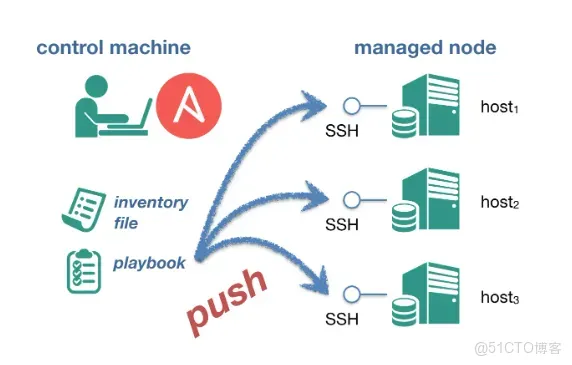
本文將通過具體操作流程,展示如何利用Ansible實現NPB設備的自動化配置。
實施流程概要
1.在服務器上安裝 Ansible
pip3 install ansible我們所提供的demo文件結構如下
eric@mypc:~$ tree
.
├── ansible.cfg
├── group_vars
│   └── sonic.yml
├── host_vars
│   └── sonic1.yml
├── inventory
├── library
│   └── sonic_klish.py
└── site.yml
2.在 ansible.cfg 中指定設備信息文件
[defaults]
inventory = inventory #指定為'inventory'文件
host_key_checking = False
retry_files_enabled = False
gathering = explicit
stdout_callback = yaml
3.在 inventory 文件中指定設備的登錄信息
[sonic]
sonic1 ansible_host=192.168.1.x ansible_user=x ansible_password=x
4.group_vars/sonic.yml 文件不需要改動
# group_vars/sonic.yml
host: "{{ ansible_host }}"
user: "{{ ansible_user }}"
password: "{{ ansible_password }}"
5.host_vars/sonic1.yml 中編寫要下發的配置
以下為兩組示例的命令行配置
config_vlan_cmd: |
  configure
  vlan 3003
  end
exit

config_acl_test_cmd: |
  configure
  access-list L3 test1 ingress priority 500000
  rule 1 packet-action permit redirect-action ethernet 11
exit
  interface ethernet 11
  acl test1
  end
exit
6.library/sonic_klish.py (不需要改動,用來調用設備的 CLI(代碼略)
7、site.yml 設置用例
新增兩個task分別調用config_acl_test_cmd和config_vlan_cmd
---
- hosts: sonic
  gather_facts: no
  tasks:
    - name: Push klish commands
      sonic_klish:
        commands: "{{ config_acl_test_cmd }}"
        host:     "{{ host }}"
        user:     "{{ user }}"
        password: "{{ password }}"
      delegate_to: localhost
      register: result

    - name: Push klish commands 1
      sonic_klish:
        commands: "{{ config_vlan_cmd }}"
        host:     "{{ host }}"
        user:     "{{ user }}"
        password: "{{ password }}"
      delegate_to: localhost
      register: result

    - debug: var=result.stdout
8.執行用例
[root@localhost ansible]# ansible-playbook -v site.yml
Using /home/ryan/ansible/ansible.cfg as config file
打印如下,則執行完畢:
PLAY [sonic] *********************

TASK [Push klish commands] ****************
changed: [sonic1 -> localhost] => changed=true
  stdout: |-
    Warning: Permanently added '192.168.1.102' (RSA) to the list of known hosts.
    ...Entering cli view, please wait...
    stty: 'standard input': Inappropriate ioctl for device
    stty: 'standard input': Inappropriate ioctl for device
    sonic# configure
    sonic(config)# access-list L3 test1 ingress priority 500000
    sonic(config-L3-acl-test1)# rule 1 packet-action permit redirect-action ethernet 13
    sonic(config-L3-acl-test1)# exit[J
    sonic(config)# interface ethernet 13
    sonic(config-if-13)# acl test1[J
    sonic(config-if-13)# end[J
    sonic# exit
  stdout_lines: <omitted>

TASK [debug] ***********************
ok: [sonic1] =>
  result.stdout: |-
    Warning: Permanently added '192.168.1.102' (RSA) to the list of known hosts.
    ...Entering cli view, please wait...
    stty: 'standard input': Inappropriate ioctl for device
    stty: 'standard input': Inappropriate ioctl for device
    sonic# configure
    sonic(config)# access-list L3 test1 ingress priority 500000
    sonic(config-L3-acl-test1)# rule 1 packet-action permit redirect-action ethernet 13
    sonic(config-L3-acl-test1)# exit[J
    sonic(config)# interface ethernet 13
    sonic(config-if-13)# acl test1[J
    sonic(config-if-13)# end[J
    sonic# exit

TASK [Push klish commands] *****************
changed: [sonic1 -> localhost] => changed=true
  stdout: |-
    Warning: Permanently added '192.168.1.102' (RSA) to the list of known hosts.
    ...Entering cli view, please wait...
    stty: 'standard input': Inappropriate ioctl for device
    stty: 'standard input': Inappropriate ioctl for device
    sonic# configure
    sonic(config)# vlan 3003
    sonic(config-vlan-3003)# end[J
    sonic# exit
  stdout_lines: <omitted>

TASK [debug] *********************
ok: [sonic1] =>
  result.stdout: |-
    Warning: Permanently added '192.168.1.102' (RSA) to the list of known hosts.
    ...Entering cli view, please wait...
    stty: 'standard input': Inappropriate ioctl for device
    stty: 'standard input': Inappropriate ioctl for device
    sonic# configure
    sonic(config)# vlan 3003
    sonic(config-vlan-3003)# end[J
    sonic# exit

PLAY RECAP ************************
sonic1                     : ok=4    changed=2    unreachable=0    failed=0    skipped=0    rescued=0    ignored=0
