
最佳實踐 - 基於鴻蒙生態的輕量化記賬工具開發:融合 ArkUI 組件與分佈式數據管理
前言
本文通過 “易記賬” 鴻蒙應用實例開發過程中的關鍵技術場景:entry 模塊構建從啓動到業務交互的核心鏈路,藉助 common 模塊實現跨頁面代碼複用,利用 ArkUI 組件快速搭建賬單錄入與統計界面,以及 DatePickerDialog 在不同業務場景下的適配使用,從開發視角還原鴻蒙技術在實際項目中的落地過程,展現鴻蒙生態的實踐價值與發展潛力。
項目簡介
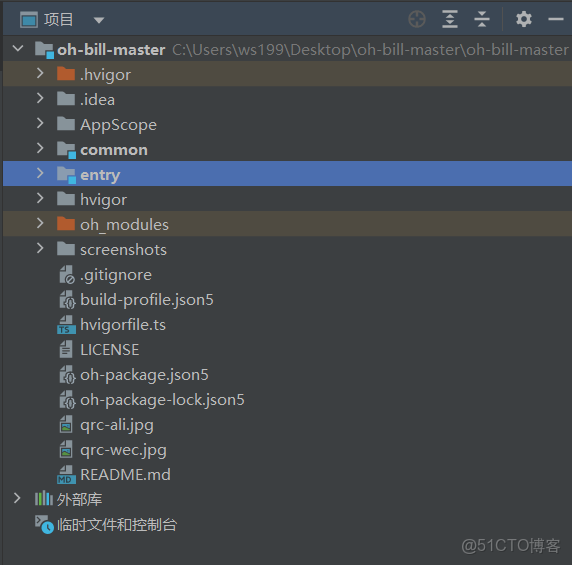
AppScope 存放應用級全局資源與配置,確保全應用樣式、常量統一;common 集中管理多模塊複用的通用代碼、組件與工具類,提升開發效率;entry 作為應用入口模塊,承載主界面與核心記賬業務邏輯,是用户交互的核心;oh_modules 存儲項目依賴的鴻蒙相關模塊,為功能實現提供基礎支持;screenshots 用於歸檔應用界面截圖,方便項目文檔説明使用
鴻蒙技術實踐:易記賬
1、entry目錄結構:components 放可複用的 UI 組件(如賬單列表、賬單預覽組件); data 存數據相關定義(如賬單類型、默認模板);entryability 是應用啓動與生命週期管理的入口;pages 包含所有業務頁面(如新增賬單、賬單詳情、首頁等)
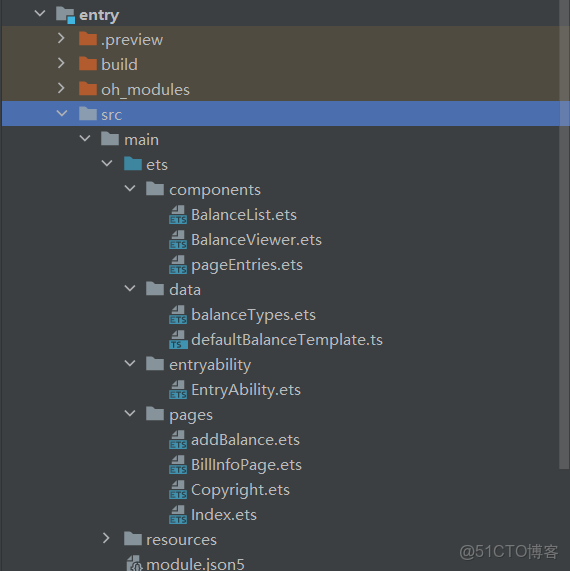
模塊分層與啓動管理:entryability 串聯應用生命週期
1、entryability:易記賬啓動核心,負責 APP 啓動時初始化全局上下文、數據庫和設置工具,指定打開首頁 pages/Index` 首頁,並監控 APP 從啓動到關閉的全生命週期狀態,銜接底層能力和用户界面的關鍵
import UIAbility from '@ohos.app.ability.UIAbility';
import hilog from '@ohos.hilog';
import window from '@ohos.window';
import {SettingManager, DBManager} from '@ohos/common';
import Want from '@ohos.app.ability.Want';
import AbilityConstant from '@ohos.app.ability.AbilityConstant';

export default class EntryAbility extends UIAbility {
  onCreate(want:Want, launchParam:AbilityConstant.LaunchParam) {
    hilog.info(0x0000, 'testTag', '%{public}s', 'Ability onCreate');
    globalThis.context = this.context;
    globalThis.__settingManager__ = new SettingManager(this.context);
    globalThis.__dbManager__ = new DBManager(this.context);
  }

  onDestroy() {
    hilog.info(0x0000, 'testTag', '%{public}s', 'Ability onDestroy');
  }

  onWindowStageCreate(windowStage: window.WindowStage) {
    // Main window is created, set main page for this ability
    hilog.info(0x0000, 'testTag', '%{public}s', 'Ability onWindowStageCreate');
    windowStage.loadContent('pages/Index', (err, data) => {
      if (err.code) {
        hilog.error(0x0000, 'testTag', 'Failed to load the content. Cause: %{public}s', JSON.stringify(err) ?? '');
        return;
      }
      hilog.info(0x0000, 'testTag', 'Succeeded in loading the content. Data: %{public}s', JSON.stringify(data) ?? '');
    });
  }

  onWindowStageDestroy() {
    // Main window is destroyed, release UI related resources
    hilog.info(0x0000, 'testTag', '%{public}s', 'Ability onWindowStageDestroy');
  }

  onForeground() {
    // Ability has brought to foreground
    hilog.info(0x0000, 'testTag', '%{public}s', 'Ability onForeground');
  }

  onBackground() {
    // Ability has back to background
    hilog.info(0x0000, 'testTag', '%{public}s', 'Ability onBackground');
  }
}
首頁賬單展示:基於 ArkUI 組件的統計與列表呈現
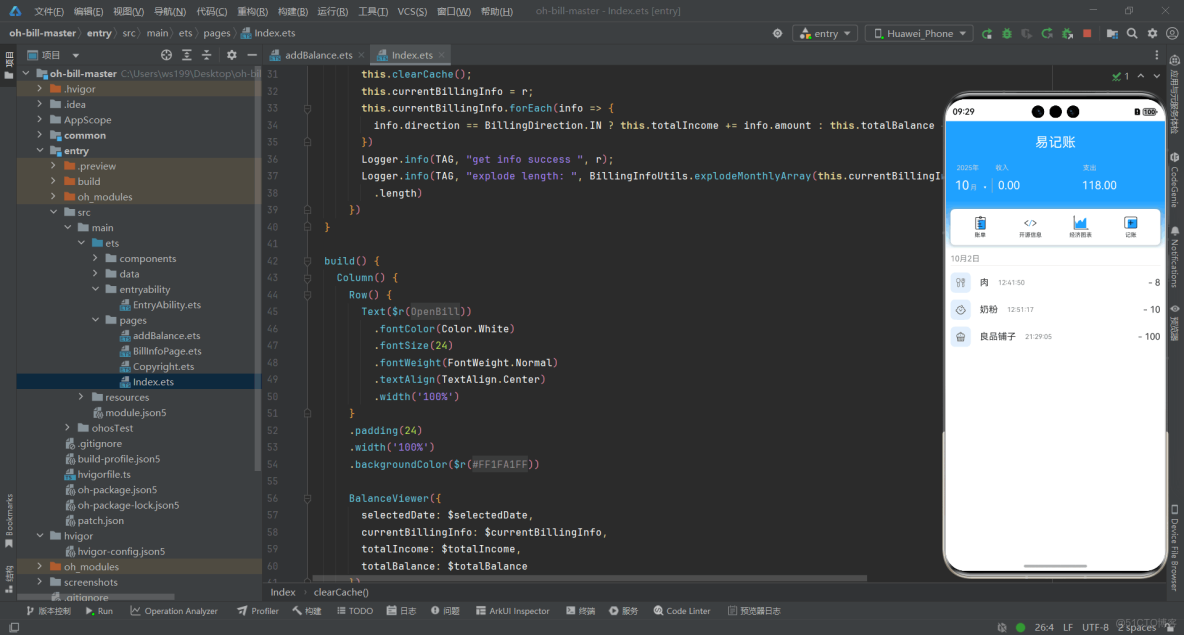
2、index.ets 首頁組件,展示用户的賬單數據與核心統計信息,頁面加載時會從數據庫拉取所有賬單,自動計算並統計總收入、總支出金額;界面上通過 BalanceViewer 組件展示收支統計結果與日期選擇功能,用 BalanceList 組件列出所有賬單明細,還通過 PageEntries 組件提供頁面入口導航,用户查看賬單彙總與明細的核心入口
import { BalanceViewer } from '../components/BalanceViewer';
import { BalanceList } from '../components/BalanceList';
import { PageEntries } from '../components/pageEntries';
import { BillingDirection, BillingInfo, BillingInfoUtils, DBManager, Logger } from '@ohos/common';

let TAG = "INDEX";

@Entry
@Component
struct Index {
  @State selectedDate: Date = new Date();
  @State currentBillingInfo: BillingInfo[] = [];
  @State totalIncome: number = 0.00;
  @State totalBalance: number = 0.00;

  clearCache() {
    this.totalIncome = 0;
    this.totalBalance = 0;
  }

  onPageShow() {
    DBManager.getInstance().getAllBillingInfo()
      .then(r => {
        this.clearCache();
        this.currentBillingInfo = r;
        this.currentBillingInfo.forEach(info => {
          info.direction == BillingDirection.IN ? this.totalIncome += info.amount : this.totalBalance += info.amount;
        })
        Logger.info(TAG, "get info success ", r);
        Logger.info(TAG, "explode length: ", BillingInfoUtils.explodeMonthlyArray(this.currentBillingInfo, new Date())[19]
          .length)
      })
  }

  build() {
    Column() {
      Row() {
        Text($r("app.string.app_title"))
          .fontColor(Color.White)
          .fontSize(24)
          .fontWeight(FontWeight.Normal)
          .textAlign(TextAlign.Center)
          .width('100%')
      }
      .padding(24)
      .width('100%')
      .backgroundColor($r("app.color.main_theme_blue"))

      BalanceViewer({
        selectedDate: $selectedDate,
        currentBillingInfo: $currentBillingInfo,
        totalIncome: $totalIncome,
        totalBalance: $totalBalance
      })
      PageEntries()
      BalanceList({
        currentBillingInfo: $currentBillingInfo,
        selectedDate: $selectedDate,
        totalBalance: $totalBalance,
        totalIncome: $totalIncome
      })
    }
  }
}
賬單錄入交互:自定義鍵盤與原生組件的融合應用
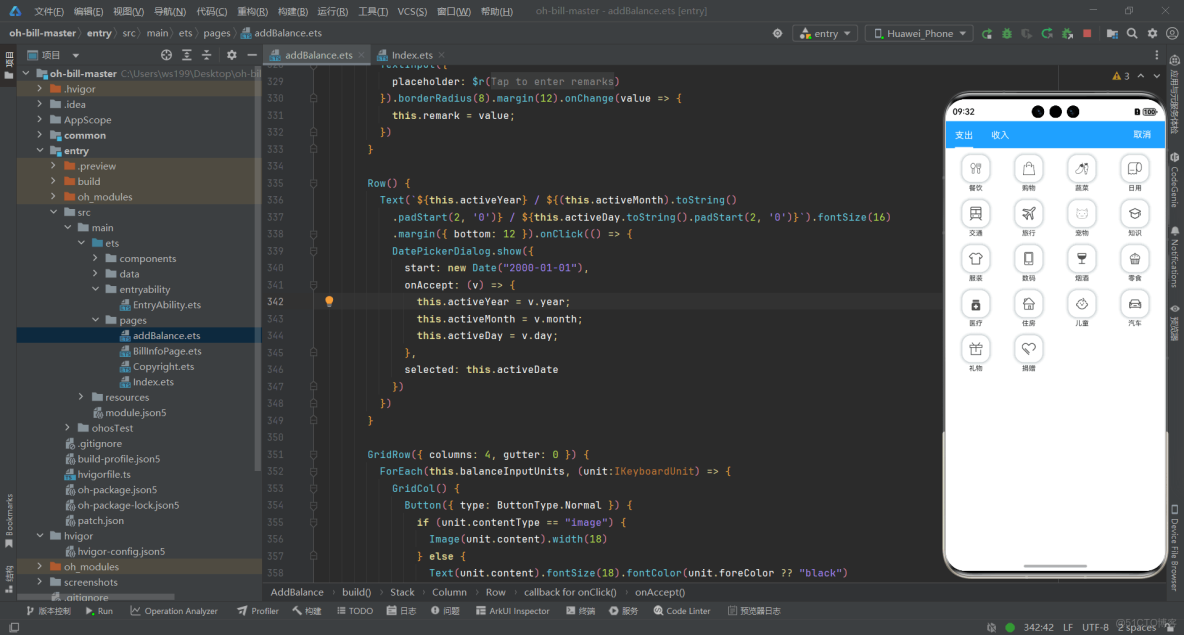
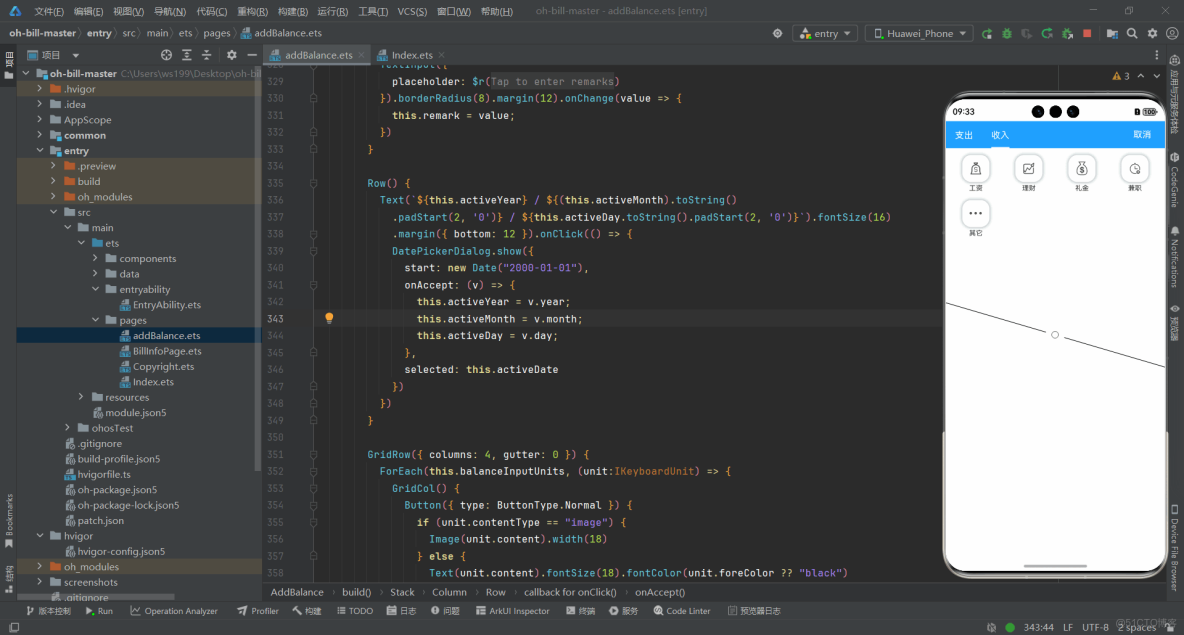
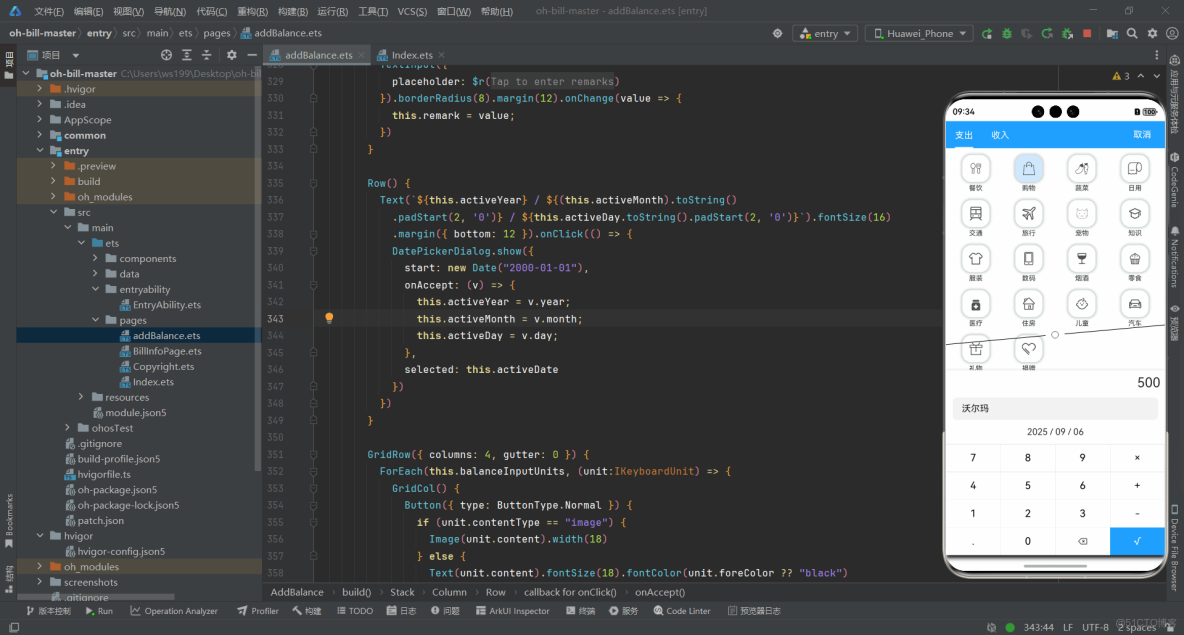
3、addBalance.ets 新增賬單頁面組件,讓用户選擇收支類型、對應的具體類別,通過自定義的數字鍵盤輸入金額,還能添加備註、選擇日期,最後把這些賬單信息存入數據庫,完成賬單記錄
- 支出
- 收入
- 記賬
import router from '@ohos.router';
import common from '@ohos.app.ability.common';
import { defaultExpenseType, defaultIncomeType, IBillType } from '../data/balanceTypes';
import { DBManager } from '@ohos/common';
import { BillingDirection } from '@ohos/common/src/main/ets/DataTypes/BillingInfo';
interface IKeyboardUnit{
  content: string | Resource,
  contentType?: string,
  callback?: () => void,
  bgColor?: ResourceColor,
  foreColor?: ResourceColor
}
@Entry
@Component
struct AddBalance {
  @State activeTab: number = 0;
  activeType: Resource = $r("app.media.salaryIcon");
  @State selectedTypeName: string = '';
  @State balanceAmount: string = "0";
  @State balanceTempAmount: string = "0";
  @State remark: string = "";
  @State calculateAction: number = 0;
  @State doneButtonText: string = "Ok";
  @State activeYear: number = (router.getParams() as ESObject)['year'];
  @State activeMonth: number = (router.getParams() as ESObject)['month'];
  @State activeDay: number = new Date().getDate();
  activeDate: Date = new Date();
  context = getContext(this) as common.UIAbilityContext;
  filesDir = this.context.filesDir;
  balanceInputUnits: IKeyboardUnit[] =
    [
      {
        content: "7",
        callback: () => {
          if (this.balanceAmount == "0") {
            this.balanceAmount = "7";
          } else {
            this.balanceAmount += "7";
          }
        }
      },
      {
        content: "8",
        callback: () => {
          if (this.balanceAmount == "0") {
            this.balanceAmount = "8";
          } else {
            this.balanceAmount += "8";
          }
        }
      },
      {
        content: "9",
        callback: () => {
          if (this.balanceAmount == "0") {
            this.balanceAmount = "9";
          } else {
            this.balanceAmount += "9";
          }
        }
      },
      {
        content: "×",
        callback: () => {
          this.calculateAction = 3;
          this.balanceTempAmount = this.balanceAmount;
          this.balanceAmount = "0";
        }
      },
      {
        content: "4",
        callback: () => {
          if (this.balanceAmount == "0") {
            this.balanceAmount = "4";
          } else {
            this.balanceAmount += "4";
          }
        }
      },
      {
        content: "5",
        callback: () => {
          if (this.balanceAmount == "0") {
            this.balanceAmount = "5";
          } else {
            this.balanceAmount += "5";
          }
        }
      },
      {
        content: "6",
        callback: () => {
          if (this.balanceAmount == "0") {
            this.balanceAmount = "6";
          } else {
            this.balanceAmount += "6";
          }
        }
      },
      {
        content: "+",
        callback: () => {
          if (this.balanceAmount.endsWith("."))
            this.balanceAmount += "0";
          this.balanceTempAmount = this.balanceAmount;
          this.balanceAmount = "0";
          this.calculateAction = 1;
          this.doneButtonText = "=";
        }
      },
      {
        content: "1",
        callback: () => {
          if (this.balanceAmount == "0") {
            this.balanceAmount = "1";
          } else {
            this.balanceAmount += "1";
          }
        }
      },
      {
        content: "2",
        callback: () => {
          if (this.balanceAmount == "0") {
            this.balanceAmount = "2";
          } else {
            this.balanceAmount += "2";
          }
        }
      },
      {
        content: "3",
        callback: () => {
          if (this.balanceAmount == "0") {
            this.balanceAmount = "3";
          } else {
            this.balanceAmount += "3";
          }
        }
      },
      {
        content: "-",
        callback: () => {
          if (this.balanceAmount.endsWith("."))
            this.balanceAmount += "0";
          this.balanceTempAmount = this.balanceAmount;
          this.balanceAmount = "0";
          this.calculateAction = 2;
          this.doneButtonText = "=";
        }
      },
      {
        content: ".",
        callback: () => {
          this.balanceAmount += "."
        }
      },
      {
        content: "0",
        callback: () => {
          if (this.balanceAmount == "0") {
            return;
          }
          this.balanceAmount += "0";
        }
      },
      {
        content: $r("app.media.delete"),
        contentType: "image",
        callback: () => {
          this.balanceAmount = this.balanceAmount.substring(0, this.balanceAmount.length - 1);
        }
      },
      {
        content: `√`,
        bgColor: $r('app.color.main_theme_blue'),
        foreColor: Color.White,
        callback: () => {
          if (this.balanceTempAmount != "0") {
            if (this.calculateAction == 1) {
              this.balanceAmount = (parseFloat(this.balanceTempAmount) + parseFloat(this.balanceAmount)).toFixed(2);
            } else if (this.calculateAction == 2) {
              this.balanceAmount = (parseFloat(this.balanceTempAmount) - parseFloat(this.balanceAmount)).toFixed(2);
            } else if (this.calculateAction == 3) {
              this.balanceAmount = (parseFloat(this.balanceTempAmount) * parseFloat(this.balanceAmount)).toFixed(2);
            }
            this.calculateAction = 0;
            this.balanceTempAmount = "0";
            this.doneButtonText = "Ok";
            return;
          }
          if (this.balanceAmount == "0")
            return;
          if (this.remark == "")
            return;
          DBManager.getInstance().addBillingInfo({
            type: {
              icon: this.activeType,
              name: this.selectedTypeName
            },
            amount: parseFloat(this.balanceAmount),
            direction: this.activeTab == 0 ? BillingDirection.OUT : BillingDirection.IN,
            timestamp: this.activeDate.getTime(),
            remark: this.remark
          })
            .then(v => {
              router.back();
            })
        }
      }
    ];
  @State inputMarginTop: number = 1000;
  @State inputOpacity: number = 0;

  onBackPress() {
    if (this.selectedTypeName != '') {
      this.selectedTypeName = '';
      return;
    }
  }

  build() {
    Stack({ alignContent: Alignment.Bottom }) {
      Column() {
        Row() {
          Row() {
            Text($r("app.string.balance"))
              .fontSize(16)
              .fontColor('white')
              .onClick(() => {
                this.activeTab = 0;
                this.selectedTypeName = '';
                this.balanceAmount = "0";
              })
              .border({
                width: {
                  bottom: this.activeTab == 0 ? 2 : 0
                },
                color: 'white'
              })
              .padding({ bottom: 16 })
              .margin({ top: 16, right: 16, left: 16 })
            Text($r("app.string.income"))
              .fontSize(16)
              .fontColor('white')
              .onClick(() => {
                this.activeTab = 1;
                this.selectedTypeName = '';
                this.balanceAmount = "0";
              })
              .border({
                width: {
                  bottom: this.activeTab == 1 ? 2 : 0
                },
                color: 'white'
              })
              .padding({ bottom: 16 })
              .margin({ top: 16, right: 16, left: 16 })
          }

          Text($r("app.string.cancel"))
            .fontSize(16)
            .fontColor('white')
            .onClick(() => {
              router.back()
            })
            .textAlign(TextAlign.End)
            .margin({ right: 24 })
        }
        .justifyContent(FlexAlign.SpaceBetween)
        .height(48)
        .backgroundColor($r('app.color.main_theme_blue'))
        .width('100%')

        GridRow({ columns: 4, gutter: 12 }) {
          ForEach(this.activeTab == 0 ? defaultExpenseType : defaultIncomeType, (item:IBillType) => {
            GridCol() {
              Column({ space: 4 }) {
                Row() {
                  Image(item.img)
                    .width(24)
                    .height(24)
                    .onClick(() => {
                      this.selectedTypeName = item.title;
                      this.activeType = item.img;
                      animateTo({ duration: 800, curve: Curve.EaseOut }, () => {
                        this.inputMarginTop = 0;
                        this.inputOpacity = 1;
                      })
                    })
                }
                .shadow({ radius: 24, color: $r('app.color.main_theme_shadow') })
                .borderRadius(16)
                .backgroundColor(this.selectedTypeName == item.title ? "#ffcfe8ff" : "white")
                .width(48)
                .height(48)
                .justifyContent(FlexAlign.Center)
                .onClick(() => {
                  this.selectedTypeName = ''
                  animateTo({ duration: 800, curve: Curve.EaseOut }, () => {
                    this.inputMarginTop = 1000;
                    this.inputOpacity = 0;
                  })
                })

                Row() {
                  Text(item.title).fontSize(12)
                }
              }
              .width(56)
              .height(68)

            }
          })
        }
        .padding(12)
      }
      .width('100%')
      .height('100%')

      Column() {
        Row() {
          Text(`${this.balanceAmount}`).textAlign(TextAlign.End).width('100%').padding(8)
            .fontSize(24)
        }.height(36)

        Row() {
          TextInput({
            placeholder: $r("app.string.add_balance_remark_placeholder")
          }).borderRadius(8).margin(12).onChange(value => {
            this.remark = value;
          })
        }

        Row() {
          Text(`${this.activeYear} / ${(this.activeMonth).toString()
            .padStart(2, '0')} / ${this.activeDay.toString().padStart(2, '0')}`).fontSize(16)
            .margin({ bottom: 12 }).onClick(() => {
            DatePickerDialog.show({
              start: new Date("2000-01-01"),
              onAccept: (v) => {
                this.activeYear = v.year;
                this.activeMonth = v.month;
                this.activeDay = v.day;
              },
              selected: this.activeDate
            })
          })
        }

        GridRow({ columns: 4, gutter: 0 }) {
          ForEach(this.balanceInputUnits, (unit:IKeyboardUnit) => {
            GridCol() {
              Button({ type: ButtonType.Normal }) {
                if (unit.contentType == "image") {
                  Image(unit.content).width(18)
                } else {
                  Text(unit.content).fontSize(18).fontColor(unit.foreColor ?? "black")
                }
              }
              .height(49)
              .backgroundColor(unit.bgColor ?? "white")
              .width('100%')
              .borderRadius(0)
              .onClick(unit.callback ?? (() => {
                return;
              }))
            }.border({
              width: {
                top: 0.5,
                right: 0.5,
                bottom: 0,
                left: 0
              },
              color: '#ffcdcdcd'
            })
          })
        }
      }
      .width('100%')
      .shadow({
        radius: 20,
        offsetY: 16
      })
      .margin({ top: this.inputMarginTop })
      .opacity(this.inputOpacity)
      .backgroundColor(Color.White)
    }
    .width('100%')
    .height('100%')
  }
}
年度賬單統計:數據分層處理與多維度展示
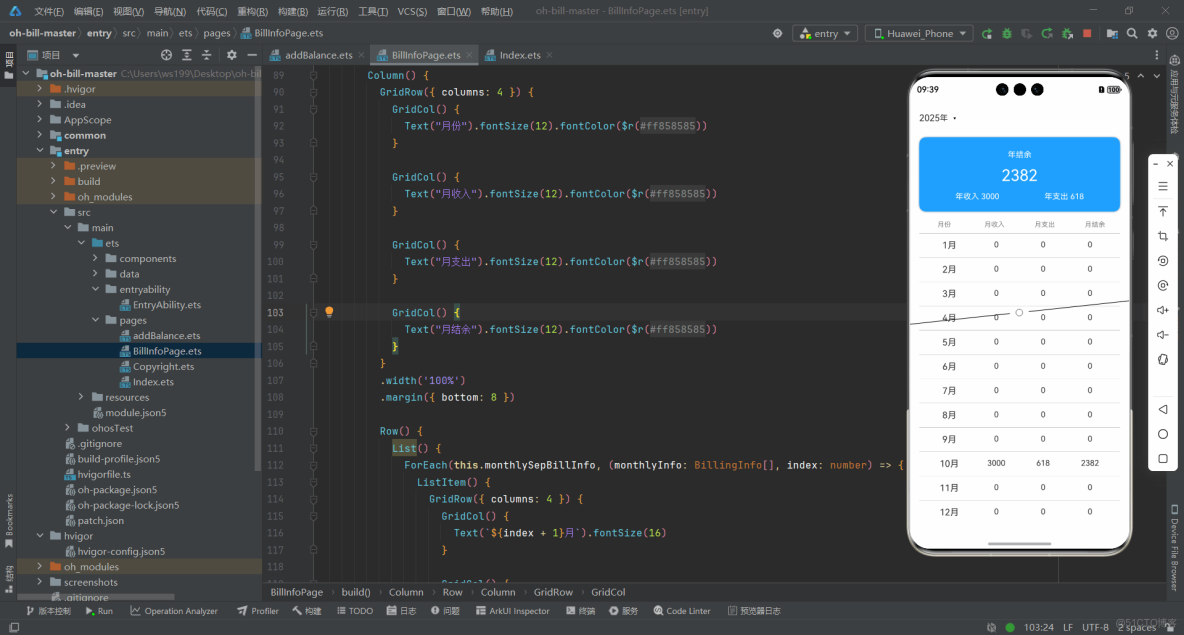
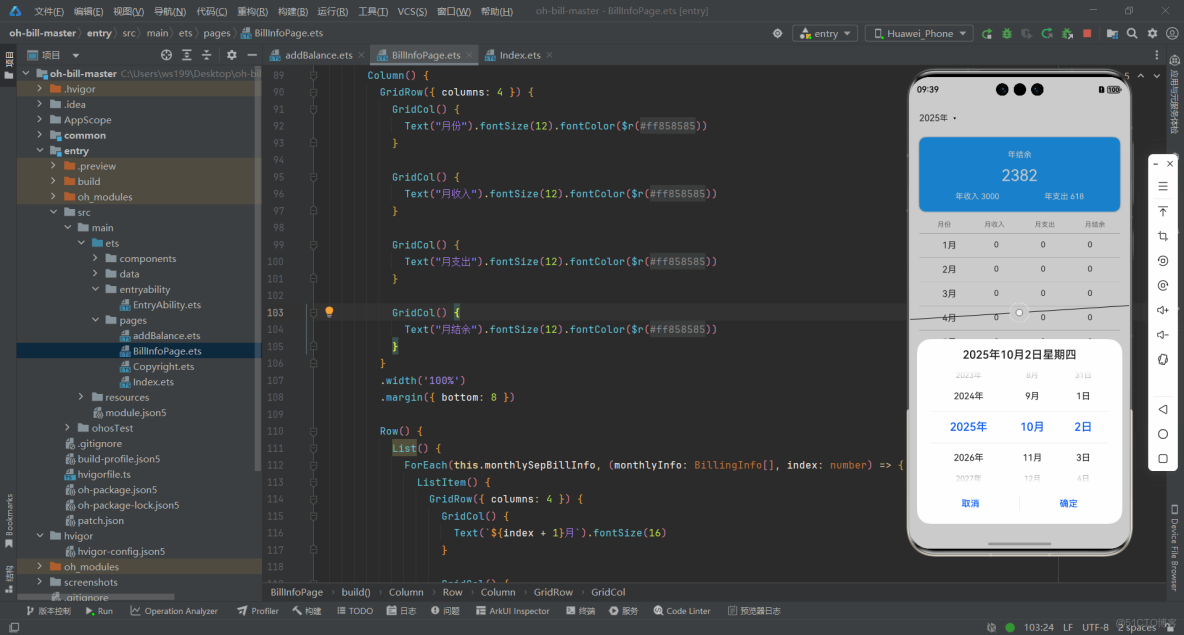
4、BillinfoPage.ets 年度賬單統計頁面組件,展示指定年份的收支彙總數據,頁面加載時會從數據庫拉取所有賬單,通過工具類 BillingInfoUtils 按月份拆分數據,計算並展示 “年結餘、年收入、年支出” 總覽,以及每個月的收入、支出、結餘明細。用户可點擊年份區域,通過內置的 DatePickerDialog 選擇其他年份,頁面會自動更新對應年份的統計數據,是用户查看年度財務狀況的核心界面
import { BillingDirection, BillingInfo, BillingInfoUtils, DBManager, Logger, StringUtils } from '@ohos/common';

let TAG = "BillInfoPage"

@Entry
@Component
struct BillInfoPage {
  @State activeDate: Date = new Date();
  @State monthlySepBillInfo: BillingInfo[][] = [];
  @State yearlyLeft: number = 0;
  @State yearlyOutBill: number = 0;
  @State yearlyIncome: number = 0;

  clearCache() {
    this.yearlyLeft = 0;
    this.yearlyOutBill = 0;
    this.yearlyIncome = 0;
  }

  onPageShow() {
    DBManager.getInstance().getAllBillingInfo()
      .then(r => {
        this.clearCache();
        Logger.info(TAG, "activeDate:", StringUtils.formatDate(this.activeDate, 'Y-M-D'))
        this.monthlySepBillInfo = BillingInfoUtils.explodeYearlyArray(r, this.activeDate);
        this.monthlySepBillInfo.forEach(monthlyInfo => {
          monthlyInfo.forEach(info => {
            if (info.direction == BillingDirection.IN) {
              this.yearlyLeft += info.amount;
              this.yearlyIncome += info.amount;
            } else {
              this.yearlyLeft -= info.amount;
              this.yearlyOutBill += info.amount;
            }
          })
        })
      })
  }

  build() {
    Column() {
      Row() {
        Text(`${this.activeDate.getFullYear()}`)
          .fontSize(16)
          .margin({ left: 16 })
        Text($r("app.string.year"))
          .fontSize(14)
        Image($r("app.media.ic_public_extract_list_dark"))
          .width(8)
          .height(8)
          .margin({ left: 8 })
      }.onClick(() => {
        DatePickerDialog.show({
          start: new Date("2000-01-01"),
          onAccept: (v) => {
            this.activeDate.setFullYear(v.year, v.month, v.day);
          }
        })
      })
      .height(36)
      .margin(16)
      .width('100%')

      Row() {
        Column() {
          Text("年結餘").fontSize(14).fontColor('#ffffff').margin(4).height(22)
          Text(`${this.yearlyLeft}`).fontSize(28).fontColor('#ffffff').margin(4).height(36)
          Row() {
            Text(`年收入 ${this.yearlyIncome}`)
              .fontColor('#ffffff')
              .fontSize(14)
              .height(30)
            Text(`年支出 ${this.yearlyOutBill}`)
              .fontColor('#ffffff')
              .fontSize(14)
              .height(30)
          }
          .justifyContent(FlexAlign.SpaceAround)
          .width('100%')
        }.padding({ left: 24, right: 24, top: 16, bottom: 16 })
      }
      .height(132)
      .backgroundColor($r("app.color.main_theme_blue"))
      .margin({ left: 16, right: 16 })
      .borderRadius(12)
      .shadow({ radius: 12, color: $r('app.color.main_theme_shadow') })

      Row() {
        Column() {
          GridRow({ columns: 4 }) {
            GridCol() {
              Text("月份").fontSize(12).fontColor($r("app.color.text_gray"))
            }

            GridCol() {
              Text("月收入").fontSize(12).fontColor($r("app.color.text_gray"))
            }

            GridCol() {
              Text("月支出").fontSize(12).fontColor($r("app.color.text_gray"))
            }

            GridCol() {
              Text("月結餘").fontSize(12).fontColor($r("app.color.text_gray"))
            }
          }
          .width('100%')
          .margin({ bottom: 8 })

          Row() {
            List() {
              ForEach(this.monthlySepBillInfo, (monthlyInfo: BillingInfo[], index: number) => {
                ListItem() {
                  GridRow({ columns: 4 }) {
                    GridCol() {
                      Text(`${index + 1}月`).fontSize(16)
                    }

                    GridCol() {
                      Text(`${BillingInfoUtils.calculateTotalIncome(monthlyInfo)}`).fontSize(14)
                    }

                    GridCol() {
                      Text(`${BillingInfoUtils.calculateTotalOutBill(monthlyInfo)}`).fontSize(14)
                    }

                    GridCol() {
                      Text(`${BillingInfoUtils.calculateTotalLeft(monthlyInfo)}`).fontSize(14)
                    }
                  }
                  .padding(12)
                  .border({
                    width: { top: 0.5 },
                    color: $r("app.color.text_gray")
                  })
                  .width('100%')
                }
              })
            }.listDirection(Axis.Vertical)
          }
          .width('100%')
        }
      }
      .padding(16)
      .width('100%')
    }
  }
}
鴻蒙原生組件實踐:DatePickerDialog 的差異化場景應用
|
維度
|
AddBalance.ets
|
BillInfoPage.ets
|
|
用途 |
選擇單條賬單的具體日期(精確到日)
|
選擇年度統計的年份(核心是年份)
|
|
觸發元素 |
頁面中部的 “年 / 月 / 日” 文本
|
頁面頂部的 “年份 + 年” 文本
|
|
數據更新 |
分別更新activeYearactiveMonthactiveDay
|
更新 activeDate 對象的年份
|
|
彈窗作用 |
確定單條賬單的記錄時間
|
切換需要統計的年度數據
|
AddBalance.ets(新增賬單頁):選擇單條賬單的具體日期
- 觸發時機:點擊頁面中顯示的 “年 / 月 / 日” 文本時觸發,用於指定當前記錄賬單的具體日期
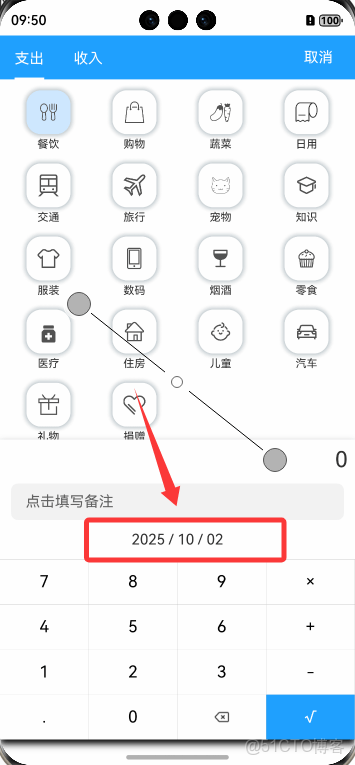
Text(`${this.activeYear} / ${this.activeMonth.toString().padStart(2, '0')} / ${this.activeDay.toString().padStart(2, '0')}`)
  .onClick(() => {
    DatePickerDialog.show({
      start: new Date("2000-01-01"), // 限制最早可選擇2000年1月1日
      selected: this.activeDate,     // 彈窗默認選中當前日期(this.activeDate)
      onAccept: (v) => {             // 點擊“確定”後更新日期
        this.activeYear = v.year;    // 更新選中的年份
        this.activeMonth = v.month;  // 更新選中的月份
        this.activeDay = v.day;      // 更新選中的日期
      }
    })
  })
- 特點:需精確到 “日”,因為單條賬單需要具體的記錄日期,且通過 activeYear、activeMonth、activeDay 三個變量分別存儲,便於後續格式化展示和存入數據庫
BillInfoPage.ets(年度賬單頁):選擇統計數據的年份
觸發時機:點擊頁面頂部顯示的年份文本時觸發,用於切換需要查看的年度賬單統計數據
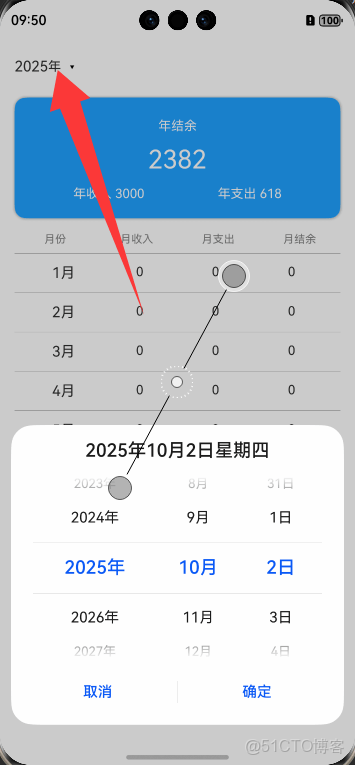
Row() {
  Text(`${this.activeDate.getFullYear()}`).fontSize(16)
  Text($r("app.string.year")).fontSize(14)
}.onClick(() => {
  DatePickerDialog.show({
    start: new Date("2000-01-01"), // 限制最早可選擇2000年
    onAccept: (v) => {             // 點擊“確定”後更新年份
      this.activeDate.setFullYear(v.year, v.month, v.day);
    }
  })
})
- 特點:核心是選擇 “年份”,月份和日期不影響統計結果,因此直接通過 this.activeDate(完整日期對象)的 setFullYear 方法更新年份,後續統計邏輯會基於該年份篩選數據
兩者均依賴鴻蒙內置的 DatePickerDialog 實現日期選擇,通過 show 方法配置可選範圍和默認值,再通過 onAccept 回調更新頁面狀態,實現 “點擊→選擇→更新” 的完整交互
鴻蒙開發實踐總結:輕量化應用開發的效率與體驗
易記賬輕量化記賬應用的鴻蒙開發過程中,從架構搭建到功能落地,深刻感受到鴻蒙生態對輕量化應用開發的適配性與效率優勢
從開發效率來看,鴻蒙的模塊化目錄設計(如AppScope統一全局資源、common封裝通用工具)讓代碼複用率顯著提升 ,DBManager 數據庫管理、BillingInfoUtils 數據處理等通用邏輯只需開發一次,即可在首頁、新增賬單頁、年度統計頁跨頁面調用;ArkUI 框架的聲明式語法則大幅簡化了界面開發,像Column/Row佈局、ForEach 循環渲染賬單列表,配合 @State 狀態管理實現數據與 UI 的自動聯動,相比傳統開發減少了近 30% 的模板代碼,尤其是原生 DatePickerDialog 組件的應用,無需自定義滾輪邏輯或適配樣式,僅通過簡單配置就能滿足 “新增賬單精確選日/年度統計選年” 兩種差異化場景,極大降低了組件開發成本
從用户體驗優化來看,鴻蒙的特性讓輕量化應用也能具備流暢的交互表現,新增賬單頁通過 animateTo 實現輸入面板的平滑彈出 / 隱藏,避免界面跳轉的割裂感;年度統計頁基於 BillingInfoUtils 的月份拆分邏輯,實現賬單數據的實時計算與展示,頁面切換時無明顯卡頓,同時, entryability 對應用生命週期的統一管理,確保了 APP 啓動時數據庫初始化、全局上下文配置的穩定性,從底層保障了用户操作的流暢性
此外,鴻蒙的生態兼容性也為輕量化應用預留了擴展空間 —— 當前 “易記賬” 雖聚焦單機記賬,但基於 common 模塊的分層設計,後續若需拓展多設備同步,如手機與平板賬單互通,只需在通用模塊中補充分佈式數據邏輯,無需重構核心業務代碼,這種 “輕量化起步、可拓展演進” 的特性,恰好契合了中小體量應用的開發需求
總結

“易記賬” 鴻蒙開發實踐是輕量化應用與鴻蒙生態高效適配:模塊化目錄設計降低代碼冗餘,ArkUI 聲明式語法減少界面開發工作量,原生組件DatePickerDialog省去大量自定義適配成本。
同時,生命週期管理與狀態聯動特性從底層保障應用穩定性與交互流暢性。這種 “低開發成本、高功能完整性” 的體驗,適配輕量化工具的開發需求,實現 “開發效率” 與 “用户體驗” 雙重平衡
