
在Java UI框架中,提供了兩種編寫佈局的方式:在XML中聲明UI佈局和在代碼中創建佈局。這兩種方式創建出的佈局沒有本質差別,為了熟悉兩種方式,我們將通過XML的方式編寫第一個頁面
- 在“Project”窗口,點擊“entry > src > main > resources > base > layout”,打開“ability_main.xml”文件。
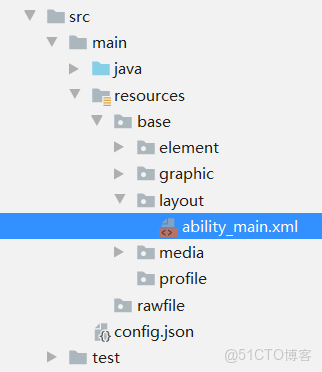
編輯
- 在“ability_main.xml”文件中創建一個文本和一個按鈕,示例代碼如下:
<?xml version="1.0" encoding="utf-8"?>
<DependentLayout
    xmlns:ohos="http://schemas.huawei.com/res/ohos"
    ohos:width="match_parent"
    ohos:height="match_parent"
    ohos:background_element="#FFFFFF">
    <Text
        ohos:id="$+id:text"
        ohos:width="match_content"
        ohos:height="match_content"
        ohos:text="Hello World"
        ohos:text_color="#000000"
        ohos:text_size="32fp"
        ohos:center_in_parent="true"/>
    <Button
        ohos:id="$+id:button"
        ohos:width="match_content"
        ohos:height="match_content"
        ohos:text="Next"
        ohos:text_size="19fp"
        ohos:text_color="#FFFFFF"
        ohos:top_padding="8vp"
        ohos:bottom_padding="8vp"
        ohos:right_padding="70vp"
        ohos:left_padding="70vp"
        ohos:background_element="$graphic:background_button"
        ohos:center_in_parent="true"
        ohos:align_parent_bottom="true"
        ohos:bottom_margin="40vp"/>
</DependentLayout>- 上述按鈕的背景是通過“background_button”來顯示的。右鍵點擊“graphic”文件夾,選擇“New > File”,命名為“background_button.xml”。
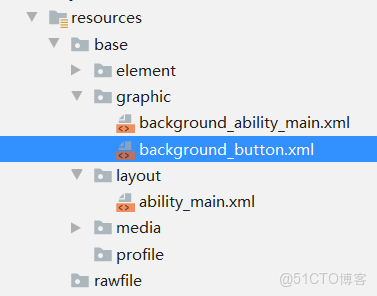
編輯
“background_button.xml”的示例代碼如下(如果DevEco Studio提示xmlns字段錯誤,請忽略,不影響後續操作):
<?xml version="1.0" encoding="utf-8"?>
<shape
    xmlns:ohos="http://schemas.huawei.com/res/ohos"
    ohos:shape="rectangle">
    <corners
        ohos:radius="100"/>
    <solid
        ohos:color="#007DFF"/>
</shape>- 在“Project”窗口,選擇“entry > src > main > java > com.example.myapplication > slice” ,打開“MainAbilitySlice.java”文件,使用setUIContent方法加載XML佈局,示例代碼如下:
package com.example.myapplication.slice;

import com.example.myapplication.ResourceTable;
import ohos.aafwk.ability.AbilitySlice;
import ohos.aafwk.content.Intent;

public class MainAbilitySlice extends AbilitySlice {
    @Override
    public void onStart(Intent intent) {
        super.onStart(intent);
        super.setUIContent(ResourceTable.Layout_ability_main); // 加載XML佈局
    }

    @Override
    public void onActive() {
        super.onActive();
    }

    @Override
    public void onForeground(Intent intent) {
        super.onForeground(intent);
    }
}
説明:如果DevEco Studio提示Layout_ability_main錯誤,點擊菜單欄的“Build”,選擇“Build App(s)/Hap(s) > Build Debug Hap(s) ”,即可消除報錯。
想入門鴻蒙開發又怕花冤枉錢?別錯過!現在能免費系統學 -- 從 ArkTS 面向對象核心的類和對象、繼承多態,到吃透鴻蒙開發關鍵技能,還能衝刺鴻蒙基礎 +高級開發者證書,更驚喜的是考證成功還送好禮!快加入我的鴻蒙班,一起從入門到精通,班級鏈接:點擊https://developer.huawei.com/consumer/cn/training/classDetail/b7365031334e4353a9a0fd6785bb0791?type=1?ha_source=hmosclass&ha_sourceId=89000248免費進入
