目錄
1. 工作台
1.1 需求分析和設計
1.1.1 產品原型
1.1.2 接口設計
1.2 代碼實現
1.2.1 Controller層
1.2.2 Service層接口
1.2.3 Service層實現類
1.2.4 Mapper層
1.3 功能測試
2. Apache POI
2.1 介紹
2.2 入門案例
2.2.1 將數據寫入Excel文件
2.2.2 通過POI基於模板寫入數據到execl
2.2.3 讀取Excel文件中的數據
3.2 代碼開發
3.2.1 實現步驟
3.2.2 Controller層
3.2.3 Service層接口
3.2.4 Service層實現類
3.3 功能測試
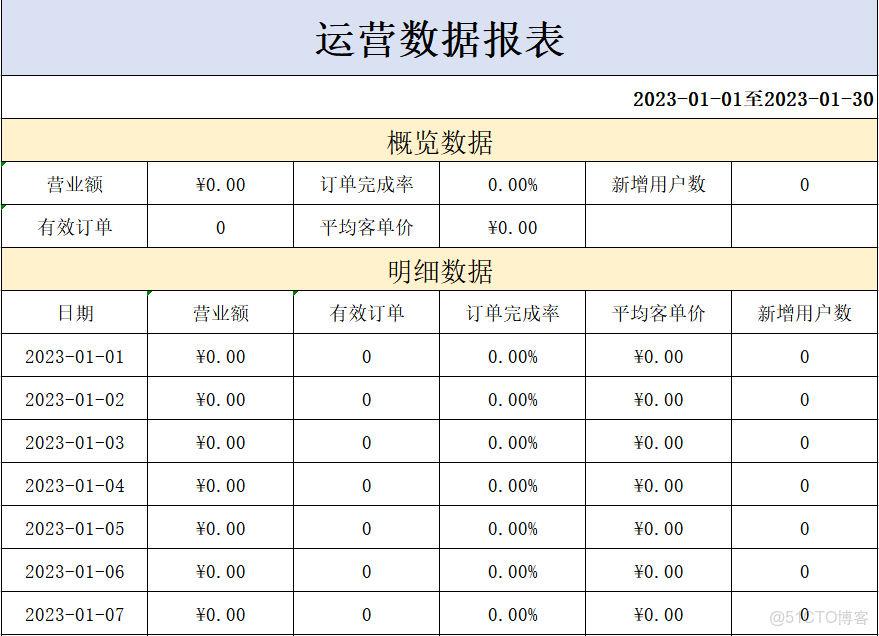
功能實現:工作台、數據導出
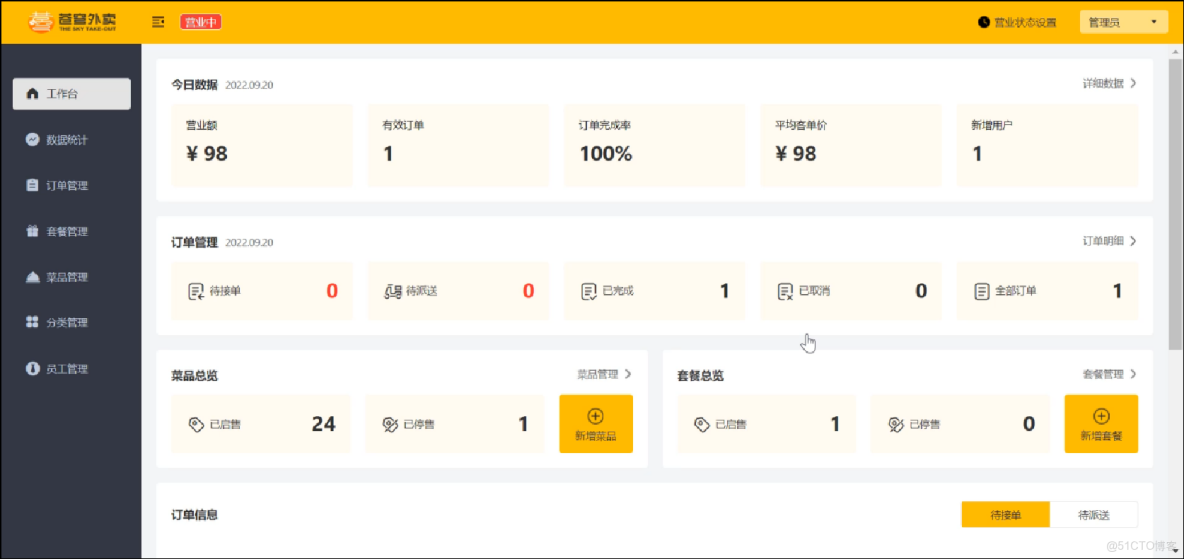
工作台效果圖:
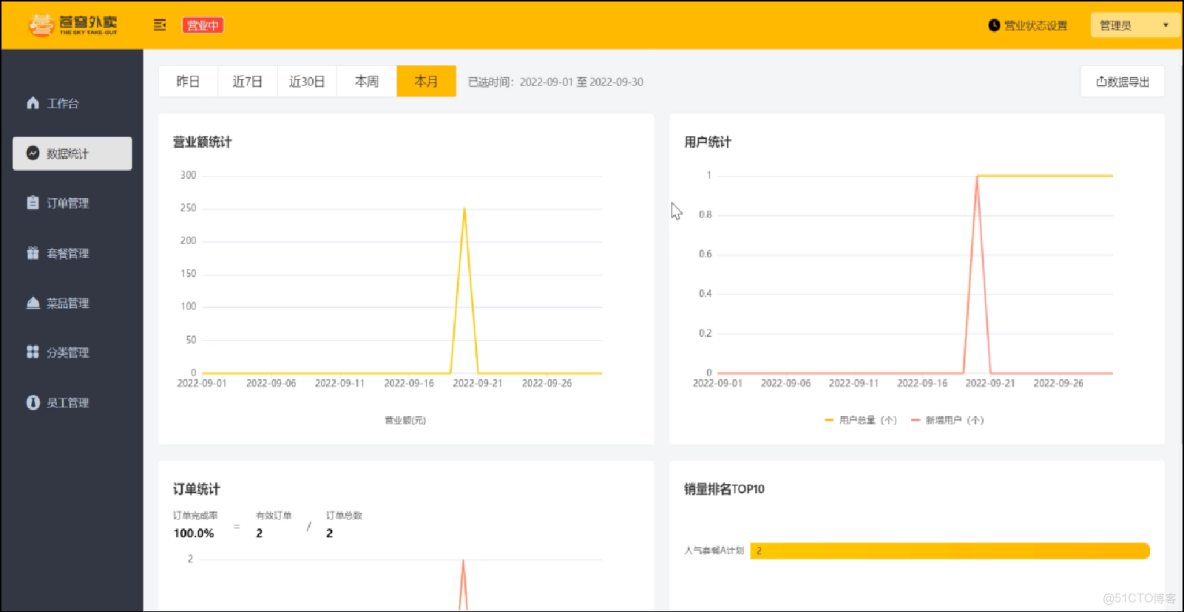
數據導出效果圖:
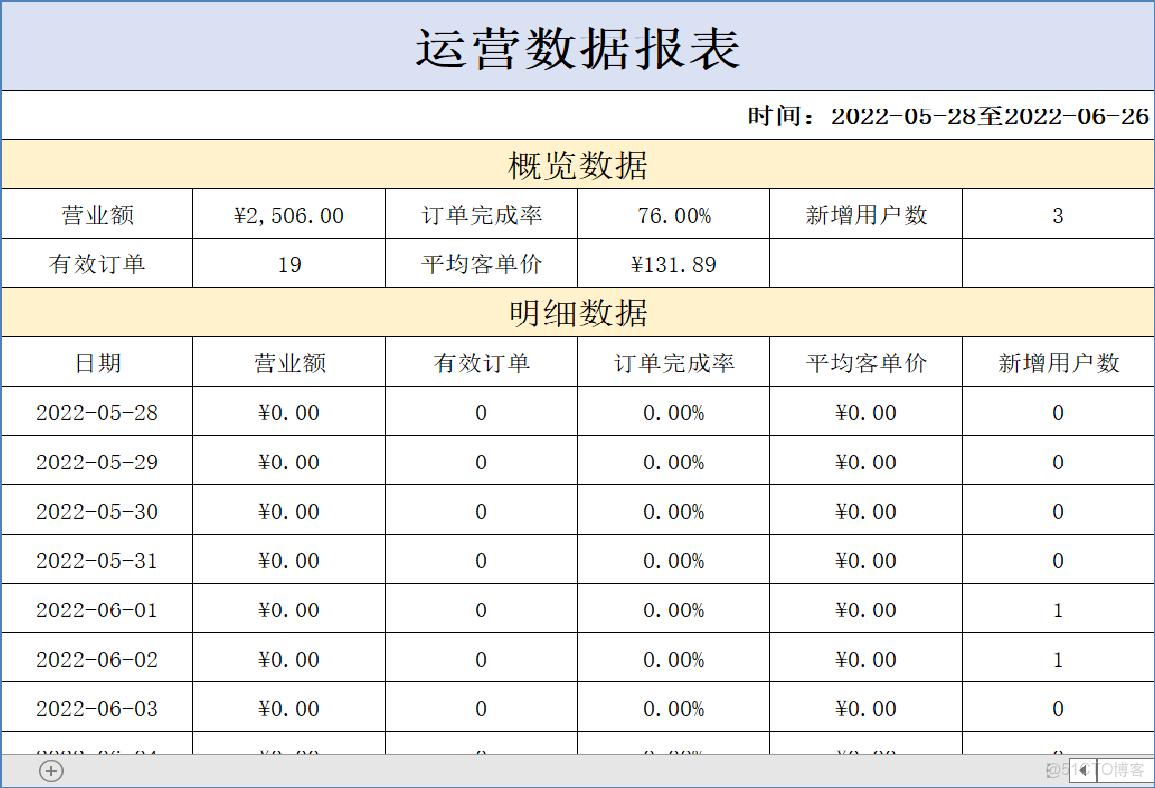
在數據統計頁面點擊數據導出:生成Excel報表
1. 工作台
1.1 需求分析和設計
1.1.1 產品原型
工作台是系統運營的數據看板,並提供快捷操作入口,可以有效提高商家的工作效率。
工作台展示的數據:
- 今日數據
- 訂單管理
- 菜品總覽
- 套餐總覽
- 訂單信息
原型圖:
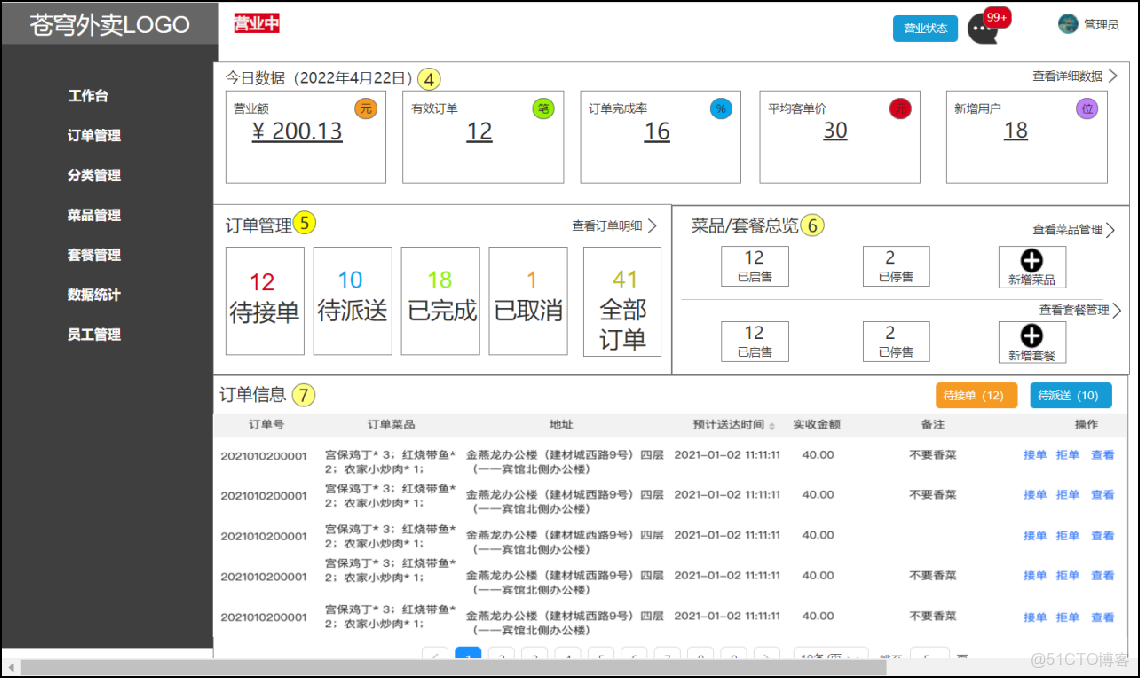
名詞解釋:
- 營業額:已完成訂單的總金額
- 有效訂單:已完成訂單的數量
- 訂單完成率:有效訂單數 / 總訂單數 * 100%
- 平均客單價:營業額 / 有效訂單數
- 新增用户:新增用户的數量
1.1.2 接口設計
通過上述原型圖分析,共包含6個接口。
接口設計:
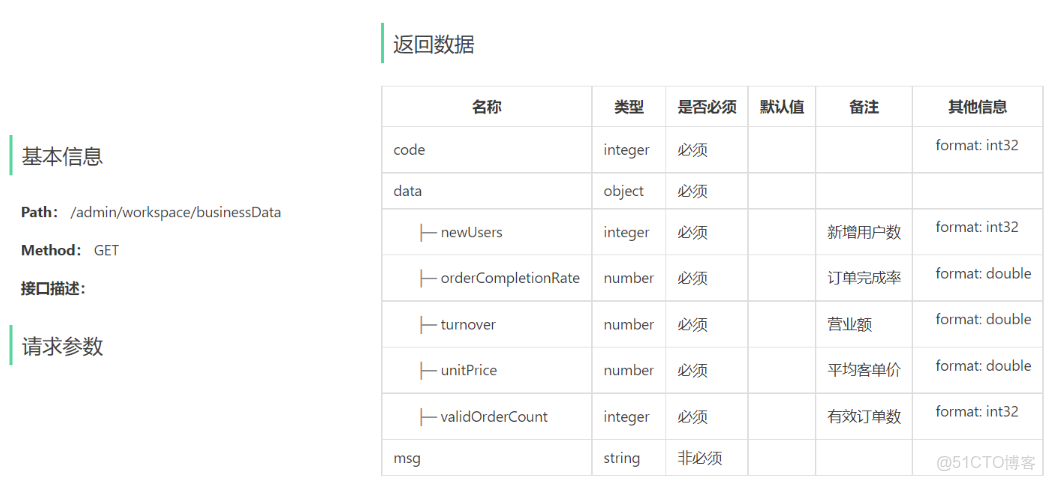
- 今日數據接口
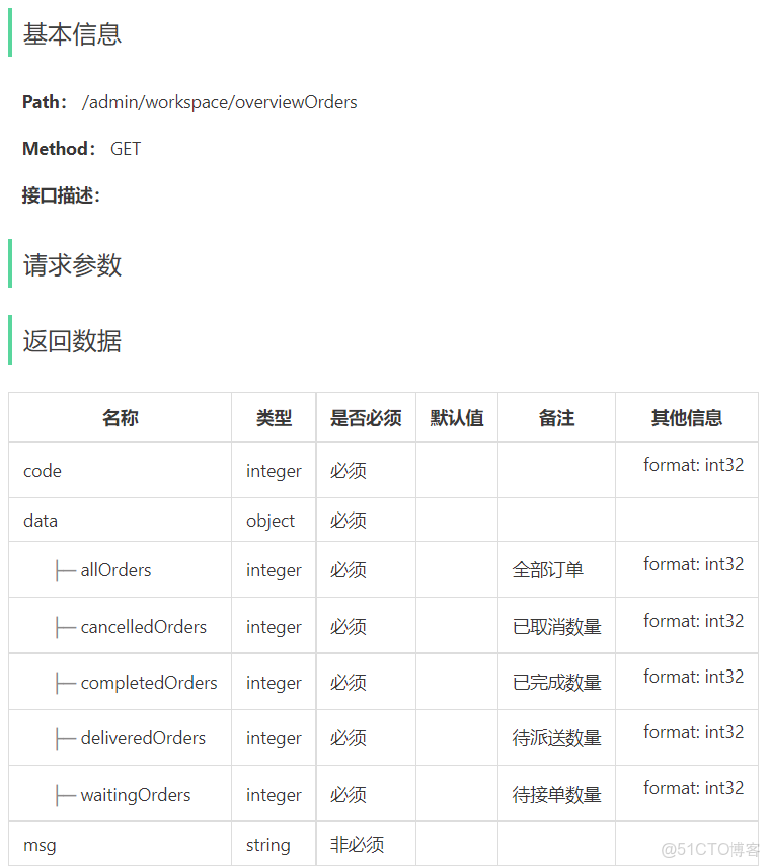
- 訂單管理接口
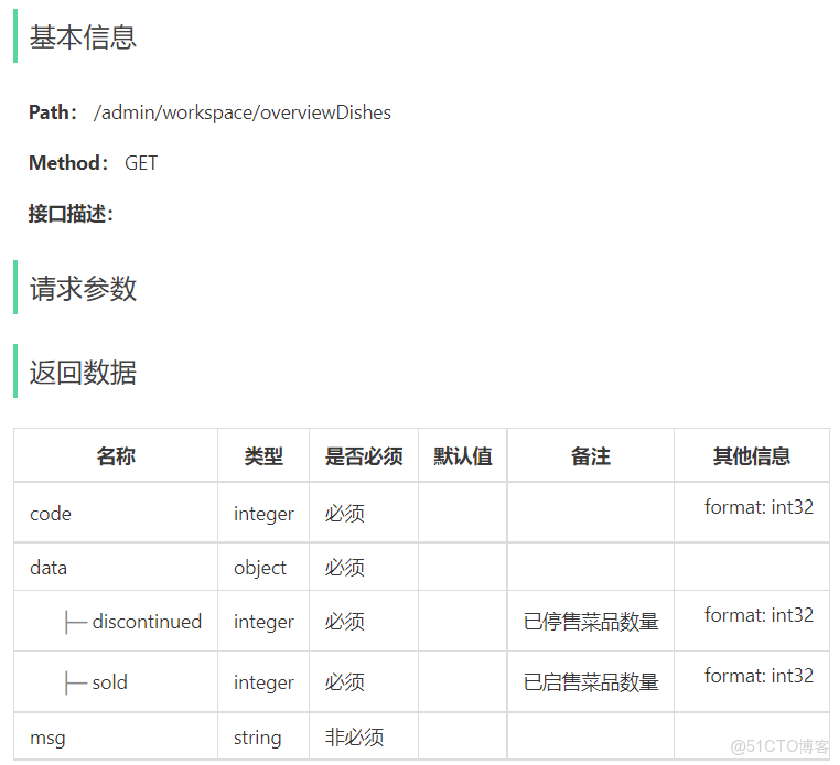
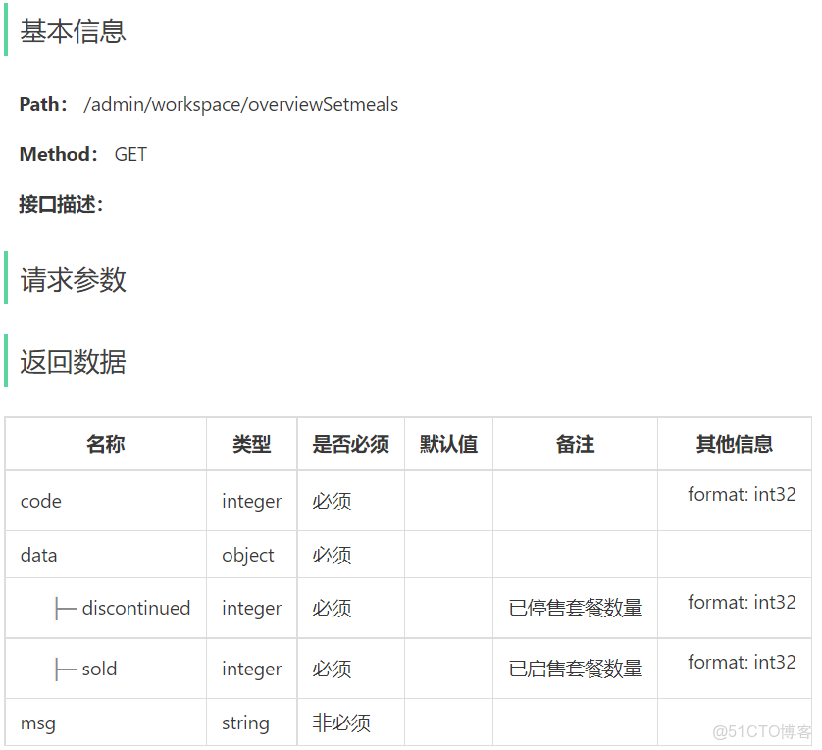
- 菜品總覽接口
- 套餐總覽接口
- 訂單搜索(已完成)
- 各個狀態的訂單數量統計(已完成)
1). 今日數據的接口設計
2). 訂單管理的接口設計
3). 菜品總覽的接口設計
4). 套餐總覽的接口設計
1.2 代碼實現
1.2.1 Controller層
添加WorkSpaceController.java
package com.sky.controller.admin;
import com.sky.service.WorkspaceService;
import com.sky.result.Result;
import com.sky.vo.BusinessDataVO;
import com.sky.vo.DishOverViewVO;
import com.sky.vo.OrderOverViewVO;
import com.sky.vo.SetmealOverViewVO;
import io.swagger.annotations.Api;
import io.swagger.annotations.ApiOperation;
import lombok.extern.slf4j.Slf4j;
import org.springframework.beans.factory.annotation.Autowired;
import org.springframework.web.bind.annotation.GetMapping;
import org.springframework.web.bind.annotation.RequestMapping;
import org.springframework.web.bind.annotation.RestController;
import java.time.LocalDateTime;
import java.time.LocalTime;
/**
 * 工作台
 */
@RestController
@RequestMapping("/admin/workspace")
@Slf4j
@Api(tags = "工作台相關接口")
public class WorkSpaceController {
    @Autowired
    private WorkspaceService workspaceService;
    /**
     * 工作台今日數據查詢
     * @return
     */
    @GetMapping("/businessData")
    @ApiOperation("工作台今日數據查詢")
    public Result businessData(){
        //獲得當天的開始時間
        LocalDateTime begin = LocalDateTime.now().with(LocalTime.MIN);
        //獲得當天的結束時間
        LocalDateTime end = LocalDateTime.now().with(LocalTime.MAX);
        BusinessDataVO businessDataVO = workspaceService.getBusinessData(begin, end);
        return Result.success(businessDataVO);
    }
    /**
     * 查詢訂單管理數據
     * @return
     */
    @GetMapping("/overviewOrders")
    @ApiOperation("查詢訂單管理數據")
    public Result orderOverView(){
        return Result.success(workspaceService.getOrderOverView());
    }
    /**
     * 查詢菜品總覽
     * @return
     */
    @GetMapping("/overviewDishes")
    @ApiOperation("查詢菜品總覽")
    public Result dishOverView(){
        return Result.success(workspaceService.getDishOverView());
    }
    /**
     * 查詢套餐總覽
     * @return
     */
    @GetMapping("/overviewSetmeals")
    @ApiOperation("查詢套餐總覽")
    public Result setmealOverView(){
        return Result.success(workspaceService.getSetmealOverView());
    }
}
1.2.2 Service層接口
添加WorkspaceService.java
package com.sky.service;
import com.sky.vo.BusinessDataVO;
import com.sky.vo.DishOverViewVO;
import com.sky.vo.OrderOverViewVO;
import com.sky.vo.SetmealOverViewVO;
import java.time.LocalDateTime;
public interface WorkspaceService {
    /**
     * 根據時間段統計營業數據
     * @param begin
     * @param end
     * @return
     */
    BusinessDataVO getBusinessData(LocalDateTime begin, LocalDateTime end);
    /**
     * 查詢訂單管理數據
     * @return
     */
    OrderOverViewVO getOrderOverView();
    /**
     * 查詢菜品總覽
     * @return
     */
    DishOverViewVO getDishOverView();
    /**
     * 查詢套餐總覽
     * @return
     */
    SetmealOverViewVO getSetmealOverView();
}
1.2.3 Service層實現類
添加WorkspaceServiceImpl.java
@Service
@Slf4j
public class WorkspaceServiceImpl implements WorkspaceService {
    @Autowired
    private OrdersMapper orderMapper;
    @Autowired
    private UserMapper userMapper;
    @Autowired
    private DishMapper dishMapper;
    @Autowired
    private SetmealMapper setmealMapper;
    /**
     * 根據時間段統計營業數據
     * @param begin
     * @param end
     * @return
     */
    public BusinessDataVO getBusinessData(LocalDateTime begin, LocalDateTime end) {
        /**
         * 營業額:當日已完成訂單的總金額
         * 有效訂單:當日已完成訂單的數量
         * 訂單完成率:有效訂單數 / 總訂單數
         * 平均客單價:營業額 / 有效訂單數
         * 新增用户:當日新增用户的數量
         */
        Map map = new HashMap();
        map.put("beginTime",begin);
        map.put("endTime",end);
        //查詢總訂單數
        Integer totalOrderCount = orderMapper.countByMap(map);
        map.put("status", Orders.COMPLETED);
        //營業額
        Double turnover = orderMapper.sumByMap(map);
        turnover = turnover == null? 0.0 : turnover;
        //有效訂單數
        Integer validOrderCount = orderMapper.countByMap(map);
        Double unitPrice = 0.0;
        Double orderCompletionRate = 0.0;
        if(totalOrderCount != 0 && validOrderCount != 0){
            //訂單完成率
            orderCompletionRate = validOrderCount.doubleValue() / totalOrderCount;
            //平均客單價
            unitPrice = turnover / validOrderCount;
        }
        //新增用户數
        Integer newUsers = userMapper.countByMap(map);
        return BusinessDataVO.builder()
                .turnover(turnover)
                .validOrderCount(validOrderCount)
                .orderCompletionRate(orderCompletionRate)
                .unitPrice(unitPrice)
                .newUsers(newUsers)
                .build();
    }
    /**
     * 查詢訂單管理數據
     *
     * @return
     */
    public OrderOverViewVO getOrderOverView() {
        Map map = new HashMap();
        map.put("beginTime", LocalDateTime.now().with(LocalTime.MIN));
        map.put("status", Orders.TO_BE_CONFIRMED);
        //待接單
        Integer waitingOrders = orderMapper.countByMap(map);
        //待派送
        map.put("status", Orders.CONFIRMED);
        Integer deliveredOrders = orderMapper.countByMap(map);
        //已完成
        map.put("status", Orders.COMPLETED);
        Integer completedOrders = orderMapper.countByMap(map);
        //已取消
        map.put("status", Orders.CANCELLED);
        Integer cancelledOrders = orderMapper.countByMap(map);
        //全部訂單
        map.put("status", null);
        Integer allOrders = orderMapper.countByMap(map);
        return OrderOverViewVO.builder()
                .waitingOrders(waitingOrders)
                .deliveredOrders(deliveredOrders)
                .completedOrders(completedOrders)
                .cancelledOrders(cancelledOrders)
                .allOrders(allOrders)
                .build();
    }
    /**
     * 查詢菜品總覽
     *
     * @return
     */
    public DishOverViewVO getDishOverView() {
        Map map = new HashMap();
        map.put("status", StatusConstant.ENABLE);
        Integer sold = dishMapper.countByMap(map);
        map.put("status", StatusConstant.DISABLE);
        Integer discontinued = dishMapper.countByMap(map);
        return DishOverViewVO.builder()
                .sold(sold)
                .discontinued(discontinued)
                .build();
    }
    /**
     * 查詢套餐總覽
     *
     * @return
     */
    public SetmealOverViewVO getSetmealOverView() {
        Map map = new HashMap();
        map.put("status", StatusConstant.ENABLE);
        Integer sold = setmealMapper.countByMap(map);
        map.put("status", StatusConstant.DISABLE);
        Integer discontinued = setmealMapper.countByMap(map);
        return SetmealOverViewVO.builder()
                .sold(sold)
                .discontinued(discontinued)
                .build();
    }
}
一定要注意這裏map裏的屬性名稱要與xml文件中對應,否則sql語句的查詢條件會出現錯誤。
1.2.4 Mapper層
在SetmealMapper中添加countByMap方法定義
/**
     * 根據條件統計套餐數量
     * @param map
     * @return
     */
    Integer countByMap(Map map);
在SetmealMapper.xml中添加對應SQL實現
select count(id) from setmeal


                and status = #{status}


                and category_id = #{categoryId}
在DishMapper中添加countByMap方法定義
/**
     * 根據狀態統計菜品數量
     * @param map
     * @return
     */
    Integer countByMap(Map map);
在DishMapper.xml中添加對應SQL實現
select count(id) from dish


                and status = #{status}


                and category_id = #{categoryId}
1.3 功能測試
啓動nginx,訪問 http://localhost,進入工作台
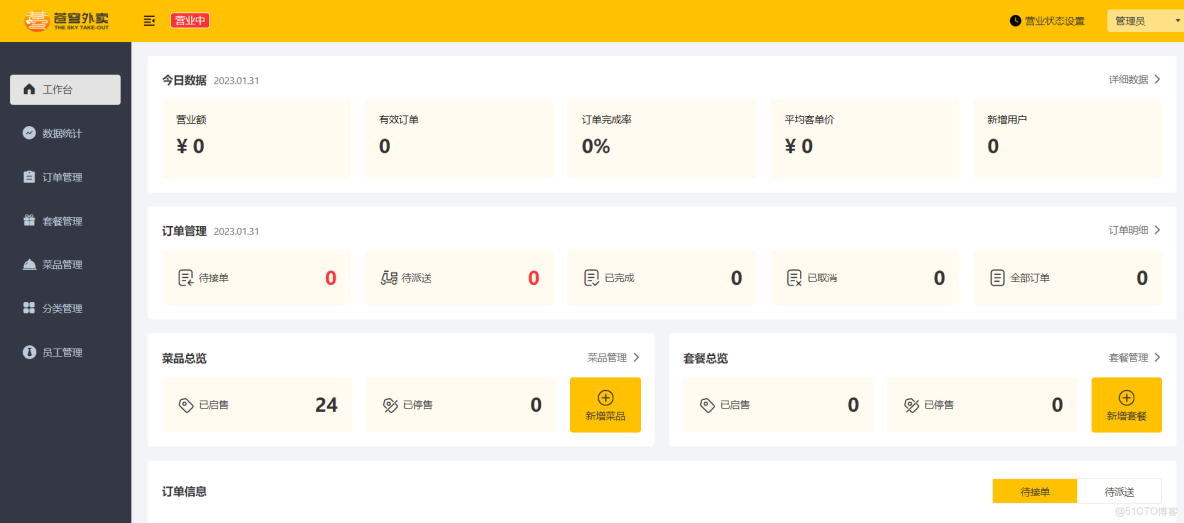
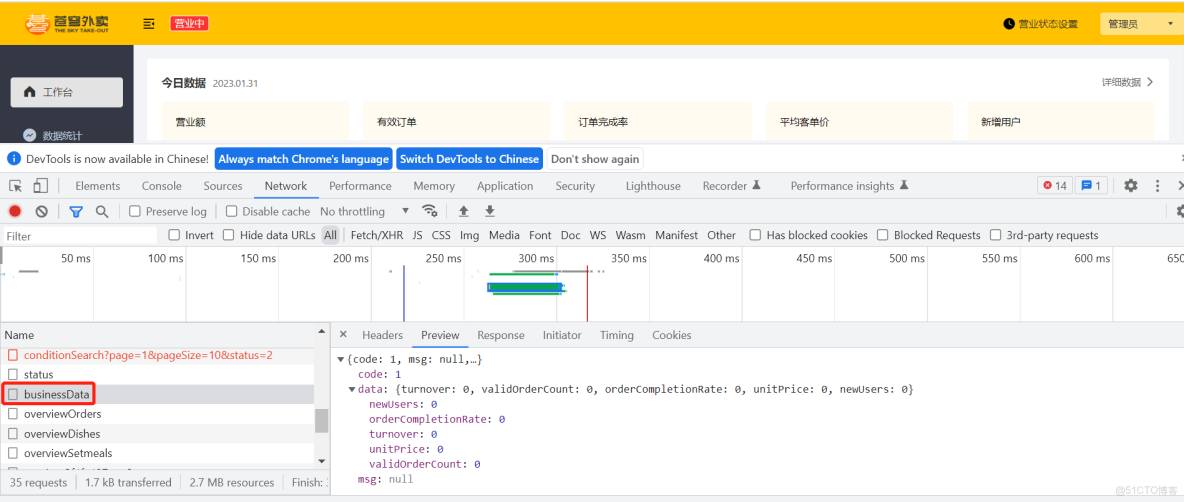
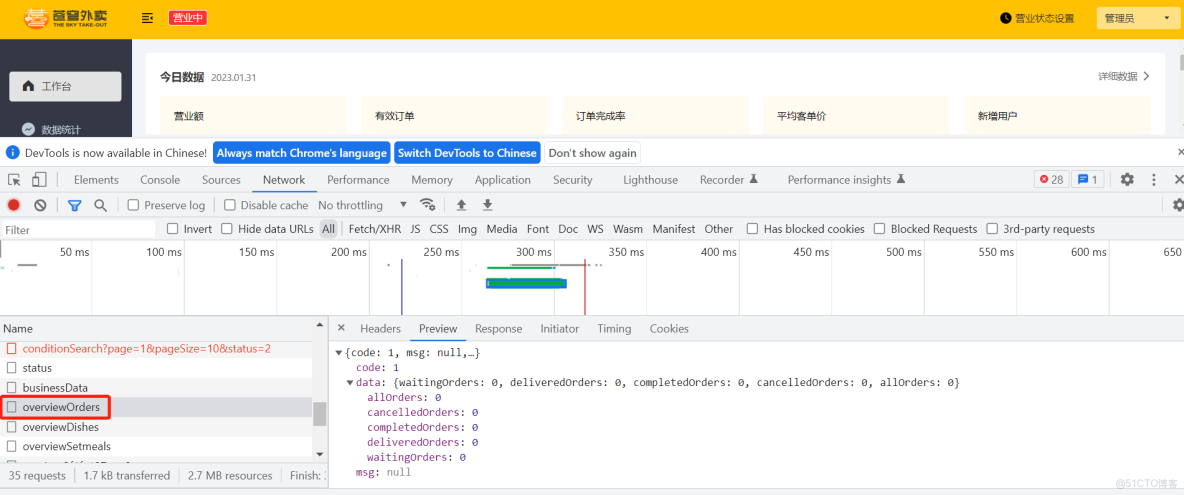
進入開發者模式,分別查看今日數據、訂單管理、菜品總覽、套餐總覽
1). 今日數據查詢
2). 訂單管理數據查詢
2. Apache POI
2.1 介紹
Apache POI 是一個處理Miscrosoft Office各種文件格式的開源項目。簡單來説就是,我們可以使用 POI 在 Java 程序中對Miscrosoft Office各種文件進行讀寫操作。 一般情況下,POI 都是用於操作 Excel 文件。
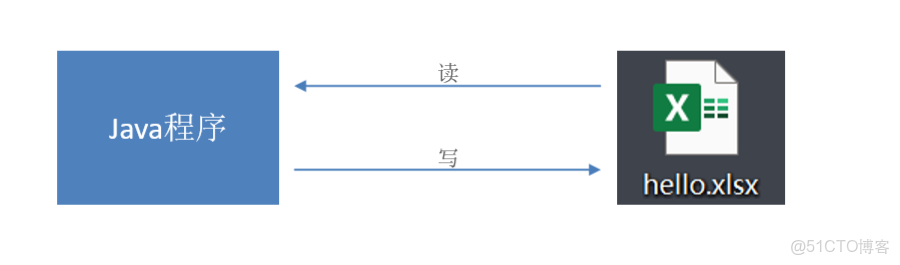
Apache POI 的應用場景:
- 銀行網銀系統導出交易明細
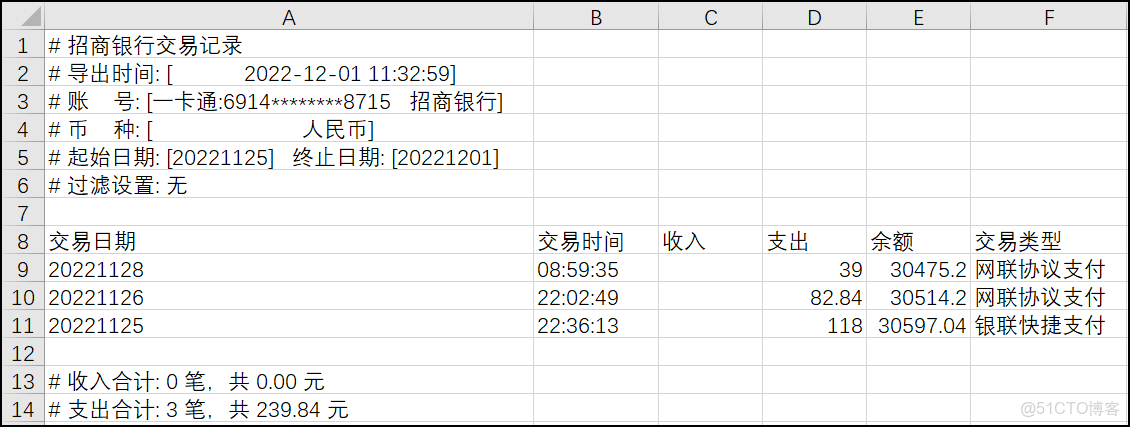
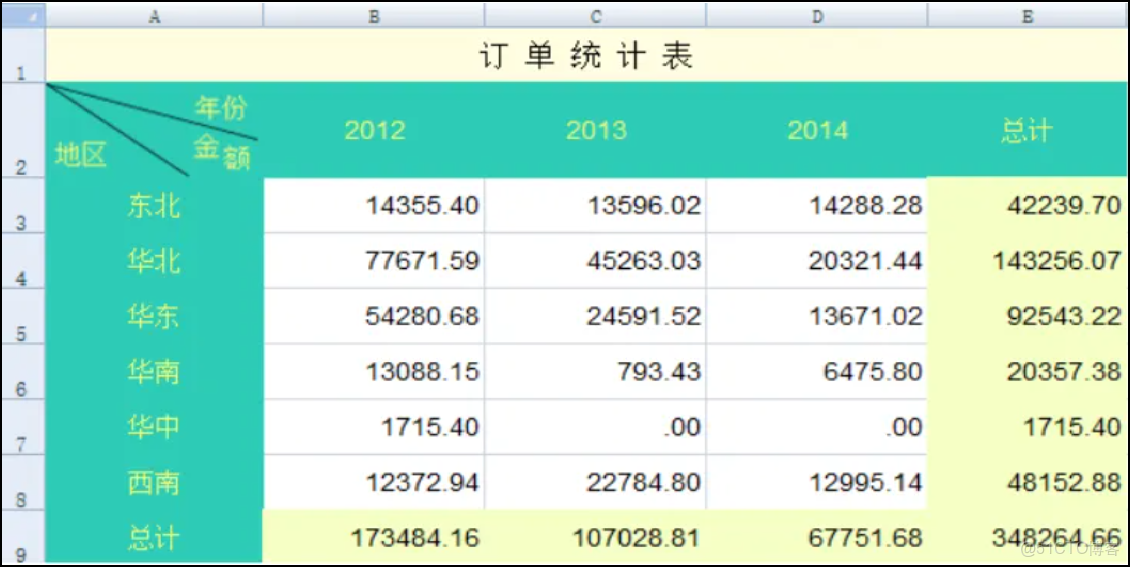
- 各種業務系統導出Excel報表
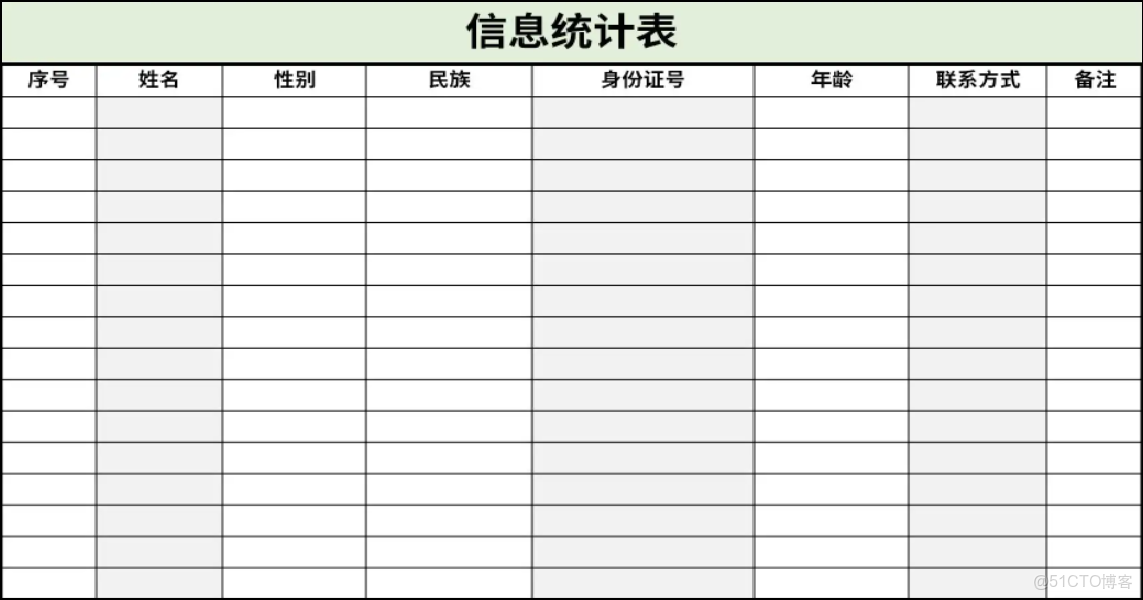
- 批量導入業務數據
2.2 入門案例
Apache POI既可以將數據寫入Excel文件,也可以讀取Excel文件中的數據,接下來分別進行實現。
Apache POI的maven座標:(項目中已導入)
org.apache.poipoi3.16org.apache.poipoi-ooxml3.162.2.1 將數據寫入Excel文件
1). 代碼開發
/**
 * POI讀寫excel測試
 */
public class TestPOI {
    /**
     * Excel的組成
     *      excel文件--->工作表對象
     *      excel裏面可以有很多個Sheet表--->工作表對象
     *      Sheet表裏面有很多行--->行對象
     *      行裏面有很多單元格--->單元格對象
     *      單元格里面有數據--->數據對象
     */
    //需求:通過POI寫入數據到執行的excel文件中
    @Test
    public void testWrite() throws Exception {
        //1.通過POI創建工作簿對象(文件)對象--excel對象
        XSSFWorkbook workbook = new XSSFWorkbook();
        //2.通過XSSFWorkbook創建工作表對象--Sheet對象
        XSSFSheet sheet = workbook.createSheet("itcast");
        //3.通過XSSFSheet創建行對象--Row對象,下標從0開始,創建第一行就寫0
        XSSFRow row = sheet.createRow(0);
        //4.通過XSSFRow創建單元格對象--Cell對象(下標從0開始),並往格子中填充數據
        row.createCell(0).setCellValue("姓名");
        row.createCell(1).setCellValue("愛好");
        //第二行
        XSSFRow row1 = sheet.createRow(1);
        row1.createCell(0).setCellValue("張三");
        row1.createCell(1).setCellValue("足球");
        //5.將excel文件寫出到指定的文件中
        FileOutputStream fos = new FileOutputStream("D:/itcast.xlsx");
        workbook.write(fos);
        System.out.println("寫出完畢...");
        //6.釋放資源
        fos.close();
        workbook.close();
    }
2). 實現效果
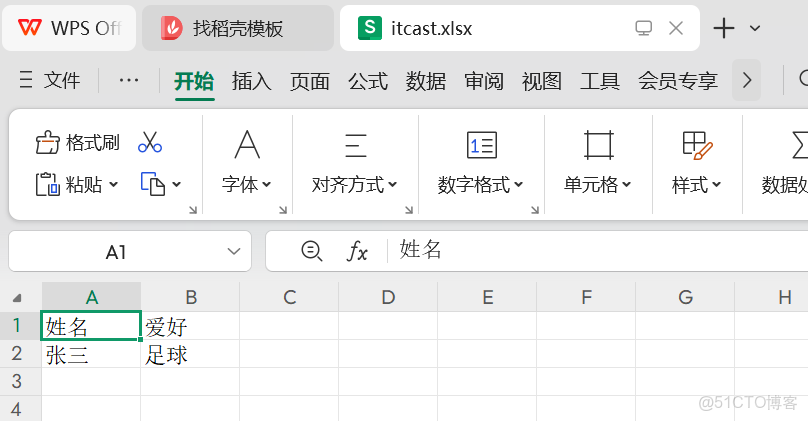
在D盤中生成itcast.xlsx文件,創建名稱為itcast的Sheet頁,同時將內容成功寫入。
2.2.2 通過POI基於模板寫入數據到execl
//需求:通過POI寫入數據到執行的excel文件中--基於模板寫入
    @Test
    public void testWrite2() throws Exception {
        //1.基於excel模板文件通過POI創建工作簿對象(文件)對象--有字體模板的excel對象
        FileInputStream fis = new FileInputStream("D:\\demo.xlsx");
        XSSFWorkbook workbook = new XSSFWorkbook(fis);
        //2.通過XSSFWorkbook獲取工作表對象--Sheet對象,注意不要createSheet,會覆蓋的。
        XSSFSheet sheet = workbook.getSheet("itcast");
        //3.通過XSSFSheet獲取行對象--Row對象,下標從0開始,創建第一行就寫0
        XSSFRow row = sheet.getRow(0);
        //4.通過XSSFRow創建單元格對象--Cell對象(下標從0開始),並往格子中填充數據
        row.getCell(0).setCellValue("姓名");
        row.getCell(1).setCellValue("愛好");
        //第二行
        XSSFRow row1 = sheet.getRow(1);
        row1.getCell(0).setCellValue("張三");
        row1.getCell(1).setCellValue("足球");
        //第三行
        XSSFRow row2 = sheet.getRow(2);
        row2.getCell(0).setCellValue("李四");
        row2.getCell(1).setCellValue("書法");
        //5.將excel文件寫出到指定的文件中
        FileOutputStream fos = new FileOutputStream("D:\\demo1.xlsx");
        workbook.write(fos);
        System.out.println("寫出完畢...");
        //6.釋放資源
        fos.close();
        workbook.close();
    }
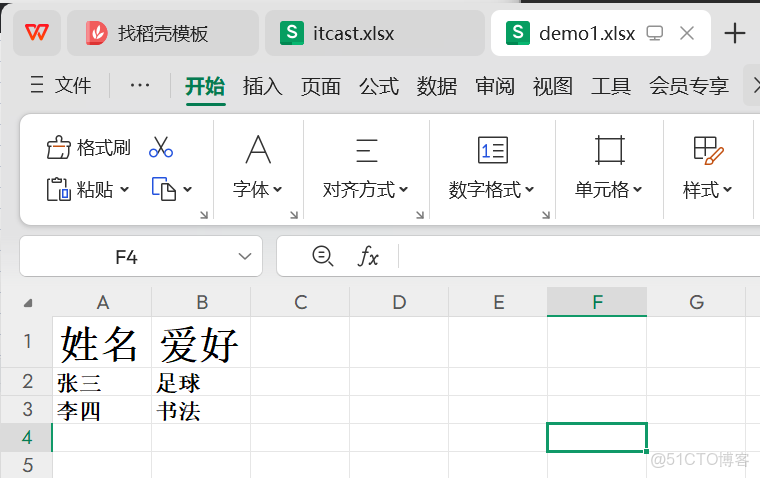
一定注意這裏面的create換成了get,如果繼續用create會覆蓋原本單元格里的格式
2.2.3 讀取Excel文件中的數據
1). 代碼開發
//需求:通過POI讀磁盤中指定的excel文件到Java內存中,並輸出到控制枱
    @Test
    public void testRead() throws Exception {
        //1.基於excel模板文件通過POI創建工作簿對象(文件)對象--有字體模板的excel對象
        FileInputStream fis = new FileInputStream("D:\\itcast.xlsx");
        XSSFWorkbook workbook = new XSSFWorkbook(fis);
        //2.通過XSSFWorkbook獲取工作表對象--Sheet對象,注意不要createSheet,會覆蓋的。
        XSSFSheet sheet = workbook.getSheet("itcast");
        //3.通過XSSFSheet獲取行對象--Row對象,下標從0開始,創建第一行就寫0
//        XSSFRow row = sheet.getRow(0);
//        //4.通過XSSFRow創建單元格對象--Cell對象(下標從0開始),並往格子中填充數據
//        String name = row.getCell(0).getStringCellValue();
//        String hobby = row.getCell(1).getStringCellValue();
//        System.out.println(name + "|" + hobby);
//        //讀第二行
//        XSSFRow row1 = sheet.getRow(1);
//        String name1 = row1.getCell(0).getStringCellValue();
//        String hobby1 = row1.getCell(1).getStringCellValue();
//        System.out.println(name1 + "|" + hobby1);
        //循環讀取表中的每一行數據
        int firstRowNum = sheet.getFirstRowNum();
        int lastRowNum = sheet.getLastRowNum();
        System.out.println("firstRowNum = " + firstRowNum);
        System.out.println("lastRowNum = " + lastRowNum);
        for (int i = firstRowNum; i <= lastRowNum; i++) {
            XSSFRow row = sheet.getRow(i);
            String name = row.getCell(0).getStringCellValue();
            String hobby = row.getCell(1).getStringCellValue();
            System.out.println(name + "|" + hobby);
        }
        //6.釋放資源
        fis.close();
        workbook.close();
    }
2). 實現效果
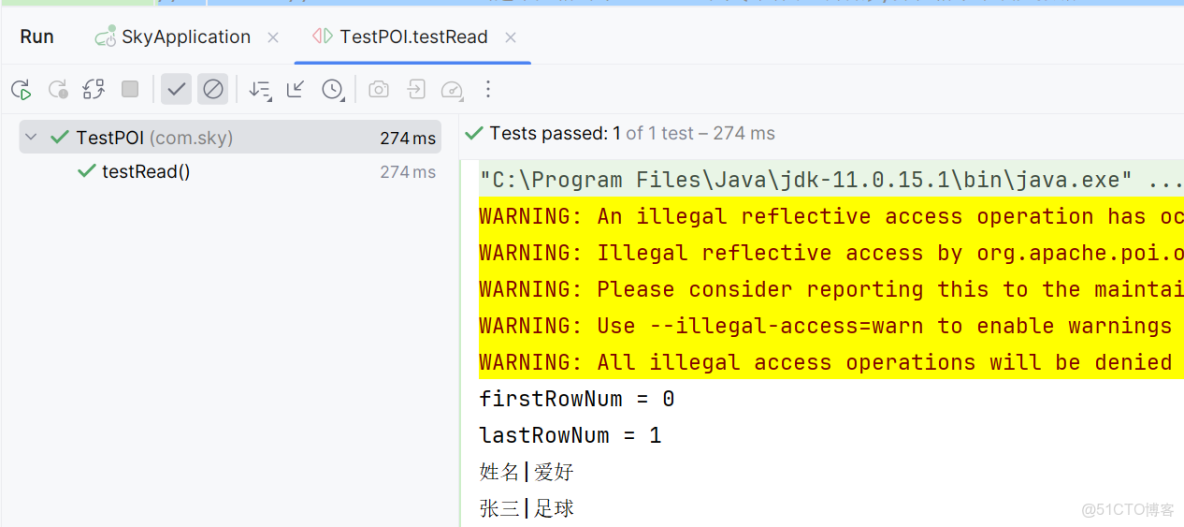
將itcast.xlsx文件中的數據進行讀取
3.2 代碼開發
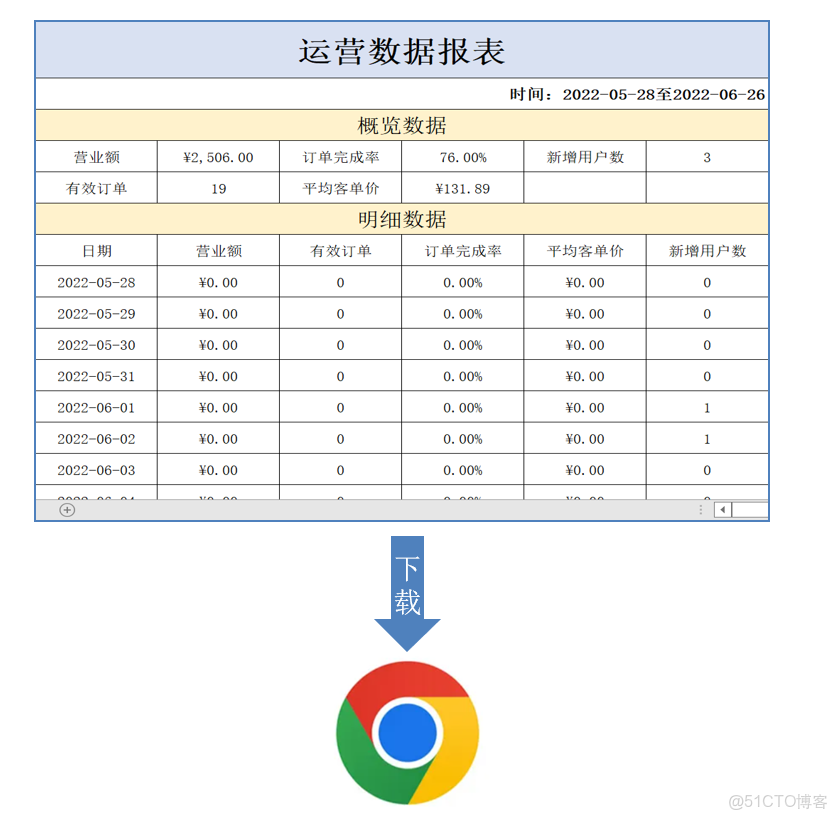
3.2.1 實現步驟
1). 設計Excel模板文件
2). 查詢近30天的運營數據
3). 將查詢到的運營數據寫入模板文件
4). 通過輸出流將Excel文件下載到客户端瀏覽器
3.2.2 Controller層
根據接口定義,在ReportController中創建export方法:
/**
     * 導出運營數據報表
     * @param response
     */
    @GetMapping("/export")
    @ApiOperation("導出運營數據報表")
    public void export(HttpServletResponse response){
        reportService.exportBusinessData(response);
    }
3.2.3 Service層接口
在ReportService接口中聲明導出運營數據報表的方法:
/**
     * 導出近30天的運營數據報表
     * @param response
     **/
    void exportBusinessData(HttpServletResponse response);
3.2.4 Service層實現類
在ReportServiceImpl實現類中實現導出運營數據報表的方法:
提前將資料中的運營數據報表模板.xlsx拷貝到項目的resources/template目錄中
/**導出近30天的運營數據報表
     * @param response
     **/
    public void exportBusinessData(HttpServletResponse response) {
        LocalDate begin = LocalDate.now().minusDays(30);
        LocalDate end = LocalDate.now().minusDays(1);
        //查詢概覽運營數據,提供給Excel模板文件
        BusinessDataVO businessData = workspaceService.getBusinessData(LocalDateTime.of(begin,LocalTime.MIN), LocalDateTime.of(end, LocalTime.MAX));
        InputStream inputStream = this.getClass().getClassLoader().getResourceAsStream("template/運營數據報表模板.xlsx");
        try {
            //基於提供好的模板文件創建一個新的Excel表格對象
            XSSFWorkbook excel = new XSSFWorkbook(inputStream);
            //獲得Excel文件中的一個Sheet頁
            XSSFSheet sheet = excel.getSheet("Sheet1");
            sheet.getRow(1).getCell(1).setCellValue(begin + "至" + end);
            //獲得第4行
            XSSFRow row = sheet.getRow(3);
            //獲取單元格
            row.getCell(2).setCellValue(businessData.getTurnover());
            row.getCell(4).setCellValue(businessData.getOrderCompletionRate());
            row.getCell(6).setCellValue(businessData.getNewUsers());
            row = sheet.getRow(4);
            row.getCell(2).setCellValue(businessData.getValidOrderCount());
            row.getCell(4).setCellValue(businessData.getUnitPrice());
            for (int i = 0; i < 30; i++) {
                LocalDate date = begin.plusDays(i);
               //準備明細數據
                businessData = workspaceService.getBusinessData(LocalDateTime.of(date,LocalTime.MIN), LocalDateTime.of(date, LocalTime.MAX));
                row = sheet.getRow(7 + i);
                row.getCell(1).setCellValue(date.toString());
                row.getCell(2).setCellValue(businessData.getTurnover());
                row.getCell(3).setCellValue(businessData.getValidOrderCount());
                row.getCell(4).setCellValue(businessData.getOrderCompletionRate());
                row.getCell(5).setCellValue(businessData.getUnitPrice());
                row.getCell(6).setCellValue(businessData.getNewUsers());
            }
            //通過輸出流將文件下載到客户端瀏覽器中
            ServletOutputStream out = response.getOutputStream();
            excel.write(out);
            //關閉資源
            out.flush();
            out.close();
            excel.close();
        }catch (IOException e){
            e.printStackTrace();
        }
    }
3.3 功能測試
直接使用前後端聯調測試。
進入數據統計
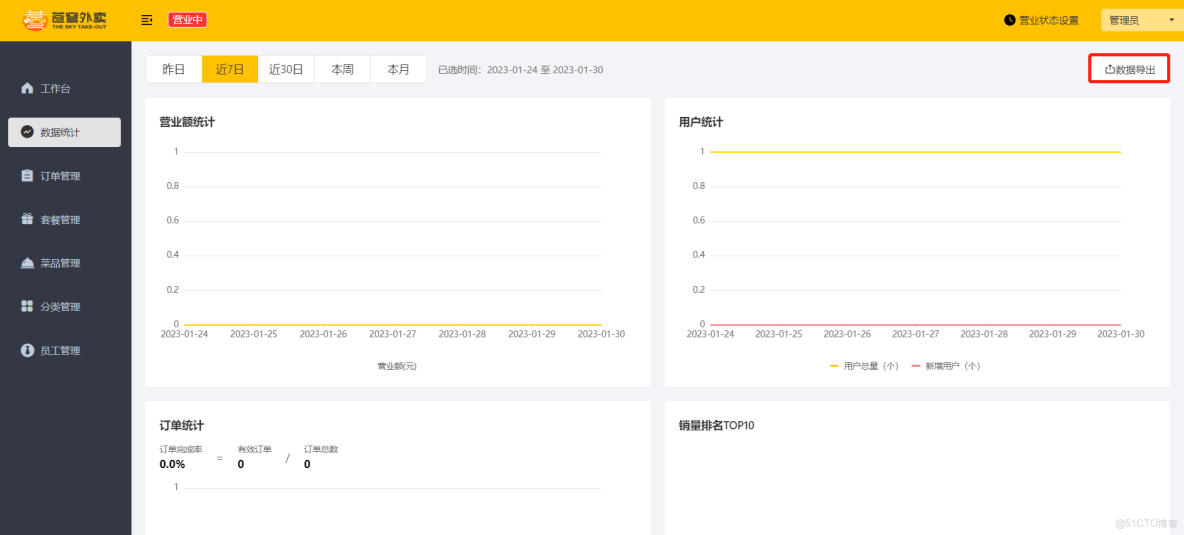
點擊數據導出:Excel報表下載成功