
介紹
Mobilenet是由Google公司創造的網絡系列,目前已經發布至V3版本,每一次版本更新都是在前一次網絡上的優化修改。Mobilenet主打的是輕量級網絡,也就説網絡參數量較少,執行速度較快,也更容易部署到終端設備上。在移動端和嵌入式設備上也有了很多的應用。
MobilenetV3對MobilenetV2進行了一系列小的修改,實現了精度的再次突破,速度也有所提升。
主要結構
深度可分離卷積
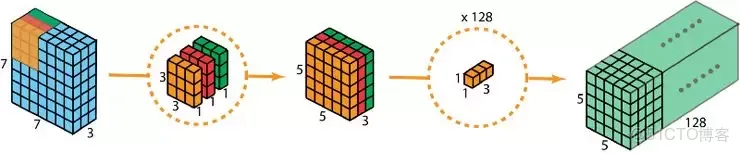
MobilenetV3的主體部分大量使用了深度可分離卷積,在上一講中我們做了詳細的介紹。再次指出,這種卷積結構極大地減少了參數量,對於輕量級的網絡是非常有利的。
SE注意力機制
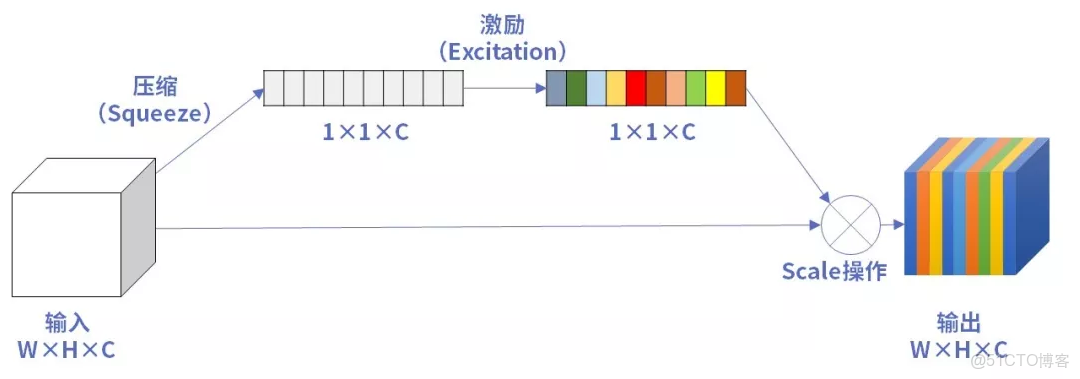
在MobilenetV3的基礎結構中,使用了SE注意力機制,這一點我們上一講也做了介紹。因為SE注意力機制會增加少量的參數,但對於精度有提升,所有MobilenetV3中對某些層加入了SE注意力機制,追求精度和參數量的平衡。而且對初始的注意力機制做了一定的修改,主要體現在卷積層和激活函數。
新型的激活函數
MobilenetV3中使用了Hardswish激活函數,代替了Swish激活。
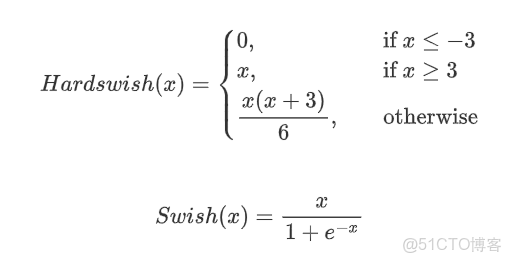
從公式上來看,Hardswish代替了指數函數,從而降低了計算的成本,使模型輕量化。
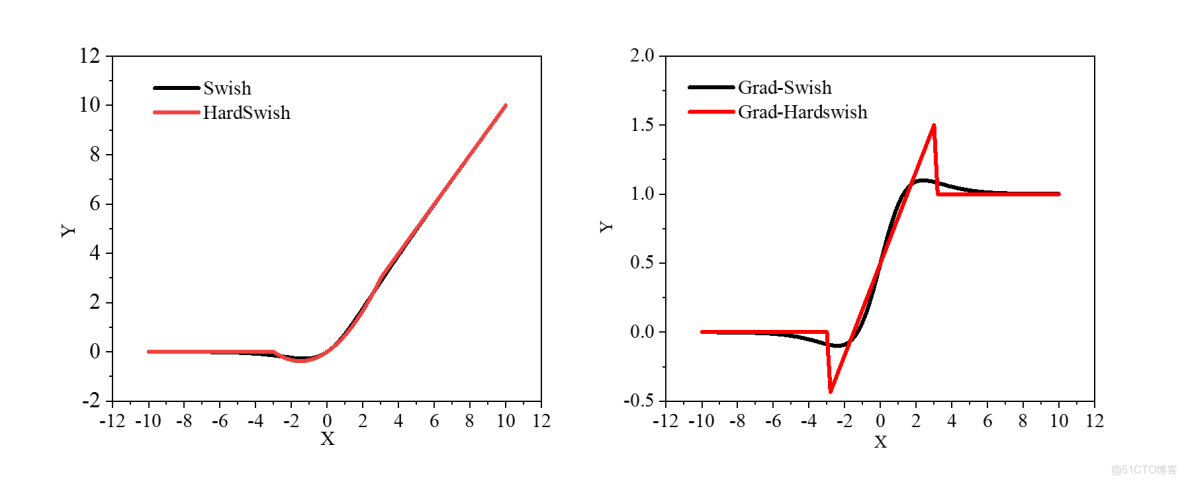
做出函數圖像和梯度圖像,可以看出原函數非常接近。在梯度圖上Hardswish存在突變,這對於訓練是不利的,而swish梯度變化平滑。也就是説Hardswish加快了運算速度,但是不利於提高精度。MobilenetV3經過多次實驗,發現Hardswish在更深的網絡中精度損失較小,最終選用在網絡的前半部分使用了Relu激活,在深層網絡中使用了Hardswish激活。
修改了尾部結構
MobilenetV3修改了MobilenetV2的尾部結構,具體修改如下:
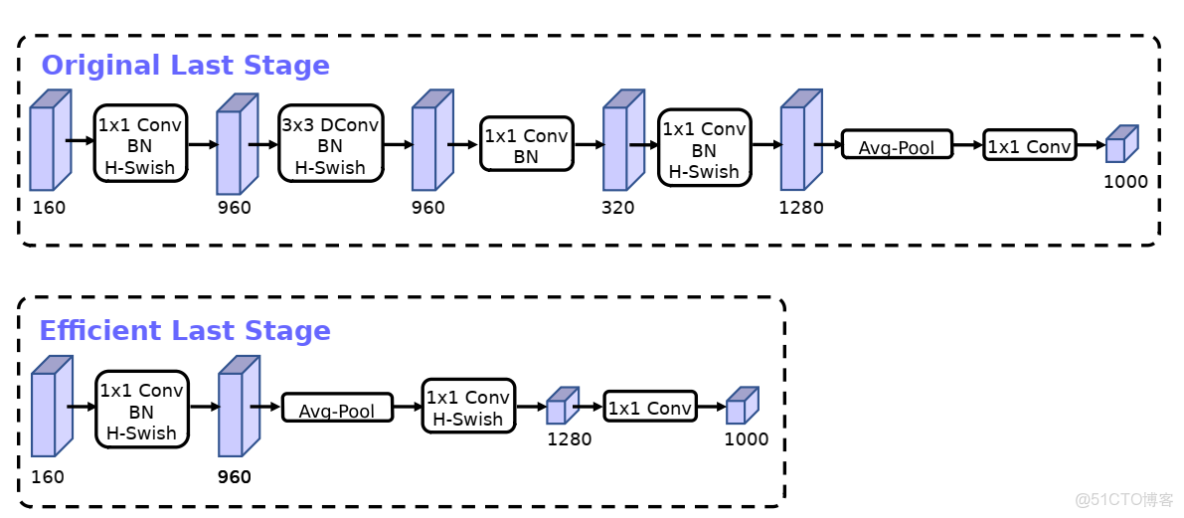
MobilenetV2最後的尾部使用了四層卷積層再接了一個平均池化,MobilenetV3僅通過一個卷積層修改通道數後,直接接了平均池化層。這也大大減少了網絡的參數量,在實驗中發現,精度並沒有降低。
整體網絡
經過以上的一些小的修改後,MobilenetV3的整體網絡形式就非常清晰了,它的通用結構單元如下:
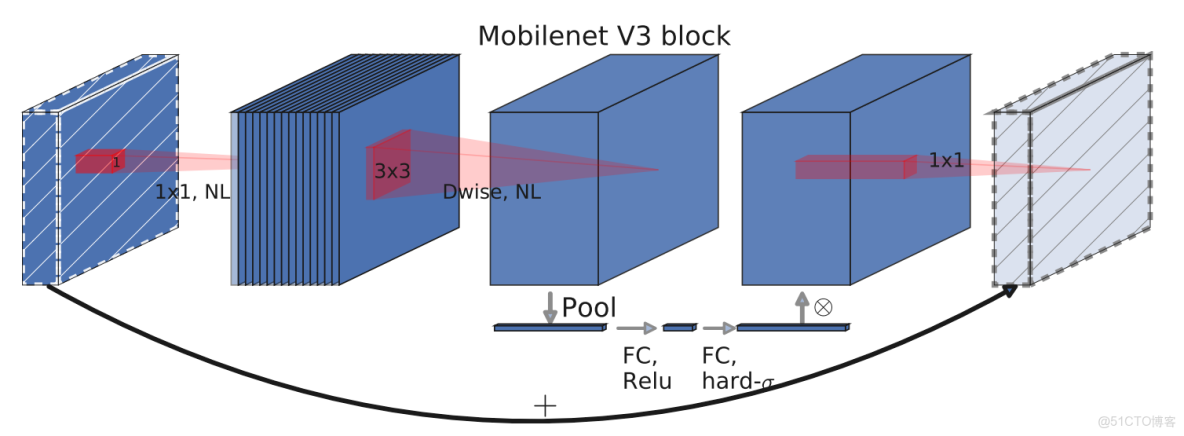
整體網絡就是由多個這樣的單元堆疊而成。MobilenetV3有large和small兩個版本,我們以large為例分析。
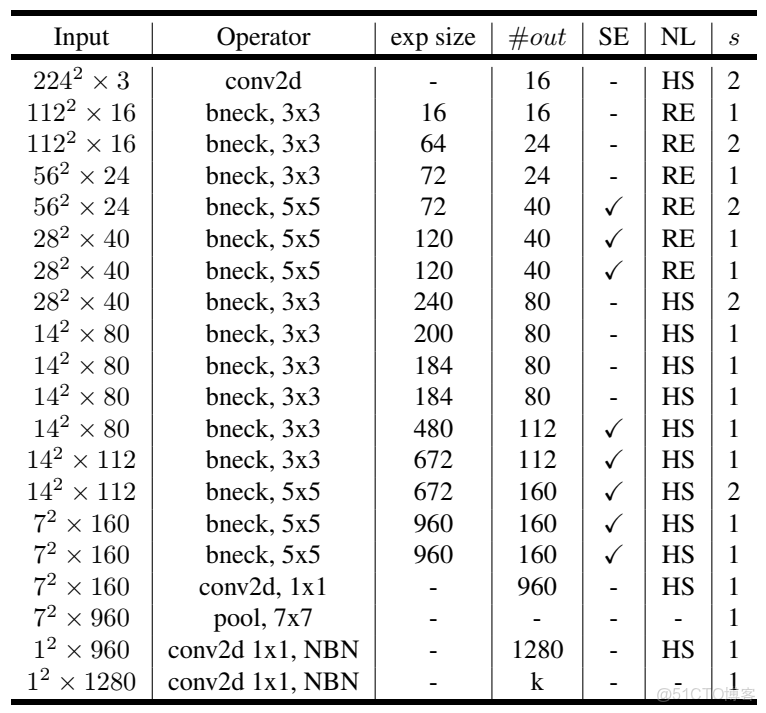
表中input表示輸出的shape,exp size表示擴大的通道數,out表示輸出通道數,SE表示是否使用SE注意力機制,NL表示使用的激活函數,S表示卷積的步長。
bneck就是第一個圖所示的格式,可以看到中間重複使用了多次。先使用一個卷積層,把通道數擴充到16,之後通過多個bneck充分提取特徵,然後接着使用一個尾部結構,最後輸出一個類別數的矩陣。因為目前寫論文通常使用的是imagenet數據集,是一個1000類別的龐大分類數據集,所以官方網絡一般最後輸出的維度都是1000。
使用PaddleClas訓練MobilenetV3
數據集下載鏈接:
鏈接:https://pan.baidu.com/s/1ZSHQft4eIpYHliKRxZcChQ 提取碼:hce7
PaddleClas是依賴於paddle的視覺分類套件,其中集成了很多分類的典型網絡,我們使用PaddleClas中的MobilenetV3訓練一下垃圾分類任務。
PaddleClas中MobileNetV3整體的代碼實現如下:
class MobileNetV3(TheseusLayer):
    """
    MobileNetV3
    Args:
        config: list. MobileNetV3 depthwise blocks config.
        scale: float=1.0. The coefficient that controls the size of network parameters.
        class_num: int=1000. The number of classes.
        inplanes: int=16. The output channel number of first convolution layer.
        class_squeeze: int=960. The output channel number of penultimate convolution layer.
        class_expand: int=1280. The output channel number of last convolution layer.
        dropout_prob: float=0.2.  Probability of setting units to zero.
    Returns:
        model: nn.Layer. Specific MobileNetV3 model depends on args.
    """

    def __init__(self,
                 config,
                 scale=1.0,
                 class_num=1000,
                 inplanes=STEM_CONV_NUMBER,
                 class_squeeze=LAST_SECOND_CONV_LARGE,
                 class_expand=LAST_CONV,
                 dropout_prob=0.2,
                 return_patterns=None):
        super().__init__()

        self.cfg = config
        self.scale = scale
        self.inplanes = inplanes
        self.class_squeeze = class_squeeze
        self.class_expand = class_expand
        self.class_num = class_num

        self.conv = ConvBNLayer(
            in_c=3,
            out_c=_make_divisible(self.inplanes * self.scale),
            filter_size=3,
            stride=2,
            padding=1,
            num_groups=1,
            if_act=True,
            act="hardswish")

        self.blocks = nn.Sequential(* [
            ResidualUnit(
                in_c=_make_divisible(self.inplanes * self.scale if i == 0 else
                                     self.cfg[i - 1][2] * self.scale),
                mid_c=_make_divisible(self.scale * exp),
                out_c=_make_divisible(self.scale * c),
                filter_size=k,
                stride=s,
                use_se=se,
                act=act) for i, (k, exp, c, se, act, s) in enumerate(self.cfg)
        ])

        self.last_second_conv = ConvBNLayer(
            in_c=_make_divisible(self.cfg[-1][2] * self.scale),
            out_c=_make_divisible(self.scale * self.class_squeeze),
            filter_size=1,
            stride=1,
            padding=0,
            num_groups=1,
            if_act=True,
            act="hardswish")

        self.avg_pool = AdaptiveAvgPool2D(1)

        self.last_conv = Conv2D(
            in_channels=_make_divisible(self.scale * self.class_squeeze),
            out_channels=self.class_expand,
            kernel_size=1,
            stride=1,
            padding=0,
            bias_attr=False)

        self.hardswish = nn.Hardswish()
        self.dropout = Dropout(p=dropout_prob, mode="downscale_in_infer")
        self.flatten = nn.Flatten(start_axis=1, stop_axis=-1)

        self.fc = Linear(self.class_expand, class_num)
        if return_patterns is not None:
            self.update_res(return_patterns)
            self.register_forward_post_hook(self._return_dict_hook)

    def forward(self, x):
        x = self.conv(x)
        x = self.blocks(x)
        x = self.last_second_conv(x)
        x = self.avg_pool(x)
        x = self.last_conv(x)
        x = self.hardswish(x)
        x = self.dropout(x)
        x = self.flatten(x)
        x = self.fc(x)

return x具體訓練也很簡單,我們只需要修改相應的配置文件,存放在ppcls/config目錄下。對於訓練自己的數據集,着重需要修改數據集的相關參數,batch_size以及輸出圖像的大小等,其他根據自己的需求進行修改。
訓練的方法是使用命令行命令。
訓練命令:
python tools/train.py -c ./ppcls/configs/quick_start/MobileNetV3_large_x1_0.yaml -o Arch.pretrained=True -o Global.device=gpu斷點訓練命令:
python tools/train.py -c ./ppcls/configs/quick_start/MobileNetV3_large_x1_0.yaml -o Global.checkpoints="./output/MobileNetV3_large_x1_0/epoch_5" -o Global.device=gpu預測命令:
python tools/infer.py -c ./ppcls/configs/quick_start/MobileNetV3_large_x1_0.yaml -o Infer.infer_imgs=./188.jpg -o Global.pretrained_model=./output/MobileNetV3_large_x1_0/best_model參考資料
https://arxiv.org/abs/1905.02244
https://github.com/PaddlePaddle/PaddleClas
