
前提:
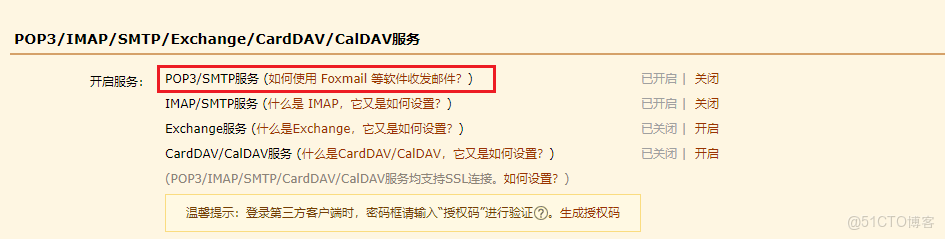
1、QQ郵箱開啓了SMTP服務
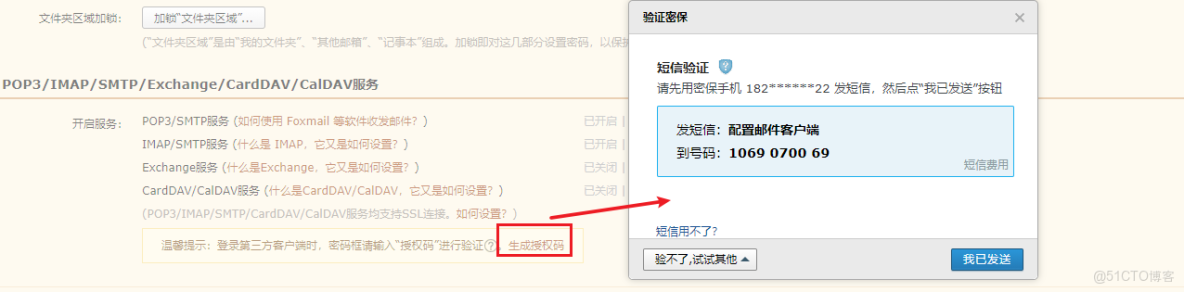
密碼
代碼:(如果沒有相關包需要自己引入)
import smtplib
from email.mime.multipart import MIMEMultipart
from email.mime.text import MIMEText
from email.mime.image import MIMEImage
from email.utils import parseaddr, formataddr
from email.mime.application import MIMEApplication

sender = 'xxxx@qq.com'  # 這裏就是你的QQ郵箱
# receiver = 'xxxxxxxx@qq.com'  # 發給單人時的郵件接收郵箱
to_address = ['xxxxx@qq.com', 'xxxx@qq.com'] # 如果想發給多人,可以放入一個數組
cc_reciver = ['xxxx@qq.com', 'xxxx@qq.com'] # 如果想添加抄送人,也可以是單人或者數組的形式
reciver = to_address + cc_reciver

smtpserver = "smtp.qq.com" # 郵件服務器,如果是qq郵箱那就是這個了,其他的可以自行查找
username = 'xxxxx@qq.com' # 這裏還是你的郵箱
password = 'xxxxx' # 上面獲取的SMTP授權碼,相當於是一個密碼驗證

msgRoot = MIMEMultipart('related') # 郵件類型,如果要加圖片等附件,就得是這個
msgRoot['Subject'] = '監控日報' # 郵件標題,以下設置項都很明瞭
msgRoot['From'] = sender
# msgRoot['To'] = receiver # 發給單人
msgRoot['To'] = ",".join( to_address ) # 發給多人
msgRoot['Cc'] = ";".join(cc_reciver) # 抄送人


# 以下為郵件正文內容,含有一個居中的標題和一張圖片
content = MIMEText('<html><head><style>#string{text-align:center;font-size:25px;}</style><div id="string">我是居中顯示的標題<div></head><body><img src="cid:image1" alt="image1"></body></html>','html','utf-8')
# 如果有編碼格式問題導致亂碼,可以進行格式轉換:
# content = content.decode('utf-8').encode('gbk')
msgRoot.attach(content)

# 上面加的圖片src必須是cid:xxx的形式,xxx就是下面添加圖片時設置的圖片id
# 添加圖片附件
fp = open('img1.jpg', 'rb')
msgImage = MIMEImage(fp.read())
fp.close()
msgImage.add_header('Content-ID', 'image1') # 這個id用於上面html獲取圖片
msgRoot.attach(msgImage)

'''
# 另外也可以用base64的方法直接加:
import base64
img_file = open('C:\\Users\\cloudoxou\\Desktop\\img.png','rb')
base64_data = base64.b64encode(img_file.read())
html = "<img src="data:image/png;base64,%s" alt="image1">"%(base64_data) # 這裏簡化了html代碼
'''


#附件2
pdfFile = 'run.py'
pdfApart = MIMEApplication(open(pdfFile, 'rb').read())
pdfApart.add_header('Content-Disposition', 'attachment', filename=pdfFile)
msgRoot.attach(pdfApart)

# 連接郵件服務器,因為使用SMTP授權碼的方式登錄,必須是465端口
smtp = smtplib.SMTP_SSL('smtp.qq.com:465')
smtp.login(username, password)
smtp.sendmail(sender, reciver, msgRoot.as_string())
smtp.quit()
後序:可以結合自動化測試來實現自動發送測試報告
本文章為轉載內容,我們尊重原作者對文章享有的著作權。如有內容錯誤或侵權問題,歡迎原作者聯繫我們進行內容更正或刪除文章。
