1.首先創建twosortfile1.txt,並在此文件中輸入內容
cd /usr/local/hadoop
vim twosortfile1.txt
twosortfile1.txt文件內容如下:
a 20
b 20
a 5
c 10
c 8
b 15
a 10
b 18
c 29
b 52
編寫twosortfile2.txt的內容
vim twosortfile2.txttwosortfile2.txt文件內容如下:
a 21
b 21
a 6
c 11
c 9
b 16
a 11
b 19
c 30
b 53
2.啓動hadoop
./sbin/start-dfs.sh
jps
3.在HDFS中新建與當前Linux用户hadoop對應的input2目錄,即“/user/hadoop/input2”目錄,不用創建output2文件,程序運行完成後,會自動創建,創建input2目錄的具體命令如下:
cd /usr/local/hadoop
./bin/hdfs dfs -mkdir input2
然後,把之前在第上面在Linux本地文件系統中新建的兩個文件twosortfile1.txt和twosortfile2.txt(這兩個文件位於“/usr/local/hadoop”目錄下,並且裏面包含了一些數據),上傳到HDFS中的“/user/hadoop/input2”目錄下,命令如下:
cd /usr/local/hadoop
./bin/hdfs dfs -put ./twosortfile1.txt input2
./bin/hdfs dfs -put ./twosortfile2.txt input2
4.打開eclipse,因為之前實驗創建過workspace,因為在下面的界面點擊我們之前創建的workspace即可
cd /usr/local/eclipse
./eclipse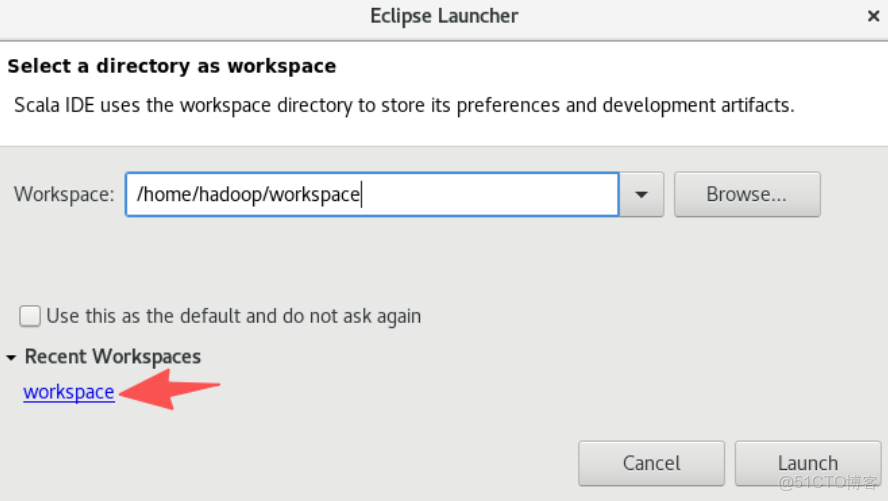
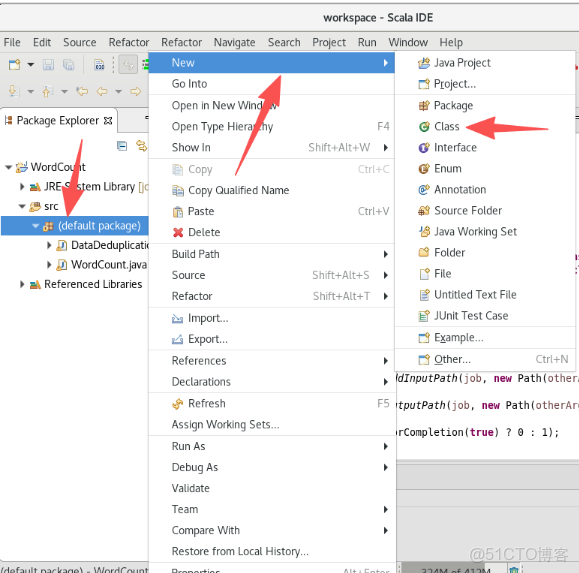
5.按照下圖從左到右創建.java文件
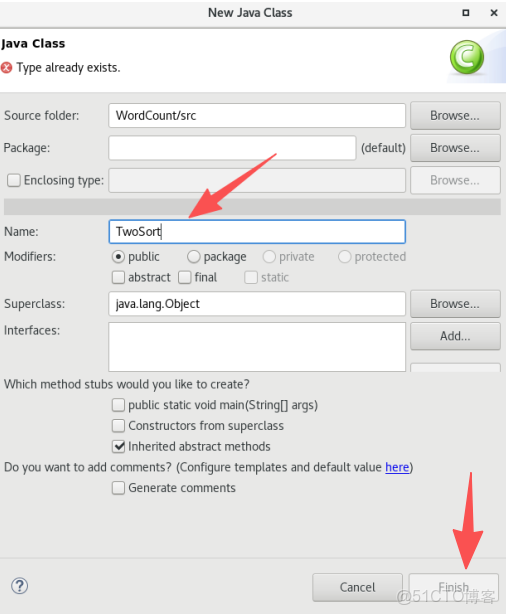
6.給.java文件命名
7.將以下代碼放在TwoSort.java文件中
import org.apache.hadoop.conf.Configuration;
import org.apache.hadoop.fs.Path;
import org.apache.hadoop.io.IntWritable;
import org.apache.hadoop.io.LongWritable;
import org.apache.hadoop.io.Text;
import org.apache.hadoop.mapreduce.Job;
import org.apache.hadoop.mapreduce.Mapper;
import org.apache.hadoop.mapreduce.Reducer;
import org.apache.hadoop.mapreduce.lib.input.FileInputFormat;
import org.apache.hadoop.mapreduce.lib.output.FileOutputFormat;
import org.apache.hadoop.util.GenericOptionsParser;
import java.io.IOException;
import java.util.ArrayList;
import java.util.Collections;
import java.util.List;
public class TwoSort{
	public static void main(String[] args) throws IOException, ClassNotFoundException, InterruptedException {
		    Configuration conf = new Configuration();
	        String[] otherArgs = (new GenericOptionsParser(conf, args)).getRemainingArgs();
	        if(otherArgs.length < 2) {
	            System.err.println("Usage: datadedup <in> [<in>...] <out>");
	            System.exit(2);
	        }
	        Job job = Job.getInstance(conf);
	        job.setJarByClass(TwoSort.class);
	        job.setMapperClass(TwoSort.TemplateMapper.class);
	        job.setReducerClass(TwoSort.TemplateReducer.class);

	        //設置輸出類型
	        job.setOutputKeyClass(Text.class);
	        job.setOutputValueClass(IntWritable.class);

	        //設置輸入和輸出目錄
	        for(int i = 0; i < otherArgs.length - 1; ++i) {
	            FileInputFormat.addInputPath(job, new Path(otherArgs[i]));
	        }
	        FileOutputFormat.setOutputPath(job, new Path(otherArgs[otherArgs.length - 1]));

	        System.exit(job.waitForCompletion(true) ? 0 : 1);
    }
    public static class TemplateMapper extends Mapper<LongWritable, Text,Text, IntWritable>{

        // 創建map輸出的對象
        private static final Text mapOutKey = new Text();
        private static final IntWritable mapOutValue = new IntWritable();

        @Override
        public void map(LongWritable key, Text value, Context context) throws IOException, InterruptedException {

            // 將每一行數據按空格拆開
            String[] values = value.toString().split(" ");

            // 數據預處理,將數組超過2的過濾掉
            if (values.length != 2){
                return;
            }
            mapOutKey.set(values[0]);
            mapOutValue.set(Integer.valueOf(values[1]));
            context.write(mapOutKey,mapOutValue);

        }
    }
    public static class TemplateReducer extends Reducer<Text,IntWritable,Text,IntWritable>{

        // 創建reduceout端的對象
        private static final IntWritable outputValue = new IntWritable();
        @Override
        public void reduce(Text key, Iterable<IntWritable> values, Context context) throws IOException, InterruptedException {
            List<Integer> valueList = new ArrayList<Integer>();
            // 取出value
            for (IntWritable value:values){
                valueList.add(value.get());
            }
			// 打印出reduce輸入的key和valueList
            System.out.println("Reduce in == KeyIn: "+key+"   ValueIn: "+valueList);
            // 進行排序
            Collections.sort(valueList);

			/*
                valueList:表示上面已經排序好的列表,即需要遍歷列表中的值作為reduce的輸出
                key不需要改變,即可作為reduce的輸出
             */
            for (Integer value : valueList){
                outputValue.set(value);
                context.write(key,outputValue);
            }
        }
    }
}
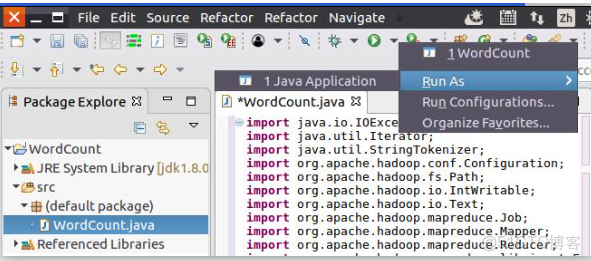
8.現在就可以編譯上面編寫的代碼。可以直接點擊Eclipse工作界面上部的運行程序的快捷按鈕,當把鼠標移動到該按鈕上時,在彈出的菜單中選擇“Run as”,繼續在彈出來的菜單中選擇“Java Application”,如下圖所示。
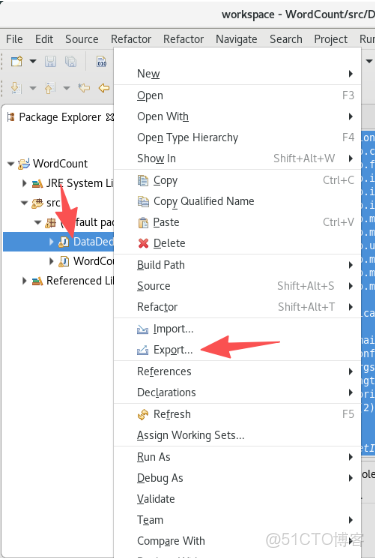
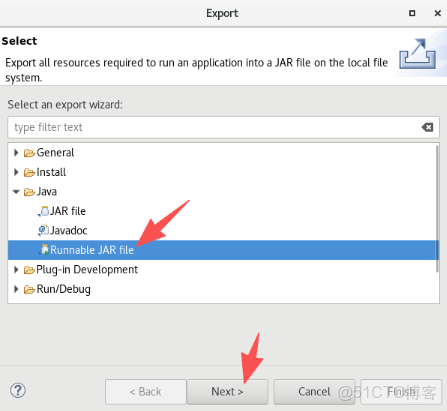
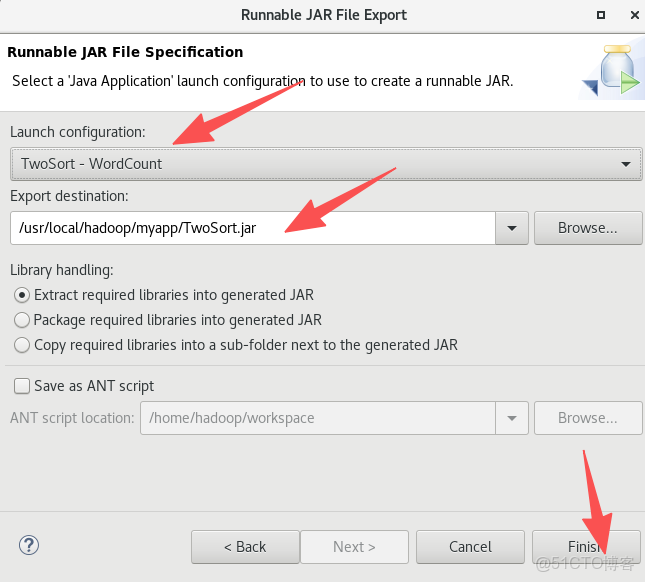
9.將TwoSort.java文件按照下面圖片的操作打包成jar包
10.現在,就可以在Linux系統中,使用hadoop jar命令運行程序,命令如下:
cd /usr/local/hadoop
./bin/hadoop jar ./myapp/TwoSort.jar input2 output2
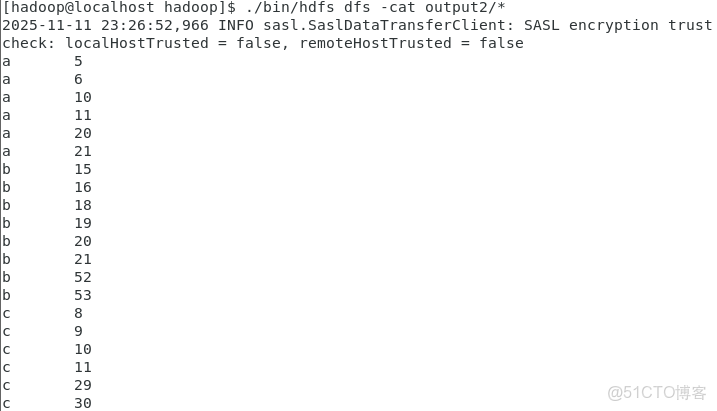
二次排序結果已經被寫入了HDFS的“/user/hadoop/output2”目錄中,可以執行如下命令查看去重結果:
cd /usr/local/hadoop
./bin/hdfs dfs -cat output2/*