
一、直接通過以下幾個屬性進行設置
1 @property(nonatomic)      UIEdgeInsets titleEdgeInsets;                // default is UIEdgeInsetsZero
2 @property(nonatomic)          UIEdgeInsets imageEdgeInsets;                // default is UIEdgeInsetsZero
如果同時設置圖片和標題,會發現圖片在左側,標題在右側,而一般情況下我們期望的是上圖下字的佈局。然後我們進入文檔看到UIButton同提供了 以上兩格字段來調整其內部佈局:
1》按上左下右設置圖片的位置(很好,很完美)
2》同樣的按照上左下右設置標題label的位置,運行,我去label呢?怎麼不見了???????
注意:後來才知道,默認的img和title 的佈局是相互影響的,除了以上兩格字段,UIButton中還有以下字段
1 @property(nonatomic) UIEdgeInsets contentEdgeInsets UI_APPEARANCE_SELECTOR; // default is UIEdgeInsetsZero. On tvOS 10 or later, default is nonzero except for custom buttons.系統默認的把 img+title 當成一個矩形框放到button的正中間(想一想xib中的約束,這裏可以認為title左側的約束是相對於img的右側來賦值的)
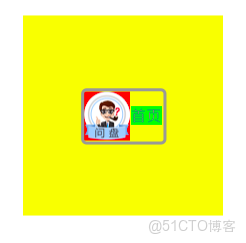
title上下邊界正常設置即可,對於左右的設置時需要注意,title左邊界是以圖片的右邊為標準的如下圖紫線
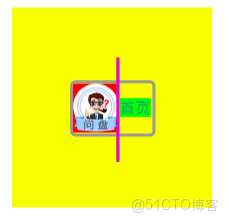
所以如果想讓標題以button的左側為標準 就要把線向左移動 ( img的左邊距 + imgSize.width )
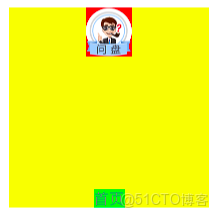
這一方法比較繁雜可以考慮第二種方法如下
二、自定義一個Button繼承自UIButton
重寫父類的方法
1、第一種:

// these return the rectangle for the background (assumes bounds), the content (image + title) and for the image and title separately. the content rect is calculated based
// on the title and image size and padding and then adjusted based on the control content alignment. there are no draw methods since the contents
// are rendered in separate subviews (UIImageView, UILabel)

- (CGRect)backgroundRectForBounds:(CGRect)bounds;
- (CGRect)contentRectForBounds:(CGRect)bounds;
- (CGRect)titleRectForContentRect:(CGRect)contentRect;
- (CGRect)imageRectForContentRect:(CGRect)contentRect;
- (CGRect)titleRectForContentRect:方法返回的是標題的frame
- (CGRect)imageRectForContentRect:返回的是imageview的frame
- (CGRect)contentRectForBounds:返回的是imageview+title的矩形框的frame
- (CGRect)backgroundRectForBounds:返回的是背景圖片的frame
當然這裏frame都是相對於bounds來説的
2、第二種:
重寫- (void)layoutSubviews方法,因為改變frame的時候會調用layoutSubviews方法進行子控件的佈局
