
方法1:
1.安裝requests_toolbelt依賴庫
#代碼實現
def upload(self):
        login_token = self.token.loadTokenList()
        for token in login_token:
            tempPassword_url = self.config['crm_test_api']+'/document/upload'
            tempPassword_data = self.data_to_str.strToDict('''title:1.png
            course_name_id:63
            course_id:1112
            desc:7
            doc_type:1
            is_public:1''',value_type='str')
            files={'file': ('1.png', open('C:\\Users\\Acer\\Pictures\\Screenshots\\1.png', 'rb'), 'image/png')}
            tempPassword_data.update(files)
            m = MultipartEncoder(
                fields=tempPassword_data
            )
            tempPassword_headers = {"Content-Type": m.content_type, "token": token}
            tempPassword_request = requests.post(url=tempPassword_url,data=m,headers=tempPassword_headers)
print(tempPassword_request.content)2.組裝MultipartEncoder對象需要的參數:將tempPassword_data的字段合併至files1.files參數介紹:
1.字典key對應file字段(我們系統是這樣,具體結合前端實際的字段為準),如圖
2.字典value裏面的對象:
1.filename(服務器最終存儲的文件名)
2.filepath(具體的文件路徑,注意轉義),文件是以二進制的形式進行傳輸的,所以這裏傳輸時以二進制的形式打開文件並傳輸
3.content_type:具體結合前端實際的字段為準:一般可定義為: 文本(text)/圖片(image)等3.tempPassword_data:為文件上傳時的附帶參數
strToDict方法:自己手寫的一個字符串轉dict的方法
遇到的問題: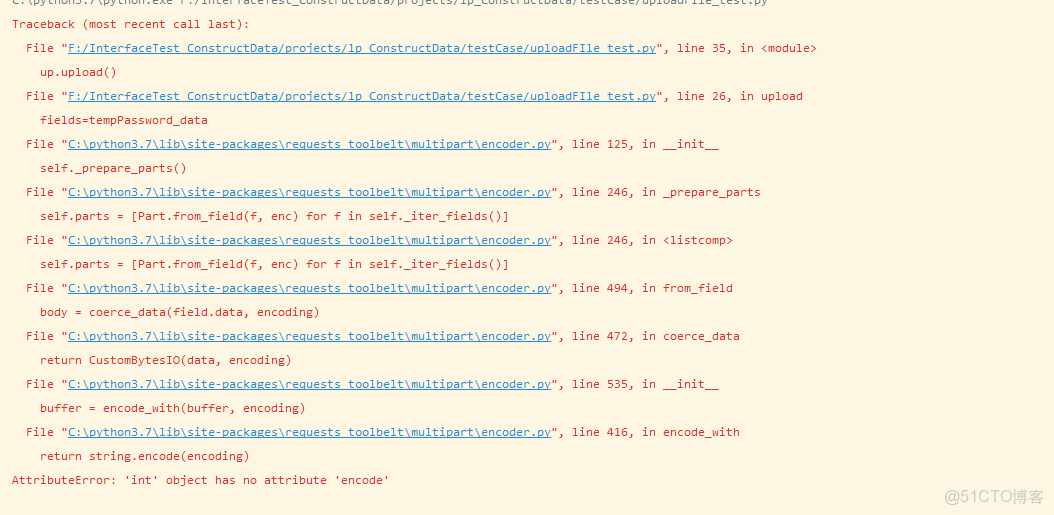
這個錯誤是説,int對象不能被編碼,所以需要手動將int對象轉換為str,所以我在此方法中定義了value_type這個參數,用於將字典中的所有value轉換為str類型
#具體代碼實現,僅供參考
def strToDict(str_in,value_type=None):
        # value_type:轉換字典的value為指定的類型,未防止異常,目前僅支持str
        # '''將str轉換為dict輸出'''
        # '''將帶有time關鍵字的參數放到字符串末尾'''
        # print(str_in)
        if str_in:
            match_str = ':'
            split_str = '\n'
            split_list = str_in.split(split_str)
            str_in_dict = {}
            for i in split_list:
                colon_str_index = i.find(match_str)
                if colon_str_index == -1:
                    # '''處理firefox複製出來的參數'''
                    match_str = '\t' or ' '
                    colon_str_index = i.find(match_str)
                # '''去掉key、value的空格,key中的引號'''
                str_in_key = i[:colon_str_index].strip()
                str_in_key = str_in_key.replace('"','')
                str_in_key = str_in_key.replace("'",'')
                # 正則過濾無用key,只保留key第一位為字母數據獲取[]_
                str_sign = re.search('[^a-zA-Z0-9\_\[\]+]', str_in_key[0])
                if str_sign is None:
                    # 處理value中的空格與轉義符
                    str_in_value = i[colon_str_index + 1:].strip()
                    str_in_value=str_in_value.replace('\\','')
                    try:
                        # 遇到是object類型的數據轉換一下
                        str_in_value=eval(str_in_value)
                    except BaseException as error:
                        str_in_value=str_in_value
                    if value_type in ['str','string']:
                        str_in_value=str(str_in_value)
                    else:
                        str_in_value=str_in_value
                    str_in_dict[str_in_key] = str_in_value
            return str_in_dict
        else:
            print("參數都沒有,還處理個球嘛")
return None3.請求時將headers的content設置為m.content_type,會設置headers的content_type為form—data,類型為str:MultipartEncoder相關源碼:4.請求時設置data為m,會輸出一個MultipartEncoder對象:

方法2:
直接使用requests,無需依賴requests_toolbelt庫
過程大同小異,也是需要將字典的value轉換為str
注意:headers不要傳content_type字段,headers不要傳content_type字段,headers不要傳content_type字段
請求時:data對應附加參數,files對應files對象
#相關代碼
def upload(self):
        login_token = self.token.loadTokenList()
        for token in login_token:
            tempPassword_url = self.config['crm_test_api']+'/document/upload'
            tempPassword_data = self.data_to_str.strToDict('''title:1.png
            course_name_id:63
            course_id:1112
            desc:7
            doc_type:1
            is_public:1''',value_type='str')
            files={'file': ('1.png', open('C:\\Users\\Acer\\Pictures\\Screenshots\\1.png', 'rb'), 'image/png')}
            tempPassword_headers = {"token": token}
            tempPassword_request = requests.post(url=tempPassword_url,data=tempPassword_data,files=files,headers=tempPassword_headers)
            print(tempPassword_request.json())
腦子不夠用當然只能腳踏實地的做事情!
本文章為轉載內容,我們尊重原作者對文章享有的著作權。如有內容錯誤或侵權問題,歡迎原作者聯繫我們進行內容更正或刪除文章。
