
近期因為項目的需求,需要開發一個文檔上傳功能,和在線預覽功能,目前上傳的類型限制為txt.ppt,pdf而且需要把上傳之後的文件轉換為swf文件在前台頁面的flash中播放預覽。
在網上找的代碼然後自己整合和修改之後:
功能實現需要,openoffice,swftools工具。
需要的jar包:
鏈接:https://pan.baidu.com/s/1skOyEjr
密碼:2l9e
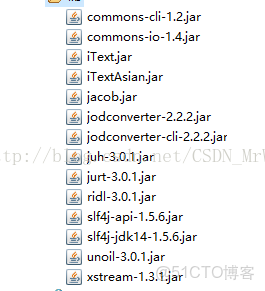
首先下載openoffice和swftools安裝到本地,
需要把openoffice配置為window服務(這樣可以實現開機自啓)——借用其他大佬的代碼:
ppt轉pdf代碼:
 import java.io.File;

 import java.io.IOException;

 import java.net.ConnectException;

 import java.util.Date;

 import com.artofsolving.jodconverter.DocumentConverter;

 import com.artofsolving.jodconverter.openoffice.connection.OpenOfficeConnection;

 import com.artofsolving.jodconverter.openoffice.connection.SocketOpenOfficeConnection;

 import com.artofsolving.jodconverter.openoffice.converter.OpenOfficeDocumentConverter;

 public class DOCtoPDFUtil extends java.lang.Thread {

 private File inputFile;// 需要轉換的文件

 private File outputFile;// 輸出的文件

 public DOCtoPDFUtil(File inputFile, File outputFile) {

 this.inputFile = inputFile;

 this.outputFile = outputFile;

 }

 public void docToPdf() {

 Date start = new Date();

 OpenOfficeConnection connection = new SocketOpenOfficeConnection(8100);

 try {

 connection.connect();

 DocumentConverter converter = new OpenOfficeDocumentConverter(
 connection);

 converter.convert(inputFile, outputFile);

 } catch (ConnectException cex) {

 cex.printStackTrace();

 } finally {

 // close the connection

 if (connection != null) {

 connection.disconnect();

 connection = null;

 }

 }

 }

 public void run() {

 this.docToPdf();

 }

 public File getInputFile() {
 return inputFile;
 }

 public void setInputFile(File inputFile) {
 this.inputFile = inputFile;
 }

 public File getOutputFile() {
 return outputFile;
 }

 public void setOutputFile(File outputFile) {
 this.outputFile = outputFile;
 }

 }


txt轉pdf代碼:
 import java.io.*;
 import com.lowagie.text.*;
 import com.lowagie.text.pdf.*;


 /**
  *  此程序主要是將txt轉為pdf
  *
  */


 public class JAVAtoPDF {


// 把文件目錄下的所有txt轉換為pdf
public static void generatePDFByAll(File dir) {
String[] contents = dir.list();// 將文件目錄中的文件提取出來
for (int i = 0; i < contents.length; i++) {
String fileName = dir + "\\" + contents[i];
if (fileName.substring(fileName.indexOf("."), fileName.length())
.equals(".txt")) {
toPDF(fileName,null);
}
}
}


// 單個txt轉換為pdf
public static void generatePDFByOne(String dir,String name) {
String[] dirLength = dir.split("\\.");
if (dirLength[dirLength.length - 1].equals("txt")) {
System.out.println("文件名:" + dir);
toPDF(dir,name);
}
}


public static void toPDF(String fileName,String name) {
try {
// 首先創建一個字體
BaseFont bfChinese = BaseFont.createFont("STSong-Light", "UniGB-UCS2-H",BaseFont.NOT_EMBEDDED);
Font FontChinese = new Font(bfChinese, 14, Font.NORMAL);
String line = null;
Document document;
document = new Document(PageSize.A4, 80, 80, 80, 80);
BufferedReader in = new BufferedReader(new FileReader(fileName));
PdfWriter.getInstance(
document,
new FileOutputStream(name));
document.open();
while ((line = in.readLine()) != null)
document.add(new Paragraph(25, line, FontChinese));
document.close();
in.close();
} catch (Exception e) {
System.err.println(e.getMessage());
}
}
 }
如果是通過txt轉換的pdf後轉swf需要配置一些東西啦,
借用其他大佬的代碼:

http://www.bbtang.info/linux/805.html


 因為txt轉換的pdf轉換swf文件會出現轉換失敗的問題,經過查找資料發現是因為io的緩存問題,啓動兩個線程刷新緩存區域解決問題


pdf轉swf代碼:
 import java.io.BufferedReader;
 import java.io.File;
 import java.io.InputStream;
 import java.io.InputStreamReader;


 import org.slf4j.Logger;
 import org.slf4j.LoggerFactory;


 public class PDFtoSWF {
private static final Logger log = LoggerFactory.getLogger(PDFtoSWF.class);


public static boolean convert(File sourceFile, File targetFile) {
try {
/**
* SWFTools_HOME在系統中的安裝目錄 --window需要指定到 pdf2swf.exe 文件
*/
String SWFTools_HOME = "D:\\SwfTools\\pdf2swf.exe";
String[] cmd = new String[7];
cmd[0] = SWFTools_HOME;
cmd[1] = "-i";
cmd[2] = sourceFile.getAbsolutePath();
cmd[3] = "-o";
cmd[4] = targetFile.getAbsolutePath();/**
*此處是為了把txt轉換的pdf文件轉換為swf文件
*實際測試中txt轉換的pdf文件轉換為swf文件的時候全部為空白
*/
cmd[5]="-s";
//路徑為解壓的xpdf-chinese-simplified的路徑
cmd[6]="languagedir=C://app//xpdf//xpdf-chinese-simplified";
Process pro = Runtime.getRuntime().exec(cmd);
// 獲取進程的標準輸入流
final InputStream is1 = pro.getInputStream();
// 獲取進城的錯誤流
final InputStream is2 = pro.getErrorStream();
//創建一個線程刷新輸入流的緩存區防止程序開始後掛起或者死鎖
new Thread(new Runnable() {
@Override
public void run() {
try {
BufferedReader bufferedReader = new BufferedReader(
new InputStreamReader(is1));
while (bufferedReader.readLine() != null) ;
} catch (Exception e) {
e.printStackTrace();
} finally {
try {
is1.close();
} catch (Exception e2) {
e2.printStackTrace();
}
}


}
}).start();//才開始的時候使用網上其他的代碼導致txt轉pdf之後轉swf的時候只有debug的時候才能生成swf文件,不是debug啓動的時候導致文件無法轉換,線程掛起或者//死鎖,因為緩存區域的問題
//創建一個線程刷新錯誤流的緩存區防止程序開始後掛起或者死鎖
new Thread(new Runnable() {
@Override
public void run() {
try {
BufferedReader bufferedReader = new BufferedReader(
new InputStreamReader(is2));
while (bufferedReader.readLine() != null);
} catch (Exception e) {
e.printStackTrace();
} finally {
try {
is1.close();
} catch (Exception e2) {
e2.printStackTrace();
}
}


}
}).start();
pro.waitFor();
pro.exitValue();
} catch (Exception e) {
log.error("pdf轉swf失敗:", e);
return false;
}
return true;
}
 }
在調用上面方法的地方要注意,使用openoffice的ppt轉pdf的時候是在其他線程中運行的如果不等待這個線程運行完畢就調用pdf轉swf的時候會導致查找不到文件最後沒有轉換的文件。
//因為此線程執行時候方法已經往下走導致其他方法先運行,所以要獲此線程下面進行其他操作
Thread join=new Thread(new DOCtoPDFUtil(new File(uploadPpt), new File(uploadPdf)));
//開啓這個線程
join.start();
//等待這個線程執行完畢只夠才會執行主線程下面的代碼
join.join();
ps:txt轉換的pdf文件格式真的不好看,目前還沒找到好的方法,先這樣吧,以後有機會在分享。
本文章為轉載內容,我們尊重原作者對文章享有的著作權。如有內容錯誤或侵權問題,歡迎原作者聯繫我們進行內容更正或刪除文章。
