本書的第二章主要解決了三個問題:
- 什麼是高度圖?怎麼創建高度圖?如何載入高度圖?
- 如何使用直接的方法渲染地形?(how to render terrain using a brute force algorithm?)
- 如何使用fault formation與mid displacement算法動態生成高度圖,然後生成地形。
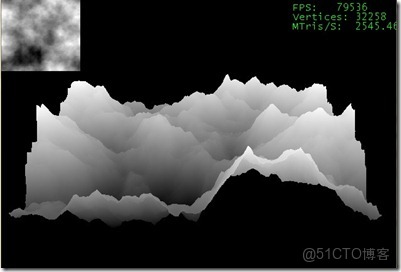
高度圖就是一個灰度圖片,每一個像素代表了一個高度。通常情況下黑色的像素點代表了地形低窪的地帶,白色的像素點代表了地形高的像素點。讀入高度圖後可以通過OpenGL直接將繪製出來。
地形生成算法(Fractal Terrain Generation):
1:Fault Formation
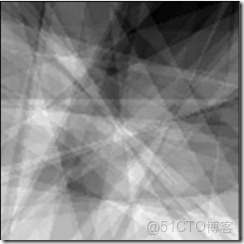
此算法的主要思想:對於想要生成的m*n維高度圖,在此高度圖上隨機取一條直線,直線將高度圖一份為二,然後在其中的一邊(被直線分成的兩部分中的一部分)加上一個隨機的高度。此算法過程中,每次迭代都需要一個平滑濾波對其進行做一定的修改,不然得出的高度圖會非常的尖鋭。如圖所示:
在生成fault formation的時候,進行改變的一邊是用過向量的叉乘得來的,在確定直線的兩點A(iRandX1, iRandX1)、B(iRandX2, iRandX2)。通過這兩點可以確定直線的方向向量,然後再在高度圖上另取一點C(x, z),此時通過向量AC叉乘向量AB,通過叉乘法則(右手法則)就可以確定直線的一邊,然後對其進行變換。變換代碼如下:
   1: for(i = 0; i < m_iSize * m_iSize; i++)
   2:     fTempBuffer[i] = 0;
   3:
   4: for(iCurrentIteration = 0; iCurrentIteration < iIterations; iCurrentIteration++)
   5: {
   6:     // calculate the height range (linear interpolation from iMaxDelta to iMinDelta
   7:     // for this fault-pass
   8:     iHeight = iMaxDelta - ((iMaxDelta - iMinDelta) * iCurrentIteration) / iIterations;
   9:
  10:     // pick two points at random from the entire height map
  11:     iRandX1 = rand() % m_iSize;
  12:     iRandZ1 = rand() % m_iSize;
  13:
  14:     // check to make sure that the points are not the same
  15:     do
  16:     {
  17:         iRandX2 = rand() % m_iSize;
  18:         iRandZ2 = rand() % m_iSize;
  19:     }while(iRandX1 == iRandX2 && iRandZ2 == iRandZ1);
  20:
  21:     // iDirX1, iDirZ1 is a vector going the same direction as the line
  22:     iDirX1 = iRandX2 - iRandX1;
  23:     iDirZ1 = iRandZ2 - iRandZ1;
  24:
  25:     for(z = 0; z < m_iSize; z++)
  26:     {
  27:         for(x = 0; x < m_iSize; x++)
  28:         {
  29:             // iDirX2, iDirZ2 is a vector  from iRandX1, iRandZ1 to the current point
  30:             iDirX2 = x - iRandX1;
  31:             iDirZ2 = z - iRandZ1;
  32:
  33:             // if the result of(iDirX2 * iDirZ1 - iDirX1 * iDirZ2) is "up"
  34:             // then raise this point by iHeight
  35:             if(iDirX2 * iDirZ1 - iDirX1 * iDirZ2 > 0)
  36:                 fTempBuffer[(z*m_iSize) + x] += (float)iHeight;
  37:
  38:         }
  39:     }
經過這些變換之後,得到的高度圖並不能得到非常平滑的地形,因此需要一個濾波變換(erosion filter)本文中使用的是FIR濾波器,在對高度圖進行處理的時候分別從左到右、從右到左、從上到下、從下到上進行處理。最後得出高度圖,如圖所示:
2:Midpoint Displacement(plasma fractal/diamond-square)
優點:對於fault formation來説生成小地形(小的山丘等)完全可以勝任,但是如果地形如果有很多山脈,fault DIsplacement就有點兒不行了,此時就需要使用midpoint displacement算法了。
缺點:只能生成一個正方形的高度圖,並且維度為2的n次方。
中點偏移算法(我自己翻譯的,如有不對還望告知)算法思想非常簡單,對於一維的(一條直線)而言取其中點,然後對重點進行一定範圍的位移,這個範圍是[-fHeight/2, fHeight/2],其中fHeight=length。經過一次迭代後,此時變換的高度要乘以一個縮放係數,2-Roughness,其中Roughness是地形的粗糙度。這樣變換是為了能夠在接下來的迭代過程中能夠得到非常好的地形。
對於二維情況,中點是由其上下左右四個點共同決定的,廢話少説,代碼説明問題:
  1:
   2:     // being the displacement process
   3:     while(iRectSize > 0)
   4:     {
   5:         for(i = 0; i < m_iSize; i += iRectSize)
   6:         {
   7:             for(j = 0; j < m_iSize; j += iRectSize)
   8:             {
   9:                 ni = (i + iRectSize) % m_iSize;
  10:                 nj = (j + iRectSize) % m_iSize;
  11:
  12:                 mi = (i + iRectSize / 2 );
  13:                 mj = ( j + iRectSize / 2);
  14:
  15:                 fTempBuffer[mi + mj * m_iSize] = (float)((fTempBuffer[i + j*m_iSize] + fTempBuffer[ni + j*m_iSize]
  16:                                                    + fTempBuffer[i + nj*m_iSize] + fTempBuffer[ni + nj*m_iSize]) / 4 + RangedRandom( -fHeight/2, fHeight/2 ));
  17:             }
  18:         }
  19:
  20:
  21:         for(i = 0; i < m_iSize; i += iRectSize)
  22:         {
  23:             for(j = 0; j < m_iSize; j += iRectSize)
  24:             {
  25:                 ni = (i + iRectSize) % m_iSize;
  26:                 nj = (j + iRectSize) % m_iSize;
  27:
  28:                 mi = (i + iRectSize / 2);
  29:                 mj = (j + iRectSize / 2);
  30:
  31:                 pmi = (i - iRectSize / 2 + m_iSize) % m_iSize;
  32:                 pmj = (j - iRectSize / 2 + m_iSize) % m_iSize;
  33:
  34:                 //Calculate the square value for the top side of the rectangle
  35:                 fTempBuffer[mi+j*m_iSize]= ( float )( ( fTempBuffer[i+j*m_iSize]      +
  36:                     fTempBuffer[ni+j*m_iSize]      +
  37:                     fTempBuffer[mi+pmj*m_iSize]      +
  38:                     fTempBuffer[mi+mj*m_iSize] )/4+
  39:                     RangedRandom( -fHeight/2, fHeight/2 ) );
  40:
  41:                 //Calculate the square value for the left side of the rectangle
  42:                 fTempBuffer[i+mj*m_iSize]= ( float )( ( fTempBuffer[i+j*m_iSize]      +
  43:                     fTempBuffer[i+nj*m_iSize]      +
  44:                     fTempBuffer[pmi+mj*m_iSize]      +
  45:                     fTempBuffer[mi+mj*m_iSize] )/4+
  46:                     RangedRandom( -fHeight/2, fHeight/2 ) );
  47:             }
  48:         }
  49:
  50:         // reduce the rectangle size by two prepare for the next
  51:         // displacement stage
  52:         iRectSize /= 2;
  53:
  54:         // reduce  the height by height reducer
  55:         fHeight *= fHeightReducer;
  56:     }
  57:
  58:     // normalize the terrain for our purposes
  59:     NormalizeTerrain(fTempBuffer);
  60:
  61:     // transfer the terrain into our class's unsigned char height buffer
  62:     for(z = 0; z < m_iSize; z++)
  63:     {
  64:         for(x = 0; x < m_iSize; x ++)
  65:             SetHeightAtPoint((unsigned char) fTempBuffer[(z * m_iSize) + x], x, z);
  66:     }
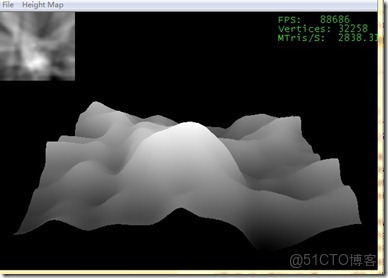
運行結果如下:
兩種方法,各有所長。