
目錄
- 學生信息管理系統——C/S架構
- 1. 系統架構設計
- 1.1 C/S架構設計思路
- 1.2 系統架構圖
- 1.3 包結構
- 2.問題解答
- 2.1 使用了字節流還是字符流來傳遞數據?簡述I/O流應用於網絡編程的好處?
- 2.2 如何使用多線程實現多客户端同時操作學生數據?多線程併發訪問數據可能會帶來什麼問題?
- 3. 關鍵代碼解析
- 3.1 客户端與服務器端通信
- 3.2 服務器端將從Socket讀取到的數據存入本地服務器
- 3.3 服務器端支持多個客户端同時訪問
- 4.結果展示
- 4.1 添加學生
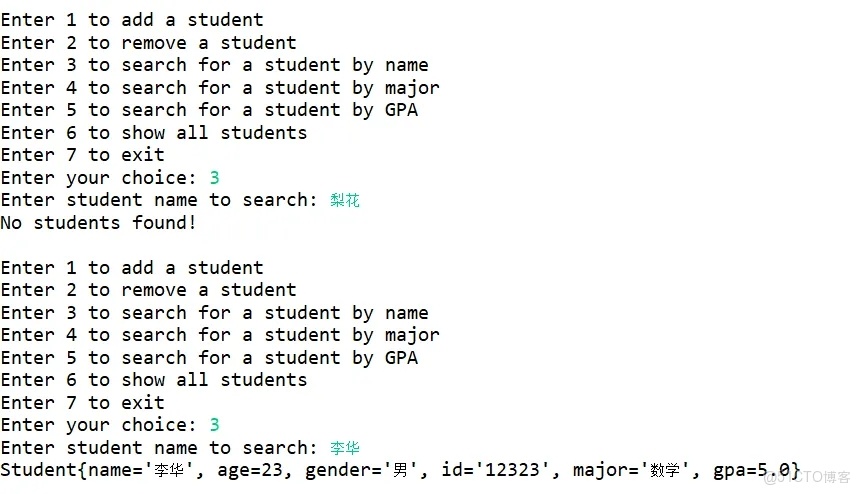
- 4.2 姓名查找
- 4.3 學科查找
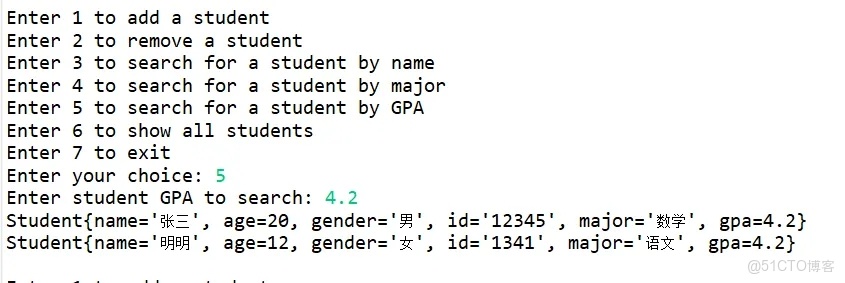
- 4.4 績點查找
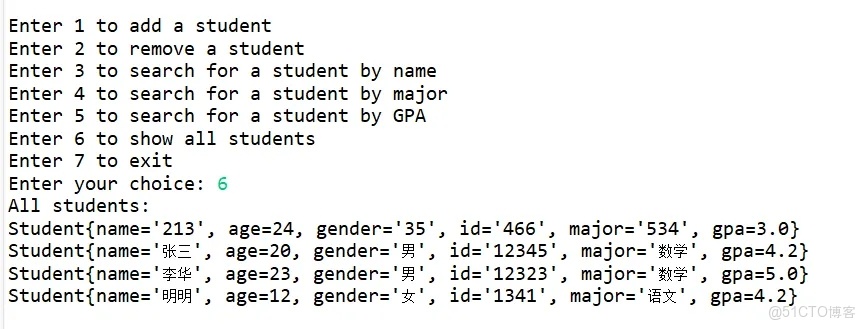
- 4.5 所有數據
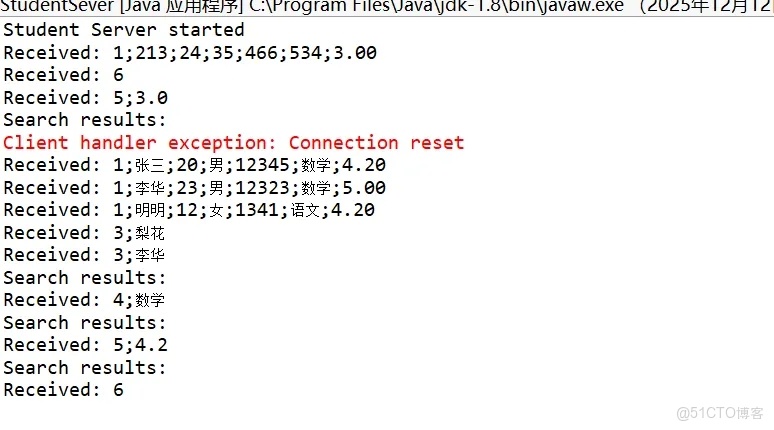
- 4.6 數據協議
- 5.遇到的問題及解決方法
- 6.完整代碼
- 7.總結
1. 系統架構設計
1.1 C/S架構設計思路
原有的學生信息管理系統通常運行在單機環境中,所有數據操作(增刪改查)直接作用於Main.java文件。為了支持多用户遠程訪問與集中管理,本次改造採用客户端-服務器(Client/Server, C/S)架構:

服務器端:負責統一維護學生數據(如存儲在內存 List ),接收來自多個客户端的請求,執行對應操作,並返回結果。它是系統的“核心引擎”和唯一數據源。

客户端:提供用户交互界面(本項目採用控制枱界面以簡化開發),負責收集用户輸入、構造請求、發送至服務器,並展示服務器返回的結果。它不直接處理數據,僅作為“前端代理”。 這種分離使得系統具備可擴展性(支持多用户)、數據一致性(單一數據源)和安全性(敏感操作集中在服務端)。
1.2 系統架構圖
+------------------+ TCP連接 +------------------+| 客户端 (Client) | <------------------> | 服務器 (Server) || - 控制枱UI | | - 主監聽線程 || - 請求構造 | | - 多工作線程池 || - 結果展示 | | - 學生數據管理器 |+------------------+ +------------------+
架構説明:
通信方式:基於 Java Socket 和 ServerSocket 實現 TCP 長連接,確保可靠傳輸。多線程處理機制:服務器主循環接受新連接後,為每個客户端創建一個獨立的 HandlerThread 線程處理其全部請求,實現併發支持。
註釋:本次未實現數據持久化,可參考文本文件與基於二進制文件的存儲的學生管理系統來進行自我改造,實現數據持久化。
1.3 包結構
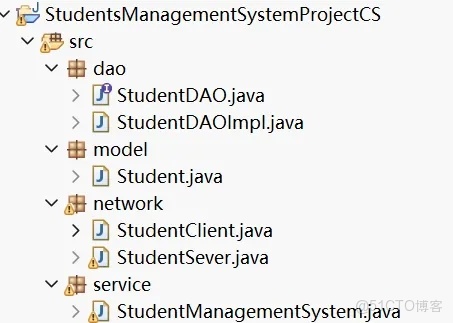
2.問題解答
2.1 使用了字節流還是字符流來傳遞數據?簡述I/O流應用於網絡編程的好處?
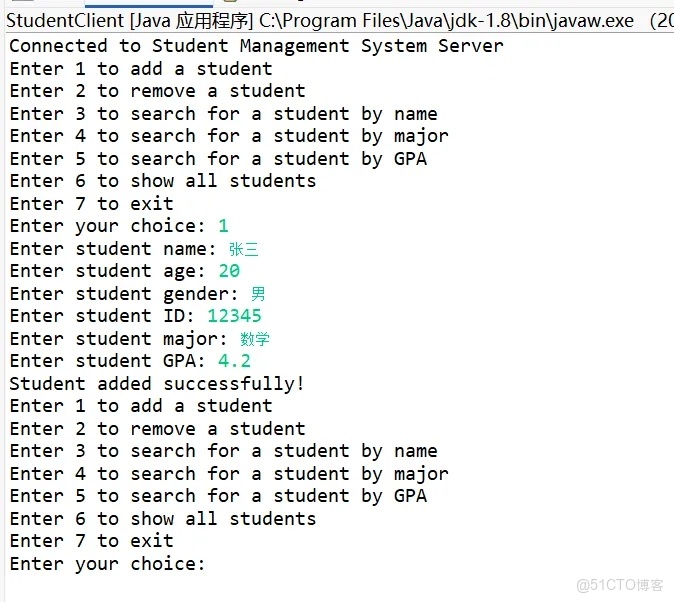
本系統採用 字符流(BufferedReader / PrintWriter) 進行數據傳輸。雖然底層 TCP 是字節流,但上層使用字符流更便於處理文本協議(如 "1;張三;20;男;12345;數學;4.2")。好處包括:
可讀性強:調試時可直接查看傳輸內容;開發便捷:無需手動序列化/反序列化對象,適合輕量級協議。
2.2 如何使用多線程實現多客户端同時操作學生數據?多線程併發訪問數據可能會帶來什麼問題?
實現方式: 服務器每接受一個 Socket 連接,就啓動一個新線程(或從線程池分配)專門處理該客户端的所有請求。每個線程獨立運行,互不阻塞。併發問題: 多個線程同時讀寫共享的學生列表(如 ArrayList)可能導致 數據不一致(如丟失更新、髒讀)甚至 ConcurrentModificationException。
解決方案: 對關鍵操作(增刪改查)加同步鎖(synchronized 塊)或使用線程安全容器(如 Collections.synchronizedList()),確保同一時間只有一個線程修改數據。
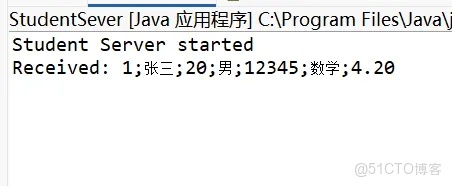
服務器啓動: 顯示“服務器已啓動,監聽端口 8080”客户端連接: 輸入名字查詢,返回“Student{name='張三', age=20, gender='男', id='12345', major='數學', gpa=4.2}

多客户端測試: 兩個終端同時添加學生,服務器日誌顯示兩條獨立處理記錄

異常處理: 客户端輸入非法指令,服務器返回“無效操作”
運行截圖
3. 關鍵代碼解析
3.1 客户端與服務器端通信
以“查詢學生姓名”功能為例:
客户端:用户輸入”張三“,通過 PrintWriter 發送至服務器。服務器:HandlerThread 讀取該行,解析指令類型和參數,在學生列表中查找姓名為 ”張三“的記錄,若存在則返回 "Student{name='張三', age=20, gender='男', id='12345', major='數學', gpa=4.2}",否則返回 "No students found!"。客户端:解析響應,打印結果或提示未找到。
// 客户端發送請求
out.println(command);
out.flush();
// 服務器處理請求(HandlerThread.run() 中)
String[] parts = command.split(";");
case "3":
// Search for a student by name
  String searchName = parts[1];
  List<Student> searchResults = studentDAO.searchByName(searchName);
  if (searchResults.isEmpty()) {
    response.append("No students found!\n");
    } else {
    System.out.println("Search results:");
    for (Student s : searchResults) {
      response.append(s).append("\n");
      }
      }
      break;
3.2 服務器端將從Socket讀取到的數據存入本地服務器
當收到 添加學生 請求時:
解析參數創建 Student 對象;調用 StudentManagementSystem.add(student);add() 方法內部將學生加入列表。
public void addStudent(Student student) {
    	synchronized (student) {
    		studentDAO.addStudent(student);
        }
    }
使用synchronized進行線程保護。
3.3 服務器端支持多個客户端同時訪問
服務器主程序使用無限循環監聽端口:
private StudentManagementSystem studentDAO=new StudentManagementSystem();
   private static ExecutorService threadPool = Executors.newCachedThreadPool();

   public StudentSever() {
   }

   public static void main(String[] args) {
       System.out.println("Student Server started");
       StudentSever server = new StudentSever();

       try (ServerSocket serverSocket = new ServerSocket(PORT)) {
           while (true) {
               Socket clientSocket = serverSocket.accept();
               threadPool.submit(new ClientHandler(clientSocket,server));
           }
       } catch (IOException e) {
           System.err.println("Server exception: " + e.getMessage());
       } finally {
           threadPool.shutdown();
       }
   }
每個 ClientHandler 線程獨立持有自己的 Socket、BufferedReader 和 PrintWriter,處理該客户端的完整會話(支持多次操作直至退出)。
4.結果展示
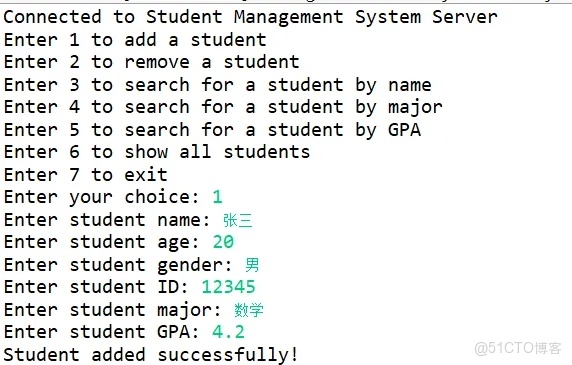
4.1 添加學生
4.2 姓名查找
4.3 學科查找

4.4 績點查找
4.5 所有數據
4.6 數據協議
5.遇到的問題及解決方法
- 問題:客户端進行選擇時,終端會出現空行跳出,沒有出現數據,在進行相同功能,數據出現原因:response.append("xxx\n")時添加換行符,而out.println(response) 又會額外再加 1 個換行符 → 最終服務器發送的響應是 xxx\n\n(兩行),導致**客户端讀取錯位 **。解決:嚴格約定每條請求為單行文本,客户端每次發送後調用 flush(),服務器按行解析。避免在一條消息中包含換行符。
代碼錯誤點:StudentClient.java
out.println(command);
out.flush();
return in.readLine();
StudentSever.java
public void run() {
....
  while ((inputLine = in.readLine()) != null) {
				   System.out.println("Received: " + inputLine);
				   String response= server.processCommand(inputLine);
				   out.println(response);
			   }
         ....
         }
     private String processCommand(String command) {
     ....
         case "1":
			// Add a student
			Student student = parseStudent(parts);
			studentDAO.addStudent(student);
			response.append("Student added successfully!\n");
			break;
      ....
      }
代碼修改後:StudentSever.java
public void run() {
....
  while ((inputLine = in.readLine()) != null) {
				   System.out.println("Received: " + inputLine);
				   String response= server.processCommand(inputLine);
				   out.println(response);
			   }
         ....
         }
     private String processCommand(String command) {
     ....
         case "1":
			// Add a student
			Student student = parseStudent(parts);
			studentDAO.addStudent(student);
			response.append("Student added successfully!");
			break;
      ....
      }
錯誤展示:
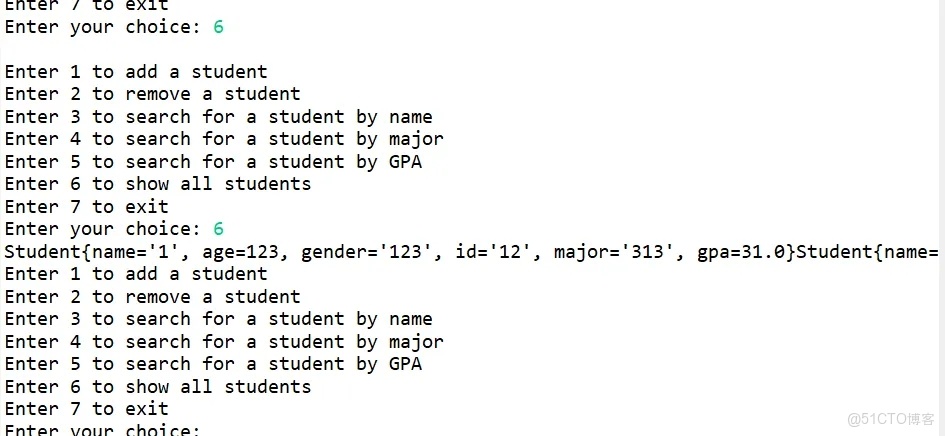
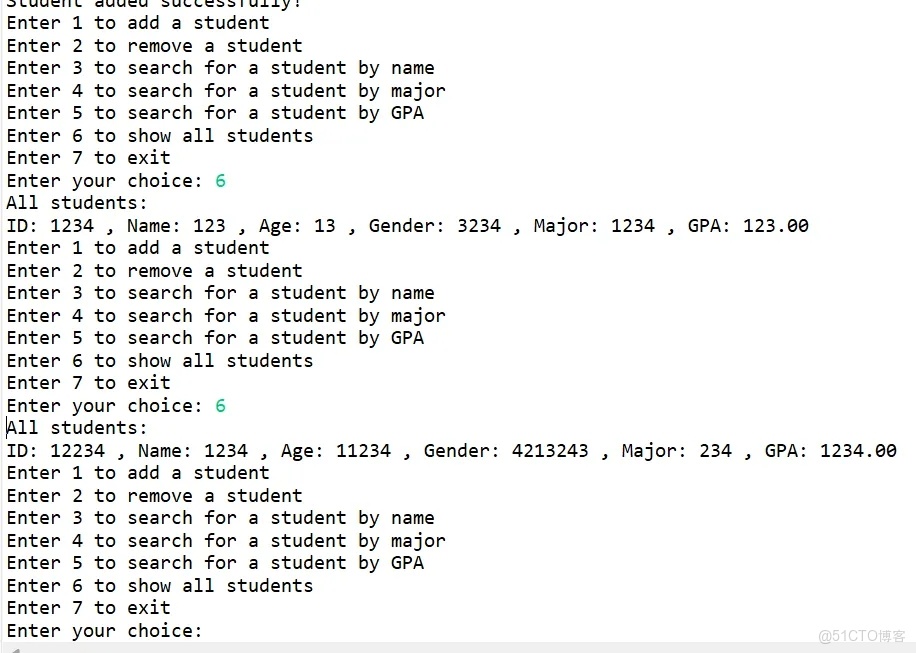
問題:客户端選擇展示全部數據時,終端會只出現一條,再選擇展示全部數據,再出現一條,直到存入的數據都展示一遍,最後輸出The System Data is empty Now!
原因:使用return in.readLine(),而為了展示美觀,在student的toString最後加上了換行符,而 in.readLine()讀取時遇到換行符就結束。
解決:添加特殊標識符。
代碼錯誤點:StudentClient.java
out.println(command);
out.flush();
return in.readLine();
StudentSever.java
case "6":
			// Show all Students
			List<Student> studentList = studentDAO.getStudents();
			if (studentList.size() == 0) {
				response.append("The System Data is empty Now!");
			}else {
				for (Student studentItem : studentList) {
					response.append(studentItem.toString());
				}
			}
			break;
代碼修改後:StudentClient.java
out.println(command);
            out.flush();
            String line;
            StringBuilder response = new StringBuilder();
           while(!(line = in.readLine()).equals("###END###")) {
        	   response.append(line).append("\n");
           }
            return response.toString();
StudentSever.java
case "6":
			// Show all Students
			List<Student> studentList = studentDAO.getStudents();
			if (studentList.size() == 0) {
				response.append("The System Data is empty Now!\n");
			}else {
				for (Student studentItem : studentList) {
					response.append(studentItem.toString()).append("\n");
				}
			}
			break;
      ....
      response.append("###END###");
錯誤展示:
6.完整代碼
StudentDAO.java
package dao;

import java.util.List;

import model.Student;

public interface StudentDAO {
    void addStudent(Student student);
    void removeStudent(String id);
    List<Student> getStudents();
    List<Student> searchByName(String name);
    List<Student> searchByMajor(String major);
    List<Student> searchByGpa(double gpa);
}
StudentDAOImpl.java
package dao;

import model.Student;
import java.util.ArrayList;
import java.util.List;

public class StudentDAOImpl implements StudentDAO {
    private List<Student> students;

    public StudentDAOImpl() {
        students = new ArrayList<>();
    }

    @Override
    public void addStudent(Student student) {
        students.add(student);
    }

    @Override
    public void removeStudent(String id) {
        students.removeIf(student -> student.getId().equals(id));
    }

    @Override
    public List<Student> getStudents() {
        return new ArrayList<>(students);
    }

    @Override
    public List<Student> searchByName(String name) {
        List<Student> result = new ArrayList<>();
        for (Student student : students) {
            if (student.getName().equals(name)) {
                result.add(student);
            }
        }
        return result;
    }

    @Override
    public List<Student> searchByMajor(String major) {
        List<Student> result = new ArrayList<>();
        for (Student student : students) {
            if (student.getMajor().equals(major)) {
                result.add(student);
            }
        }
        return result;
    }

    @Override
    public List<Student> searchByGpa(double gpa) {
        List<Student> result = new ArrayList<>();
        for (Student student : students) {
            if (student.getGpa() == gpa) {
                result.add(student);
            }
        }
        return result;
    }
}
Student.java
package model;

public class Student {
    private String name;
    private int age;
    private String gender;
    private String id;
    private String major;
    private double gpa;

    public Student(String name, int i, String gender, String id, String major, double d) {
        this.name = name;
        this.age = i;
        this.gender = gender;
        this.id = id;
        this.major = major;
        this.gpa = d;
    }

    public String getName() {
        return name;
    }

    public void setName(String name) {
        this.name = name;
    }

    public int getAge() {
        return age;
    }

    public void setAge(int age) {
        this.age = age;
    }

    public String getGender() {
        return gender;
    }

    public void setGender(String gender) {
        this.gender = gender;
    }

    public String getId() {
        return id;
    }

    public void setId(String id) {
        this.id = id;
    }

    public String getMajor() {
        return major;
    }

    public void setMajor(String major) {
        this.major = major;
    }

    public double getGpa() {
        return gpa;
    }

    public void setGpa(double gpa) {
        this.gpa = gpa;
    }
    @Override
    public String toString() {
        return String.format(
        		"Student{" +
                        "name='" + name + '\'' +
                        ", age=" + age +
                        ", gender='" + gender + '\'' +
                        ", id='" + id + '\'' +
                        ", major='" + major + '\'' +
                        ", gpa=" + gpa +
                        '}'
        );
    }
}
StudentClient.java
package network;

import java.io.*;
import java.net.*;
import java.util.*;

public class StudentClient {
    private static final String SERVER_ADDRESS = "127.0.0.1";
    private static final int SERVER_PORT =8080;
    private Socket socket;
    private Scanner scanner;
    private BufferedReader in;
    private PrintWriter out;


    public StudentClient() {
        scanner = new Scanner(System.in);
    }

    public void start() {
        try {
            socket = new Socket(SERVER_ADDRESS, SERVER_PORT);
             in = new BufferedReader(
            	    new InputStreamReader(socket.getInputStream()));
            	 out = new PrintWriter(socket.getOutputStream(), true);

            System.out.println("Connected to Student Management System Server");

            boolean running = true;
            while (running) {
                showMenu();
                int choice = scanner.nextInt();
                scanner.nextLine();

                switch (choice) {
                    case 1:
                        addStudent();
                        break;
                    case 2:
                        removeStudent();
                        break;
                    case 3:
                        searchByName();
                        break;
                    case 4:
                        searchByMajor();
                        break;
                    case 5:
                        searchByGpa();
                        break;
                    case 6:
                        showAllStudents();
                        break;
                    case 7:
                        sendCommand("EXIT");
                        running = false;
                        break;
                    default:
                        System.out.println("Invalid choice!");
                }
            }
        } catch (IOException e) {
            System.err.println("Client exception: " + e.getMessage());
        } finally {
            closeConnections();
        }
    }

    private void showMenu() {
    	System.out.println("Enter 1 to add a student");
		System.out.println("Enter 2 to remove a student");
		System.out.println("Enter 3 to search for a student by name");
		System.out.println("Enter 4 to search for a student by major");
		System.out.println("Enter 5 to search for a student by GPA");
		System.out.println("Enter 6 to show all students");
		System.out.println("Enter 7 to exit");
        System.out.print("Enter your choice: ");
    }

    private void addStudent() {
        System.out.print("Enter student name: ");
        String name = scanner.nextLine();
        System.out.print("Enter student age: ");
        int age = scanner.nextInt();
        scanner.nextLine(); // consume newline
        System.out.print("Enter student gender: ");
        String gender = scanner.nextLine();
        System.out.print("Enter student ID: ");
        String id = scanner.nextLine();
        System.out.print("Enter student major: ");
        String major = scanner.nextLine();
        System.out.print("Enter student GPA: ");
        double gpa = scanner.nextDouble();
        scanner.nextLine(); // consume newline

        String command = String.format("1;%s;%d;%s;%s;%s;%.2f",
            name, age, gender, id, major, gpa);
        String response = sendCommand(command);
        System.out.println(response);
    }

    private void removeStudent() {
        System.out.print("Enter student ID to remove: ");
        String id = scanner.nextLine();
        String response = sendCommand("2;" + id);
        System.out.println(response);
    }

    private void searchByName() {
        System.out.print("Enter student name to search: ");
        String name = scanner.nextLine();
        String response = sendCommand("3;" + name);
        System.out.println(response);
    }

    private void searchByMajor() {
        System.out.print("Enter student major to search: ");
        String major = scanner.nextLine();
        String response = sendCommand("4;" + major);
        System.out.println(response);
    }

    private void searchByGpa() {
        System.out.print("Enter student GPA to search: ");
        double gpa = scanner.nextDouble();
        scanner.nextLine();
        String response = sendCommand("5;" + gpa);
        System.out.println(response);
    }

    private void showAllStudents() {
        String response = sendCommand("6");
        if (response.isEmpty() || response.equals("The System Data is empty Now!")) {
            System.out.println("No students found!");
        } else {
            System.out.println("All students:");
            System.out.println(response);
        }
    }

    private String sendCommand(String command) {
        try {
			out.println(command);
            out.flush();
            String line;
            StringBuilder response = new StringBuilder();
           while(!(line = in.readLine()).equals("###END###")) {
        	   response.append(line).append("\n");
           }
            return response.toString();
        } catch (IOException e) {
             closeConnections();
            return "Error: " + e.getMessage();
        }
    }

    private void closeConnections() {
        try {
            if (in != null) in.close();
            if (out != null) out.close();
            if (socket != null) socket.close();
            if (scanner != null) scanner.close();
        } catch (IOException e) {
            System.err.println("Error closing connections: " + e.getMessage());
        }
    }

    public static void main(String[] args) {
        StudentClient client = new StudentClient();
        client.start();
    }
}
StudentSever.java
package network;
import java.util.*;
import java.util.concurrent.ExecutorService;
import java.util.concurrent.Executors;

import model.Student;
import service.StudentManagementSystem;
import dao.StudentDAO;
import dao.StudentDAOImpl;

import java.io.*;
import java.net.ServerSocket;
import java.net.Socket;

public class StudentSever {
   private static final int PORT = 8080;
   private StudentManagementSystem studentDAO=new StudentManagementSystem();
   private static ExecutorService threadPool = Executors.newCachedThreadPool();

   public StudentSever() {
   }

   public static void main(String[] args) {
       System.out.println("Student Server started");
       StudentSever server = new StudentSever();

       try (ServerSocket serverSocket = new ServerSocket(PORT)) {
           while (true) {
               Socket clientSocket = serverSocket.accept();
               threadPool.submit(new ClientHandler(clientSocket,server));
           }
       } catch (IOException e) {
           System.err.println("Server exception: " + e.getMessage());
       } finally {
           threadPool.shutdown();
       }
   }

   private static class ClientHandler implements Runnable {
	   private Socket clientSocket;
	   private StudentSever server;

	   public ClientHandler(Socket socket,StudentSever server) {
		   this.clientSocket = socket;
		   this.server = server;
	   }
	   @Override
	   public void run() {
		   try (BufferedReader in = new BufferedReader(new InputStreamReader(clientSocket.getInputStream()));
				PrintWriter out = new PrintWriter(clientSocket.getOutputStream(), true)) {
			   String inputLine;
			   while ((inputLine = in.readLine()) != null) {
				   System.out.println("Received: " + inputLine);

				   String response= server.processCommand(inputLine);
				   out.println(response);
			   }
		   } catch (IOException e) {
			   System.err.println("Client handler exception: " + e.getMessage());
		   } finally {
			   try {
				   clientSocket.close();
			   } catch (IOException e) {
				   System.err.println("Could not close client socket: " + e.getMessage());
			   }
		   }
	   }

   }

	   private String processCommand(String command) {
	   String[] parts = command.split(";");
	   String choice = parts[0];
	   StringBuilder response = new StringBuilder();
	   try {
	   switch (choice) {
		case "1":
			// Add a student
			Student student = parseStudent(parts);
			studentDAO.addStudent(student);
			response.append("Student added successfully!\n");
			break;
		case "2":
			// Remove a student
			String removeId = parts[1];
			List<Student> students = studentDAO.getStudents();
			boolean removed = false;
			for (Student s : students) {
				if (s.getId().equals(removeId)) {
					studentDAO.removeStudent(s);
					removed = true;
					response.append("Student removed successfully!\n");
					break;
				}
			}
			if (!removed) {
				response.append("Student not found!\n");
			}
			break;
		case "3":
			// Search for a student by name
			String searchName = parts[1];
			List<Student> searchResults = studentDAO.searchByName(searchName);
			if (searchResults.isEmpty()) {
				response.append("No students found!\n");
			} else {
				System.out.println("Search results:");
				for (Student s : searchResults) {
					response.append(s).append("\n");
				}
			}
			break;
		case "4":
			// Search for a student by major
			String searchMajor = parts[1];
			searchResults = studentDAO.searchByMajor(searchMajor);
			if (searchResults.isEmpty()) {
				response.append("No students found!\n");
			} else {
				System.out.println("Search results:");
				for (Student s : searchResults) {
					response.append(s).append("\n");
				}
			}
			break;
		case "5":
			// Search for a student by GPA
			double searchGpa = Double.parseDouble(parts[1]);
			searchResults = studentDAO.searchByGpa(searchGpa);
			if (searchResults.isEmpty()) {
				response.append("No students found!\n");
			} else {
				System.out.println("Search results:");
				for (Student s : searchResults) {

					response.append(s).append("\n");
				}
			}
			break;
		case "6":
			// Show all Students
			List<Student> studentList = studentDAO.getStudents();
			if (studentList.size() == 0) {
				response.append("The System Data is empty Now!\n");
			}else {
				for (Student studentItem : studentList) {
					response.append(studentItem.toString()).append("\n");
				}
			}
			break;
		case "7":
			// Exit the program
			 response.append("Exit Successfully!\n");
			break;
		default:
			// Invalid input
			response.append("Invalid choice!\n");
			break;

		}
	   } catch (Exception e) {
		   response.append("Error processing command: " + e.getMessage()).append("\n");
	   }
	     response.append("###END###");
	    return response.toString();
   }
   private Student parseStudent(String[] parts) {
	Student student = new Student(
		   parts[1], // name
		   Integer.parseInt(parts[2]), // age
		   parts[3],
		   parts[4],
		   parts[5],
		   Double.parseDouble(parts[6]) // gpa
		   );
	return student;
   }
}
StudentManagementSystem.java
package service;

import dao.StudentDAO;
import dao.StudentDAOImpl;
import model.Student;

import java.util.ArrayList;
import java.util.Collections;
import java.util.List;

public class StudentManagementSystem {
    private StudentDAO studentDAO;
    private List<Student> students = Collections.synchronizedList(new ArrayList<>());

    public StudentManagementSystem() {
        this.studentDAO = new StudentDAOImpl();
    }

    public void addStudent(Student student) {
    	synchronized (student) {
    		studentDAO.addStudent(student);
        }
    }

    public void removeStudent(Student student) {
    	synchronized (student) {
        studentDAO.removeStudent(student.getId());
    }
    }

    public List<Student> getStudents() {

        return studentDAO.getStudents();
    }

    public List<Student> searchByName(String name) {
        return studentDAO.searchByName(name);
    }

    public List<Student> searchByMajor(String major) {
        return studentDAO.searchByMajor(major);
    }

    public List<Student> searchByGpa(double gpa) {
        return studentDAO.searchByGpa(gpa);
    }
}
7.總結
通過本次作業,我深入理解了 C/S 架構的核心思想、TCP 網絡編程的實現細節以及多線程併發控制的重要性。不僅掌握了 Socket、Thread、synchronized 等關鍵技術,還提升了系統設計和調試能力。
可改進之處:
使用 GUI(如 Swing)提升客户端體驗;引入連接池優化線程資源;採用 JSON 或自定義二進制協議提高傳輸效率;增加用户認證與操作日誌。
數據持久化。附加問答:能否使用應用層的網絡協議來改寫該系統?完全可以。當前系統基於原始 TCP 自定義文本協議,屬於應用層協議的自行實現。若改用標準應用層協議,可考慮:
HTTP/HTTPS:將服務器改造為 RESTful API(如使用 Spring Boot),客户端通過 HTTP 請求(GET/POST/PUT/DELETE)操作學生資源。優勢是兼容性強、工具鏈豐富、天然支持 Web 客户端。WebSocket:適用於需要雙向實時通信的場景(如通知推送)。自定義二進制協議:如基於 Protobuf 或自定義幀結構,提升性能與安全性。改用標準協議能顯著降低開發複雜度、提升互操作性,尤其適合構建跨平台或互聯網級應用。但對於教學目的或小型局域網系統,原始 TCP + 自定義協議仍是一種簡潔有效的方案。
