

微信小程序中,不同的分包對應不同的下載單元;因此,除了非獨立分包可以依賴主包外,分包之間不能互相使用自定義組件或進行 require。「分包異步化」特性將允許通過一些配置和新的接口,使部分跨分包的內容可以等待下載後異步使用,從而一定程度上解決這個限制。
口述表達就是,如果想要在一個分包內使用另一個分包的組件或資源,可以通過分包異步化實現。
通過分包異步化,可以節省包大小,當你的主包或子包的大小接近2M時,新的資源可以通過分包異步化引入,異步化組件不會佔用包大小,從而節省包空間。
配置pages.json
{
    "pages": [ // https://uniapp.dcloud.io/collocation/pages
        {
            "path": "pages/index/index",
            "style": {
                "navigationBarTitleText": "首頁",
                "navigationStyle": "custom",
                "navigationBarTextStyle": "white"
            }
        }
    ],
    "subPackages": [
        {
            "root": "subPackages/agent",
            "pages": [{
                "path": "pages/agent/index",
                "style": {
                    "navigationBarTitleText": "智能體頁面",
                    "navigationBarTextStyle": "black",
                    "usingComponents": {
                        "nav-bar": "/subPackages/chat-component/pages/nav-bar/index" // 組件的路徑
                    },
                    "componentPlaceholder": {
                        "nav-bar": "view" // 未完成時的佔位組件
                    }
                }
            }]
        },
        {
            "root": "subPackages/chat-component",
            "pages": [{
                "path": "pages/chat/index",
                "style": {
                    "navigationBarTitleText": "",
                    "navigationStyle": "custom",
                    "navigationBarTextStyle": "white"
                }
            }]
        }
    ],
}這裏我樣式了一個子包中使用分包異步化,加載另一個子包組件的例子,其中subPackages/agent是一個子包,subPackages/chat-component是另一個子包,我在subPackages/agent子包的pages/agent/index頁面引入subPackages/chat-component子包內的nav-bar組件
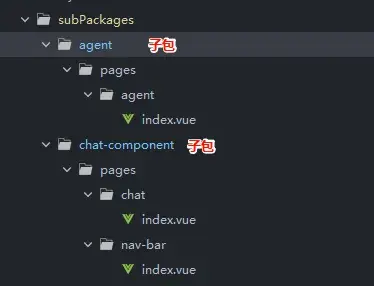
由於我引入的是chat-component子包內的nav-bar/index頁面,而我們在pages.json裏只定義了chat-component/pages/chat/index.vue頁面,所以我們必須在chat/index.vue內引入同包的nav-bar/index.vue頁面,否則/nav-bar/index.vue將不會被打包,導致分包異步化導入失敗
<template>
    <view>
        <NavBar/>
    </view>
</template>

<script setup>
import NavBar from '@/subPackages/chat-component/pages/nav-bar/index.vue';
</script>到這裏,我們的異步化的配置工作就做好了,可以在agent/index.vue頁面正常導入了
導入分包異步化組件
agent/index.vue頁面
<template>
    <view>
        <NavBar />
    </view>
</template>

<script setup>
import NavBar from '@/subPackages/chat-component/pages/nav-bar/index.vue';
</script>就像正常引入組件一樣,導入使用即可,需要注意,導入的路徑得跟pages.json內配置的組件路徑一致。
分包異步化支持的組件通信
經過測試,得到如下總結:
支持的通信方式:
- emit
- props
- defineModel
- provide/inject
不支持的通信方式:
- defineExpose 父組件調用異步化組件內的事件
下面是測試頁面,你可以複製到你的頁面裏直接查看效果
父組件 agent/index.vue
<template>
    <view>
        <view>父級頁面</view>
        <button type="primary" size="mini" @click="onFn">父組件調用子組件事件</button>
        <button type="primary" size="mini" @click="onFnUpdate">父組件修改雙向綁定內容</button>
        <view>===============================================</view>
        <view>分包異步化組件</view>
        <NavBar ref="navBarRef" :text="text" v-model="text2" @onBack="onBack" />
    </view>
</template>

<script setup>
import NavBar from '@/subPackages/chat-component/pages/nav-bar/index.vue';
import { ref, provide } from 'vue';

const navBarRef = ref();

const form = ref({
    text: '測試provide'
});
provide('form', form);

const text = ref('父組件內容');

const text2 = ref('雙向綁定的內容');
const onFnUpdate = () => {
    text2.value = '父組件修改';
};

const onFn = () => {
    navBarRef.value.event1();
};

const onBack = (e) => {
    console.log('子組件返回了', e);
};
</script>
異步化組件 nav-bar/index.vue
<template>
    <view>
        <button type="primary" size="mini" @click="onBack">子組件事件回傳</button>
        <view>props綁定內容:{{ props.text }}</view>
        <button type="primary" size="mini" @click="onUpdate">子組件修改雙向綁定內容</button>
        <view>
            {{ text2 }}
        </view>
        <view>
            {{ form.text }}
        </view>
    </view>
</template>

<script setup>
import { defineEmits, defineProps, defineExpose, defineModel, inject } from 'vue';

const props = defineProps({
    text: {
        type: String,
        defaule: ''
    }
});
const emit = defineEmits(['onBack']);

const form = inject('form');

const text2 = defineModel();
const onUpdate = () => {
    text2.value = '子組件修改';
};

const onBack = () => {
    emit('onBack', { text: '子組件返回' });
};

const event1 = () => {
    console.log('子組件內事件');
};

defineExpose({ event1 });
</script>
參考文檔:
微信小程序分包異步化
如何使用分包異步化能力?
uniapp微信小程序之分包異步化
