

AST(抽象語法樹)
為什麼要談AST?
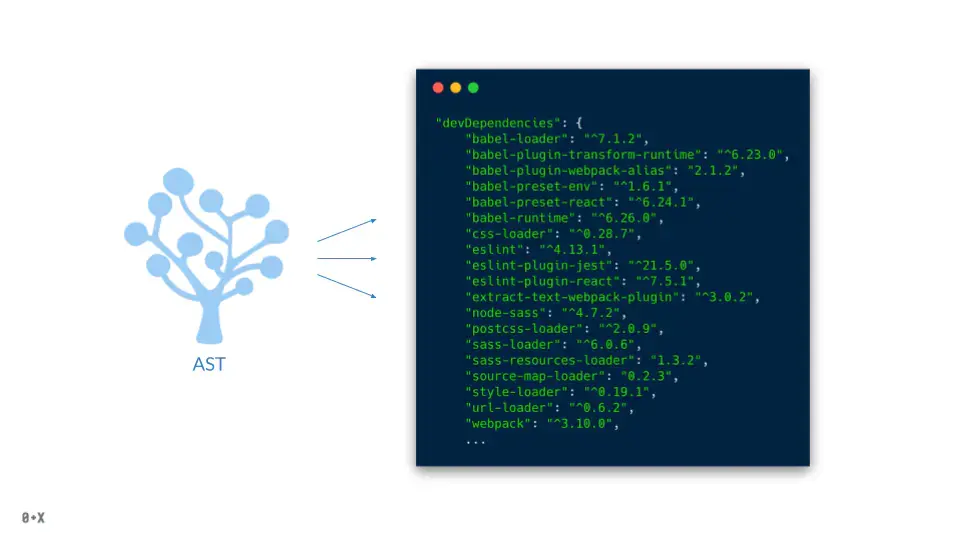
如果你查看目前任何主流的項目中的devDependencies,會發現前些年的不計其數的插件誕生。我們歸納一下有:ES6轉譯、代碼壓縮、css預處理器、eslint、prettier等。這些模塊很多都不會用到生產環境,但是它們在開發環境中起到很重要的作用,這些工具的誕生都是建立在了AST這個巨人的肩膀上。
什麼是AST?
It is a hierarchical program representation that presents source code structure according to the grammar of a programming language, each AST node corresponds to an item of a source code.
抽象語法樹(abstract syntax code,AST)是源代碼的抽象語法結構的樹狀表示,樹上的每個節點都表示源代碼中的一種結構,這所以説是抽象的,是因為抽象語法樹並不會表示出真實語法出現的每一個細節,比如説,嵌套括號被隱含在樹的結構中,並沒有以節點的形式呈現。抽象語法樹並不依賴於源語言的語法,也就是説語法分析階段所採用的上下文無文文法,因為在寫文法時,經常會對文法進行等價的轉換(消除左遞歸,回溯,二義性等),這樣會給文法分析引入一些多餘的成分,對後續階段造成不利影響,甚至會使合個階段變得混亂。因些,很多編譯器經常要獨立地構造語法分析樹,為前端,後端建立一個清晰的接口。
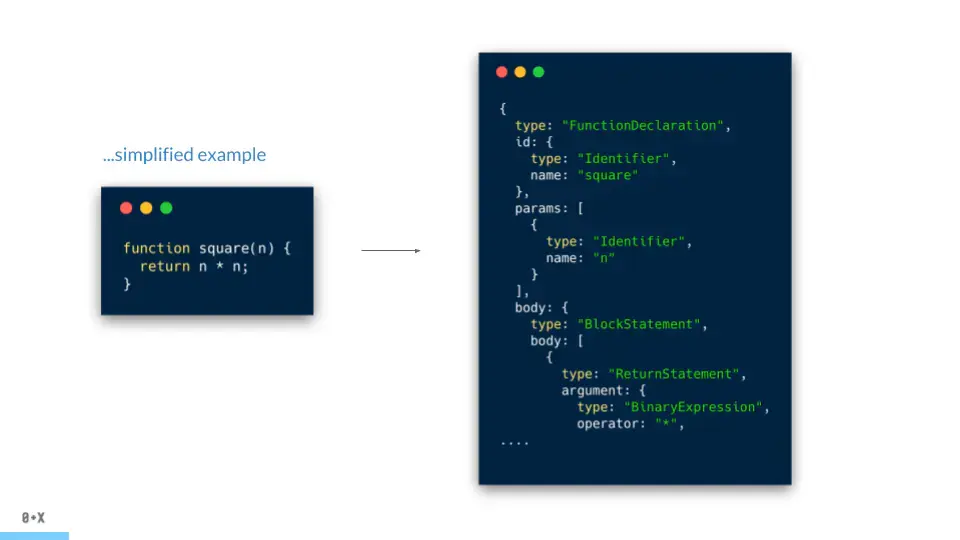
從純文本轉換成樹形結構的數據,也就是AST,每個條目和樹中的節點一一對應。
AST的流程
此部分將讓你瞭解到從源代碼到詞法分析生成tokens再到語法分析生成AST的整個流程。
從源代碼中怎麼得到AST呢?當下的編譯器幫着做了這件事,那編譯器是怎麼做的呢?
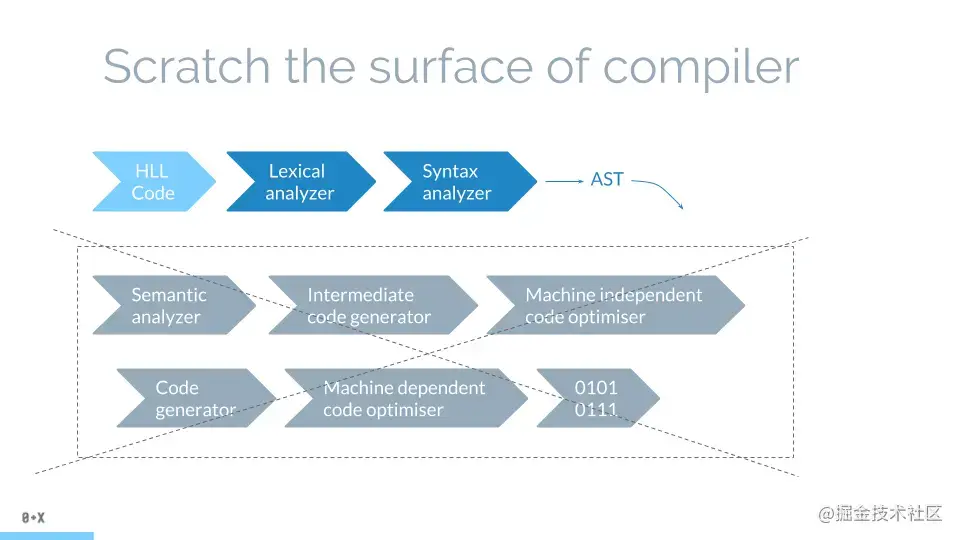
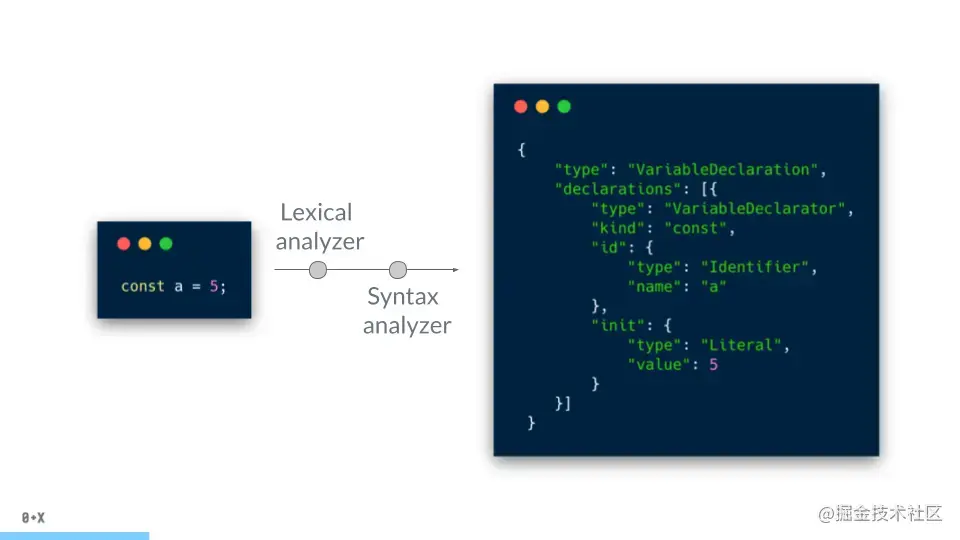
一款編譯器的編譯流程(將高級語言轉譯成二進制位)是很複雜的,但我們只需要關注詞法分析和語法分析,這兩步是從代碼生成AST的關鍵所在。
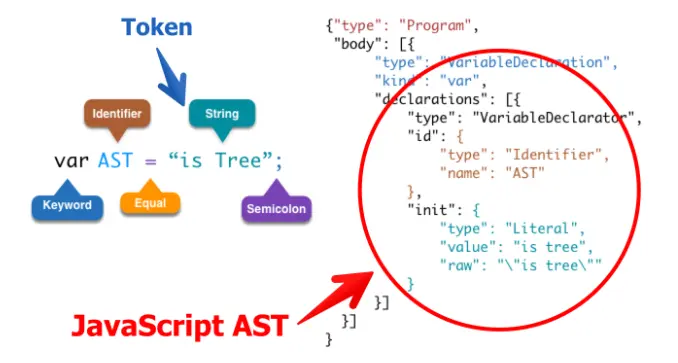
第一步,詞法分析器,也稱為掃描器,它會先對整個代碼進行掃描,當它遇到空格、操作符或特殊符號時,它決定一個單詞完成,將識別出的一個個單詞、操作符、符號等以對象的形式({type, value, range, loc })記錄在tokens數組中,註釋會另外存放在一個comments數組中。
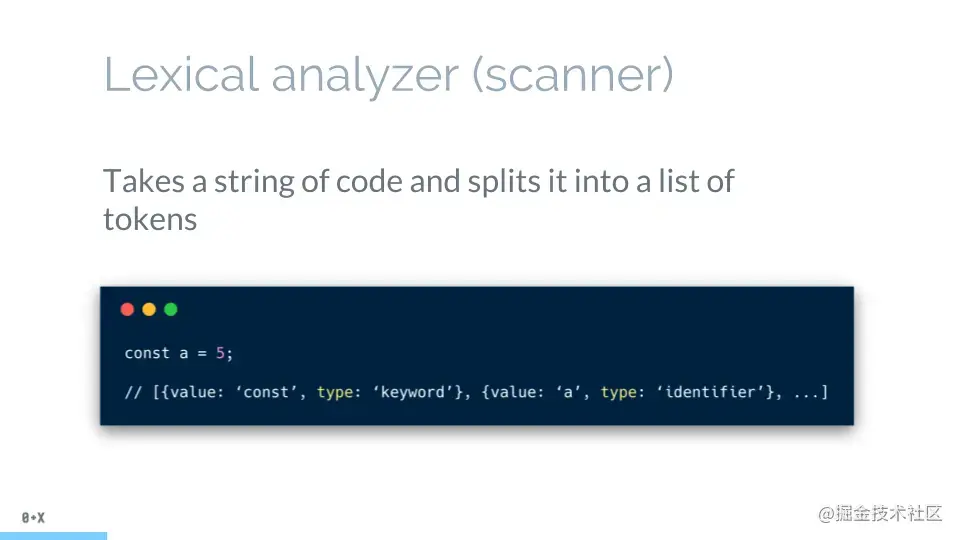
比如var a = 1;,@typescript-eslint/parser解析器生成的tokens如下:
tokens: [
    {
      "type": "Keyword",
      "value": "var",
      "range": [112, 115],
      "loc": {
        "start": {
          "line": 11,
          "column": 0
        },
        "end": {
          "line": 11,
          "column": 3
        }
      }
    },
    {
      "type": "Identifier",
      "value": "a",
      "range": [116, 117],
      "loc": {
        "start": {
          "line": 11,
          "column": 4
        },
        "end": {
          "line": 11,
          "column": 5
        }
      }
    },
    {
      "type": "Punctuator",
      "value": "=",
      "range": [118, 119],
      "loc": {
        "start": {
          "line": 11,
          "column": 6
        },
        "end": {
          "line": 11,
          "column": 7
        }
      }
    },
    {
      "type": "Numeric",
      "value": "1",
      "range": [120, 121],
      "loc": {
        "start": {
          "line": 11,
          "column": 8
        },
        "end": {
          "line": 11,
          "column": 9
        }
      }
    },
    {
      "type": "Punctuator",
      "value": ";",
      "range": [121, 122],
      "loc": {
        "start": {
          "line": 11,
          "column": 9
        },
        "end": {
          "line": 11,
          "column": 10
        }
      }
    }
]第二步,語法分析器,也稱為解析器,將詞法分析得到的tokens數組轉換為樹形結構表示,驗證語言語法並拋出語法錯誤(如果發生這種情況)
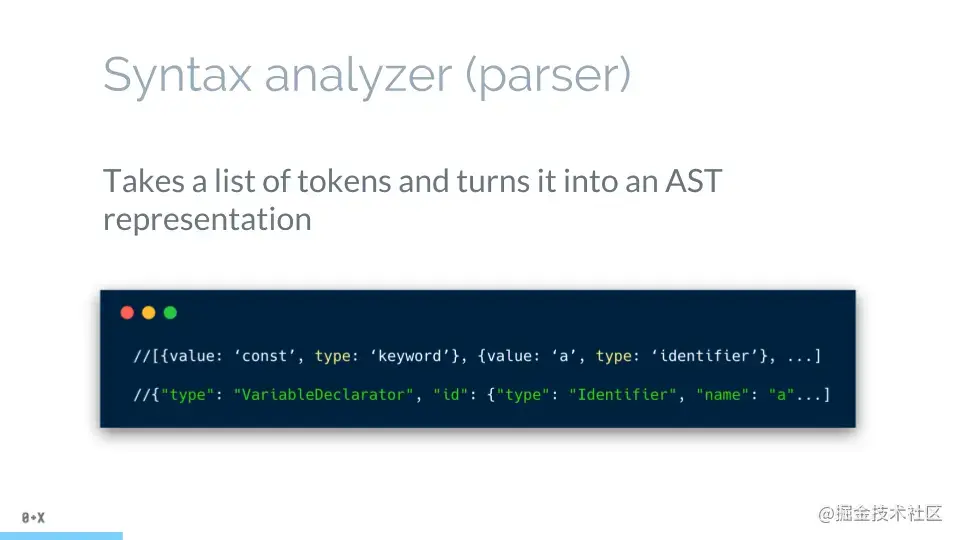
var a = 1;從tokens數組轉換為樹形結構如下所示:
{
  type: 'Program',
  body: [
    {
      "type": "VariableDeclaration",
      "declarations": [
        {
          "type": "VariableDeclarator",
          "id": {
            "type": "Identifier",
            "name": "a",
            "range": [
              116,
              117
            ],
            "loc": {
              "start": {
                "line": 11,
                "column": 4
              },
              "end": {
                "line": 11,
                "column": 5
              }
            }
          },
          "init": {
            "type": "Literal",
            "value": 1,
            "raw": "1",
            "range": [
              120,
              121
            ],
            "loc": {
              "start": {
                "line": 11,
                "column": 8
              },
              "end": {
                "line": 11,
                "column": 9
              }
            }
          },
          "range": [
            116,
            121
          ],
          "loc": {
            "start": {
              "line": 11,
              "column": 4
            },
            "end": {
              "line": 11,
              "column": 9
            }
          }
        }
      ],
      "kind": "var",
      "range": [
        112,
        122
      ],
      "loc": {
        "start": {
          "line": 11,
          "column": 0
        },
        "end": {
          "line": 11,
          "column": 10
        }
      }
    }
  ]
}
在生成樹時,解析器會剔除掉一些不必要的標記(例如冗餘括號),因此創建的“抽象語法樹”不是 100% 與源代碼匹配,但足以讓我們知道如何處理它。另一方面,完全覆蓋所有代碼結構的解析器生成的樹稱為“具體語法樹”
編譯器拓展
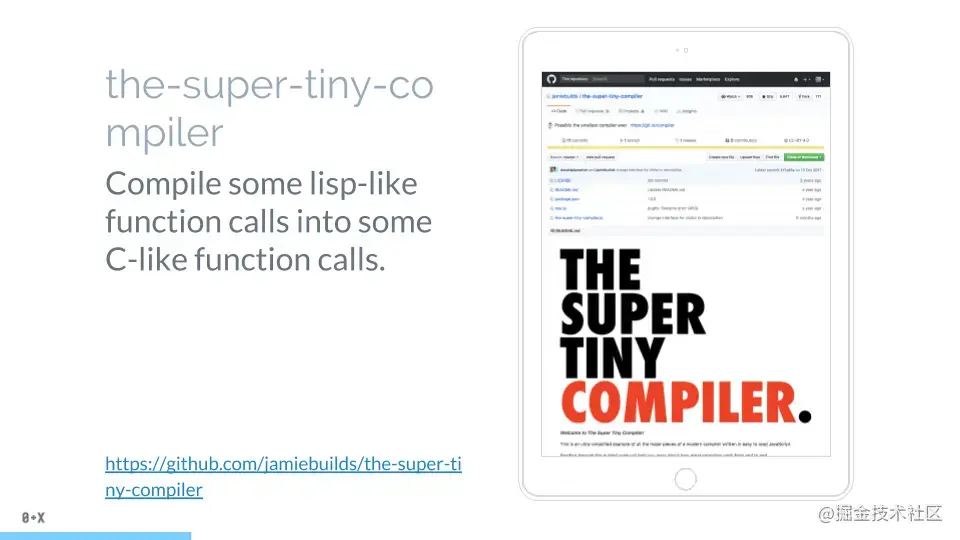
想了解更多關於編譯器的知識? the-super-tiny-compiler,這是一個用JavaScript 編寫的編譯器。大概200行代碼,其背後的想法是將Lisp編譯成C語言,幾乎每行都有註釋。
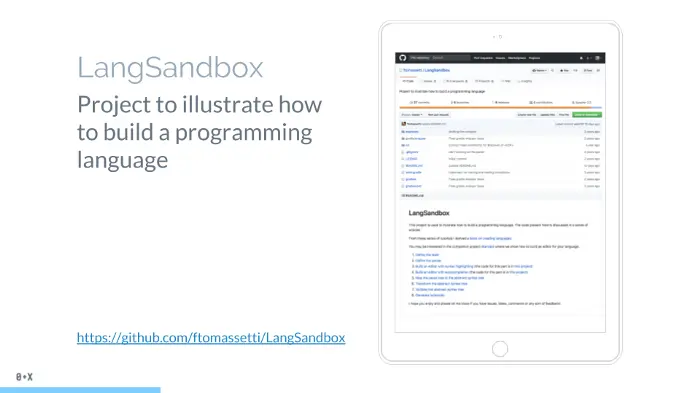
LangSandbox,一個更好的項目,它説明了如何創造一門編程語言。當然,設計編程語言這樣的書市面上也一坨坨。所以,這項目更加深入,與the-super-tiny-compiler的項目將Lisp轉為C語言不同,這個項目你可以寫一個你自己的語言,並且將它編譯成C語言或者機器語言,最後運行它。
能直接用三方庫來生成AST嗎? 當然可以!有一堆三方庫可以用。你可以訪問astexplorer,然後挑你喜歡的庫。astexplorer是一個很棒的網站,你可以在線玩轉AST,而且除了JavaScript 之外,它還包含許多其他語言AST庫
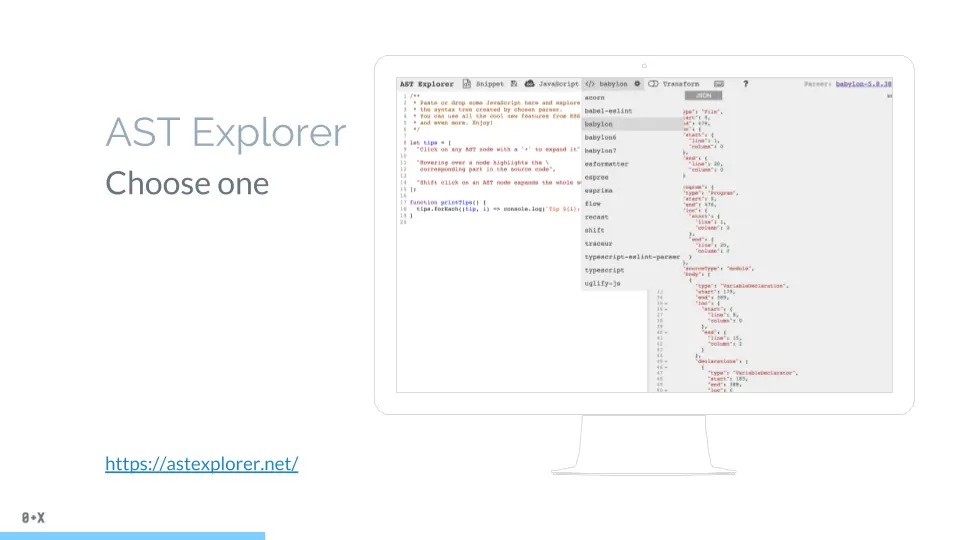
我想特別強調其中的一個,在我看來它是非常好的一個,babylon
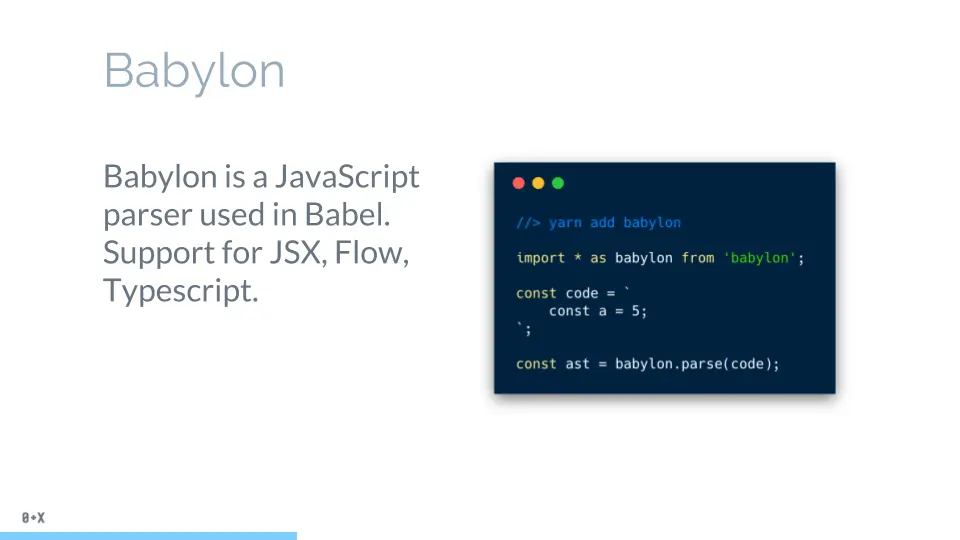
它在 Babel 中使用,也許這也是它受歡迎的原因。因為它是由 Babel項目支持的,所以它會始終與最新的JS特性保持同步,可以大膽地使用。另外,它的API也非常的簡單,容易使用。
OK,現在您知道如何將代碼生成 AST,讓我們繼續討論現實中的用例。
我想談論的第一個用例是代碼轉譯,當然是 Babel。
Babel is not a ‘tool for having ES6 support’. Well, it is, but it is far not only what it is about.
Babel與ES6/7/8 特性的支持有很多關聯,這就是我們經常使用它的原因。但它僅僅是一組插件,我們還可以將它用於代碼壓縮、React 相關的語法轉換(例如 JSX)、Flow 插件等。
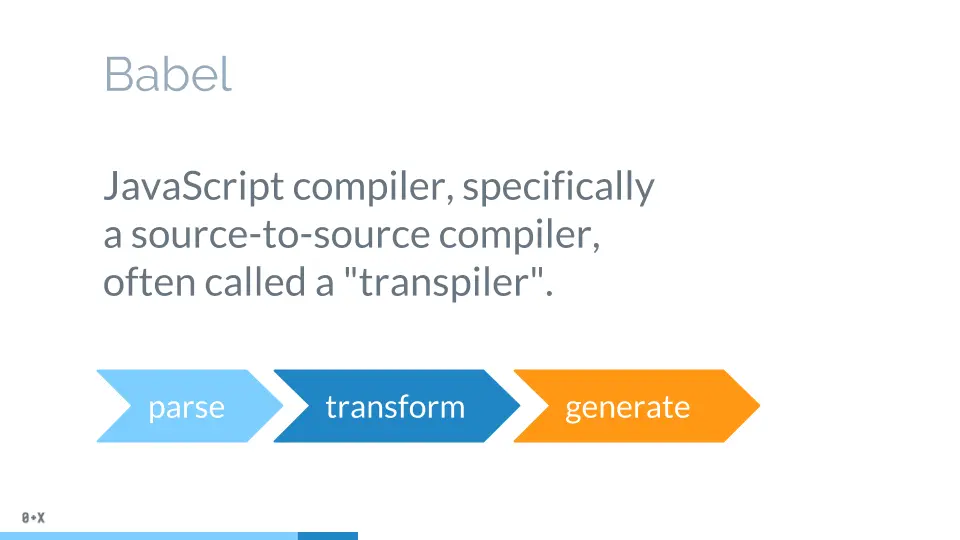
Babel 是一個 JavaScript編譯器,它的編譯有三個階段:解析(parsing)、轉譯(transforming)、生成(generation)。你給 Babel一些 JavaScript 代碼,它修改代碼並生成新的代碼,它是如何修改代碼?沒錯!它構建 AST,遍歷它,根據babel-plugin修改它,然後從修改後的AST 生成新代碼。

讓我們在一個簡單的代碼示例中看到這一點。
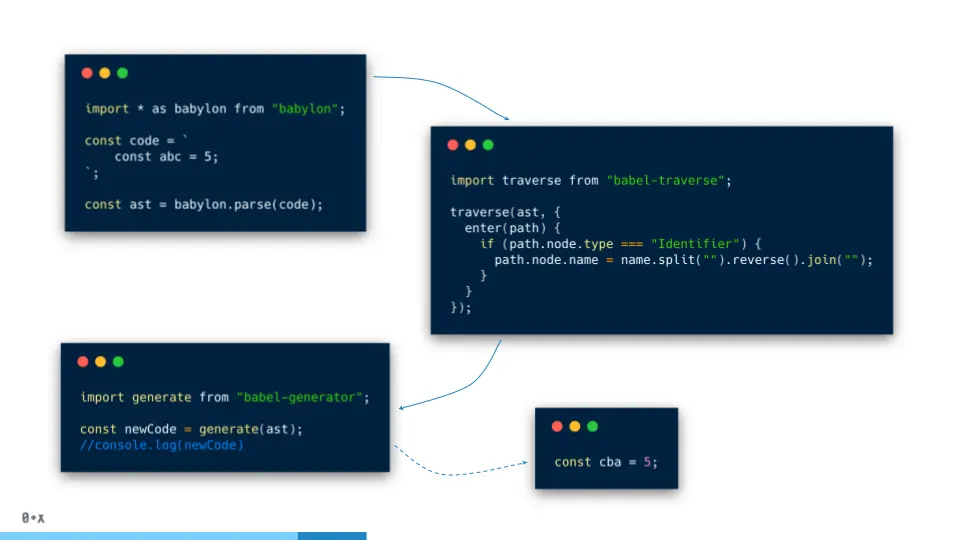
正如我之前提到的,Babel 使用 Babylon,所以,我們首先解析代碼生成AST,然後遍歷 AST 並反轉所有變量名稱,最後生成代碼。正如我們看到的,第一步(解析)和第三步(代碼生成)階段看起來很常見,每次都會做的。所以,Babel接管了這兩步,我們真正感興趣的是 AST 轉換(Babel-plugin修改)。
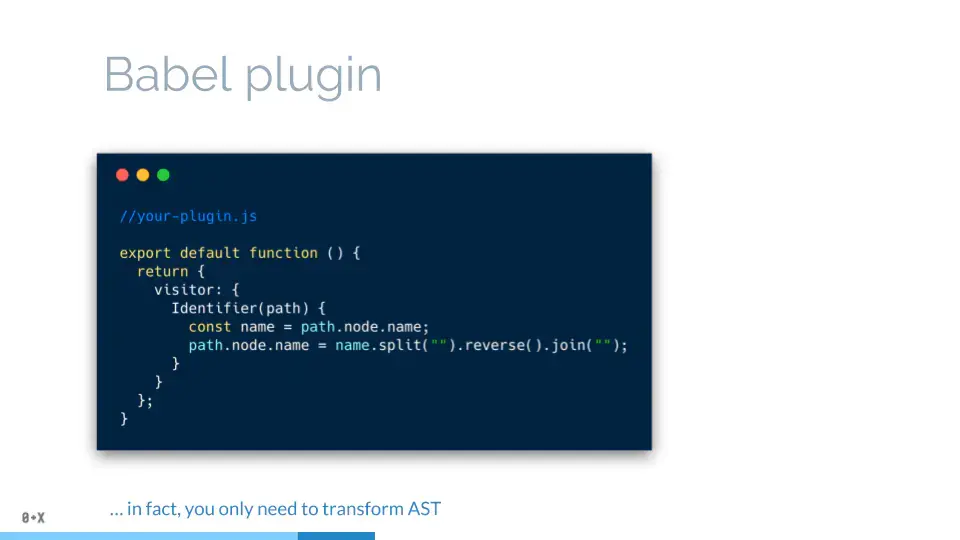
當開發 Babel-plugin 時,你只需要描述節點“visitors”,它會改變你的AST。將它加入你的babel插件列表中,設置你webpack的babel-loader配置或者.babelrc中的plugins即可
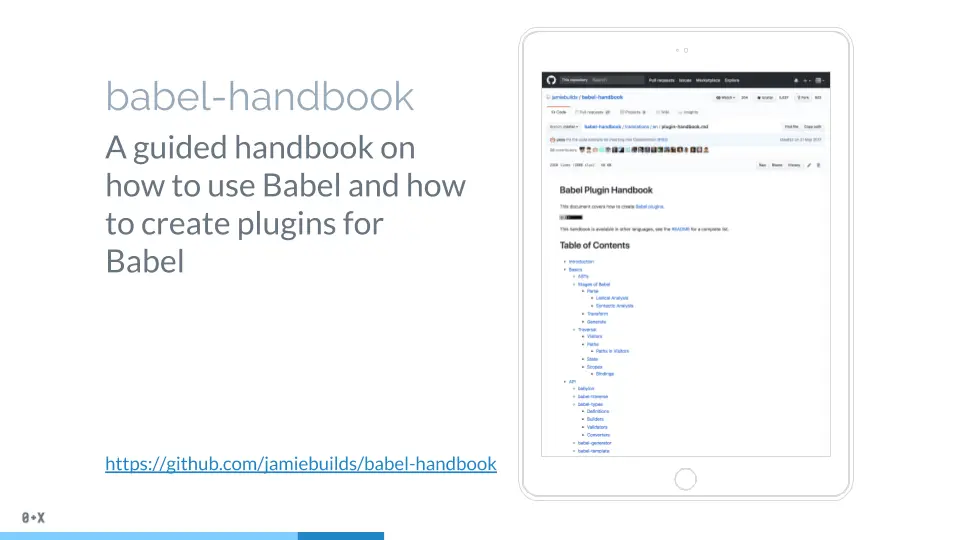
如果你想了解更多關於如何創建 babel-plugin,你可以查看 Babel-handbook。
AST 在 ESLint 中的運用
在正式寫 ESLint 插件前,你需要了解下 ESLint 的工作原理。其中 ESLint 使用方法大家應該都比較熟悉,這裏不做講解,不瞭解的可以點擊官方文檔 如何在項目中配置 ESLint。
在項目開發中,不同開發者書寫的源碼是各不相同的,那麼 ESLint 如何去分析每個人寫的源碼呢?
沒錯,就是 AST (Abstract Syntax Tree(抽象語法樹)),再祭上那張看了幾百遍的圖。
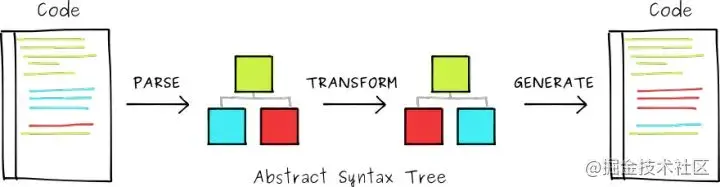
在 ESLint 中,默認使用 esprima 來解析 Javascript ,生成抽象語法樹,然後去 攔截 檢測是否符合我們規定的書寫方式,最後讓其展示報錯、警告或正常通過。 ESLint 的核心就是規則(rules),而定義規則的核心就是利用 AST 來做校驗。每條規則相互獨立,可以設置禁用off、警告warn⚠️和報錯error❌,當然還有正常通過不用給任何提示。
手把手教你寫Eslint插件
目標&涉及知識點
本文 ESLint 插件旨在校驗代碼註釋是否寫了註釋:
- 每個聲明式函數、函數表達式都需要註釋;
- 每個
interface頭部和字段都需要註釋; - 每個
enum頭部和字段都需要註釋; - 每個
type頭部都需要註釋; - ......
知識點
AST抽象語法樹ESLintMocha單元測試Npm發佈
腳手架搭建項目
這裏我們利用 yeoman 和 generator-eslint 來構建插件的腳手架代碼,安裝:
npm install -g yo generator-eslint本地新建文件夾eslint-plugin-pony-comments:
mkdir eslint-plugin-pony-comments
cd eslint-plugin-pony-comments命令行初始化ESLint插件的項目結構:
yo eslint:plugin下面進入命令行交互流程,流程結束後生成ESLint插件項目框架和文件
$ yo eslint:plugin
? What is your name? xxx // 作者
? What is the plugin ID? eslint-plugin-pony-comments // 插件名稱
? Type a short description of this plugin: 檢查代碼註釋 // 插件描述
? Does this plugin contain custom ESLint rules? (Y/n) Y
? Does this plugin contain custom ESLint rules? Yes // 這個插件是否包含自定義規則
? Does this plugin contain one or more processors? (y/N) N
? Does this plugin contain one or more processors? No // 該插件是否需要處理器
   create package.json
   create lib\index.js
   create README.md
此時文件的目錄結構為:
.
├── README.md
├── lib
│   ├── processors // 處理器,選擇不需要時沒有該目錄
│   ├── rules // 自定義規則目錄
│   └── index.js // 導出規則、處理器以及配置
├── package.json
└── tests
    ├── processors // 處理器,選擇不需要時沒有該目錄
    └── lib
        └── rules // 編寫規則的單元測試用例
安裝依賴:
npm install // 或者yarn至此,環境搭建完畢。
創建規則
以實現”每個interface頭部和字段都需要註釋“為例創建規則,終端執行:
yo eslint:rule // 生成默認 eslint rule 模版文件下面進入命令行交互流程:
$ yo eslint:rule
? What is your name? xxx // 作者
? Where will this rule be published? ESLint Plugin // 選擇生成插件模板
? What is the rule ID? no-interface-comments // 規則名稱
? Type a short description of this rule: 校驗interface註釋 // 規則描述
? Type a short example of the code that will fail:
   create docs\rules\no-interface-comments.md
   create lib\rules\no-interface-comments.js
   create tests\lib\rules\no-interface-comments.js
此時項目結構為:
.
├── README.md
├── docs // 説明文檔
│   └── rules
│       └── no-interface-comments.md
├── lib // eslint 規則開發
│   ├── index.js
│   └── rules // 此目錄下可以構建多個規則,本文只拿一個規則來講解
│       └── no-interface-comments.js
├── package.json
└── tests // 單元測試
    └── lib
        └── rules
            └── no-interface-comments.js
ESLint 中的每個規則都有三個以其標識符命名的文件(例如,no-interface-comments)。
- 在
lib/rules目錄中:一個源文件(例如,no-interface-comments.js) - 在
tests/lib/rules目錄中:一個測試文件(例如,no-interface-comments.js) - 在
docs/rules目錄中:一個Markdown文檔文件(例如,no-interface-comments)
在正式進入開發規則之前先來看看生成的規則模板 no-interface-comments.js:
/**
 * @fileoverview no-interface-comments
 * @author xxx
 */
"use strict";

//------------------------------------------------------------------------------
// Rule Definition
//------------------------------------------------------------------------------

module.exports = {
    meta: {
        docs: {
            description: "no console.time()",
            category: "Fill me in",
            recommended: false
        },
        fixable: null,  // or "code" or "whitespace"
        schema: [
            // fill in your schema
        ]
    },

    create: function(context) {

        // variables should be defined here

        //----------------------------------------------------------------------
        // Helpers
        //----------------------------------------------------------------------

        // any helper functions should go here or else delete this section

        //----------------------------------------------------------------------
        // Public
        //----------------------------------------------------------------------

        return {

            // give me methods

        };
    }
};
這個文件給出了書寫規則的模版,一個規則對應一個可導出的 node 模塊,它由 meta 和 create 兩部分組成。
meta:代表了這條規則的元數據,如其類別,文檔,可接收的參數的schema等等。create:如果説meta表達了我們想做什麼,那麼create則用表達了這條rule具體會怎麼分析代碼;
create 返回一個對象,其中最常見的鍵名是AST抽象語法樹中的選擇器,在該選擇器中,我們可以獲取對應選中的內容,隨後我們可以針對選中的內容作一定的判斷,看是否滿足我們的規則。如果不滿足,可用 context.report 拋出問題,ESLint 會利用我們的配置對拋出的內容做不同的展示。詳情參考:context.report
在編寫no-interface-comments規則之前,我們在AST Explorer看看interface代碼解析成AST的結構是怎麼樣的?
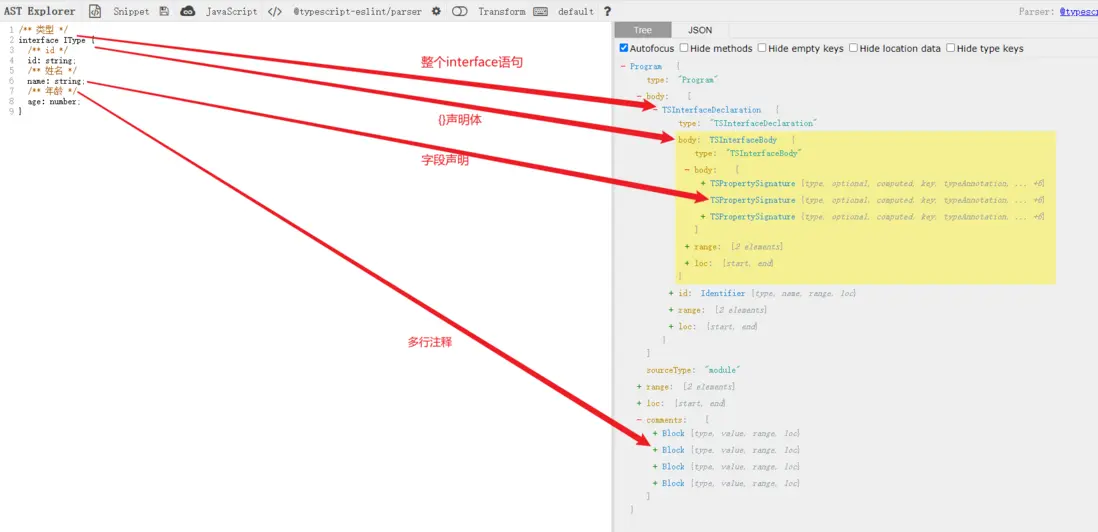
根據上面AST結構,我們創建兩個選擇器校驗代碼註釋,TSInterfaceDeclaration選擇器校驗interface頭部是否有註釋,TSPropertySignature選擇器校驗字段是否有註釋。遍歷AST可能需要用到以下API,詳情參考官網:
fixer.insertTextAfter(nodeOrToken, text)- 在給定的節點或標記之後插入文本fixer.insertTextBefore(nodeOrToken, text)- 在給定的節點或標記之前插入文本sourceCode.getAllComments()- 返回源代碼中所有註釋的數組context.getSourceCode()- 獲取源代碼
/**
 * @fileoverview interface定義類型註釋校驗
 * @author xxx
 */
'use strict';

const {
  docsUrl,
  getLastEle,
  getAllComments,
  judgeNodeType,
  getComments,
  genHeadComments,
  report,
  isTailLineComments,
  getNodeStartColumn,
  genLineComments,
} = require('../utils');

module.exports = {
  meta: {
    /**
     * 規則的類型
     * "problem" 意味着規則正在識別將導致錯誤或可能導致混淆行為的代碼。開發人員應將此視為優先解決的問題。
     * "suggestion" 意味着規則正在確定可以以更好的方式完成的事情,但如果不更改代碼,則不會發生錯誤。
     * "layout" 意味着規則主要關心空格、分號、逗號和括號,程序的所有部分決定了代碼的外觀而不是它的執行方式。這些規則適用於 AST 中未指定的部分代碼。
     */
    type: 'layout',
    docs: {
      description: 'interface定義類型註釋校驗', // 規則描述
      category: 'Fill me in',
      recommended: true, // 是配置文件中的"extends": "eslint:recommended"屬性是否啓用規則
      url: 'https://github.com/Revelation2019/eslint-plugin-pony-comments/tree/main/docs/rules/no-interface-comments.md', // 該規則對應在github上的文檔介紹
    },
    fixable: 'whitespace',  // or "code" or "whitespace"
    schema: [ // 指定選項,比如'pony-comments/no-interface-comments: [2, 'always', { leadingCommentType: 'Block', propertyComments: { pos: 'lead', commentsType: 'Block'}}]'
      {
        'enum': ['always', 'never'],
      },
      {
        'type': 'object',
        'properties': {
          /**
           * 是否需要頭部註釋
           * 'No':表示不需要頭部註釋
           * 'Line': 表示頭部需要單行註釋
           * 'Block':表示頭部需要多行註釋
           */
          'leadingCommentType': {
            'type': 'string',
          },
          /** 字段註釋採用單行還是多行註釋 */
          'propertyComments': {
            'type': 'object',
            'properties': {
              'pos': {
                'type': 'string', // lead || tail 表示註釋位置是行頭還是行尾
              },
              'commentsType': {
                'type': 'string', // No || Line || Block 表示註釋是單行還是多行,或者不需要註釋
              },
            },
          },
        },
        'additionalProperties': false,
      },
    ],
  },

  create: function(context) {
    // 獲取選項
    const options = context.options;
    const leadingCommentsType = options.length > 0 ? getLastEle(options).leadingCommentType : null;
    const propertyComments = options.length > 0 ? getLastEle(options).propertyComments : {};
    const { pos, commentsType } = propertyComments;
    /** 獲取所有的註釋節點 */
    const comments = getAllComments(context);
    // 有效的選項值
    const commentsTypeArr = ['No', 'Line', 'Block'];

    return {
      /** 校驗interface定義頭部註釋 */
      'TSInterfaceDeclaration': (node) => {
        /** 不需要頭部註釋 */
        if (leadingCommentsType === 'No' || !commentsTypeArr.includes(leadingCommentsType)) return;
        const { id } = node;
        const { name } = id;
        // 判斷interface的父節點是否是export
        if (judgeNodeType(node, 'ExportNamedDeclaration')) {
          /** export interface XXX {} */
          const { leading } = getComments(context, node.parent);
          if (!leading.length) {
            // 沒有頭部註釋,拋出斷言
            report(context, node.parent, '導出的類型頭部沒有註釋', genHeadComments(node.parent, name, leadingCommentsType));
          }
        } else {
          /** enum interface {} */
          const { leading } = getComments(context, node); // 獲取節點頭部和尾部註釋
          if (!leading.length) {
            // 沒有頭部註釋,拋出斷言
            report(context, node, '類型頭部沒有註釋', genHeadComments(node, name, leadingCommentsType));
          }
        }
      },
      /** 校驗interface定義字段註釋 */
      'TSPropertySignature': (node) => {
        if (commentsType === 'No' || !commentsTypeArr.includes(commentsType)) return;
        /** 避免 export const Main = (props: { name: string }) => {} */
        if (judgeNodeType(node, 'TSInterfaceBody')) {
          const { key } = node;
          const { name } = key;
          const { leading } = getComments(context, node); // 獲取節點頭部和尾部註釋
          const errorMsg = '類型定義的字段沒有註釋';
          if (isTailLineComments(comments, node) || (leading.length &&  getNodeStartColumn(getLastEle(leading)) === getNodeStartColumn(node))) {
            /**
             * 節點尾部已有註釋 或者 頭部有註釋並且註釋開頭與節點開頭列數相同
             * 這裏判斷節點開始位置column與註釋開頭位置column是因為getComments獲取到的頭部註釋可能是不是當前節點的,比如
             interface xxx {
                 id: string; // id
                 name: string; // name
             }
             leading拿到的是// id,但這個註釋不是name字段的
             */
            return;
          }
          // 根據選項報出斷言,並自動修復
          if (commentsType === 'Block' || (commentsType === 'Line' && pos === 'lead')) {
            // 自動添加行頭多行註釋
            report(context, node, errorMsg, genHeadComments(node, name, commentsType));
          } else {
            // 自動添加行尾單行註釋
            report(context, node, errorMsg, genLineComments(node, name));
          }
        }
      },
    };
  },
};
自動修復函數:
/**
 * @description 在函數頭部加上註釋
 * @param {Object} node 當前節點
 * @param {String} text 註釋內容
 * @returns
 */
const genHeadComments = (node, text, commentsType) => {
  if (!text) return null;
  const eol = require('os').EOL; // 獲取換行符,window是CRLF,linux是LF
  let content = '';
  if (commentsType && commentsType.toLowerCase === 'line') {
    content = `// ${text}${eol}`;
  } else if (commentsType && commentsType.toLowerCase === 'block') {
    content = `/** ${text} */${eol}`;
  } else {
    content = `/** ${text} */${eol}`;
  }
  return (fixer) => {
    return fixer.insertTextBefore(
      node,
      content,
    );
  };
};
/**
* @description 生成行尾單行註釋
* @param {Object} node 當前節點
* @param {String} value 註釋內容
* @returns
*/
const genLineComments = (node, value) => {
return (fixer) => {
return fixer.insertTextAfter(
node,
`// ${value}`,
);
};
};至此,no-interface-comments規則編寫就基本完成了
插件中的配置
您可以通過在configs指定插件對應的規則狀態,當您要提供一些支持它的自定義規則時,這會很有用。參考官網
// lib/index.js
module.exports = {
    configs: {
        recommended: {
            plugins: ['pony-comments'],
            parserOptions: {
                sourceType: 'module',
                ecmaVersion: 2018,
            },
            rules: {
                'pony-comments/no-interface-comments': [2, 'always', { leadingCommentType: 'Block', propertyComments: { pos: 'tail', commentsType: 'Line' } }],
            }
        },
    }
};
插件規則將可以通過extends配置繼承:
{
    "extends": ["plugin:pony-comments/recommended"]
}注意:請注意,默認情況下配置不會啓用任何插件規則,而是應視為獨立配置。這意味着您必須在plugins數組中指定您的插件名稱以及您要啓用的任何規則,這些規則是插件的一部分。任何插件規則都必須以短或長插件名稱作為前綴
創建處理器
處理器可以告訴 ESLint 如何處理 JavaScript 以外的文件,比如從其他類型的文件中提取 JavaScript 代碼,然後讓 ESLint 對 JavaScript 代碼進行 lint,或者處理器可以出於某種目的在預處理中轉換 JavaScript 代碼。參考官網
// 在lib/index.js中導出自定義處理器,或者將其抽離
module.exports = {
    processors: {
        "markdown": {
            // takes text of the file and filename
            preprocess: function(text, filename) {
                // here, you can strip out any non-JS content
                // and split into multiple strings to lint

                return [ // return an array of code blocks to lint
                    { text: code1, filename: "0.js" },
                    { text: code2, filename: "1.js" },
                ];
            },

            // takes a Message[][] and filename
            postprocess: function(messages, filename) {
                // `messages` argument contains two-dimensional array of Message objects
                // where each top-level array item contains array of lint messages related
                // to the text that was returned in array from preprocess() method

                // you need to return a one-dimensional array of the messages you want to keep
                return [].concat(...messages);
            },

            supportsAutofix: true // (optional, defaults to false)
        }
    }
};要在配置文件中指定處理器,請使用processor帶有插件名稱和處理器名稱的連接字符串的鍵(由斜槓)。例如,以下啓用pony-comments插件提供的markdown處理器:
{
    "plugins": ["pony-comments"],
    "processor": "pony-comments/markdown"
}要為特定類型的文件指定處理器,請使用overrides鍵和processor鍵的組合。例如,以下使用處理器pony-comments/markdown處理*.md文件。
{
    "plugins": ["pony-comments"],
    "overrides": [
        {
            "files": ["*.md"],
            "processor": "pony-comments/markdown"
        }
    ]
}處理器可能會生成命名代碼塊,例如0.js和1.js。ESLint 將這樣的命名代碼塊作為原始文件的子文件處理。您可以overrides在 config 部分為命名代碼塊指定其他配置。例如,以下strict代碼禁用.js以 markdown 文件結尾的命名代碼塊的規則。
{
    "plugins": ["pony-comments"],
    "overrides": [
        {
            "files": ["*.md"],
            "processor": "pony-comments/markdown"
        },
        {
            "files": ["**/*.md/*.js"],
            "rules": {
                "strict": "off"
            }
        }
    ]
}
ESLint 檢查命名代碼塊的文件路徑,如果任何overrides條目與文件路徑不匹配,則忽略那些。一定要加的overrides,如果你想皮棉比其他命名代碼塊的條目*.js。
文件擴展名處理器
如果處理器名稱以 開頭.,則 ESLint 將處理器作為文件擴展名處理器來處理,並自動將處理器應用於文件類型。人們不需要在他們的配置文件中指定文件擴展名的處理器。例如:
module.exports = {
    processors: {
        // This processor will be applied to `*.md` files automatically.
        // Also, people can use this processor as "plugin-id/.md" explicitly.
        ".md": {
            preprocess(text, filename) { /* ... */ },
            postprocess(messageLists, filename) { /* ... */ }
        }
    }
}
編寫單元測試
eslint.RuleTester是一個為 ESLint 規則編寫測試的實用程序。RuleTester構造函數接受一個可選的對象參數,它可以用來指定測試用例的默認值(官網)。例如,如果可以指定用@typescript-eslint/parser解析你的測試用例:
const ruleTester = new RuleTester({ parser: require.resolve('@typescript-eslint/parser') });當需要解析.tsx文件時,就需要指定特定的解析器,比如@typescript-eslint/parser,因為eslint服務默認使用的解析器是esprima,它不支持對typescript和react
如果在執行測試用例時報如下錯誤:
AssertionError [ERR_ASSERTION]: Parsers provided as strings to RuleTester must be absolute paths這是因為解析器需要用絕對路徑 配置 ESLint RuleTester 以使用 Typescript Parser
/**
 * @fileoverview interface定義類型註釋校驗
 * @author xxx
 */
'use strict';

const rule = require('../../../lib/rules/no-interface-comments');

const RuleTester = require('eslint').RuleTester;
const ruleTester = new RuleTester({
  parser: require.resolve('@typescript-eslint/parser'),
  parserOptions: {
    ecmaVersion: 2018,
    sourceType: 'module',
    ecmaFeatures: {
      jsx: true,
    },
    comment: true,
    useJSXTextNode: true,
  },
});
ruleTester.run('no-interface-comments', rule, {
  // 有效測試用例
  valid: [
    {
      code: `
        export const Main = (props: { name: string }) => {}
      `,
      options: ['always', { leadingCommentType: 'Block', propertyComments: { pos: 'lead', commentsType: 'Block' } }],
    },
    {
      code: `
        /** 類型 */
        export interface IType {
          id: string; // id
          name: string; // 姓名
          age: number; // 年齡
        }
      `,
      options: ['always', { leadingCommentType: 'Block', propertyComments: { pos: 'tail', commentsType: 'Line' } }],
    },
    {
      code: `
        /** 類型 */
        interface IType {
          /** id */
          id: string;
          /** 姓名 */
          name: string;
          /** 年齡 */
          age: number;
        }
      `,
      options: ['always', { leadingCommentType: 'Block', propertyComments: { pos: 'lead', commentsType: 'Block' } }],
    },
  ],
  // 無效測試用例
  invalid: [
    {
      code: `
        export interface IType {
          /** id */
          id: string;
          /** 姓名 */
          name: string;
          /** 年齡 */
          age: number;
        }
      `,
      errors: [{
        message: 'interface頭部必須加上註釋',
        type: 'TSInterfaceDeclaration',
      }],
      options: ['always', { leadingCommentType: 'Block', propertyComments: { pos: 'lead', commentsType: 'Block' } }],
      output: `
        /** 類型 */
        export interface IType {
          /** id */
          id: string;
          /** 姓名 */
          name: string;
          /** 年齡 */
          age: number;
        }
      `,
    },
    {
      code: `
        /** 類型 */
        interface IType {
          id: string;
          name: string;
          age: number;
        }
      `,
      errors: [{
        message: 'interface字段必須加上註釋',
        type: 'TSPropertySignature',
      }],
      options: ['always', { leadingCommentType: 'Block', propertyComments: { pos: 'lead', commentsType: 'Block' } }],
      output: `
        /** 類型 */
        interface IType {
          /** id */
          id: string;
          /** 姓名 */
          name: string;
          /** 年齡 */
          age: number;
        }
      `,
    },
  ],
});
當yarn test執行測試用例,控制枱輸出:
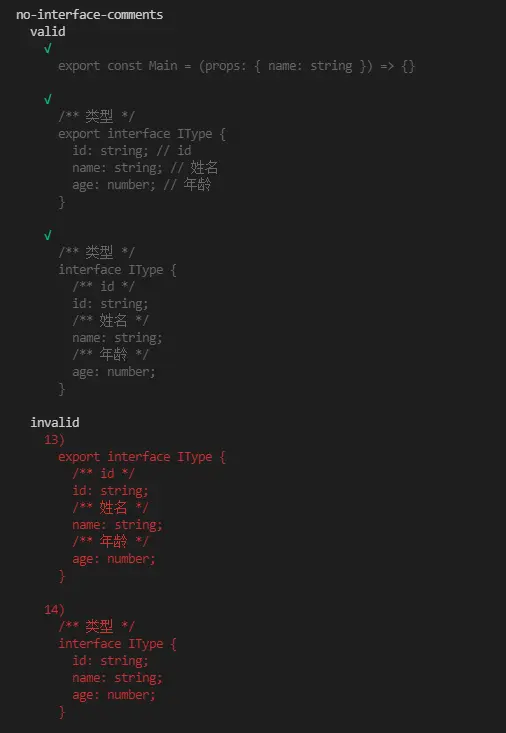
github傳送門:https://github.com/Revelation...
在VSCode中調試測試用例
依照下面流程在工程創建launch.json,會在根目錄下生成.vscode目錄
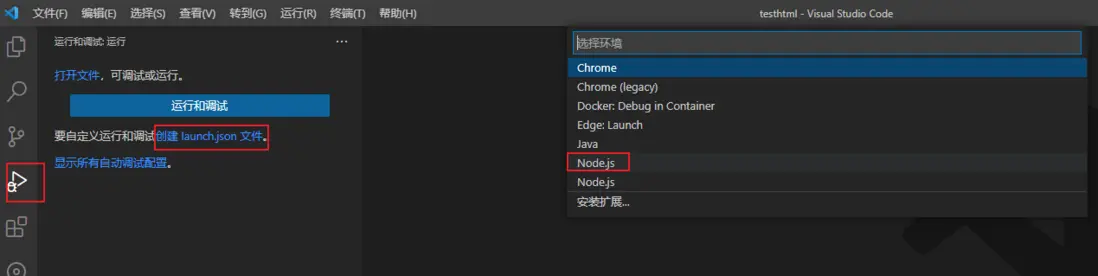
launch.json默認內容如下:
{
  // 使用 IntelliSense 瞭解相關屬性。
  // 懸停以查看現有屬性的描述。
  // 欲瞭解更多信息,請訪問: https://go.microsoft.com/fwlink/?linkid=830387
  "version": "0.2.0",
  "configurations": [
    {
      "type": "pwa-node",
      "request": "launch",
      "name": "Launch Program",
      "skipFiles": [
        "<node_internals>/**"
      ],
      "program": "${workspaceFolder}\\lib\\index.js" // debugger默認啓動的腳本
    }
  ]
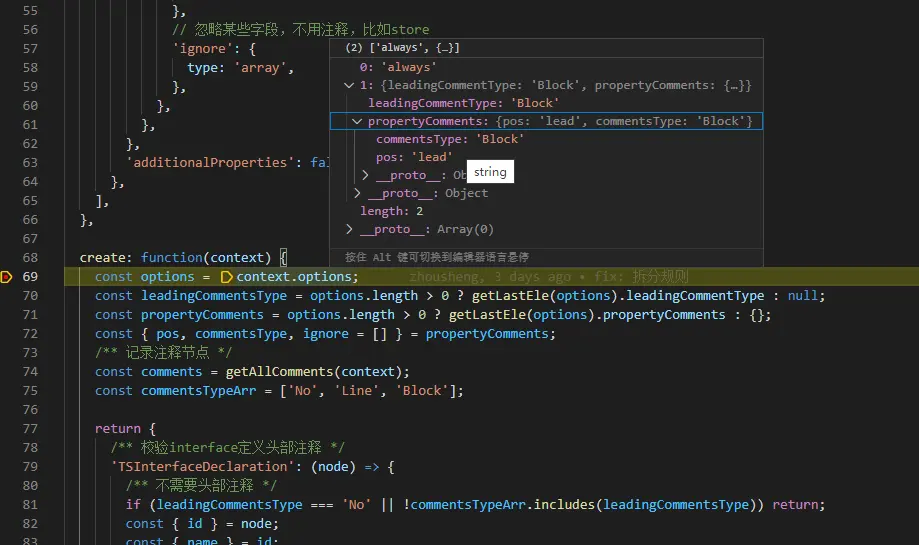
}這裏我們想調試no-interface-comments規則的測試用例,需做如下更改:
"program": "${workspaceFolder}\\tests\\lib\\rules\\no-interface-comments.js"然後,打斷點debugger就可以調試了
項目中使用
(1)安裝eslint-plugin-pony-comments
yarn add eslint-plugin-pony-comments -D(2)配置.eslintrc.json
{
  "extends": "plugin:@casstime/inquiry-eslint/recommended",
  "parser": "@typescript-eslint/parser",
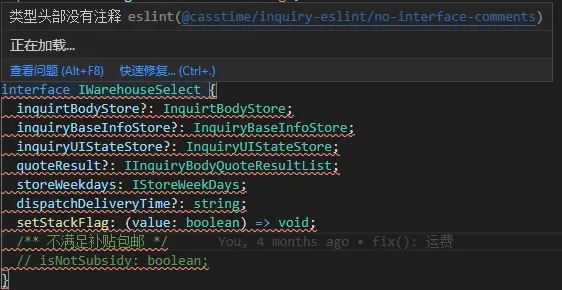
}(3)重啓項目,重啓eslint服務,檢視效果如下
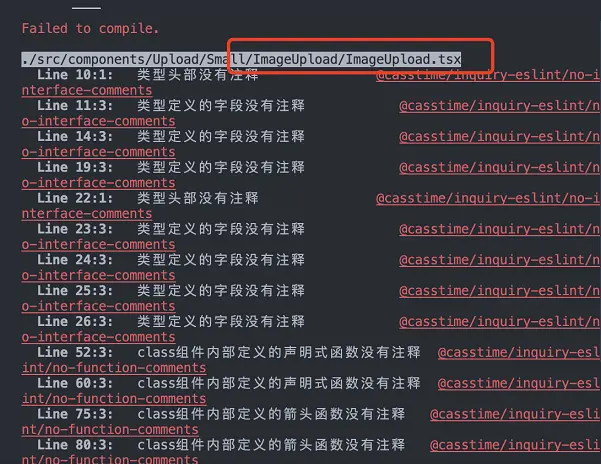
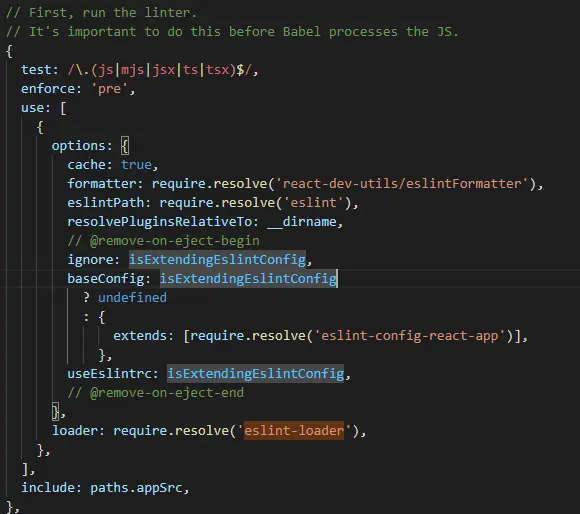
如果在yarn start啓動項目時報了很多未更改文件的校驗錯誤,這是因為create-react-app腳手架中默認配置了eslint-loader,在start或者build時會調用eslint去將所有文件檢視一遍,參考:https://v4.webpack.docschina....
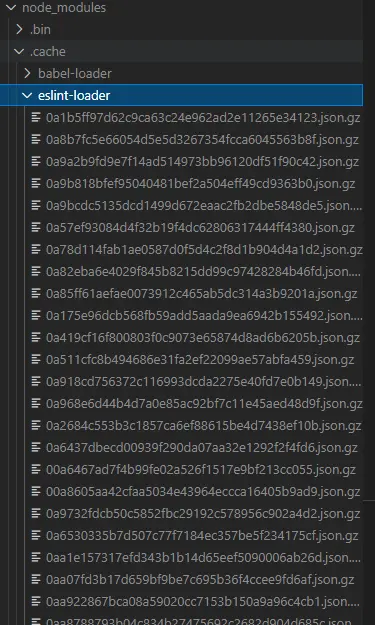
針對以上問題,這裏提供兩種解決辦法:
- 刪除
node_modules/.cache文件夾,然後重啓項目。這是因為eslint-loader默認啓動cache,將linting結果緩存寫入./node_modules/.cache目錄,這對於在進行完整構建時減少linting時間特別有用,但可能影響到start或者build時eslint的檢視
- 在根目錄下
config-overrides.js的override函數中添加config.module.rules.splice(1, 1);,因為編寫代碼和提交代碼時就會檢視,不用在項目啓動或者構建時再檢視一遍,直接幹掉eslint-loader
發佈
(1)npm 賬户登錄
npm login --registry=倉庫鏡像
# 輸入用户名/密碼/郵箱
(2)執行構建
yarn build(3)發佈
yarn publish --registry=倉庫鏡像如果報如下錯誤,可能是使用的郵箱不對

課外知識:Lint 簡史
Lint 是為了解決代碼不嚴謹而導致各種問題的一種工具。比如 == 和 === 的混合使用會導致一些奇怪的問題。
JSLint 和 JSHint
2002年,Douglas Crockford 開發了可能是第一款針對 JavaScript 的語法檢測工具 —— JSLint,並於 2010 年開源。
JSLint 面市後,確實幫助許多 JavaScript 開發者節省了不少排查代碼錯誤的時間。但是 JSLint 的問題也很明顯—— 幾乎不可配置,所有的代碼風格和規則都是內置好的;再加上 Douglas Crockford 推崇道系「愛用不用」的優良傳統,不會向開發者妥協開放配置或者修改他覺得是對的規則。於是 Anton Kovalyov 吐槽:「JSLint 是讓你的代碼風格更像 Douglas Crockford 的而已」,並且在 2011 年 Fork 原項目開發了 JSHint。《Why I forked JSLint to JSHint》
JSHint 的特點就是可配置,同時文檔也相對完善,而且對開發者友好。很快大家就從 JSLint 轉向了 JSHint。
ESLint 的誕生
後來幾年大家都將 JSHint 作為代碼檢測工具的首選,但轉折點在2013年,Zakas 發現 JSHint 無法滿足自己制定規則需求,並且和 Anton 討論後發現這根本不可能在JShint上實現,同時 Zakas 還設想發明一個基於 AST 的 lint。於是 2013年6月份,Zakas 發佈了全新 lint 工具——ESLint。《Introducing ESLint》
ESLint早期源碼:
var ast = esprima.parse(text, { loc: true, range: true }),
    walk = astw(ast);

walk(function(node) {
    api.emit(node.type, node);
});

return messages;
ESLint 的逆襲
ESLint 的出現並沒有撼動 JSHint 的霸主地位。由於前者是利用 AST 處理規則,用 Esprima 解析代碼,執行速度要比只需要一步搞定的 JSHint 慢很多;其次當時已經有許多編輯器對 JSHint 支持完善,生態足夠強大。真正讓 ESLint 逆襲的是 ECMAScript 6 的出現。
2015 年 6 月,ES2015 規範正式發佈。但是發佈後,市面上瀏覽器對最新標準的支持情況極其有限。如果想要提前體驗最新標準的語法,就得靠 Babel 之類的工具將代碼編譯成 ES5 甚至更低的版本,同時一些實驗性的特性也能靠 Babel 轉換。 但這時候的 JSHint 短期內無法提供支持,而 ESLint 卻只需要有合適的解析器就能繼續去 lint 檢查。Babel 團隊就為 ESLint 開發了一款替代默認解析器的工具,也就是現在我們所見到的 babel-eslint,它讓 ESLint 成為率先支持 ES6 語法的 lint 工具。
也是在 2015 年,React 的應用越來越廣泛,誕生不久的 JSX 也愈加流行。ESLint 本身也不支持 JSX 語法。但是因為可擴展性,eslint-plugin-react 的出現讓 ESLint 也能支持當時 React 特有的規則。
2016 年,JSCS 開發團隊認為 ESLint 和 JSCS 實現原理太過相似,而且需要解決的問題也都一致,最終選擇合併到 ESLint,並停止 JSCS 的維護。
當前市場上主流的 lint 工具以及趨勢圖:
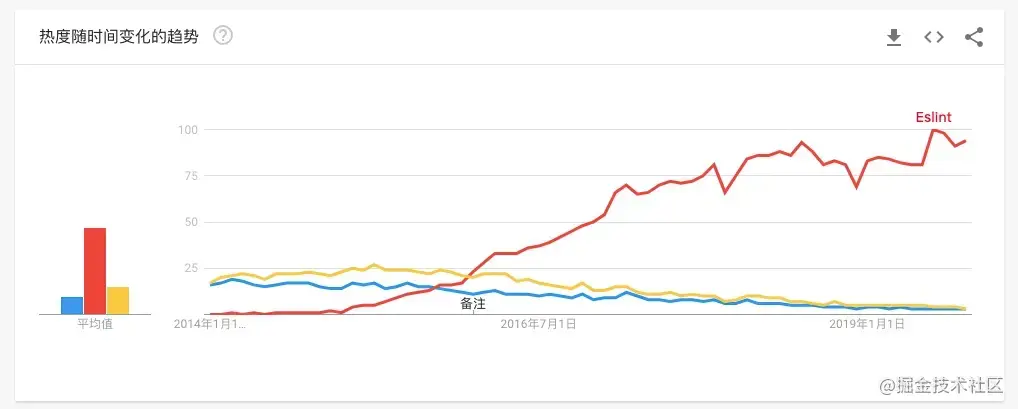
從此 ESLint 一統江湖,成為替代 JSHint 的前端主流工具。
參考:
平庸前端碼農之蜕變 — AST
【AST篇】手把手教你寫Eslint插件
配置 ESLint RuleTester 以使用 Typescript Parser
