

簡介
CommonsChunkPlugin主要是用來提取第三方庫和公共模塊,避免首屏加載的bundle文件或者按需加載的bundle文件體積過大,從而導致加載時間過長,着實是優化的一把利器。
先來説一下各種教程以及文檔中CommonsChunkPlugin提及到chunk有哪幾種,主要有以下三種:
webpack當中配置的入口文件(entry)是chunk,可以理解為entry chunk- 入口文件以及它的依賴文件通過
code split(代碼分割)出來的也是chunk,可以理解為children chunk - 通過
CommonsChunkPlugin創建出來的文件也是chunk,可以理解為commons chunk
CommonsChunkPlugin可配置的屬性:
name:可以是已經存在的chunk(一般指入口文件)對應的name,那麼就會把公共模塊代碼合併到這個chunk上;否則,會創建名字為name的commons chunk進行合併
* filename:指定commons chunk的文件名
* chunks:指定source chunk,即指定從哪些chunk當中去找公共模塊,省略該選項的時候,默認就是entry chunks
* minChunks:既可以是數字,也可以是函數,還可以是Infinity,具體用法和區別下面會説
children和async屬於異步中的應用,放在了最後講解。
可能這麼説,大家會雲裏霧裏,下面用demo來檢驗上面的屬性。
實戰應用
以下幾個demo主要是測試以下幾種情況:
- 不分離出第三方庫和自定義公共模塊
- 分離出第三方庫、自定義公共模塊、webpack運行文件,但它們在同一個文件中
- 單獨分離第三方庫、自定義公共模塊、webpack運行文件,各自在不同文件
不分離出第三方庫和自定義公共模塊
項目初始結構,後面打包後會生成dist目錄:

src目錄下各個文件內容都很簡潔的,如下:
common.js
export const common = 'common file';

first.js
import {common} from './common';
import $ from 'jquery';
console.log($,`first  ${common}`);

second.js
import {common} from './common';
import $ from 'jquery';
console.log($,`second ${common}`);
package.json文件:
{
  "name": "test",
  "version": "1.0.0",
  "description": "",
  "main": "index.js",
  "scripts": {
    "test": "echo \"Error: no test specified\" && exit 1",
    "build": "rimraf dist && webpack"
  },
  "author": "",
  "license": "ISC",
  "devDependencies": {
    "rimraf": "^2.6.2",
    "webpack": "^3.10.0",
    "webpack-dev-server": "^2.10.1"
  },
  "dependencies": {
    "jquery": "^3.2.1"
  }
}
webpack.config.js:
const path = require("path");
const webpack = require("webpack");

const config = {
    entry: {
        first: './src/first.js',
        second: './src/second.js'
    },
    output: {
        path: path.resolve(__dirname,'./dist'),
        filename: '[name].js'
    },
}

module.exports = config;接着在命令行npm run build,此時項目中多了dist目錄:

再來查看一下命令行中webpack的打包信息:

查看first.js和second.js,會發現共同引用的common.js文件和jquery都被打包進去了,這肯定不合理,公共模塊重複打包,體積過大。
分離出第三方庫、自定義公共模塊、webpack運行文件
這時候修改webpack.config.js新增一個入口文件vendor和CommonsChunkPlugin插件進行公共模塊的提取:
const path = require("path");
const webpack = require("webpack");
const packagejson = require("./package.json");

const config = {
    entry: {
        first: './src/first.js',
        second: './src/second.js',
        vendor: Object.keys(packagejson.dependencies)//獲取生產環境依賴的庫
    },
    output: {
        path: path.resolve(__dirname,'./dist'),
        filename: '[name].js'
    },
    plugins: [
        new webpack.optimize.CommonsChunkPlugin({
            name: 'vendor',
            filename: '[name].js'
        }),
    ]
}

module.exports = config;查看dist目錄下,新增了一個vendor.js的文件:

再來查看一下命令行中webpack的打包信息:

通過查看vendor.js文件,發現first.js和second.js文件中依賴的jquery和common.js都被打包進vendor.js中,同時還有webpack的運行文件。總的來説,我們初步的目的達到,提取公共模塊,但是它們都在同一個文件中。
到這裏,肯定有人希望自家的vendor.js純白無瑕,只包含第三方庫,不包含自定義的公共模塊和webpack運行文件,又或者希望包含第三方庫和公共模塊,不包含webpack運行文件。
其實,這種想法是對,特別是分離出webpack運行文件,因為每次打包webpack運行文件都會變,如果你不分離出webpack運行文件,每次打包生成vendor.js對應的哈希值都會變化,導致vendor.js改變,但實際上你的第三方庫其實是沒有變,然而瀏覽器會認為你原來緩存的vendor.js就失效,要重新去服務器中獲取,其實只是webpack運行文件變化而已,就要人家重新加載,好冤啊~
OK,接下來就針對這種情況來測試。
單獨分離出第三方庫、自定義公共模塊、webpack運行文件
這裏我們分兩步走:
先單獨抽離出webpack運行文件
接着單獨抽離第三方庫和自定義公共模塊,這裏利用minChunks有兩種方法可以完成,往後看就知道了
1、抽離webpack運行文件
這裏解釋一下什麼是webpack運行文件:
/******/ (function(modules) { // webpackBootstrap
/******/     // install a JSONP callback for chunk loading
/******/     var parentJsonpFunction = window["webpackJsonp"];
/******/     window["webpackJsonp"] = function webpackJsonpCallback(chunkIds, moreModules, executeModules) {
/******/         // add "moreModules" to the modules object,
/******/         // then flag all "chunkIds" as loaded and fire callback
/******/         var moduleId, chunkId, i = 0, resolves = [], result;
/******/         for(;i < chunkIds.length; i++) {
/******/             chunkId = chunkIds[i];
/******/             if(installedChunks[chunkId]) {
/******/                 resolves.push(installedChunks[chunkId][0]);
/******/             }
/******/             installedChunks[chunkId] = 0;
/******/         }
/******/         for(moduleId in moreModules) {
/******/             if(Object.prototype.hasOwnProperty.call(moreModules, moduleId)) {
/******/                 modules[moduleId] = moreModules[moduleId];
/******/             }
/******/         }
/******/         if(parentJsonpFunction) parentJsonpFunction(chunkIds, moreModules, executeModules);
/******/         while(resolves.length) {
/******/             resolves.shift()();
/******/         }
/******/         if(executeModules) {
/******/             for(i=0; i < executeModules.length; i++) {
/******/                 result = __webpack_require__(__webpack_require__.s = executeModules[i]);
/******/             }
/******/         }
/******/         return result;
/******/     };
/******/
/******/     // The module cache
/******/     var installedModules = {};
/******/
/******/     // objects to store loaded and loading chunks
/******/     var installedChunks = {
/******/         5: 0
/******/     };
/******/
/******/     // The require function
/******/     function __webpack_require__(moduleId) {
/******/
/******/         // Check if module is in cache
/******/         if(installedModules[moduleId]) {
/******/             return installedModules[moduleId].exports;
/******/         }
/******/         // Create a new module (and put it into the cache)
/******/         var module = installedModules[moduleId] = {
/******/             i: moduleId,
/******/             l: false,
/******/             exports: {}
/******/         };
/******/
/******/         // Execute the module function
/******/         modules[moduleId].call(module.exports, module, module.exports, __webpack_require__);
/******/
/******/         // Flag the module as loaded
/******/         module.l = true;
/******/
/******/         // Return the exports of the module
/******/         return module.exports;
/******/     }
/******/
/******/     // This file contains only the entry chunk.
/******/     // The chunk loading function for additional chunks
/******/     __webpack_require__.e = function requireEnsure(chunkId) {
/******/         var installedChunkData = installedChunks[chunkId];
/******/         if(installedChunkData === 0) {
/******/             return new Promise(function(resolve) { resolve(); });
/******/         }
/******/
/******/         // a Promise means "currently loading".
/******/         if(installedChunkData) {
/******/             return installedChunkData[2];
/******/         }
/******/
/******/         // setup Promise in chunk cache
/******/         var promise = new Promise(function(resolve, reject) {
/******/             installedChunkData = installedChunks[chunkId] = [resolve, reject];
/******/         });
/******/         installedChunkData[2] = promise;
/******/
/******/         // start chunk loading
/******/         var head = document.getElementsByTagName('head')[0];
/******/         var script = document.createElement('script');
/******/         script.type = "text/javascript";
/******/         script.charset = 'utf-8';
/******/         script.async = true;
/******/         script.timeout = 120000;
/******/
/******/         if (__webpack_require__.nc) {
/******/             script.setAttribute("nonce", __webpack_require__.nc);
/******/         }
/******/         script.src = __webpack_require__.p + "static/js/" + ({"3":"comC"}[chunkId]||chunkId) + "." + chunkId + "." + {"0":"3c977d2f8616250b1d4b","3":"c00ef08d6ccd41134800","4":"d978dc43548bed8136cb"}[chunkId] + ".js";
/******/         var timeout = setTimeout(onScriptComplete, 120000);
/******/         script.onerror = script.onload = onScriptComplete;
/******/         function onScriptComplete() {
/******/             // avoid mem leaks in IE.
/******/             script.onerror = script.onload = null;
/******/             clearTimeout(timeout);
/******/             var chunk = installedChunks[chunkId];
/******/             if(chunk !== 0) {
/******/                 if(chunk) {
/******/                     chunk[1](new Error('Loading chunk ' + chunkId + ' failed.'));
/******/                 }
/******/                 installedChunks[chunkId] = undefined;
/******/             }
/******/         };
/******/         head.appendChild(script);
/******/
/******/         return promise;
/******/     };
/******/
/******/     // expose the modules object (__webpack_modules__)
/******/     __webpack_require__.m = modules;
/******/
/******/     // expose the module cache
/******/     __webpack_require__.c = installedModules;
/******/
/******/     // define getter function for harmony exports
/******/     __webpack_require__.d = function(exports, name, getter) {
/******/         if(!__webpack_require__.o(exports, name)) {
/******/             Object.defineProperty(exports, name, {
/******/                 configurable: false,
/******/                 enumerable: true,
/******/                 get: getter
/******/             });
/******/         }
/******/     };
/******/
/******/     // getDefaultExport function for compatibility with non-harmony modules
/******/     __webpack_require__.n = function(module) {
/******/         var getter = module && module.__esModule ?
/******/             function getDefault() { return module['default']; } :
/******/             function getModuleExports() { return module; };
/******/         __webpack_require__.d(getter, 'a', getter);
/******/         return getter;
/******/     };
/******/
/******/     // Object.prototype.hasOwnProperty.call
/******/     __webpack_require__.o = function(object, property) { return Object.prototype.hasOwnProperty.call(object, property); };
/******/
/******/     // __webpack_public_path__
/******/     __webpack_require__.p = "/";
/******/
/******/     // on error function for async loading
/******/     __webpack_require__.oe = function(err) { console.error(err); throw err; };
/******/ })
/************************************************************************/
/******/ ([]);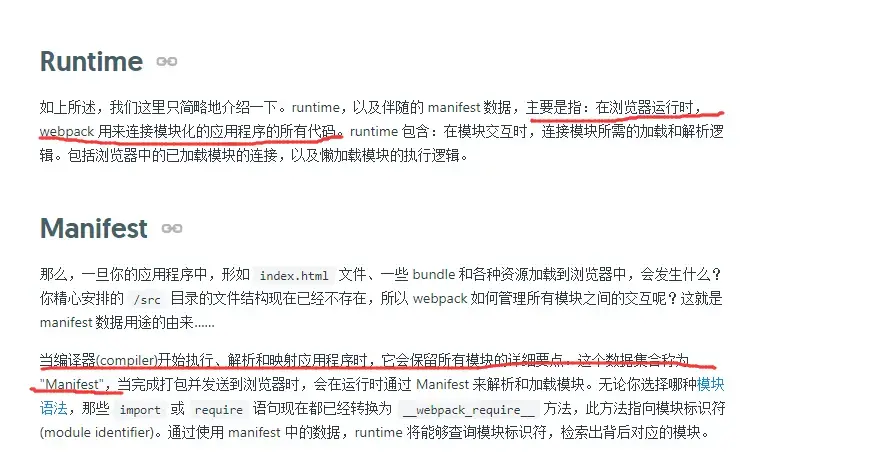
上面就是抽離出來的webpack運行時代碼,其實這裏,webpack幫我們定義了一個webpack\_require的加載模塊的方法,而manifest模塊數據集合就是對應代碼中的 installedModules 。每當我們在main.js入口文件引入一模塊,installModules就會發生變化,當我們頁面點擊跳轉,加載對應模塊就是通過\_\_webpack\_require\_\_方法在installModules中找對應模塊信息,進行加載
參考:https://www.jianshu.com/p/95752b101582
先來抽離webpack運行文件,修改webpack配置文件:
plugins: [
        new webpack.optimize.CommonsChunkPlugin({
            name: ['vendor','runtime'],
            filename: '[name].js'
        }),
    ]
其實上面這段代碼,等價於下面這段:
 plugins: [
        new webpack.optimize.CommonsChunkPlugin({
            name: 'vendor',
            filename: '[name].js'
        }),
        new webpack.optimize.CommonsChunkPlugin({
            name: 'runtime',
            filename: '[name].js',
            chunks: ['vendor']
        }),
]上面兩段抽離webpack運行文件代碼的意思是創建一個名為runtime的commons chunk進行webpack運行文件的抽離,其中source chunks是vendor.js。
查看dist目錄下,新增了一個runtime.js的文件,其實就是webpack的運行文件:

再來查看一下命令行中webpack的打包信息,你會發現vendor.js的體積已經減小,説明已經把webpack運行文件提取出來了:

可是,vendor.js中還有自定義的公共模塊common.js,人家只想vendor.js擁有項目依賴的第三方庫而已(這裏是jquery),這個時候把minChunks這個屬性引進來。
minChunks可以設置為數字、函數和Infinity,默認值是2,並不是官方文檔説的入口文件的數量,下面解釋下minChunks含義:
- 數字:模塊被多少個
chunk公共引用才被抽取出來成為commons chunk - 函數:接受 (
module, count) 兩個參數,返回一個布爾值,你可以在函數內進行你規定好的邏輯來決定某個模塊是否提取成為commons chunk Infinity:只有當入口文件(entry chunks) >= 3 才生效,用來在第三方庫中分離自定義的公共模塊
2、抽離第三方庫和自定義公共模塊
要在vendor.js中把第三方庫單獨抽離出來,上面也説到了有兩種方法。
第一種方法minChunks設為Infinity,修改webpack配置文件如下:
plugins: [
        new webpack.optimize.CommonsChunkPlugin({
            name: ['vendor','runtime'],
            filename: '[name].js',
            minChunks: Infinity
        }),
        new webpack.optimize.CommonsChunkPlugin({
            name: 'common',
            filename: '[name].js',
            chunks: ['first','second']//從first.js和second.js中抽取commons chunk
        }),
]查看dist目錄下,新增了一個common.js的文件:

再來查看一下命令行中webpack的打包信息,自定義的公共模塊分離出來:

這時候的vendor.js就純白無瑕,只包含第三方庫文件,common.js就是自定義的公共模塊,runtime.js就是webpack的運行文件。
第二種方法把它們分離開來,就是利用minChunks作為函數的時候,説一下minChunks作為函數兩個參數的含義:
module:當前chunk及其包含的模塊count:當前chunk及其包含的模塊被引用的次數
minChunks作為函數會遍歷每一個入口文件及其依賴的模塊,返回一個布爾值,為true代表當前正在處理的文件(module.resource)合併到commons chunk中,為false則不合並。
繼續修改我們的webpack配置文件,把vendor入口文件註釋掉,用minChunks作為函數實現vendor只包含第三方庫,達到和上面一樣的效果:
const config = {
    entry: {
        first: './src/first.js',
        second: './src/second.js',
        //vendor: Object.keys(packagejson.dependencies)//獲取生產環境依賴的庫
    },
    output: {
        path: path.resolve(__dirname,'./dist'),
        filename: '[name].js'
    },
     plugins: [
        new webpack.optimize.CommonsChunkPlugin({
            name: 'vendor',
            filename: '[name].js',
            minChunks: function (module,count) {
                console.log(module.resource,`引用次數${count}`);
                //"有正在處理文件" + "這個文件是 .js 後綴" + "這個文件是在 node_modules 中"
                return (
                    module.resource &&
                    /\.js$/.test(module.resource) &&
                    module.resource.indexOf(path.join(__dirname, './node_modules')) === 0
                )
            }
        }),
        new webpack.optimize.CommonsChunkPlugin({
            name: 'runtime',
            filename: '[name].js',
            chunks: ['vendor']
        }),
    ]
}上面的代碼其實就是生成一個叫做vendor的commons chunk,那麼有哪些模塊會被加入到vendor中呢?就對入口文件及其依賴的模塊進行遍歷,如果該模塊是js文件並且在node_modules中,就會加入到vendor當中,其實這也是一種讓vendor只保留第三方庫的辦法。
再來查看一下命令行中webpack的打包信息:

你會發現,和上面minChunks設為Infinity的結果是一致的。
children和async屬性
這兩個屬性主要是在code split(代碼分割)和異步加載當中應用。
-
children- 指定為
true的時候,就代表source chunks是通過entry chunks(入口文件)進行code split出來的children chunks children和chunks不能同時設置,因為它們都是指定source chunks的children可以用來把entry chunk創建的children chunks的共用模塊合併到自身,但這會導致初始加載時間較長
- 指定為
* async:即解決children:true時合併到entry chunks自身時初始加載時間過長的問題。async設為true時,commons chunk 將不會合併到自身,而是使用一個新的異步的commons chunk。當這個children chunk 被下載時,自動並行下載該commons chunk
修改webpack配置文件,增加chunkFilename,如下:
output: {
        ...........
        chunkFilename: "[name].[hash:5].chunk.js",
    },
plugins: [
    new webpack.optimize.CommonsChunkPlugin({
        name: ['vendor','runtime'],
        filename: '[name].js',
        minChunks: Infinity
    }),
   new webpack.optimize.CommonsChunkPlugin({
        children: true,
        async: 'children-async'
    })
]chunkFilename用來指定異步加載的模塊名字,異步加載模塊中的共同引用到的模塊就會被合併到async中指定名字,上面就是children-async。
修改成異步截圖出來太麻煩了,就簡單説明一下:first和second是異步加載模塊,同時它們共同引用了common.js這個模塊,如果你不設置這一步:
 new webpack.optimize.CommonsChunkPlugin({
        children: true,
        async: 'children-async'
})那麼共同引用的common.js都被打包進各自的模塊當中,就重複打包了。
OK,你設置之後,也得看children的臉色怎麼來劃分:
children為true,共同引用的模塊就會被打包合併到名為children-async的公共模塊,當你懶加載first或者second的時候並行加載這和children-async公共模塊children為false,共同引用的模塊就會被打包到首屏加載的app.bundle當中,這就會導致首屏加載過長了,而且也不要用到,所以最好還是設為true
瀏覽器緩存的實現
先來説一下哈希值的不同:
hash是build-specific,即每次編譯都不同——適用於開發階段chunkhash是chunk-specific,是根據每個chunk的內容計算出的hash——適用於生產
所以,在生產環境,要把文件名改成'[name].[chunkhash]',最大限度的利用瀏覽器緩存。
最後,寫這篇文章,自己測試了很多demo,當然不可能全部貼上,但還是希望自己多動手測試以下,真的坑中帶坑。
也參考了很多文章:
https://github.com/creeperyan...
https://segmentfault.com/q/10...
https://segmentfault.com/q/10...
https://www.jianshu.com/p/2b8...

