

背景
公司前端技術棧還處於React+Mobx與Spring MVC(freemarker+jQuery)共存的階段,兩種技術棧頁面難免會存在一些相同的業務功能,如果分別開發和維護,需要投入較大人力成本,因此,我們嘗試將React業務組件應用於Spring MVC項目,一處開發多處使用,降低不必要的成本投入。
應用
一、簡單封裝組件掛載與卸載方法
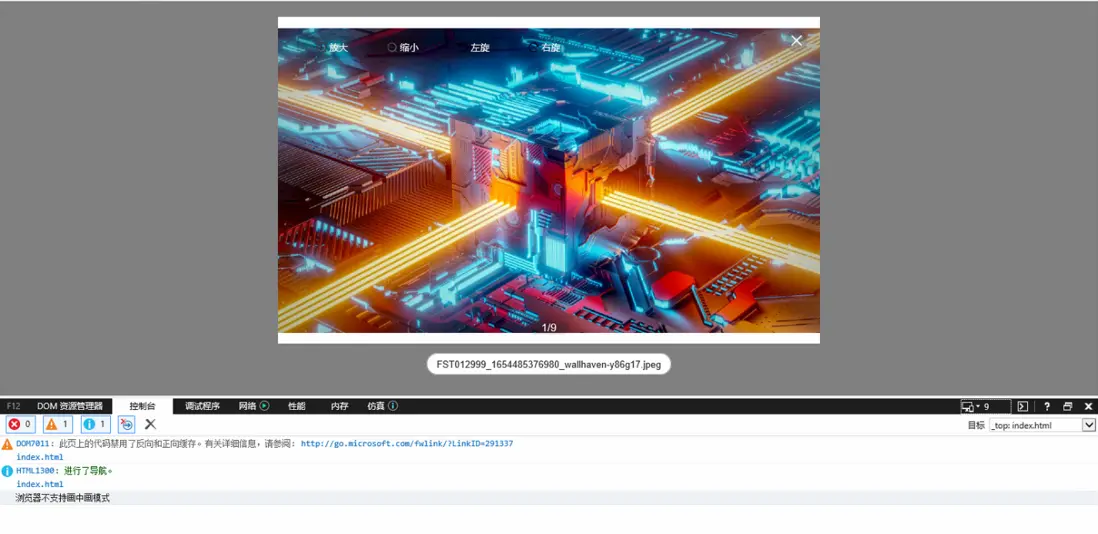
Spring MVC是面向DOM api的編程,需要給組件封裝掛載和卸載的方法。React業務組件可以利用react-dom中的render方法掛載到對應的容器元素上,利用unmountComponentAtNode方法卸載掉容器元素下的元素。
// 引入polyfill,後面會將為什麼不用@babel/polyfill
import 'react-app-polyfill/ie9';
import 'react-app-polyfill/stable';
import React from 'react';
import ReactDOM from 'react-dom';
import { MediaPreview } from './src/MediaPreview';

// 引入組件庫全部樣式,後面會做css tree shaking處理
import '@casstime/bricks/dist/bricks.development.css';
import './styles/index.scss';

;(function () {
  window.MediaPreview = (props, container) => {
    return {
      // 卸載
      close: function () {
        ReactDOM.unmountComponentAtNode(container);
      },
      // 掛載
      open: function (activeIndex) {
        ReactDOM.render(React.createElement(MediaPreview, { ...props, visible: true, activeIndex: activeIndex || 0 }), container);
        // 或者
        // ReactDOM.render(<MediaPreview {...{ ...props, visible: true, activeIndex: activeIndex || 0 }} />, container);
      },
    };
  };
})();二、babel轉譯成ES5語法規範,polyfill處理兼容性api
babel在轉譯的時候,會將源代碼分成syntax和api兩部分來處理
syntax:類似於展開對象、optional chain、let、const等語法;api:類似於[1,2,3].includes、new URL(),new URLSearchParams()、new Map()等函數、方法;
babel很輕鬆就轉譯好syntax,但對於api並不會做任何處理,如果在不支持這些api的瀏覽器中運行,就會報錯,因此需要使用polyfill來處理api,處理兼容性api有以下方案:
@babel/preset-env中有一個配置選項useBuiltIns,用來告訴babel如何處理api。由於這個選項默認值為false,即不處理api
- 設置
useBuiltIns為“entry”,在入口文件最上方引入@babel/polyfill;或者不設置useBuiltIns和設置useBuiltIns為false,在webpack entry添加@babel/polyfill。這種配置下,babel會將所有的polyfill全部引入,構建產物體積會很大,需要啓用tree shaking清除沒有使用的代碼; - 啓用按需加載,將
useBuiltIns改成“usage”,babel就可以按需加載polyfill,並且不需要手動引入@babel/polyfill,但依然需要安裝它; - 上述兩種方法存在兩個問題,①
polyfill注入的方法會改變全局變量的原型(篡改原型鏈),可能帶來意料之外的問題。② 轉譯syntax時,會注入一些輔助函數來幫忙轉譯,這些helper函數會在每個需要轉譯的文件中定義一份,導致最終的產物含有大量重複的helper。因此,引入@babel/plugin-transform-runtime將helper和api都改為從一個統一的地方引入,並且引入的對象和全局變量是完全隔離的,既不會篡改原型鏈,亦不會出現重複的helper; - 在入口文件最上方或者
webpack entry引入react-app-polyfill,啓用tree shaking;
方案一:全量引入@babel/polyfill,啓用tree shaking
入口文件添加@babel/polyfill
// index.tsx
import '@babel/polyfill';
// coding...根目錄配置babel.config.json
{
  "presets": [
    [
      "@babel/preset-env",
      {
        "targets": {
          "chrome": "58",
          "ie": "9"
        }
      },
      "useBuiltIns": "entry",
      "corejs": "3" // 指定core-js版本,core-js提供各種墊片
    ],
    "@babel/preset-react",
    "@babel/preset-typescript"
  ],
  "plugins": []
}如果在執行構建時報如下警告,表示在使用useBuiltIns選項時沒有指定core-js版本
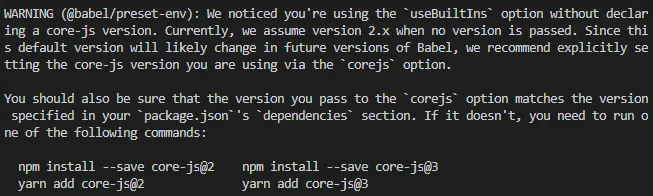
webpack.config.js配置
/* eslint-disable @typescript-eslint/no-var-requires */
const package = require('./package.json');
const path = require('path');

module.exports = {
  mode: 'production',
  entry: [
    './index.tsx',
  ],
  output: {
    path: __dirname + '/dist',
    filename: `media-preview.v${package.version}.min.js`,
    library: {
      type: 'umd',
    },
  },
  module: {
    rules: [
      {
        test: /\.(m?js|ts|js|tsx|jsx)$/,
        exclude: /(node_modules|lib|dist)/,
        use: [
          {
            loader: 'babel-loader',
            options: {
              cacheDirectory: true,
            },
          },
        ],
      },
      {
        test: /\.(scss|css|less)/,
        use: [
          'style-loader',
          'css-loader',
          'sass-loader',
        ],
      },
      {
        test: /\.(png|jpg|jepg|gif)$/i,
        use: [
          {
            loader: 'url-loader',
            options: {
              limit: 8 * 1024 * 1024, // 大小超過8M就不使用base64編碼了
              name: 'static/media/[name].[hash:8].[ext]',
              fallback: require.resolve('file-loader'),
            },
          },
        ],
      },
      {
        test: /\.(woff(2)?|ttf|eot|svg)(\?v=\d+\.\d+\.\d+)?$/,
        use: [
          {
            loader: 'url-loader',
            options: {
              limit: 8 * 1024 * 1024,
              name: 'static/fonts/[name].[hash:8].[ext]',
              fallback: require.resolve('file-loader'),
            },
          },
        ],
      },
    ],
  },
  plugins: [],
  resolve: {
    extensions: ['.ts', '.tsx', '.js', '.json'],
  },
};構建生成的產物含有一堆圖片和字體文件,並且都重複了雙份,其實期望的結果是這些資源都被base64編碼在代碼中,但沒有生效。
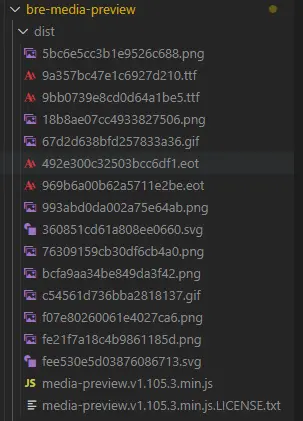
原因是當在 webpack 5 中使用舊的 assets loader(如 file-loader/url-loader/raw-loader 等)和 asset 模塊時,你可能想停止當前 asset 模塊的處理,並再次啓動處理,這可能會導致 asset 重複,你可以通過將 asset 模塊的類型設置為 'javascript/auto' 來解決。
module.exports = {
  module: {
   rules: [
      {
        test: /\.(png|jpg|jepg|gif)$/i,
        use: [
          {
            loader: 'url-loader',
            options: {
              limit: 8 * 1024 * 1024, // 大小超過8M就不使用base64編碼了
              name: 'static/media/[name].[hash:8].[ext]',
              fallback: require.resolve('file-loader'),
            },
          },
        ],
        type: 'javascript/auto',
      },
      {
        test: /\.(woff(2)?|ttf|eot|svg)(\?v=\d+\.\d+\.\d+)?$/,
        use: [
          {
            loader: 'url-loader',
            options: {
              limit: 8 * 1024 * 1024,
              name: 'static/fonts/[name].[hash:8].[ext]',
              fallback: require.resolve('file-loader'),
            },
          },
        ],
        type: 'javascript/auto',
      },
   ]
  },
}
傳送門:資源模塊(asset module)
再次構建,生成的產物在IE瀏覽器中應用會報語法錯誤,代碼中有使用箭頭函數語法。不是説babel會將高級語法轉譯成ES5語法嗎?為什麼還會出現語法錯誤呢?
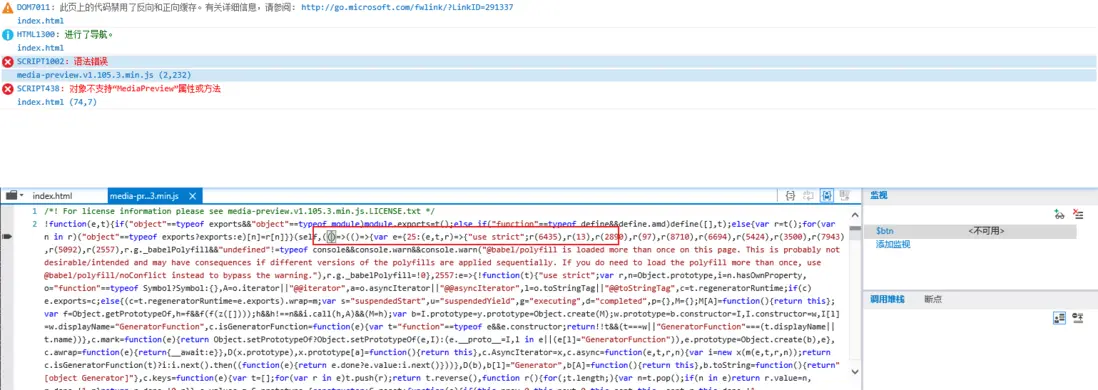
這是因為webpack注入的運行時代碼默認是按web平台構建編譯的,但是編譯的語法版本不是ES5,因此需要告知 webpack 為目標(target)指定一個環境
module.exports = {
  // ...
  target: ['web', 'es5'], // Webpack 將生成 web 平台的運行時代碼,並且只使用 ES5 相關的特性
};
傳送門:構建目標(Targets)
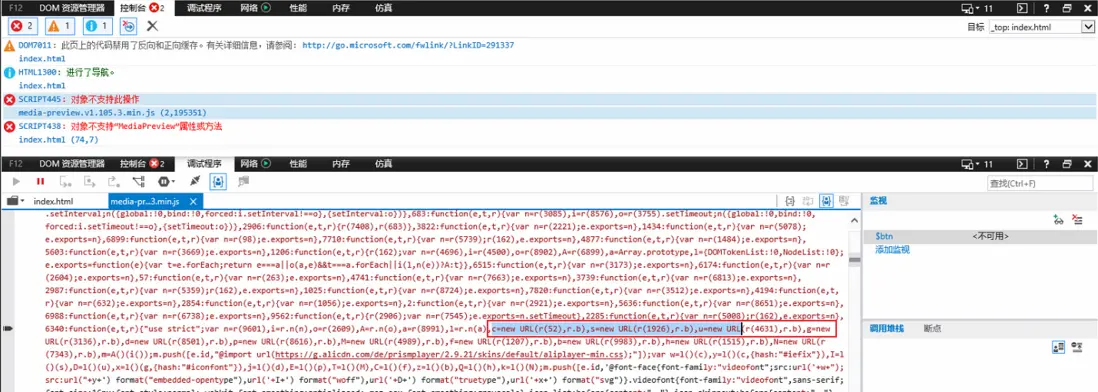
再次構建,IE瀏覽器運行,出現另外問題,IE瀏覽器不支持new URL構造函數,為什麼呢?@babel/polyfill不是會處理具有兼容性問題的api嗎?
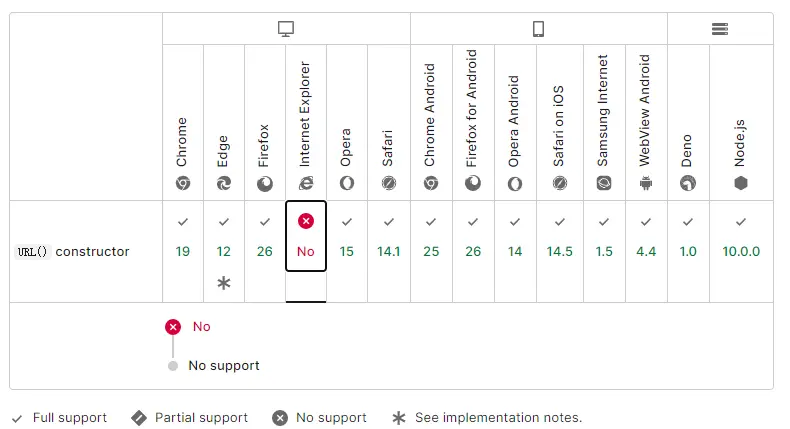
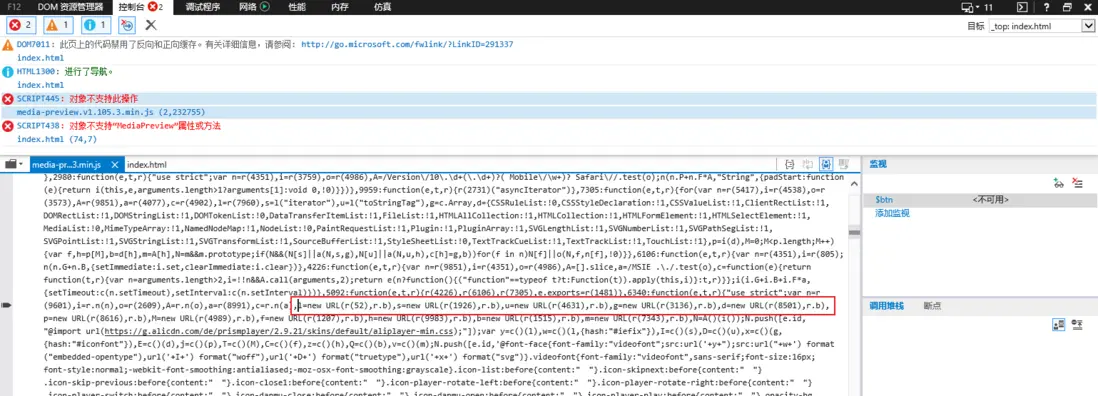
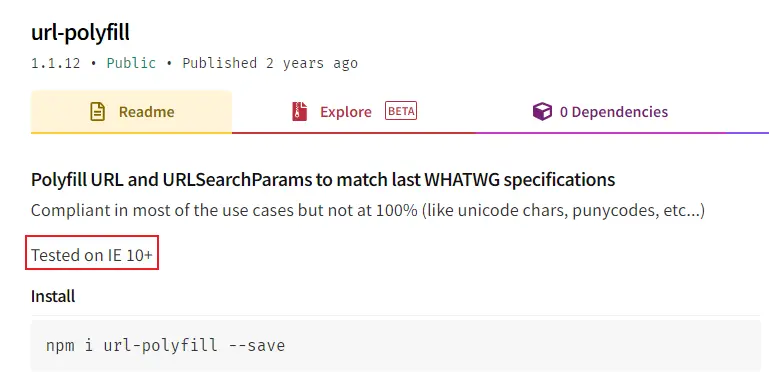
原因在於@babel/polyfill中core-js部分並沒有提供URL構造函數的墊片,自行安裝URL墊片庫url-polyfill,在入口文件或者webpack entry引入它,再次構建
module.exports = {
  // ...
  entry: ['url-polyfill', './index.tsx'],
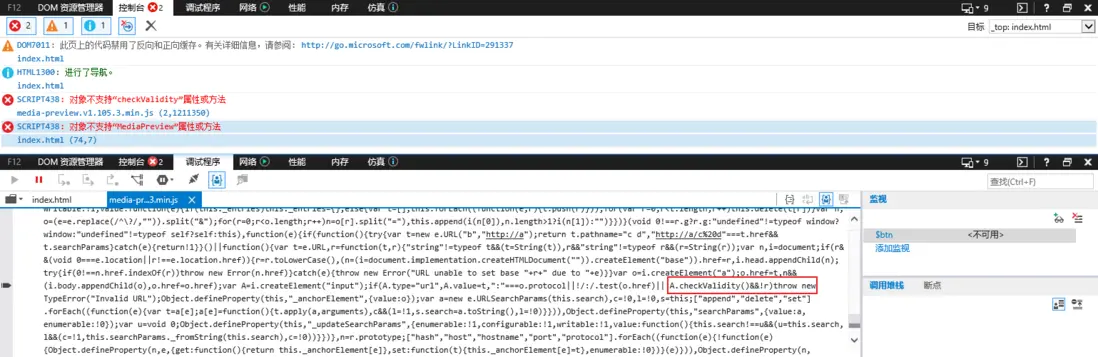
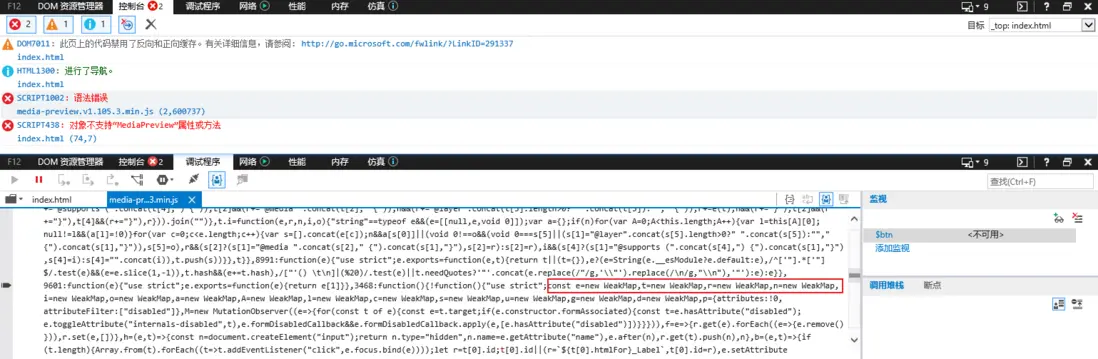
};在IE10和IE11運行正常,但是在IE9會報錯,原因是url-polyfill使用了IE9不支持的“checkValidity”屬性或方法

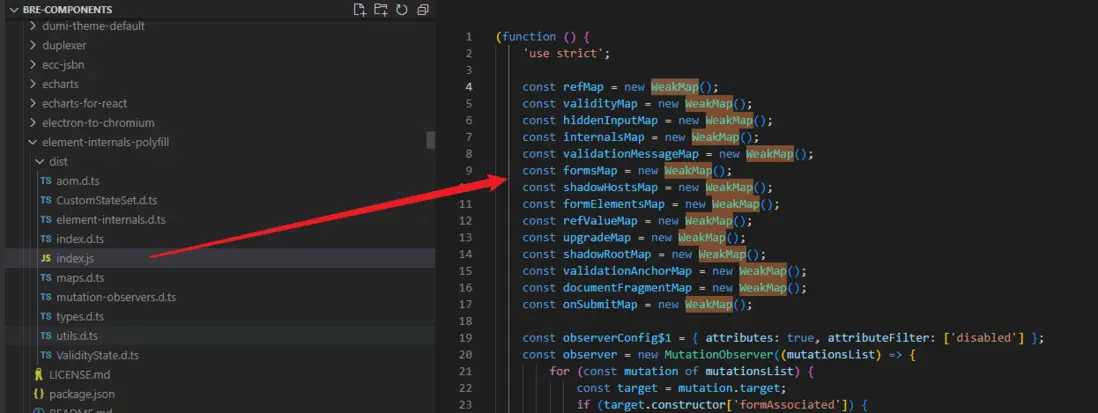
element-internals-polyfill實現了ElementInternals,為 Web 開發人員提供了一種允許自定義元素完全參與 HTML表單的方法。
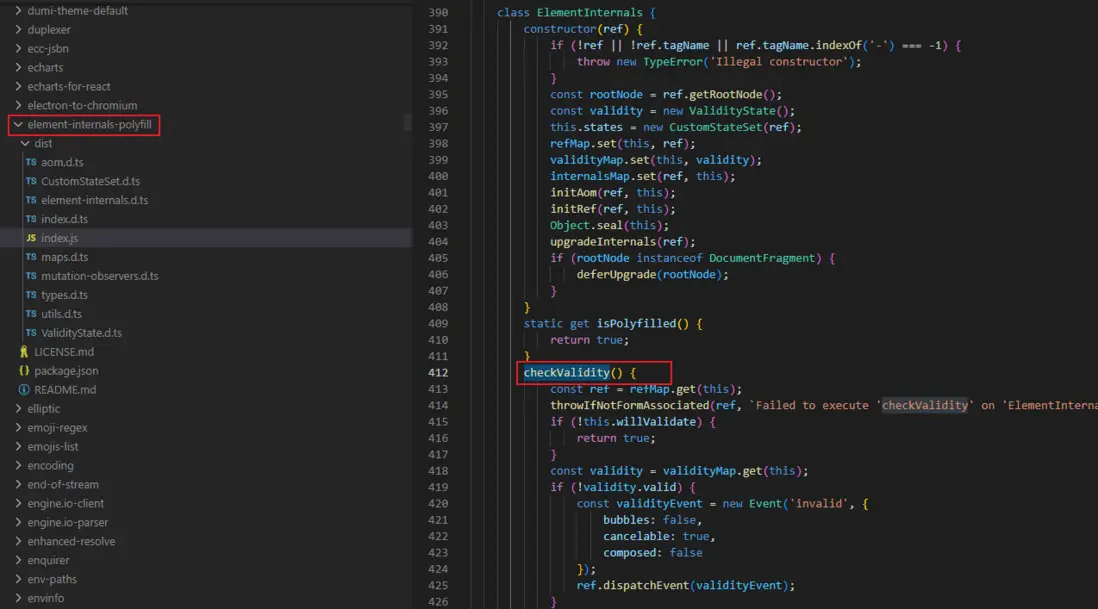
但是,該墊片中另外使用new WeakMap,WeakMap在IE中也存在兼容性問題,一個個去補充缺失的墊片方法簡直跟套娃似的,還不如換其他方案
方案二:按需引入@babel/polyfill
不用在入口文件最上方或者webpack entry引入@babel/polyfill,只需要設置"useBuiltIns": "usage",並安裝@babel/polyfill即可
babel.config.json
{
  "presets": [
    [
      "@babel/preset-env",
      {
        "targets": {
          "chrome": "58",
          "ie": "9"
        }
      },
      "useBuiltIns": "usage"
    ],
    "@babel/preset-react",
    "@babel/preset-typescript"
  ],
  "plugins": []
}方案二和方案一都是使用@babel/polyfill,構建產物在IE執行依舊會報一樣的錯誤,URL構造函數不支持
方案三:@babel/plugin-transform-runtime
安裝yarn add @babel/plugin-transform-runtime @babel/runtime-corejs3 -D,由 @babel/runtime-corejs3 提供墊片彌補兼容性問題
{
  "presets": [
    [
      "@babel/preset-env",
      {
        "targets": {
          "chrome": "58",
          "ie": "9"
        },
      }
    ],
    "@babel/preset-react",
    "@babel/preset-typescript"
  ],
  "plugins": [
    [
    "@babel/plugin-transform-runtime",
      {
        "absoluteRuntime": true,
        "corejs": 3, // 指定corejs版本,安裝@babel/runtime-corejs3就指定3版本
        "helpers": true,
        "regenerator": true,
        "version": "7.0.0-beta.0"
      }
    ]
  ]
}構建產物在IE運行同樣會報上述方案的錯誤,原因是安裝的@babel/runtime-corejs3沒有提供URL構造函數的墊片
方案四:入口文件引入react-app-polyfill,啓用tree shaking
安裝
yarn add react-app-polyfill在入口文件最上方或者webpack entry引入
// 入口文件引入
import 'react-app-polyfill/ie9';
import 'react-app-polyfill/stable';

// webpack entry
entry: [‘react-app-polyfill/ie9’, 'react-app-polyfill/stable', './index.tsx'],設置mode: 'production'就會默認啓用tree shaking
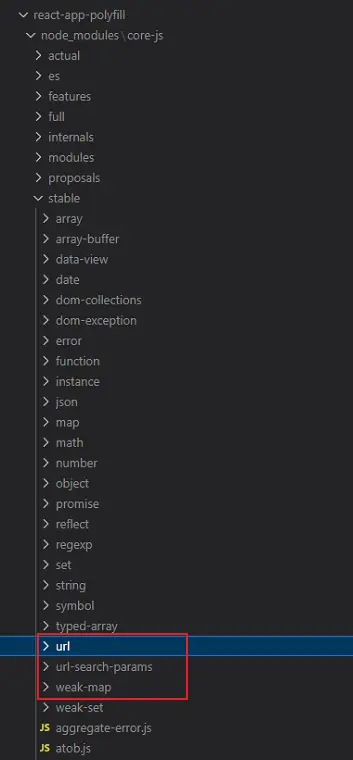
執行構建,產物在IE9+都可以運行成功,説明react-app-polyfill很好的提供了new URL、checkValidity等墊片,查閲源代碼也可驗證
三、css tree shaking
業務組件中使用了基礎組件庫,比如import { Modal, Carousel, Icon } from '@casstime/bricks';,雖然這些基礎組件都有對應的樣式文件(比如Modal組件有自己的對應的_modal.scss),但這些樣式文件可能依賴樣式變量_variables.scss,混合_mixins.scss等,需要捋清樣式模塊依賴關係,一個個導入,非常不方便。於是在入口文件全局引入整個組件庫樣式import '@casstime/bricks/dist/bricks.development.css';,但會引入很多未使用的樣式,被打包到最終產物中,致使產物體積增大,需要對樣式做清潔處理css tree shaking。
接下來就該 PurgeCSS 上場了。PurgeCSS 是一個用來刪除未使用的 CSS 代碼的工具。當你構建一個網站時,你可能會決定使用一個 CSS 框架,例如 TailwindCSS、Bootstrap、MaterializeCSS、Foundation 等,但是,你所用到的也只是框架的一小部分而已,大量 CSS 樣式並未被使用。PurgeCSS 通過分析你的內容和 CSS 文件,首先它將 CSS 文件中使用的選擇器與內容文件中的選擇器進行匹配,然後它會從 CSS 中刪除未使用的選擇器,從而生成更小的 CSS 文件。
對應webpack插件purgecss-webpack-plugin,該插件的使用依賴樣式抽離插件mini-css-extract-plugin,只有先將樣式抽離成獨立文件後才能將 CSS 文件中使用的樣式選擇器與內容文件中的樣式選擇器進行匹配,刪除 CSS 中未使用的選擇器,從而生成更小的 CSS 文件。
purgecss-webpack-plugin的使用需要指定paths屬性,告訴purgecss需要分析的文件列表,這些文件中使用的選擇器與抽離的樣式文件中的選擇器進行匹配,從而剔除未使用的選擇器。
安裝:
yarn add purgecss-webpack-plugin mini-css-extract-plugin glob-all -Dwebpack.config.js:
/* eslint-disable @typescript-eslint/no-var-requires */
const package = require('./package.json');
const path = require('path');
const PurgeCSSPlugin = require('purgecss-webpack-plugin');
const MiniCssExtractPlugin = require('mini-css-extract-plugin');
const glob = require('glob-all');

const PATHS = {
  src: path.join(__dirname, 'src'),
};

function collectSafelist() {
  return {
    standard: ['icon', /^icon-/],
    deep: [/^icon-/],
    greedy: [/^icon-/],
  };
}

module.exports = {
  target: ['web', 'es5'],
  mode: 'production',
  // 'element-internals-polyfill', 'url-polyfill',
  entry: ['./index.tsx'],
  output: {
    path: __dirname + '/dist',
    filename: `media-preview.v${package.version}.min.js`,
    library: {
      type: 'umd',
    },
  },
  module: {
    rules: [
      {
        test: /\.(m?js|ts|js|tsx|jsx)$/,
        exclude: /(node_modules|lib|dist)/,
        use: [
          {
            loader: 'babel-loader',
            options: {
              cacheDirectory: true,
            },
          },
        ],
      },
      {
        test: /\.(scss|css|less)/,
        use: [
          'style-loader',
          MiniCssExtractPlugin.loader,
          {
            loader: 'css-loader',
            options: {
              // url: false
              // modules: {
              //   localIdentName: '[name]_[local]_[hash:base64:5]'
              // },
              // 1、【name】:指代的是模塊名
              // 2、【local】:指代的是原本的選擇器標識符
              // 3、【hash:base64:5】:指代的是一個5位的hash值,這個hash值是根據模塊名和標識符計算的,因此不同模塊中相同的標識符也不會造成樣式衝突。
            },
          },
          {
            loader: 'postcss-loader',
            options: {
              postcssOptions: {
                // parser: 'postcss-js',
                // execute: true,
                plugins: [['postcss-preset-env']], // 跟Autoprefixer類型,為樣式添加前綴
              },
            },
          },
          'sass-loader',
        ],
      },
      {
        test: /\.(png|jpg|jepg|gif)$/i,
        use: [
          {
            loader: 'url-loader',
            options: {
              limit: 8 * 1024 * 1024, // 大小超過8M就不使用base64編碼了
              name: 'static/media/[name].[hash:8].[ext]',
              fallback: require.resolve('file-loader'),
            },
          },
        ],
        type: 'javascript/auto',
      },
      {
        test: /\.(woff(2)?|ttf|eot|svg)(\?v=\d+\.\d+\.\d+)?$/,
        use: [
          {
            loader: 'url-loader',
            options: {
              limit: 8 * 1024 * 1024, // 為了不將font抽離,目標產物只有js和css
              name: 'static/fonts/[name].[hash:8].[ext]',
              fallback: require.resolve('file-loader'),
            },
          },
        ],
        type: 'javascript/auto',
      },
    ],
  },
  plugins: [
    new MiniCssExtractPlugin({
      filename: `media-preview.v${package.version}.min.css`,
    }),
    /**
     * PurgeCSSPlugin用於清除⽆⽤ css,必須和MiniCssExtractPlugin搭配使用,不然不會生效。
     * paths屬性用於指定哪些文件中使用樣式應該保留,沒有在這些文件中使用的樣式會被剔除
     */
    new PurgeCSSPlugin({
      paths: glob.sync(
        [
          `${PATHS.src}/**/*`,
          path.resolve(__dirname, '../../node_modules/@casstime/bricks/lib/components/carousel/*.js'),
          path.resolve(__dirname, '../../node_modules/@casstime/bricks/lib/components/modal/*.js'),
          path.resolve(__dirname, '../../node_modules/@casstime/bricks/lib/components/icon/*.js'),
        ],
        { nodir: true },
      ),
      safelist: collectSafelist, // 安全列表,指定不剔除的樣式
    }),
  ],
  resolve: {
    extensions: ['.ts', '.tsx', '.js', '.json'],
  },
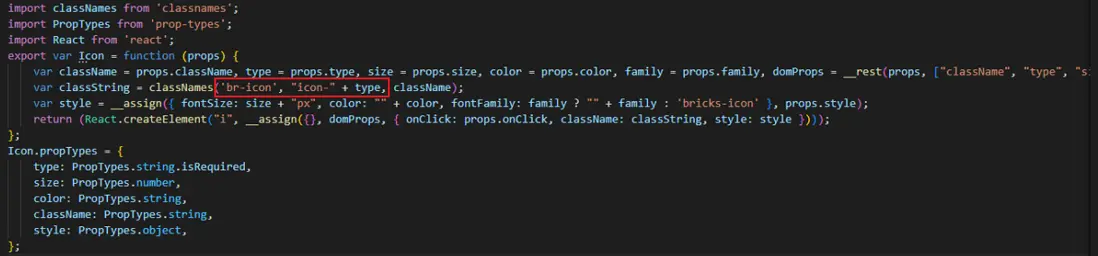
};由於Icon組件使用的圖標是通過type屬性指定的,比如<icon type="close"/>,表示應用icon-close的樣式,雖然PurgeCSSPlugin配置指定icon.js文件中使用樣式應該保留,但因為icon-${type}是動態的,PurgeCSSPlugin並不知道icon-close被使用了,會被剔除掉,因此需要配置safelist,手動指定不被剔除的樣式,防止無意被刪除。
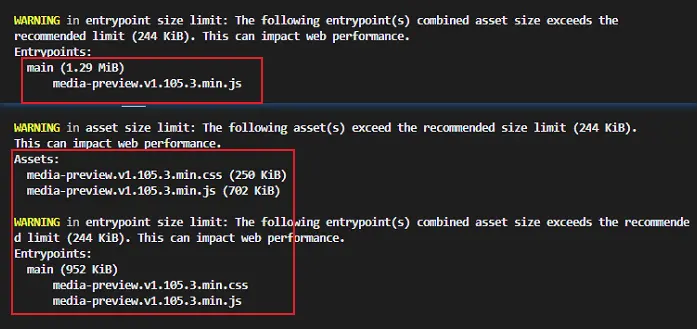
最終產物由1.29M降低到752KB,其實構建後產物中還有比較多冗餘重複的代碼,如果使用公共模塊抽取還會進一步減小產物體積大小,但是會拆分成好多個文件,不方便在Spring MVC項目的引入使用,期望最終構建產物由一個js或者一個js和一個css組成最佳
四、處理樣式兼容性
1、scss中使用具有兼容性樣式
在書寫scss樣式文件時,常常會用到一些具有兼容性問題的樣式屬性,比如transform、transform-origin,在IE內核瀏覽器中需要添加ms-前綴,谷歌內核瀏覽器需要添加webkit-前綴,因此構建時需要相應的loader或者plugin處理,這裏我們採用postcss來處理
安裝
yarn add postcss postcss-preset-env -Dloader配置
module.exports = {
    module: [
        // ...
        {
        test: /\.(scss|css|less)/,
        use: [
          'style-loader',
          MiniCssExtractPlugin.loader,
          {
            loader: 'css-loader',
            options: {
              // url: false
              // modules: {
              //   localIdentName: '[name]_[local]_[hash:base64:5]'
              // },
              // 1、【name】:指代的是模塊名
              // 2、【local】:指代的是原本的選擇器標識符
              // 3、【hash:base64:5】:指代的是一個5位的hash值,這個hash值是根據模塊名和標識符計算的,因此不同模塊中相同的標識符也不會造成樣式衝突。
            },
          },
          {
            loader: 'postcss-loader',
            options: {
              postcssOptions: {
                // parser: 'postcss-js',
                // execute: true,
                plugins: [['postcss-preset-env']], // 跟Autoprefixer類型,為樣式添加前綴
              },
            },
          },
          'sass-loader',
        ],
      },
    ]
}2、處理tsx腳本中動態注入兼容性問題的樣式
在某些場景下,可能會用腳本來控制UI交互,比如控制拖拽平移element.style.transform = 'matrix(1.0, 2.0, 3.0, 4.0, 5.0, 6.0)';,對於這類具有兼容性問題的動態樣式也是需要處理的。可以考慮以下幾種方案:
- 自行實現
loader或者plugin轉化腳本的樣式,或者尋找對應的第三方庫; - 平時編寫的動態樣式就處理好其兼容性;
由於我們的業務組件相對簡單,直接在編寫時做好了兼容性處理
element.style.transform = 'matrix(1.0, 2.0, 3.0, 4.0, 5.0, 6.0)';
element.style.msTransform = 'matrix(1.0, 2.0, 3.0, 4.0, 5.0, 6.0)';
element.style.oTransform = 'matrix(1.0, 2.0, 3.0, 4.0, 5.0, 6.0)';
element.style.webkitTransform = 'matrix(1.0, 2.0, 3.0, 4.0, 5.0, 6.0)';
五、附錄
常見polyfill清單
| No. | Name | Package | Source Map | Network |
|---|---|---|---|---|
| 1 | ECMAScript6 |
es6-shim |
✅ | 🇺🇳 🇨🇳 |
| 2 | Proxy |
es6-proxy-polyfill |
🇺🇳 🇨🇳 | |
| 3 | ECMAScript7 |
es7-shim |
✅ | 🇺🇳 🇨🇳 |
| 4 | ECMAScript |
core-js-bundle |
✅ | 🇺🇳 🇨🇳 |
| 5 | Regenerator |
regenerator-runtime |
✅ | 🇺🇳 🇨🇳 |
| 6 | GetCanonicalLocales |
@formatjs/intl-getcanonicallocales |
🇺🇳 🇨🇳 | |
| 7 | Locale |
@formatjs/intl-locale |
🇺🇳 🇨🇳 | |
| 8 | PluralRules |
@formatjs/intl-pluralrules |
🇺🇳 🇨🇳 | |
| 9 | DisplayNames |
@formatjs/intl-displaynames |
🇺🇳 🇨🇳 | |
| 10 | ListFormat |
@formatjs/intl-listformat |
🇺🇳 🇨🇳 | |
| 11 | NumberFormat |
@formatjs/intl-numberformat |
🇺🇳 🇨🇳 | |
| 12 | DateTimeFormat |
@formatjs/intl-datetimeformat |
🇺🇳 🇨🇳 | |
| 13 | RelativeTimeFormat |
@formatjs/intl-relativetimeformat |
🇺🇳 🇨🇳 | |
| 14 | ResizeObserver |
resize-observer-polyfill |
✅ | 🇺🇳 🇨🇳 |
| 15 | IntersectionObserver |
intersection-observer |
🇺🇳 🇨🇳 | |
| 16 | ScrollBehavior |
scroll-behavior-polyfill |
✅ | 🇺🇳 🇨🇳 |
| 17 | WebAnimation |
web-animations-js |
✅ | 🇺🇳 🇨🇳 |
| 18 | EventSubmitter |
event-submitter-polyfill |
🇺🇳 🇨🇳 | |
| 19 | Dialog |
dialog-polyfill |
🇺🇳 🇨🇳 | |
| 20 | WebComponents |
@webcomponents/webcomponentsjs |
✅ | 🇺🇳 🇨🇳 |
| 21 | ElementInternals |
element-internals-polyfill |
🇺🇳 🇨🇳 | |
| 22 | AdoptedStyleSheets |
construct-style-sheets-polyfill |
✅ | 🇺🇳 🇨🇳 |
| 23 | PointerEvents |
@wessberg/pointer-events |
✅ | 🇺🇳 🇨🇳 |
| 24 | TextEncoder |
fastestsmallesttextencoderdecoder-encodeinto |
✅ | 🇺🇳 🇨🇳 |
| 25 | URL |
url-polyfill |
🇺🇳 🇨🇳 | |
| 26 | URLPattern |
urlpattern-polyfill |
🇺🇳 🇨🇳 | |
| 27 | Fetch |
whatwg-fetch |
✅ | 🇺🇳 🇨🇳 |
| 28 | EventTarget |
event-target-polyfill |
✅ | 🇺🇳 🇨🇳 |
| 29 | AbortController |
yet-another-abortcontroller-polyfill |
✅ | 🇺🇳 🇨🇳 |
| 30 | Clipboard |
clipboard-polyfill |
✅ | 🇺🇳 🇨🇳 |
| 31 | PWAManifest |
pwacompat |
🇺🇳 🇨🇳 | |
| 32 | Share |
share-api-polyfill |
🇺🇳 🇨🇳 |
