背景
項目開發中,前端同學經常會本地聯調測試環境,聯調的方法有很多,在《前端項目本地調試方案》一文中我最後講述到在瀏覽器與前端項目本地服務之間加一層代理服務(正向代理),幫助自動登錄拿到令牌後轉發請求獲取靜態頁面、靜態資源以及受保護資源,從而實現聯調。
原理
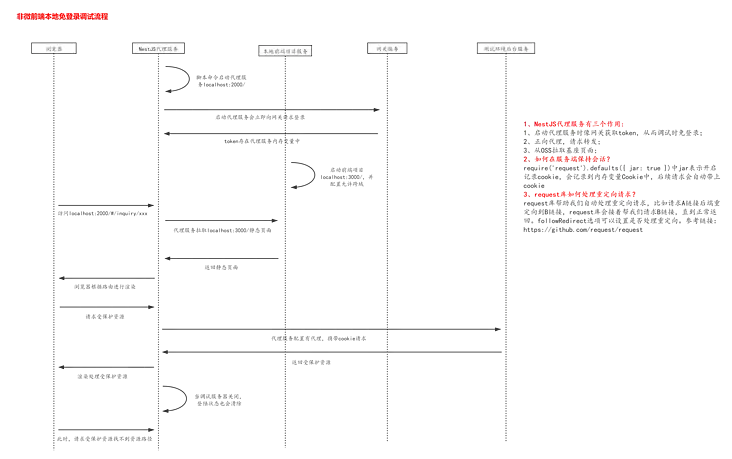
流程描述:
- 首先本地啓動前端本地項目和代理服務,代理服務幫助實現自動登錄,拿到令牌
- 瀏覽器輸入訪問地址,請求首先會到代理服務,代理服務會根據代理配置判斷該請求是向前端本地服務獲取靜態資源還是向後端服務獲取受保護資源。這裏的請求可以大致分為三種,一是構建後的靜態頁面以及構建的靜態資源(腳本、樣式);二是向後端服務請求受保護資源;三是頁面加載後向OSS獲取靜態資源,一般是圖片
- 代理服務獲取到資源後返回給瀏覽器渲染
實踐
首先,創建工程文件夾fe-debug-cli,在當前文件夾執行npm init生成package.json管理依賴
然後執行以下命令安裝項目所需要的包。使用express框架搭建代理服務;body-parser用來解析請求體參數;request用來發送請求,它還有一個很重要的功能就是可以將獲取到的令牌存在服務的內存中,下次請求會自動攜帶令牌;yargs用來解析命令行參數;項目打算引入typescript,執行tsc --init生成並初始化tsconfig.json,使用tsc-watch編譯,tsc-watch會監聽文件變化,只要發生改變就會再次編譯。
yarn add express body-parser request yargs typescript tsc-watch按如下結構初始化項目空間
fe-debug-cli
├── bin // 存放自定義命令所執行的腳本
├── cmds // 存放定義的子命令
├── config // 配置文件
├── src
    ├── interfaces // 類型文件
    ├── routes // 請求路由
    ├── utils // 工具類
    ├── app.ts // 應用主文件
├── index.js // 入口文件
├── package.json
└── tsconfig.json
從app.ts主文件開始編寫代理服務
// app.ts
/* eslint-disable @typescript-eslint/no-var-requires */
import express from 'express';
import bodyParser, { OptionsJson } from 'body-parser';

/** 路由 */
const indexRouter = require('./routes/index');
/** 端口 */
const port = process.env.PORT || 2000;
const app = express();

/** body解析 */
app.use(bodyParser.json({ extended: false } as OptionsJson));
/** 註冊路由 */
app.use('/', indexRouter);


app.listen(port, () => {
  console.log(`代理已啓動: http://localhost:${port}`);
});
請求路由處理,服務啓動時會調登錄接口獲取令牌存放在內存中
// src/routes/index.ts
import express, { Request, Response } from 'express';
import { userAgent } from '@src/interfaces';
import { config, getProxy } from '@src/utils';
import request, { RequiredUriUrl, CoreOptions } from 'request';

const router = express.Router();
const ask = request.defaults({ jar: true }); // jar表示存儲登錄狀態

// 請求轉發
router.all('*', async (req: Request, res: Response) => {
    const options: RequiredUriUrl & CoreOptions = {
        method: req.method,
        url: getProxy(req.originalUrl),
        headers: {
            'Content-Type': req.headers['content-type'] || req.headers['Content-Type'],
            'User-Agent': userAgent,
        },
    };
    if (req.method === 'POST' && JSON.stringify(req.body) !== '{}') {
        options.json = true;
        options.body = req.body;
    }
    const result = ask(options);
    if (result instanceof Promise) {
        const { result: r } = await result;
        res.send(r);
        return;
    }
    result.pipe(res);
    return;
});

/** 自動登錄 */
const login = () => {
    const host = config.proxy[0].target;
    console.log('url', `${host}/passport/login`);
    const options = {
        method: 'POST',
        url: `${host}/passport/login`,
        headers: {
            'Content-Type': 'multipart/form-data',
            'User-Agent': userAgent,
        },
        formData: {
            ...config.user,
            logintype: 'PASSWORD',
        },
    };
    ask(options, (error) => {
        if (error) throw new Error(error);
        ask({
            method: 'GET',
            url: host,
            headers: {
                'User-Agent': userAgent,
            },
        }, (e, r, b) => {
            if (e) {
                throw new Error(e);
            }
            if (b && b.indexOf('登錄') > -1 && b.indexOf('註冊') > -1) {
                console.log(chalk.green.bold('登錄失敗,請檢查!'));
            } else {
                console.log(chalk.green.bold('登錄成功!'));
            }
        });
    });
};

login();

module.exports = router;
工具類
// src/utils/index.ts
import { IProxy } from '@src/interfaces';

/** 讀取配置文件 */
// eslint-disable-next-line @typescript-eslint/no-var-requires
export const config = require(process.env.CONFIG_PATH || '../../config/debug.js');

/** 代理url */
export const getProxy = (path: string): string => {
    const { proxy, html } = config;
    const t = proxy.filter((p: IProxy) => p.path.some((s: string) => path.includes(s)));
    return t.length ? t[0].target + path : html + path;
};
入口文件,其中不執行編譯前的主文件是因為項目發佈不會把源代碼也發佈出去,只會發佈編譯構建之後的代碼
// index.js
const path = require('path');
// 編譯和運行時路徑映射不一樣,tsconfig.json配置路徑映射僅僅在編譯時生效,在運行時不會起作用,因此這裏需要引入module-alias庫幫助在運行時解析路徑映射
const moduleAlias = require('module-alias');

(function run() {
  moduleAlias.addAlias('@src', path.resolve(__dirname, './dist'));
  // 執行編譯後的主文件
  require('./dist/app');
})();
現在,代理服務相關代碼基本完成,下面來配置一下編譯選項、package.json以及命令行參數
編譯後得腳本需要在node環境執行,因此module屬性需要指定為"commonjs",tsconfig.json配置如下:
{
  "compilerOptions": {
    /* Basic Options */
    "incremental": true,                         /* Enable incremental compilation */
    "target": "ES2017",                                /* Specify ECMAScript target version: 'ES3' (default), 'ES5', 'ES2015', 'ES2016', 'ES2017', 'ES2018', 'ES2019', 'ES2020', 'ES2021', or 'ESNEXT'. */
    "module": "commonjs",                           /* Specify module code generation: 'none', 'commonjs', 'amd', 'system', 'umd', 'es2015', 'es2020', or 'ESNext'. */
    "declaration": true,                         /* Generates corresponding '.d.ts' file. */
    "declarationMap": true,                      /* Generates a sourcemap for each corresponding '.d.ts' file. */
    "removeComments": true,                      /* Do not emit comments to output. */
    /* Strict Type-Checking Options */
    "strict": true,                                 /* Enable all strict type-checking options. */
    /* Module Resolution Options */
    "baseUrl": "./",                             /* Base directory to resolve non-absolute module names. */
    "paths": {
      "@src/*": ["./src/*"],
    },                                 /* A series of entries which re-map imports to lookup locations relative to the 'baseUrl'. */
    "esModuleInterop": true,                        /* Enables emit interoperability between CommonJS and ES Modules via creation of namespace objects for all imports. Implies 'allowSyntheticDefaultImports'. */
    /* Advanced Options */
    "skipLibCheck": true,                           /* Skip type checking of declaration files. */
    "forceConsistentCasingInFileNames": true        /* Disallow inconsistently-cased references to the same file. */
  },
  "exclude": [
    "node_modules", "test", "dist", "**/*spec.ts"
  ],
  "include": [
    "src"
  ]
}
package.json中主要配置編譯命令、加上bin屬性定義命令,以及files屬性定義安裝的文件
"scripts": {
    "build": "rimraf dist && tsc -p tsconfig.json",
    "start:dev": "tsc-watch -p tsconfig.json --onSuccess \"node index.js\"",
    "start:debug": "tsc-watch -p tsconfig.json --onSuccess \"node --inspect-brk index.js\""
},
"bin": {
    "fee": "./bin/index.js"
},
"files": [
    "bin/*",
    "cmds/*",
    "config/*",
    "dist/*",
    "index.js",
    "package.json",
    "tsconfig.json",
    "README.md"
]
接下來解析命令行參數,#!/usr/bin/env node的作用是指明該腳本在node環境下執行;commandDir制定子命令,子命令會執行入口文件index.js,從而啓動代理服務
#!/usr/bin/env node
require('yargs')
  .scriptName('fee')
  .usage('Usage: $0 <command> [options]')
  .commandDir('../cmds')
  .demandCommand()
  .example('fee debug -c debug.js -p 3333')
  .help('h')
  .alias('v', 'version')
  .alias('h', 'help')
  .argv;
子命令
const fs = require('fs');
const path = require('path');

exports.command = 'debug';

exports.describe = '調試應用';

exports.builder = yargs => {
    return yargs
        .option('config', {
            alias: 'c',
            default: 'debug.js',
            describe: '配置文件',
            type: 'string',
        })
        .option('port', {
            alias: 'p',
            default: 3000,
            describe: '端口',
            type: 'number',
        })
    .argv
};

exports.handler = function(argv) {
    const configPath = path.resolve(process.cwd(), argv.config);
    if (!fs.existsSync(configPath)) {
        console.log('沒有配置文件');
        process.exit();
    }

    process.env.PORT = argv.port;
    process.env.CONFIG_PATH = configPath;
    process.env.NAMESPACE = argv.namespace;
    require('../index.js'); // 執行入口文件
};
現在,只剩下最後的發佈工作,先npm login登錄npm倉庫,然後執行編譯命令yarn build,接着就可以執行npm publish發佈了,這裏需要注意執行發佈命令之前需要切回到npm鏡像
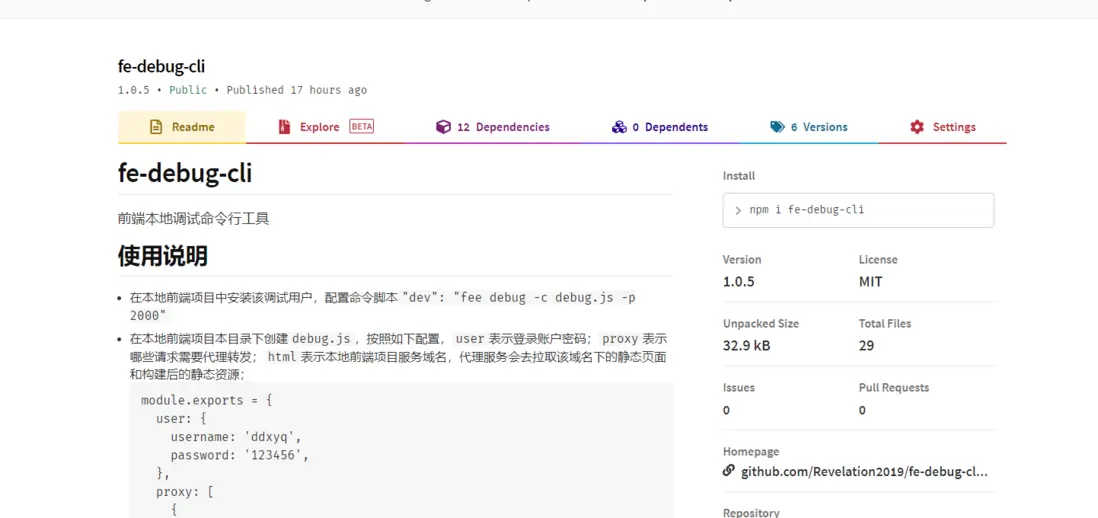
全局安裝fee-debug-cli調試看看效果

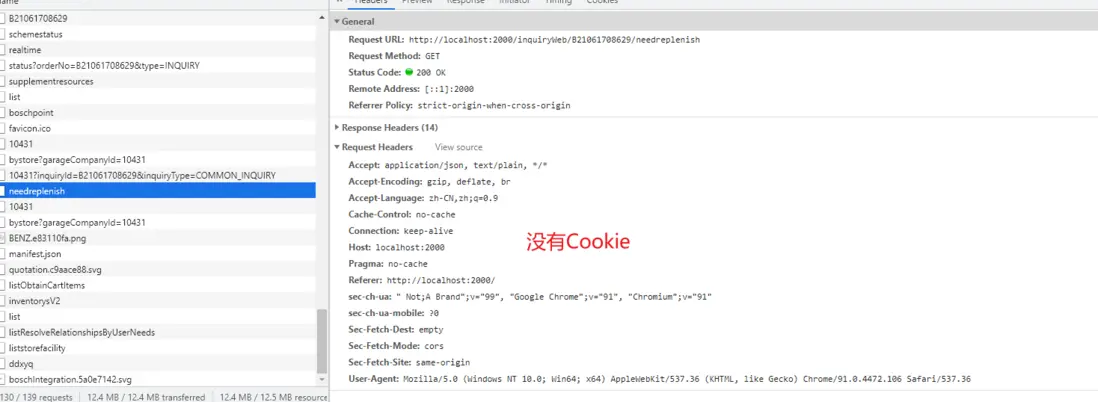
瀏覽器發送的請求在控制枱是沒有攜帶令牌的,攜帶上令牌是代理服務做的事
注意:代理服務啓動後出現了一個奇怪的現象,釘釘消息經常發不出去,時常斷線,這可能是因為代理服務代理轉發了所有的請求,並沒有區分域名。因此,需要判斷代理的請求是否來源於localhost:xxx域名下。
倉庫地址:fe-debug-cli