摘要
本次案例是使用Vue3.3.4的組合式API實現一個簡單的博客開發流程和組件使用示例代碼,比較簡單,主要是通俗易懂,瞭解組合式API的使用。
創建項目
Windows cmd創建一個Vue3.2項目(使用cnpm國內鏡像高速構建)
開發
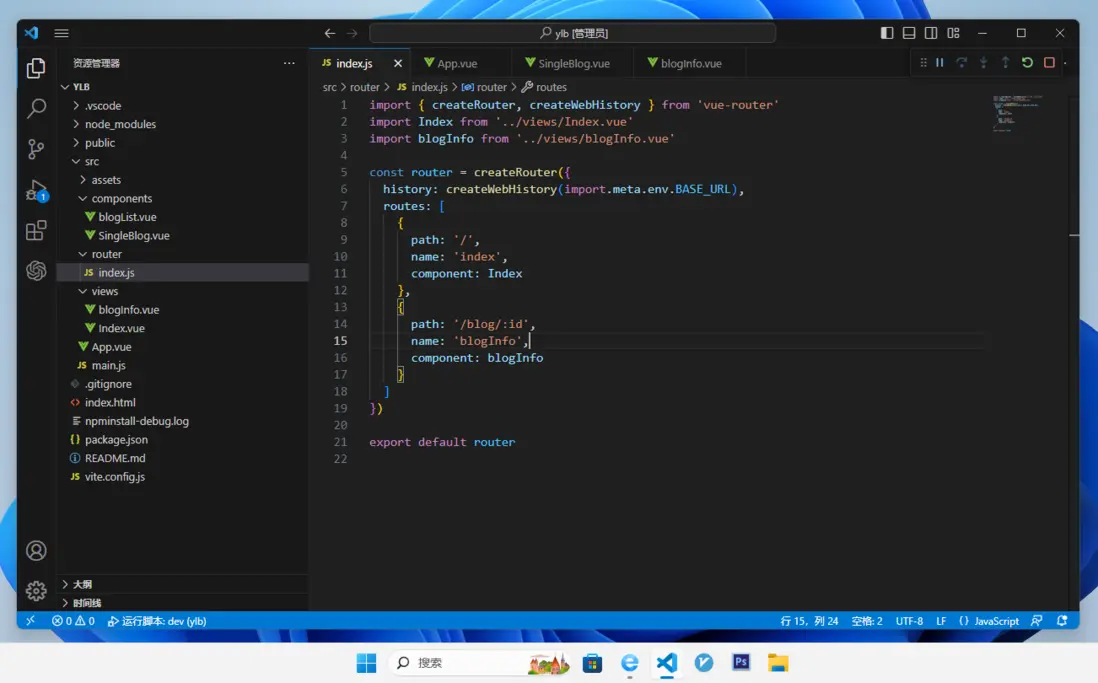
組件
views/Index.vue 首頁組件
components/blogList.vue 博客列表
components/SingleBlog.vue 單條博客
views/blogInfo.vue 單條博客的詳情
路由
main.js
import './assets/main.css'
import { createApp } from 'vue'
import App from './App.vue'
import router from './router'
const app = createApp(App)
app.use(router)
app.mount('#app')
router/index.js
import { createRouter, createWebHistory } from 'vue-router'
import Index from '../views/Index.vue'
import blogInfo from '../views/blogInfo.vue'

const router = createRouter({
  history: createWebHistory(import.meta.env.BASE_URL),
  routes: [
    {
      path: '/',
      name: 'index',
      component: Index
    },
    {
      path: '/blog/:id',
      name: 'blogInfo',
      component: blogInfo
    }
  ]
})

export default router
組件代碼
views/Index.vue
<script setup>
import { ref } from "vue"

// 導入博客列表組件
import blogList from "../components/blogList.vue"

// 博客數據(僅作演示,實際需要通過async await axios請求服務器獲取)
const blogData = ref([
  { id:100, title:"廣東2023年高招專科批徵集志願投檔分數線", body:"100內容" },
  { id:101, title:"廣東:2023年高考專科批體育藝術類統考共投出14927人", body:"101內容" },
  { id:102, title: "廣東2023年高考專科批投檔分數線", body: "102內容" },
  { id:103, title: "廣東2023年高考專科提前批投檔情況公佈", body: "103內容" },
  { id:104, title:"廣東2023年本科批第二次徵集志願投檔分數線", body:"104內容" }
])
</script>

<template>
  <div class="blogContainer">

    <!-- 使用博客列表組件,將博客數據傳遞過去 -->
    <blogList :blogList="blogData" />
  </div>
</template>

<style scoped>
  .blogContainer{
    width: 60%;
    margin: 50px auto 0;
    background: #f1f1f1;
    padding: 20px;
    border-radius: 10px;
  }
</style>
components/blogList.vue
<script setup>

// 導入單條博客組件
import SingleBlog from "../components/SingleBlog.vue"

// 接收Index組件傳過來的博客數據展示在博客列表組件中
// Array代表傳過來的數據類型
// 例如 [{},{},{},...] 所以是Array
defineProps({
    blogList:Array
})

</script>

<template>
  <div v-for="blog in blogList" :key="blog.id" class="blogCard">

    <!-- 將for出來的每一條都傳到單條博客組件 -->
    <SingleBlog :blog="blog"/>
  </div>
</template>

<style scoped>
  .blogCard{
    width: 100%;
    height: 100px;
  }
</style>
components/SingleBlog.vue
<script setup>

// 接收博客列表傳過來的單條博客數據
// Object代表傳過來的是一個對象
// 例如 { id:100, title:"廣東2023年高招專科批徵集志願投檔分數線", body:"100內容" }
// 所以是Object
defineProps({
    blog:Object
})

</script>

<template>

  <!-- 使用路由跳轉 -->
  <RouterLink :to="'/blog/' + blog.id">

    <!-- 標題 -->
    <h4>{{ blog.title }}</h4>
  </RouterLink>

  <!-- 內容,這裏實際上運用需要做截斷處理,因為body屬於正文,超長就影響閲讀了,所以在列表只需要展示部分內容 -->
  <p>{{ blog.body }}</p>
</template>

<style scoped>
  p{
    color: #666;
  }
</style>
views/blogInfo.vue
<script setup>

import { ref } from "vue"

// 導入使用路由的組件
// 用途:獲取路由參數
import { useRouter } from "vue-router";

// 獲取當前路由參數
const router = useRouter();
const router_id = router.currentRoute.value.params.id;

// 根據blogId從服務器獲取博客內容
const blogId = ref(router_id)

// axios
// 這裏我就不寫了,自己加強學習,結合axios請求服務器獲取Array然後渲染到這個組件即可

</script>

<template>
  <h1>當前博客ID:{{ blogId }}</h1>
</template>

<style scoped>
</style>
App.vue
這個組件直接使用路由容器即可,因為在路由配置中已經將所有組件渲染到<RouterView></RouterView>,即根據路由來決定渲染的組件,然後將這個組件渲染到<RouterView></RouterView>
<script setup>
</script>

<template>
  <RouterView></RouterView>
</template>

<style scoped>

</style>
效果

打包
打包在根目錄,無需配置。
打包後,準備部署在生產環境的二級目錄,需要在vite.config.js配置二級目錄路徑。
import { fileURLToPath, URL } from 'node:url'

import { defineConfig } from 'vite'
import vue from '@vitejs/plugin-vue'

export default defineConfig({
  base: process.env.NODE_ENV === 'production' ? '/vue3-vite-bulid-blog/' : '/',
  plugins: [
    vue()
  ],
  resolve: {
    alias: {
      '@': fileURLToPath(new URL('./src', import.meta.url))
    },
  }
})其中base: process.env.NODE_ENV === 'production' ? '/vue3-vite-bulid-blog/' : '/',這個配置,如果沒有,你需要增加。/vue3-vite-bulid-blog/是你的服務器的二級目錄名。
打包命令
我目前所在的開發環境是Windows,在項目目錄進入cmd,執行:
npm run build即可快速打包。
我使用的是cnpm
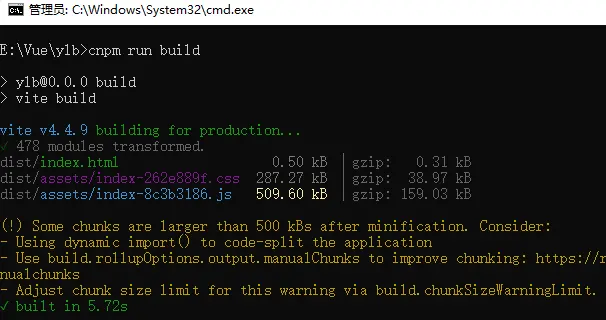
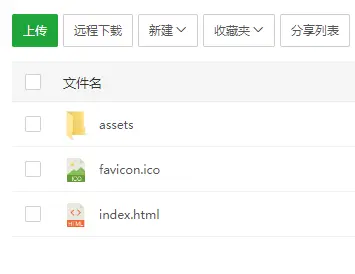
打包完成後,會有一個dist目錄
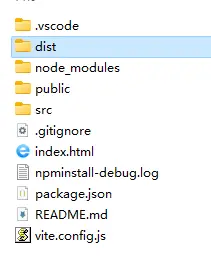
裏面就是可以放在服務器運行的編譯後html、css、JavaScript代碼。
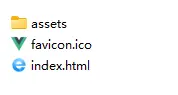
將這些代碼全部上傳至你打包配置的目錄下,訪問域名即可。
演示
http://demo.likeyunba.com/vue3-vite-bulid-blog/
作者
TANKING