

摘要
當使用 Vue.js 的 CDN 來實現一個簡單的上傳圖片組件時,你可以利用 Vue 的數據綁定和事件處理能力,結合 HTML 和 CSS,輕鬆地創建一個交互式的圖片上傳界面。以下是一個示例:
代碼結構
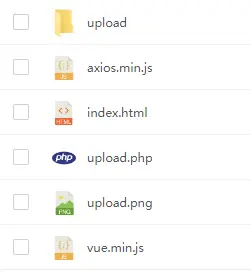
index.html
<!DOCTYPE html>
<html lang="en">
    <head>
        <meta charset="UTF-8">
        <meta name="viewport" content="width=device-width, initial-scale=1.0">
        <title>Vue上傳圖片</title>
        <script src="vue.min.js"></script>
        <script src="axios.min.js"></script>
        <style>
            body {
                font-family: Arial, sans-serif;
                margin: 0;
                padding: 0;
                background: #f1f1f1;
            }

            .container {
                width: 100%;
                margin: 50px auto 0;
            }

            .container .upload-pannel {
                width: 500px;
                background: #fff;
                border-radius: 10px;
                margin: 20px auto 0;
                overflow: hidden;
            }
            .container .upload-pannel .pannel-title {
                width: 90%;
                margin: 20px auto;
                font-size: 15px;
                color: #333;
                font-weight: bold;
                display: block;
            }
            .container .upload-pannel .file-select{
                width: 90%;
                height: 250px;
                border: 2px dashed rgb(59,94,225);
                background: rgba(59,94,225,0.05);
                margin: 20px auto;
                display: block;
                border-radius: 10px;
                position: relative;
            }
            .container .upload-pannel input[type="file"]{
                width: 100%;
                height: 100%;
                opacity: 0;
                position: absolute;
                left: 0;
                top: 0;
            }
            .container .upload-pannel .upload-icon{
                width: 40px;
                height: 35px;
                display: block;
                margin: 0 auto;
                line-height: 250px;
            }
            .container .upload-pannel .upload-icon img{
                width: 40px;
                height: 35px;
            }
            .container .upload-pannel .file-select .upload-text{
                text-align: center;
                display: block;
                font-size: 14px;
                color: #999;
                line-height: 230px;
            }
            .container .upload-pannel .upload-progress{
                width: 90%;
                height: 60px;
                background: #f1f1f1;
                margin: 20px auto;
                border-radius: 10px;
                overflow: hidden;
            }
            .container .upload-pannel .upload-progress .progress-bar-container {
                position: relative;
                width: 90%;
                height: 10px;
                margin: 25px auto;
                background: #f1f1f1;
                border-radius: 10px;
                overflow: hidden;
            }

            .container .upload-pannel .upload-progress .progress-bar {
                height: 100%;
                background: rgb(59,94,225);
                border-radius: 10px;
                transition: width 0.3s ease-in-out;
            }

            .container .upload-pannel .upload-progress .progress-text {
                position: absolute;
                top: 50%;
                left: 50%;
                transform: translate(-50%, -50%);
                font-size: 12px;
                color: #fff;
            }

            .container .upload-pannel .imgPreview{
                width: 90%;
                margin: 20px auto;
                display: block;
            }

        </style>
    </head>
    <body>
        <div id="app"></div>
        <script>
            new Vue({
                el: '#app',
                data() {
                return {
                    imgUrl: '',
                    uploadProgress: 0,
                    uploadProgressbg: false
                };
              },
              methods: {
                async handleImageUpload(event) {
                    const file = event.target.files[0];
                    if (file) {

                        // 上傳圖片
                        this.uploadProgressbg = true;
                        const formData = new FormData();
                        formData.append('image', file);

                        try {
                            const response = await axios.post('upload.php', formData, {
                            onUploadProgress: progressEvent => {

                                // 改變進度條
                                this.uploadProgress = Math.round((progressEvent.loaded / progressEvent.total) * 100);
                            },
                        });

                        const imageUrl = response.data.url;
                        if (imageUrl) {

                            // 上傳成功
                            this.imgUrl = imageUrl;
                        }

                        } catch (error) {

                            // 上傳失敗
                            console.error('Error uploading image:', error);
                        } finally {

                        // 隱藏進度條
                        setTimeout(() => {
                            this.uploadProgress = 0;
                            this.uploadProgressbg = false;
                        }, 1500);
                    }
                  }
                },
            },
            template: `
                <div class="container">
                        <div class="upload-pannel">
                            <span class="pannel-title">Vue.js 圖片上傳</span>
                            <span class="file-select">
                                <input type="file" @change="handleImageUpload">
                                <span class="upload-icon">
                                    <img src="upload.png" />
                                </span>
                                <span class="upload-text">僅支持上傳jpg、png、gif格式的圖片</span>
                            </span>
                            <div class="upload-progress" v-if="uploadProgressbg == true">
                                <div class="progress-bar-container" :class="{ active: uploadProgressbg }">
                                    <div class="progress-bar" :style="{ width: uploadProgress + '%' }"></div>
                                <span class="progress-text" v-if="uploadProgressbg">{{ uploadProgress }}%</span>
                            </div>
                        </div>
                        <img v-if="imgUrl" :src="imgUrl" class="imgPreview">
                    </div>
                </div>`,
            });
        </script>
    </body>
</html>
動圖演示

作者
TANKING
源碼下載
https://afdian.net/item/ffa3292a337c11ee9a8c5254001e7c00



