

摘要
很多場景下需要選擇多張圖片上傳,或者是批量上傳以提高效率,多圖上傳的需求自然就比較多了,本文使用最簡單的XMLHttpRequest異步上傳圖片。
界面

上傳示例
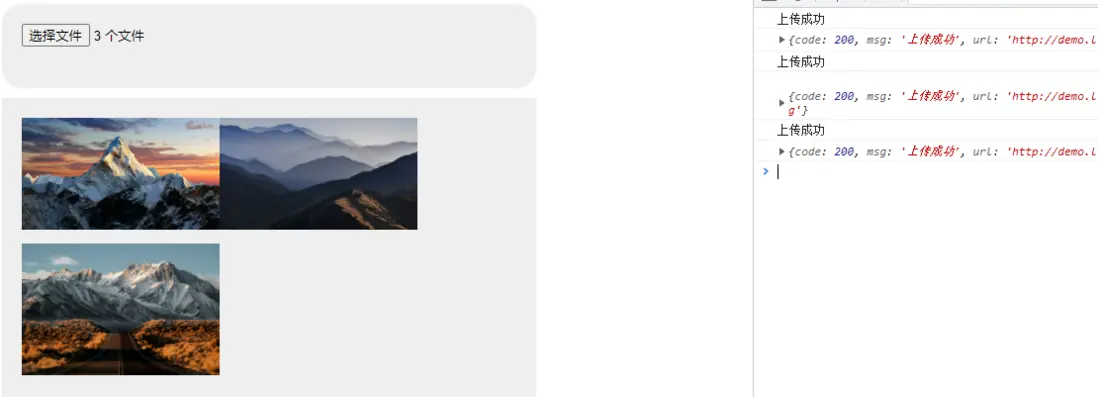
代碼
index.html
<!DOCTYPE html>
<html>
    <head>
        <title>多圖上傳</title>
        <meta charset="utf-8">
        <style>
            #fileInput{
                width: 500px;
                height: 45px;
                margin: 50px auto 0;
                background: #eee;
                display: block;
                padding: 20px 20px;
                border-radius: 20px;
            }
            #previewContainer{
                width: 500px;
                margin: 10px auto;
                background: #eee;
                padding: 20px 20px;
                display: none;
            }
            .preview-image {
              max-width: 200px;
              max-height: 200px;
              margin-bottom: 10px;
            }
        </style>
    </head>
    <body>

        <!--選擇文件-->
        <input type="file" id="fileInput" accept="image/*" multiple>
        <div id="previewContainer"></div>

        <script>
            const fileInput = document.getElementById('fileInput');
            const previewContainer = document.getElementById('previewContainer');

            // 監聽選擇文件
            fileInput.addEventListener('change', handleFileSelect);

            function handleFileSelect(event) {
                const files = event.target.files;

                for (let i = 0; i < files.length; i++) {
                    const file = files[i];
                    const reader = new FileReader();

                    reader.onload = function(event) {
                        const image = document.createElement('img');
                        image.className = 'preview-image';
                        image.src = event.target.result;
                        previewContainer.appendChild(image);

                        // 將文件上傳至服務器
                        uploadImage(file);
                    }

                    reader.readAsDataURL(file);
                }
            }

            // 將文件上傳至服務器
            function uploadImage(file) {
                const xhr = new XMLHttpRequest();
                const formData = new FormData();

                // 將文件添加到formData對象
                formData.append('image', file);

                // 設置XHR請求的處理函數
                xhr.onreadystatechange = function() {

                    if (xhr.readyState === XMLHttpRequest.DONE) {
                        if (xhr.status === 200) {

                            console.log('上傳成功');

                            // 顯示圖片預覽區域
                            document.querySelector('#previewContainer').setAttribute('style', 'display:block');

                            // 打印JSON
                            console.log(JSON.parse(xhr.response))

                        } else {

                            console.log('上傳失敗');
                        }
                    }
                }

                // 發送POST請求到服務器
                xhr.open('POST', 'upload.php', true);
                xhr.send(formData);

            }
        </script>
    </body>
</html>
upload.php
(請建立一個upload文件夾以存放上傳的文件)
<?php

    // 編碼
    header("Content-type:application/json");

    // 檢查是否有文件上傳
    if (isset($_FILES['image'])) {

        // 獲取上傳的文件信息
        $file = $_FILES['image'];

        // 獲取文件名
        $fileName = $file['name'];

        // 獲取文件的臨時路徑
        $tmpFilePath = $file['tmp_name'];

        // 指定保存目錄
        $uploadDir = 'upload/';

        // 驗證是否為圖片文件
        if ((($_FILES["image"]["type"] == "image/gif")
        || ($_FILES["image"]["type"] == "image/jpeg")
        || ($_FILES["image"]["type"] == "image/jpg")
        || ($_FILES["image"]["type"] == "image/pjpeg")
        || ($_FILES["image"]["type"] == "image/x-png")
        || ($_FILES["image"]["type"] == "image/png"))
        && ($_FILES["image"]["size"] < 10485760)){

            // 生成唯一的文件名
            $uniqueFileName = uniqid() . '_' . $fileName;

            // 拼接保存路徑
            $uploadPath = $uploadDir . $uniqueFileName;

            // 獲取HTTP協議
            function get_http_type(){
                $http_type = ((isset($_SERVER['HTTPS']) && $_SERVER['HTTPS'] == 'on') || (isset($_SERVER['HTTP_X_FORWARDED_PROTO']) && $_SERVER['HTTP_X_FORWARDED_PROTO'] == 'https')) ? 'https://' : 'http://';
                return $http_type;
            }

            // 將臨時文件移動到目標路徑
            if (move_uploaded_file($tmpFilePath, $uploadPath)) {

                    // 上傳成功
                    // 可以在此處進行進一步處理,比如生成縮略圖、添加水印等
                    $result = array(
                        'code' => 200,
                        'msg' => '上傳成功',
                        'url' => get_http_type().dirname($_SERVER['HTTP_HOST'].$_SERVER['PHP_SELF']).'/'.$uploadPath
                    );
            } else {

                    // 上傳失敗
                    $result = array(
                        'code' => 202,
                        'msg' => '文件上傳失敗'
                    );
            }
        }else{

            // 不合規的文件
            $result = array(
                'code' => 202,
                'msg' => '不合規的文件'
            );
        }

    } else {

        // 沒有文件上傳
        $result = array(
            'code' => 202,
            'msg' => '沒有選擇要上傳的文件'
        );
    }

    // JSON
    echo json_encode($result, JSON_UNESCAPED_UNICODE);
?>
作者
TANKING



