

需求
網站如果想要實現微信掃碼登錄其實有很多種方案,常見的方案就是微信開放平台和微信公眾號服務號。前者是目前大部分網站並且是微信認可的一種方式,後者是開發者發現服務號具備掃碼關注後即可獲取用户基本信息的能力後而開發的一種方式。
而這兩者其實都是需要具備資質,例如認證,對於個人開發者來説,是有一定的門檻的,而我這次分享的是0門檻的,個人開發者一樣可以實現。
原理
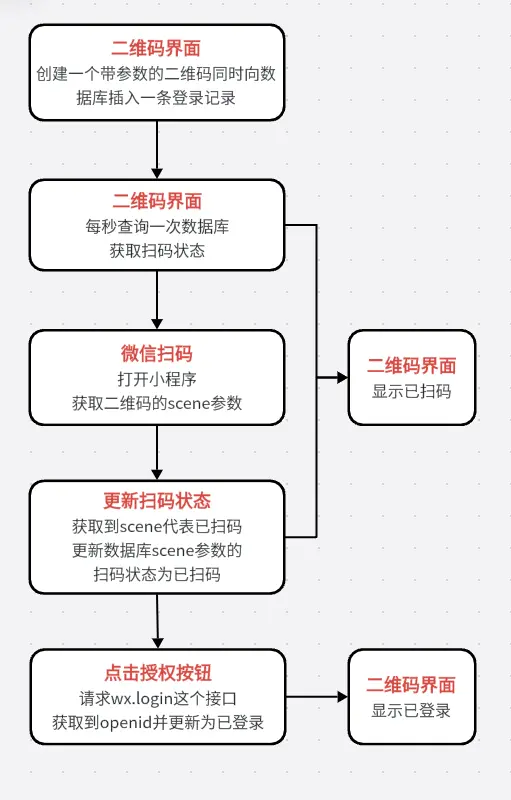
小程序也是具備獲取用户基本信息的能力的,可以調用wx.login接口獲取用户的openid實現登錄。簡單來説就是web端創建一個帶參數的二維碼同時向數據庫插入一條登錄記錄,此時web端已經開始輪詢數據庫這條記錄的掃碼狀態了,微信掃碼後打開小程序並立即獲取到這個參數,然後點擊授權登錄按鈕請求wx.login這個接口獲取到openid,然後將openid更新至數據庫這個登錄記錄中並更新掃碼狀態,web端可以輪詢到登錄成功的狀態碼就展示登錄成功。
代碼
creatqrcode.php
<!DOCTYPE html>
<html>
<head>
    <title>小程序掃碼登錄示例</title>
    <meta charset="utf-8">
    <script type="text/javascript" src="./jquery.min.js"></script>
    <link rel="stylesheet" type="text/css" href="./bootstrap.min.css">
    <style>
        *{
            padding:0;
            margin:0;
        }
        #xcxqrcode{
            width: 200px;
            height: 200px;
            margin:50px auto;
            display: block;
        }
        #lgtext{
            text-align: center;
            padding:20px 20px;
            background: #f1f1f1;
            border-radius: 100px;
        }
        #openid{
            text-align: center;
            padding:20px 20px;
        }
    </style>
</head>
<body>
<?php
// Header
header("Content-type:text/html;charset=utf-8");

// 獲取access_token
function getToken(){
    /**
     * 這裏替換為你的小程序的appid和appsecret
     */
    $appid='xxx';
    $appsecret='xxx';
    // 讀取access_token
    include 'access_token.php';
    // 判斷是否過期
    if (time() > $access_token['expires']){
        // 如果已經過期就得重新獲取並緩存
        $access_token = array();
        $access_token['access_token'] = getNewToken($appid,$appsecret);
        $access_token['expires']=time()+7000;
        // 將數組寫入php文件
        $arr = '<?php'.PHP_EOL.'$access_token = '.var_export($access_token,true).';'.PHP_EOL.'?>';
        $arrfile = fopen("./access_token.php","w");
        fwrite($arrfile,$arr);
        fclose($arrfile);
        // 返回當前的access_token
        return $access_token['access_token'];

    }else{
        // 如果沒有過期就直接讀取緩存文件
        return $access_token['access_token'];
    }
}

// 獲取新的access_token
function getNewToken($appid,$appsecret){
    $url = "https://api.weixin.qq.com/cgi-bin/token?grant_type=client_credential&appid={$appid}&secret={$appsecret}";
    $access_token_Arr =  https_request($url);
    return $access_token_Arr['access_token'];
}

// curl請求函數
function https_request ($url){
    $ch = curl_init();
    curl_setopt($ch, CURLOPT_URL, $url);
    curl_setopt($ch,CURLOPT_RETURNTRANSFER,1);
    curl_setopt($ch, CURLOPT_SSL_VERIFYPEER, false);
    $out = curl_exec($ch);
    curl_close($ch);
    return  json_decode($out,true);
}

// 創建小程序碼
function creatQrcode(){
    // 請求小程序接口創建小程序碼
    $ch = curl_init();
    curl_setopt($ch, CURLOPT_URL, 'https://api.weixin.qq.com/wxa/getwxacodeunlimit?access_token='.getToken());
    curl_setopt($ch, CURLOPT_POST, true);
    $sc = uniqid(); // 生成scene
    $data = array(
        "scene" => $sc,
        "env_version" => "develop" // 小程序審核通過後需要修改參數為release
    );
    curl_setopt($ch, CURLOPT_POSTFIELDS, json_encode($data));
    curl_setopt($ch, CURLOPT_SSL_VERIFYPEER, 0);
    curl_setopt($ch, CURLOPT_SSL_VERIFYHOST, 2);
    curl_setopt($ch, CURLOPT_RETURNTRANSFER, true);
    $result = curl_exec($ch);
    // 圖片buffer轉本地圖片
    $img = file_put_contents($sc.'.png', $result);
    // 引入數據庫配置
    include './Db.php';
    // 將二維碼的scene寫入數據庫
    $add_scene = "INSERT INTO xcxqrcodelogin (scene) VALUES ('$sc')";
    if ($conn->query($add_scene) === TRUE) {
        $file = $sc.'.png';
        if($fp = fopen($file,"rb", 0))
        {
            $gambar = fread($fp,filesize($file));
            fclose($fp);
            $base64_qrcode = 'data:image/jpg/png/gif;base64,'.chunk_split(base64_encode($gambar));
            // 以JSON的方式返回小程序碼及scene
            return json_encode(array('xcxqrcode'=>$base64_qrcode,'scene'=>$sc));
        }
    }
    // 斷開連接
    curl_close($ch);
    $conn->close();
}

?>

<!-- 獲取到小程序碼的base64數據 -->
<?php
    $qrcodebase64json = json_decode(creatQrcode());
    $xcxqrcode = $qrcodebase64json->xcxqrcode;
    $scene = $qrcodebase64json->scene;
    // 刪除本地的圖片
    unlink('./'.$scene.'.png');
?>
<!-- 展示二維碼及掃碼結果 -->
<div style="width:300px;margin:50px auto;">
    <img src="<?php echo $xcxqrcode; ?>" id="xcxqrcode">
    <input type="hidden" value="<?php echo $scene; ?>" id="sc"/>
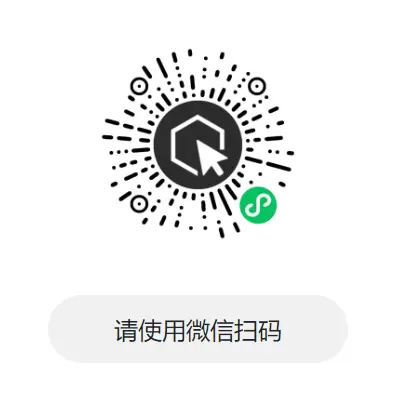
    <h4 id="lgtext">請使用微信掃碼</h4>
    <p id="openid"></p>
</div>

<!-- 輪詢掃碼結果 -->
<script type="text/javascript">

// 從0秒開始輪詢
let TimeOut = 0;
let checklogin = setInterval('CheckStatus()', 1000);

// 查詢掃碼狀態
function CheckStatus() {
    // 獲取scene
    var sc = $('#sc').val();
    $.ajax({
        type: "POST",
        url: "./getstatus.php?scene="+sc,
        success:function(data){
            // code==200即授權登錄成功
            if (data.code == 200) {
                console.log(data.msg)
                $('#lgtext').html('<span style="color:#07c160;">'+data.msg+'</span>')
                $('#openid').text(data.openid)
                $('#xcxqrcode').css('filter','blur(5px)')
                clearTimeout(checklogin);
            }else{
                console.log(data.msg)
                if(data.code == 201){
                    $('#lgtext').html('<span style="color:#666;">'+data.msg+'</span>')
                }else if(data.code == 202){
                    $('#lgtext').html('<span style="color:#07c160;">'+data.msg+'</span>')
                }
            }
            guoqi();
        },
        error:function(data) {
          console.log('服務器發生錯誤')
          $('#lgtext').text('服務器發生錯誤')
        }
    });
}

// 小程序碼過期檢測
function guoqi(){
    TimeOut += 1;
    // 60秒後過期
    if(TimeOut >= 60){
        // 過期後停止輪詢
        clearTimeout(checklogin);
        $('#lgtext').text('已過期,請刷新頁面')
        $('#xcxqrcode').css('filter','blur(5px)')
    }
}

</script>
</body>
</html>
getstatus.php
<?php
header("Content-type:application/json");

// 小程序掃碼後解析小程序碼獲取到的scene
$scene = $_GET['scene'];

// 引入數據庫配置
include './Db.php';

// 查詢當前scene的掃碼狀態
$getstatusinfo = "SELECT * FROM xcxqrcodelogin WHERE scene='$scene'";
$result_statusinfo = $conn->query($getstatusinfo);

// 如果scene存在
if ($result_statusinfo->num_rows > 0) {
    while($row_statusinfo = $result_statusinfo->fetch_assoc()) {
        $status = $row_statusinfo['status'];
        $openid = $row_statusinfo['openid'];
    }
    // 當scene=1的時候代表還沒掃碼
    if($status == '1'){
        $ret = array(
            'code' => 201,
            'msg' => '請使用微信掃碼'
        );
    }else if($status == '2'){
        // 當scene=2的時候代表已掃碼未登錄
        $ret = array(
            'code' => 202,
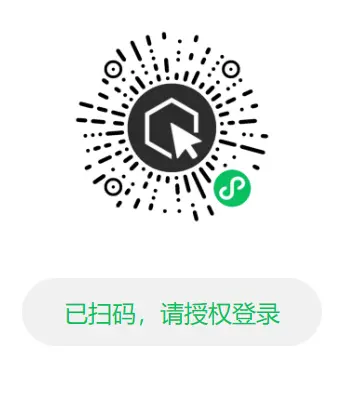
            'msg' => '已掃碼,請授權登錄'
        );
    }else if($status == '3'){
        // 當scene=3的時候代表已登錄
        $ret = array(
            'code' => 200,
            'msg' => '登錄成功',
            'openid' => $openid
        );
    }
}else{
    $ret = array(
        'code' => 203,
        'msg' => '請刷新重試'
    );
}

// 斷開數據庫連接
$conn->close();

// 輸出結果
echo json_encode($ret,JSON_UNESCAPED_UNICODE);

?>
scanCode.php
<?php
/**
 * 告訴數據庫我已經掃碼了
 */
header("Content-type:application/json");
$scene = $_GET['scene'];
// 引入數據庫配置
include './Db.php';
mysqli_query($conn,"UPDATE xcxqrcodelogin SET status='2' WHERE scene='$scene'");
$conn->close();
?>
login.php
<?php
header("content-type:application/json");

// 通過wx.login獲取到的code
$code = $_GET["code"];
$scene = $_GET['scene'];

/**
 * 這裏替換為你的小程序的appid和appsecret
 */
$appid = "xxx";
$secret = "xxx";

// 請求接口進行登錄獲取到openid
$api = "https://api.weixin.qq.com/sns/jscode2session?appid=$appid&secret=$secret&js_code=$code&grant_type=authorization_code";
$result = file_get_contents($api);
$arr_result = json_decode($result, true);
$openid = $arr_result["openid"];

// 引入數據庫配置
include './Db.php';
// 更新登錄狀態
mysqli_query($conn,"UPDATE xcxqrcodelogin SET openid='$openid',status='3' WHERE scene='$scene'");
$ret = array(
    'code' => 200,
    'msg' => '登錄成功',
    'openid' => $openid
);
$conn->close();

// 返回結果
echo json_encode($ret,JSON_UNESCAPED_UNICODE);
?>
Db.php
<?php

/**
 * 數據庫配置
 * BY TANKING 2022-08-06
 * https://segmentfault.com/u/tanking
 */
$db_url = "XXX"; // 數據庫服務器地址
$db_user = "XXX"; // 數據庫賬號
$db_pwd = "XXX"; // 數據庫賬號
$db_name = "XXX"; // 數據庫名稱

// 連接數據庫
$conn = new mysqli($db_url, $db_user, $db_pwd, $db_name);
mysqli_query($conn, "SET NAMES UTF-8");

?>
代碼説明
1、creatqrcode.php是生成小程序碼的界面,其中41行和42行的$appid和$appsecret要換成你的小程序的。以及92行的env_version在你的小程序上線後要改為release,如果是開發調試中,就保持現狀。
2、login.php是小程序端向後端請求接口獲取openid的,其中11行和12行的$appid和$appsecret要換成你的小程序的。
3、scanCode.php是掃碼後告訴服務器你已經完成掃碼的後端。
4、getstatus.php是輪詢掃碼狀態的後端。
5、Db.php是數據庫配置文件,需要進去配置你的數據庫地址、賬號、密碼、數據庫名稱。
數據庫創建
將這條SQL粘貼至你的數據庫管理端進行創建數據庫表。
CREATE TABLE `xcxqrcodelogin` (
  `id` int(11) NOT NULL AUTO_INCREMENT,
  `scene` varchar(32) DEFAULT '',
  `openid` varchar(32) DEFAULT '',
  `status` varchar(2) DEFAULT '1' COMMENT '1未掃碼2已掃碼3已登錄',
  `creat_time` timestamp NULL DEFAULT CURRENT_TIMESTAMP,
  PRIMARY KEY (`id`)
) ENGINE=InnoDB AUTO_INCREMENT=148 DEFAULT CHARSET=utf8mb4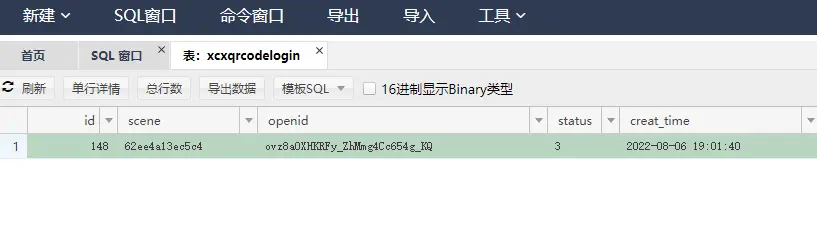
Demo
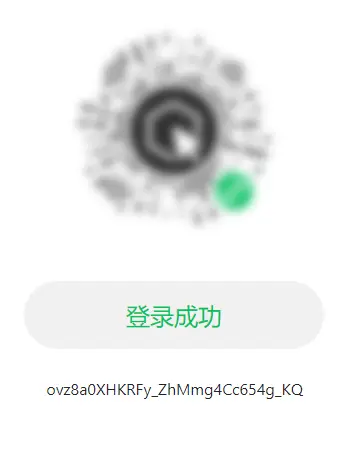
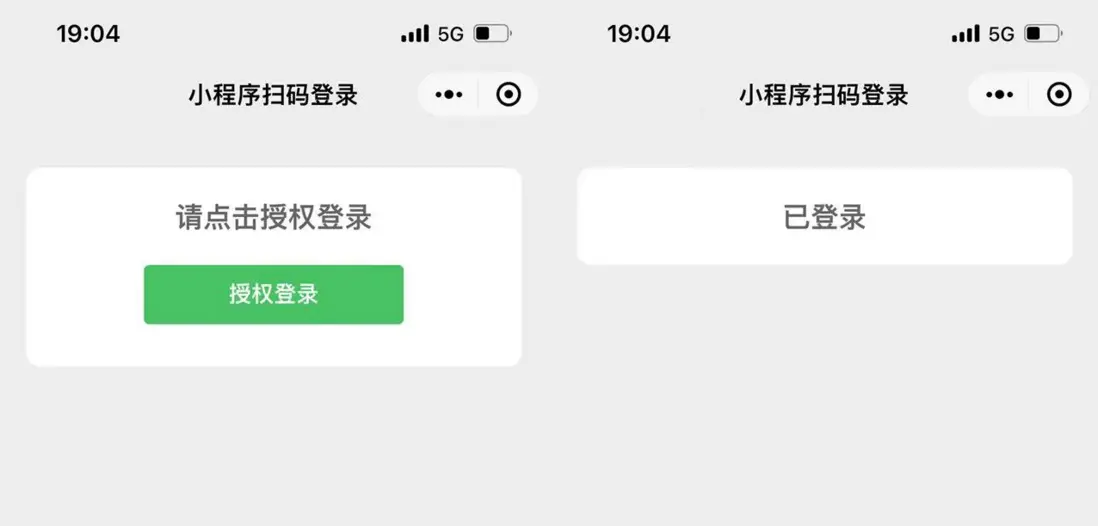
在線體驗
https://ma.liketube.cn/xcxqrcodelogin/creatqrcode.php
小程序端代碼
以上僅為前端和後端的代碼,小程序端的代碼請點擊這裏下載。
小程序端代碼:https://likeyun.lanzout.com/ii2Tp093wk6b
作者
TANKING
如需請教,可加WeChat:sansure2016
