

工具調用總體實現:
設計工具類:
@Component
public class WeatherInquiryTools {

    @Autowired
    private WeatherService weatherService;

    @Tool(description = "根據城市名稱查詢城市LocationID")
    public String getLocationId(@ToolParam(description = "城市名稱") String cityName){
        return weatherService.getLocationId(cityName).getLocation().get(0).getId();
    }

    @Tool(description = "根據城市LocationID查詢實時温度")
    public String getWeather(@ToolParam(description = "城市LocationID") String locationId){
        return weatherService.getWeather(locationId).getNow().getTemp();
    }
}
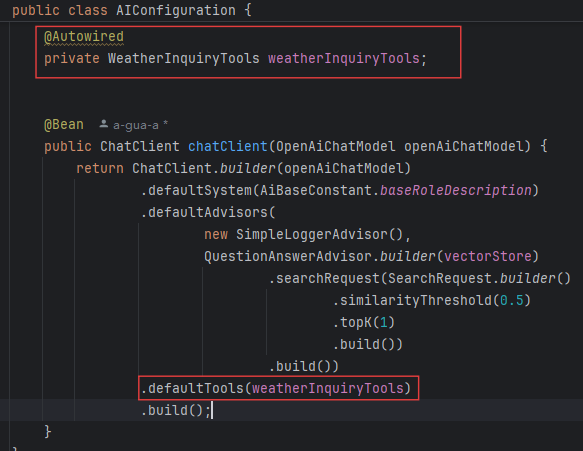
將工具交給ai客户端:
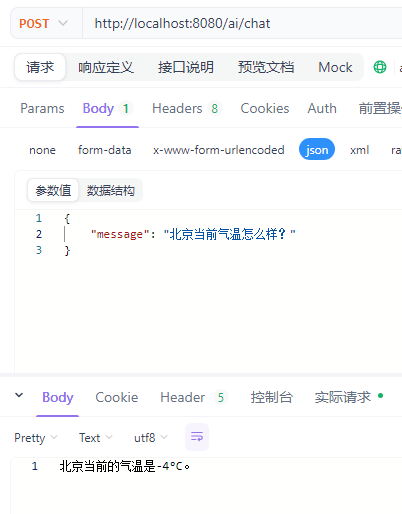
對話測試:
具體實現:
實體類:
@NoArgsConstructor
@AllArgsConstructor
@Data
public class WeatherResponse {
    @JsonProperty("code")
    private String code;

    @JsonProperty("updateTime")
    private String updateTime;

    @JsonProperty("fxLink")
    private String fxLink;

    @JsonProperty("now")
    private NowData now;

    @JsonProperty("refer")
    private Refer refer;
}
@Data
@AllArgsConstructor
@NoArgsConstructor
public class NowData {

    // 觀測時間
    @JsonProperty("obsTime")
    private String obsTime;

    // 温度,單位:攝氏度
    @JsonProperty("temp")
    private String temp;

    // 體感温度,單位:攝氏度
    @JsonProperty("feelsLike")
    private String feelsLike;

    // 天氣圖標代碼
    @JsonProperty("icon")
    private String icon;

    // 天氣描述
    @JsonProperty("text")
    private String text;

    // 風向360角度
    @JsonProperty("wind360")
    private String wind360;

    // 風向
    @JsonProperty("windDir")
    private String windDir;

    // 風力等級
    @JsonProperty("windScale")
    private String windScale;

    // 風速,單位:公里/小時
    @JsonProperty("windSpeed")
    private String windSpeed;

    // 相對濕度,單位:%
    @JsonProperty("humidity")
    private String humidity;

    // 降水量,單位:毫米
    @JsonProperty("precip")
    private String precip;

    // 大氣壓強,單位:百帕
    @JsonProperty("pressure")
    private String pressure;

    // 能見度,單位:公里
    @JsonProperty("vis")
    private String vis;

    // 雲量,單位:%
    @JsonProperty("cloud")
    private String cloud;

    //露點温度,單位:攝氏度
    @JsonProperty("dew")
    private String dew;
}
@NoArgsConstructor
@AllArgsConstructor
@Data
public class LocationResponse {

    @JsonProperty("code")
    private String code;

    @JsonProperty("location")
    private List<Location> location;

    @JsonProperty("refer")
    private Refer refer;
}
@AllArgsConstructor
@NoArgsConstructor
@Data
public class Location {

    @JsonProperty("name")
    private String name;

    @JsonProperty("id")
    private String id;

    @JsonProperty("lat")
    private String lat;

    @JsonProperty("lon")
    private String lon;

    @JsonProperty("adm2")
    private String adm2;

    @JsonProperty("adm1")
    private String adm1;

    @JsonProperty("country")
    private String country;

    @JsonProperty("tz")
    private String timezone;

    @JsonProperty("utcOffset")
    private String utcOffset;

    @JsonProperty("isDst")
    private String isDst;

    @JsonProperty("type")
    private String type;

    @JsonProperty("rank")
    private String rank;

    @JsonProperty("fxLink")
    private String fxLink;
}
@NoArgsConstructor
@AllArgsConstructor
@Data
public class Refer {

    @JsonProperty("sources")
    private List<String> sources;

    @JsonProperty("license")
    private List<String> license;
}
以上實體類基於 和風天氣api 設計。
配置類:
@Component
@Data
@ConfigurationProperties(prefix = "frog.weather")
public class WeatherProperties {

    private String apiKey;

    private String apiHost;
}
以上配置類基於 和風天氣api 設計。
序列化與反序列化工具類:
@Component
public class JasonUtils {

    private static final ObjectMapper mapper = new ObjectMapper()
            .configure(DeserializationFeature.FAIL_ON_UNKNOWN_PROPERTIES, false)
            .setSerializationInclusion(JsonInclude.Include.NON_NULL)
            .registerModule(new JavaTimeModule());

    public static String toJson(Object obj) {
        try {
            return mapper.writeValueAsString(obj);
        } catch (JsonProcessingException e) {
            throw new RuntimeException("序列化失敗", e);
        }
    }

    public static <T> T fromJson(String json, Class<T> clazz) {
        try {
            return mapper.readValue(json, clazz);
        } catch (JsonProcessingException e) {
            throw new RuntimeException("反序列化失敗", e);
        }
    }
}
查詢功能具體實現:
@Service
@Slf4j
public class WeatherServiceImpl implements WeatherService {

    @Autowired
    private WeatherProperties weatherProperties;

    /**
     * 根據城市LocationID查詢實時天氣狀況
     */
    @Override
    public WeatherResponse getWeather(String locationId) {
        HttpClient client = HttpClient.newHttpClient();
        String apiUrl = weatherProperties.getApiHost() + "/v7/weather/now?location=" + locationId;
        try {
            HttpRequest request = HttpRequest.newBuilder()
                    .uri(URI.create(apiUrl))
                    .header("X-QW-Api-Key", weatherProperties.getApiKey())
                    .GET()
                    .build();
            HttpResponse<byte[]> response = client.send(request, HttpResponse.BodyHandlers.ofByteArray());
            byte[] compressedBody = response.body();
            // 解壓縮響應體
            String decompressedBody = GzipDecompressor.decompressToString(compressedBody);
            log.info("查詢天氣成功, locationId: {}", locationId);
            WeatherResponse weatherResponse = JasonUtils.fromJson(decompressedBody, WeatherResponse.class);
            return weatherResponse;
        } catch (Exception e) {
            log.error("查詢天氣失敗, locationId: {}", locationId, e);
            return null;
        }
    }

    /**
     * 根據城市名稱查詢城市LocationID
     */
    @Override
    public LocationResponse getLocationId(String cityName) {
        HttpClient client = HttpClient.newHttpClient();
        String apiUrl = weatherProperties.getApiHost() + "/geo/v2/city/lookup?location=" + cityName;
        try {
            HttpRequest request = HttpRequest.newBuilder()
                    .uri(URI.create(apiUrl))
                    .header("X-QW-Api-Key", weatherProperties.getApiKey())
                    .GET()
                    .build();
            HttpResponse<byte[]> response = client.send(request, HttpResponse.BodyHandlers.ofByteArray());
            byte[] compressedBody = response.body();
            // 解壓縮響應體
            String decompressedBody = GzipDecompressor.decompressToString(compressedBody);
            log.info("查詢城市LocationID成功, cityName: {}", cityName);
            LocationResponse locationResponse = JasonUtils.fromJson(decompressedBody, LocationResponse.class);
            return locationResponse;
        } catch (Exception e) {
            log.error("查詢城市LocationID失敗, cityName: {}", cityName, e);
            return null;
        }
    }
}
目前實現的tool查詢功能侷限温度查詢,但根據工具需求可拓展(service返回了所有查詢所得,tool內對數據重新整理可以產生豐富功能)。
