

在本指南中,我們將詳細瞭解 Prometheus 架構,以有效地理解、配置和利用 Prometheus。
Prometheus 是一個用 Golang 編寫的流行開源監控和警報系統,能夠收集和處理來自各種目標的指標。您還可以查詢、查看、分析指標並根據閾值收到警報。
此外,在當今世界,可觀察性對於每個組織都變得至關重要,而 Prometheus 是開源領域的關鍵觀測工具之一。
Prometheus 架構概述

Prometheus主要由以下部分組成:
- Prometheus Server
- Service Discovery
- Time-Series Database (TSDB)
- Targets
- Exporters
- Push Gateway
- Alert Manager
- Client Libraries
- PromQL
讓我們詳細看看每個組件。
Prometheus Server
Prometheus 服務器是基於指標的監控系統的大腦。服務器的主要工作是使用拉模型從各個目標收集指標。目標只不過是服務器、pod、端點等,我們將在下一個主題中詳細介紹它們。使用 Prometheus 從目標收集指標的通用術語稱為抓取。
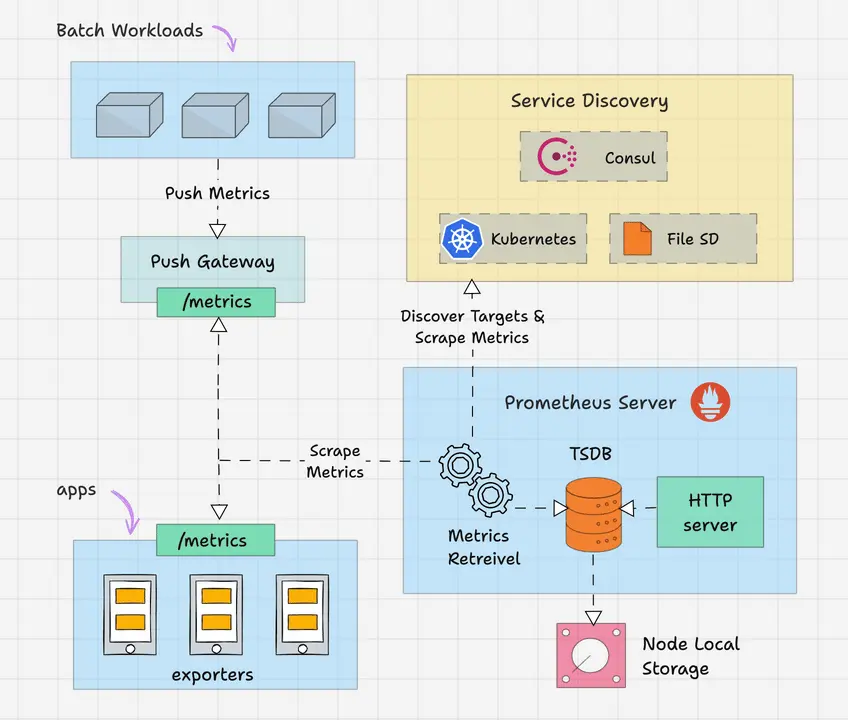
Prometheus 根據我們在 Prometheus 配置文件中給出的抓取間隔定期抓取指標。這是一個配置示例。
global:
  scrape_interval: 15s
  evaluation_interval: 15s
  scrape_timeout: 10s

rule_files:
  - "rules/*.rules"

scrape_configs:
  - job_name: 'prometheus'
    static_configs:
      - targets: ['localhost:9090']
  - job_name: 'node-exporter'
    static_configs:
      - targets: ['node-exporter:9100']

alerting:
  alertmanagers:
    - static_configs:
        - targets: ['alertmanager:9093']
Time-Series Database (TSDB)
prometheus 接收到的指標數據隨着時間的推移而變化(CPU、內存、網絡 IO 等)。它被稱為時間序列數據。因此 Prometheus 使用時間序列數據庫(TSDB)來存儲其所有數據。默認情況下,Prometheus 以高效的格式(塊)將其所有數據存儲在本地磁盤中。隨着時間的推移,它會壓縮所有舊數據以節省空間。它還具有刪除舊數據的保留策略。TSDB 具有內置的機制來管理長期保存的數據。您可以選擇以下任意數據保留策略。
- 基於時間的保留:數據將保留指定的天數。默認保留期為 15 天。
- 基於大小的保留:您可以指定 TSDB 可以容納的最大數據量。一旦達到這個限制,普羅米修斯將釋放空間來容納新數據。
Prometheus 還提供遠程存儲選項。這主要是存儲可擴展性、長期存儲、備份和災難恢復等所需要的。
Prometheus Targets
Target 是 Prometheus 抓取指標的來源。目標可以是服務器、服務、Kubernetes Pod、應用程序端點等。
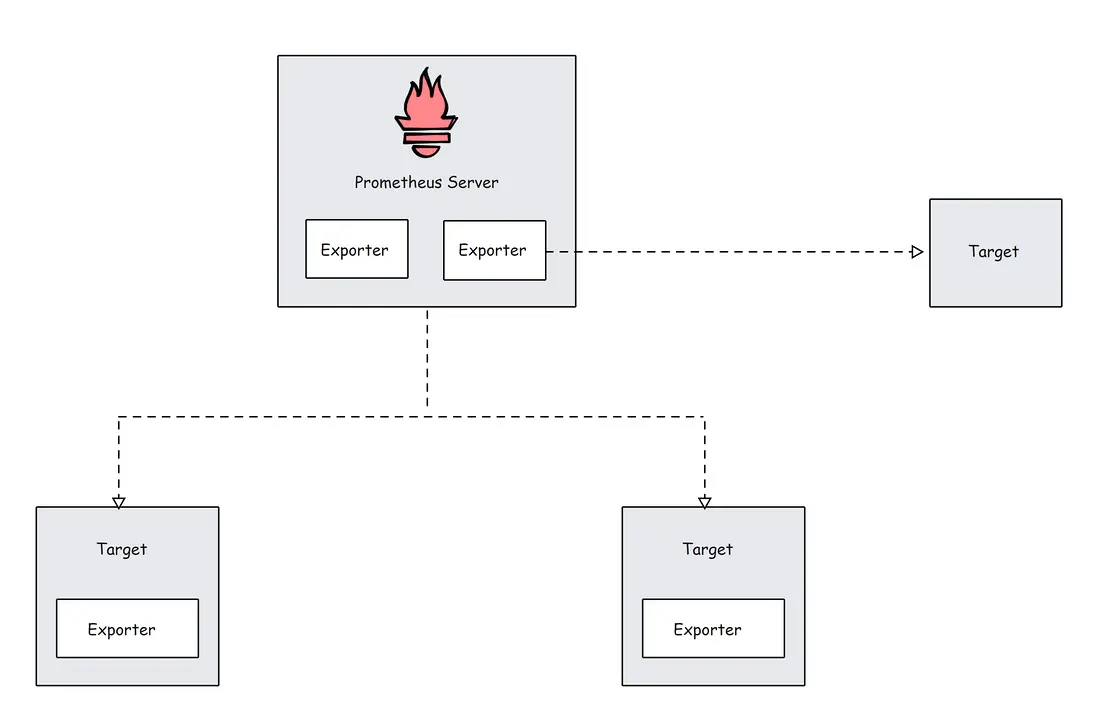
默認情況下,prometheus 會在目標的 /metrics 路徑下查找指標。可以在目標配置中更改默認路徑。這意味着,如果您不指定自定義指標路徑,Prometheus 會在 /metrics 下查找指標。
目標配置位於 Prometheus 配置文件中的 scrape_configs 下。這是一個配置示例。
scrape_configs:

  - job_name: 'node-exporter'
    static_configs:
      - targets: ['node-exporter1:9100', 'node-exporter2:9100']

  - job_name: 'my_custom_job'
    static_configs:
      - targets: ['my_service_address:port']
    metrics_path: '/custom_metrics'

  - job_name: 'blackbox-exporter'
    static_configs:
      - targets: ['blackbox-exporter1:9115', 'blackbox-exporter2:9115']
    metrics_path: /probe

  - job_name: 'snmp-exporter'
    static_configs:
      - targets: ['snmp-exporter1:9116', 'snmp-exporter2:9116']
    metrics_path: /snmp
Prometheus 需要來自目標端點的特定文本格式的數據。每個指標都必須換行。通常,這些指標使用 Prometheus exporters 來暴露。Prometheus exporter 通常和 target 伴生在一起。
Prometheus Exporters
Exporter 就像在目標上運行的代理。它將指標從特定系統轉換為普羅米修斯可以理解的格式。它可以是系統指標,如 CPU、內存等,也可以是 Java JMX 指標、MySQL 指標等。
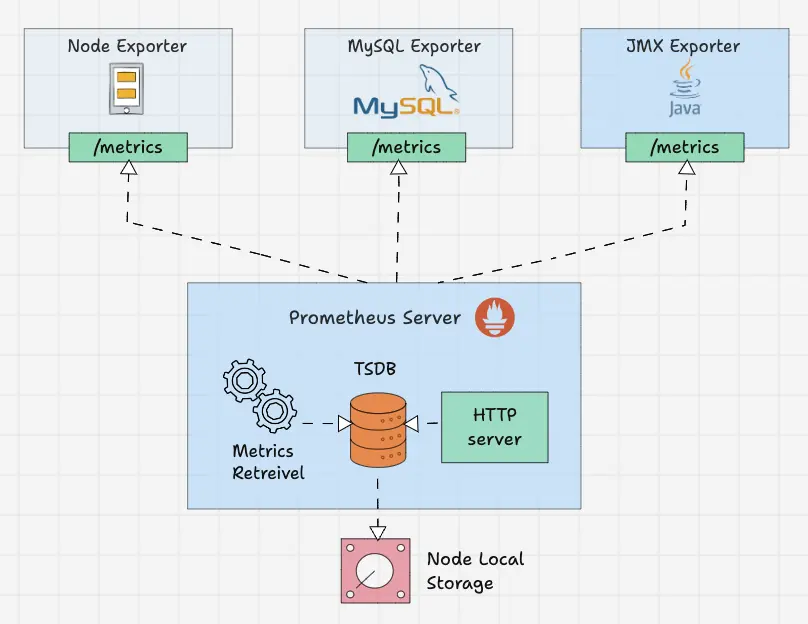
默認情況下,這些轉換後的指標由 Exporter 在目標的 /metrics 路徑(HTTP 端點)上公開。例如,如果要監控服務器的 CPU 和內存,則需要在該服務器上安裝 Node Exporter,並且 Node Exporter 以 prometheus 指標格式在 /metrics 上公開 CPU 和內存指標。一旦 Prometheus 提取指標,它將結合指標名稱、標籤、值和時間戳生成結構化數據。
社區有很多 Exporters 可用,但只有其中一些獲得 Prometheus 官方認可。如果您需要更多自定義採集,則需要創建自己的導出器。Prometheus 將 Exporter 分為各個部分,例如數據庫、硬件、問題跟蹤器和持續集成、消息系統、存儲、公開 Prometheus 指標的軟件、其他第三方實用程序等。您可以從官方文檔中查看每個類別的 Exporter 列表。
在 Prometheus 配置文件中,所有 Exporter 的詳細信息將在 scrape_configs 下給出。
scrape_configs:
  - job_name: 'node-exporter'
    static_configs:
      - targets: ['node-exporter1:9100', 'node-exporter2:9100']

  - job_name: 'blackbox-exporter'
    static_configs:
      - targets: ['blackbox-exporter1:9115', 'blackbox-exporter2:9115']
    metrics_path: /probe

  - job_name: 'snmp-exporter'
    static_configs:
      - targets: ['snmp-exporter1:9116', 'snmp-exporter2:9116']
    metrics_path: /snmp
Prometheus Service Discovery
Prometheus 使用兩種方法從目標中獲取指標。
- 靜態配置:當目標具有靜態 IP 或 DNS 端點時,我們可以使用這些端點作為目標。
- 服務發現:在大多數自動伸縮系統和 Kubernetes 等分佈式系統中,目標不會有靜態端點。在這種情況下,使用 prometheus 服務發現來發現目標端點,並且目標會自動添加到 prometheus 配置中。
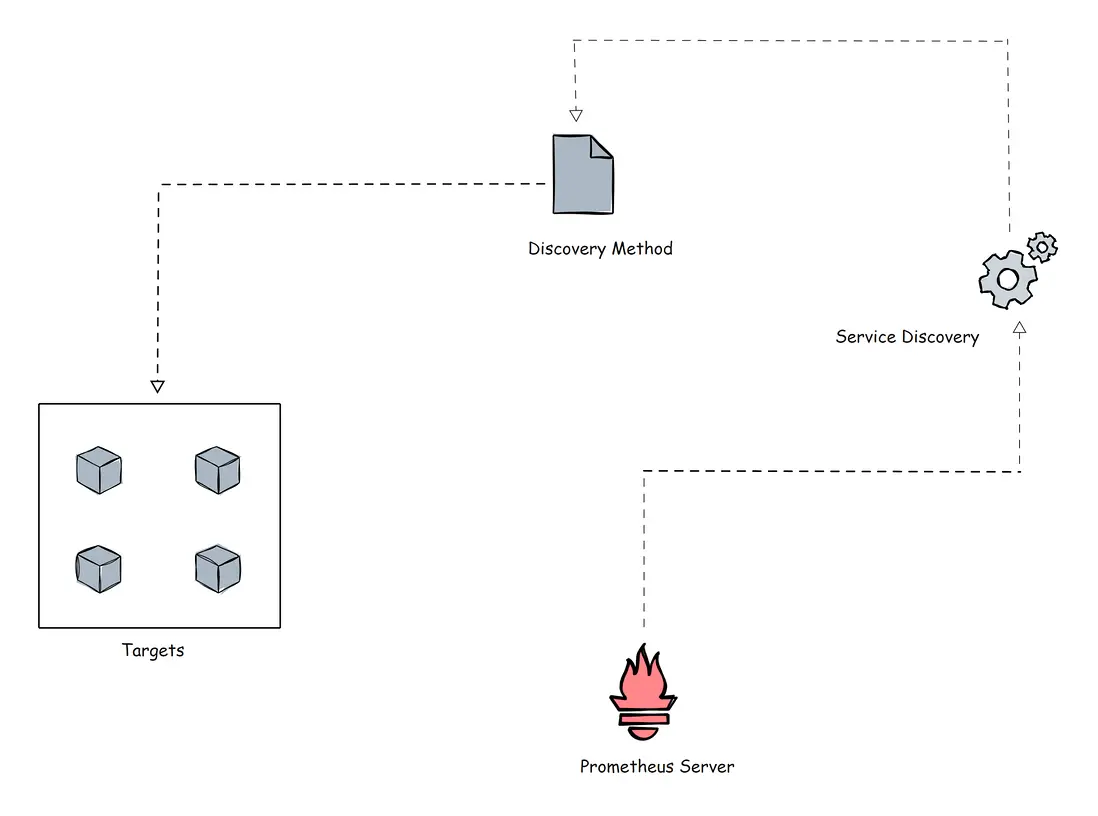
在進一步討論之前,讓我展示一個使用 kubernetes_sd_configs 的 Prometheus 配置文件的 Kubernetes 服務發現塊的小示例。
scrape_configs:
  - job_name: 'kubernetes-apiservers'
    kubernetes_sd_configs:
    - role: endpoints
    scheme: https
    tls_config:
      ca_file: /var/run/secrets/kubernetes.io/serviceaccount/ca.crt
    bearer_token_file: /var/run/secrets/kubernetes.io/serviceaccount/token
    relabel_configs:
    - source_labels: [__meta_kubernetes_namespace, __meta_kubernetes_service_name, __meta_kubernetes_endpoint_port_name]
      action: keep
      regex: default;kubernetes;https
Kubernetes 是動態目標的完美示例。在這裏,您不能使用靜態目標方法,因為 Kubernetes 集羣中的目標(pod)可能是短暫存活的。
Kubernetes 中還有基於文件的服務發現 file_sd_configs 。它適用於靜態目標,但經典靜態配置 static_configs 和 file_sd_configs 之間的主要區別在於,在這種情況下,我們創建單獨的 JSON 或 YAML 文件並將目標信息保存在文件中。Prometheus 將讀取文件來識別目標。
不僅這兩種,還可以使用各種服務發現方法,例如 consul_sd_configs(prometheus 從 consul 獲取目標詳細信息)、ec2_sd_configs 等。如需瞭解更多配置細節,請訪問官方文檔。
Prometheus Pushgateway
Prometheus 默認使用 pull 方式來抓取指標。然而,有些場景需要將指標推送到 prometheus。讓我們舉一個在 Kubernetes cronjob 上運行的批處理作業的示例,該作業每天根據某些事件運行 5 分鐘。在這種情況下,Prometheus 將無法使用拉機制正確抓取服務級別指標。因此,我們需要將指標推送到 prometheus,而不是等待 prometheus 拉取指標。為了推送指標,prometheus 提供了一個名為 Pushgateway 的解決方案。它是一種中間網關。
Pushgateway 需要作為獨立組件運行。批處理作業可以使用 HTTP API 將指標推送到 Pushgateway。然後 Pushgateway 在 /metrics 端點上公開這些指標。然後 Prometheus 從 Pushgateway 中抓取這些指標。
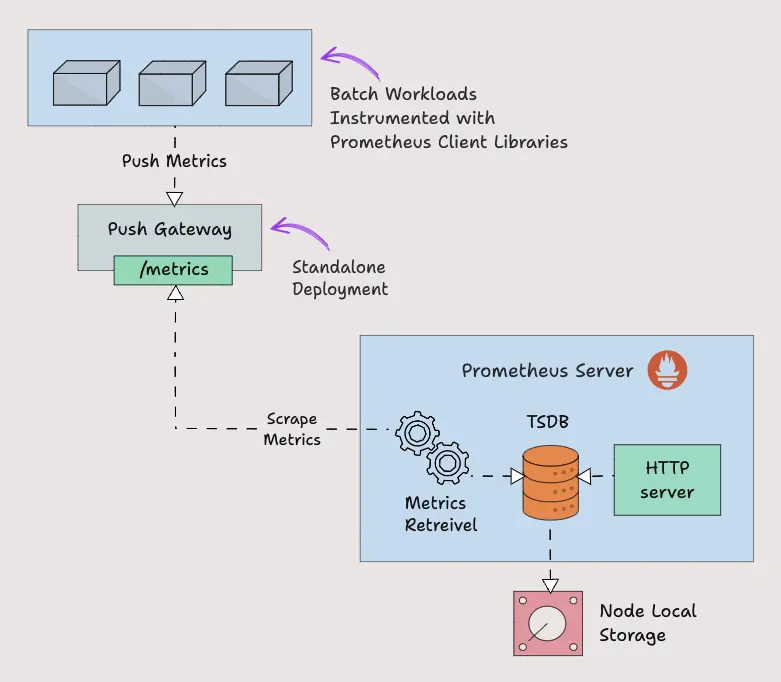
Pushgateway 將指標數據臨時存儲在內存中。它更像是一個臨時緩存。Pushgateway 配置也將在 Prometheus 配置中的 scrape_configs 部分下進行配置。
scrape_configs:
  - job_name: "pushgateway"
    honor_labels: true
    static_configs:
    - targets: [pushgateway.monitoring.svc:9091]
要將指標發送到 Pushgateway,您需要使用 prometheus 客户端庫對應用程序插樁,或使用腳本暴露指標。
Prometheus Client Libraries
Prometheus 客户端庫是可用於檢測應用程序代碼的軟件庫,以 Prometheus 理解的方式公開指標。如果您需要自行埋點插樁或想要創建自己的Exporter,則可以使用客户端庫。
一個非常好的用例是需要將指標推送到 Pushgateway 的批處理作業。批處理作業使用客户端庫來埋點,以 prometheus 格式暴露指標。下面是一個 Python Client Library 的示例,它公開了名為 batch_job_records_processed_total 的自定義指標。
from prometheus_client import start_http_server, Counter
import time
import random

RECORDS_PROCESSED = Counter('batch_job_records_processed_total', 'Total number of records processed by the batch job')

def process_record():
    time.sleep(random.uniform(0.01, 0.1))
    RECORDS_PROCESSED.inc()

def batch_job():

    for _ in range(100):
        process_record()

if __name__ == '__main__':

    start_http_server(8000)
    print("Metrics server started on port 8000")

    batch_job()
    print("Batch job completed")

    while True:
        time.sleep(1)
在使用客户端庫時,prometheus_client 會在 /metrics 端點上公開指標。Prometheus 擁有幾乎所有編程語言的客户端庫,如果您想創建客户端庫,也 OK。要了解更多創建指南和查看客户端庫列表,您可以參考官方文檔。
Prometheus Alert Manager
Alertmanager 是 Prometheus 監控系統的關鍵部分。它的主要工作是根據 Prometheus 警報配置中設置的指標閾值發送警報。警報由 Prometheus 觸發(注意,是由 Prometheus 進程觸發原始告警)併發送到 Alertmanager。Alertmanager 對告警去重、抑制、靜默、分組,最後使用各類通知媒介(電子郵件、slack 等)發出告警事件。其具體功能:
- Alert Deduplicating:消除重複警報
- Grouping:將相關警報分組在一起
- Silencing:靜默維護
- Routing:路由,根據嚴重性將警報路由到適當的接收者
- Inhibition:抑制,當存在中高嚴重性警報時停止低嚴重性警報的過程
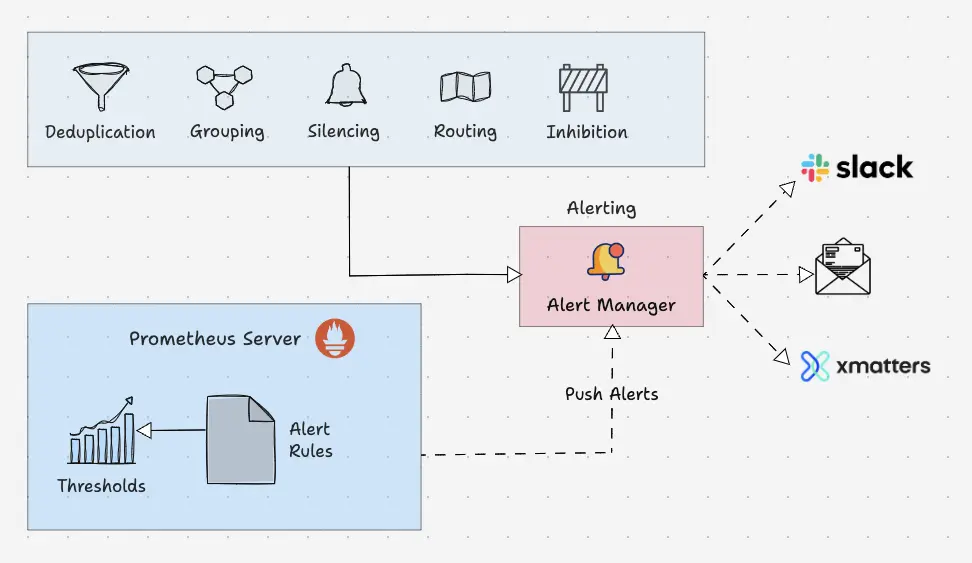
以下是警報規則的配置示例:
groups:
- name: microservices_alerts
  rules:
  - record: http_latency:average_latency_seconds
    expr: sum(http_request_duration_seconds_sum) / sum(http_request_duration_seconds_count)
  - alert: HighLatencyAlert
    expr: http_latency:average_latency_seconds > 0.5
    for: 5m
    labels:
      severity: critical
    annotations:
      summary: "High latency detected in microservices"
      description: "The average HTTP latency is high ({{ $value }} seconds) in the microservices cluster."
這是 Alertmanager 配置文件的路由配置示例:
routes:
- match:
    severity: 'critical'
  receiver: 'pagerduty-notifications'

- match:
    severity: 'warning'
  receiver: 'slack-notifications'
Alertmanager 支持大多數消息和通知系統,例如 Discord、電子郵件、Slack 等,以將警報作為通知發送給接收者。
PromQL
PromQL 是一種靈活的查詢語言,可用於從 prometheus 查詢時間序列指標。
譯者注:這是 Prometheus 生態的重中之重,我之前寫過一篇《PromQL 從入門到精通》,儘量融入了生產使用場景,讀者可以下載學習。
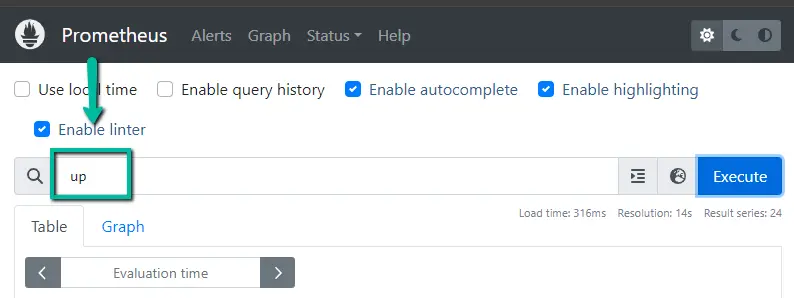
我們可以直接從 Prometheus 用户界面使用查詢,也可以使用 curl 命令通過命令行界面進行查詢。
Prometheus UI
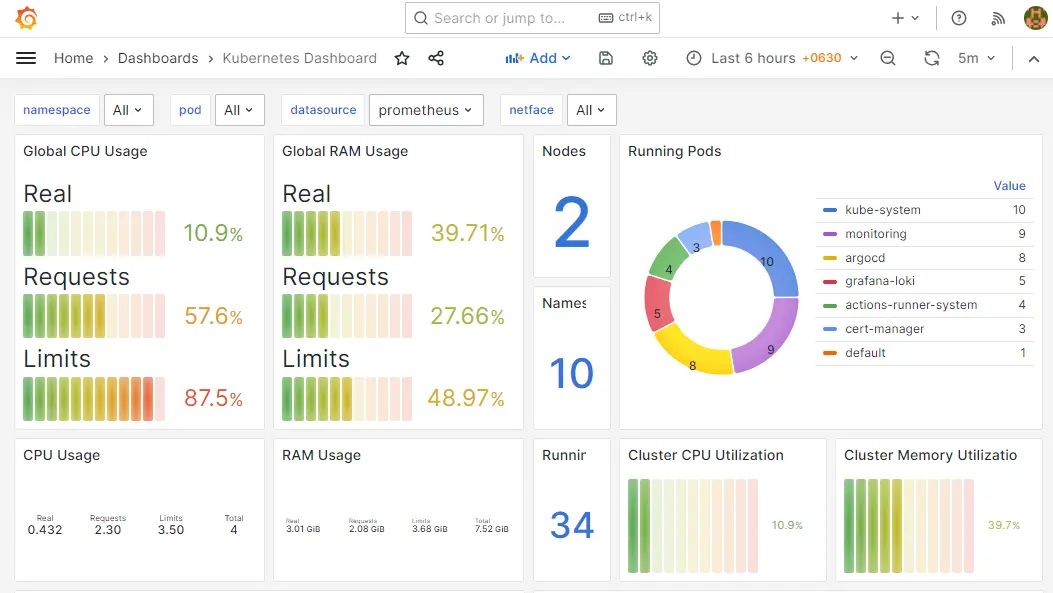
另外,當您將 prometheus 作為數據源添加到 Grafana 時,您可以使用 PromQL 來查詢和創建 Grafana 儀表板,如下所示。
總結
這解釋了 Prometheus 架構的主要組件,並將給出 Prometheus 配置的基本概述,您還可以使用配置做很多事情。每個組織的需求會有所不同,並且 Prometheus 在不同環境(例如 VM 和 Kubernetes)中的實現也有所不同。如果您瞭解基礎知識和關鍵配置,您就可以輕鬆地在任何平台上落地它。
本文翻譯自這裏。讀者既然讀到這裏了,説明對 IT 監控這塊很感興趣,如下內容可能也會對您有所幫助:
- 運維監控實戰筆記 是我在極客時間寫的一個專欄,對監控體系的方方面面都有涉及,已經有近萬人學習了,您也可以試讀一下。
- github.com/ccfos/nightingale 是我們開源的運維監控系統,解決 Prometheus 告警規則管理的問題,可以 star 一下收藏備用。
- FlashDuty 事件 OnCall 中心 是統一的告警分發平台,一般公司都有多套監控系統(Zabbix、Prometheus、Nightingale、藍鯨、雲監控、Graylog、Skywalking、監控寶等),FlashDuty 可以對接各類監控系統,做統一的告警收斂降噪、排班、認領升級、報表統計、團隊協同等功能。
