

承認有點標題黨了。這次開發一個項目遇到問題,以前有兩個微信老項目基於yaf,域名為m.baidu.com(做示例),然後網頁授權域名填的是m.baidu.com,而這次新開發的項目是基於laravel,那麼域名為wechat.baidu.com,但是網頁授權域名怎麼辦,這就坑爹了。當然了,大部分人不會遇到這麼蛋疼的事情吧。
前提
laravel5.5

php7.1.0

nginx1.10

overtrue/laravel-wechat
瞭解微信OAuth
這個過程必須要明白
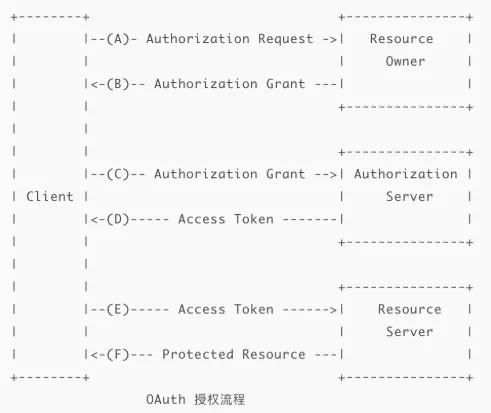
感謝超神的圖片

從流程我們可以看到,回調url域名其實就是我們的網頁授權域名。那麼既然這樣我們是不是可以造個假呢,
在域名為wechat.baidu.com的項目下,我們也把網頁授權域名寫成m.baidu.com,然後再使用nginx做代理,基於location 轉發到wechat.baidu.com下;
改寫overtrue/laravel-wechat中間件
為什麼要改寫這個中間件呢,因為中間件默認會直接獲取你的域名,所以如果我使用wechat.baidu.com,那麼默認就會回調後跳轉到wechat.baidu.com,而實際上我要跳轉到m.baidu.com
在Middleware文件夾下新建一箇中間件OAuthAuthenticate,並且繼承 Overtrue\LaravelWeChat\Middleware\OAuthAuthenticate;:
namespace App\Http\Middleware;


use Illuminate\Http\Request;
use Illuminate\Support\Facades\App;
use Illuminate\Support\Facades\Event;
use Overtrue\LaravelWeChat\Events\WeChatUserAuthorized;
use Overtrue\LaravelWeChat\Middleware\OAuthAuthenticate as BaseAuthenticate;

class OAuthAuthenticate extends BaseAuthenticate
{


    public function handle($request, \Closure $next, $account = 'default', $scopes = null)
    {
        // $account 與 $scopes 寫反的情況
        if (is_array($scopes) || (\is_string($account) && str_is('snsapi_*', $account))) {
            list($account, $scopes) = [$scopes, $account];
            $account || $account = 'default';
        }

        $isNewSession = false;
        $sessionKey = \sprintf('wechat.oauth_user.%s', $account);
        $config = config(\sprintf('wechat.official_account.%s', $account), []);
        $officialAccount = app(\sprintf('wechat.official_account.%s', $account));
        $scopes = $scopes ?: array_get($config, 'oauth.scopes', ['snsapi_base']);

        if (is_string($scopes)) {
            $scopes = array_map('trim', explode(',', $scopes));
        }

        $session = session($sessionKey, []);

        if (!$session) {
            if ($request->has('code')) {
                session([$sessionKey => $officialAccount->oauth->user() ?? []]);
                $isNewSession = true;

                Event::fire(new WeChatUserAuthorized(session($sessionKey), $isNewSession, $account));

                return redirect()->to($this->getTargetUrl($request));
            }

            session()->forget($sessionKey);


            //本地和測試環境下使用這個
            if(App::environment()=='local' ||App::environment()=="test"){
                return $officialAccount->oauth->scopes($scopes)->redirect($request->fullUrl());
            }


            $query = $request->getQueryString();

            $question = $request->getBaseUrl().$request->getPathInfo() == '/' ? '/?' : '?';

            $url= $query ? $request->getPathInfo().$question.$query : $request->getPathInfo();

            $url="http://m.baidu.com".$url; //就這一步很重要

            return $officialAccount->oauth->scopes($scopes)->redirect($url);
        }

        Event::fire(new WeChatUserAuthorized(session($sessionKey), $isNewSession, $account));

        return $next($request);
    }


}然後在kernel.php中的$routeMiddleware添加
"wechat.oauth.baidu.com"=>OAuthAuthenticate::class然後就可以在路由文件使用了,完工。
nginx 設置代理
這個覺得沒有什麼好講的,其實原理很簡單,直接上代碼
     //在m.baidu.com域名配置下,設置location規則,所有router以/official_account開頭的都去wechat.baidu.com下,然後設置跨域

     location /official_account/{
        add_header 'Access-Control-Allow-Origin' "$http_origin";
        add_header 'Access-Control-Allow-Methods' 'GET, POST, PUT, DELETE, OPTIONS';
        add_header 'Access-Control-Allow-Headers' 'DNT,X-Mx-ReqToken,Keep-Alive,User-Agent,X-Requested-With,If-Modified-Since,Cache-Control,Content-Type,Authorization,X-CSRF-TOKEN,X-XSRF-TOKEN';
        add_header 'Access-Control-Allow-Credentials' 'true';
        if ($request_method = 'OPTIONS') {
                add_header 'Access-Control-Allow-Origin' "$http_origin";
                add_header 'Access-Control-Allow-Methods' 'GET, POST, PUT, DELETE, OPTIONS';
                add_header 'Access-Control-Allow-Headers' 'DNT,X-Mx-ReqToken,Keep-Alive,User-Agent,X-Requested-With,If-Modified-Since,Cache-Control,Content-Type,Authorization,X-CSRF-TOKEN,X-XSRF-TOKEN';
                add_header 'Access-Control-Allow-Credentials' 'true';
                #add_header 'Access-Control-Max-Age' 1728000; # 20 天
                #add_header 'Content-Type' 'text/html charset=UTF-8';
                #add_header 'Content-Length' 0;
                return 200;
        }
    # 這下面是要被代理的後端服務器,它們就不需要修改代碼來支持跨域了
        proxy_pass http://wechat.m.liaorusanshe.com;
        #       proxy_set_header Host $host;
        proxy_redirect off;
        #proxy_set_header X-Real-IP $remote_addr;
        #proxy_set_header X-Forwarded-For $proxy_add_x_forwarded_for;
        proxy_connect_timeout 60;
        proxy_read_timeout 60;
        proxy_send_timeout 60;


}這個代碼配置參考了《Nginx配置實現CORS》,但是直接複製過來,配合proxy_pass會出現400 request header or cookie too large錯誤, 百度了一下"400 Bad Request Request Header Or Cookie Too Large",<<nginx配置反向代理或跳轉出現400問題處理記錄>>可以解決,就是如下三個設置有問題,去掉就好了:
         proxy_set_header Host $host;
         proxy_set_header X-Real-IP $remote_addr;
proxy_set_header X-Forwarded-For $proxy_add_x_forwarded_for;綜合分析,應該是nginx在使用proxy_pass做跳轉時,如果直接使用域名,且需要向後端提交當前訪問的IP地址時,引發nginx的bug造成死循環,不知道大家有沒有遇到過這種情況。
然後重新啓動就好了,完工。
