


Vaadin 是一個面向企業級應用的現代 Web 開發框架,專注於 Java 全棧開發、組件化 UI 構建,並提供豐富的開箱即用 Web Components。Vaadin 的優勢包括:
-
Java 到前端的統一開發體驗
-
企業級安全性與長生命週期支持
-
高質量 UI 組件庫與設計系統
-
與 Figma 無縫銜接的 Copilot AI 輔助開發能力
在最新版本中,Vaadin Copilot 新增了 Figma Importer API,實現“從設計到代碼”的自動化,讓開發者可以直接將 Figma 組件複製並粘貼到 Vaadin 項目中,生成 Java 或 React 代碼。
本文基於 Vaadin 官方示例並由慧都整理改寫,幫助國內開發者快速上手。
獲取Vaadin產品試用 請聯繫慧都科技>>>
1. 功能概覽:從 Figma 複製、到 Vaadin 自動生成代碼
通過 Vaadin Copilot 的 Figma Importer API,你可以做到:
-
從 Figma 複製組件或實例(如卡片、按鈕)
-
在 Vaadin 項目中直接粘貼
-
自動生成對應的 Java(Flow) 或 React(Hilla) 組件代碼
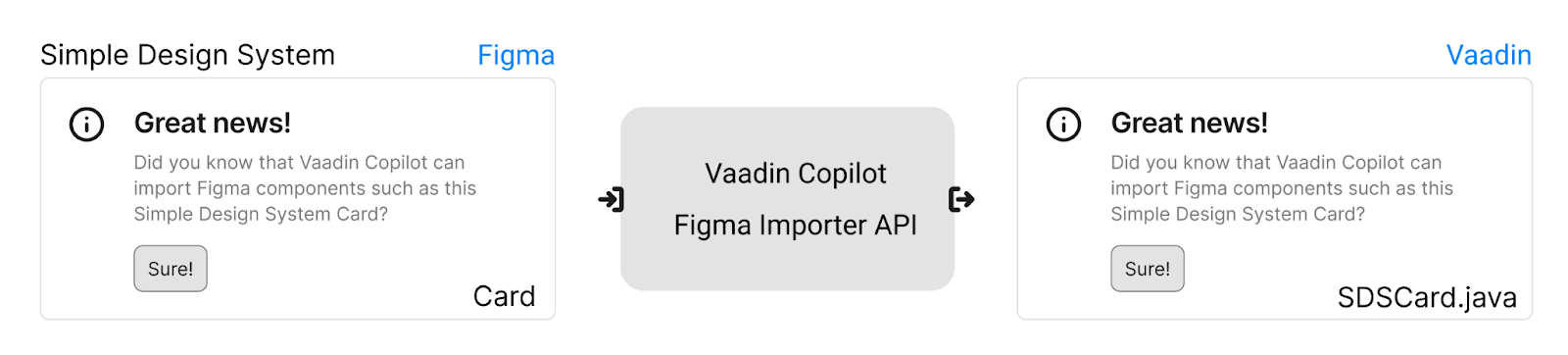
Figma Importer API 用於將 Simple Design System Card 映射到 Java SDSCard 組件。
官方項目基於:
-
Demo 項目
-
Figma 組件與實例示例
2. 使用前準備
啓用 Vite 熱重載(推薦)
在 Spring Bootapplication.properties中加入:
vaadin.frontend.hotdeploy=true3. Figma 組件體系與 Importer API 原理
許多公司(包括 Vaadin)都有自己的 Figma 設計系統,也可使用公開設計系統(如 Simple Design System)。
Vaadin Copilot 24.9 引入的 Figma Importer API 用於將這些組件映射為真實代碼。
Figma → Vaadin 的映射關係:
-
Figma 的 Component ≈ Java/TS 中的 class
-
Figma 的 Instance ≈ Java/TS 中的 object
-
屬性可被實例覆蓋
-
通過“標記屬性(marker property)”來區分組件類型
例如,Figma 中 Card 組件的屬性:
type = SDSCardImporter 僅匹配帶有此屬性的組件。
4. 目標 Java / React 組件示例
以 SDSCard 與 SDSButton 為例:
若手動創建 Java 組件:
var sdscard = new SDSCard();
sdscard.setTitle("Great news!");
sdscard.setBody(sayHello);

var sdsbutton = new SDSButton();
sdsbutton.setLabel("Sure!");
sdscard.add(sdsbutton);
若使用 React:
<SDSCard title="Great news!">
   <span slot="body">Did you know that Vaadin Copilot can import Figma components?</span>
   <SDSButton label="Sure!" />
</SDSCard>
示例工程已包含這些組件。
5. 編寫 Importer:從 Figma 轉換為 Java/React
Importer 是一個 TypeScript 函數:
-
輸入 FigmaNode
-
輸出 ComponentDefinition
-
根據目標語言(Java 或 React)生成代碼結構
5.1 SDSCard Java Importer 示例
文件:frontend/sdscard-java-importer.ts
function sdsCardJavaImporter(node, metadata) {
  if (node.properties.type === 'SDSCard' && metadata.target === 'java') {
    return {
      tag: 'SDSCard',
      props: {
        title: node.properties.title,
        body: {
          tag: 'Span',
          props: { text: node.properties.body },
          javaClass: 'com.vaadin.flow.component.html.Span',
        },
      },
      children: createChildrenDefinitions(node, metadata, n => {
        return n.properties.type === 'SDSButton';
      }),
      javaClass: 'test.vaadin.copilot.flow.testviews.ui.customcomponents.components.SDSCard',
    };
  }
}
registerImporter(sdsCardJavaImporter);
核心點説明:
-
匹配type: SDSCard
-
生成 Java 組件結構
-
子組件過濾以查找 Button
5.2 SDSButton Java Importer
文件:frontend/sdsbutton-java-importer.ts
function sdsButtonJavaImporter(node, metadata) {
  if (node.properties.type === 'SDSButton' && metadata.target === 'java') {
    return {
      tag: 'SDSButton',
      props: { label: node.properties.label },
      children: [],
      javaClass: 'test.vaadin.copilot.flow.testviews.ui.customcomponents.components.SDSButton',
    };
  }
}
registerImporter(sdsButtonJavaImporter);
5.3 SDSCard React Importer
文件:frontend/sdscard-react-importer.ts
function sdsCardReactImporter(node, metadata) {
  if (node.properties.type === 'SDSCard' && metadata.target === 'react') {
    return {
      tag: 'SDSCard',
      props: { title: node.properties.title },
      children: [
        {
          tag: 'span',
          props: { slot: 'body' },
          children: [node.properties.body.toString()],
        },
        ...createChildrenDefinitions(node, metadata, n => n.properties.type === 'SDSButton'),
      ],
      reactImports: { SDSCard: 'Frontend/components/SDSCard' },
    };
  }
}
registerImporter(sdsCardReactImporter);
5.4 SDSButton React Importer
文件:frontend/sdsbutton-react-importer.ts
function sdsButtonReactImporter(node, metadata) {
  if (node.properties.type === 'SDSButton' && metadata.target === 'react') {
    return {
      tag: 'SDSButton',
      props: { label: node.properties.label },
      children: [],
      reactImports: { SDSButton: 'Frontend/components/SDSButton' },
    };
  }
}
registerImporter(sdsButtonReactImporter);
6. 在項目中啓用 Importer
Flow(Java)項目中:
@SpringBootApplication
@JsModule(value = "./sdscard-java-importer.ts", developmentOnly = true)
@JsModule(value = "./sdsbutton-java-importer.ts", developmentOnly = true)
@JsModule(value = "./sdscard-react-importer.ts", developmentOnly = true)
@JsModule(value = "./sdsbutton-react-importer.ts", developmentOnly = true)
public class Application implements AppShellConfigurator {}
React 項目:index.tsx
if (import.meta.env.DEV) {
  import('./sdscard-java-importer');
  import('./sdsbutton-java-importer');
  import('./sdscard-react-importer');
  import('./sdsbutton-react-importer');
}
7. 自動生成的代碼示例
Java 生成代碼:
SDSCard sdscard = new SDSCard();
sdscard.setTitle("Great news!");
Span didYouKnowThatVaadin = new Span("Did you know that Vaadin Copilot can import Figma components?");
sdscard.setBody(didYouKnowThatVaadin);

SDSButton sure = new SDSButton();
sure.setLabel("Sure!");
sdscard.add(sure);

add(sdscard);
React 生成代碼:
<SDSCard title="Great news!">
   <span slot="body">
      Did you know that Vaadin Copilot can import Figma components?
   </span>
   <SDSButton label="Sure!" />
</SDSCard>
Vaadin 25 版本更新提醒
在 Vaadin 25 中:
-
_registerImporter→registerImporter
-
_createChildrenDefinitions→createChildrenDefinitions
請注意 API 名稱變更。
獲取Vaadin產品試用 請聯繫慧都科技>>>
