

1、需求
想實現頁面彈窗的拖拽功能,原生手寫時,基本邏輯能實現,但是拖拽雙擊操作時,會有bug,待解決,就想着看看有沒有合適的組件,發現還真有~
2、介紹
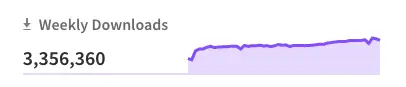
周下載量300w+
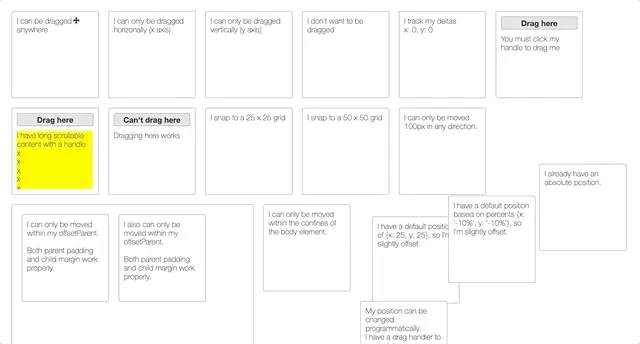
2.1支持有各種拖拽情況的Demo實現
2.1支持有各種拖拽情況的Demo實現;大概十幾種;
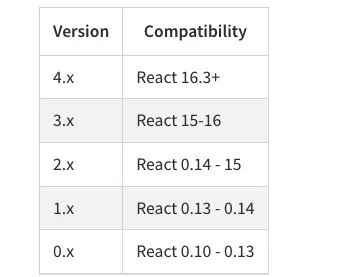
2.2支持React16.3+
2.3 基本代碼
<Draggable>
  <div>I can now be moved around!</div>
</Draggable>
3、Demo樣例

// Copyright 2021 zhaoarden
import React from 'react';
import Draggable from 'react-draggable'; // The default
import { Modal,Button } from 'antd';
import "antd/dist/antd.css";
class Dragable extends React.Component {
    constructor(props) {
        super(props);
        this.state={
            visible: false
        }
    }
    componentDidMount(){
    };
    render() {
        const {visible}=this.state
        const clickName=()=>{
            this.setState({visible:true});
            console.log('clickName');
        }
        const handleOk = () => {
            this.setState({visible:false});
        };
        const handleCancel = () => {
            this.setState({visible:false});
        };
        return <div>
            <h1>Learn, {this.props.name}</h1>
            <Button type="primary"  onClick={clickName}>Primary Button</Button>
            <Modal title="Basic Modal" visible={visible} onOk={handleOk} onCancel={handleCancel}>
                <Draggable>
                    <div>I can now be moved around!</div>
                </Draggable>
            </Modal>
        </div>;
    }
}
export default Dragable;
可運行的Demo的GitHub倉庫
https://github.com/iguoxing/r...
參考資料
https://www.npmjs.com/package...
