

在工作日常中難免會遇到一些大屏項目,對於中台類型產品,少不了數據流通顯示環節。
今天就給大家講解一種實現數據流通圖的寫法。
等不及的小夥伴直接翻到最底部,把html代碼拷貝出來,粘貼到你的html內就能看到效果。
需求:
實現下圖所示:

分析:
拿到設計稿後我們首先要做的是分析此圖該用哪種技術實現?
第一步:應該使用定位實現圖中的文本和靜態元素
第二步:難點分析;需要動態展現數據流。這裏因為動畫很簡單,所以選擇svg實現。
第三步:佈局,以及排版;把設計稿先固定寬高,以後通過縮放實現適配。
先實現這樣的佈局。實現佈局時候,將整體設計稿定當作背景。

可以先把大體佈局寫好。也可以先實現動圖。這裏我們選擇實現大體佈局。再把設計稿背景去掉。

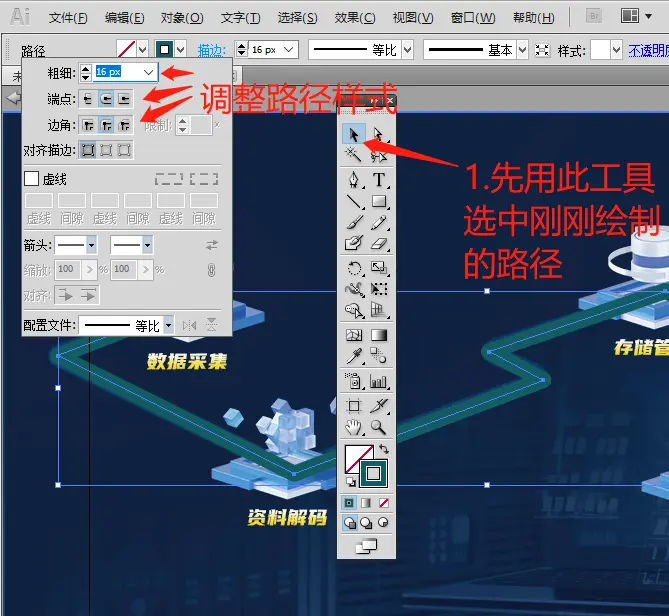
接着製作svg路徑

調整路徑樣式
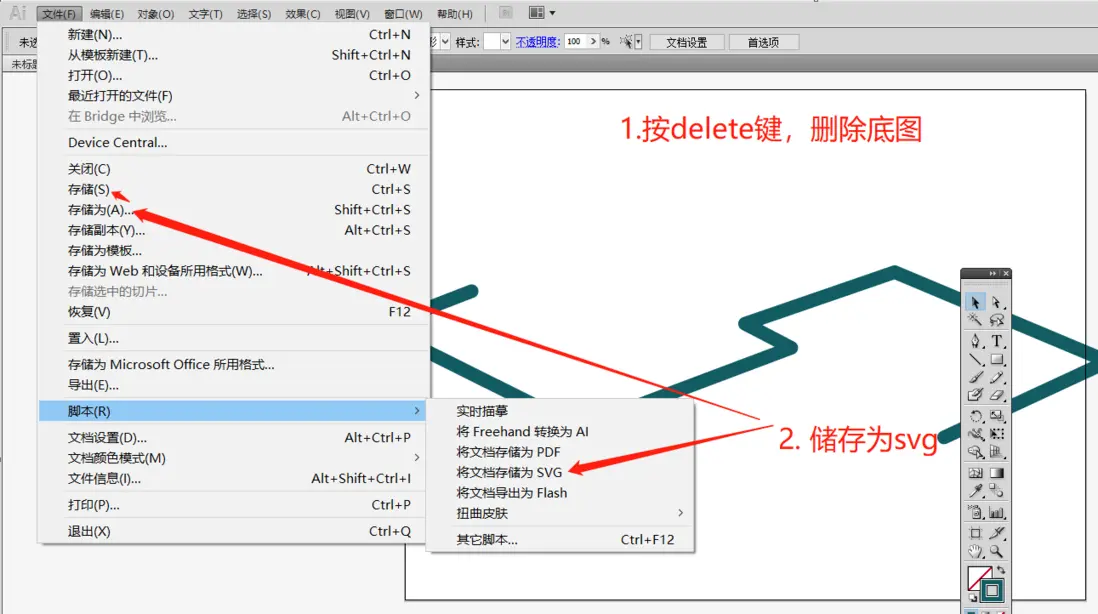
導出svg
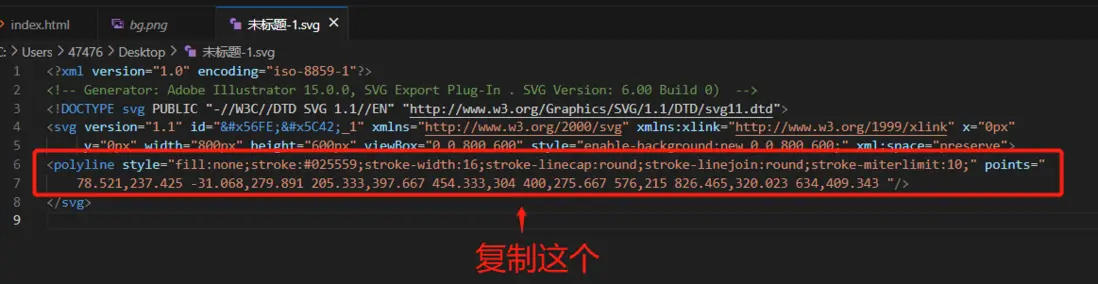
在VScode打開剛剛儲存的svg,複製剛剛svg中的多邊形或者路徑,並粘貼到空svg內
<!-- 這裏的980和526就是設計稿寬高 -->
<!-- 給polyline設置style,和設計稿對齊。 -->
<svg xmlns="http://www.w3.org/2000/svg" width="980" height="526">
            <polyline style="fill:none;stroke-width:16;stroke-linecap:round;stroke-linejoin:round;stroke-miterlimit:10; stroke:rgb(58 171 255 / 20%); transform: translate(83px, -31px); " points="
            78.521,237.425 -31.068,279.891 205.333,397.667 454.333,304 400,275.667 576,215 826.465,320.023 634,409.343 "
            />
      </svg>
再就是一步一步調整;添加漸變色,添加動畫屬性等等。就完成了。下面是整體代碼:複製粘貼到你的html內就能看到效果辣!
<!DOCTYPE html>
<html lang="en">
<head>
    <meta charset="UTF-8">
    <meta http-equiv="X-UA-Compatible" content="IE=edge">
    <meta name="viewport" content="width=device-width, initial-scale=1.0">
    <title>Document</title>
</head>
<body>
  <div style="width:980px;height: 526px; background-image: url(./gbs.png); position: relative;">
    <div style="position: absolute;width: 100%;height: 100%;">
      <svg xmlns="http://www.w3.org/2000/svg" width="980" height="526" viewBox="0 0 980 526">
        <defs>
          <linearGradient id="gradient" x1="0%" y1="0%" x2="100%" y2="0%">
            <stop offset="0%" style="stop-color: #0285FF;" />
            <stop offset="5%" style="stop-color: #00FCFF;" />
            <stop offset="10%" style="stop-color: #0285FF;" />
            <stop offset="15%" style="stop-color: #00FCFF;" />
            <stop offset="20%" style="stop-color: #0285FF;" />
            <stop offset="25%" style="stop-color: #00FCFF;" />
            <stop offset="30%" style="stop-color: #0285FF;" />
            <stop offset="35%" style="stop-color: #00FCFF;" />
            <stop offset="40%" style="stop-color: #0285FF;" />
            <stop offset="45%" style="stop-color: #00FCFF;" />
            <stop offset="50%" style="stop-color: #0285FF;" />
            <stop offset="55%" style="stop-color: #00FCFF;" />
            <stop offset="60%" style="stop-color: #0285FF;" />
            <stop offset="65%" style="stop-color: #00FCFF;" />
            <stop offset="70%" style="stop-color: #0285FF;" />
            <stop offset="75%" style="stop-color: #00FCFF;" />
            <stop offset="80%" style="stop-color: #0285FF;" />
            <stop offset="85%" style="stop-color: #00FCFF;" />
            <stop offset="90%" style="stop-color: #0285FF;" />
            <stop offset="95%" style="stop-color: #00FCFF;" />
            <stop offset="100%" style="stop-color: #0285FF;" />
          </linearGradient>
        </defs>
        <polyline style="fill:none;stroke-width:10;stroke-linecap:round;stroke-linejoin:round;stroke-miterlimit:10;transform: translate(83px, -31px);" points="
              78.521,237.425 -31.068,279.891 205.333,397.667 454.333,304 400,275.667 576,215 826.465,320.023 634,409.343 "
              stroke-dasharray="70" stroke-dashoffset="0" stroke="url(#gradient)"
              >
              <animate
                attributeName="stroke-dashoffset"
                attributeType="XML"
                values="980;0;"
                dur="5s"
                repeatCount="indefinite"
                ></animate>
            </polyline>
            <polyline style="fill:none;stroke-width:16;stroke-linecap:round;stroke-linejoin:round;stroke-miterlimit:10; stroke:rgb(58 171 255 / 20%); transform: translate(83px, -31px); " points="
            78.521,237.425 -31.068,279.891 205.333,397.667 454.333,304 400,275.667 576,215 826.465,320.023 634,409.343 "
            />
      </svg>
    </div>
    <!-- 這裏你們沒有背景圖片。可以自己設置成一個純色背景,就可以看到是覆蓋在動圖上面的 -->
    <div style="width:160px;height: 120px;background-image: url(./CnRxMh.png); position: absolute;left: 106px;top:132px;border:1px solid red;">元素1</div>
    <div style="width:160px;height: 120px;background-image: url(./K1R8bm.png); position: absolute;left: 205px;top:285px;border:1px solid red;">元素2</div>
    <div style="width:160px;height: 120px;background-image: url(./Omc8gl.png); position: absolute;left: 572px;top:115px;border:1px solid red;">元素3</div>
    <div style="width:160px;height: 120px;background-image: url(./fwilwN.png); position: absolute;left: 635px;top:296px;border:1px solid red;">元素4</div>
  </div>
</body>
</html>
效果圖:

如果覺得有幫到你,請給個關注,點個贊吧!
注意:由於是使用定位實現,所以一定要注意元素擺放的先後順序。先繪製流動圖,再繪製其他元素,這樣就被蓋在流動圖上面。
