

快速配置
創建項目
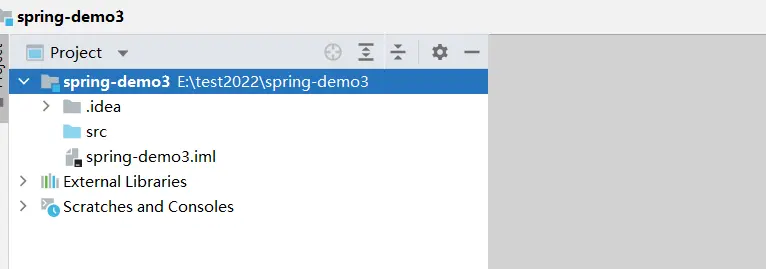
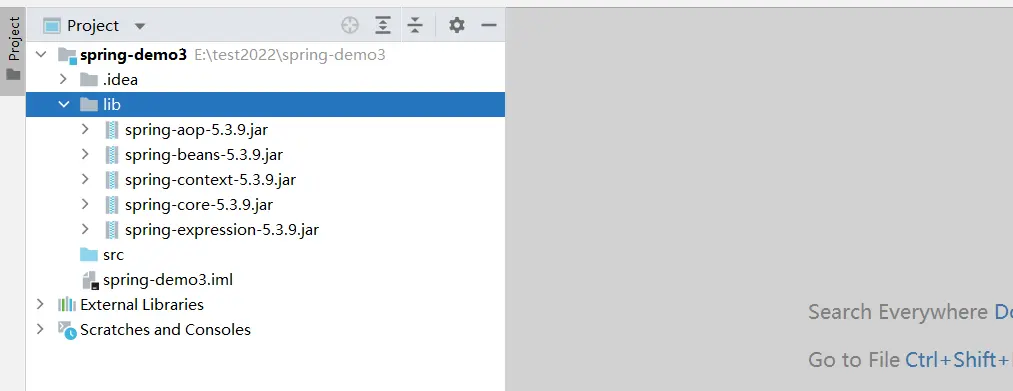
下載並引入依賴包
下載地址:Spring-5.3.9
官網下載方式參考:官網下載Spring的jar包教程
編寫代碼
寫一個普通類用作注入的bean:
package com.hqz;

public class Student {
    public void study() {
        System.out.println("I am learning");
    }
}
編寫配置文件(配置文件的頭部信息是固定的):
<?xml version="1.0" encoding="UTF-8"?>
<beans xmlns="http://www.springframework.org/schema/beans"
       xmlns:xsi="http://www.w3.org/2001/XMLSchema-instance"
       xsi:schemaLocation="http://www.springframework.org/schema/beans http://www.springframework.org/schema/beans/spring-beans.xsd">

    <bean id="student" class="com.hqz.Student"/>
</beans>
測試類:
package com.hqz;

import org.springframework.context.ApplicationContext;
import org.springframework.context.support.ClassPathXmlApplicationContext;

public class Test {
    public static void main(String[] args) {
        ApplicationContext applicationContext = new ClassPathXmlApplicationContext("bean.xml");
        Student student = applicationContext.getBean("student", Student.class);
        student.study();
    }
}
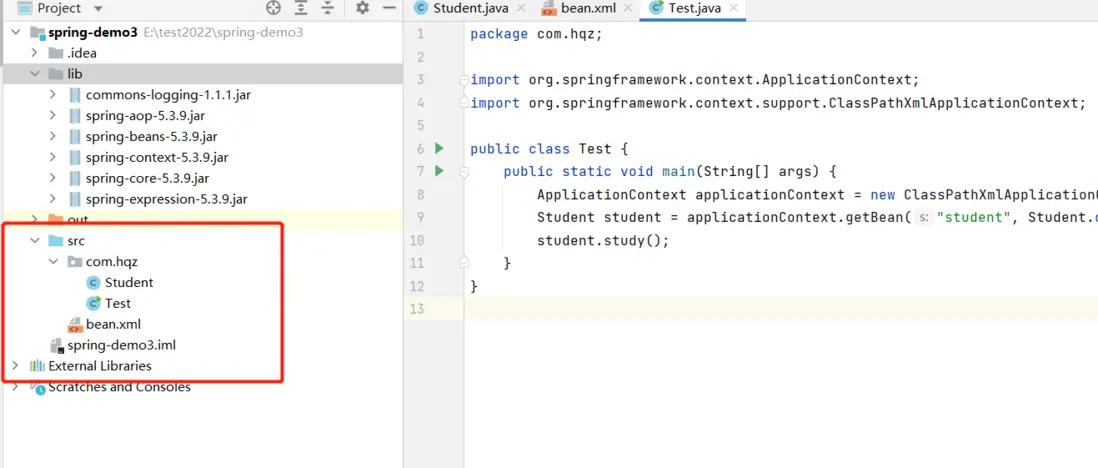
最終的項目結構如下圖所示:
Bean管理
XML方式
創建對象
<bean id="dao" class="com.hqz.UserDao"></bean>三種屬性注入方式
set方法注入
public Class Book {
    private String name;

    public void SetName(String name) {
        this.name = name;
    }
}
<bean id="book" class="com.hqz.Book">
<property name="name" value="金瓶梅"></property>
</bean>有參構造注入
public Class Orders {
    private String name;
    private String address;

    public Orders(String name, String address) {
        this.name = name;
        this.address = address;
    }
}
<bean id="orders" class="com.hqz.Orders">
<!-- 通過屬性名稱來注入 -->
<constructor-arg name="name" value="西遊記"></constructor-arg>
<!-- 通過屬性索引值來注入 -->
<constructor-arg index="0" value="中國"></constructor-arg>
</bean>p名稱空間注入
- 第一步:添加p名稱空間在配置文件中
<?xml version="1.0" encoding="UTF-8"?>
<beans xmlns="http://www.springframework.org/schema/beans"
       xmlns:xsi="http://www.w3.org/2001/XMLSchema-instance"
       <!-- 添加p名稱空間在配置文件中 -->
       xmlns:p="http://www.springframework.org/schema/p"
       xsi:schemaLocation="http://www.springframework.org/schema/beans http://www.springframework.org/schema/beans/spring-beans.xsd">

    <bean id="user" class="com.hqz.User"/>
</beans>- 第二步:進行屬性注入,在bean標籤裏面進行操作
<bean id="book" class="com.hqz.Book" p:name="三國演義"></bean>各種數據類型注入
注入null值
<bean id="book" class="com.hqz.Book">
    <property name="name">
        <null/>
    </property>
</bean>
注入特殊符號
<bean id="book" class="com.hqz.Book">
    <!-- 錯誤寫法 -->
    <property name="name" value="<<南京>>"></property>

    <!-- 正確寫法 -->
    <property name="name">
        <value>
            <![CDATA[<<南京>>]]>
        </value>
    </property>
</bean>
注入外部bean
使用ref注入
<bean id="userService" class="com.hqz.service.impl.UserServiceImpl">
    <property name="userDao" ref="userDaoImplId" />
</bean>

<bean id="userDaoImplId" class="com.hqz.dao.impl.UserDaoImpl" />
注入內部bean
<!-- 方式一:內部bean -->
<bean id="emp" class="com.hqz.bean.Emp">
    <property name="name" value="張三"/>
    <property name="sex" value="女"/>
    <property name="dept">
        <bean id="dept" class="com.hqz.bean.Dept">
            <property name="name" value="技術部"/>
        </bean>
    </property>
</bean>


<!-- 方式二:級聯賦值 -->
<bean id="emp" class="com.hqz.bean.Emp">
    <property name="name" value="張三"/>
    <property name="sex" value="女"/>
    <property name="dept" ref="dept" />
</bean>

<bean id="dept" class="com.hqz.bean.Dept">
    <property name="name" value="財務部"/>
</bean>

<!-- 方式三 -->
<bean id="emp" class="com.hqz.bean.Emp">
    <property name="name" value="張三"/>
    <property name="sex" value="女"/>
    <property name="dept" ref="dept"/>
    <property name="dept.name" value="行政部" />
</bean>
<bean id="dept" class="com.hqz.bean.Dept" />
//部門類
package com.hqz.bean;
public class Dept {
private String name;
public String getName() {
return name;
}
public void setName(String name) {
this.name = name;
}
}//員工類
package com.hqz.bean;
public class Emp {
private String name;
private String sex;
private Dept dept;
public Dept getDept() {
return dept;
}
public void setDept(Dept dept) {
this.dept = dept;
}
public String getName() {
return name;
}
public void setName(String name) {
this.name = name;
}
public String getSex() {
return sex;
}
public void setSex(String sex) {
this.sex = sex;
}
}注入集合屬性
數組類型屬性注入
public class Student {
    private String[] names;

    public void setNames(String[] names) {
        this.names = names;
    }
}
<bean id="student" class="com.hqz.Student">
<property name="names">
<!-- 數組類型屬性注入 -->
<array>
<value>張三</value>
<value>李四</value>
</array>
</property>
</bean>list類型屬性注入
public class Student {
    private List<String> names;

    public void setNames(List<String> names) {
        this.names = names;
    }
}
<bean id="student" class="com.hqz.Student">
<property name="names">
<!-- list類型屬性注入 -->
<list>
<value>張三</value>
<value>李四</value>
</list>
</property>
</bean>map類型屬性注入
public class Student {
    private Map<String, String> maps;

    public void setMaps(Map<String, String> maps) {
        this.maps = maps;
    }
}
<bean id="student" class="com.hqz.Student">
<property name="maps">
<!-- map類型屬性注入 -->
<map>
<entry key="name" value="張三"/>
<entry key="age" value="20"/>
</map>
</property>
</bean>set類型屬性注入
public class Student {
    private Set<String> sets;

    public void setSets(Set<String> sets) {
        this.sets = sets;
    }
}
<bean id="student" class="com.hqz.Student">
<property name="sets">
<!-- set類型屬性注入 -->
<set>
<value>李四</value>
</set>
</property>
</bean>注入對象到集合中
public class Book {
    private String bookName;

    public void setBookName(String bookName) {
        this.bookName = bookName;
    }
}
public class Library {
private List<Book> bookList;
public void setBookList(List<Book> bookList) {
this.bookList = bookList;
}
}<bean id="book" class="com.hqz.Book">
<property name="bookName" value="語文" />
</bean>
<bean id="library" class="com.hqz.Library">
<property name="bookList">
<list>
<ref bean="book"></ref>
</list>
</property>
</bean>提取集合注入
把通用的集合列表提取出來,方便在多個地方進行引用。
- 引入util命名空間
<?xml version="1.0" encoding="UTF-8"?>
<beans xmlns="http://www.springframework.org/schema/beans"
       xmlns:xsi="http://www.w3.org/2001/XMLSchema-instance"
       xmlns:util="http://www.springframework.org/schema/util"
       xsi:schemaLocation="http://www.springframework.org/schema/beans http://www.springframework.org/schema/beans/spring-beans.xsd
       http://www.springframework.org/schema/util http://www.springframework.org/schema/util/spring-util.xsd">

</beans>- 創建bean類
public class Library {
    private List<String> bookList;

    public void setBookList(List<String> bookList) {
        this.bookList = bookList;
    }
}- 編寫配置類
<util:list id="bookListId">
    <value>《三國演義》</value>
    <value>《西遊記》</value>
    <value>《水滸傳》</value>
    <value>《紅樓夢》</value>
</util:list>

<bean id="library" class="com.hqz.Library">
    <property name="bookList" ref="bookListId"/>
</bean>
外部屬性文件
- 引入命名空間
xmlns:context="http://www.springframework.org/schema/context"
<?xml version="1.0" encoding="UTF-8"?>
<beans xmlns="http://www.springframework.org/schema/beans"
       xmlns:xsi="http://www.w3.org/2001/XMLSchema-instance"
       xmlns:util="http://www.springframework.org/schema/util"
       xmlns:context="http://www.springframework.org/schema/context"
       xsi:schemaLocation="http://www.springframework.org/schema/beans http://www.springframework.org/schema/beans/spring-beans.xsd
http://www.springframework.org/schema/util http://www.springframework.org/schema/util/spring-util.xsd
http://www.springframework.org/schema/context http://www.springframework.org/schema/context/spring-context.xsd">

</beans>-
編寫外部文件
jdbc.properties
prop.driverClass=com.mysql.jdbc.Driver
prop.url=jdbc:mysql://localhost:3306/userDb
prop.userName=root
prop.password=root- 配置
<!-- 引入外部屬性文件 -->
<context:property-placeholder location="classpath:jdbc.properties"/>

<!-- 配置連接池 -->
<bean id="dataSource" class="com.alibaba.druid.pool.DruidDataSource">
    <property name="driverClassName" value="${prop.driverClass}"/>
    <property name="url" value="${prop.url}"/>
    <property name="userName" value="${prop.userName}"/>
    <property name="password" value="${prop.password}"/>
</bean>
註解方式
創建對象
- 配置文件中開啓組件掃描
<?xml version="1.0" encoding="UTF-8"?>
<beans xmlns="http://www.springframework.org/schema/beans"
       xmlns:xsi="http://www.w3.org/2001/XMLSchema-instance"
       xmlns:context="http://www.springframework.org/schema/context"
       xsi:schemaLocation="http://www.springframework.org/schema/beans http://www.springframework.org/schema/beans/spring-beans.xsd
http://www.springframework.org/schema/context http://www.springframework.org/schema/context/spring-context.xsd">

    <!-- 開啓組件掃描
        1、如果掃描多個名,可以用逗號隔開
        2、或者掃描上層目錄
     -->
    <context:component-scan base-package="com.hqz.dao,com.hqz.service"/>
</beans>- 添加註解
package com.hqz.service;

import org.springframework.stereotype.Component;

//在註解裏面value屬性值可以不寫
//默認值是類名稱,首字母小寫

@Component(value = "userService")
public class UserService {
    public void add() {
        System.out.println("中華人民共和國");
    }
}- 組件掃描配置
<?xml version="1.0" encoding="UTF-8"?>
<beans xmlns="http://www.springframework.org/schema/beans"
       xmlns:xsi="http://www.w3.org/2001/XMLSchema-instance"
       xmlns:context="http://www.springframework.org/schema/context"
       xsi:schemaLocation="http://www.springframework.org/schema/beans http://www.springframework.org/schema/beans/spring-beans.xsd
http://www.springframework.org/schema/context http://www.springframework.org/schema/context/spring-context.xsd">

    <!-- 開啓組件掃描
        1、如果掃描多個名,可以用逗號隔開
        2、或者掃描上層目錄
     -->
    <context:component-scan base-package="com.hqz.dao,com.hqz.service"/>

    <!-- 示例1
        use-default-filters="false",表示現在不使用默認filter,自己配置filter
        context:include-filter,設置掃描哪些內容
    -->
    <context:component-scan base-package="com.hqz" use-default-filters="false">
        <context:include-filter type="annotation" expression="org.springframework.stereotype.Controller"/>
    </context:component-scan>

    <!-- 示例2
        設置哪些內容不掃描
     -->
    <context:component-scan base-package="com.hqz">
        <context:exclude-filter type="annotation" expression="org.springframework.stereotype.Controller"/>
    </context:component-scan>
</beans>
註解説明
- @AutoWired:根據屬性類型進行自動裝配
@Service
public class UserService {

    @Autowired
    private UserDao userDao;

    public void add() {
        userDao.add();
    }
}- @Qualifier:根據屬性名稱進行注入(比如有多個實現類的接口)
@Service
public class UserService {

    @Autowired
    @Qualifier( value = "userDaoImpl")
    private UserDao userDao;

    public void add() {
        userDao.add();
    }
}- @Resource:可以根據類型注入,也可以根據名稱注入
@Service
public class UserService {

    @Resource
    private UserDao userDao;

    public void add() {
        userDao.add();
    }
}- @Value:注入普通類型屬性
public class Book {
    @Value("《金瓶梅》")
    private String bookName;
}
完全註解開發
- 創建配置類,替代xml配置文件
//作為配置類,替代xml
@Configuration
@ComponentScan(basePackages = {"com.hqz"})
public class SpringConfig {

}- 使用
ApplicationContext applicationContext = new AnnotationConfigApplicationContext(SpringConfig.class);歡迎關注我的公眾號:『深海雲帆』
