

實踐環境
openEuler-22.03-LTS-SP4
registry.cn-shanghai.aliyuncs.com/labring/kubernetes:v1.27.16
registry.cn-shanghai.aliyuncs.com/labring/helm:v3.8.2
registry.cn-shanghai.aliyuncs.com/labring/cilium:v1.14.4
https://github.com/labring/sealos/releases/download/v5.1.1/sealos_5.1.1_linux_amd64.tar.gz
簡介
Sealos是一個簡單的 Golang 二進制文件,可用於快速部署Kubernetes集羣
-
支持在線和離線安裝,適用於amd64和arm64架構的 K8s 集羣。
-
支持節點管理和分佈式應用安裝。
-
支持Containerd和Docker運行時。
- 支持大多數 Linux 發行版,例如:Ubuntu、CentOS、Rocky linux。
- 支持 Docker Hub 中的所有 Kubernetes 版本。
- 支持使用 Containerd 作為容器運行時。
先決條件
以下是一些基本的安裝要求:
-
每個集羣節點的主機名保持唯一,且主機名不要帶下劃線。
-
所有節點的時間需要保持一致。
-
建議使用乾淨的操作系統來創建集羣。不要自己裝 Docker!
-
主節點內存 儘量大於等於3 G,否則運行時可能因為內存不足報錯
[ERROR Mem]: the system RAM (1427 MB) is less than the minimum 1700 MB -
建議不要創建
/var分區,如果主節點有創建/var分區,建議配置50G以上,用於存儲相關鏡像,其它worker節點如果有創建/var分區,也建議配置大一點20G以上
前置準備
1、同步所有集羣節點的時間
2、修改所集羣節點的主機名
配置示例--設置節點 192.168.88.141的主機名
# hostnamectl set-hostname 192-168-88-141
3、 關閉防火牆
# systemctl stop firewalld
# systemctl disable firewalld
4、選擇k8s集羣鏡像版本
瀏覽器打開 Registry Explorer ,可以查看 K8s 集羣鏡像的所有版本:
輸入 registry.cn-shanghai.aliyuncs.com/labring/kubernetes,然後點擊“提交”:
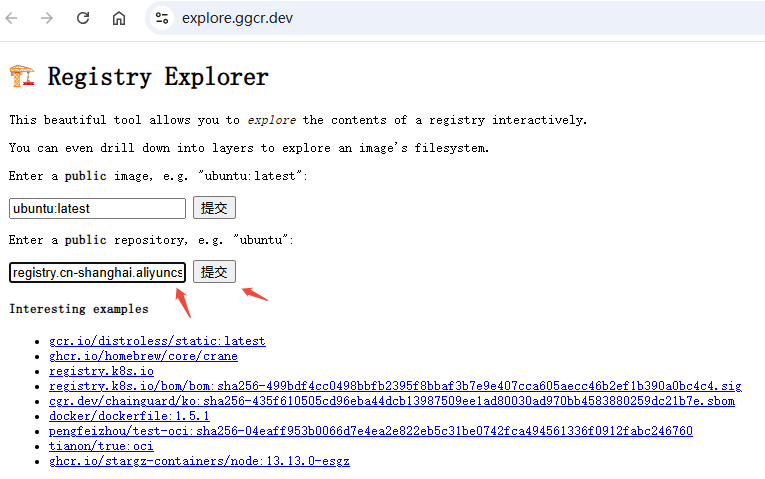
就會看到這個集羣鏡像的所有 tag。
Docker Hub 同理,輸入 docker.io/labring/kubernetes 即可查看所有 tag。
注意:K8s 的小版本號越高,集羣越穩定。例如 v1.29.x,其中的 x 就是小版本號。建議使用小版本號比較高的 K8s 版本。本文截止前,v1.27 最高的版本號是 v1.27.16,而 v1.31 最高的版本號是 v1.31.9,所以建議使用 v1.27.16。你需要根據實際情況來選擇最佳的 K8s 版本
5、明確適配所選k8s版本的 labring/helm 和labring/cilium鏡像版本
6、下載 Sealos並配置
手動下載地址:https://github.com/labring/sealos/releases
注意
1、Sealos的版本需要適配k8s集羣鏡像版本,詳情參見:集羣鏡像版本支持説明
2、建議使用穩定版本例如v4.3.0。像 v4.3.0-rc1、v4.3.0-alpha1 這樣的版本是預發佈版,請謹慎使用。
3、master節點執行
這裏選擇下載二進制
# wget https://github.com/labring/sealos/releases/download/v5.1.1/sealos_5.1.1_linux_amd64.tar.gz && tar -zxvf sealos_5.1.1_linux_amd64.tar.gz sealos && chmod +x sealos && mv sealos /usr/bin/
説明:如果無法直接下載(比如在內網,無法直接訪問網絡),可以外網下載然後再上傳服務器執行解壓等操作。
參考連接:https://sealos.run/docs/k8s/quick-start/install-cli
4、master執行
yum install -y socat
解決安裝過程中出現告警:[WARNING FileExisting-socat]: socat not found in system path
5、
安裝K8S集羣
方式1、在線安裝
master節點上執行
# sealos run registry.cn-shanghai.aliyuncs.com/labring/kubernetes:v1.22.17 registry.cn-shanghai.aliyuncs.com/labring/helm:v3.8.2 registry.cn-shanghai.aliyuncs.com/labring/cilium:v1.14.4 \
     --masters 192.168.88.139 \
     --nodes 192.168.88.140,192.168.88.141 -p testpwd@316
注意:labring/helm 應當在 labring/cilium 之前。
參數説明:
--masters IP列表K8s master 節點地址列表,如果有多個master節點即多個IP地址,IP之間用英文逗號分隔,形如 192.168.64.2,192.168.64.2--nodes IP列表K8s node 節點地址列表,地址之間用英文逗號分隔-p 節點ssh登錄密碼
遇到問題
實際安裝過程中,遇到過安裝失敗的情況,錯誤提示如下:
[wait-control-plane] Waiting for the kubelet to boot up the control plane as static Pods from directory "/etc/kubernetes/manifests". This can take up to 4m0s
[kubelet-check] Initial timeout of 40s passed.

	Unfortunately, an error has occurred:
		timed out waiting for the condition

	This error is likely caused by:
		- The kubelet is not running
		- The kubelet is unhealthy due to a misconfiguration of the node in some way (required cgroups disabled)

	If you are on a systemd-powered system, you can try to troubleshoot the error with the following commands:
		- 'systemctl status kubelet'
		- 'journalctl -xeu kubelet'

	Additionally, a control plane component may have crashed or exited when started by the container runtime.
	To troubleshoot, list all containers using your preferred container runtimes CLI.

	Here is one example how you may list all Kubernetes containers running in cri-o/containerd using crictl:
		- 'crictl --runtime-endpoint unix:///run/containerd/containerd.sock ps -a | grep kube | grep -v pause'
		Once you have found the failing container, you can inspect its logs with:
		- 'crictl --runtime-endpoint unix:///run/containerd/containerd.sock logs CONTAINERID'

error execution phase wait-control-plane: couldn't initialize a Kubernetes cluster
To see the stack trace of this error execute with --v=5 or higher
2026-01-17T02:32:51 error Applied to cluster error: failed to init masters: init master0 failed, error: exit status 1. Please clean and reinstall
Error: failed to init masters: init master0 failed, error: exit status 1. Please clean and reinstall
查看kubelet 狀態如下
# systemctl status kubelet
● kubelet.service - kubelet: The Kubernetes Node Agent
     Loaded: loaded (/etc/systemd/system/kubelet.service; enabled; vendor preset: disabled)
    Drop-In: /etc/systemd/system/kubelet.service.d
             └─10-kubeadm.conf
     Active: active (running) since Sat 2026-01-17 02:17:08 CST; 5min ago
       Docs: http://kubernetes.io/docs/
    Process: 2221 ExecStartPre=/usr/bin/kubelet-pre-start.sh (code=exited, status=0/SUCCESS)
   Main PID: 2237 (kubelet)
      Tasks: 13 (limit: 15376)
     Memory: 42.7M
     CGroup: /system.slice/kubelet.service
             └─ 2237 /usr/bin/kubelet --bootstrap-kubeconfig=/etc/kubernetes/bootstrap-kubelet.conf --kubeconfig=/etc/kubernetes/kubelet.conf --config=/var/lib/kubelet/config.yaml --container-runti>

Jan 17 02:22:32 192-168-88-139 kubelet[2237]: E0117 02:22:32.852248    2237 kubelet.go:2456] "Error getting node" err="node \"192-168-88-139\" not found"
.....
查看kubelet系統日誌,發現存在以下類似以下錯誤
Jan 17 11:32:37 192-168-88-139 kubelet[280750]: I0117 11:32:37.489925  280750 dynamic_cafile_content.go:155] "Starting controller" name="client-ca-bundle::/etc/kubernetes/pki/ca.crt"
Jan 17 11:32:37 192-168-88-139 kubelet[280750]: E0117 11:32:37.495435  280750 certificate_manager.go:471] kubernetes.io/kube-apiserver-client-kubelet: Failed while requesting a signed certificate from the control plane: cannot create certificate signing request: Post "https://apiserver.cluster.local:6443/apis/certificates.k8s.io/v1/certificatesigningrequests": dial tcp 192.168.88.139:6443: connect: connection refused
Jan 17 11:33:51 192-168-88-139 kubelet[280750]: E0117 11:33:51.604218 280750 pod_workers.go:951] "Error syncing pod, skipping" err="failed to \"CreatePodSandbox\" for \"kube-apiserver-192-168-88-139_kube-system(7eb23211a94fd3a4a50291a818fefe89)\" with CreatePodSandboxError: \"Failed to create sandbox for pod \\\"kube-apiserver-192-168-88-139_kube-system(7eb23211a94fd3a4a50291a818fefe89)\\\": rpc error: code = Unknown desc = failed to create containerd task: failed to create shim task: OCI runtime create failed: unable to retrieve OCI runtime error (open /run/containerd/io.containerd.runtime.v2.task/k8s.io/23a20fe1613712213d8ff67507c9c81639cc6d75d63b6728682df689a0f9a970/log.json: no such file or directory): fork/exec /usr/bin/runc: exec format error: unknown\"" pod="kube-system/kube-apiserver-192-168-88-139" podUID=7eb23211a94fd3a4a50291a818fefe89
説明:當然除了上述錯誤日誌還有其它非關鍵錯誤日誌,筆者排查後選擇性忽略了。
查看文件
# file /usr/bin/runc
/usr/bin/runc: ASCII text, with no line terminators
初步斷定 /usr/bin/runc 文件生成失敗,導致kubelet無法正常運行,從而導致主節點註冊失敗
解決方法
先執行以下命令,清理k8s集羣,然後重新運行上述安裝命令,
# sealos reset
安裝過程中(出現: fork/exec /usr/bin/runc: exec format error: unknown錯誤時),手動下載runc文件並替換
# wget https://github.com/opencontainers/runc/releases/download/v1.1.12/runc.amd64 -O /usr/bin/runc
問題:為啥不是在運行sealos前替換呢?因為sealos會動態創建該文件,運行前替換會被覆蓋。
集羣安裝好後,查看集羣節點狀態,如下發現存在非就緒狀態節點
# kubectl get nodes
NAME             STATUS     ROLES                  AGE   VERSION
192-168-88-139   Ready      control-plane,master   27m   v1.22.17
192-168-88-140   NotReady   <none>                 27m   v1.22.17
192-168-88-141   NotReady   <none>                 27m   v1.22.17
查看 kubelet 系統日誌,發現存在以下關鍵錯誤日誌
Jan 17 12:41:32 192-168-88-139 kubelet[302969]: E0117 12:41:32.954702  302969 kuberuntime_manager.go:819] "CreatePodSandbox for pod failed" err="rpc error: code = Unknown desc = failed to setup network for sandbox \"2f60f86855778cfab8037eb27d657ff3254bc58c1ecfc206dd984cfe41978f43\": plugin type=\"cilium-cni\" failed (add): unable to connect to Cilium daemon: failed to create cilium agent client after 30.000000 seconds timeout: Get \"http://localhost/v1/config\": dial unix /var/run/cilium/cilium.sock: connect: no such file or directory\nIs the agent running?" pod="kube-system/coredns-7bdbbf6bf5-99cf4"
Jan 17 12:41:32 192-168-88-139 kubelet[302969]: E0117 12:41:32.954738  302969 pod_workers.go:951] "Error syncing pod, skipping" err="failed to \"CreatePodSandbox\" for \"coredns-7bdbbf6bf5-99cf4_kube-system(7f589667-5cac-4c4c-b993-459318dfb8bd)\" with CreatePodSandboxError: \"Failed to create sandbox for pod \\\"coredns-7bdbbf6bf5-99cf4_kube-system(7f589667-5cac-4c4c-b993-459318dfb8bd)\\\": rpc error: code = Unknown desc = failed to setup network for sandbox \\\"2f60f86855778cfab8037eb27d657ff3254bc58c1ecfc206dd984cfe41978f43\\\": plugin type=\\\"cilium-cni\\\" failed (add): unable to connect to Cilium daemon: failed to create cilium agent client after 30.000000 seconds timeout: Get \\\"http://localhost/v1/config\\\": dial unix /var/run/cilium/cilium.sock: connect: no such file or directory\\nIs the agent running?\"" pod="kube-system/coredns-7bdbbf6bf5-99cf4" podUID=7f589667-5cac-4c4c-b993-459318dfb8bd
Jan 17 12:41:34 192-168-88-139 kubelet[302969]: E0117 12:41:34.758111  302969 cadvisor_stats_provider.go:415] "Partial failure issuing cadvisor.ContainerInfoV2" err="partial failures: [\"/system.slice/kubelet.service\": RecentStats: unable to find data in memory cache]"
根據日誌分析可知cilium運行狀態異常,導致節點資源監控(cAdvisor)數據收集受阻,屬於連帶問題, 查看其pod狀態,發現全部異常
# kubectl get pods -n kube-system | grep cilium
cilium-2s77x                             0/1     Init:0/6            0               34m
cilium-operator-6778f57859-ls6qn         0/1     ContainerCreating   0               34m
cilium-rqr6f                             0/1     Running             8 (6m42s ago)   34m
cilium-wbjf7                             0/1     Init:0/6            0               34m
查看pod事件,發現以下錯誤
Events:
  Type     Reason                  Age                    From               Message
  ----     ------                  ----                   ----               -------
  Normal   Scheduled               34m                    default-scheduler  Successfully assigned kube-system/cilium-2s77x to 192-168-88-141
  Warning  FailedCreatePodSandBox  34m                    kubelet            Failed to create pod sandbox: rpc error: code = Unknown desc = failed to create containerd task: failed to create shim task: OCI runtime create failed: unable to retrieve OCI runtime error (open /run/containerd/io.containerd.runtime.v2.task/k8s.io/655252912fe2c7336eb25a1d57e78a7bcaff2fb7a98890c11000454dd10d2b7b/log.json: no such file or directory): fork/exec /usr/bin/runc: exec format error: unknown
解決方法:每個節點上執行以下命令,手動替換runc 二進制
# wget https://github.com/opencontainers/runc/releases/download/v1.1.12/runc.amd64 -O /usr/bin/runc
然後重啓cilium daemonset
# kubectl rollout restart daemonset cilium -n kube-system
再次檢測節點狀態,如下,都正常。至此集羣部署成功。
#  kubectl get nodes
NAME             STATUS   ROLES                  AGE   VERSION
192-168-88-139   Ready    control-plane,master   55m   v1.22.17
192-168-88-140   Ready    <none>                 54m   v1.22.17
192-168-88-141   Ready    <none>                 54m   v1.22.17
方式2:離線安裝
離線環境只需要提前導入鏡像,其它步驟與在線安裝一致。
kubernetes為例,首先在有網絡的環境中導出集羣鏡像:
# sealos pull registry.cn-shanghai.aliyuncs.com/labring/kubernetes:v1.22.17
# sealos save -o kubernetes.tar registry.cn-shanghai.aliyuncs.com/labring/kubernetes:v1.22.17
導入鏡像並安裝,將 kubernetes.tar 拷貝到離線環境,使用 load 命令導入鏡像即可:
# sealos load -i kubernetes.tar
sealos images # 查看集羣鏡像是否導入成功
剩下的安裝方式與在線安裝的步驟一致:
# run registry.cn-shanghai.aliyuncs.com/labring/kubernetes:v1.22.17 registry.cn-shanghai.aliyuncs.com/labring/helm:v3.8.2 registry.cn-shanghai.aliyuncs.com/labring/cilium:v1.14.4 \
     --masters 192.168.88.139 \
     --nodes 192.168.88.140,192.168.88.141 -p testpwd@316
也可以不用 load 命令導入鏡像,直接運行以下啓動命令即可安裝 K8s:
# sealos run kubernetes.tar helm.tar cilium.tar
     --masters 192.168.88.139 \
     --nodes 192.168.88.140,192.168.88.141 -p testpwd@316
按需安裝其它分佈式應用
示例:
sealos run registry.cn-shanghai.aliyuncs.com/labring/openebs:v3.9.0 # install openebs
sealos run registry.cn-shanghai.aliyuncs.com/labring/minio-operator:v4.5.5 registry.cn-shanghai.aliyuncs.com/labring/ingress-nginx:4.1.0
這樣Minio,openebs 等應用都有了,不用關心所有的依賴問題。
附:sealos其它功能命令簡介
增加 K8s 節點
增加 node 節點:
$ sealos add --nodes 192.168.88.142,192.168.88.143
增加 master 節點:
$ sealos add --masters 192.168.88.137,192.168.88.138
刪除 K8s 節點
刪除 node 節點:
$ sealos delete --nodes 192.168.88.142,192.168.88.143
刪除 master 節點:
$ sealos delete --masters 192.168.88.137,192.168.88.138
清理 K8s 集羣
$ sealos reset
更多用法,查看命令幫助 sealos --help
參考鏈接
https://sealos.run/docs/k8s/quick-start/deploy-kubernetes
