

流與塊
Standard IO是對字節流的讀寫,在進行IO之前,首先創建一個流對象,流對象進行讀寫操作都是按字節 ,一個字節一個字節的來讀或寫。而NIO把IO抽象成塊,類似磁盤的讀寫,每次IO操作的單位都是一個塊,塊被讀入內存之後就是一個byte[],NIO一次可以讀或寫多個字節。
I/O 與 NIO 最重要的區別是數據打包和傳輸的方式,I/O 以流的方式處理數據,而 NIO 以塊的方式處理數據。
面向流的 I/O 一次處理一個字節數據: 一個輸入流產生一個字節數據,一個輸出流消費一個字節數據。為流式數據創建過濾器非常容易,鏈接幾個過濾器,以便每個過濾器只負責複雜處理機制的一部分。不利的一面是,面向流的 I/O 通常相當慢。
面向塊的 I/O 一次處理一個數據塊,按塊處理數據比按流處理數據要快得多。但是面向塊的 I/O 缺少一些面向流的 I/O 所具有的優雅性和簡單性。
I/O 包和 NIO 已經很好地集成了,java.io.* 已經以 NIO 為基礎重新實現了,所以現在它可以利用 NIO 的一些特性。例如,java.io.* 包中的一些類包含以塊的形式讀寫數據的方法,這使得即使在面向流的系統中,處理速度也會更快。
Java對IO多路複用的支持
NIO 常常被叫做非阻塞 IO,主要是因為 NIO 在網絡通信中的非阻塞特性被廣泛使用。但其實應該叫new IO,是相較於傳統IO來説的。
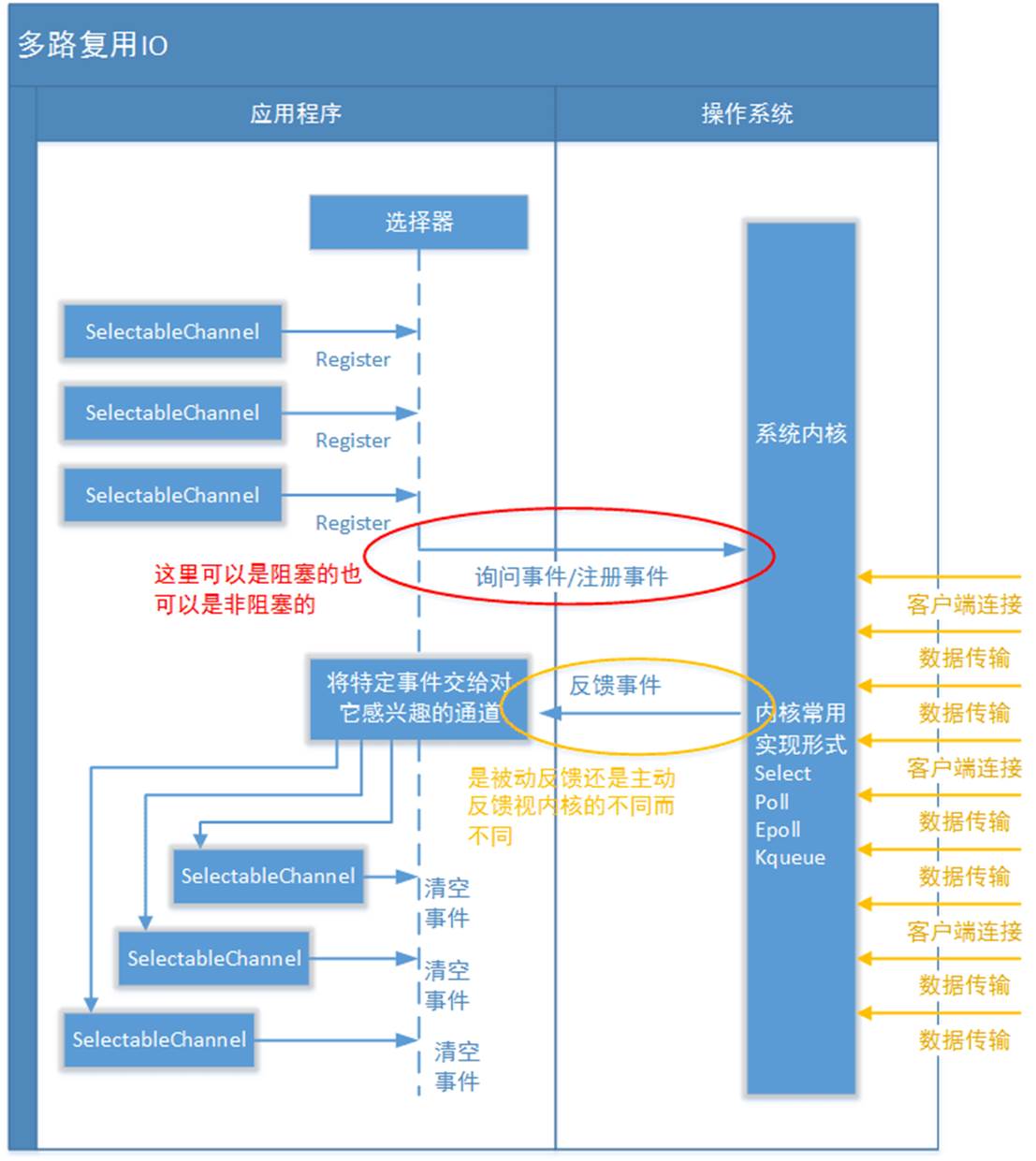
Java NIO 中的 Selector 類是基於操作系統提供的 I/O 多路複用機制實現的,而在 Linux 上,這個機制就是 epoll。
關於觸發模式
- Java NIO 的
Selector默認使用的是水平觸發模式(Level-Triggered, LT)。這意味着當一個文件描述符(在 Java 中通常是SocketChannel或ServerSocketChannel)變得可讀或可寫時,Selector會持續通知,直到該文件描述符上的事件被處理。這與epoll的水平觸發模式是一致的。 - 雖然
epoll也支持邊緣觸發模式(Edge-Triggered, ET),但 Java NIO 的Selector並沒有直接提供對邊緣觸發模式的支持。如果需要使用邊緣觸發模式,通常需要直接使用底層的系統調用(如通過 JNI 調用epoll的邊緣觸發模式),但這超出了標準 Java NIO 庫的範圍。
關於水平觸發和邊緣觸發的區別可以看這篇文章,總結一下:
- Java NIO 在 Linux 上使用
epoll作為底層的 I/O 多路複用機制。 - Java NIO 的
Selector默認使用epoll的水平觸發模式。 - Java NIO 不直接支持
epoll的邊緣觸發模式,需要通過其他方式實現。
因此,如果在 Linux 上使用 Java NIO 的 Selector,它使用的是 epoll 的水平觸發模式。
三大組件
通道
被建立的一個應用程序和操作系統交互事件、傳遞內容的渠道(注意是連接到操作系統)。一個通道會有一個專屬的文件狀態描述符。那麼既然是和操作系統進行內容的傳遞,那麼説明應用程序可以通過通道讀取數據,也可以通過通道向操作系統寫數據。
通道 Channel 是對原 I/O 包中的流的模擬,可以通過它讀取和寫入數據。通道與流的不同之處在於,流只能在一個方向上移動(一個流必須是 InputStream 或者 OutputStream 的子類),而通道是雙向的,可以用於讀、寫或者同時用於讀寫。
JAVA NIO 框架中,自有的Channel通道包括:
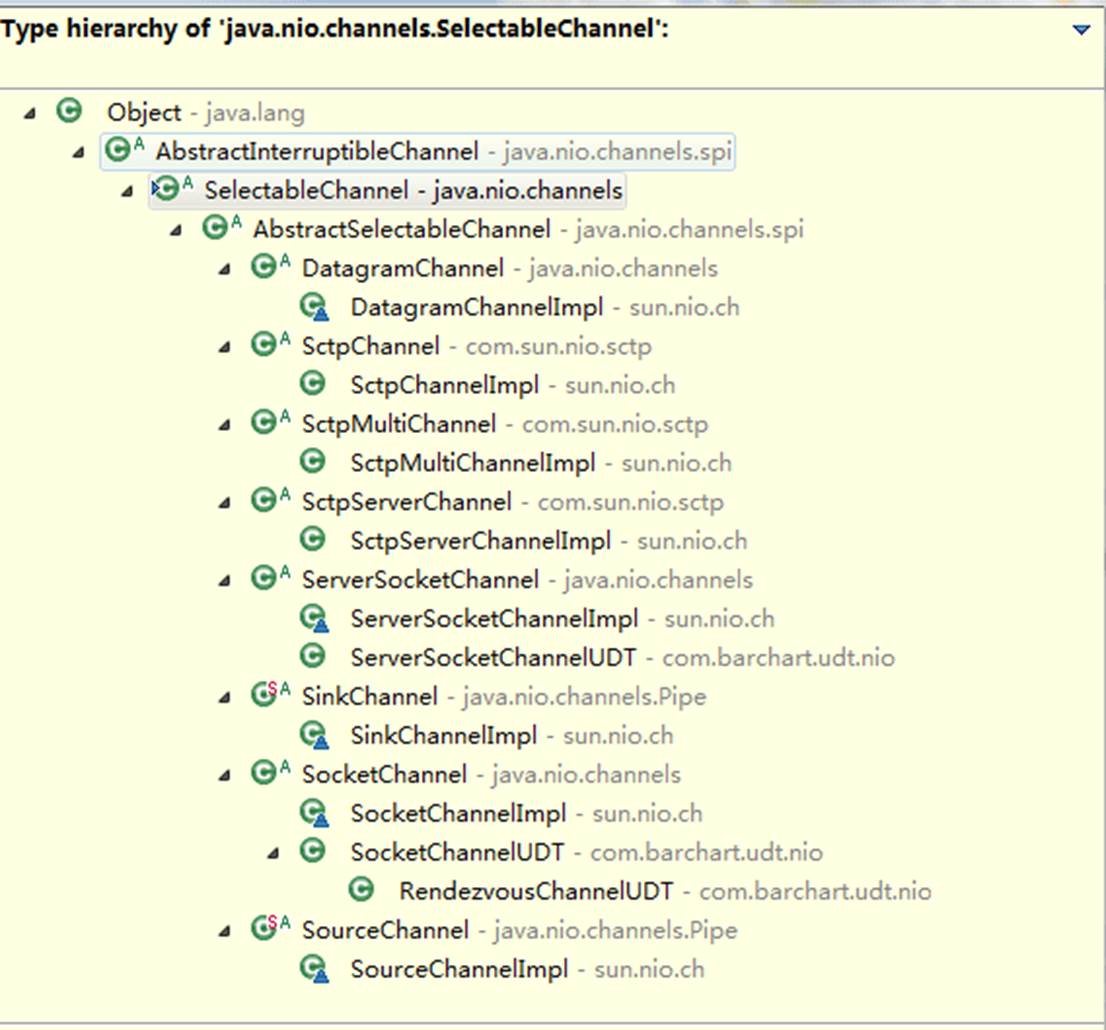
所有被Selector(選擇器)註冊的通道,只能是繼承了SelectableChannel類的子類。如上圖所示
-
FileChannel: 從文件中讀寫數據;
-
DatagramChannel: 通過 UDP 讀寫網絡中數據;
-
SocketChannel: TCP Socket套接字的監聽通道,一個Socket套接字對應了一個客户端IP: 端口 到 服務器IP: 端口的通信連接。
-
ServerSocketChannel: 應用服務器程序的監聽通道。只有通過這個通道,應用程序才能向操作系統註冊支持“多路複用IO”的端口監聽。同時支持UDP協議和TCP協議。
FileChannel 是磁盤IO的通道,後三個是網絡IO的通道。並且FileChannel不能切換為非阻塞模式,因此FileChannel不適合Selector。
緩衝區
數據緩存區: 在JAVA NIO 框架中,為了保證每個通道的數據讀寫速度JAVA NIO 框架為每一種需要支持數據讀寫的通道集成了Buffer的支持。用於讀取或寫入數據到通道。
這句話怎麼理解呢? 例如ServerSocketChannel通道它只支持對OP_ACCEPT事件的監聽,所以它是不能直接進行網絡數據內容的讀寫的。所以ServerSocketChannel是沒有集成Buffer的。
Buffer有兩種工作模式: 寫模式和讀模式。在讀模式下,應用程序只能從Buffer中讀取數據,不能進行寫操作。但是在寫模式下,應用程序是可以進行讀操作的,這就表示可能會出現髒讀的情況。所以一旦您決定要從Buffer中讀取數據,一定要將Buffer的狀態改為讀模式。
發送給一個通道的所有數據都必須首先放到緩衝區中,同樣地,從通道中讀取的任何數據都要先讀到緩衝區中。也就是説,不會直接對通道進行讀寫數據,而是要先經過緩衝區。
緩衝區實質上是一個數組,但它不僅僅是一個數組。緩衝區提供了對數據的結構化訪問,而且還可以跟蹤系統的讀/寫進程。
緩衝區包括以下類型:
-
ByteBuffer
-
CharBuffer
-
ShortBuffer
-
IntBuffer
-
LongBuffer
-
FloatBuffer
-
DoubleBuffer
ByteBuffer 正確使用姿勢
- 向 buffer 寫入數據,例如調用 channel.read(buffer)
- 調用 flip() 切換至讀模式
- 從 buffer 讀取數據,例如調用 buffer.get()
- 調用 clear() 或 compact() 切換至寫模式
- 重複 1~4 步驟
ByteBuffer 大小分配:
- 每個 channel 都需要記錄可能被切分的消息,因為 ByteBuffer 不能被多個 channel 共同使用,因此需要為每個 channel 維護一個獨立的 ByteBuffer
- ByteBuffer 不能太大,比如一個 ByteBuffer 1Mb 的話,要支持百萬連接就要 1Tb 內存,因此需要設計大小可變的 ByteBuffer
- 一種思路是首先分配一個較小的 buffer,例如 4k,如果發現數據不夠,再分配 8k 的 buffer,將 4k buffer 內容拷貝至 8k buffer,優點是消息連續容易處理,缺點是數據拷貝耗費性能,參考實現 http://tutorials.jenkov.com/java-performance/resizable-array.html
- 另一種思路是用多個數組組成 buffer,一個數組不夠,把多出來的內容寫入新的數組,與前面的區別是消息存儲不連續解析複雜,優點是避免了拷貝引起的性能損耗
緩衝區狀態變量
-
capacity: 最大容量;
-
position: 當前已經讀寫的字節數;
-
limit: 還可以讀寫的字節數。
狀態變量的改變過程舉例:
① 新建一個大小為 8 個字節的緩衝區,此時 position 為 0,而 limit = capacity = 8。capacity 變量不會改變,下面的討論會忽略它。
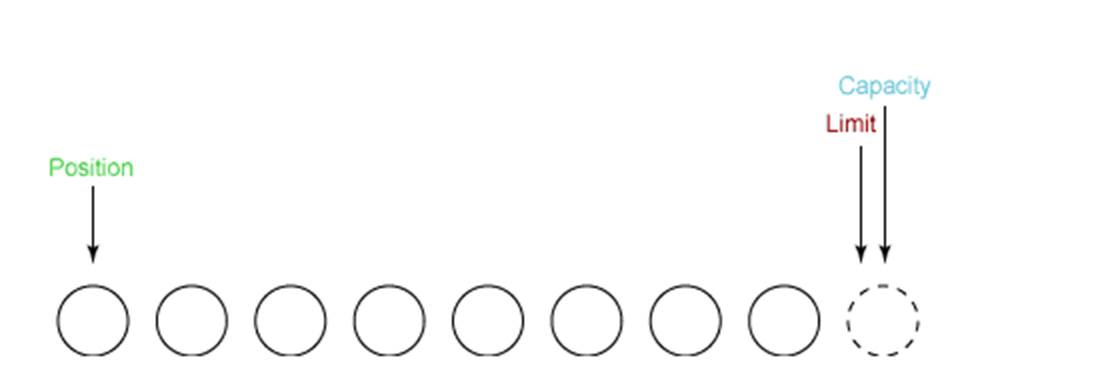
② 從輸入通道中讀取 5 個字節數據寫入緩衝區中,此時 position 移動設置為 5,limit 保持不變。
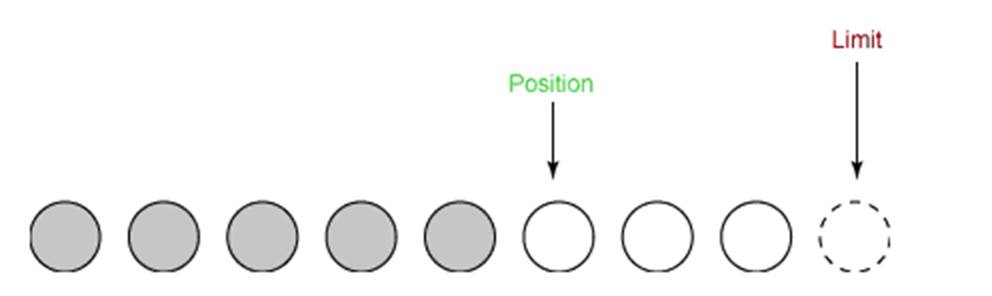
③ 在將緩衝區的數據寫到輸出通道之前,需要先調用 flip() 方法,這個方法將 limit 設置為當前 position,並將 position 設置為 0。
寫到輸出通道,意味着要從buffer中讀出,才能寫入channel
public Buffer flip() {
     limit = position;
     position = 0;
     mark = -1;
     return this;
}
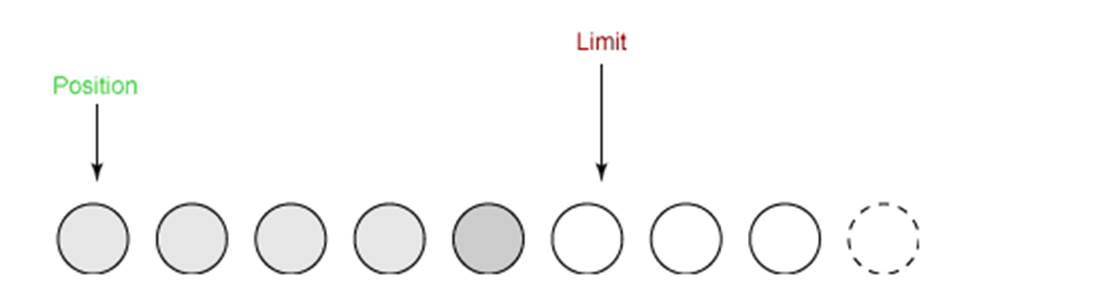
④ 從緩衝區中取 4 個字節到輸出緩衝中,此時 position 設為 4。
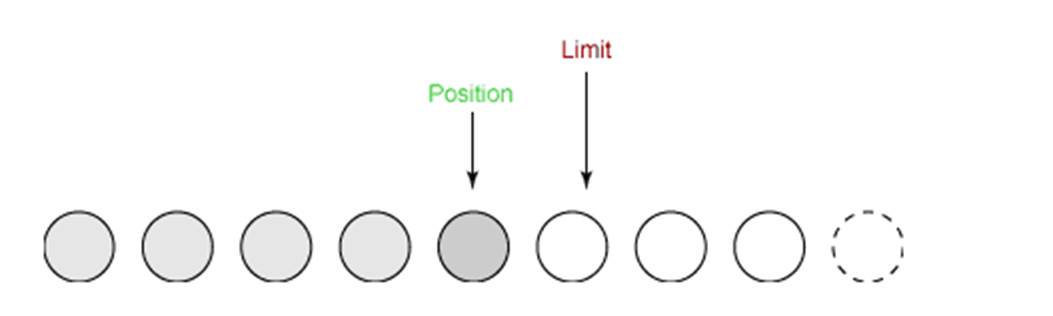
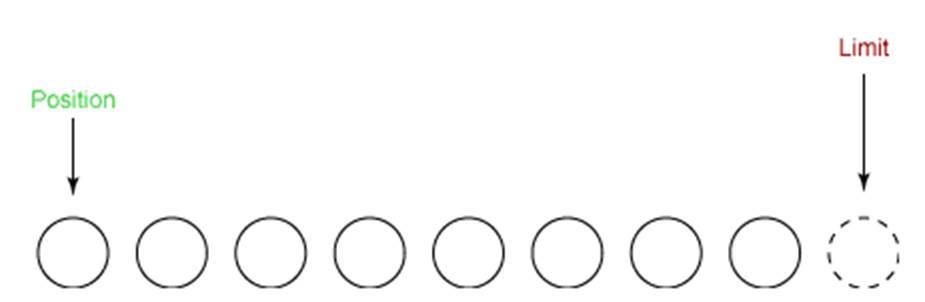
⑤ 最後需要調用 clear() 方法來清空緩衝區,此時 position 和 limit 都被設置為最初位置。
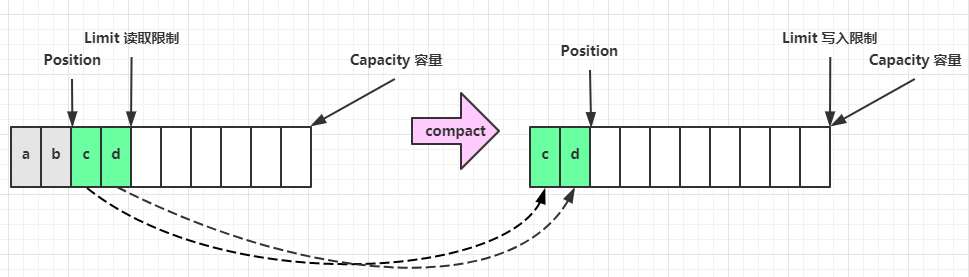
⑥ compact 方法,是把未讀完的部分向前壓縮,然後切換至寫模式
文件 NIO 實例
以下展示了使用 NIO 快速複製文件的實例:
public static void fastCopy(String src, String dist) throws IOException {

    // 獲得源文件的輸入字節流
    FileInputStream fin = new FileInputStream(src);

    // 獲取輸入字節流的文件通道
    FileChannel fcin = fin.getChannel();

    // 獲取目標文件的輸出字節流
    FileOutputStream fout = new FileOutputStream(dist);

    // 獲取輸出字節流的通道
    FileChannel fcout = fout.getChannel();

    // 為緩衝區分配 1024 個字節
    ByteBuffer buffer = ByteBuffer.allocateDirect(1024);

    while (true) {

        // 從輸入通道中讀取數據到緩衝區中
        int r = fcin.read(buffer);//對於buffer來説,這是寫入的過程

        // read() 返回 -1 表示 EOF
        if (r == -1) {
            break;
        }

        // 切換讀寫
        buffer.flip();

        // 把緩衝區的內容寫入輸出文件中
        fcout.write(buffer);//對於buffer來説,這是讀取的過程

        // 清空緩衝區
        buffer.clear();
    }
}
選擇器
Selector (選擇器,多路複用器)是JavaNIO 中能夠檢測一到多個NIO通道,是否為諸如讀寫事件做好準備的組件。這樣,一個單獨的線程可以管理多個channel,從而管理多個網絡連接。
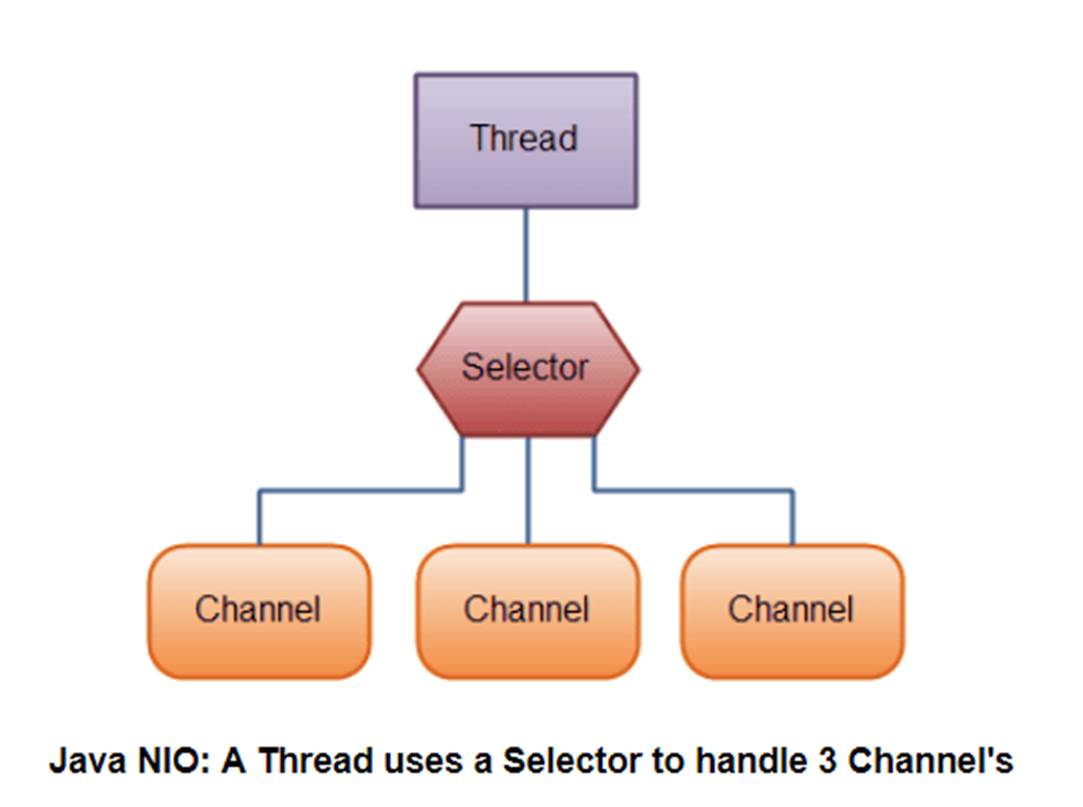
NIO 實現了 IO 多路複用中的 多Reactor多進程/線程 模型,一個線程 Thread 使用一個選擇器 Selector 通過輪詢的方式去監聽多個通道 Channel 上的事件,從而讓一個線程就可以處理多個事件。通過配置監聽的通道 Channel 為非阻塞,那麼當 Channel 上的 IO 事件還未到達時,就不會進入阻塞狀態一直等待,而是繼續輪詢其它 Channel,找到 IO 事件已經到達的 Channel 執行。
因為創建和切換線程的開銷很大,因此使用一個線程來處理多個事件而不是一個線程處理一個事件具有更好的性能。
- 事件訂閲和Channel管理:應用程序將向Selector對象註冊需要它關注的Channel,以及具體的某一個Channel會對哪些IO事件感興趣。Selector中也會維護一個“已經註冊的Channel”的容器。以下代碼來自WindowsSelectorImpl實現類中,對已經註冊的Channel的管理容器:
// Initial capacity of the poll array
private final int INIT_CAP = 8;
// Maximum number of sockets for select().
// Should be INIT_CAP times a power of 2
private final static int MAX_SELECTABLE_FDS = 1024;

// The list of SelectableChannels serviced by this Selector. Every mod
// MAX_SELECTABLE_FDS entry is bogus, to align this array with the poll
// array,  where the corresponding entry is occupied by the wakeupSocket
private SelectionKeyImpl[] channelArray = new SelectionKeyImpl[INIT_CAP];
- 輪詢代理:應用層不再通過阻塞模式或者非阻塞模式直接詢問操作系統“事件有沒有發生”,而是由Selector代其詢問。
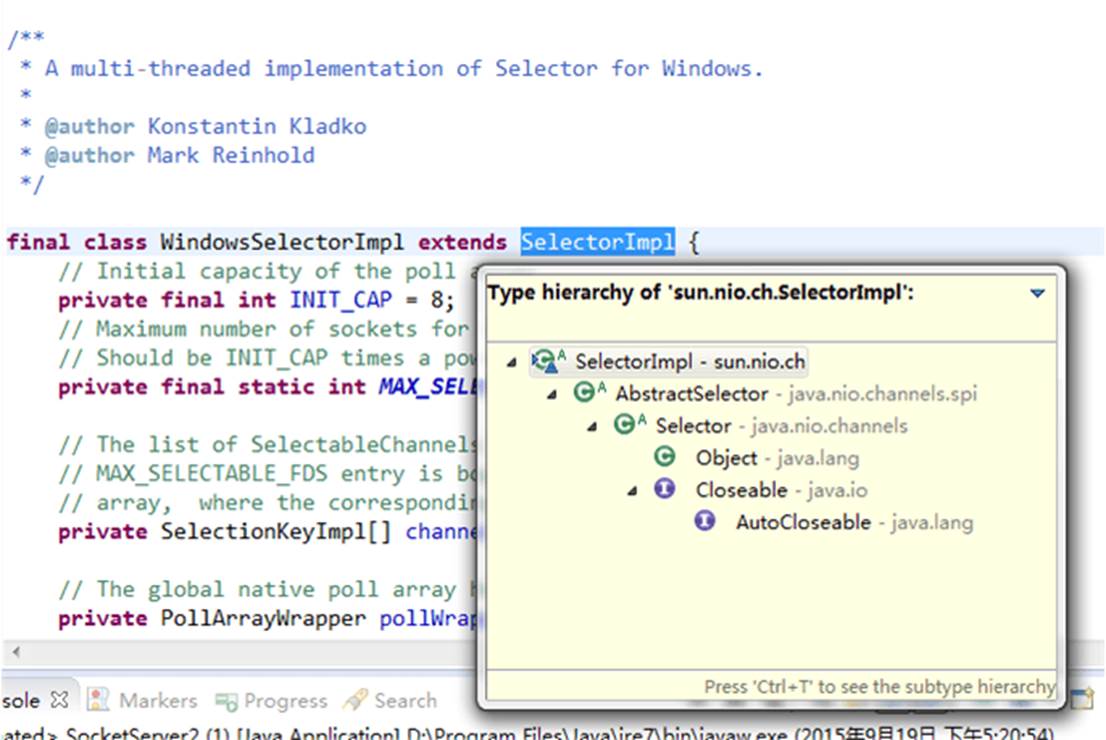
- 實現不同操作系統的支持:多路複用IO技術 是需要操作系統進行支持的,其特點就是操作系統可以同時掃描同一個端口上不同網絡連接的事件。所以作為上層的JVM,必須要為 不同操作系統的多路複用IO實現 編寫不同的代碼。同樣測試環境是Windows,它對應的實現類是sun.nio.ch.WindowsSelectorImpl:
selector 的作用就是配合一個線程來管理多個 channel,獲取這些 channel 上發生的事件,這些 channel 工作在非阻塞模式下,不會讓線程吊死在一個 channel 上。適合連接數特別多,但流量低的場景(low traffic)
創建選擇器
Selector selector = Selector.open();
綁定 Channel 事件
也稱之為註冊事件,綁定的事件 selector 才會關心
ServerSocketChannel ssChannel = ServerSocketChannel.open();
ssChannel.configureBlocking(false);
ssChannel.register(selector, SelectionKey.OP_ACCEPT);
Channel必須配置為非阻塞模式,否則使用選擇器就沒有任何意義了,因為如果通道在某個事件上被阻塞,那麼服務器就不能響應其它事件,必須等待這個事件處理完畢才能去處理其它事件,顯然這和選擇器的作用背道而馳。
在將通道註冊到選擇器上時,還需要指定要註冊的具體事件,主要有以下幾類:
-
SelectionKey.OP_CONNECT
-
SelectionKey.OP_ACCEPT
-
SelectionKey.OP_READ
-
SelectionKey.OP_WRITE
它們在 SelectionKey 的定義如下:
public static final int OP_READ = 1 << 0;
public static final int OP_WRITE = 1 << 2;
public static final int OP_CONNECT = 1 << 3;
public static final int OP_ACCEPT = 1 << 4;
可以看出每個事件可以被當成一個位域,從而組成事件集整數。例如:
int interestSet = SelectionKey.OP_READ | SelectionKey.OP_WRITE;
監聽事件
- 方法1,阻塞直到綁定事件發生
int count = selector.select();
- 方法2,阻塞直到綁定事件發生,或是超時(時間單位為 ms)
int count = selector.select(long timeout);
- 方法3,不會阻塞,也就是不管有沒有事件,立刻返回,自己根據返回值檢查是否有事件
int count = selector.selectNow();
使用 select() 來監聽到達的事件,它會一直阻塞直到有至少一個事件到達。
那 select 何時不阻塞:
- 事件發生時
- 客户端發起連接請求,會觸發 accept 事件
- 客户端發送數據過來,客户端正常、異常關閉時,都會觸發 read 事件,另外如果發送的數據大於 buffer 緩衝區,會觸發多次讀取事件
- channel 可寫,會觸發 write 事件
- 在 linux 下 nio bug 發生時
- 調用 selector.wakeup()
- 調用 selector.close()
- selector 所在線程 interrupt
處理accept事件
// 獲取所有事件
Set<SelectionKey> keys = selector.selectedKeys();
// 遍歷所有事件,逐一處理
Iterator<SelectionKey> keyIterator = keys.iterator();
while (keyIterator.hasNext()) {
    SelectionKey key = keyIterator.next();
    // 判斷事件類型
    if (key.isAcceptable()) {
        ServerSocketChannel c = (ServerSocketChannel) key.channel();
        // 必須處理
        SocketChannel sc = c.accept();
        sc.configureBlocking(false);
        sc.register(selector, SelectionKey.OP_READ);
        // ...
    }
    // 處理完畢,必須將事件移除
    keyIterator.remove();
}
事件發生後,能否不處理?
不能,事件發生後,要麼處理,要麼取消(cancel),不能什麼都不做,否則下次該事件仍會觸發,這是因為 nio 底層使用的是水平觸發
這裏為什麼要 keyIterator.remove() 操作?
因為 select 在事件發生後,就會將相關的 key 放入 selectedKeys 集合,但不會在處理完後從 selectedKeys 集合中移除,需要我們自己編碼刪除。例如
- 第一次觸發了 ssckey 上的 accept 事件,沒有移除 ssckey
- 第二次觸發了 sckey 上的 read 事件,但這時 selectedKeys 中還有上次的 ssckey ,在處理時因為沒有真正的 serverSocket 連上了,就會導致空指針異常
處理 read 事件
// 獲取所有事件
Set<SelectionKey> keys = selector.selectedKeys();
// 遍歷所有事件,逐一處理
Iterator<SelectionKey> keyIterator = keys.iterator();
while (keyIterator.hasNext()) {
    SelectionKey key = keyIterator.next();
    // 判斷事件類型
    if (key.isAcceptable()) {
        ServerSocketChannel c = (ServerSocketChannel) key.channel();
        // 必須處理
        SocketChannel sc = c.accept();
        sc.configureBlocking(false);
        sc.register(selector, SelectionKey.OP_READ);
        // ...
    } else if (key.isReadable()) {
        SocketChannel sc = (SocketChannel) key.channel();
        //實際使用中,不會一次給buffer緩衝區分配太多空間,因此可能存在粘包的問題
        ByteBuffer buffer = ByteBuffer.allocate(128);
        int read = sc.read(buffer);
        if(read == -1) {
            key.cancel();
            sc.close();
        } else {
            buffer.flip();
        }
    }
    // 處理完畢,必須將事件移除
    keyIterator.remove();
}
cancel 的作用? cancel 會取消註冊在 selector 上的 channel,並從 keys 集合中刪除 key 後續不會再監聽事件
處理消息的邊界
// 獲取所有事件
Set<SelectionKey> keys = selector.selectedKeys();
// 遍歷所有事件,逐一處理
Iterator<SelectionKey> keyIterator = keys.iterator();
while (keyIterator.hasNext()) {
    SelectionKey key = keyIterator.next();
    // 判斷事件類型
    if (key.isAcceptable()) {
        ServerSocketChannel c = (ServerSocketChannel) key.channel();
        // 必須處理
        SocketChannel sc = c.accept();
        sc.configureBlocking(false);
        ByteBuffer buffer = ByteBuffer.allocate(16); // attachment
        // 將一個 byteBuffer 作為附件關聯到 selectionKey 上
        SelectionKey scKey = sc.register(selector, 0, buffer);
        scKey.register(selector, SelectionKey.OP_READ);
    } else if (key.isReadable()) { // 如果是 read
        try {
            SocketChannel sc = (SocketChannel) key.channel();
            // 獲取 selectionKey 上關聯的附件
            ByteBuffer buffer = (ByteBuffer) key.attachment();
            int read = sc.read(buffer);
            if(read == -1) {
                key.cancel();
            } else {
                split(buffer);
                // 需要擴容
                if (buffer.position() == buffer.limit()) {
                    ByteBuffer newBuffer = ByteBuffer.allocate(buffer.capacity() * 2);
                    buffer.flip();
                    newBuffer.put(buffer); // 0123456789abcdef3333\n
                    key.attach(newBuffer);
                }
            } catch (IOException e) {
                e.printStackTrace();
                key.cancel();  // 因為客户端斷開了,因此需要將 key 取消(從 selector 的 keys 集合中真正刪除 key)
            }
    }
    // 處理完畢,必須將事件移除
    keyIterator.remove();
}
split 方法
private static void split(ByteBuffer source) {
    source.flip();
    for (int i = 0; i < source.limit(); i++) {
        // 找到一條完整消息
        if (source.get(i) == '\n') {
            int length = i + 1 - source.position();
            // 把這條完整消息存入新的 ByteBuffer
            ByteBuffer target = ByteBuffer.allocate(length);
            // 從 source 讀,向 target 寫
            for (int j = 0; j < length; j++) {
                target.put(source.get());
            }
            debugAll(target);
        }
    }
    source.compact(); // 0123456789abcdef  position 16 limit 16
}
處理 write 事件
一次無法寫完的例子
- 非阻塞模式下,無法保證把 buffer 中所有數據都寫入 channel,因此需要追蹤 write 方法的返回值(代表實際寫入的字節數)
- 用 selector 監聽所有 channel 的可寫事件,每個 channel 都需要一個 key 來跟蹤 buffer,但這樣又會導致佔用內存過多,就有兩階段策略
- 當消息處理器第一次寫入消息時,才將 channel 註冊到 selector 上
- selector 檢查 channel 上的可寫事件,如果所有的數據寫完了,就取消 channel 的註冊
- 如果不取消,會每次可寫均會觸發 write 事件
public class WriteServer {

    public static void main(String[] args) throws IOException {
        ServerSocketChannel ssc = ServerSocketChannel.open();
        ssc.configureBlocking(false);
        ssc.bind(new InetSocketAddress(8080));

        Selector selector = Selector.open();
        ssc.register(selector, SelectionKey.OP_ACCEPT);

        while(true) {
            selector.select();

            Iterator<SelectionKey> iter = selector.selectedKeys().iterator();
            while (iter.hasNext()) {
                SelectionKey key = iter.next();
                iter.remove();
                if (key.isAcceptable()) {
                    SocketChannel sc = ssc.accept();
                    sc.configureBlocking(false);
                    SelectionKey sckey = sc.register(selector, SelectionKey.OP_READ);
                    // 1. 向客户端發送內容
                    StringBuilder sb = new StringBuilder();
                    for (int i = 0; i < 3000000; i++) {
                        sb.append("a");
                    }
                    ByteBuffer buffer = Charset.defaultCharset().encode(sb.toString());
                    int write = sc.write(buffer);
                    // 3. write 表示實際寫了多少字節
                    System.out.println("實際寫入字節:" + write);
                    // 4. 如果有剩餘未讀字節,才需要關注寫事件
                    if (buffer.hasRemaining()) {
                        // read 1  write 4
                        // 在原有關注事件的基礎上,多關注 寫事件
                        //key.interestOps() 表示原有關注的時間,+  SelectionKey.OP_WRITE 寫事件
                        sckey.interestOps(sckey.interestOps() + SelectionKey.OP_WRITE);
                        // 把 buffer 作為附件加入 sckey
                        sckey.attach(buffer);
                    }
                } else if (key.isWritable()) {
                    ByteBuffer buffer = (ByteBuffer) key.attachment();
                    SocketChannel sc = (SocketChannel) key.channel();
                    int write = sc.write(buffer);
                    System.out.println("實際寫入字節:" + write);
                    if (!buffer.hasRemaining()) { // 寫完了
                        // 為什麼要取消關注 寫事件
                        // 只要向 channel 發送數據時,socket 緩衝可寫,這個事件會頻繁觸發,因此應當只在 socket 緩衝區寫不下時再關注可寫事件,數據寫完之後應該取消關注
                        key.interestOps(key.interestOps() - SelectionKey.OP_WRITE);
                        key.attach(null);
                    }
                }
            }
        }
    }
}
客户端
public class WriteClient {
    public static void main(String[] args) throws IOException {
        Selector selector = Selector.open();
        SocketChannel sc = SocketChannel.open();
        sc.configureBlocking(false);
        sc.register(selector, SelectionKey.OP_CONNECT | SelectionKey.OP_READ);
        sc.connect(new InetSocketAddress("localhost", 8080));
        int count = 0;
        while (true) {
            selector.select();
            Iterator<SelectionKey> iter = selector.selectedKeys().iterator();
            while (iter.hasNext()) {
                SelectionKey key = iter.next();
                iter.remove();
                if (key.isConnectable()) {
                    System.out.println(sc.finishConnect());
                } else if (key.isReadable()) {
                    ByteBuffer buffer = ByteBuffer.allocate(1024 * 1024);
                    count += sc.read(buffer);
                    buffer.clear();
                    System.out.println(count);
                }
            }
        }
    }
}
文件編程 FileChannel
FileChannel 只能工作在阻塞模式下,沒有非阻塞模式
獲取FileChannel 時,不能直接打開 FileChannel,必須通過 FileInputStream、FileOutputStream 或者 RandomAccessFile 來獲取 FileChannel,它們都有 getChannel 方法
- 通過 FileInputStream 獲取的 channel 只能讀
- 通過 FileOutputStream 獲取的 channel 只能寫
- 通過 RandomAccessFile 是否能讀寫根據構造 RandomAccessFile 時的讀寫模式決定
兩個 Channel 傳輸數據
String FROM = "helloword/data.txt";
String TO = "helloword/to.txt";
long start = System.nanoTime();
try (FileChannel from = new FileInputStream(FROM).getChannel();
     FileChannel to = new FileOutputStream(TO).getChannel();
    ) {
    from.transferTo(0, from.size(), to);
} catch (IOException e) {
    e.printStackTrace();
}
long end = System.nanoTime();
System.out.println("transferTo 用時:" + (end - start) / 1000_000.0);//transferTo 用時:8.2011
超過 2g 大小的文件傳輸
public class TestFileChannelTransferTo {
    public static void main(String[] args) {
        try (
                FileChannel from = new FileInputStream("data.txt").getChannel();
                FileChannel to = new FileOutputStream("to.txt").getChannel();
        ) {
            // 效率高,底層會利用操作系統的零拷貝進行優化
            long size = from.size();
            // left 變量代表還剩餘多少字節
            for (long left = size; left > 0; ) {
                System.out.println("position:" + (size - left) + " left:" + left);
                left -= from.transferTo((size - left), left, to);
            }
        } catch (IOException e) {
            e.printStackTrace();
        }
    }
}
實際傳輸一個超大文件
position:0 left:7769948160
position:2147483647 left:5622464513
position:4294967294 left:3474980866
position:6442450941 left:1327497219
FileChannel.map()方法其實就是採用了操作系統中的內存映射方式,將內核緩衝區的內存和用户緩衝區的內存做了一個地址映射。它解決數據從磁盤讀取到內核緩衝區,然後內核緩衝區的數據複製移動到用户空間緩衝區。程序還是需要從用户態切換到內核態,然後再進行操作系統調用,並且數據移動和複製了兩次。
transferTo方法則是使用了sendfile的方式,來分析一下其中原理:
- transferTo()方法直接將當前通道內容傳輸到另一個通道,沒有涉及到Buffer的任何操作,NIO中的Buffer是JVM堆或者堆外內存,但不論如何他們都是操作系統內核空間的內存。也就是説這種方式不會有內核緩衝區和用户緩衝區之間的拷貝問題。
- transferTo()的實現方式就是通過系統調用sendfile()(當然這是Linux中的系統調用),根據我們上面所寫説這個過程是效率遠高於從內核緩衝區到用户緩衝區的讀寫的。
- 同理transferFrom()也是這種實現方式。
具體細節可以看這篇文章 網絡編程 - NIO的零拷貝實現
網絡編程
JAVA NIO 框架簡要設計分析
多路複用IO技術是操作系統的內核實現。在不同的操作系統,甚至同一系列操作系統的版本中所實現的多路複用IO技術都是不一樣的。那麼作為跨平台的JAVA JVM來説如何適應多種多樣的多路複用IO技術實現呢? 面向對象的威力就顯現出來了: 無論使用哪種實現方式,他們都會有“選擇器”、“通道”、“緩存”這幾個操作要素,那麼可以為不同的多路複用IO技術創建一個統一的抽象組,並且為不同的操作系統進行具體的實現。JAVA NIO中對各種多路複用IO的支持,主要的基礎是java.nio.channels.spi.SelectorProvider抽象類,其中的幾個主要抽象方法包括:
-
public abstract DatagramChannel openDatagramChannel(): 創建和這個操作系統匹配的UDP 通道實現。
-
public abstract AbstractSelector openSelector(): 創建和這個操作系統匹配的NIO選擇器,就像上文所述,不同的操作系統,不同的版本所默認支持的NIO模型是不一樣的。
-
public abstract ServerSocketChannel openServerSocketChannel(): 創建和這個NIO模型匹配的服務器端通道。
-
public abstract SocketChannel openSocketChannel(): 創建和這個NIO模型匹配的TCP Socket套接字通道(用來反映客户端的TCP連接)
由於JAVA NIO框架的整個設計是很大的,所以我們只能還原一部分我們關心的問題。這裏我們以JAVA NIO框架中對於不同多路複用IO技術的選擇器 進行實例化創建的方式作為例子,以點窺豹觀全局:
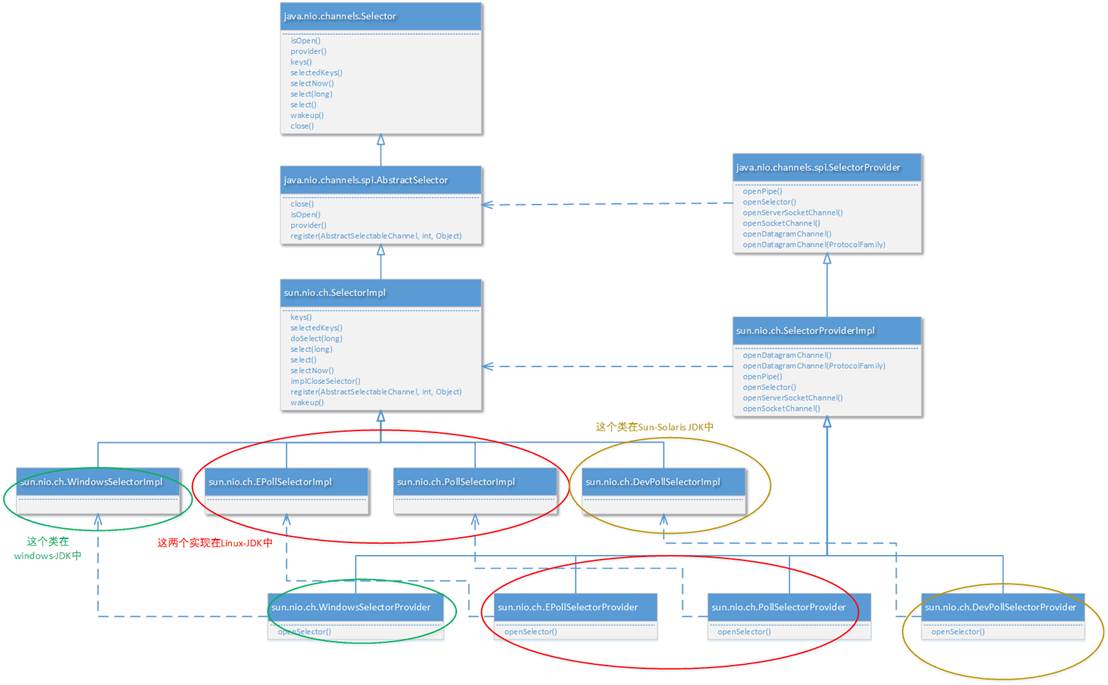
很明顯,不同的SelectorProvider實現對應了不同的 選擇器。由具體的SelectorProvider實現進行創建。另外説明一下,實際上netty底層也是通過這個設計獲得具體使用的NIO模型。以下代碼是Netty 4.0中NioServerSocketChannel進行實例化時的核心代碼片段:
private static ServerSocketChannel newSocket(SelectorProvider provider) {
    try {
        /**
            *  Use the {@link SelectorProvider} to open {@link SocketChannel} and so remove condition in
            *  {@link SelectorProvider#provider()} which is called by each ServerSocketChannel.open() otherwise.
            *
            *  See <a href="See https://github.com/netty/netty/issues/2308">#2308</a>.
            */
        return provider.openServerSocketChannel();
    } catch (IOException e) {
        throw new ChannelException(
                "Failed to open a server socket.", e);
    }
}
JAVA實例 - 利用多線程優化
前面的代碼只有一個選擇器,沒有充分利用多核 cpu。而現在都是多核 cpu,設計時要充分考慮別讓 cpu 的力量被白白浪費
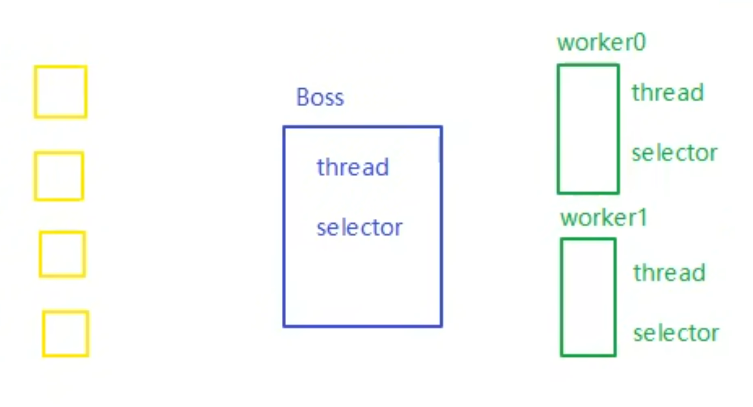
分兩組選擇器
- 單線程配一個選擇器,專門處理 accept 事件
- 創建 cpu 核心數的線程,每個線程配一個選擇器,輪流處理 read 事件
public class ChannelDemo7 {
    public static void main(String[] args) throws IOException {
        new BossEventLoop().register();
    }


    @Slf4j
    static class BossEventLoop implements Runnable {
        private Selector boss;//只負責建立連接
        private WorkerEventLoop[] workers;//負責處理業務能力
        private volatile boolean start = false;
        AtomicInteger index = new AtomicInteger();

        public void register() throws IOException {
            if (!start) {
                ServerSocketChannel ssc = ServerSocketChannel.open();
                ssc.bind(new InetSocketAddress(8080));
                ssc.configureBlocking(false);
                //獲取 boss 的選擇器
                boss = Selector.open();
                //將ssc 綁定到boss的選擇器
                SelectionKey ssckey = ssc.register(boss, 0, null);
                ssckey.interestOps(SelectionKey.OP_ACCEPT);
                workers = initEventLoops();
                //啓動boss線程,接收accept事件
                new Thread(this, "boss").start();
                log.debug("boss start...");
                start = true;
            }
        }

        public WorkerEventLoop[] initEventLoops() {
         //Runtime.getRuntime().availableProcessors(可以拿到 cpu 個數
         //但是如果工作在 docker 容器下,因為容器不是物理隔離的,會拿到物理 cpu 個數,而不是容器申請時的個數
		// 這個問題直到 jdk 10 才修復,使用 jvm 參數 UseContainerSupport 配置, 默認開啓
//        EventLoop[] eventLoops = new EventLoop[Runtime.getRuntime().availableProcessors()];
            //創建處理業務的線程
            WorkerEventLoop[] workerEventLoops = new WorkerEventLoop[2];
            for (int i = 0; i < workerEventLoops.length; i++) {
                workerEventLoops[i] = new WorkerEventLoop(i);
            }
            return workerEventLoops;
        }

        @Override
        public void run() {
            while (true) {
                try {
                    boss.select();
                    Iterator<SelectionKey> iter = boss.selectedKeys().iterator();
                    while (iter.hasNext()) {
                        SelectionKey key = iter.next();
                        iter.remove();
                        if (key.isAcceptable()) {
                            ServerSocketChannel c = (ServerSocketChannel) key.channel();
                            SocketChannel sc = c.accept();
                            sc.configureBlocking(false);
                            log.debug("{} connected", sc.getRemoteAddress());
                            //選擇哪個線程來註冊這個 accept事件
                            workers[index.getAndIncrement() % workers.length].register(sc);
                        }
                    }
                } catch (IOException e) {
                    e.printStackTrace();
                }
            }
        }
    }

    @Slf4j
    static class WorkerEventLoop implements Runnable {
        private Selector worker;
        private volatile boolean start = false;
        private int index;

        private final ConcurrentLinkedQueue<Runnable> tasks = new ConcurrentLinkedQueue<>();

        public WorkerEventLoop(int index) {
            this.index = index;
        }

        public void register(SocketChannel sc) throws IOException {
            if (!start) {
                worker = Selector.open();
                new Thread(this, "worker-" + index).start();
                start = true;
            }
            tasks.add(() -> {
                try {
                    SelectionKey sckey = sc.register(worker, 0, null);
                    //關注讀事件
                    sckey.interestOps(SelectionKey.OP_READ);
                    worker.selectNow();
                } catch (IOException e) {
                    e.printStackTrace();
                }
            });
            worker.wakeup();
        }

        @Override
        public void run() {
            while (true) {
                try {
                    worker.select();
                    Runnable task = tasks.poll();
                    if (task != null) {
                        task.run();
                    }
                    Set<SelectionKey> keys = worker.selectedKeys();
                    Iterator<SelectionKey> iter = keys.iterator();
                    while (iter.hasNext()) {
                        SelectionKey key = iter.next();
                        //只需要關注 讀事件
                        if (key.isReadable()) {
                            SocketChannel sc = (SocketChannel) key.channel();
                            ByteBuffer buffer = ByteBuffer.allocate(128);
                            try {
                                // 這裏沒再關注 粘包半包 的問題了
                                int read = sc.read(buffer);
                                if (read == -1) {
                                    key.cancel();
                                    sc.close();
                                } else {
                                    buffer.flip();
                                    log.debug("{} message:", sc.getRemoteAddress());
                                    //... 處理業務
                                }
                            } catch (IOException e) {
                                e.printStackTrace();
                                key.cancel();
                                sc.close();
                            }
                        }
                        iter.remove();
                    }
                } catch (IOException e) {
                    e.printStackTrace();
                }
            }
        }
    }
}
UDP
- UDP 是無連接的,client 發送數據不會管 server 是否開啓
- server 這邊的 receive 方法會將接收到的數據存入 byte buffer,但如果數據報文超過 buffer 大小,多出來的數據會被默默拋棄
首先啓動服務器端
public class UdpServer {
    public static void main(String[] args) {
        try (DatagramChannel channel = DatagramChannel.open()) {
            channel.socket().bind(new InetSocketAddress(9999));
            System.out.println("waiting...");
            ByteBuffer buffer = ByteBuffer.allocate(32);
            channel.receive(buffer);
            buffer.flip();
            //業務處理
        } catch (IOException e) {
            e.printStackTrace();
        }
    }
}
運行客户端
public class UdpClient {
    public static void main(String[] args) {
        try (DatagramChannel channel = DatagramChannel.open()) {
            ByteBuffer buffer = StandardCharsets.UTF_8.encode("hello");
            InetSocketAddress address = new InetSocketAddress("localhost", 9999);
            channel.send(buffer, address);
        } catch (Exception e) {
            e.printStackTrace();
        }
    }
}
多路複用IO的優缺點
-
不用再使用多線程來進行IO處理了(包括操作系統內核IO管理模塊和應用程序進程而言)。當然實際業務的處理中,應用程序進程還是可以引入線程池技術的
-
同一個端口可以處理多種協議,例如,使用ServerSocketChannel測測的服務器端口監聽,既可以處理TCP協議又可以處理UDP協議。
-
操作系統級別的優化: 多路複用IO技術可以是操作系統級別在一個端口上能夠同時接受多個客户端的IO事件。同時具有之前我們講到的阻塞式同步IO和非阻塞式同步IO的所有特點。Selector的一部分作用更相當於“輪詢代理器”。
-
都是同步IO: 目前介紹的 阻塞式IO、非阻塞式IO甚至包括多路複用IO,這些都是基於操作系統級別對“同步IO”的實現。我們一直在説“同步IO”,一直都沒有詳細説,什麼叫做“同步IO”。實際上一句話就可以説清楚: 只有上層(包括上層的某種代理機制)系統詢問我是否有某個事件發生了,否則我不會主動告訴上層系統事件發生了
存在的誤區
最初在認識上有這樣的誤區,認為只有在 netty,nio 這樣的多路複用 IO 模型時,讀寫才不會相互阻塞,才可以實現高效的雙向通信,但實際上,Java Socket 是全雙工的:在任意時刻,線路上存在A 到 B 和 B 到 A 的雙向信號傳輸。即使是阻塞 IO,讀和寫是可以同時進行的,只要分別採用讀線程和寫線程即可,讀不會阻塞寫、寫也不會阻塞讀
服務端:
public class TestServer {
    public static void main(String[] args) throws IOException {
        ServerSocket ss = new ServerSocket(8888);
        Socket s = ss.accept();

        new Thread(() -> {
            try {
                BufferedReader reader = new BufferedReader(new InputStreamReader(s.getInputStream()));
                while (true) {
                    System.out.println(reader.readLine());
                }
            } catch (IOException e) {
                e.printStackTrace();
            }
        }).start();

        new Thread(() -> {
            try {
                BufferedWriter writer = new BufferedWriter(new OutputStreamWriter(s.getOutputStream()));
                // 例如在這個位置加入 thread 級別斷點,可以發現即使不寫入數據,也不妨礙前面線程讀取客户端數據
                for (int i = 0; i < 100; i++) {
                    writer.write(String.valueOf(i));
                    writer.newLine();
                    writer.flush();
                }
            } catch (IOException e) {
                e.printStackTrace();
            }
        }).start();
    }
}
客户端:
public class TestClient {
    public static void main(String[] args) throws IOException {
        Socket s = new Socket("localhost", 8888);

        new Thread(() -> {
            try {
                BufferedReader reader = new BufferedReader(new InputStreamReader(s.getInputStream()));
                while (true) {
                    System.out.println(reader.readLine());
                }
            } catch (IOException e) {
                e.printStackTrace();
            }
        }).start();

        new Thread(() -> {
            try {
                BufferedWriter writer = new BufferedWriter(new OutputStreamWriter(s.getOutputStream()));
                for (int i = 0; i < 100; i++) {
                    writer.write(String.valueOf(i));
                    writer.newLine();
                    writer.flush();
                }
            } catch (IOException e) {
                e.printStackTrace();
            }
        }).start();
    }
}
JavaNIO的缺陷
使用 Java 原生 NIO 來編寫服務器應用,代碼一般類似:
// 創建、配置 ServerSocketChannel
ServerSocketChannel serverChannel = ServerSocketChannel.open();
serverChannel.socket().bind(new InetSocketAddress(9998));
serverChannel.configureBlocking(false);

// 創建 Selector
Selector selector = Selector.open();

// 註冊
serverChannel.register(selector, SelectionKey.OP_ACCEPT);

while (true) {
    selector.select();  // select 可能在無就緒事件時異常返回!

    Set<SelectionKey> readyKeys = selector.selectedKeys();
    Iterator<SelectionKey> it = readyKeys.iterator();

    while (it.hasNext()) {
        SelectionKey key = it.next();
        ...  // 處理事件
        it.remove();
    }
}
selector.select() 應該 一直阻塞,直到有就緒事件到達,但很遺憾,由於 Java NIO 實現上存在 bug,select() 可能在 沒有 任何就緒事件的情況下返回,從而導致 while(true) 被不斷執行,最後導致某個 CPU 核心的利用率飆升到 100%,這就是臭名昭著的 Java NIO 的 epoll bug。
實際上,這是 Linux 系統下 poll/epoll 實現導致的 bug,但 Java NIO 並未完善處理它,所以也可以説是 Java NIO 的 bug。
該問題最早在 Java 6 發現,隨後很多版本聲稱解決了該問題,但實際上只是降低了該 bug 的出現頻率,起碼從網上搜索看,Java 8 還是存在該問題。
