

python代碼:
# post請求
@local_service.route('/serverName/postInterfaceName', methods=['POST'])
@cross_origin(supports_credentials=True)
def post_interface_name():
    # #讀取json文件當成返回
    path = os.path.dirname(os.path.dirname(os.path.abspath(__file__))) + '/jsonFile/jsonFileName.json'
    with open(path, 'r', encoding='utf')as fp:
        response = json.load(fp)
    return response


# get請求
@local_service.route('/system/time', methods=['GET'])
@cross_origin(supports_credentials=True)
def get_interface_name():
    time = {"success": True, "code": "8000", "result":  1625068800000}
    time_map = json.dumps(time, sort_keys=True, indent=4, separators=(',', ': '))
    return time_map


if __name__ == '__main__':
    local_service.run(port=8890, debug=True, host='127.0.0.1')
charles設置:
右鍵要mock的接口--->Map remote--->選擇Protocol,填寫Host Port Path--->OK
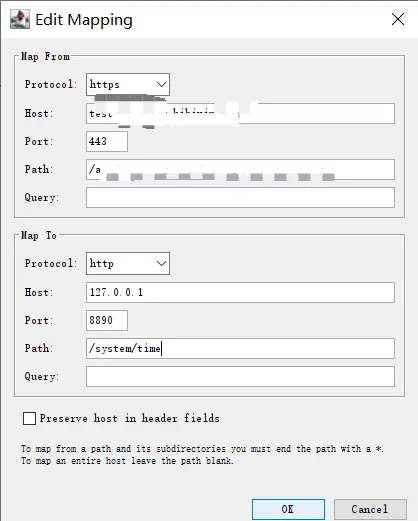
每次系統調用這個接口都會走本地mock數據
