

使用DllPlugin可以很大程度提高webpack的構建速度,但是有幾點不注意的話會使得打包的體積較大。
以下以react的配置來説明一下(webpack3)
一、先看一下最簡單的打包
const path = require('path');
const webpack = require('webpack');
const DllPlugin = require('webpack/lib/DllPlugin');
module.exports = {

    entry: {
        vendor: ['react', 'react-dom', 'react-router']
    },
    output: {
        path: path.resolve(__dirname, '../public/static/dll'),
        filename: '[name].js',
        library: '[name]'
    },
    devtool: 'inline-source-map',
    plugins: [
        new DllPlugin({
            filename: '[name].js',
            name: '[name]',
            path: path.resolve(__dirname, '../public/static/dll', '[name].manifest.json'), //描述生成的manifest文件
        }),
        new webpack
            .optimize
            .UglifyJsPlugin({
                compress: {
                    warnings: false, //刪除無用代碼時不輸出警告
                    drop_console: true, //刪除所有console語句,可以兼容IE
                    collapse_vars: true, //內嵌已定義但只使用一次的變量
                    reduce_vars: true, //提取使用多次但沒定義的靜態值到變量
                },
                output: {
                    beautify: false, //最緊湊的輸出,不保留空格和製表符
                    comments: false, //刪除所有註釋
                }
            })
    ]
}
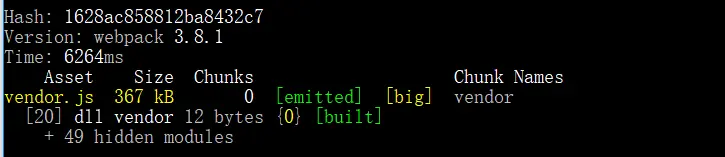
可以發現,僅僅是 'react', 'react-dom', 'react-router' 這三個就有三百多k,是不是太大了一點!!!
二、使用生產模式構建
在plugins中加入
 plugins: [
          ...
         new webpack.DefinePlugin({
            'process.env': {
                'NODE_ENV': JSON.stringify('production')
            }
        }),
]

重新打包,可以發現,打包的體積一下子降到了 143 kB
三、這還不夠,還可以更小。使用 alias 處理包的路徑
    resolve: {
        alias: {
            'react': path.resolve(__dirname, '../node_modules/react/cjs/react.production.min.js'),
            'react-dom': path.resolve(__dirname, '../node_modules/react-dom/cjs/react-dom.production.min.js'),
            'react-router': path.resolve(__dirname, '../node_modules/react-router/umd/react-router.min.js'),
        }
    },
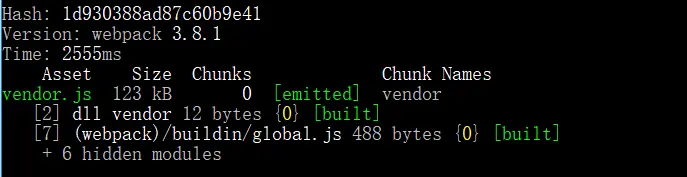
重新打包, 發現打包的體積為 123 kB ,減少了20k。
關於dll打包中,使用聲明 production 和 使用 alias 處理路徑 可以大幅減少包的體積。
以下説一下, dll 打包具體怎麼做
1. 首先新建一個文件 webpack.config.dll.js ,這個文件用來打包引用的公共包
類似這樣
const path = require('path');
const webpack = require('webpack');
const DllPlugin = require('webpack/lib/DllPlugin');
module.exports = {

    entry: {
        vendor: ['react', 'react-dom', 'react-router']
    },
    resolve: {
        alias: {
            'react': path.resolve(__dirname, '../node_modules/react/cjs/react.production.min.js'),
            'react-dom': path.resolve(__dirname, '../node_modules/react-dom/cjs/react-dom.production.min.js'),
            'react-router': path.resolve(__dirname, '../node_modules/react-router/umd/react-router.min.js'),
        }
    },
    output: {
        path: path.resolve(__dirname, '../public/static/dll'),
        filename: '[name].js',
        library: '[name]'
    },
    devtool: 'inline-source-map',
    plugins: [
        new webpack.DefinePlugin({
            'process.env': {
                'NODE_ENV': JSON.stringify('production')
            }
        }),
        new DllPlugin({
            filename: '[name].js',
            name: '[name]',
            path: path.resolve(__dirname, '../public/static/dll', '[name].manifest.json'), //描述生成的manifest文件
        }),
        new webpack
            .optimize
            .UglifyJsPlugin({
                compress: {
                    warnings: false, //刪除無用代碼時不輸出警告
                    drop_console: true, //刪除所有console語句,可以兼容IE
                    collapse_vars: true, //內嵌已定義但只使用一次的變量
                    reduce_vars: true, //提取使用多次但沒定義的靜態值到變量
                },
                output: {
                    beautify: false, //最緊湊的輸出,不保留空格和製表符
                    comments: false, //刪除所有註釋
                }
            })
    ]
}
2. 在package.json 中的 script 加入 "dll": "node_modules/.bin/webpack --config config/webpack.config.dll.js"
3. npm run dll 就可以打包了
4. 打包後在webpack中(例如 webpack.config.dev)引用
  const manifest = require('../public/static/dll/vendor.manifest.json');
  ...

plugins: [
    new webpack.DllReferencePlugin({
      manifest
    }),
]
5.在html文件中引入打包的文件
<script src="/static/dll/vendor.js"></script>
end.
demo地址
