

1. 前言
大家好,我是若川,歡迎關注我的公眾號:若川視野。從 2021 年 8 月起,我持續組織了好幾年的每週大家一起學習 200 行左右的源碼共讀活動,感興趣的可以點此掃碼加我微信 ruochuan02 參與。另外,想學源碼,極力推薦關注我寫的專欄《學習源碼整體架構系列》,目前是掘金關注人數(6k+人)第一的專欄,寫有幾十篇源碼文章。
截至目前(2024-08-28),taro 4.0 正式版已經發布,目前最新是 4.0.5,官方4.0正式版本的介紹文章暫未發佈。官方之前發過Taro 4.0 Beta 發佈:支持開發鴻蒙應用、小程序編譯模式、Vite 編譯等。
計劃寫一個 Taro 源碼揭秘系列,博客地址:https://ruochuan12.github.io/taro 可以加入書籤,持續關注若川。
- [x] 1. 揭開整個架構的入口 CLI => taro init 初始化項目的秘密
- [x] 2. 揭開整個架構的插件系統的秘密
- [x] 3. 每次創建新的 taro 項目(taro init)的背後原理是什麼
- [x] 4. 每次 npm run dev:weapp 開發小程序,build 編譯打包是如何實現的?
- [x] 5. 高手都在用的發佈訂閲機制 Events 在 Taro 中是如何實現的?
- [x] 6. 為什麼通過 Taro.xxx 能調用各個小程序平台的 API,如何設計實現的?
- [x] 7. Taro.request 和請求響應攔截器是如何實現的
- [x] 8. Taro 是如何使用 webpack 打包構建小程序的?
- [x] 9. Taro 是如何生成 webpack 配置進行構建小程序的?
- [x] 10. Taro 到底是怎樣轉換成小程序文件的?
- [ ] 等等
前面 4 篇文章都是講述編譯相關的,CLI、插件機制、初始化項目、編譯構建流程。第 6 篇我們來講些相對簡單的,Taro 是如何實現 Taro.xxx 能訪問 wx.xxx(文章以微信小程序為例)。
關於克隆項目、環境準備、如何調試代碼等,參考第一篇文章-準備工作、調試。後續文章基本不再過多贅述。
學完本文,你將學到:
1. @tarojs/taro 源碼揭秘
2. 端平台插件運行時源碼分析
3. initNativeApi 中的 processApis 是如何設計實現的,如何 promisify 化的
等等
2. Taro 文檔 - API 説明
Taro 文檔 - API 説明
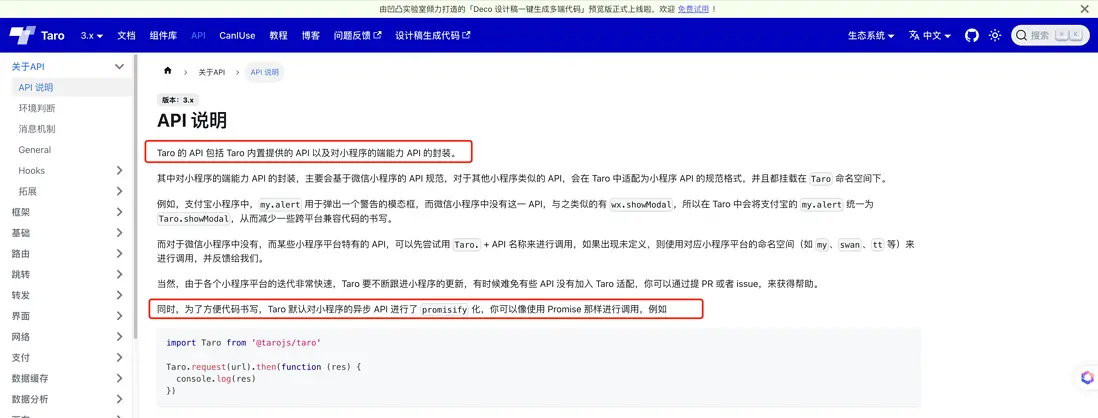
import Taro from '@tarojs/taro'

Taro.request(url).then(function (res) {
  console.log(res)
})我們具體來分析下,Taro 源碼中是如何實現 Taro.xxx 訪問 wx.xxx 的,並且是如何實現 promisify 的。
promisify 把回調函數轉成 promise 避免回調地獄問題。面試也經常考察此題。我之前寫過一篇文章:從22行有趣的源碼庫中,我學到了 callback promisify 化的 Node.js 源碼實現
文章中簡單的 promisify 函數實現如下:
// 簡單的 promisify 函數
function promisify(original){
    function fn(...args){
        return new Promise((resolve, reject) => {
            args.push((err, ...values) => {
                if(err){
                    return reject(err);
                }
                resolve(values);
            });
            // original.apply(this, args);
            Reflect.apply(original, this, args);
        });
    }
    return fn;
}
我們日常開發都會引入 @tarojs/taro,然後調用 Taro.xxx 方法,比如 Taro.navigateTo,微信小程序調用的是 wx.navigateTo,支付寶小程序則是 my.navigateTo。
我們先來看 @tarojs/taro 的代碼。
3. @tarojs/taro taro 入口
// packages/taro/index.js
const { hooks } = require('@tarojs/runtime')
const taro = require('@tarojs/api').default

if (hooks.isExist('initNativeApi')) {
  hooks.call('initNativeApi', taro)
}

module.exports = taro
module.exports.default = module.exports
hooks 和 @tarojs/api 在上篇文章5. 高手都在用的發佈訂閲機制 Events 在 Taro 中是如何實現的?講過。
簡單來説就是 tap 是註冊事件,call 是觸發事件。其中 mergeReconciler 函數中註冊initNativeApi函數。
這時我們需要來尋找 initNativeApi 函數在哪裏實現的。可以在Taro源碼中根據 initNativeApi 關鍵字搜索。或者之前的第三篇文章 3. taro build。我們知道端平台插件的代碼在 @tarojs/plugin-platform-weapp 包中,路徑是 packages/taro-platform-weapp/src/program.ts。
4. new Weapp 端平台插件
// packages/taro-platform-weapp/src/program.ts
import { TaroPlatformBase } from '@tarojs/service'

// 省略若干代碼

const PACKAGE_NAME = '@tarojs/plugin-platform-weapp'

export default class Weapp extends TaroPlatformBase {
  template: Template
  platform = 'weapp'
  globalObject = 'wx'
  projectConfigJson: string = this.config.projectConfigName || 'project.config.json'
  runtimePath = `${PACKAGE_NAME}/dist/runtime`
  //   省略若干代碼
}
runtimePath 路徑:@tarojs/plugin-platform-weapp/dist/runtime。
對應的運行時路徑 packages/taro-platform-weapp/src/runtime.ts。
5. 運行時 runtime.ts
// packages/taro-platform-weapp/src/runtime.ts
import { mergeInternalComponents, mergeReconciler } from '@tarojs/shared'

import { components, hostConfig } from './runtime-utils'

mergeReconciler(hostConfig)
mergeInternalComponents(components)- 使用
mergeReconciler函數把自定義的hostConfig合併到全局 Reconciler 中。 - 使用
mergeInternalComponents函數把自定義組件信息 components.ts 合併到全局internalComponents組件信息對象中。
我們來看下 mergeReconciler 函數的實現。
6. mergeReconciler 函數
// packages/shared/src/utils.ts
import { hooks } from './runtime-hooks'
export function mergeReconciler (hostConfig, hooksForTest?) {
  const obj = hooksForTest || hooks
  const keys = Object.keys(hostConfig)
  keys.forEach(key => {
    obj.tap(key, hostConfig[key])
  })
}
obj.tap(key, hostConfig[key]) 是註冊事件,在 call 調用。
再看 hostConfig 配置對象。
7. hostConfig 配置對象
// packages/taro-platform-weapp/src/runtime-utils.ts
import { Shortcuts, toCamelCase } from '@tarojs/shared'

import { initNativeApi } from './apis'

declare const getCurrentPages: any

export { initNativeApi }
export * from './apis-list'
export * from './components'
export const hostConfig = {
  initNativeApi,
  getMiniLifecycle (config) {
    // 省略具體實現
  },
  transferHydrateData (data, element, componentsAlias) {
    // 省略具體實現
  },
}
hostConfig 對象中包含了 initNativeApi 等函數。我們接着來看 initNativeApi 函數。
8. initNativeApi 初始化原始 api
// packages/taro-platform-weapp/src/apis.ts
import { processApis } from '@tarojs/shared'

import { needPromiseApis } from './apis-list'

declare const wx: any

export function initNativeApi (taro) {
  processApis(taro, wx, {
    needPromiseApis,
    modifyApis (apis) {
      // fix https://github.com/NervJS/taro/issues/9899
      apis.delete('lanDebug')
    },
    transformMeta (api: string, options: Record<string, any>) {
      // 省略具體實現
    }
  })
  taro.cloud = wx.cloud
  taro.getTabBar = function (pageCtx) {
    if (typeof pageCtx?.getTabBar === 'function') {
      return pageCtx.getTabBar()?.$taroInstances
    }
  }
  taro.getRenderer = function () {
    return taro.getCurrentInstance()?.page?.renderer ?? 'webview'
  }
}
initNativeApi 函數中調用了 processApis 函數,把 wx 的 api 轉換成 taro 的 api。我們接着來看 processApis 函數的具體實現。
9. processApis 處理 apis
// packages/shared/src/native-apis.ts

// 需要 promisify 的 api 列表(內置的,所有端平台都用得上的)
const needPromiseApis = new Set<string>([
  // 省略了很多 api,這裏相對常用的留一些
  'chooseAddress', 'chooseImage', 'chooseLocation', 'downloadFile','getLocation', 'navigateBack', 'navigateTo', 'openDocument', 'openLocation', 'reLaunch', 'redirectTo', 'scanCode', 'showModal', 'showToast', 'switchTab', 'uploadFile',
])

// processApis config 參數對象,TS 接口定義
interface IProcessApisIOptions {
  // 不需要 promisify 的 api
  noPromiseApis?: Set<string>
  // 需要 promisify 的 api
  needPromiseApis?: Set<string>
  // handleSyncApis 磨平差異
  handleSyncApis?: (key: string, global: IObject, args: any[]) => any
  // 改變 key 或 option 字段,如需要把支付寶標準的字段對齊微信標準的字段
  transformMeta?: (key: string, options: IObject) => { key: string, options: IObject }
  //  修改 apis
  modifyApis?: (apis: Set<string>) => void
  //  修改返回結果
  modifyAsyncResult?: (key: string, res) => void
//   是否只 promisify,只在 plugin-inject 端使用
  isOnlyPromisify?: boolean
  [propName: string]: any
}

function processApis (taro, global, config: IProcessApisIOptions = {}) {
    // 省略...
}
我們來看 processApis 函數的具體實現。
// packages/shared/src/native-apis.ts
function processApis (taro, global, config: IProcessApisIOptions = {}) {
  // 端平台插件中定義的一些需要 promisify 的 api
  const patchNeedPromiseApis = config.needPromiseApis || []
  const _needPromiseApis = new Set<string>([...patchNeedPromiseApis, ...needPromiseApis])
  //  保留的 api
  const preserved = [
    'getEnv',
    'interceptors',
    'Current',
    'getCurrentInstance',
    'options',
    'nextTick',
    'eventCenter',
    'Events',
    'preload',
    'webpackJsonp'
  ]

  // Object.keys(global) (wx、my等) 獲取所有 api 的 key,過濾掉保留的 api
  // 如果 config.isOnlyPromisify 為 true,則只執行 needPromiseApis,其他的已經在此之前執行過了。
  const apis = new Set(
    !config.isOnlyPromisify
      ? Object.keys(global).filter(api => preserved.indexOf(api) === -1)
      : patchNeedPromiseApis
  )

  // 修改 apis,如需要把支付寶標準的 apis 對齊微信標準的 apis
  if (config.modifyApis) {
    config.modifyApis(apis)
  }

  // 遍歷 apis,需要 promisify 的 api 執行 promisify,不需要的則直接掛載到 taro 上
  apis.forEach(key => {
    // 省略,拆開到下方
  })

  // 掛載常用的 API, 比如 canIUseWebp、getCurrentPages、getApp、env 等
  !config.isOnlyPromisify && equipCommonApis(taro, global, config)
}
9.1 apis.forEach 需要 promisify 的 api 邏輯
// packages/shared/src/native-apis.ts
apis.forEach(key => {
    if (_needPromiseApis.has(key)) {
      const originKey = key
      taro[originKey] = (options: Record<string, any> | string = {}, ...args) => {
        let key = originKey

        // 第一個參數 options 為字符串,單獨處理
        if (typeof options === 'string') {
          if (args.length) {
            return global[key](options, ...args)
          }
          return global[key](options)
        }

        // 改變 key 或 option 字段,如需要把支付寶標準的字段對齊微信標準的字段
        if (config.transformMeta) {
          const transformResult = config.transformMeta(key, options)
          key = transformResult.key
          ; (options as Record<string, any>) = transformResult.options
          // 新 key 可能不存在
          if (!global.hasOwnProperty(key)) {
            return nonsupport(key)()
          }
        }

        let task: any = null
        const obj: Record<string, any> = Object.assign({}, options)

        // 為頁面跳轉相關的 API 設置一個隨機數作為路由參數。為了給 runtime 區分頁面。
        setUniqueKeyToRoute(key, options)

        // Promise 化
        const p: any = new Promise((resolve, reject) => {
          // 省略...,拆開在下方
        })

        // 給 promise 對象掛載屬性
        if (['uploadFile', 'downloadFile'].includes(key)) {
          // 省略實現...
        }
        return p
      }
    } else {
        // 拆開,放在下方
    }
  })
nonsupport 函數
// packages/shared/src/utils.ts
export function nonsupport (api) {
  return function () {
    console.warn(`小程序暫不支持 ${api}`)
  }
}
promisify 具體實現
// Promise 化
const p: any = new Promise((resolve, reject) => {
    obj.success = res => {
        config.modifyAsyncResult?.(key, res)
        options.success?.(res)
        if (key === 'connectSocket') {
            resolve(
                Promise.resolve().then(() => task ? Object.assign(task, res) : res)
            )
        } else {
            resolve(res)
        }
    }
    obj.fail = res => {
        options.fail?.(res)
        reject(res)
    }
    obj.complete = res => {
        options.complete?.(res)
    }
    if (args.length) {
        task = global[key](obj, ...args)
    } else {
        task = global[key](obj)
    }
})
上傳和下載文件的 API 需要特殊處理,因為它們返回的是 Task 對象,需要將 Task 對象的屬性和方法掛載到 Promise 對象上。
// 給 promise 對象掛載屬性
if (['uploadFile', 'downloadFile'].includes(key)) {
    equipTaskMethodsIntoPromise(task, p)
    p.progress = cb => {
        task?.onProgressUpdate(cb)
        return p
    }
    p.abort = cb => {
        cb?.()
        task?.abort()
        return p
    }
}
equipTaskMethodsIntoPromise 方法的實現如下:
// packages/shared/src/native-apis.ts
/**
 * 將Task對象中的方法掛載到promise對象中,適配小程序api原生返回結果
 * @param task Task對象 {RequestTask | DownloadTask | UploadTask}
 * @param promise Promise
 */
function equipTaskMethodsIntoPromise (task, promise) {
  if (!task || !promise) return
  const taskMethods = ['abort', 'onHeadersReceived', 'offHeadersReceived', 'onProgressUpdate', 'offProgressUpdate', 'onChunkReceived', 'offChunkReceived']
  task && taskMethods.forEach(method => {
    if (method in task) {
      promise[method] = task[method].bind(task)
    }
  })
}
文檔 - wx.uploadFile |
文檔 - 返回值 UploadTask |
文檔 - wx.downloadFile |
文檔 - 返回值 DownloadTask |
9.2 apis.forEach 不需要 promisify 的 api 邏輯
// packages/shared/src/native-apis.ts
if (_needPromiseApis.has(key)) {
    // 省略,上方
} else {
    let platformKey = key
    // 改變 key 或 option 字段,如需要把支付寶標準的字段對齊微信標準的字段
    if (config.transformMeta) {
        platformKey = config.transformMeta(key, {}).key
    }

    // API 不存在
    if (!global.hasOwnProperty(platformKey)) {
        taro[key] = nonsupport(key)
        return
    }
    if (isFunction(global[key])) {
        taro[key] = (...args) => {
            if (config.handleSyncApis) {
                return config.handleSyncApis(key, global, args)
            } else {
                return global[platformKey].apply(global, args)
            }
        }
    } else {
        // 屬性類型
        taro[key] = global[platformKey]
    }
}
9.3 掛載常用 API
function processApis (taro, global, config: IProcessApisIOptions = {}) {
    // 省略若干代碼...
    // 最後一行代碼
    !config.isOnlyPromisify && equipCommonApis(taro, global, config)
}
isOnlyPromisify 參數為 true,表示只 promisify。
我們來看 equipCommonApis 的具體實現。
/**
 * 掛載常用 API
 * @param taro Taro 對象
 * @param global 小程序全局對象,如微信的 wx,支付寶的 my
 */
function equipCommonApis (taro, global, apis: Record<string, any> = {}) {
  //   省略若干代碼
  taro.canIUseWebp = getCanIUseWebp(taro)
  taro.getCurrentPages = getCurrentPages || nonsupport('getCurrentPages')
  taro.getApp = getApp || nonsupport('getApp')
  taro.env = global.env || {}

  // 添加request 和 攔截器
  // request & interceptors
  const request = apis.request || getNormalRequest(global)
  function taroInterceptor (chain) {
    return request(chain.requestParams)
  }
  const link = new taro.Link(taroInterceptor)
  taro.request = link.request.bind(link)
  taro.addInterceptor = link.addInterceptor.bind(link)
  taro.cleanInterceptors = link.cleanInterceptors.bind(link)

  try {
    taro.requirePlugin = requirePlugin || nonsupport('requirePlugin')
  } catch (error) {
    taro.requirePlugin = nonsupport('requirePlugin')
  }
  taro.miniGlobal = taro.options.miniGlobal = global
}
添加一些公共的 API。Taro 文檔 有這些 API。request 和攔截器等。request 這部分的具體實現,相對比較複雜,我們後續再單獨寫一篇文章來講述。
9.4 @tarojs/plugin-inject 插件注入公共的組件、API 等邏輯
我們可以搜索 taro 源碼中 isOnlyPromisify 查找到 processApis 傳入 isOnlyPromisify 為 true。只在 @tarojs/plugin-inject 插件使用
可以為小程序平台注入公共的組件、API 等邏輯
// packages/taro-plugin-inject/src/runtime.ts
import { mergeInternalComponents, mergeReconciler, processApis } from '@tarojs/shared'

import { needPromiseApis, noPromiseApis } from './apis-list'
import { components } from './components'

const hostConfig = {
  initNativeApi (taro) {
    const global = taro.miniGlobal
    processApis(taro, global, {
      noPromiseApis,
      needPromiseApis,
      isOnlyPromisify: true
    })
  }
}

mergeReconciler(hostConfig)
mergeInternalComponents(components)
我們來看具體是如何實現支持開發者自定義 API 的。
添加 asyncApis 也就是 needPromiseApis 字段。
插件支持為小程序新增 異步的 API。
用法:
const config = {
  plugins: [
    ['@tarojs/plugin-inject', {
      // 配置需要新增的 API
      asyncApis: ['b']
    }]
  ]
}
運行時即可調用此新增的 API:
Taro.b()
  .then(() => {})
  .catch(() => {})
apis-list.ts 文件默認內容如下:
// packages/taro-plugin-inject/src/apis-list.ts
export const noPromiseApis = new Set([])
export const needPromiseApis = new Set([])
調用 @tarojs/plugin-inject 插件時會調用 injectApis 函數,修改這個文件裏的 needPromiseApis。
// packages/taro-plugin-inject/src/index.ts
function injectApis (fs, syncApis, asyncApis) {
  fs.writeFileSync(path.resolve(__dirname, '../dist/apis-list.js'), `
export const noPromiseApis = new Set(${syncApis ? JSON.stringify(syncApis) : JSON.stringify([])});
export const needPromiseApis = new Set(${asyncApis ? JSON.stringify(asyncApis) : JSON.stringify([])});
`)
}
這一步即可注入開發者自定義的公共的組件和 API 等。
後續有時間再單獨寫一篇文章分析 @tarojs/plugin-inject 的具體實現,這裏限於篇幅就不詳細講述了。
10. 總結
我們最後來總結一下整個過程。
端平台插件運行時 mergeReconciler(hostConfig)
// packages/shared/src/utils.ts
import { hooks } from './runtime-hooks'
export function mergeReconciler (hostConfig, hooksForTest?) {
  const obj = hooksForTest || hooks
  const keys = Object.keys(hostConfig)
  keys.forEach(key => {
    obj.tap(key, hostConfig[key])
  })
}
class TaroHooks(實例對象hooks) 繼承自 Events,tap 註冊事件回調,call 調用事件。
Events 機制的好處在於解耦。缺點是維護成本較高,可能消耗內存較多。
hostConfig 對象中存在 initNativeApi 函數調用 processApis。
// packages/taro/index.js
const { hooks } = require('@tarojs/runtime')
const taro = require('@tarojs/api').default

if (hooks.isExist('initNativeApi')) {
  hooks.call('initNativeApi', taro)
}

module.exports = taro
module.exports.default = module.exports
@tarojs/taro call 調用 initNativeApi 函數。
@tarojs/taro 最終會調用不同小程序端的運行時註冊是事件。會調用 hostConfig 中的 initNativeApi 函數中的 processApis。
processApis(taro, global, config):
- 掛載小程序平台公共的小程序 API 到
Taro對象上,需要needPromiseApis異步 API,promisify轉換返回Promise對象。傳入一些配置修改 apis 等,支持抹平平台差異等。 - 掛載常用的小程序全局對象屬性 到
Taro對象上。 - 掛載開發者傳入的小程序 API 到
Taro對象上,@tarojs/plugin-inject插件支持開發者自定義的公共組件和 API 等。
11. 參考
- Taro文檔 - 端平台插件
如果看完有收穫,歡迎點贊、評論、分享、收藏支持。你的支持和肯定,是我寫作的動力。也歡迎提建議和交流討論。
作者:常以若川為名混跡於江湖。所知甚少,唯善學。若川的博客,github blog,可以點個 star 鼓勵下持續創作。
最後可以持續關注我@若川,歡迎關注我的公眾號:若川視野。從 2021 年 8 月起,我持續組織了好幾年的每週大家一起學習 200 行左右的源碼共讀活動,感興趣的可以點此掃碼加我微信 ruochuan02 參與。另外,想學源碼,極力推薦關注我寫的專欄《學習源碼整體架構系列》,目前是掘金關注人數(6k+人)第一的專欄,寫有幾十篇源碼文章。

