- 直接從幕布考過來的,懶得改排版了, 😄😄😄,
- 幕布地址: https://mubu.com/doc/_77_RCP9GG
-
前言
- 公司搬家了, 換了新的電腦, 感覺桌面有點空蕩蕩,想去搞幾張高級的背景圖片來裝下13,於是便有了這個項目
- 經過一番谷歌,感覺比較喜歡wallhaven這種風格的背景圖,開始搞起 ~~~
-
搞搞搞
-
思路
-
- 解析頁面,分析頁面結構,然後拿到圖片地址
-
- 然後發起請求,只用寫入本地
-
-
具體操作
-
解析頁面,分析頁面結構,然後拿到圖片地址,
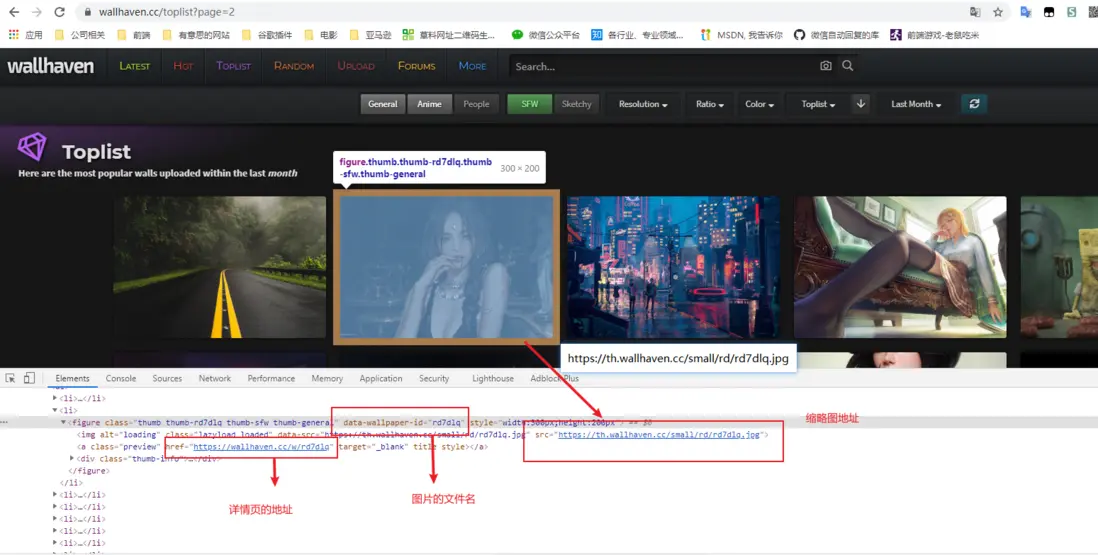
- 縮略圖的頁面結構
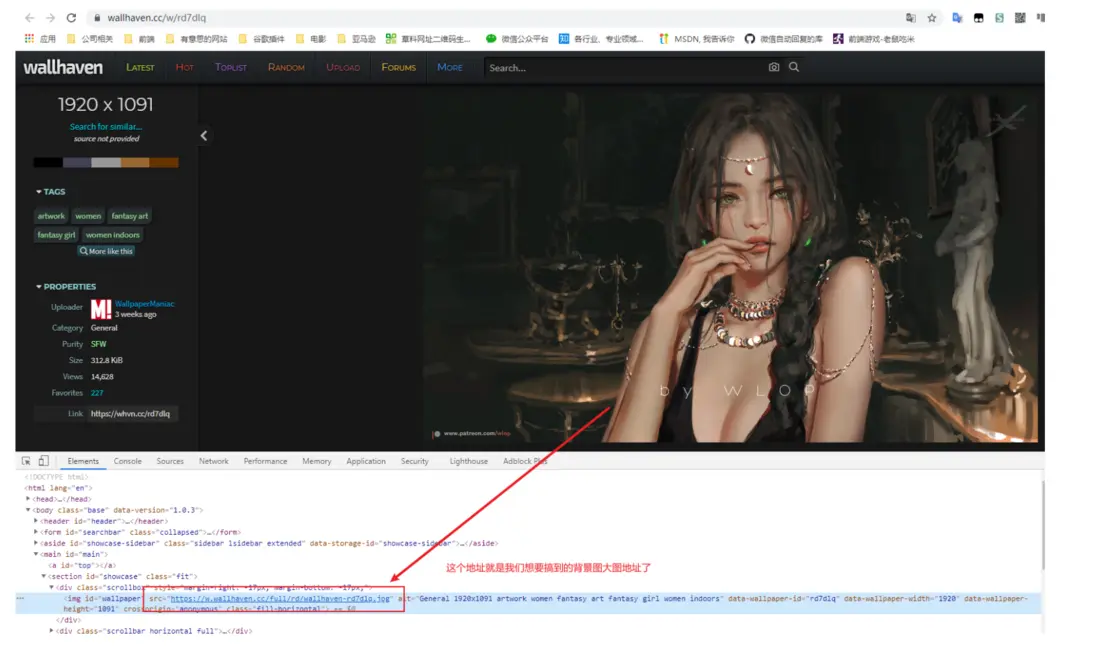
- 詳情圖的頁面結構
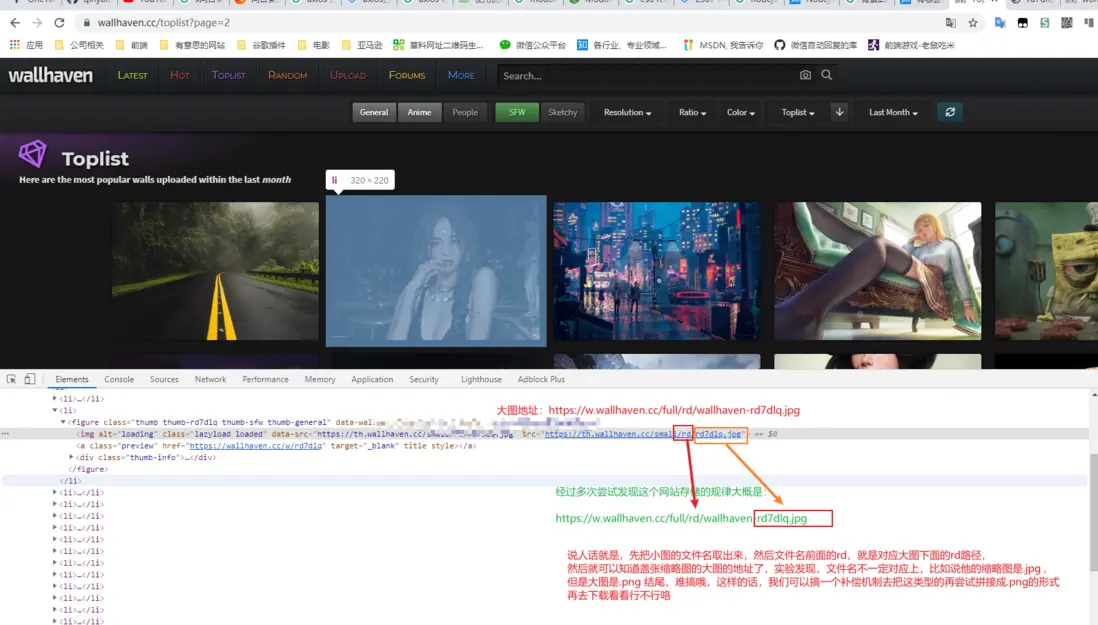
- 縮略圖地址: https://th.wallhaven.cc/small/rd/rd7dlq.jpg
- 大圖地址: https://w.wallhaven.cc/full/rd/wallhaven-rd7dlq.jpg
-
找規律
- 通過知道小圖地址,找出大圖地址,不同網站不同哦
- 通過知道小圖地址,找出大圖地址,不同網站不同哦
-
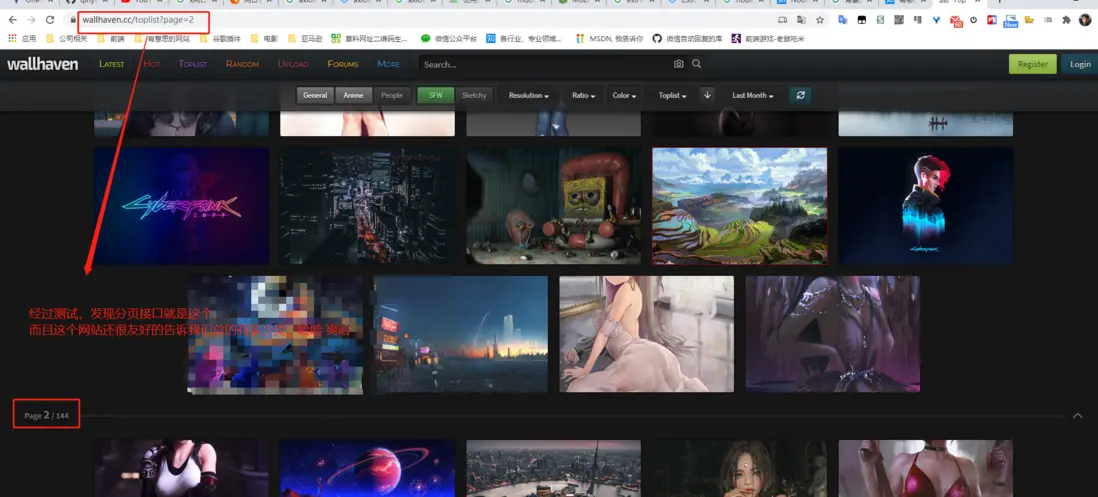
找分頁接口
- 縮略圖的頁面結構
- 知道網站的佈局和規律之後,我們就可以開始編碼了
-
編碼思路:
- 先把所有的縮略圖都爬取出來,爬完之後,再按照每次10個 ,10秒一次去下載,然後寫入本地
-
具體步驟
- Express 應用程序生成器來構建一個express應用,具體步驟參考官網
-
需要使用的庫
- consola 讓日誌好看點,方便觀賞
- cheerio node 版本的jquery,用來解析頁面
- axios 發送請求,下載圖片
-
核心代碼
-
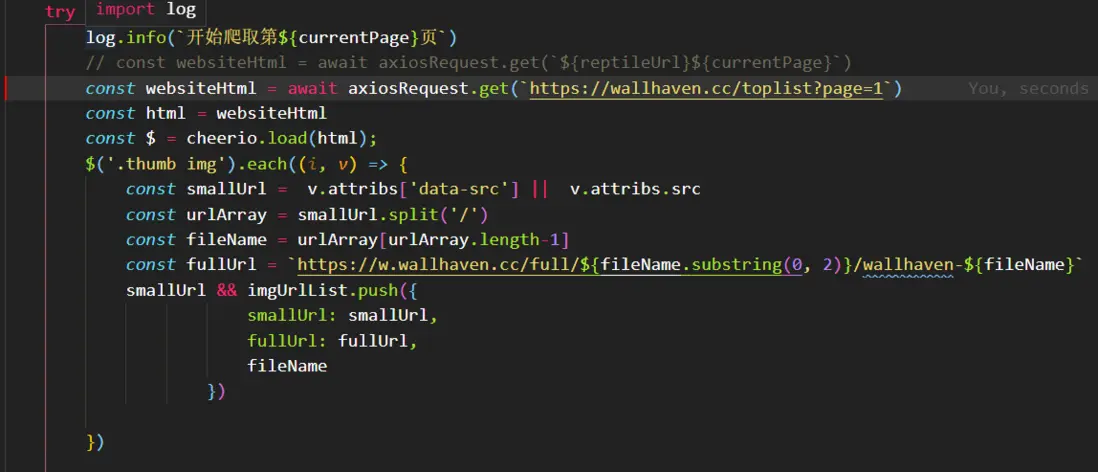
- 發起請求,獲取到縮略圖的地址,然後存到一個數組裏面
- 發起請求,獲取到縮略圖的地址,然後存到一個數組裏面
-
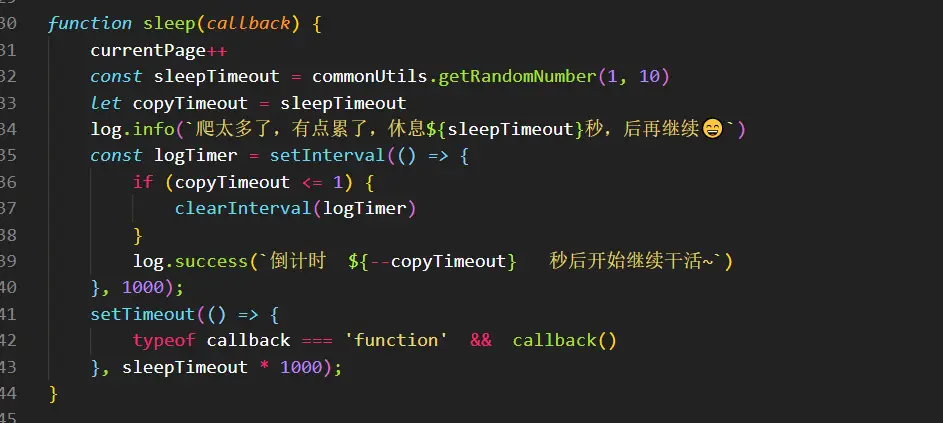
- 輪詢,調用分頁接口獲取縮略圖地址
- 輪詢,調用分頁接口獲取縮略圖地址
-
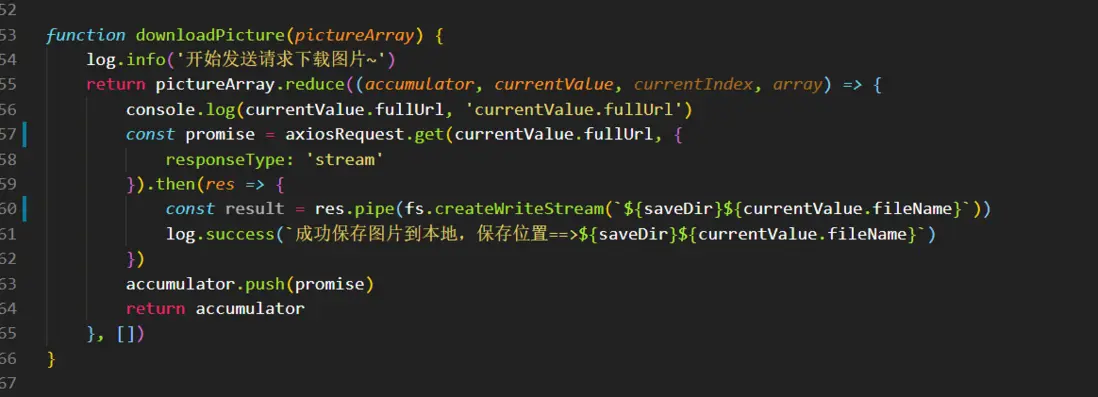
- 下載圖片,然後存儲到本地電腦,樓主使用萬年window,窮😄
- 下載圖片,然後存儲到本地電腦,樓主使用萬年window,窮😄
-
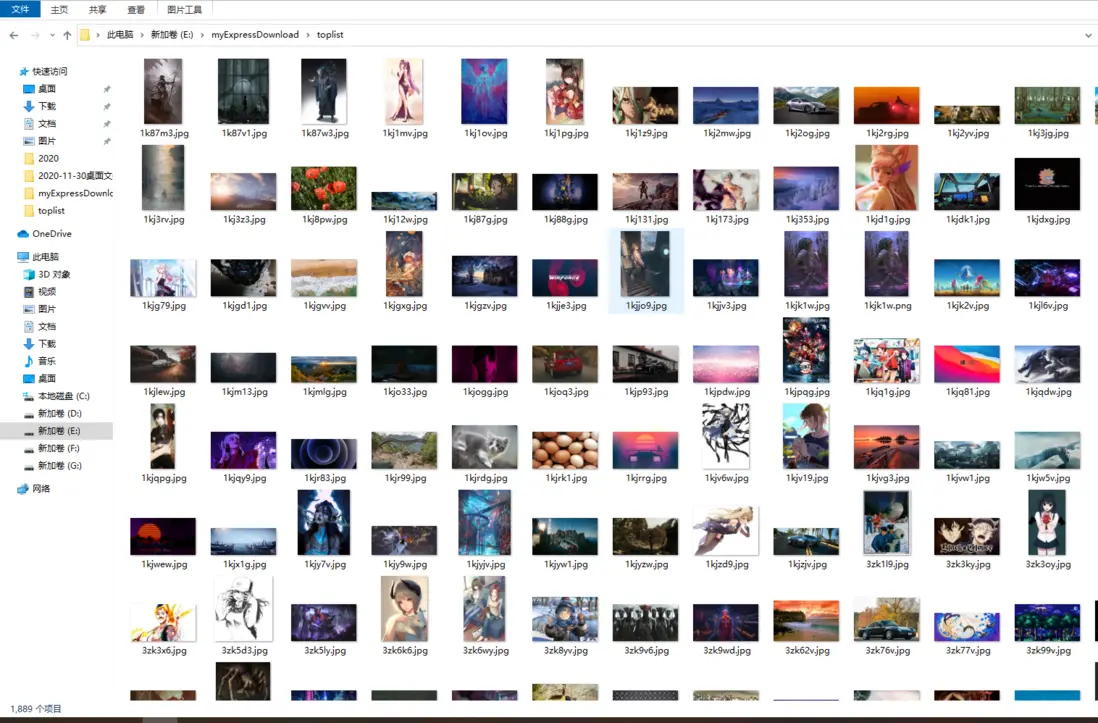
- 效果,美滋滋
- 5核心代碼
-
-
-
const reptileUrl = 'https://wallhaven.cc/toplist?page='
// 本地存儲路徑
const saveDir = 'E:/myExpressDownload/toplist3/'
let currentPage = 1
const maxPage = 2

const imgUrlList = []


init()

/**
 * 爬取主程序入口
 */
async function init() {
    log.info('主程序開始啓動,請您耐心等待~')
    log.info(`開始爬取${reptileUrl}的圖片`)
    log.info(`文件將會被保存到以下地址中:${saveDir}`)

    // 判斷本地存儲文件夾是否存在
    if (!fs.existsSync(saveDir)) {
        log.info('目標文件不存在,開始創建新的文件夾~')
        fs.mkdirSync(saveDir);
    }

    if (currentPage > maxPage) {
        log.error('超出最大頁數,停止收集源數據,開始爬取圖片~')
        try {
            const downloadTimer = setInterval(() => {
                if(!imgUrlList.length){
                    log.error('沒有更多了,收工了~~~~')
                    clearInterval(downloadTimer)
                    return false
                }
                log.success('開始輪詢下載圖片~')
                downloadPicture(imgUrlList.splice(0, 10))
            }, 10000);
        } catch (error) {
            log.error(`downloadPicture fail===>`, error)
        }

        // const downloadTimer  = setInterval(() => {
        //     if(!imgUrlList.length){
        //         log.error('沒有圖片了, 終於幹完活了, 累死了~~~')
        //         clearInterval(downloadTimer)
        //     }
        //     log.success('開始輪詢下載圖片咯~')
        //     downloadPicture(imgUrlList.splice(0, 10))
        // }, 20000);
        return false
    }
    try {
        log.info(`開始爬取第${currentPage}頁`)
        const websiteHtml = await axiosRequest.get(`${reptileUrl}${currentPage}`)
        const html = websiteHtml
        const $ = cheerio.load(html);
        $('.thumb img').each((i, v) => {
            const smallUrl =  v.attribs['data-src'] ||  v.attribs.src
            const urlArray = smallUrl.split('/')
            const fileName = urlArray[urlArray.length-1]
            const fullUrl = `https://w.wallhaven.cc/full/${fileName.substring(0, 2)}/wallhaven-${fileName}`
            smallUrl && imgUrlList.push({
                        smallUrl: smallUrl,
                        fullUrl: fullUrl,
                        fileName
                    })

        })

        log.error(`imgUrlList==>`, imgUrlList)
        sleep(init)
    } catch (error) {
        log.error(`爬取錯誤,錯誤信息如下==>`, error)
    }
}

function sleep(callback) {
    currentPage++
    const sleepTimeout = commonUtils.getRandomNumber(1, 10)
    let copyTimeout = sleepTimeout
    log.info(`爬太多了,有點累了,休息${sleepTimeout}秒,後再繼續😄`)
    const logTimer = setInterval(() => {
        if (copyTimeout <= 1) {
            clearInterval(logTimer)
        }
        log.success(`倒計時  ${--copyTimeout}   秒後開始繼續幹活~`)
    }, 1000);
    setTimeout(() => {
        typeof callback === 'function'  &&  callback()
    }, sleepTimeout * 1000);
}

async function findPicture(aTagArray) {
    log.info('開始解析圖片內容~')
    const array = aTagArray.map(v => axiosRequest.get(v))
    return Promise.all(array)
}


function downloadPicture(pictureArray) {
    log.info('開始發送請求下載圖片~')
    return pictureArray.reduce((accumulator, currentValue, currentIndex, array) => {
        console.log(currentValue.fullUrl, 'currentValue.fullUrl')
        const promise = axiosRequest.get(currentValue.fullUrl, {
            responseType: 'stream'
        }).then(res => {
            const result = res.pipe(fs.createWriteStream(`${saveDir}${currentValue.fileName}`))
            log.success(`成功保存圖片到本地,保存位置==>${saveDir}${currentValue.fileName}`)
        })
        accumulator.push(promise)
        return accumulator
    }, [])
}-
完整代碼
- https://github.com/qinyuanqib...
-
結束語
- 本文如有錯誤,歡迎指正,非常感謝
- 覺得有用的老鐵,點個雙擊,小紅心走一波
- 歡迎灌水,來呀,互相傷害哈 o(∩_∩)o 哈哈