

lumen
為速度而生的 Laravel 框架
官網的介紹很簡潔,而且 lumen 確實也很簡單,我在調研了 lumen 相關組件(比如緩存,隊列,校驗,路由,中間件和最重要的容器)之後認為已經能夠滿足我目前這個微服務的需求了。
任務目標
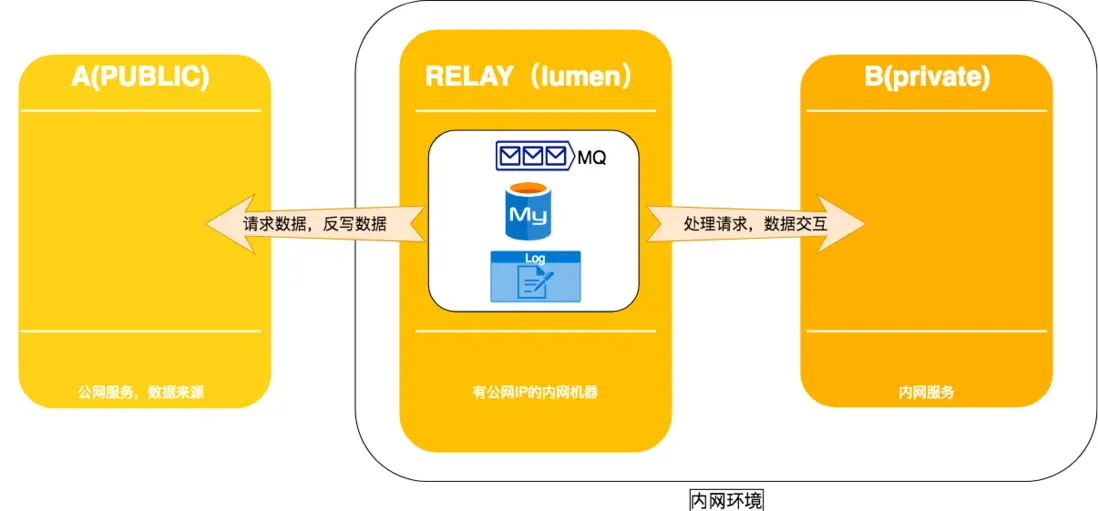
因為業務需求,需要在內網服務B中獲取到公網服務A中的數據,但是B服務並不能直接對接公網,於是需要開發一個relay 中轉機來完成數據轉存和交互。
任務列表
- 環境準備 【done】
- RSA數據加密 【done】
- guzzle請求封裝 【done】
- 添加monolog日誌【done】
- 數據庫migrate【done】
- Event和Listener的業務應用 【done】
- Scheduler計劃任務(基於crontab)【done】
- 使用Mail來發郵件
- Jobs和Queue業務應用
- 使用supervisor守護queue進程和java進程
- 添加sentry來獲取服務日誌信息和實現郵件報警
- jwt用户身份校驗
- .env 文件的配置
- 可能的擴展 K8S docker
- 性能併發測試 【done】
環境準備
- 機器是centos6.8, 使用work用户, 安裝 php(^7),mysql,nginx,redis
- yum 安裝的同學可以試試 https://www.softwarecollectio...
-
安裝composer
-
https://getcomposer.org/downl...
# 注意php的環境變量
php -r "copy('https://getcomposer.org/installer', 'composer-setup.php');"
php -r "if (hash_file('sha384', 'composer-setup.php') === '93b54496392c062774670ac18b134c3b3a95e5a5e5c8f1a9f115f203b75bf9a129d5daa8ba6a13e2cc8a1da0806388a8') { echo 'Installer verified'; } else { echo 'Installer corrupt'; unlink('composer-setup.php'); } echo PHP_EOL;"
php composer-setup.php
php -r "unlink('composer-setup.php');"

mv composer.phar /usr/local/bin/composer
-
-
安裝lumen
- composer global require "laravel/lumen-installer"
- composer create-project --prefer-dist laravel/lumen YOURPROJECT
-
配置 .env
配置
Lumen 框架所有的配置信息都是存在 .env 文件中。一旦 Lumen 成功安裝,你同時也要 配置本地環境。

應用程序密鑰
在你安裝完 Lumen 後,首先需要做的事情是設置一個隨機字符串到應用程序密鑰。通常這個密鑰會有 32 字符長。
這個密鑰可以被設置在 .env 配置文件中。如果你還沒將 .env.example 文件重命名為 .env,那麼你現在應該
去設置下。如果應用程序密鑰沒有被設置的話,你的用户 Session 和其它的加密數據都是不安全的!
-
配置nginx 和 php-fpm
-
配置nginx的server
server { listen 8080; server_name localhost; index index.php index.html index.htm; root /home/work/YOURPROJECT/public; error_page 404 /404.html; location / { try_files $uri $uri/ /index.php?$query_string; } location ~ \.php$ { root /home/work/YOURPROJECT/public; fastcgi_pass 127.0.0.1:9000; fastcgi_index index.php; fastcgi_param SCRIPT_FILENAME $document_root$fastcgi_script_name; include fastcgi_params; #include fastcgi.conf; } } - php-fpm的監聽端口
- 推薦一篇文章:Nginx+Php-fpm運行原理詳解
-
lumen 基礎介紹
- lumen的入口文件是 public/index.php,在nginx配置文件中已有體現
-
初始化核心容器是 bootstrap/app.php 它做了幾件非常重要的事情
- 加載了 composer的 autoload 自動加載
- 創建容器並可以選擇開啓 Facades 和 Eloquent (建議都開啓,非常方便)
- Register Container Bindings:註冊容器綁定 ExceptionHandler(後面monolog和sentry日誌收集用到了) 和 ConsoleKernel(執行計劃任務)
- Register Middleware:註冊中間件,例如auth驗證: $app->routeMiddleware(['auth' => AppHttpMiddlewareAuthenticate::class,]);
- 註冊Service Providers
$app->register(App\Providers\AppServiceProvider::class); $app->register(App\Providers\AuthServiceProvider::class); $app->register(App\Providers\EventServiceProvider::class); 在AppServiceProvider 裏還能一起註冊多個provider // JWT $this->app->register(\Tymon\JWTAuth\Providers\LumenServiceProvider::class); // redis $this->app->register(\Illuminate\Redis\RedisServiceProvider::class); // 方便IDE追蹤代碼的Helper,因為laravel使用了大量的魔術方法和call方法以至於,對IDE的支持並不友好,強烈推薦開發環境安裝 $this->app->register(\Barryvdh\LaravelIdeHelper\IdeHelperServiceProvider::class); // sentry $this->app->register(\Sentry\SentryLaravel\SentryLumenServiceProvider::class);- 加載route文件 routes/web.php
//localhost:8080/test 調用app/Http/Controllers/Controller.php的 test方法 $router->get("/test", ['uses' => "Controller@test"]); // 使用中間件進行用户校驗 $router->group(['middleware' => 'auth:api'], function () use ($router) { $router->get('/auth/show', 'AuthController@getUser'); });- 還可以添加其他初始化控制的handler,比如説這個 monolog日誌等級和格式,以及集成sentry的config
$app->configureMonologUsing(function(Monolog\Logger $monoLog) use ($app){ // 設置processor的extra日誌信息等級為WARNING以上,並且不展示Facade類的相關信息 $monoLog->pushProcessor(new \Monolog\Processor\IntrospectionProcessor(Monolog\Logger::WARNING, ['Facade'])); // monolog 日誌發送到sentry $client = new Raven_Client(env('SENTRY_LARAVEL_DSN')); $handler = new Monolog\Handler\RavenHandler($client); $handler->setFormatter(new Monolog\Formatter\LineFormatter(null, null, true, true)); $monoLog->pushHandler($handler); // 設置monolog 的日誌處理handler return $monoLog->pushHandler( (new Monolog\Handler\RotatingFileHandler( env('APP_LOG_PATH') ?: storage_path('logs/lumen.log'), 90, env('APP_LOG_LEVEL') ?: Monolog\Logger::DEBUG) )->setFormatter(new \Monolog\Formatter\LineFormatter(null, null, true, true)) ); }); - 配置文件 config/ 和 .env 文件
- 其他目錄文件用到時再具體説明
RSA數據加密
因為業務中包含部分敏感數據,所以,數據在傳輸過程中需要加密傳輸。選用了RSA非對稱加密。
- 借鑑了 PHP 使用非對稱加密算法(RSA)
- 但由於傳輸數據量較大,加密時會報錯,所以採用了分段加密連接和分段解密
php使用openssl進行Rsa長數據加密(117)解密(128)
如果選擇密鑰是1024bit長的(openssl genrsa -out rsa_private_key.pem 1024),那麼支持加密的明文長度字節最多隻能是1024/8=128byte;
如果加密的padding填充方式選擇的是OPENSSL_PKCS1_PADDING(這個要佔用11個字節),那麼明文長度最多隻能就是128-11=117字節。如果超出,那麼這些openssl加解密函數會返回false。
- 分享一個我的完成版的工具類
openssl genrsa -out rsa_private_key.pem 1024
//生成原始 RSA私鑰文件
openssl pkcs8 -topk8 -inform PEM -in rsa_private_key.pem -outform PEM -nocrypt -out private_key.pem
//將原始 RSA私鑰轉換為 pkcs8格式
openssl rsa -in rsa_private_key.pem -pubout -out rsa_public_key.pem
<?php
namespace App\Lib;
class Rsa
{
    private static $PRIVATE_KEY =
        '-----BEGIN RSA PRIVATE KEY-----
xxxxxxxxxxxxx完整複製過來xxxxxxxxxxxxxxxxxxx
-----END RSA PRIVATE KEY-----';
    private static $PUBLIC_KEY = '-----BEGIN PUBLIC KEY-----
xxxxxxxxxxxxx完整複製過來xxxxxxxxxxxxxxxxxxx
-----END PUBLIC KEY-----';

    /**
     * 獲取私鑰
     * @return bool|resource
     */
    private static function getPrivateKey()
    {
        $privateKey = self::$PRIVATE_KEY;
        return openssl_pkey_get_private($privateKey);
    }

    /**
     * 獲取公鑰
     * @return bool|resource
     */
    private static function getPublicKey()
    {
        $publicKey = self::$PUBLIC_KEY;
        return openssl_pkey_get_public($publicKey);
    }

    /**
     * 私鑰加密
     * @param string $data
     * @return null|string
     */
    public static function privateEncrypt($data = '')
    {
        if (!is_string($data)) {
            return null;
        }
        $EncryptStr = '';
        foreach (str_split($data, 117) as $chunk) {
            openssl_private_encrypt($chunk, $encryptData, self::getPrivateKey());
            $EncryptStr .= $encryptData;
        }

        return base64_encode($EncryptStr);
    }

    /**
     * 公鑰加密
     * @param string $data
     * @return null|string
     */
    public static function publicEncrypt($data = '')
    {
        if (!is_string($data)) {
            return null;
        }
        return openssl_public_encrypt($data,$encrypted,self::getPublicKey()) ? base64_encode($encrypted) : null;
    }

    /**
     * 私鑰解密
     * @param string $encrypted
     * @return null
     */
    public static function privateDecrypt($encrypted = '')
    {
        $DecryptStr = '';

        foreach (str_split(base64_decode($encrypted), 128) as $chunk) {

            openssl_private_decrypt($chunk, $decryptData, self::getPrivateKey());

            $DecryptStr .= $decryptData;
        }

        return $DecryptStr;
    }


    /**
     * 公鑰解密
     * @param string $encrypted
     * @return null
     */
    public static function publicDecrypt($encrypted = '')
    {
        if (!is_string($encrypted)) {
            return null;
        }
        return (openssl_public_decrypt(base64_decode($encrypted), $decrypted, self::getPublicKey())) ? $decrypted : null;
    }
}
使用tip
// 私鑰加密則公鑰解密,反之亦然
$data = \GuzzleHttp\json_encode($data);
$EncryptData = Rsa::privateEncrypt($data);
$data = Rsa::publicDecrypt($EncryptData);
guzzle使用
- 安裝超簡單 composer require guzzlehttp/guzzle:~6.0
- guzzle 支持PSR-7 http://docs.guzzlephp.org/en/...
- 官網的示例也很簡單,發個post自定義參數的例子
    use GuzzleHttp\Client;

    $client = new Client();
    // 發送 post 請求
    $response = $client->request(
        'POST', $this->queryUrl, [
        'form_params' => [
            'req' => $EncryptData
        ]
    ]);

    $callback = $response->getBody()->getContents();
$callback = json_decode($callback, true);- guzzle支持 異步請求
    // Send an asynchronous request.
    $request = new \GuzzleHttp\Psr7\Request('GET', 'http://httpbin.org');
    $promise = $client->sendAsync($request)->then(function ($response) {
        echo 'I completed! ' . $response->getBody();
    });
$promise->wait();- 值的注意的是github上有一個很好玩的項目 https://github.com/kitetail/zttp
它在guzzle的基礎上做了封裝,採用鏈式調用
    $response = Zttp::withHeaders(['Fancy' => 'Pants'])->post($url, [
        'foo' => 'bar',
        'baz' => 'qux',
    ]);
    $response->json();
    // => [
    //  'whatever' => 'was returned',
    // ];
    $response->status();
    // int
    $response->isOk();
    // true / false

    #如果是guzzle 則需要更多的代碼
    $client = new Client();
    $response = $client->request('POST', $url, [
        'headers' => [
            'Fancy' => 'Pants',
        ],
        'form_params' => [
            'foo' => 'bar',
            'baz' => 'qux',
        ]
    ]);

    json_decode($response->getBody());
monolog日誌
- 在LaravelLumenApplication 中會初始化執行
    /**
     * Register container bindings for the application.
     *
     * @return void
     */
    protected function registerLogBindings()
    {
        $this->singleton('Psr\Log\LoggerInterface', function () {
            // monologConfigurator 我們在 bootstrap/app.php中已經初始化了
            if ($this->monologConfigurator) {
                return call_user_func($this->monologConfigurator, new Logger('lumen'));
            } else {
                // 這裏new的 Logger 就是 Monolog 類
                return new Logger('lumen', [$this->getMonologHandler()]);
            }
        });
}- 因為monologConfigurator 我們在 bootstrap/app.php中已經初始化了,所以lumen實際實現的log類是 RotatingFileHandler(按日期分文件) 格式的log,裏面還可以詳細定義日誌的格式,文件路徑,日誌等級等
- 中間有一段 sentry部分的代碼,含義是添加一個monolog日誌handler,在發生日誌信息記錄時,同步將日誌信息發送給sentry的服務器,sentry服務器的接收地址在 .env的 SENTRY_LARAVEL_DSN 中記錄
    $app->configureMonologUsing(function(Monolog\Logger $monoLog) use ($app){
        $monoLog->pushProcessor(new \Monolog\Processor\IntrospectionProcessor(Monolog\Logger::WARNING, ['Facade']));

        // monolog 日誌發送到sentry
        $client = new Raven_Client(env('SENTRY_LARAVEL_DSN'));
        $handler = new Monolog\Handler\RavenHandler($client);
        $handler->setFormatter(new Monolog\Formatter\LineFormatter(null, null, true, true));
        $monoLog->pushHandler($handler);

        return $monoLog->pushHandler(
            (new Monolog\Handler\RotatingFileHandler(
                env('APP_LOG_PATH') ?: storage_path('logs/lumen.log'),
                90,
                env('APP_LOG_LEVEL') ?: Monolog\Logger::DEBUG)
            )->setFormatter(new \Monolog\Formatter\LineFormatter(null, null, true, true))
        );
    });
- 準備動作完成後使用方法就很簡單了
    use Illuminate\Support\Facades\Log;

    Log::info(11);
    // [2019-01-09 14:25:47] lumen.INFO: 11
    Log::error('error info', $exception->getMessage());
數據庫migrate
-
基本的使用就只有三步,詳情請參考官網文檔 數據庫遷移
# 1 初始化遷移文件 php artisan make:migration create_Flights_table # 2 自定義表結構 class CreateFlightsTable extends Migration { public function up() { Schema::create('flights', function (Blueprint $table) { $table->increments('id'); $table->string('name'); $table->string('airline'); $table->timestamps(); }); } } # 3 執行遷移,執行遷移的庫是 .env 中配置好的 php artisan migrate -
很推薦使用 migrate 來記錄數據庫,它的核心優勢是:允許團隊簡單輕鬆的編輯並共享應用的數據庫表結構
- 場景1:數據庫遷移時,開發原本需要先從數據庫導出表結構,然後在新的數據庫上執行;現在只需要修改數據庫連接參數,執行
php artisan migrate就完成了 (線上同步配置文件可以使用分佈式文件系統,比如Apollo) - 場景2:需要alert 字段或索引時,也只需要更新遷移文件然後執行更新,因為代碼全程記錄了所有數據庫的修改記錄,日後查看相關數據庫信息時也更加方便(相當於把sql.log文件放在了php代碼中管理)
- 場景1:數據庫遷移時,開發原本需要先從數據庫導出表結構,然後在新的數據庫上執行;現在只需要修改數據庫連接參數,執行
- 如果一個遷移文件執行後,內容做了修改,需要修改一下文件名稱中的時間,不然執行不成功,因為在 migrations 表中已經記錄該文件已同步完成的信息了
Event和Listener的業務應用
-
首先解決一個問題,為什麼要使用Event+Listener 來處理業務?
- Event事件應當作為Hook來使用,實現的是代碼結構的解耦,尤其是當一個業務模塊需要同時關聯多個業務模塊時,Event+Listener 的工具可以通過解耦代碼使代碼的可維護性增加,並且可以避免重複代碼的出現。
- 在Listener 中可以通過 implements ShouldQueue 這個接口來實現異步隊列執行,從而優化接口性能
- 轉載一篇有詳細內容的文章 Laravel 中的 Event 和事件的概念
-
在初始化lumen後,代碼中有Example示例 相關文件,更多內容可以查看官方文檔
- AppEventsExampleEvent.php
- AppListenersExampleListener.php
- Appproviders/EventServiceProvider.php 配置觸發關係
Scheduler計劃任務
- scheduler 的使用使開發擺脱了一種不好的開發方式:在各種機器上跑茫茫多的腳本,時間一長這種模式幾乎不可維護,一旦發生交接時更是特別容易遺漏機器和腳本。這種傳統的“簡單”方式,毫無疑問會造成相當多的麻煩。
- 現在 laravel 的 scheduler 提供了一種更易於使用和維護的計劃任務方式。
過去,你可能需要在服務器上為每一個調度任務去創建 Cron 入口。但是這種方式很快就會變得不友好,因為這些任務調度不在源代碼中,並且你每次都需要通過 SSH 鏈接登錄到服務器中才能增加 Cron 入口。
Laravel 命令行調度器允許你在 Laravel 中對命令調度進行清晰流暢的定義。且使用這個任務調度器時,你只需要在你的服務器上創建單個 Cron 入口接口。你的任務調度在 app/Console/Kernel.php 的 schedule 方法中進行定義。
這個單一入口就是在crontab中添加一行
* * * * * cd /path-to-your-project && php artisan schedule:run >> /dev/null 2>&1
這個 Cron 為每分鐘執行一次 Laravel 的命令行調度器。當 schedule:run 命令被執行的時候,Laravel 會根據你的調度執行預定的程序。
然後在 app/Console/Kernel.php 中定義任何你想要執行的命令,腳本,代碼。
    protected function schedule(Schedule $schedule)
    {
       // 調用一個閉包函數
        $schedule->call(function () {
            event(new GetData());
        })->cron("0 */6 * * *");

        // 調用 Artisan 命令
        $schedule->command('emails:send --force')->daily();

        // 調度 隊列任務 分發任務到 "heartbeats" 隊列...
        $schedule->job(new Heartbeat, 'heartbeats')->everyMinute();

        // 調用 Shell 命令
        $schedule->exec('sh build.sh')->hourly();

        // 甚至做閉包限制測試:如果給定的 Closure 返回結果為 true,只要沒有其他約束條件阻止任務運行,任務就會一直執行下去
        $schedule->command('emails:send')->daily()->when(function () {
            return true;
        });

        // 規定任務只能在一台機器上執行
        //為了説明任務應該在單個服務器上運行,在定義調度任務時使用 onOneServer 方法。第一個獲取到任務的服務器會生成一個原子鎖,用來防止其他服務器在同一時刻執行相同任務

        ->onOneServer();

        // 任務輸出到某個文件或發送到郵箱
        ->sendOutputTo($filePath);
        ->emailOutputTo($email);
    }
- 還可以做一個安全的措施,本地備份數據庫 Laravel定時任務備份數據庫
使用Mail來發郵件
- 安裝mail組件 composer require illuminate/mail
- 添加config文件 並在 bootstrap/app.php 中加載
<?php
    //qq郵件
return [
    'driver' => "smtp",
    'host' => "smtp.qq.com", // 根據你的郵件服務提供商來填
    'port' => "465", // 同上
    'encryption' => "ssl", // 同上 一般是tls或ssl
    'username' => 'xxx@qq.com',
    'password' => 'xxx', // 在qq郵箱中,這個密碼是生成的校驗碼
    'from' => [
        'address' => 'xxx@qq.com',
        'name' => 'xxx',
    ],
]; $app->configure('mail');- 在 app/Providers/AppServiceProvider.php 或 bootstrap/app.php 中注服務
$this->app->register(\Illuminate\Mail\MailServiceProvider::class); //註冊服務提供者
- mail的兩個用法
// 發送文本
 $text = '<b>這裏是測試</b>';
   Mail::raw($text, function($message) {
      $message->to('xxx@qiyi.com')->subject("test subject");
 });

// 發送模板郵件, testMail 是模板的名字,創建在 resources/views/testMail.blade.php
Mail::send('testMail', ["data" => $data, "count" => $count], function ($message) {
            $message->to(["xxx@qiyi.com", "xxx@qiyi.com"])
               ->cc(["liguopu@qiyi.com"])
               ->subject("test subject");
        });
- 給個例子出來 resources/views/testMail.blade.php
<!DOCTYPE html>
<html>
<head>
    <meta charset="utf-8">
    <title>simple data</title>
    <style type="text/css">
        /* gridtable */
        table.gridtable {
            font-family: verdana,arial,sans-serif;
            font-size:14px;
            color:#333333;
            border-width: 1px;
            border-color: #666666;
            border-collapse: collapse;
        }
        table.gridtable th {
            border-width: 1px;
            padding: 5px;
            border-style: solid;
            border-color: #666666;
            background-color: #dedede;
        }
        table.gridtable td {
            border-width: 1px;
            padding: 5px;
            border-style: solid;
            border-color: #666666;
            background-color: #ffffff;
        }
    </style>
</head>
<body>

<h2>數據</h2>
<table class="gridtable">
    <tr>
        <th>數據詳情</th>
        <th>數量</th>
        @foreach ($data as $key => $item)
            <th>{{ $key }}</th>
        @endforeach
    </tr>
    <tr>
        <td>data</td>
        <td>{{ count($data) }}</td>
        @foreach ($diffCB as $item)
            <td>{{ $item }}</td>
        @endforeach
    </tr>
</table>

</body>
</html>
性能測試
- 開啓opcache
- composer dump-autoload --optimize
不開啓opcache
ab -c 100 -n 1000 localhost:8002/phpinfo

Benchmarking localhost (be patient)
Completed 100 requests
Completed 200 requests
Completed 300 requests
Completed 400 requests
Completed 500 requests
Completed 600 requests
Completed 700 requests
Completed 800 requests
Completed 900 requests
Completed 1000 requests
Finished 1000 requests


Server Software:        nginx/1.10.2
Server Hostname:        localhost
Server Port:            8002

Document Path:          /test
Document Length:        92827 bytes

Concurrency Level:      100
Time taken for tests:   4.171 seconds
Complete requests:      1000
Failed requests:        140
   (Connect: 0, Receive: 0, Length: 140, Exceptions: 0)
Write errors:           0
Total transferred:      92989847 bytes
HTML transferred:       92826847 bytes
Requests per second:    239.74 [#/sec] (mean)
Time per request:       417.113 [ms] (mean)
Time per request:       4.171 [ms] (mean, across all concurrent requests)
Transfer rate:          21771.20 [Kbytes/sec] received

Connection Times (ms)
              min  mean[+/-sd] median   max
Connect:        0    0   0.8      0       4
Processing:    29  394  74.6    388     628
Waiting:       27  392  74.6    385     625
Total:         32  394  74.2    388     629

Percentage of the requests served within a certain time (ms)
  50%    388
  66%    407
  75%    445
  80%    451
  90%    479
  95%    517
  98%    557
  99%    570
 100%    629 (longest request)
==開啓opcache==
yum install php7.*-opcache (根據當前php版本做選擇)
php -i | grep opcache.ini
修改 opcache.ini

// 大部分維持默認值,少部分值可以根據業務做調整
opcache.enable=1
opcache.memory_consumption=256
opcache.interned_strings_buffer=64
opcache.max_accelerated_files=10000
opcache.validate_timestamps=0
opcache.save_comments=1
opcache.fast_shutdown=0
ab -c 100 -n 1000 localhost:8002/phpinfo

Benchmarking localhost (be patient)
; Enable Zend OPcache extension module
Completed 100 requests
Completed 200 requests
Completed 300 requests
Completed 400 requests
Completed 500 requests
Completed 600 requests
Completed 700 requests
Completed 800 requests
Completed 900 requests
Completed 1000 requests
Finished 1000 requests


Server Software:        nginx/1.10.2
Server Hostname:        localhost
Server Port:            8002

Document Path:          /test
Document Length:        93858 bytes

Concurrency Level:      100
Time taken for tests:   0.657 seconds
Complete requests:      1000
Failed requests:        298
   (Connect: 0, Receive: 0, Length: 298, Exceptions: 0)
Write errors:           0
Total transferred:      94021119 bytes
HTML transferred:       93858119 bytes
Requests per second:    1522.02 [#/sec] (mean)
Time per request:       65.702 [ms] (mean)
Time per request:       0.657 [ms] (mean, across all concurrent requests)
Transfer rate:          139747.77 [Kbytes/sec] received

Connection Times (ms)
              min  mean[+/-sd] median   max
Connect:        0    1   1.4      0       6
Processing:    15   61  15.8     54     119
Waiting:       10   61  15.9     54     119
Total:         19   61  15.9     54     121

Percentage of the requests served within a certain time (ms)
  50%     54
  66%     56
  75%     62
  80%     69
  90%     89
  95%    100
  98%    108
  99%    114
 100%    121 (longest request)
可以看到併發大概提升了10倍,達到了1522qps(當然這是沒有DB交互以及接口調用的簡單輸出響應測試),平均響應時間和數據傳輸速度提升了6-7倍。
-
在生產環境運行
composer dump-autoload --optimize- composer autoload 慢的主要原因在於來自對 PSR-0 和 PSR-4 的支持,加載器得到一個類名時需要到文件系統裏查找對應的類文件位置,這導致了很大的性能損耗,當然這在我們開發時還是有用的,這樣我們添加的新的類文件就能即時生效。 但是在生產模式下,我們想要最快的找到這些類文件,並加載他們。
- composer dump-autoload --optimize 這個命令的本質是將 PSR-4/PSR-0 的規則轉化為了 classmap 的規則, 因為 classmap 中包含了所有類名與類文件路徑的對應關係,所以加載器不再需要到文件系統中查找文件了。可以從 classmap 中直接找到類文件的路徑。
-
注意事項
- 建議開啓 opcache , 這樣會極大的加速類的加載。
- php5.5 以後的版本中默認自帶了 opcache 。
- 這個命令並沒有考慮到當在 classmap 中找不到目標類時的情況,當加載器找不到目標類時,仍舊會根據PSR-4/PSR-0 的規則去文件系統中查找
高可用問題思考
-
數據傳輸量過大可能導致的問題
- RSA加密失敗
- 請求超時
- 數據庫存儲併發
- 列隊失敗重試和堵塞
- 數據操作日誌監控和到達率監控
未完待續.....
