
vue 甘特圖 vxe-gantt 手動增加一條依賴線,刪除連接線的用法,通過設置 links 定義連接線,from 對應源任務的行主鍵,tom 對應目標任務的行主鍵
0 FinishToStart 結束後才開始,表示一個任務必須在另一個任務開始之前完成
1 StartToFinish 開始到結束,表示從某個過程的開始到結束的整個過程
2 StartToStart 開始後才開始,表示一個活動結束了,另一個活動才能開始,它們之間按先後順序進行
3 FinishToFinish 完成到完成,表示一個任務必須在另一個任務完成之後才能完成
查看官網:https://gantt.vxeui.com/
gitbub:https://github.com/x-extends/vxe-gantt
gitee:https://gitee.com/x-extends/vxe-gantt
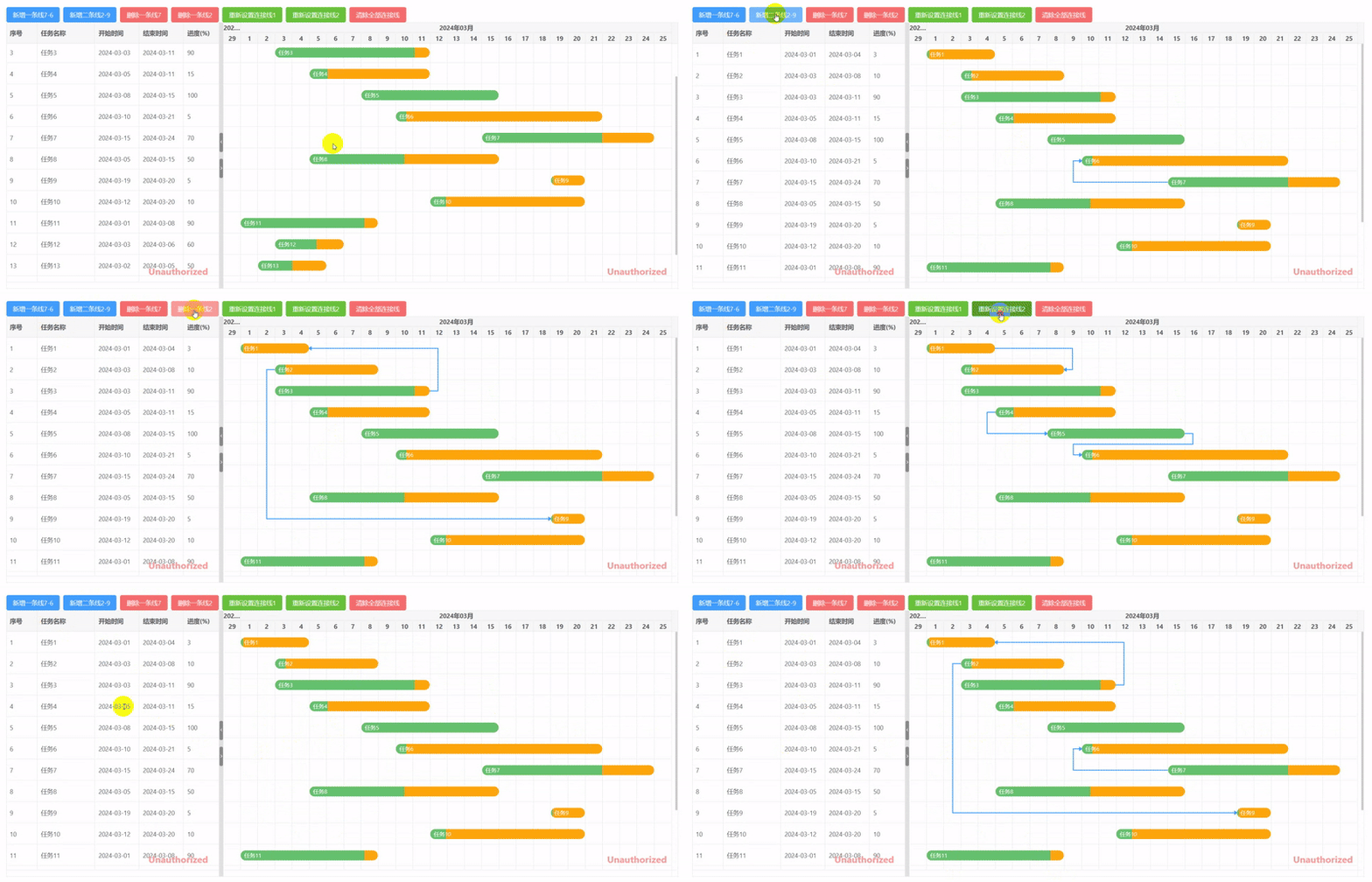
過調用 setTaskLinks、clearTaskLinks 方法來設置或清除連接線可以很簡單的畫連接線或清除連接線
<template>
  <div>
    <vxe-button status="primary" @click="addLink1">新增一條線7-6</vxe-button>
    <vxe-button status="primary" @click="addLink2">新增二條線2-9</vxe-button>
    <vxe-button status="error" @click="delLink1">刪除一條線7</vxe-button>
    <vxe-button status="error" @click="delLink2">刪除一條線2</vxe-button>
    <vxe-button status="success" @click="updateLink1">重新設置連接線1</vxe-button>
    <vxe-button status="success" @click="updateLink2">重新設置連接線2</vxe-button>
    <vxe-button status="error" @click="clearLink">清除全部連接線</vxe-button>

    <vxe-gantt ref="ganttRef" v-bind="ganttOptions"></vxe-gantt>
  </div>
</template>

<script setup>
import { ref, reactive } from 'vue'
import { VxeGanttDependencyType } from 'vxe-gantt'

const ganttRef = ref()

const ganttOptions = reactive({
  border: true,
  height: 600,
  rowConfig: {
    keyField: 'id' // 行主鍵
  },
  taskBarConfig: {
    showProgress: true, // 是否顯示進度條
    showContent: true, // 是否在任務條顯示內容
    move: true, // 是否允許拖拽任務移動日期
    resize: true, // 是否允許拖拽任務調整日期
    barStyle: {
      round: true, // 圓角
      bgColor: '#fca60b', // 任務條的背景顏色
      completedBgColor: '#65c16f' // 已完成部分任務條的背景顏色
    }
  },
  taskViewConfig: {
    tableStyle: {
      width: 480 // 表格寬度
    }
  },
  columns: [
    { type: 'seq', width: 70 },
    { field: 'title', title: '任務名稱' },
    { field: 'start', title: '開始時間', width: 100 },
    { field: 'end', title: '結束時間', width: 100 },
    { field: 'progress', title: '進度(%)', width: 80 }
  ],
  data: [
    { id: 10001, title: '任務1', start: '2024-03-01', end: '2024-03-04', progress: 3 },
    { id: 10002, title: '任務2', start: '2024-03-03', end: '2024-03-08', progress: 10 },
    { id: 10003, title: '任務3', start: '2024-03-03', end: '2024-03-11', progress: 90 },
    { id: 10004, title: '任務4', start: '2024-03-05', end: '2024-03-11', progress: 15 },
    { id: 10005, title: '任務5', start: '2024-03-08', end: '2024-03-15', progress: 100 },
    { id: 10006, title: '任務6', start: '2024-03-10', end: '2024-03-21', progress: 5 },
    { id: 10007, title: '任務7', start: '2024-03-15', end: '2024-03-24', progress: 70 },
    { id: 10008, title: '任務8', start: '2024-03-05', end: '2024-03-15', progress: 50 },
    { id: 10009, title: '任務9', start: '2024-03-19', end: '2024-03-20', progress: 5 },
    { id: 10010, title: '任務10', start: '2024-03-12', end: '2024-03-20', progress: 10 },
    { id: 10011, title: '任務11', start: '2024-03-01', end: '2024-03-08', progress: 90 },
    { id: 10012, title: '任務12', start: '2024-03-03', end: '2024-03-06', progress: 60 },
    { id: 10013, title: '任務13', start: '2024-03-02', end: '2024-03-05', progress: 50 },
    { id: 10014, title: '任務14', start: '2024-03-04', end: '2024-03-15', progress: 0 },
    { id: 10015, title: '任務15', start: '2024-03-01', end: '2024-03-05', progress: 30 }
  ]
})

const addLink1 = () => {
  const $gantt = ganttRef.value
  if ($gantt) {
    $gantt.addTaskLink({ from: 10007, to: 10006, type: VxeGanttDependencyType.StartToStart })
  }
}

const addLink2 = () => {
  const $gantt = ganttRef.value
  if ($gantt) {
    $gantt.addTaskLink([
      { from: 10002, to: 10009, type: VxeGanttDependencyType.StartToStart },
      { from: 10003, to: 10001, type: VxeGanttDependencyType.FinishToFinish }
    ])
  }
}

const delLink1 = () => {
  const $gantt = ganttRef.value
  if ($gantt) {
    $gantt.removeTaskLink(10007)
  }
}

const delLink2 = () => {
  const $gantt = ganttRef.value
  if ($gantt) {
    $gantt.removeTaskLink(10002)
  }
}

const updateLink1 = () => {
  const $gantt = ganttRef.value
  if ($gantt) {
    $gantt.setTaskLinks([
      { from: 10001, to: 10002, type: VxeGanttDependencyType.FinishToFinish },
      { from: 10004, to: 10005, type: VxeGanttDependencyType.StartToStart },
      { from: 10005, to: 10006, type: VxeGanttDependencyType.FinishToStart },
      { from: 10013, to: 10012, type: VxeGanttDependencyType.StartToFinish }
    ])
  }
}

const updateLink2 = () => {
  const $gantt = ganttRef.value
  if ($gantt) {
    $gantt.setTaskLinks([
      { from: 10001, to: 10003, type: VxeGanttDependencyType.StartToStart },
      { from: 10008, to: 10004, type: VxeGanttDependencyType.FinishToStart }
    ])
  }
}

const clearLink = () => {
  const $gantt = ganttRef.value
  if ($gantt) {
    $gantt.clearTaskLinks()
  }
}
</script>
https://gitee.com/x-extends/vxe-gantt
