Android協程解決什麼問題?
- 處理耗時任務,這種任務常常會阻塞主線程
- 保證主線程安全,確保安全地從主線程調用任何suspend函數
舉例子(異步任務)
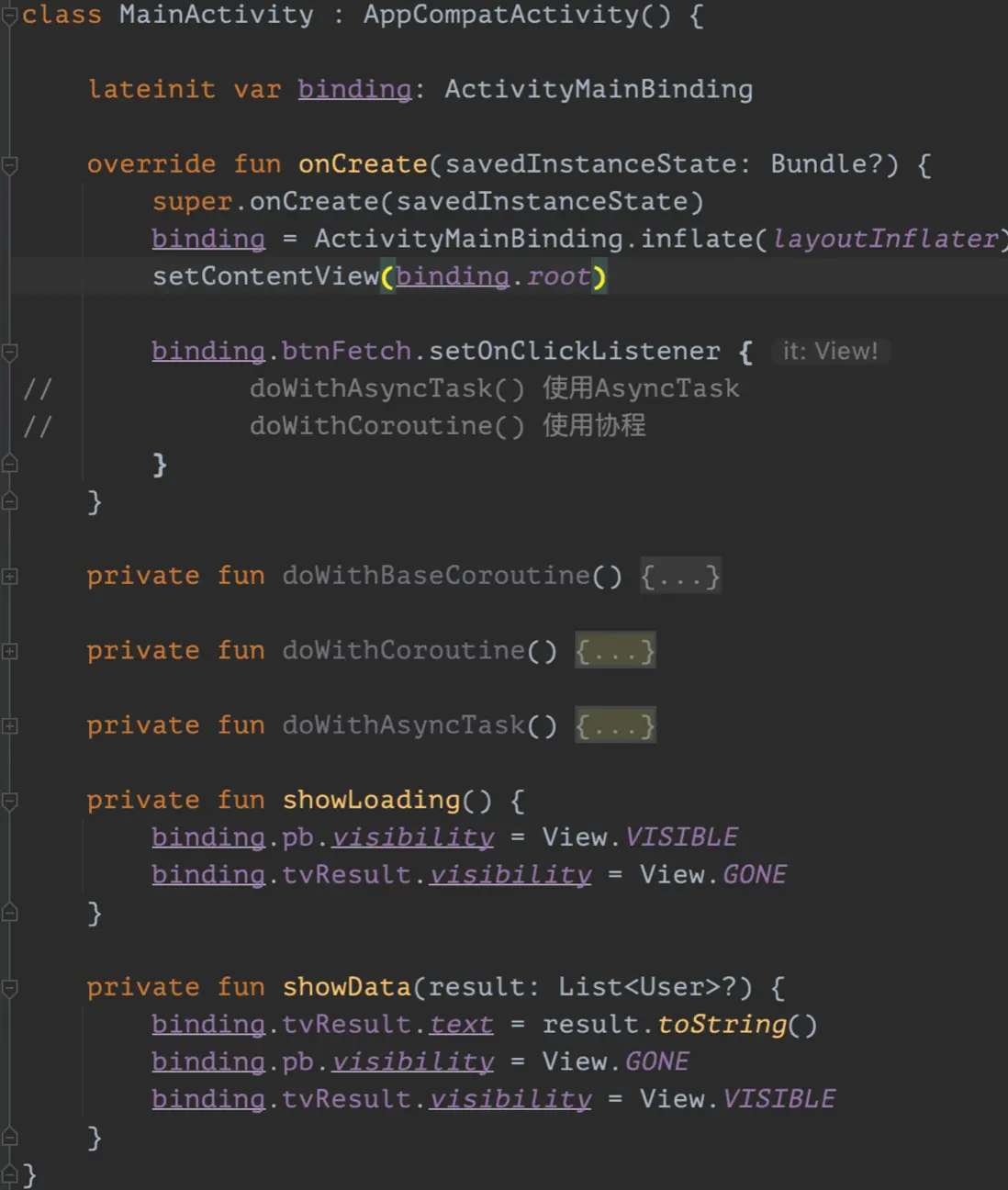
實現一個請求網絡數據的例子:頁面上有一個button,一個loading,一個textview用來顯示結果。點擊button,顯示loading,向server發送請求,拿到數據後把result顯示在textview上,並隱藏loading。
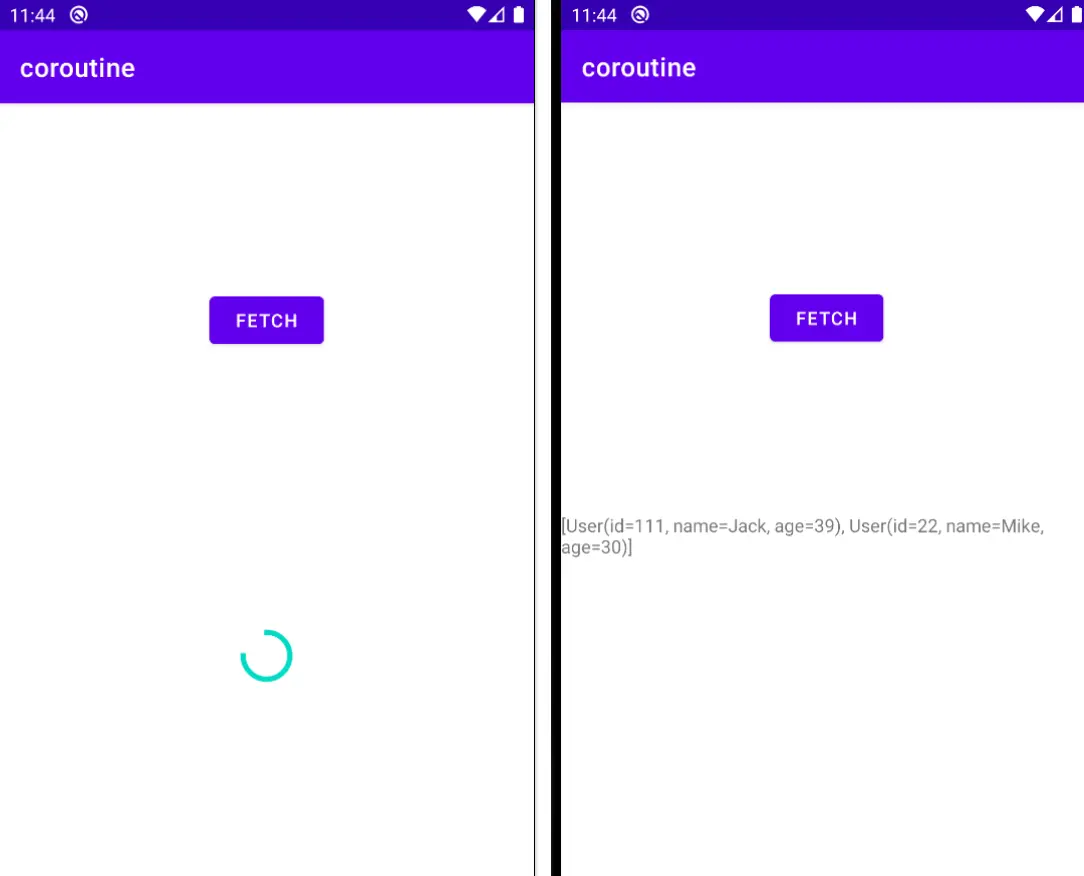
界面如下
Service和Retrofit
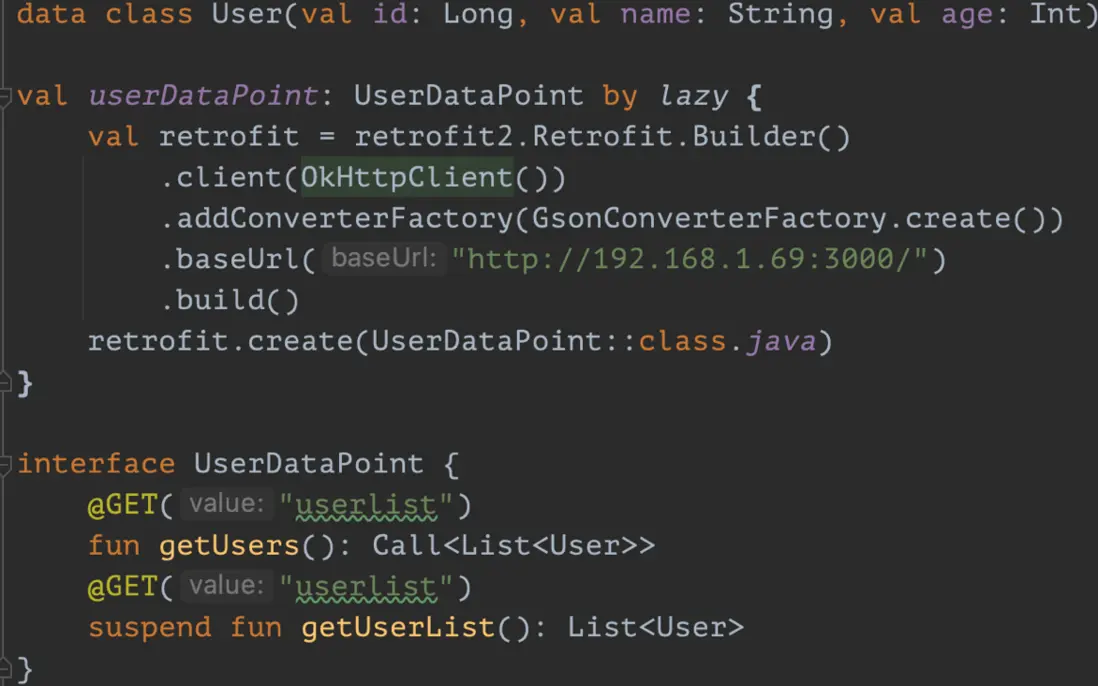
getUsers()供AsyncTask方式調用,getUserList()是一個suspend方法,供協程方式調用。
-
使用AsyncTask的做法
private fun doWithAsyncTask() {
  val task = object : AsyncTask<Void, Void, List<User>>() {
      override fun onPreExecute() {
          super.onPreExecute()
          showLoading()
      }

      override fun doInBackground(vararg p0: Void?): List<User>? {
          return userDataPoint.getUsers().execute().body()
      }

      override fun onPostExecute(result: List<User>?) {
          super.onPostExecute(result)
          Log.d(TAG, "onPostExecute: done.")
          showData(result)
      }
  }
  task.execute()
}
使用協程,調用掛起函數suspend
private fun doWithCoroutine() {
    GlobalScope.launch(Dispatchers.Main) {
        showLoading()
        val users = withContext(Dispatchers.IO) {
            userDataPoint.getUserList()
        }
        showData(users)
    }
}
下面來詳細瞭解一下協程及其好處。
協程是什麼?
協程讓異步邏輯同步化,杜絕回調地獄。
協程最核心的點是,函數或者一段程序能夠被掛起,稍後再在掛起的位置恢復。
協程的掛起和恢復
-
常規函數基礎操作包括invoke(或者call)和return,協程新增了suspend和resume
- suspend也稱為掛起或暫停,用於暫停執行當前協程,並保存所有局部變量。
- resume用於讓已暫停的協程從其暫停處繼續執行。
掛起函數
- 使用suspend關鍵字修飾的函數叫作掛起函數
-
掛起函數只能在協程體內或其他掛起函數內調用
掛起和阻塞的區別
Case對比:協程中的delay(5000)是掛起函數,Java中的Thread.sleep(5000)是一個阻塞函數。
例如在點擊事件中,用協程中調用delay函數,不會阻塞主線程,主線程該幹啥幹啥;但是使用sleep會阻塞主線程,主線程一直卡在那裏等待5秒鐘才繼續。協程的兩部分
- 基礎設施層,標準庫的協程API,主要對協程提供了概念和語義上最基本的支持。
-
業務框架層,協程的上層框架支持。GlobalScope和delay函數等都屬於這一層。
使用基礎設施層創建協程會麻煩很多,所以開發中大都使用業務框架層即可。
比如NIO和Netty的關係,NIO是基礎API,Netty是建立在NIO上的業務框架。來看一段使用基礎設施層創建的協程以及其執行。// 創建協程體 val continuation = suspend { userDataPoint.getUserList() }.createCoroutine(object: Continuation<List<User>>{ override val context: CoroutineContext = EmptyCoroutineContext override fun resumeWith(result: Result<List<User>>) { Log.d(TAG, "resumeWith: ${result.getOrNull()}") } }) // 啓動協程 continuation.resume(Unit)其實裏面還是回調。。。
上面例子中,基礎框架用的是kotlin.coroutines包下的API,而業務框架層用的是kotlinx.coroutines包下的API調度器
所有協程必須在調度器中運行,即使他們在主線程上運行也是如此。
-
Dispatchers.Main, Android上的主線程,處理UI交互和一些輕量級任務
- 調用suspend函數
- 調用UI函數
- 更新LiveData
-
Dispatchers.IO,磁盤和網絡IO
- 數據庫
- 文件讀寫
- 網絡處理
-
Dispatchers.Default,非主線程,CPU密集型任務
- 數組排序
- JSON解析
- 處理差異判斷
任務泄露
-
當某個協程任務丟失,無法追蹤,會導致內存、CPU、磁盤等資源浪費,甚至發送一個無用的網絡請求,這種情況稱為任務泄露。
- 例如點擊按鈕向server發送request,server還沒處理完就按下返回鍵退出應用,Activity已經銷燬,這時網絡請求還在進行,網絡請求對象還佔用着內存,就會發生任務泄露。
-
為了避免協程任務泄露,Kotlin引入了結構化併發機制。
結構化併發
使用結構化併發可以做到
- 取消任務,當某任務不再需要時取消它。
- 追蹤任務,當任務正在執行時,追蹤它。
-
發出錯誤信號,當協程失敗時,發出錯誤信號表明有錯誤發生。
協程作用域(CoroutineScope)
定義協程必須指定其CoroutineScope,它會跟蹤所有協程,還可以取消由它啓動的所有協程。
常用的API有: - GlobalScope,生命週期是process級別的,即使Activity/Fragment銷燬,協程仍在執行。
- MainScope,在Activity中使用,可以在onDestroy中取消協程。
- viewModelScope,只能在ViewModel中使用,綁定ViewModel的生命週期。
- lifecycleScope,只能在Activity/Fragment中使用,綁定Activity/Fragment的生命週期。
MainScope:
private val mainScope = MainScope()
private fun doWithMainScope() {
    mainScope.launch {
        try {
            showLoading()
            val users = userDataPoint.getUserList()
            showData(users)
        } catch (e: CancellationException) {
            Log.d(TAG, "CancellationException: $e")
            showData(emptyList())
        }
    }
}
override fun onDestroy() {
    super.onDestroy()
    mainScope.cancel()
}
在Activity銷燬的回調中,取消mainScope會取消掉裏面的任務,並且會拋出CancellationException,可以在catch中處理取消後的操作。
另外,MainScope是CoroutineScope,CoroutineScope是一個接口,可以讓Activity實現接口並默認用MainScope作為委託對象,這樣就可以在activity中直接使用launch和cancel了。
class MainActivity : AppCompatActivity(), CoroutineScope by MainScope()//private val mainScope = MainScope()
private fun doWithMainScope() {
launch {
showLoading()
try {
val users = userDataPoint.getUserList()
showData(users)
} catch (e: CancellationException) {
Log.d(TAG, "CancellationException: $e")
showData(emptyList())
}
}
}
override fun onDestroy() {
super.onDestroy()
cancel()
}協程的啓動與取消
-
啓動協程
- 啓動構建器
- 啓動模式
- 作用域構建器
- Job的生命週期
-
取消協程
- 協程的取消
- CPU密集型任務取消
- 協程取消的副作用
- 超時任務
協程構建器
launch和async構建器都用來啓動新協程
- launch,返回一個Job並且不附帶任何結果
- async,返回一個Deferred,Deferred也是一個Job,可以使用.await()在一個延期的值上得到它的最終結果。
等待一個作業 - join和await。兩者都是掛起函數,不會阻塞主線程。
-
組合開發
例1:launch和async啓動協程
GlobalScope是頂級協程,不建議使用。runBlocking可以把測試方法包裝成一個協程,測試方法是運行在主線程上的。在協程中可以用launch和async啓動協程。
@Test
fun test_coroutine_builder() = runBlocking {
  val job1 = launch {
      delay(2000)
      println("job1 finished.")
  }

  val job2 = async {
      delay(2000)
      println("job2 finished")
      "job2 result"
  }
  println("job1: $job1")
  println("job2: $job2")
  println("job2: ${job2.await()}")
}
輸出結果
job1: "coroutine#2":StandaloneCoroutine{Active}@71b1176b
job2: "coroutine#3":DeferredCoroutine{Active}@6193932a
job1 finished.
job2 finished
job2: job2 result
兩種構建器都可以啓動協程,如上,await可以得到async構建器返回的結果。job1和job2是runBlocking包裝的主協程裏面的子協程。兩個子協程執行完畢,主協程才會退出。
協程執行順序
@Test
fun test_join() = runBlocking {
  val start = System.currentTimeMillis()
  println("start: ${System.currentTimeMillis() - start}")
  val job1 = launch {
      delay(2000)
      println("job1, ${System.currentTimeMillis() - start}")
  }
  val job2 = launch {
      delay(1000)
      println("job2, ${System.currentTimeMillis() - start}")
  }
  val job3 = launch {
      delay(5000)
      println("job3, ${System.currentTimeMillis() - start}")
  }
  println("end: ${System.currentTimeMillis() - start}")
}
用launch啓動三個協程,job1中delay2秒,job2中delay1秒,job3中delay5秒。執行結果輸出
start: 0
end: 8
job2, 1018
job1, 2017
job3, 5018
start和end嗖的一下在主協程中打印完畢,中間瞬間使用launch啓動器啓動3個協程,用了8毫秒,1秒鐘後job2打印,2秒鐘後job1打印,5秒鐘後job3打印。
例2:join
如果想控制它們的順序,使用join函數:
@Test
fun test_join() = runBlocking {
  val start = System.currentTimeMillis()
  println("start: ${System.currentTimeMillis() - start}")
  val job1 = launch {
      delay(2000)
      println("job1, ${System.currentTimeMillis() - start}")
  }
  job1.join()
  val job2 = launch {
      delay(1000)
      println("job2, ${System.currentTimeMillis() - start}")
  }
  job2.join()
  val job3 = launch {
      delay(5000)
      println("job3, ${System.currentTimeMillis() - start}")
  }
  println("end: ${System.currentTimeMillis() - start}")
}
結果如下:
start: 0
job1, 2016
job2, 3022
end: 3024
job3, 8025
start開始,然後後執行job1,打印job1,這時過了2016ms,因為job1中任務delay了2s。
然後執行job2,打印job2,因為job2中任務delay了1s,所以這時的時間流逝了大約3s。
對job3沒有使用join函數,所以直接打印end,又過了5秒鐘job3delay完畢,打印job3。
如果在end之前對job3調用join()函數,那麼結果如下:start: 0 job1, 2014 job2, 3018 job3, 8019 end: 8019end 在job3執行完畢後打印。
例3:await
測試一下await:
fun test_await() = runBlocking {
  val start = System.currentTimeMillis()
  println("start: ${System.currentTimeMillis() - start}")
  val job1 = async {
      delay(2000)
      println("job1, ${System.currentTimeMillis() - start}")
      "result 1"
  }
  println(job1.await())
  val job2 = async {
      delay(1000)
      println("job2, ${System.currentTimeMillis() - start}")
      "result 2"
  }
  println(job2.await())
  val job3 = async {
      delay(5000)
      println("job3, ${System.currentTimeMillis() - start}")
      "result 3"
  }
  println(job3.await())
  println("end: ${System.currentTimeMillis() - start}")
}
輸出結果
start: 0
job1, 2018
result 1
job2, 3027
result 2
job3, 8032
result 3
end: 8033
await也讓子協程按順序執行,並返回協程執行後的結果。
組合
@Test
fun test_sync() = runBlocking {
  val time = measureTimeMillis {
      val one = firstTask()
      val two = secondTask()
      println("result: ${one + two}")
  }
  println("total time: $time ms")
}

private suspend fun firstTask(): Int {
  delay(2000)
  return 3
}

private suspend fun secondTask(): Int {
  delay(2000)
  return 6
}
兩個task,各自delay 2秒鐘然後返回一個數值;在測試函數中,在主協程中用measureTimeMillis計算代碼塊的耗時然後打印,拿到兩個任務的返回值,然後相加輸出結果
result: 9
total time: 4010 ms
總共耗時4秒多,第一個任務執行完2秒,才執行第二個任務2秒。
例4:使用async
使用async讓兩個任務同時執行,用await來獲得返回結果,看例子:
@Test
fun test_combine_async() = runBlocking {
  val time = measureTimeMillis {
      val one = async { firstTask() }
      val two = async { secondTask() }
      println("result: ${one.await() + two.await()}")
  }
  println("total time: $time ms")
}
結果如下
result: 9
total time: 2025 ms
總共耗時約2秒鐘,兩個任務同時執行。
用上面的例子再來梳理一遍流程,runBlocking保證是在主線程中啓動的主協程,然後第4行在主協程中啓動了協程one來執行任務firstTask,第5行在主協程中啓動了協程two來執行任務secondTask,one和two這兩個子協程總的任務併發執行,第6行等待one和two都返回結果後,把兩者相加,輸出結果。
來看下面的寫法:@Test fun test_combine_async_case2() = runBlocking { val time = measureTimeMillis { val one = async { firstTask() }.await() val two = async { secondTask() }.await() println("result: ${one + two}") } println("total time: $time ms") }在第4行,啓動了協程one然後等待結果,用了約2秒;然後在第5行啓動協程two然後等待結果,用了約2秒,第6行計算,輸出結果。總共用了4秒多。如果是要並行的效果,這樣寫是不對的。
result: 9
total time: 4018 ms
協程的啓動模式
public fun CoroutineScope.launch(
  //上下文調取器
  context: CoroutineContext = EmptyCoroutineContext,
  //啓動模式
  start: CoroutineStart = CoroutineStart.DEFAULT,
  //協程方法
  block: suspend CoroutineScope.() -> Unit
): Job {
  val newContext = newCoroutineContext(context)
  val coroutine = if (start.isLazy)
      LazyStandaloneCoroutine(newContext, block) else
      StandaloneCoroutine(newContext, active = true)
  coroutine.start(start, coroutine, block)
  return coroutine
}
在構造方法中,第二個參數就是啓動模式,默認為DEFAULT。有四種模式。
- DEFAULT:協程創建後,立即開始調度,在調度前如果協程被取消,直接進入取消響應的狀態。
- ATOMIC:協程創建後,立即開始調度,協程執行到第一個掛起點之前不響應取消。
- LAZY:只有協程被需要時,包括主動調用協程的start、join或者await等函數時才會開始調度,如果調度前就被取消,那麼該協程將直接進入異常結束狀態。
-
UNDISPATCHED:協程創建後立即在當前函數調用棧中執行,直到遇到第一個真正掛起的點。
注意:調度並不代表執行。
可以理解為有一個隊列,調度就是把協程的任務添加到這個隊列,並不代表執行。
從調度到執行是有時間間隔的;協程是可以被取消的。public enum class CoroutineStart { //協程創建後。立即開始調度。在調度前如果協程被取消。直接進入取消響應的狀態 DEFAULT, //當我們需要他執行的時候才會執行,不然就不會執行。 LAZY, //立即開始調度,協程之前到第一個掛起點之前是不響應取消的 ATOMIC, //創建協程後立即在當前函數的調用棧中執行。直到遇到第一個掛起點為止。 UNDISPATCHED }DEFAULT
協程創建後,立即開始調度。若在調度前被取消,則直接進入取消響應的狀態。
協程創建後,立即開始調度:意思是協程創建後,被添加入調度器,也就是上面説的那個隊列,不需要start()或join(),任務就會自行觸發。下面的測試代碼可以説明,start()對測試結果沒有任何影響。
在調度前如果被取消,則直接進入取消響應狀態:這個更有意思,前面已經説了,創建一個協程就會被添加到隊列中,任務會自行觸發。那cancel的時間就很難把握,是在執行任務前還是後呢,即使是創建協程後,立馬cancel,也有可能調度器已經在執行協程的代碼塊了。
@Test
fun test_fib_time() {
    val time = measureTimeMillis {
        println("result: ${fib(45)}")
    }
    println("time used: $time")
}
private fun fib(n: Int): Long {
    if (n == 1 || n == 2) return 1L
    return fib(n - 1) + fib(n - 2)
}
這是一段計算斐波那契數列的代碼,計算45的時候耗時大約3秒鐘。
result: 1134903170
time used: 3132
下面來看測試代碼,使用DEFAULT啓動協程,協程中計算fib(46),這是一個耗時操作>3s:
@Test
fun test_default() {
    val start = System.currentTimeMillis()
    val job = GlobalScope.launch(start = CoroutineStart.DEFAULT) {
        println("Job started. ${System.currentTimeMillis() - start}")
        val res = fib(46)
        println("result: $res")
        println("Job finished. ${System.currentTimeMillis() - start}")
    }
    job.cancel()
    println("end.")
}
多運行幾次可以得到兩種結果。
結果1如下:
end.
Job started. 124
結果2如下:
end.結果1:job創建後,立即開始調度,被加入隊列,沒有調用start()或join()方法,任務自行觸發了,執行耗時操作時被cancel了。
結果2:job創建後,立即開始調度,被加入隊列,沒來得及自行觸發,就被cancel了。
所以説cancel的時間很難把握,創建後立馬cancel,調度器可能已經在執行任務,也可能沒有來得及執行任務。並且調用start(),join()沒什麼影響,可以在cancel前加調用一下start(),效果也一樣。
LAZY
當需要協程執行的時候才執行,不然就不會執行。如果調度前就被取消,那麼直接進入異常結束狀態。
需要執行的時候才執行,也就是執行了start()或join()才會啓動,是否執行協程,取決於是否start()。
如果調度前就被取消,那麼直接進入異常結束狀態,也就是説,將協程任務添加到調度器中,等待執行,此時取消協程,那麼是不會執行的。
@Test
fun test_lazy() {
    val start = System.currentTimeMillis()
    val job = GlobalScope.launch(start = CoroutineStart.LAZY) {
        println("Job started. ${System.currentTimeMillis() - start}")
        val res = fib(46)
        println("result: $res")
        println("Job finished. ${System.currentTimeMillis() - start}")
    }
    job.cancel()
    println("end.")
}
使用LAZY啓動協程,測試結果永遠只會輸出
end.
因為沒有start,永遠不會執行。
但是加上start()後,也不能保證就一定能執行。例如
@Test
fun test_lazy() {
    val start = System.currentTimeMillis()
    val job = GlobalScope.launch(start = CoroutineStart.LAZY) {
        println("Job started. ${System.currentTimeMillis() - start}")
        val res = fib(46)
        println("result: $res")
        println("Job finished. ${System.currentTimeMillis() - start}")
    }
    job.start()
    job.cancel()
    println("end.")
}
第10行加上了start(),但是結果可能是進入執行,也可能是沒來得及執行就結束了。
把第10行和11行換位置,先cancel,在start,也永遠無法進入執行。
ATOMIC
協程創建後,立即開始調度,協程執行到第一個掛起點之前不響應取消。
@Test
fun test_atomic() = runBlocking {
    val start = System.currentTimeMillis()
    val job = launch(start = CoroutineStart.ATOMIC) {
        println("Job started. ${System.currentTimeMillis() - start}")
        val result = fib(46)
        println("result $result")
        delay(1000)
        println("Job finished. ${System.currentTimeMillis() - start}")
    }
    job.cancel()
    println("end.")
}
結果:
end.
Job started. 9
result 1836311903

Process finished with exit code 0
第一個掛起點是在第8行delay掛起函數,所以Job執行後打印Job started,雖然cancel了,但是得執行到第一個掛起點才響應取消,等了大概5秒鐘打印出fib函數結果才響應cancel。
應用中通常把不能取消的操作放到掛起函數之前,確保其執行完畢才去響應取消。
UNDISPATCHED
協程創建後,立即在當前函數調用棧中執行,直到遇到第一個真正掛起的點。
@Test
fun test_un_dispatched() = runBlocking {
    val start = System.currentTimeMillis()
    val job = launch(context = Dispatchers.IO, start = CoroutineStart.UNDISPATCHED) {
        println("Job started. ${Thread.currentThread().name}, ${System.currentTimeMillis() - start}")
        val result = fib(46)
        println("result $result ${System.currentTimeMillis() - start}")
        delay(1000)
        println("Job finished. ${System.currentTimeMillis() - start}")
    }
    job.cancel()
    println("end.")
}
結果
Job started. main @coroutine#2, 3
result 1836311903 5073
end.

Process finished with exit code 0
啓動協程的時候指定用context=Dispachers.IO, 使用UNDISPACHED模式啓動,在執行協程的過程中,打印當前線程名稱,是主線程,並不是IO線程。因為runBlocking是運行在主線程,即當前函數調用棧。
協程的作用域構建器
coroutineScope與runBlocking
runBlocking是常規函數,主要用於main函數和測試,而coroutineScope是掛起函數
它們都會等待其協程體以及所有子協程結束,主要區別在於runBlocking方法會阻塞當前線程來等待,而coroutineScope只是掛起,會釋放底層線程用於其他用途。
runBlocking的例子
@Test
fun test_coroutine_scope_runBlocking() {
    val start = System.currentTimeMillis()
    runBlocking {
        val job1 = async {
            println("job 1 開始. ${System.currentTimeMillis() - start}")
            delay(400)
            println("job 1 結束. ${System.currentTimeMillis() - start}")
        }
        val job2 = launch {
            println("job 2 開始. ${System.currentTimeMillis() - start}")
            delay(200)
            println("job 2 結束. ${System.currentTimeMillis() - start}")
        }
        println("runBlocking結束.")
    }
    println("程序結束.")
}
輸出結果
runBlocking結束.
job 1 開始. 121
job 2 開始. 127
job 2 結束. 333
job 1 結束. 525
程序結束.
Process finished with exit code 0
在程序結束前,會等待runBlocking中的子協程結束。
coroutineScope的例子
@Test
fun test_coroutine_scope_coroutineScope() = runBlocking {
    val start = System.currentTimeMillis()
    coroutineScope {
        val job1 = async {
            println("job 1 開始. ${System.currentTimeMillis() - start}")
            delay(400)
            println("job 1 結束. ${System.currentTimeMillis() - start}")
        }
        val job2 = launch {
            println("job 2 開始. ${System.currentTimeMillis() - start}")
            delay(200)
            println("job 2 結束. ${System.currentTimeMillis() - start}")
        }
        println("coroutineScope結束.")
    }
    println("程序結束.")
}
輸出結果
coroutineScope結束.
job 1 開始. 16
job 2 開始. 28
job 2 結束. 233
job 1 結束. 424
程序結束.
Process finished with exit code 0
同樣會在程序結束前,等待coroutineScope中的子協程都結束。如上所述,coroutineScope是掛起函數,需要在協程中執行,所以用runBlocking產生一個協程環境,供coroutineScope運行。
coroutineScope與supervisorScope
- coroutineScope:一個協程失敗了,其他兄弟協程也會被取消。
-
supervisorScope:一個協程失敗了,不會影響其他兄弟協程。
例子,用coroutineScope測試失敗@Test fun test_coroutine_scope_coroutineScopeFail() = runBlocking { val start = System.currentTimeMillis() coroutineScope { val job1 = async { println("job 1 開始. ${System.currentTimeMillis() - start}") delay(400) println("job 1 結束. ${System.currentTimeMillis() - start}") } val job2 = launch { println("job 2 開始. ${System.currentTimeMillis() - start}") delay(200) throw IllegalArgumentException("exception happened in job 2") println("job 2 結束. ${System.currentTimeMillis() - start}") } println("coroutineScope結束.") } println("程序結束.") }結果
coroutineScope結束.
job 1 開始. 15
job 2 開始. 24
java.lang.IllegalArgumentException: exception happened in job 2
...

Process finished with exit code 255
job1和job2是在coroutineScope中啓動的兩個兄弟協程,job2失敗了,job1也沒有繼續執行。
例子,用supervisorScope測試失敗,把上面的coroutineScope換掉即可supervisorScope結束. job 1 開始. 10 job 2 開始. 17 Exception in thread "main @coroutine#3" java.lang.IllegalArgumentException: exception happened in job 2 ... job 1 結束. 414 程序結束. Process finished with exit code 0job1和job2是在supervisorScope中啓動的兩個兄弟協程,job2失敗了拋出異常,job1則繼續執行到任務完成。
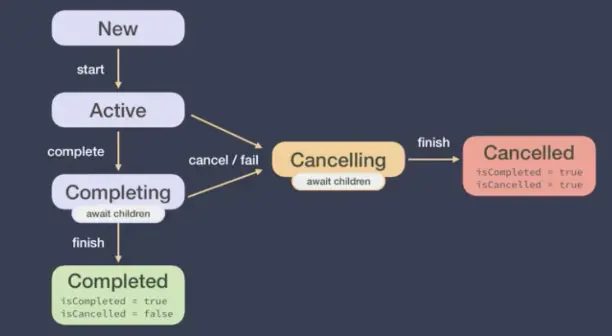
Job對象
對於每一個創建的協程(通過launch或async),會返回一個Job實例,該實例是協程的唯一標示,並負責管理協程的生命週期。
一個Job可以包含一系列狀態,雖然無法直接訪問這些狀態,但是可以訪問Job的屬性(isActive, isCancelled, isCompleted) - 新創建(New)
- 活躍(Active)
- 完成中(Completing)
- 已完成(Completed)
- 取消中(Cancelling)
-
已取消(Cancelled)
@Test
fun test_job_status() = runBlocking {
  val start = System.currentTimeMillis()
  var job1: Job? = null
  var job2: Job? = null
  job1 = async {
      println("job 1 開始. ${System.currentTimeMillis() - start}")
      delay(400)
      job1?.let { println("Job1- isActive:${it.isActive}, isCancelled:${it.isCancelled}, isCompleted:${it.isCompleted}") }
      job2?.let { println("Job2- isActive:${it.isActive}, isCancelled:${it.isCancelled}, isCompleted:${it.isCompleted}") }
      println("job 1 結束. ${System.currentTimeMillis() - start}")
  }
  job2 = launch {
      println("job 2 開始. ${System.currentTimeMillis() - start}")
      delay(200)
      job1?.let { println("Job1- isActive:${it.isActive}, isCancelled:${it.isCancelled}, isCompleted:${it.isCompleted}") }
      job2?.let { println("Job2- isActive:${it.isActive}, isCancelled:${it.isCancelled}, isCompleted:${it.isCompleted}") }
      println("job 2 結束. ${System.currentTimeMillis() - start}")
  }
  println("程序結束.")
}
Output:
程序結束.
job 1 開始. 8
job 2 開始. 15
Job1- isActive:true, isCancelled:false, isCompleted:false
Job2- isActive:true, isCancelled:false, isCompleted:false
job 2 結束. 216
Job1- isActive:true, isCancelled:false, isCompleted:false
Job2- isActive:false, isCancelled:false, isCompleted:true
job 1 結束. 416
Process finished with exit code 0
在job2執行完畢後,job1中打印job2的信息,由於job2已經完成,所以 isActive=false, isCompleted=true.
看下圖
協程的取消
- 取消作用域會取消它的子協程
- 被取消的子協程不會影響其餘兄弟協程
- 協程通過拋出一個特殊的異常CancellationException來處理取消操作
-
所有kotlinx.coroutines中的掛起函數(withContex/delay等)都是可取消的
取消作用域會取消它的子協程
@Test
fun test_cancel_2() = runBlocking<Unit> {
  val scope = CoroutineScope(Dispatchers.Default)
  val job1 = scope.launch {
      println("job1 started.")
      delay(10)
      println("job1 finished.")
  }
  val job2 = scope.launch {
      println("job2 started.")
      delay(100)
      println("job2 finished.")
  }
  delay(500)
}
output:
job1 started.
job2 started.
job1 finished.
job2 finished.
Process finished with exit code 0
注意:runBlocking是主協程,用自定義scope啓動兩個子協程,job1和job2是scope作用域中的子協程。第14行delay 500毫秒是在主協程中的,歸主協程作用域管。運行測試代碼,程序會在delay 500這個掛起函數結束後退出。這時,scope啓動的子協程job1和job2任務一個需要10毫秒,一個需要100毫秒,也能執行完畢。delay如果50毫秒,那麼這期間能夠讓job1完成,但是job2完不成。
下面來看取消作用域scope會怎樣:
@Test
fun test_cancel_3() = runBlocking<Unit> {
    val scope = CoroutineScope(Dispatchers.Default)
    val job1 = scope.launch {
        println("job1 started.")
        delay(10)
        println("job1 finished.")
    }
    val job2 = scope.launch {
        println("job2 started.")
        delay(100)
        println("job2 finished.")
    }
    scope.cancel()
    delay(500)
}
結果是
job1 started.
job2 started.

Process finished with exit code 0
第14行把scope作用域取消掉,可以看到job1和job2屬於scope作用域中的兄弟協程,scope取消後,皮之不存毛將焉附,倆都cancel了。也就是説,取消作用域會取消它的子協程。
被取消的子協程不影響其餘兄弟協程
@Test
fun test_cancel_4() = runBlocking<Unit> {
    val scope = CoroutineScope(Dispatchers.Default)
    val job1 = scope.launch {
        println("job1 started.")
        delay(10)
        println("job1 finished.")
    }
    val job2 = scope.launch {
        println("job2 started.")
        delay(100)
        println("job2 finished.")
    }
    job1.cancel()
    delay(500)
}
結果
job1 started.
job2 started.
job2 finished.

Process finished with exit code 0
把job1取消掉,並沒有影響兄弟job2的執行。
CancellationException
@Test
fun test_cancel_exception() = runBlocking<Unit> {
    val scope = CoroutineScope(Dispatchers.Default)
    val job1 = scope.launch {
        try {
            println("job1 started.")
            delay(10)
            println("job1 finished.")
        } catch (e: Exception) {
            println(e.toString())
        }
    }
    job1.cancel("handle the cancellation exception!")
    job1.join()
}
Output
job1 started.
java.util.concurrent.CancellationException: handle the cancellation exception!

Process finished with exit code 0
還有個cancelAndJoin():
@Test
fun test_cancel_exception() = runBlocking<Unit> {
    val scope = CoroutineScope(Dispatchers.Default)
    val job1 = scope.launch {
        try {
            println("job1 started.")
            delay(10)
            println("job1 finished.")
        } catch (e: Exception) {
            println(e.toString())
        }
    }
    job1.cancelAndJoin()
}
效果一樣。
所有kotlinx.coroutines中的掛起函數(withContex/delay等)都是可取消的
例如上面的例子中,delay()掛起函數,在掛起等待的時候都可以被cancel。
CPU密集型任務的取消
- isActive是一個可以被使用在CoroutineScope中的擴展屬性,檢查Job是否處於活躍狀態
- ensureActive(),如果job處於非活躍狀態,這個方法會立即拋出異常。
-
yield函數會檢查所在協程的狀態,如果已經取消,則拋出CancellationException予以響應。此外還會嘗試出讓線程的執行權,給其他協程提供執行機會。
@Test
fun test_cpu_task() = runBlocking {
  val start = System.currentTimeMillis();
  val job = launch(Dispatchers.Default) {
      var i = 0
      var nextPrintTime = start
      while (i < 5) {
          if (System.currentTimeMillis() >= nextPrintTime) {
              println("job is waiting ${i++}")
              nextPrintTime += 1000
          }
      }
  }
  delay(1000)
  job.cancel()
  println("main ended.")
}
output:
job is waiting 0
job is waiting 1
main ended.
job is waiting 2
job is waiting 3
job is waiting 4

Process finished with exit code 0
job中是一個CPU密集型任務,每個1秒打印一下。雖然job被取消了,但是job還是把while執行完畢。想要終止任務,可以使用isActive,在while條件中增加判斷:
@Test
fun test_cpu_task_active() = runBlocking {
  val start = System.currentTimeMillis();
  val job = launch(Dispatchers.Default) {
      var i = 0
      var nextPrintTime = start
      while (i < 5 && isActive) {
          if (System.currentTimeMillis() >= nextPrintTime) {
              println("job is waiting ${i++}")
              nextPrintTime += 1000
          }
      }
  }
  delay(1000)
  job.cancel()
  println("main ended.")
}
output:
job is waiting 0
job is waiting 1
main ended.

Process finished with exit code 0
這個isActive可以用來檢查協程的狀態,但是無法拋出異常。也就是説加上try catch並不能捕獲任何異常。如果想達到這個效果,可以用ensureActive()函數,其內部還是用的檢查isActive然後拋出異常:
@Test
fun test_cpu_task_active_cancel() = runBlocking {
  val start = System.currentTimeMillis();
  val job = launch(Dispatchers.Default) {
      try {
          var i = 0
          var nextPrintTime = start
          while (i < 5) {
              ensureActive()
              if (System.currentTimeMillis() >= nextPrintTime) {
                  println("job is waiting ${i++}")
                  nextPrintTime += 1000
              }
          }
      } catch (e: Exception) {
          println(e.toString())
      }
  }
  delay(1000)
  job.cancel()
  println("main ended.")
}
output:
job is waiting 0
job is waiting 1
main ended.
kotlinx.coroutines.JobCancellationException: StandaloneCoroutine was cancelled; job="coroutine#2":StandaloneCoroutine{Cancelling}@720b7121

Process finished with exit code 0
可以看到拋出並捕獲異常JobCancellationException。
yeild也可以拋出異常並予以響應,還可以讓出線程執行權給其他協程提供執行機會。@Test fun test_cpu_task_yield() = runBlocking { val start = System.currentTimeMillis(); val job = launch(Dispatchers.Default) { try { var i = 0 var nextPrintTime = start while (i < 5) { yield() if (System.currentTimeMillis() >= nextPrintTime) { println("job is waiting ${i++}") nextPrintTime += 1000 } } } catch (e: Exception) { println(e.toString()) } } delay(1000) job.cancel() println("main ended.") }output:
job is waiting 0
job is waiting 1
main ended.
kotlinx.coroutines.JobCancellationException: StandaloneCoroutine was cancelled; job="coroutine#2":StandaloneCoroutine{Cancelling}@478cdf05

Process finished with exit code 0
協程取消的副作用
- 在finally中釋放資源
-
use函數:該函數只能被實現了Coloseable的對象使用,程序結束時會自動調用close方法,適合文件對象。
@Test
fun test_release() = runBlocking {
  val job = launch {
      try {
          repeat(1000) { i ->
              println("job is waiting $i ...")
              delay(1000)
          }
      } catch (e: Exception) {
          println(e.toString())
      } finally {
          println("job finally.")
      }
  }
  delay(1500)
  println("job cancel.")
  job.cancelAndJoin()
  println("main ended.")
}
output:
job is waiting 0 ...
job is waiting 1 ...
job cancel.
kotlinx.coroutines.JobCancellationException: StandaloneCoroutine was cancelled; job="coroutine#2":StandaloneCoroutine{Cancelling}@4f6ee6e4
job finally.
main ended.

Process finished with exit code 0
可以在finally中進行釋放資源的操作。
使用use函數,可以省略掉手動釋放資源,不使用use時,自己要處理:@Test fun test_not_use() = runBlocking { val filePath = "" val br = BufferedReader(FileReader(filePath)) with(br) { var line: String? try { while (true) { line = readLine() ?: break println(line) } } catch (e: Exception) { println(e.toString()) } finally { close() } } }使用use,不需要額外處理:
@Test
fun test_use() = runBlocking {
  val path = ""
  BufferedReader(FileReader(path)).use {
      var line: String?
      while (true) {
          line = readLine()?:break
          println(line)
      }
  }
}
NonCancellable
NonCancellable可以用來處理那些不能取消的操作。
看下這個例子
@Test
fun test_cancel_normal() = runBlocking {
    val job = launch {
        try {
            repeat(100) { i ->
                println("job is waiting $i...")
                delay(1000)
            }
        } finally {
            println("job finally...")
            delay(1000)
            println("job delayed 1 second as non cancellable...")
        }
    }
    delay(1000)
    job.cancelAndJoin()
    println("main end...")
}
output
job is waiting 0...
job finally...
main end...

Process finished with exit code 0
如果在finally中11行12行有不能取消的操作,這樣子就不行。這時可以使用NonCancellable:
@Test
fun test_non_cancellable() = runBlocking {
    val job = launch {
        try {
            repeat(100) { i ->
                println("job is waiting $i...")
                delay(1000)
            }
        } finally {
            withContext(NonCancellable) {
                println("job finally...")
                delay(1000)
                println("job delayed 1 second as non cancellable...")
            }
        }
    }
    delay(1000)
    job.cancelAndJoin()
    println("main end...")
}
output
job is waiting 0...
job finally...
job delayed 1 second as non cancellable...
main end...
Process finished with exit code 0
超時任務
- 很多情況下取消一個協程的理由是它有可能超時
-
withTimeoutOrNull通過返回null來進行超時操作,從而替代拋出一個異常
@Test
fun test_timeout() = runBlocking {
  val job = withTimeout(1300) {
      repeat(5) {
          println("start job $it ...")
          delay(1000)
          println("end job $it ...")
      }
  }
}
output:
start job 0 ...
end job 0 ...
start job 1 ...
kotlinx.coroutines.TimeoutCancellationException: Timed out waiting for 1300 ms
withTimeout,當超過1300毫秒,任務就會終止,然後拋出TimeoutCancellationException.
@Test
fun test_timeout_return_null() = runBlocking {
  val res = withTimeoutOrNull(1300) {
      repeat(5) {
          println("start job $it ...")
          delay(1000)
          println("end job $it ...")
      }
      "Done"
  }
  println("Result: $res")
}
output:
start job 0 ...
end job 0 ...
start job 1 ...
Result: null

Process finished with exit code 0
withTimeoutOrNull會在代碼塊最後一行返回一個結果,正常結束後返回改結果,超時則返回null,例子:
@Test
fun test_timeout_return_null() = runBlocking {
  val res = withTimeoutOrNull(1300) {
      try {
          repeat(5) {
              println("start job $it ...")
              delay(1000)
              println("end job $it ...")
          }
          "Done"
      } catch (e: Exception) {
          println(e.toString())
      }
  }
  println("Result: $res")
}
output:
start job 0 ...
end job 0 ...
start job 1 ...
kotlinx.coroutines.TimeoutCancellationException: Timed out waiting for 1300 ms
Result: null

Process finished with exit code 0
協程的異常處理
-
協程的上下文
- 組合上下文中的元素
- 協程上下文的繼承
-
協程的異常處理
- 異常的傳播特性
- 異常的捕獲
- 全局異常處理
- 取消與異常
- 異常聚合
協程上下文是什麼
CoroutineContext是一組用於定義協程行為的元素。它由如下幾項構成:
- Job: 控制協程的生命週期
- CoroutineDispatcher: 向合適的線程分發任務
- CoroutineName: 協程的名稱,調試的時候很有用
-
CoroutineExceptionHandler: 處理未被捕捉的異常
組合上下文中的元素
有時需要在協程上下文中定義多個元素,可以使用+操作符來實現。比如可以顯示指定一個調度器來啓動協程,並且同時顯式指定一個命名:
@Test
fun test_coroutine_context() = runBlocking<Unit> {
  launch(Dispatchers.Default + CoroutineName("test")) {
      println("running on thread: ${Thread.currentThread().name}")
  }
}
output:
running on thread: DefaultDispatcher-worker-1 @test#2
Process finished with exit code 0
協程上下文的繼承
對於新創建的協程,它的CoroutineContext會包含一個全新的Job實例,它會幫我們控制協程的生命週期。而剩下的元素會從CoroutineContext的父類繼承,該父類可能是另外一個協程或者創建該協程的CoroutineScope。
@Test
fun test_coroutine_context_extend() = runBlocking<Unit> {
  // 創建一個協程作用域
  val scope = CoroutineScope(Job() + Dispatchers.IO + CoroutineName("test"))
  println("${coroutineContext[Job]} , ${Thread.currentThread().name}")
  // 通過協程作用域啓動一個協程
  val job = scope.launch {
      println("${coroutineContext[Job]} , ${Thread.currentThread().name}")
      val result = async {
          println("${coroutineContext[Job]} , ${Thread.currentThread().name}")
          "Ok"
      }.await()
      println("result: $result")
  }
  job.join()
}
output:
"coroutine#1":BlockingCoroutine{Active}@2ddc8ecb , main @coroutine#1
"test#2":StandaloneCoroutine{Active}@5dd0b98f , DefaultDispatcher-worker-1 @test#2
"test#3":DeferredCoroutine{Active}@4398fdb7 , DefaultDispatcher-worker-3 @test#3
result: Ok

Process finished with exit code 0
runBlocking是運行在主線程中的協程,job是scope中的協程,result是job中的協程;每一層的CoroutineContext都會有一個全新的Job實例,BlockingCoroutine{Active}@2ddc8ecb,StandaloneCoroutine{Active}@5dd0b98f,DeferredCoroutine{Active}@4398fdb7;剩下的元素從CoroutineContext的父類繼承,比如scope下的job,從父親scope中繼承Dispachers.IO和CoroutineName("test").
協程的上下文 = 默認值 + 繼承的CoroutineContext + 參數
- 一些元素包含默認值:Dispatchers.Default是默認的CoroutineDispatcher,以及"coroutine"作為默認的CoroutineName;
- 繼承的CoroutineContext是CoroutineScope或者其父協程的CoroutineContext;
-
傳入協程構建器的參數的優先級高於繼承的上下文參數,因此會覆蓋對應的參數值。
@Test
fun test_coroutine_context_extend2() = runBlocking<Unit> {
  val coroutineExceptionHandler = CoroutineExceptionHandler { _, exception ->
      println("handle exception: $exception")
  }
  val scope = CoroutineScope(Job() + Dispatchers.Main + CoroutineName("test") + coroutineExceptionHandler)
  val job = scope.launch(Dispatchers.IO) {
      println("${coroutineContext[Job]} , ${Thread.currentThread().name}")
      3/0
      println("end of job...")
  }
  job.join()
}
output:
"test#2":StandaloneCoroutine{Active}@39e6aad4 , DefaultDispatcher-worker-2 @test#2
handle exception: java.lang.ArithmeticException: / by zero

Process finished with exit code 0
由上面的例子可見,構建器傳入的參數Dispatchers.IO覆蓋了原來的Main;名字來自scope中的CoroutineName("test");協程任務中的除0操作引起的異常,被自定義的exceptionHandler捕獲。
異常處理的必要性
當應用出現一些意外情況時,給用户提供合適的體驗非常重要,一方面,應用崩潰是很糟糕的體驗,另外,在用户操作失敗時,也必須要能給出正確的提示信息。
異常的傳播
構建器有兩種形式:
- 自動傳播異常(launch與actor)
-
向用户暴露異常(async與produce)
當這些構建器用於創建一個根協程時(該協程不是另一個協程的子協程),前者這類構建器,異常會在它發生的第一時間被拋出;而後者則依賴用户來最終消費異常,例如通過await或receive. 來看例子:@Test fun test_exception() = runBlocking<Unit> { val job = GlobalScope.launch { try { throw IllegalArgumentException("exception from job1") } catch (e: Exception) { println("Caught exception: $e") } } job.join() val job2 = GlobalScope.async { 1 / 0 } try { job2.await() } catch (e: Exception) { println("Caught exception: $e") } }launch是自動傳播異常,發生的第一時間被拋出;async是向用户暴露異常,依賴用户消費異常,通過await函數調用的時候。輸出如下
Caught exception: java.lang.IllegalArgumentException: exception from job1
Caught exception: java.lang.ArithmeticException: / by zero

Process finished with exit code 0
對於async啓動的協程,如果用户不處理,則並不會暴露異常。如下
  @Test
  fun test_exception() = runBlocking<Unit> {
      val job = GlobalScope.launch {
          try {
              throw IllegalArgumentException("exception from job1")
          } catch (e: Exception) {
              println("Caught exception: $e")
          }
      }
      job.join()

      val job2 = GlobalScope.async {
          println("job2 begin")
          1 / 0
      }
      delay(1000)
//        try {
//            job2.await()
//        } catch (e: Exception) {
//            println("Caught exception: $e")
//        }
  }
output
Caught exception: java.lang.IllegalArgumentException: exception from job1
job2 begin
Process finished with exit code 0
job2執行了,但是並沒有拋出異常。需要用户消費異常。
非根協程的異常
其他協程所創建的協程中,產生的異常總是會被傳播。
@Test
fun text_exception_2() = runBlocking<Unit> {
  val scope = CoroutineScope(Job())
  val job = scope.launch {
      async {
          println("async started a coroutine...")
          1/0
      }
  }
  delay(100)
}
output:
async started a coroutine...
Exception in thread "DefaultDispatcher-worker-2 @coroutine#3" java.lang.ArithmeticException: / by zero
異常傳播的特性
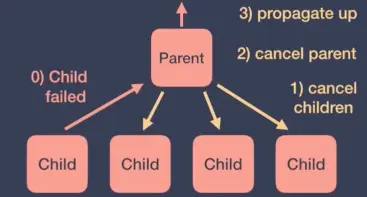
當一個協程由於一個異常而運行失敗時,它會傳播這個異常並傳遞給它的父級。接下來父級會進行下面幾步操作:
- 取消它自己的子級
- 取消它自己
-
將異常傳播並傳遞給它的父級
SupervisorJob
- 使用SupervisorJob時,一個子協程的運行失敗不會影響到其他子協程。SupervisorJob不會傳播異常給它的父級,它會讓子協程自己處理異常。
-
這種需求常見於在作用域內定義作業的UI組件,如果任何一個UI的子作業執行失敗,並不總是有必要取消整個UI組件,但是如果UI組件被銷燬了,由於它的結果不再被需要,就有必要使所有的子作業執行失敗。
@Test
fun text_supervisor_job1() = runBlocking<Unit> {
  val scope = CoroutineScope(SupervisorJob())
  val job1 = scope.launch {
      println("child 1 start.")
      delay(1000)
      1 / 0
  }
  val job2 = scope.launch {
      println("child 2 start.")
      delay(5000)
      println("child 2 end.")
  }
  joinAll(job1, job2)
}
output
child 1 start.
child 2 start.
Exception in thread "DefaultDispatcher-worker-1 @coroutine#2" java.lang.ArithmeticException: / by zero
...
child 2 end.
Process finished with exit code 0
上面的例子,使用SupervisorJob啓動兩個子協程job1,job2。兩個job都執行了,在job1中有一個除零操作,拋出了異常,但是job2並不受影響。但是如果換成val scope = CoroutineScope(Job()),兩個子協程都會終止
@Test
fun text_supervisor_job2() = runBlocking<Unit> {
  val scope = CoroutineScope(Job())
  val job1 = scope.launch {
      println("child 1 start.")
      delay(1000)
      1 / 0
  }
  val job2 = scope.launch {
      println("child 2 start.")
      delay(5000)
      println("child 2 end.")
  }
  joinAll(job1, job2)
}
結果
child 1 start.
child 2 start.
Exception in thread "DefaultDispatcher-worker-1 @coroutine#2" java.lang.ArithmeticException: / by zero
...
Process finished with exit code 0
supervisorScope
當作業自身執行失敗的時候,所有子作業將會被全部取消。
@Test
@Test
fun text_supervisor_scope() = runBlocking<Unit> {
  try {
      supervisorScope {
          val job1 = launch {
              println("child 1 start.")
              delay(50)
              println("child 1 end.")
          }
          val job2 = launch {
              println("child 2 start.")
              delay(5000)
              println("child 2 end.")
          }
          println("in supervisor scope...")
          delay(1000)
          1 / 0
      }
  } catch (e: Exception) {
      println("caught exception: ${e.toString()}")
  }
}
輸出
in supervisor scope...
child 1 start.
child 2 start.
child 1 end.
caught exception: java.lang.ArithmeticException: / by zero
Process finished with exit code 0
直接使用supervisorScope啓動協程,裏面兩個子協程job1,job2,然後後面執行打印,delay和除零操作,可以看到除零操作拋出異常,在此期間,job1 delay時間較短,執行完畢,但是job2沒有執行完畢被取消了。
異常的捕獲
- 使用CoroutineExceptionHandler對協程的異常進行捕獲
-
以下條件被滿足時,異常就會被捕獲:
- 時機:異常是被自動拋出異常的協程所拋出的(使用launch而不是async時)
- 位置:在CoroutineScope的CoroutineContext中或在一個根協程(CoroutineScope或supervisorScope的直接子協程)中。
@Test
fun test_exception_handler() = runBlocking<Unit> {
  val handler = CoroutineExceptionHandler { _, exception ->
      println("caught exception: $exception")
  }
  val job = GlobalScope.launch(handler) {
      throw IllegalArgumentException("from job")
  }
  val deferred = GlobalScope.async(handler) {
      throw ArithmeticException("from deferred")
  }
  job.join()
  deferred.await()
}
output
caught exception: java.lang.IllegalArgumentException: from job
java.lang.ArithmeticException: from deferred
...
Process finished with exit code 255
可見,handler捕獲了launch啓動的協程(自動拋出),而沒有捕獲async啓動的協程(非自動拋出);並且GlobalScope是一個根協程。
@Test
fun test_exception_handler2() = runBlocking<Unit> {
  val handler = CoroutineExceptionHandler { _, exception ->
      println("caught exception: $exception")
  }
  val scope = CoroutineScope(Job())
  val job1 = scope.launch(handler) {
      launch {
          throw IllegalArgumentException("from job1")
      }
  }

  job1.join()
}
output:
caught exception: java.lang.IllegalArgumentException: from job1
Process finished with exit code 0
上面的例子中handler安裝在外部協程上,能被捕獲到。但是如果安裝在內部協程上,就無法被捕獲,如下
@Test
fun test_exception_handler4() = runBlocking<Unit> {
  val handler = CoroutineExceptionHandler { _, exception ->
      println("caught exception: $exception")
  }
  val scope = CoroutineScope(Job())
  val job1 = scope.launch {
      launch(handler) {
          throw IllegalArgumentException("from job1")
      }
  }

  job1.join()
}
output:
Exception in thread "DefaultDispatcher-worker-2 @coroutine#3" java.lang.IllegalArgumentException: from job1
...
Process finished with exit code 0
Android中全局異常處理
- 全局異常處理可以獲取到所有協程未處理的未捕獲異常,不過它並不能對異常進行捕獲,雖然不能阻止程序崩潰,全局異常處理器在程序調試和異常上報等場景中仍然有非常大的用處。
-
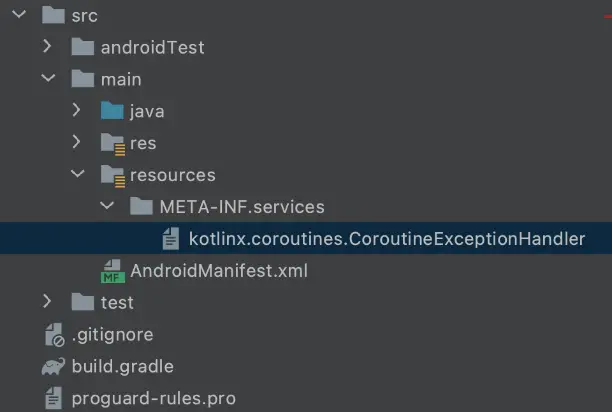
需要在classpath裏面創建META-INF/services目錄,並在其中創建一個名為kotlinx.coroutines.CoroutineExceptionHandler的文件,文件內容就是我們全局異常處理器的全類名。
看一個android中捕獲異常的例子:override fun onCreate(savedInstanceState: Bundle?) { super.onCreate(savedInstanceState) binding = DataBindingUtil.setContentView(this, R.layout.activity_main) val handler = CoroutineExceptionHandler { _, e -> Log.d(TAG, "onCreate: caught exception: $e") } binding.btnFetch.setOnClickListener { lifecycleScope.launch(handler) { Log.d(TAG, "onCreate: on click") "abc".substring(10) } } }如果不用handler,應用就崩潰了;加上handler,就可以捕獲並處理異常,避免應用崩潰。
但是如果沒有被捕獲,怎麼辦呢?還有一種方法可以拿到全局的異常信息,這就是上面所説的Android全局異常處理。
如上面所述,在project目錄下src/main創建resource/META-INF/services/目錄,並創建kotlinx.coroutines.CoroutineExceptionHandler文件。
文件內容是全局異常處理器的全類名。如下
全局異常處理類如下,在實現handleException方法時根據自己的業務需要去實現諸如打印和日誌收集等邏輯。class GlobalCoroutineExceptionHandler: CoroutineExceptionHandler { override val key = CoroutineExceptionHandler override fun handleException(context: CoroutineContext, exception: Throwable) { Log.d("GlobalException", "Unhandled exception: $exception") } }如此以來,沒有被捕獲的異常就都會在改方法中獲取到。
取消與異常
- 取消與異常緊密相關,協程內部使用CancellationException進行取消,該異常會被忽略。
- 當子協程被取消時,不會取消它的父協程。
-
如果一個協程遇到了CancellationException以外的異常,它將使用該異常取消它的父協程。當父協程的所有子協程都結束後,異常才會被父協程處理。
@Test
fun test_cancel_and_exception1() = runBlocking<Unit> {
  val job = launch {
      println("parent started.")
      val child = launch {
          println("child started.")
          delay(10000)
          println("child ended.")
      }
      yield()
      child.cancelAndJoin()
      yield()
      println("parent is not cancelled.")
  }
}
output
parent started.
child started.
parent is not cancelled.
Process finished with exit code 0
程序運行正常,child ended 沒有打印,child被取消了。
會有一個JobCancellationException。可以用try catch捕獲。如下:@Test fun test_cancel_and_exception2() = runBlocking<Unit> { val job = launch { println("parent started.") val child = launch { try { println("child started.") delay(10000) println("child ended.") } catch (e: Exception) { println("child exception: $e") } finally { println("child finally.") } } yield() child.cancelAndJoin() yield() println("parent is not cancelled.") } }output
parent started.
child started.
child exception: kotlinx.coroutines.JobCancellationException: StandaloneCoroutine was cancelled; job="coroutine#3":StandaloneCoroutine{Cancelling}@294425a7
child finally.
parent is not cancelled.
Process finished with exit code 0
@Test fun test_cancel_and_exception3() = runBlocking<Unit> { val handler = CoroutineExceptionHandler { _, e -> println("handle the exception: $e") } val parent = GlobalScope.launch(handler) { val child1 = launch { try { println("child1 started.") delay(Long.MAX_VALUE) println("child1 ended.") } finally { withContext(NonCancellable) { println("child1 cancelled, but exception is not handled until all children are terminated") delay(100) println("child1 finished in the non cancellable block") } } } val child2 = launch { println("child2 started.") "abc".substring(10) delay(100) println("child2 ended.") } } parent.join() }output
child1 started.
child2 started.
child1 cancelled, but exception is not handled until all children are terminated
child1 finished in the non cancellable block
handle the exception: java.lang.StringIndexOutOfBoundsException: String index out of range: -7
Process finished with exit code 0
當父協程的所有子協程都結束後,異常才會被父協程處理。
異常聚合
當協程的多個子協程因異常而失敗時,一般情況下取第一個異常進行處理。在第一個異常之後發生的所有其他異常,都將被綁定到第一個異常之上。
@Test
fun exception_aggregation() = runBlocking<Unit> {
  val handler = CoroutineExceptionHandler { _, e ->
      println("handle the exception: $e")
      println("the other exceptions: ${e.suppressedExceptions}")
  }
  val job = GlobalScope.launch(handler) {
      launch {
          try {
              delay(Long.MAX_VALUE)
          } finally {
              throw ArithmeticException("first exception")
          }
      }
      launch {
          try {
              delay(Long.MAX_VALUE)
          } finally {
              throw ArithmeticException("second exception")
          }
      }
      launch {
          "abc".substring(10)
      }
  }
  job.join()
}
output:
handle the exception: java.lang.StringIndexOutOfBoundsException: String index out of range: -7
the other exceptions: [java.lang.ArithmeticException: second exception, java.lang.ArithmeticException: first exception]
Process finished with exit code 0
在異常處理器中可以用e.suppressedExceptions來得到其他異常。
學習筆記,教程來自:
https://www.bilibili.com/vide...
感謝~