

Flow異步流
-
認識
- 特性
- 構建器和上下文
- 啓動
- 取消與取消檢測
- 緩衝
-
操作符
- 過渡操作符
- 末端操作符
- 組合
- 展平
-
異常
- 異常處理
- 完成
如何表示多個值?
掛起函數可以異步的返回單個值,但是如何異步返回多個計算好的值呢?
方案
- 集合
- 序列
- 掛起函數
-
Flow
用集合,返回多個值,但不是異步的。private fun createList() = listOf<Int>(1, 2, 3) @Test fun test_list() { createList().forEach { println(it) } }用序列,返回一個整數序列
private fun createSequence(): Sequence<Int> {
  return sequence {
      for (i in 1..3) {
          Thread.sleep(1000) // 假裝在計算,此處是阻塞,不能做其他事情了
          // delay(1000) 這裏不能用掛起函數
          yield(i)
      }
  }
}

@Test
fun test_sequence() {
  createSequence().forEach { println(it) }
}
看下源碼
public fun <T> sequence(@BuilderInference block: suspend SequenceScope<T>.() -> Unit): Sequence<T> = Sequence { iterator(block) }傳入的是一個SequenceScope的擴展函數。
@RestrictsSuspension
@SinceKotlin("1.3")
public abstract class SequenceScope<in T> internal constructor()
而RestrictsSuspension限制只能使用裏面提供的已有的掛起函數,如yield,yieldAll等。
createSequence返回了多個值,但是也是同步的。// 返回多個值,異步 private suspend fun createList2(): List<Int> { delay(5000) return listOf<Int>(1, 2, 3) } @Test fun test_list2() = runBlocking<Unit> { createList().forEach { println(it) } }可以使用suspend函數返回多個值,是異步,但是是是一次性返回了多個值,能否像流一樣返回多個值並保持異步呢?Flow可以解決這個問題。
private suspend fun createFlow(): Flow<Int> = flow {
  for (i in 1..3) {
      delay(1000)
      emit(i) // 發射,產生一個元素
  }
}

@Test
fun test_flow() = runBlocking<Unit> {
  createFlow().collect { println(it) } // collect是一個末端操作符,後面講
}
每隔1秒鐘產生一個元素,這裏是掛起的。用例子來證明一下:
  private suspend fun createFlow(): Flow<Int> = flow {
      for (i in 1..3) {
          delay(1000)
          emit(i)
      }
  }
  @Test
  fun test_flow2() = runBlocking<Unit> {
      launch {
          for (i in 1..3) {
              println("I am running and not blocked $i")
              delay(1500)
          }
      }
      createFlow().collect { println(it) }
  }
輸出
I am running and not blocked 1
1
I am running and not blocked 2
2
I am running and not blocked 3
3

Process finished with exit code 0
collect收集結果的過程並沒有阻塞另外的協程,打印完1,然後在delay掛起時,去執行其他,並沒有阻塞,兩個任務來回切換執行。
Flow真正地做到了返回多個值,並且是異步的。
Flow與其他方式的區別
- 名為flow的Flow類型的構建器函數
- flow{...}構建塊中的代碼可以掛起
- 函數createFlow()不再標有suspend修飾符,上面代碼中的suspend修飾符可以去掉
- 流使用emit函數發射值
-
流使用collect函數收集值
Flow應用
在android中,文件下載是Flow的一個非常典型的應用。
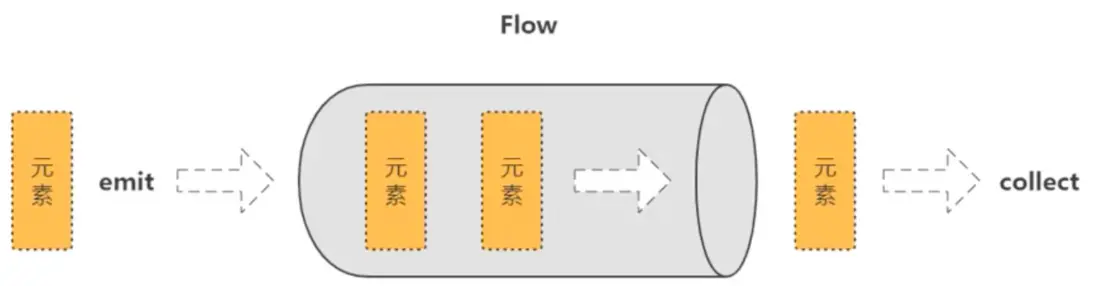

冷流
Flow是一種類似於序列的冷流,flow構建器中的代碼直到流被收集的時候才運行。
private fun createFlow2() = flow<Int> {
    println("Flow started.")
    for (i in 1..3) {
        delay(1000)
        emit(i)
    }
}
@Test
fun test_flow_cold() = runBlocking<Unit> {
    val flow = createFlow2()
    println("calling collect...")
    flow.collect { value -> println(value) }
    println("calling collect again...")
    flow.collect { value -> println(value) }
}
calling collect...
Flow started.
1
2
3
calling collect again...
Flow started.
1
2
3
Process finished with exit code 0可以看到,當調用collect方法的時候,流才開始運行,並且可以多次調用。
流的連續性
- 流的每次單獨收集都是按順序執行的,除非使用特殊操作符。
-
從上游到下游,每個過渡操作符都會處理每個發射出的值,然後再交給末端操作符。
@Test
fun test_flow_continuation() = runBlocking<Unit> {
  (1..5).asFlow()
      .filter { it % 2 == 0 }
      .map { "string $it" }
      .collect { println("collect $it") }
}
collect string 2 collect string 4 Process finished with exit code 0改例子經過了如下步驟:生成一個流,過濾出偶數,轉成字符串,開始收集
流的構建器
- flowOf構建器定義了一個發射固定值集的流。
-
使用.asFlow()擴展函數,可以將各種集合與序列轉換為流。
@Test
fun test_flow_builder() = runBlocking<Unit> {
  // flowOf構建器
  flowOf("one", "two", "three")
      .onEach { delay(1000) }
      .collect { value -> println(value) }
  // asFlow擴展函數
  (1..3).asFlow().collect { value -> println(value) }
}
one two three 1 2 3 Process finished with exit code 0流的上下文
- 流的收集總是在調用協程的上下文中發生,流的該屬性成為上下文保存。
- flow{...}構建器中的代碼必須遵循上下文保存屬性,並且不允許從其他上下文中發射。
-
flowOn操作符,該函數用於更改流發射的上下文。
private fun createFlow3() = flow<Int> {
  println("Flow started ${Thread.currentThread()}")
  for (i in 1..3) {
      delay(1000)
      emit(i)
  }
}

@Test
fun test_flow_context() = runBlocking<Unit> {
  createFlow3()
      .collect {
          println("$it, thread: ${Thread.currentThread()}")
      }
}
Flow started Thread[main @coroutine#1,5,main] 1, thread: Thread[main @coroutine#1,5,main] 2, thread: Thread[main @coroutine#1,5,main] 3, thread: Thread[main @coroutine#1,5,main] Process finished with exit code 0不做線程切換,收集和構建都在同一上下文,運行的線程是一樣的。
試着更改一下線程,如下private fun createFlow4() = flow { withContext(Dispatchers.IO) { // 用io線程 println("Flow started ${Thread.currentThread().name}") for (i in 1..3) { delay(1000) emit(i) } } } @Test fun test_flow_on() = runBlocking { createFlow4().collect { println("collect $it, ${Thread.currentThread()}") } }Flow started DefaultDispatcher-worker-1 @coroutine#1 java.lang.IllegalStateException: Flow invariant is violated: Flow was collected in [CoroutineId(1), "coroutine#1":BlockingCoroutine{Active}@4600ac86, BlockingEventLoop@1e1d1f06], but emission happened in [CoroutineId(1), "coroutine#1":DispatchedCoroutine{Active}@79c0c2ed, Dispatchers.IO]. Please refer to 'flow' documentation or use 'flowOn' instead可以看到,構建流在IO線程中執行,但在收集流的時候報錯了,不允許這樣做,建議使用flowOn.
正確的做法如下:private fun createFlow5() = flow { println("Flow started ${Thread.currentThread().name}") for (i in 1..3) { delay(1000) emit(i) } }.flowOn(Dispatchers.IO) @Test fun test_flow_on2() = runBlocking { createFlow5().collect { println("collect $it, ${Thread.currentThread().name}") } }Flow started DefaultDispatcher-worker-1 @coroutine#2 collect 1, main @coroutine#1 collect 2, main @coroutine#1 collect 3, main @coroutine#1 Process finished with exit code 0流在IO線程中構建和發射,在main線程中收集。
啓動流
-
使用launchIn替換collect,可以在單獨的協程中啓動流的收集。
  private fun events() = (1..3).asFlow()
      .onEach {
          delay(1000)
          println("$it, ${Thread.currentThread().name}")
      }.flowOn(Dispatchers.Default)


  @Test
  fun testFlowLaunch() = runBlocking<Unit> {
      events()
          .onEach { e -> println("Event: $e ${Thread.currentThread().name}") }
          //.collect()
          .launchIn(CoroutineScope(Dispatchers.IO))
          .join()
  }
1, DefaultDispatcher-worker-3 @coroutine#3 Event: 1 DefaultDispatcher-worker-1 @coroutine#2 2, DefaultDispatcher-worker-1 @coroutine#3 Event: 2 DefaultDispatcher-worker-1 @coroutine#2 3, DefaultDispatcher-worker-1 @coroutine#3 Event: 3 DefaultDispatcher-worker-2 @coroutine#2 Process finished with exit code 0onEach是過渡操作符,並不會觸發收集數據,collect是末端操作符,才能觸發收集數據。過渡操作符就像是過濾器,末端操作符就像是水龍頭的閥門,不打開閥門水就流不出來,無論中間加了多少個過濾裝置。
如果想指定在哪個協程裏面收集數據,就可以用末端操作符launchIn(),可以傳遞一個作用域進去,而作用域又可以指定調度器,launchIn(CoroutineScope(Dispatchers.IO)).
launchIn返回的是一個job對象,可以進行cancel等操作。例如
@Test
fun testFlowLaunch2() = runBlocking<Unit> {
    val job = events()
        .onEach { e -> println("Event: $e ${Thread.currentThread().name}") }
        .launchIn(CoroutineScope(Dispatchers.IO))
    delay(2000)
    job.cancel()
}
1, DefaultDispatcher-worker-1 @coroutine#3
Event: 1 DefaultDispatcher-worker-3 @coroutine#2
Process finished with exit code 0如上,只收集了一個數字,job就取消了。
其實runBlockint本身就是一個主線程作用域,可以放到launchIn中,如下
@Test
fun testFlowLaunch3() = runBlocking<Unit> {
    val job = events()
        .onEach { e -> println("Event: $e ${Thread.currentThread().name}") }
        .launchIn(this)
}
1, DefaultDispatcher-worker-1 @coroutine#3
Event: 1 main @coroutine#2
2, DefaultDispatcher-worker-1 @coroutine#3
Event: 2 main @coroutine#2
3, DefaultDispatcher-worker-1 @coroutine#3
Event: 3 main @coroutine#2
Process finished with exit code 0流的取消
-
流採用與協程同樣的協作取消。流的收集可以是當流在一個可取消的掛起函數(如delay)中掛起的時候取消。
  private fun createFlow6() = flow<Int> {
      for (i in 1..3) {
          delay(1000)
          println("emitting $i")
          emit(i)
      }
  }

  @Test
  fun testCancelFlow() = runBlocking<Unit> {
      withTimeoutOrNull(2500) {
          createFlow6().collect {
              println("collect: $it")
          }
      }
      println("Done.")
  }
emitting 1 collect: 1 emitting 2 collect: 2 Done. Process finished with exit code 0設置2.5秒超時,流還沒發射3,就超時了,流被取消。
流的取消檢測
- 方便起見,流構建器對每個發射值執行附加的ensureActive檢測以進行取消,這意味着從flow{...}發出的繁忙循環是可以取消的。
- 處於性能原因,大多數其他流操作不會自行執行其他取消檢測,在協程處於繁忙循環的情況下,必須明確檢測是否取消。
-
通過cancellable操作符來執行操作。
  private fun createFlow7() = flow<Int> {
      for (i in 1..5) {
          delay(1000)
          println("emitting $i")
          emit(i)
      }
  }

  @Test
  fun testCancelFlowCheck() = runBlocking<Unit> {
      createFlow7().collect {
          if (it == 3) cancel()
          println("collect: $it")
      }
      println("Done.")
  }
emitting 1 collect: 1 emitting 2 collect: 2 emitting 3 collect: 3 kotlinx.coroutines.JobCancellationException: BlockingCoroutine was cancelled ... Process finished with exit code 255在收集流的時候,遇到3就執行取消操作,拋出JobCancellationException,3還是會被收集到。
  @Test
  fun testCancelFlowCheck2() = runBlocking<Unit> {
      (1..5).asFlow().collect {
          if (it == 3) cancel()
          println("collect: $it")
      }
      println("Done.")
  }
collect: 1 collect: 2 collect: 3 collect: 4 collect: 5 Done. kotlinx.coroutines.JobCancellationException: BlockingCoroutine was cancelled使用asFlow()創建流,在收集的時候,雖然遇到3進行了取消,但是還是把所有的元素都打印了以後才拋出異常。如果要在執行的過程中真正的阻斷流,需要加上cancellable()操作,如下:
  @Test
  fun testCancelFlowCheck3() = runBlocking<Unit> {
      (1..5).asFlow().cancellable().collect {
          if (it == 3) cancel()
          println("collect: $it")
      }
      println("Done.")
  }
collect: 1 collect: 2 collect: 3 kotlinx.coroutines.JobCancellationException: BlockingCoroutine was cancelled背壓
- buffer(),併發運行流中發射元素的代碼。
- conflate(),合併發射項,不對每個值進行處理。
- collectLatest(),取消並重新發射最後一個值。
- 當必須更改CoroutineDispatcher時,flowOn操作符使用了相同的緩衝機制,但是buffer函數顯示地請求緩衝而不改變執行上下文。
    private fun createFlow8() = flow<Int> {
        for (i in 1..5) {
            delay(100) // 生產一個元素需要0.1秒
            println("emitting $i")
            emit(i)
        }
    }

    @Test
    fun testBackPressure() = runBlocking<Unit> {
        val time = measureTimeMillis {
            createFlow8()
                .buffer(50) // 併發運行流中發射元素
                .collect {
                    delay(200) // 消費一個元素需要0.2秒
                    println("collect: $it")
                }
        }

        println("Done, total $time")
    }
emitting 1
emitting 2
collect: 1
emitting 3
emitting 4
collect: 2
emitting 5
collect: 3
collect: 4
collect: 5
Done, total 1188使用buffer可以讓發射元素併發執行,提高效率。
使用flowOn()切換線程,也可以提高效率。
    private fun createFlow8() = flow<Int> {
        for (i in 1..5) {
            delay(100) // 生產一個元素需要0.1秒
            println("emitting $i, ${Thread.currentThread().name}")
            emit(i)
        }
    }

    @Test
    fun testBackPressure2() = runBlocking<Unit> {
        val time = measureTimeMillis {
            createFlow8()
                .flowOn(Dispatchers.Default)
                .collect {
                    delay(200) // 消費一個元素需要0.2秒
                    println("collect: $it, ${Thread.currentThread().name}")
                }
        }

        println("Done, total $time")
    }
emitting 1, DefaultDispatcher-worker-1 @coroutine#2
emitting 2, DefaultDispatcher-worker-1 @coroutine#2
emitting 3, DefaultDispatcher-worker-1 @coroutine#2
collect: 1, main @coroutine#1
emitting 4, DefaultDispatcher-worker-1 @coroutine#2
collect: 2, main @coroutine#1
emitting 5, DefaultDispatcher-worker-1 @coroutine#2
collect: 3, main @coroutine#1
collect: 4, main @coroutine#1
collect: 5, main @coroutine#1
Done, total 1186conflate()可以合併發射項,但是不會對每個值進行處理。
    @Test
    fun testBackPressure3() = runBlocking<Unit> {
        val time = measureTimeMillis {
            createFlow8()
                .conflate()
                .collect {
                    delay(200) // 消費一個元素需要0.2秒
                    println("collect: $it, ${Thread.currentThread().name}")
                }
        }

        println("Done, total $time")
    }
emitting 1, main @coroutine#2
emitting 2, main @coroutine#2
emitting 3, main @coroutine#2
collect: 1, main @coroutine#1
emitting 4, main @coroutine#2
collect: 3, main @coroutine#1
emitting 5, main @coroutine#2
collect: 4, main @coroutine#1
collect: 5, main @coroutine#1
Done, total 1016上面的例子中,使用conflate(),collect時跳過了2.
使用collectLatest()只會收集最後一個值,如下:
    @Test
    fun testBackPressure4() = runBlocking<Unit> {
        val time = measureTimeMillis {
            createFlow8()
                .collectLatest {
                    delay(200) // 消費一個元素需要0.2秒
                    println("collect: $it, ${Thread.currentThread().name}")
                }
        }

        println("Done, total $time")
    }
emitting 1, main @coroutine#2
emitting 2, main @coroutine#2
emitting 3, main @coroutine#2
emitting 4, main @coroutine#2
emitting 5, main @coroutine#2
collect: 5, main @coroutine#7
Done, total 913
Process finished with exit code 0操作符
過渡流操作符
- 可以使用操作符轉換流,就像使用集合與序列一樣。
- 過渡操作符應用於上游流,並返回下游流。
- 這些操作符也是冷操作符,就像流一樣。這類操作符本身不是掛起函數。
-
運行速度很快,返回新的轉換流的定義。
  private fun createFlow9() = flow<Int> {
      for (i in 1..3) {
          delay(100) // 生產一個元素需要0.1秒
          println("emitting $i")
          emit(i)
      }
  }

  @Test
  fun testMap() = runBlocking<Unit> {
      createFlow9()
          .map { data -> performRequest(data) }
          .collect {
              println("collect: $it")
          }
  }
emitting 1 collect: --response 1-- emitting 2 collect: --response 2-- emitting 3 collect: --response 3-- Process finished with exit code 0上面的例子,map操作符,把Int流轉成了String流。
  @Test
  fun testTransform() = runBlocking<Unit> {
      createFlow9()
          .transform { data ->
              emit("making request $data")
              emit(performRequest(data))
          }
          .collect {
              println("collect: $it")
          }
  }
emitting 1 collect: making request 1 collect: --response 1-- emitting 2 collect: making request 2 collect: --response 2-- emitting 3 collect: making request 3 collect: --response 3-- Process finished with exit code 0上面的例子,transform操作符可以把流經過多次轉換,多次發射。
限長操作符
take操作符
  private fun numbers() = flow<Int> {
      try {
          emit(1)
          emit(2)
          println("This line will not execute")
          emit(3)
      } finally {
          println("Finally.")
      }
  }

  @Test
  fun testLimitOperator() = runBlocking {
      numbers().take(2).collect {
          println("collect $it")
      }
  }
collect 1 collect 2 Finally.take傳入參數2,則只取2個數據。
末端流操作符
末端操作符是在流上用於啓動流收集的掛起函數。collect是最基礎的末端操作符,但是還有一些更方便的末端操作符:
- 轉化為各種集合,例如toList和toSet.
- 獲取第一個(first)值與確保流發射單個(single)值的操作符。
-
使用reduce與fold將流規約到單個值。
例如reduce操作符@Test fun testTerminateOperator() = runBlocking { val sum = (1..5).asFlow().map { it * it }.reduce { a, b -> a + b } println(sum) }55計算數字1-5的平方,然後求和,得到55.
組合多個流
就像Kotlin標準庫中的Sequence.zip擴展函數一樣,流擁有一個zip操作符用於組合兩個流中的相關值。
  @Test
  fun testZip() = runBlocking {
      val numbers = (1..3).asFlow()
      val strings = flowOf("One", "Two", "Three")
      numbers.zip(strings) { a, b -> "$a -> $b" }.collect { println(it) }
  }
這個例子把數字流和字符串流用zip操作符組合起來,成為一個字符流。
1 -> One
2 -> Two
3 -> Three

Process finished with exit code 0
    @Test
    fun testZip2() = runBlocking {
        val numbers = (1..3).asFlow().onEach { delay(300) }
        val strings = flowOf("One", "Two", "Three").onEach { delay(500) }
        val start = System.currentTimeMillis()
        numbers.zip(strings) { a, b -> "$a -> $b" }.collect { println("$it, ${System.currentTimeMillis() - start}") }
    }
如果兩個流各自有delay,合併操作會等待那個delay時間較長的數據。
1 -> One, 563
2 -> Two, 1065
3 -> Three, 1569

Process finished with exit code 0
展平流
流表示異步接收的值序列,所以很容易遇到這樣情況:每個值都會觸發對另一個值序列的請求,然而,由於流具有異步的性質,因此需要不同的展平模式,為此,存在一系列的流展平操作符:
- flatMapConcat連接模式
- flatMapMerge合併模式
- flatMapLatest最新展平模式
使用flatMapConcat連接模式
    private fun requestFlow(i: Int) = flow<String> {
        emit("$i: First")
        delay(500)
        emit("$i: Second")
    }

    @Test
    fun testFlatMapConcat() = runBlocking {
        val startTime = System.currentTimeMillis()
        (1..3).asFlow()
            .onEach { delay(100) }
            //.map { requestFlow(it) } // 如果用map,則產生一個Flow<Flow<String>>
            .flatMapConcat { requestFlow(it) } // 使用flatMapConcat,把flow展平成一維,達到效果
            .collect { println("$it at ${System.currentTimeMillis() - startTime} ms") }
    }
1: First at 144 ms
1: Second at 649 ms
2: First at 754 ms
2: Second at 1256 ms
3: First at 1361 ms
3: Second at 1861 ms
Process finished with exit code 0使用flatMapMerge
    @Test
    fun testFlatMapMergeConcat() = runBlocking {
        val startTime = System.currentTimeMillis()
        (1..3).asFlow()
            .onEach { delay(100) }
            .flatMapMerge { requestFlow(it) }
            .collect { println("$it at ${System.currentTimeMillis() - startTime} ms") }
    }
1: First at 202 ms
2: First at 301 ms
3: First at 407 ms
1: Second at 708 ms
2: Second at 805 ms
3: Second at 927 ms
Process finished with exit code 0發射1:First後,delay 500ms,這期間發射2:First,發射3:First;分別把這些數據收集到,然後其餘的數據累計發射完畢並收集。
在來看flatMapLatest操作符
    private fun requestFlow(i: Int) = flow<String> {
        emit("$i: First")
        delay(500)
        emit("$i: Second")
    }

    @Test
    fun testFlatMapLatestConcat() = runBlocking {
        val startTime = System.currentTimeMillis()
        (1..3).asFlow()
            .onEach { delay(200) }
            .flatMapLatest { requestFlow(it) }
            .collect { println("$it at ${System.currentTimeMillis() - startTime} ms") }
    }
1: First at 313 ms
2: First at 581 ms
3: First at 786 ms
3: Second at 1291 ms
Process finished with exit code 0跳過某些中間值,只收集最新的值。
流的異常處理
當運算符中的發射器或代碼拋出異常時,有幾種處理異常的方法:
- try catch塊
-
catch函數
使用代碼塊捕獲下游異常private fun createFlow10() = flow<Int> { for (i in 1..3) { println("emitting $i") emit(i) } } @Test fun testException() = runBlocking { try { createFlow10().collect { println("collect: $it") check(it <= 1) { "wrong value " } } } catch (e: Exception) { println("handle the exception: $e") } }emitting 1 collect: 1 emitting 2 collect: 2 handle the exception: java.lang.IllegalStateException: wrong value Process finished with exit code 0使用catch操作符捕獲上游異常
  @Test
  fun testException2() = runBlocking {
      flow {
          emit(1)
          1/0
          emit(2)
      }
          .catch { println("$it") }
          .flowOn(Dispatchers.IO)
          .collect { println("collect: $it") }
  }
java.lang.ArithmeticException: / by zero collect: 1 Process finished with exit code 0可以在捕獲異常後補充發射一個數據
  @Test
  fun testException2() = runBlocking {
      flow {
          emit(1)
          1/0
          emit(2)
      }
          .catch {
              println("$it")
              emit(10)
          }
          .flowOn(Dispatchers.IO)
          .collect { println("collect: $it") }
  }
java.lang.ArithmeticException: / by zero collect: 1 collect: 10 Process finished with exit code 0後面的2當然是收不到的。
流的完成
當流收集完成時(普通情況或者異常情況),它可能需要執行一個動作。
- 命令式finally塊
-
onCompletion聲明式處理
使用命令式finally塊的例子private fun simpleFlow() = (1..3).asFlow() @Test fun testFinally() = runBlocking { try { simpleFlow().collect { println("collect $it") } } finally { println("Done.") } }collect 1 collect 2 collect 3 Done. Process finished with exit code 0使用聲明式onCompletion的例子:
  @Test
  fun testOnComplete() = runBlocking {
      simpleFlow()
          .onCompletion { println("Done.") }
          .collect { println("collect $it") }

  }
onCompletion優勢在於,非正常程序結束,能夠拿到異常信息。
看下面的例子,如果上游發射流拋出了異常,如果用finally命令式,若不用catch則無法捕獲異常:
    private fun createFlow11() = flow<Int> {
        emit(1)
        1 / 0
        emit(2)
    }

    @Test
    fun testFinally2() = runBlocking {
        try {
            createFlow11().collect { println("collect $it") }
        } finally {
            println("Finally.")
        }
    }
collect 1
Finally.

java.lang.ArithmeticException: / by zero
但是如果使用聲明式onCompletion,則能夠得到異常信息:
    @Test
    fun testComplete2() = runBlocking {
        createFlow11()
            .onCompletion { println("exception info: $it") }
            .collect { println("collect $it") }
    }
collect 1
exception info: java.lang.ArithmeticException: / by zero
java.lang.ArithmeticException: / by zeroonCompletion裏面能得到異常,但是並不能捕獲異常,程序還是拋出了異常。如果想捕獲並處理還需要catch操作符。
    @Test
    fun testComplete2() = runBlocking {
        createFlow11()
            .onCompletion { println("exception info: $it") }
            .catch { println("handle exception: $it") }
            .collect { println("collect $it") }
    }
collect 1
exception info: java.lang.ArithmeticException: / by zero
handle exception: java.lang.ArithmeticException: / by zero
Process finished with exit code 0onCompletion還可以得到下游的異常信息,例如
    private fun simpleFlow() = (1..3).asFlow()

    @Test
    fun testComplete3() = runBlocking {
        simpleFlow()
            .onCompletion { println("exception info: $it") }
            .catch { println("handle exception: $it") }
            .collect {
                println("collect $it")
                check(it <= 1) { "invalid $it" }
            }
    }
下游check會拋出一個異常,onCompletion也會得到這個異常。
collect 1
collect 2
exception info: java.lang.IllegalStateException: invalid 2

java.lang.IllegalStateException: invalid 2
當然,程序還是會拋出異常。雖然這個例子有catch,但是那是捕獲上游異常用的。onCompletion只是得到了下游異常信息,如果要捕獲下游異常,還是要用try catch命令式方式。
    @Test
    fun testComplete4() = runBlocking {
        try {
            simpleFlow()
                .onCompletion { println("exception info: $it") }
                .catch { println("handle exception from catch: $it") }
                .collect {
                    println("collect $it")
                    check(it <= 1) { "invalid $it" }
                }
        } catch (e: Exception) {
            println("handle exception from try catch: $e")
        }
    }
collect 1
collect 2
exception info: java.lang.IllegalStateException: invalid 2
handle exception from try catch: java.lang.IllegalStateException: invalid 2
Process finished with exit code 0