本文由TinySpace組件貢獻者夏雯斐同學原創。
前言
近期,TinyVue正式發佈 v3.27.0版本,這次版本更新也增加了很多新特性,space組件就是其中比較重要的一個特性。
Space組件 是 OpenTiny Vue組件庫中的一個佈局容器組件,用於在子元素之間提供靈活的間距控制。
它支持水平與垂直方向排列、自動換行、對齊與分佈控制、以及順序調整等功能,能幫助開發者輕鬆實現響應式、整齊的組件佈局。
適用場景
- 表單項或按鈕組的佈局
- 列表項的水平/垂直間距
- 工具欄元素的分佈控制
- 在響應式佈局中控制間距與換行
環境準備與安裝
1. 環境要求
確保已安裝 Node.js 10.13+ 及包管理器 npm/pnpm/yarn。
node -v2. 安裝 OpenTiny Vue
# npm
npm install @opentiny/vue

# 或 pnpm
pnpm add @opentiny/vue
3.引入TinySpace
import { TinySpace } from '@opentiny/vue'快速開始
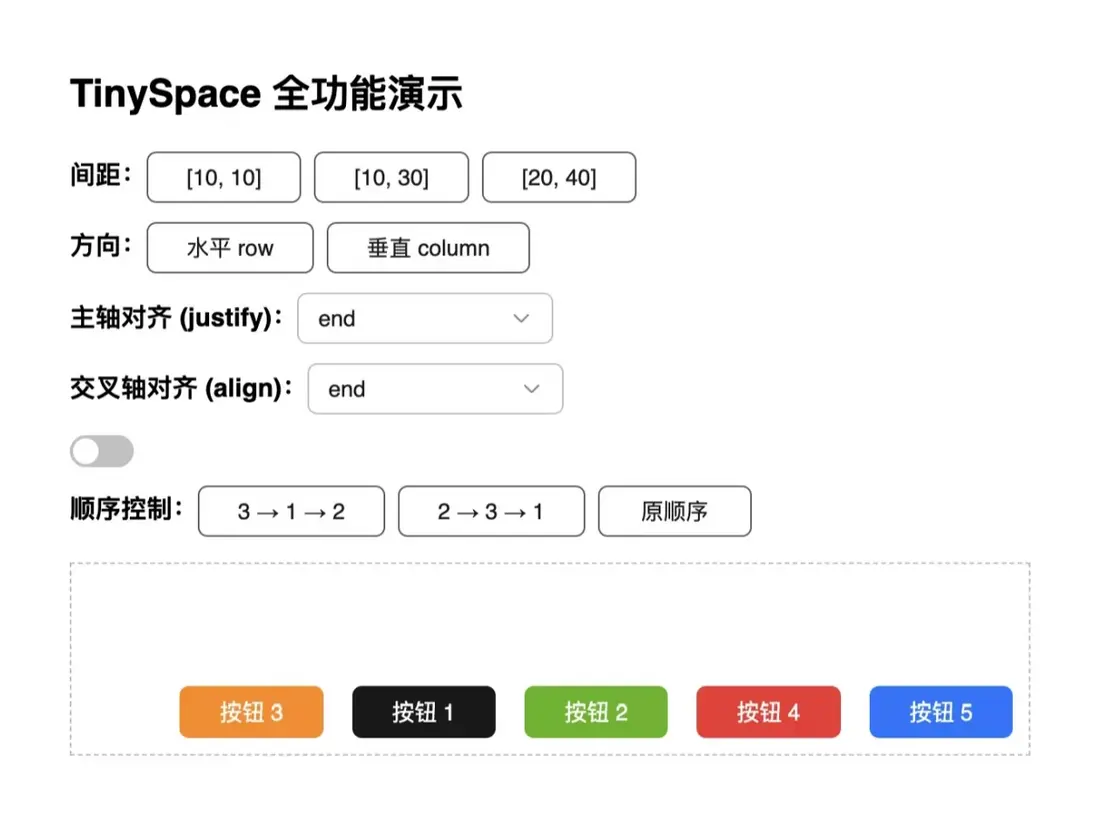
基礎使用
<template>
  <div id="tiny-space-all" style="padding: 16px; max-width: 600px">
    <h2>TinySpace 全功能演示</h2>

    <!-- 控制面板 -->
    <div style="margin-bottom: 16px; display: flex; flex-direction: column; gap: 12px;">
      <!-- 間距控制 -->
      <div>
        <strong>間距:</strong>
        <tiny-button @click="size = [10, 10]">[10, 10]</tiny-button>
        <tiny-button @click="size = [10, 30]">[10, 30]</tiny-button>
        <tiny-button @click="size = [20, 40]">[20, 40]</tiny-button>
      </div>

      <!-- 佈局方向 -->
      <div>
        <strong>方向:</strong>
        <tiny-button-group>
          <tiny-button @click="direction = 'row'">水平 row</tiny-button>
          <tiny-button @click="direction = 'column'">垂直 column</tiny-button>
        </tiny-button-group>
      </div>

      <!-- 主軸對齊 -->
      <div>
        <strong>主軸對齊 (justify):</strong>
        <tiny-select v-model="justify" style="width: 160px">
          <tiny-option label="start" value="start" />
          <tiny-option label="center" value="center" />
          <tiny-option label="end" value="end" />
          <tiny-option label="space-between" value="space-between" />
          <tiny-option label="space-around" value="space-around" />
        </tiny-select>
      </div>

      <!-- 交叉軸對齊 -->
      <div>
        <strong>交叉軸對齊 (align):</strong>
        <tiny-select v-model="align" style="width: 160px">
          <tiny-option label="start" value="start" />
          <tiny-option label="center" value="center" />
          <tiny-option label="end" value="end" />
          <tiny-option label="baseline" value="baseline" />
        </tiny-select>
      </div>

      <!-- 自動換行 -->
      <div>
        <tiny-switch v-model="wrap" active-text="自動換行" inactive-text="不換行" />
      </div>

      <!-- 順序控制 -->
      <div>
        <strong>順序控制:</strong>
        <tiny-button @click="order = ['3', '1', '2']">3 → 1 → 2</tiny-button>
        <tiny-button @click="order = ['2', '3', '1']">2 → 3 → 1</tiny-button>
        <tiny-button @click="order = []">原順序</tiny-button>
      </div>
    </div>

    <!-- Space 佈局演示 -->
    <tiny-space
      class="tiny-space-demo"
      :size="size"
      :direction="direction"
      :justify="justify"
      :align="align"
      :wrap="wrap"
      :order="order"
      style="border: 1px dashed #bbb; padding: 10px; min-height: 120px;"
    >
      <tiny-button key="1" type="primary">按鈕 1</tiny-button>
      <tiny-button key="2" type="success">按鈕 2</tiny-button>
      <tiny-button key="3" type="warning">按鈕 3</tiny-button>
      <tiny-button key="4" type="danger">按鈕 4</tiny-button>
      <tiny-button key="5" type="info">按鈕 5</tiny-button>
    </tiny-space>
  </div>
</template>

<script setup>
import { ref } from 'vue'
import { TinyButton, TinyButtonGroup, TinySwitch, TinySelect, TinyOption } from '@opentiny/vue'
import TinySpace from '@opentiny/vue-space'


// 響應式配置項
const size = ref([10, 20])
const direction = ref('row')
const justify = ref('start')
const align = ref('center')
const wrap = ref(true)
const order = ref([])
</script>

<style scoped>
.tiny-space-demo .tiny-button {
  min-width: 80px;
}
</style>默認方向為row(水平排列),默認間距為8px。
配置詳解
1.控制間距 size
size 是最核心的屬性,支持多種寫法。
1.1數值寫法
<tiny-space :size="20"/>間距為 20px。
1.2數組寫法([rowGap, columnGap])
<tiny-space :size="[50, 50]"/>行間距 50px,列間距 50px,方便實現不等距佈局。
1.3字符串寫法
<tiny-space size="100px"/>間距為 100px
<tiny-space size="small"/>
// small | medium | large
2.控制排列方向 direction
<tiny-space :size="12" direction="row"/>- 'row'(默認):水平排列
- 'column':垂直排列
可以通過切換 direction 實現響應式佈局(如手機端豎排、PC端橫排)。
3.對齊 align 與分佈 justify
通過 align 和 justify 控制元素對齊與分佈方式。
3.1 justify
<tiny-space :size="10" justify="center"/>3.2 aligin
<tiny-space :size="10" align="baseline"/> | 屬性 | 説明 | 可選值 |
|---|---|---|
align |
垂直對齊 | start / center / end/baseline/stretch |
justify |
水平分佈 | start / center / end / space-between |
4.自動換行 wrap
<tiny-space :wrap="true" :size="[10, 12]">
  <tiny-button v-for="n in 10" :key="n">按鈕 {{ n }}</tiny-button>
</tiny-space>效果: 當寬度不夠時,按鈕會自動換行,仍然保持間距一致。

5.控制順序 order
<template>
  <tiny-space :order="order" style="border: 1px dashed #ccc">
    <tiny-button key="1">First Button</tiny-button>
    <tiny-button key="2">Second Button</tiny-button>
    <tiny-button key="3">Third Button</tiny-button>
    <tiny-button>Fourth Button</tiny-button>
  </tiny-space>
</template>
<script setup>
import { TinyButton, TinySpace } from '@opentiny/vue'
const order = ['2', '3', '1'] // 自定義順序:第二個、第三個、然後第一個
</script>
設置 order="['2', '3', '1']" 後,渲染順序會變為 2 → 3 → 1。
適用於在響應式佈局中快速調換內容順序。
6.嵌套佈局(組合使用)
<tiny-space direction="column" :size="16">
 <tiny-space direction="row" :size="8">
  <tiny-button>左</tiny-button>
  <tiny-button>中</tiny-button>
  <tiny-button>右</tiny-button>
 </tiny-space>

 <tiny-space direction="row" :size="8">
  <tiny-button>上</tiny-button>
  <tiny-button>下</tiny-button>
 </tiny-space>
</tiny-space>
7.測試與穩定性
TinySpace 已通過 Playwright E2E 自動化測試,驗證:
- 間距正確渲染(
rowGap/columnGap) - 動態數據更新響應
- 換行與方向切換穩定
- 兼容 Vue 2 & Vue 3 環境
8.最佳實踐總結
| 場景 | 推薦配置 |
|---|---|
| 表單項垂直間距 | <tiny-space direction="column" :size="12"> |
| 按鈕組 | <tiny-space :size="8" align="center"> |
| 可換行標籤集合 | <tiny-space :size="[8, 16]" wrap> |
9.小結
TinySpace 是一個輕量級、靈活的佈局組件,專為控制子元素間距而設計。
它支持:
- 數值、預設、數組多種間距形式
- 垂直與水平排列
- 自動換行與對齊分佈
- 順序控制
- Vue 2 / Vue 3 雙版本兼容
通過它,開發者可以輕鬆構建整潔、美觀、響應式的 UI 佈局。
屬性一覽
| 屬性 | 類型 | 默認值 | 説明 | |
|---|---|---|---|---|
size |
number /array / string |
small |
設置間距大小,可為字符串、數字或數組,數組形式為 [橫向間距, 縱向間距] | |
direction |
string |
row |
row \ |
column |
align |
string |
stretch |
設置交叉軸上的對齊方式,對應 CSS align-items 屬性 |
|
justify |
string |
start |
設置主軸上的對齊方式,對應 CSS justify-content 屬性 |
|
wrap |
boolean |
false |
是否自動換行 | |
order |
string[] |
- | 控制子項顯示順序 |
關於OpenTiny
歡迎加入 OpenTiny 開源社區。添加微信小助手:opentiny-official 一起參與交流前端技術~
OpenTiny 官網:https://opentiny.design
OpenTiny 代碼倉庫:https://github.com/opentiny
TinyVue 源碼:https://github.com/opentiny/tiny-vue
TinyEngine 源碼: https://github.com/opentiny/tiny-engine
歡迎進入代碼倉庫 Star🌟TinyEngine、TinyVue、TinyNG、TinyCLI、TinyEditor ~
如果你也想要共建,可以進入代碼倉庫,找到 good first issue 標籤,一起參與開源貢獻 ~