

GoAccess 是一款專為快速、終端化日誌分析設計的工具。其核心設計理念是無需瀏覽器即可實時快速分析並查看 Web 服務器統計數據 —— 這一特性尤為實用:無論是通過 SSH 快速分析訪問日誌,還是你本身偏好終端工作流,都能輕鬆適配。
終端輸出來為默認呈現方式,同時它還支持生成功能完整、獨立運行的實時 HTML 報告(適用於數據分析、監控及數據可視化場景),此外也可導出 JSON 和 CSV 格式的報告文件。
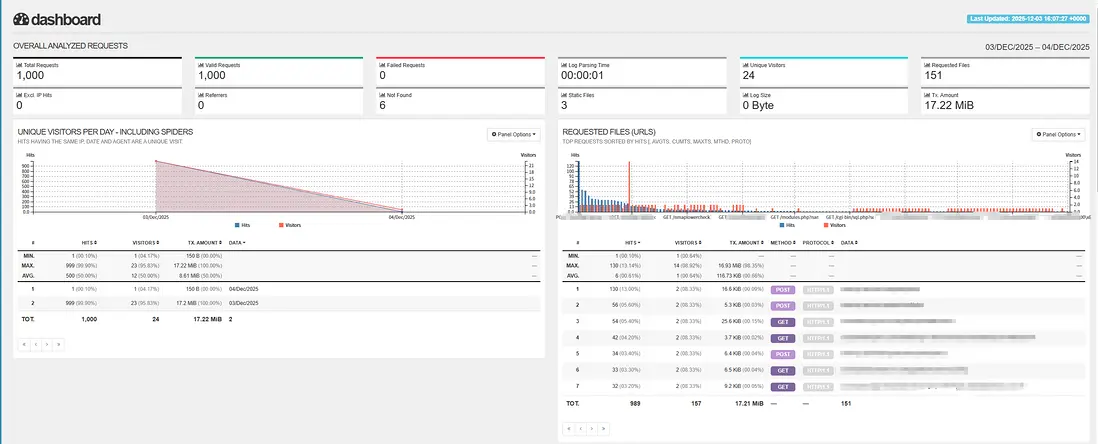
HTML報告樣例
包括最後1000行訪問記錄,按天的訪問流量(MB)、請求的URL頻率統計:
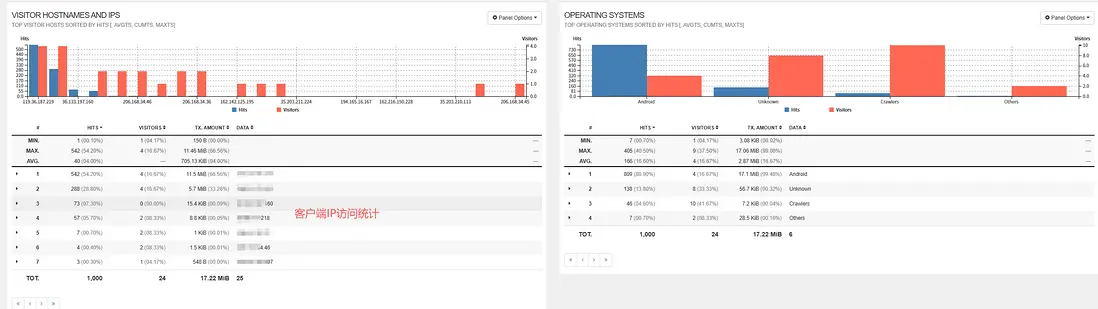
客户端IP訪問統計、客户端的操作系統統計
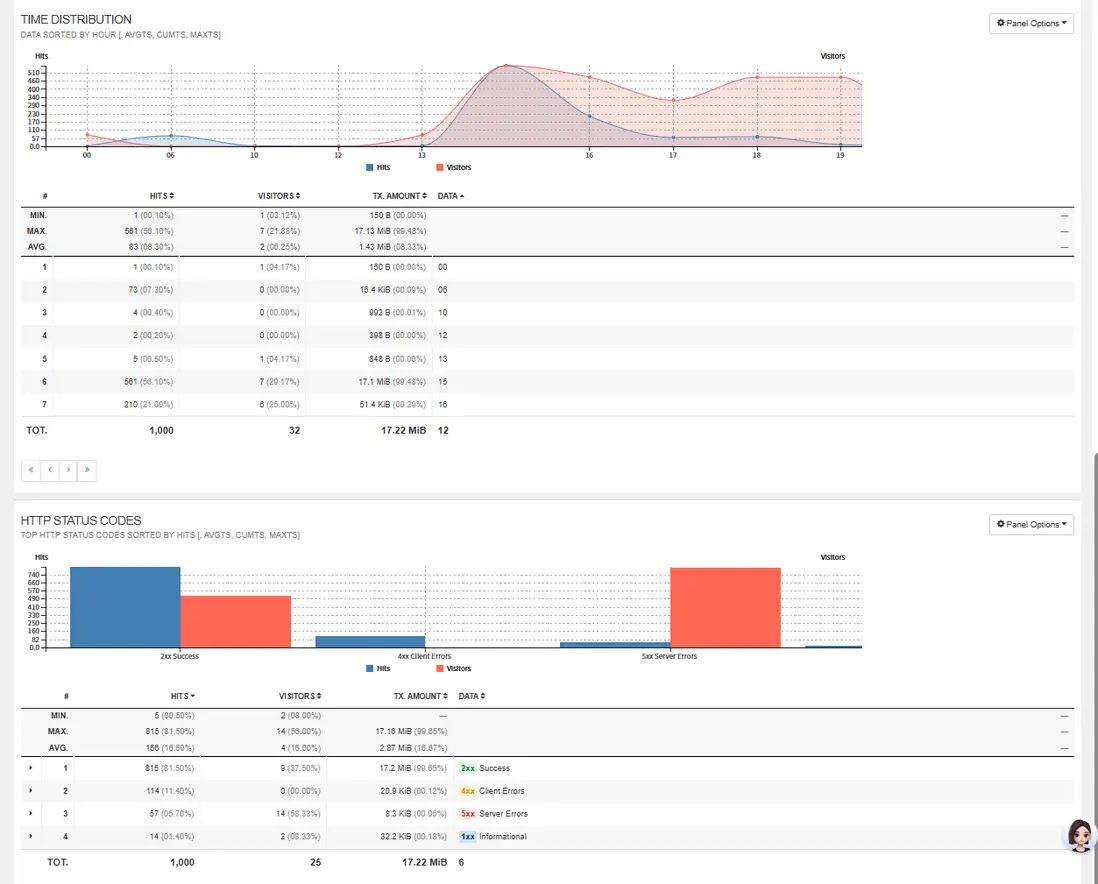
點擊率統計、請求的HTTP狀態碼統計
部署Goaccess到Kubernetes平台
本例部署的Goaccess服務,將實時分析nginx的訪問日誌,生成HTML報告。
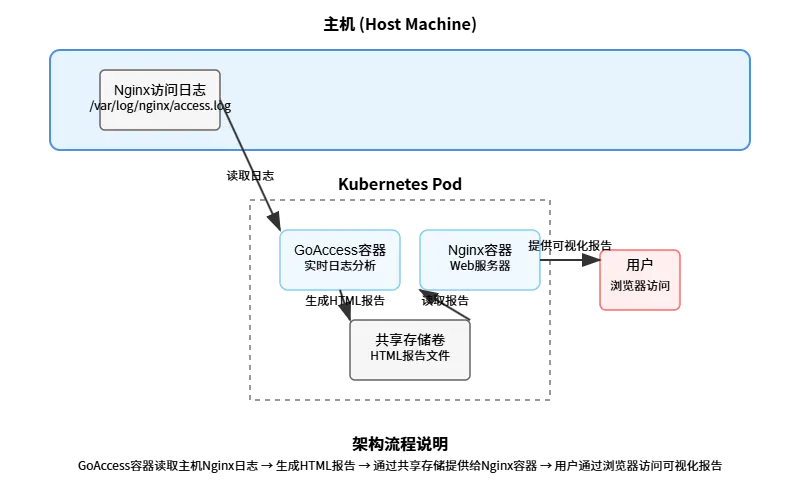
主要部署架構為:
- goaccess持續監控主機上的nginx訪問日誌文件,實時生成HTML報告。
- nginx容器將通過共享存儲卷讀取goaccess生成的HTML報告,提供html頁面訪問。
以下架構圖直觀展示了GoAccess與Nginx容器在Kubernetes環境中的協作流程:
Kubernetes編排文件配置
1. GoAccess Deployment (goaccess-deployment.yaml)
kind: Deployment
apiVersion: apps/v1
metadata:
  name: goaccess
  namespace: goaccess
spec:
  replicas: 1
  selector:
    matchLabels:
      app: goaccess
  template:
    metadata:
      labels:
        app: goaccess
    spec:
      volumes:
        - name: nginx-logs
          hostPath:
            path: /data/nginx/logs
            type: Directory
        - name: nginx-config
          configMap:
            name: nginx-config
            items:
              - key: default.conf
                path: default.conf
            defaultMode: 420
        - name: report-volume
          emptyDir: {}
        - name: time-vol
          hostPath:
            path: /etc/localtime
            type: ''
      containers:
        - name: nginx
          image: 'nginx:v1.29.1'
          ports:
            - containerPort: 80
              protocol: TCP
          resources: {}
          volumeMounts:
            - name: report-volume
              readOnly: true
              mountPath: /usr/share/nginx/html
            - name: nginx-config
              readOnly: true
              mountPath: /etc/nginx/conf.d
            - name: time-vol
              readOnly: true
              mountPath: /etc/localtime
          imagePullPolicy: IfNotPresent
        - name: goaccess
          image: 'goaccess:1.9.4-arm64'
          command:
            - /bin/sh
          args:
            - '-c'
            - >-
              tail -F /var/log/nginx/access.log | goaccess -
              --log-format=COMBINED  -o /goaccess-report/report.html
              --real-time-html --port=7890 --addr=0.0.0.0
              --ws-url=ws://${your_ip_address}:31367/ws/
          ports:
            - containerPort: 7890
              protocol: TCP
          env:
            - name: LANG
              value: en_US.UTF-8
          resources: {}
          volumeMounts:
            - name: nginx-logs
              readOnly: true
              mountPath: /var/log/nginx
            - name: report-volume
              mountPath: /goaccess-report
            - name: time-vol
              readOnly: true
              mountPath: /etc/localtime
          terminationMessagePath: /dev/termination-log
          terminationMessagePolicy: File
          imagePullPolicy: IfNotPresent
      restartPolicy: Always
      terminationGracePeriodSeconds: 30
      dnsPolicy: ClusterFirst
      nodeName: ${nginx代理所在主機名}
配置説明:
- 創建一個包含Nginx和GoAccess兩個容器的Pod
- 使用
hostPath卷掛載主機上的Nginx日誌目錄 - 使用
emptyDir卷作為共享存儲,GoAccess生成HTML報告,Nginx提供訪問 - GoAccess容器實時監控Nginx日誌並生成實時HTML報告
--ws-url=ws://${your_ip_address}:31367/ws/report.html中WebSocket通信,用於實現實時更新,因為我們在Nginx配置中設置了proxy_pass http://127.0.0.1:7890/來代理websocket請求,所以使用了Nginx的NodePort端口31367. 默認會訪問ws://$ip:7890,很顯然瀏覽器訪問不到k8s環境內部端口。
2. GoAccess Service (goaccess-service.yaml)
kind: Service
apiVersion: v1
metadata:
  name: goaccess-service
  namespace: goaccess
  labels:
    app: goaccess
    component: goaccess-reporting
spec:
  ports:
    - name: http-report
      protocol: TCP
      port: 80
      targetPort: 80
      nodePort: 31367
  selector:
    app: goaccess
  type: NodePort
配置説明:
- 提供兩個服務端口:80端口用於HTML報告訪問,7890端口用於GoAccess管理界面
- 使用NodePort類型,外部可通過節點IP和指定端口訪問服務
- 通過標籤選擇器關聯到GoAccess Deployment
3. Nginx ConfigMap (nginx-configmap.yaml)
kind: ConfigMap
apiVersion: v1
metadata:
  name: nginx-config
  namespace: goaccess
data:
  default.conf: |
    server {
        listen 80;
        server_name _;
        root /usr/share/nginx/html;
        index report.html;

        location / {
            try_files $uri $uri/ =404;
            autoindex off;
            add_header Cache-Control "no-cache, no-store, must-revalidate";
            add_header Pragma "no-cache";
            add_header Expires "0";
        }
        location /ws/ {
            # 代理到 GoAccess 容器的實時服務器
            proxy_pass http://127.0.0.1:7890/; # 關鍵點1:使用 localhost
            # 必須的頭部,用於升級協議到 WebSocket
            proxy_http_version 1.1;
            proxy_set_header Upgrade $http_upgrade;
            proxy_set_header Connection "upgrade";
            # 傳遞必要的主機信息
            proxy_set_header Host $host;
            proxy_set_header X-Real-IP $remote_addr;
            proxy_set_header X-Forwarded-For $proxy_add_x_forwarded_for;
            proxy_set_header X-Forwarded-Proto $scheme;
            # 重要:調整超時設置以適應長連接
            proxy_read_timeout 86400s; # WebSocket連接可能保持很久
            proxy_send_timeout 86400s;
        }
        # 啓用 gzip 壓縮
        gzip on;
        gzip_types text/html text/css application/javascript;
    }
配置説明:
- 配置Nginx服務器,根目錄指向共享存儲中的HTML報告
- 設置默認索引文件為report.html
- 配置WebSocket代理,支持GoAccess的實時更新功能
