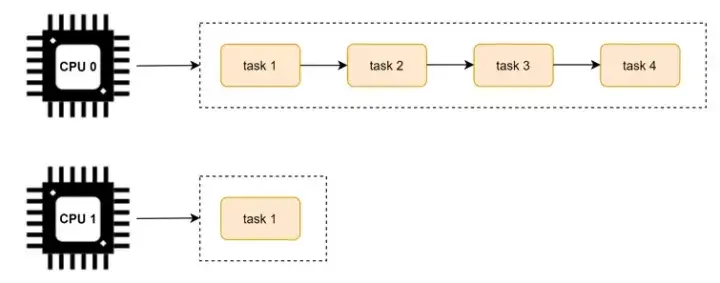
前面的調度學習都是默認在單個 CPU 上的調度策略。我們知道為了 CPU 之間減少“干擾”,每個 CPU 上都有一個任務隊列。運行的過程種可能會出現有的 CPU 很忙,有的 CPU 很閒,如下圖所示:
為了避免這個問題的出現,Linux 內核實現了 CPU 可運行進程隊列之間的負載均衡。
因為負載均衡是在多個核上的均衡,所以在講解負載均衡之前,我們先看下多核的架構。
將 task 從負載較重的 CPU 上轉移到負載相對較輕的 CPU 上執行,這個過程就是負載均衡的過程。
多核架構
這裏以 Arm64 的 NUMA(Non Uniform Memory Access) 架構為例,看下多核架構的組成。
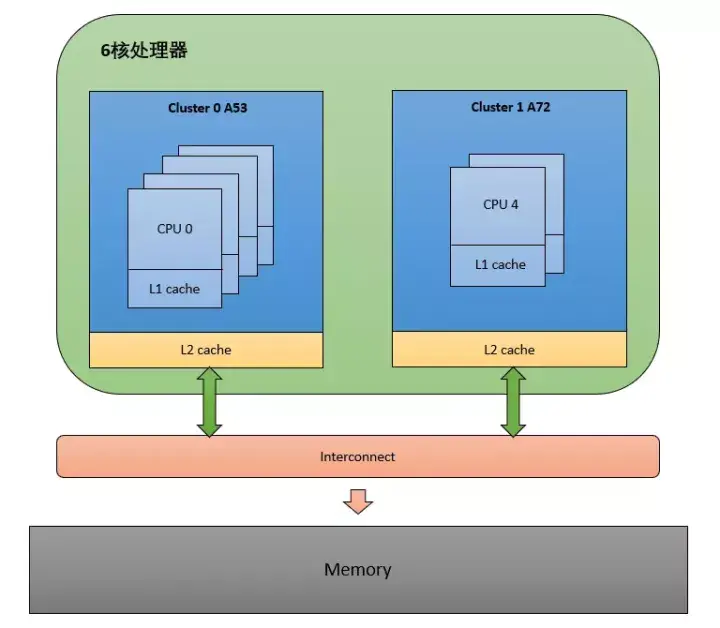
從圖中可以看出,這是非一致性內存訪問。每個 CPU 訪問 local memory,速度更快,延遲更小。因為 Interconnect 模塊的存在,整體的內存會構成一個內存池,所以 CPU 也能訪問 remote memory,但是相對 local memory 來説速度更慢,延遲更大。
我們知道一個多核心的 SOC 片上系統,內部結構是很複雜的。內核採用 CPU 拓撲結構來描述一個 SOC 的架構,使用調度域和調度組來描述 CPU 之間的層次關係。
LinuxC++後台服務器開發架構師免費學習地址
【文章福利】:小編整理了一些個人覺得比較好的學習書籍、視頻資料共享在羣文件裏面,有需要的可以自行添加哦!~點擊加入(需要自取)
CPU 拓撲
每一個 CPU 都會維護這麼一個結構體實例,用來描述 CPU 拓撲。
struct cpu_topology {
 int thread_id;
 int core_id;
 int cluster_id;
 cpumask_t thread_sibling;
 cpumask_t core_sibling;
};

thread_id: 從 mpidr_el1 寄存器中獲取
core_id:從 mpidr_el1 寄存器中獲取
cluster_id:從mpidr_el1寄存器中獲取
thread_sibling:當前 CPU 的兄弟 thread。
core_sibling:當前 CPU 的兄弟Core,即在同一個 Cluster 中的 CPU。
可以通過 /sys/devices/system/cpu/cpuX/topology 查看 cpu topology 的信息。
cpu_topology 結構體是通過函數 parse_dt_topology() 解析 DTS 中的信息建立的:
kernel_init() -> kernel_init_freeable() -> smp_prepare_cpus() -> init_cpu_topology() -> parse_dt_topology()
static int __init parse_dt_topology(void)
{
 struct device_node *cn, *map;
 int ret = 0;
 int cpu;

 cn = of_find_node_by_path("/cpus");          ------(1)
 if (!cn) {
  pr_err("No CPU information found in DT\n");
  return 0;
 }

 /*
  * When topology is provided cpu-map is essentially a root
  * cluster with restricted subnodes.
  */
 map = of_get_child_by_name(cn, "cpu-map");   ------(2)
 if (!map)
  goto out;

 ret = parse_cluster(map, 0);                 ------(3)
 if (ret != 0)
  goto out_map;

 topology_normalize_cpu_scale();

 /*
  * Check that all cores are in the topology; the SMP code will
  * only mark cores described in the DT as possible.
  */
 for_each_possible_cpu(cpu)
  if (cpu_topology[cpu].cluster_id == -1)
   ret = -EINVAL;

out_map:
 of_node_put(map);
out:
 of_node_put(cn);
 return ret;
}
找到 dts 中 cpu topology 的根節點 "/cpus"
找到 "cpu-map" 節點
解析 "cpu-map" 中的 cluster
以 i.mx8qm 為例,topology 為:”4A53 + 2A72”,dts中定義如下:
# imx8qm.dtsi

cpus: cpus {
        #address-cells = <2>;
        #size-cells = <0>;

        A53_0: cpu@0 {
                device_type = "cpu";
                compatible = "arm,cortex-a53", "arm,armv8";
                reg = <0x0 0x0>;
                clocks = <&clk IMX_SC_R_A53 IMX_SC_PM_CLK_CPU>;
                enable-method = "psci";
                next-level-cache = <&A53_L2>;
                operating-points-v2 = <&a53_opp_table>;
                #cooling-cells = <2>;
        };

        A53_1: cpu@1 {
                device_type = "cpu";
                compatible = "arm,cortex-a53", "arm,armv8";
                reg = <0x0 0x1>;
                clocks = <&clk IMX_SC_R_A53 IMX_SC_PM_CLK_CPU>;
                enable-method = "psci";
                next-level-cache = <&A53_L2>;
                operating-points-v2 = <&a53_opp_table>;
                #cooling-cells = <2>;
        };

        A53_2: cpu@2 {
                device_type = "cpu";
                compatible = "arm,cortex-a53", "arm,armv8";
                reg = <0x0 0x2>;
                clocks = <&clk IMX_SC_R_A53 IMX_SC_PM_CLK_CPU>;
                enable-method = "psci";
                next-level-cache = <&A53_L2>;
                operating-points-v2 = <&a53_opp_table>;
                #cooling-cells = <2>;
        };

        A53_3: cpu@3 {
                device_type = "cpu";
                compatible = "arm,cortex-a53", "arm,armv8";
                reg = <0x0 0x3>;
                clocks = <&clk IMX_SC_R_A53 IMX_SC_PM_CLK_CPU>;
                enable-method = "psci";
                next-level-cache = <&A53_L2>;
                operating-points-v2 = <&a53_opp_table>;
                #cooling-cells = <2>;
        };

        A72_0: cpu@100 {
                device_type = "cpu";
                compatible = "arm,cortex-a72", "arm,armv8";
                reg = <0x0 0x100>;
                clocks = <&clk IMX_SC_R_A72 IMX_SC_PM_CLK_CPU>;
                enable-method = "psci";
                next-level-cache = <&A72_L2>;
                operating-points-v2 = <&a72_opp_table>;
                #cooling-cells = <2>;
        };

        A72_1: cpu@101 {
                device_type = "cpu";
                compatible = "arm,cortex-a72", "arm,armv8";
                reg = <0x0 0x101>;
                clocks = <&clk IMX_SC_R_A72 IMX_SC_PM_CLK_CPU>;
                enable-method = "psci";
                next-level-cache = <&A72_L2>;
                operating-points-v2 = <&a72_opp_table>;
                #cooling-cells = <2>;
        };

        A53_L2: l2-cache0 {
                compatible = "cache";
        };

        A72_L2: l2-cache1 {
                compatible = "cache";
        };

        cpu-map {
                cluster0 {
                        core0 {
                                cpu = <&A53_0>;
                        };
                        core1 {
                                cpu = <&A53_1>;
                        };
                        core2 {
                                cpu = <&A53_2>;
                        };
                        core3 {
                                cpu = <&A53_3>;
                        };
                };

                cluster1 {
                        core0 {
                                cpu = <&A72_0>;
                        };
                        core1 {
                                cpu = <&A72_1>;
                        };
                };
        };
};
經過 parse_dt_topology(),update_siblings_masks() 解析後得到 cpu_topology 的值為:
CPU0: cluster_id = 0, core_id = 0
CPU1: cluster_id = 0, core_id = 1
CPU2: cluster_id = 0, core_id = 2
CPU3: cluster_id = 0, core_id = 3
CPU4: cluster_id = 1, core_id = 0
CPU5: cluster_id = 1, core_id = 1
調度域和調度組
在 Linux 內核中,調度域使用 sched_domain 結構表示,調度組使用 sched_group 結構表示。
調度域 sched_domain
struct sched_domain {
    struct sched_domain *parent;
    struct sched_domain *child;
    struct sched_group  *groups;
    unsigned long min_interval;
    unsigned long max_interval;
    ...
};
parent:由於調度域是分層的,上層調度域是下層的調度域的父親,所以這個字段指向的是當前調度域的上層調度域。
child:如上所述,這個字段用來指向當前調度域的下層調度域。
groups:每個調度域都擁有一批調度組,所以這個字段指向的是屬於當前調度域的調度組列表。
min_interval/max_interval:做均衡也是需要開銷的,不能時刻去檢查調度域的均衡狀態,這兩個參數定義了檢查該 sched domain 均衡狀態的時間間隔的範圍
sched_domain 是分成兩個 level,base domain 稱為 MC domain(multi core domain),頂層 domain 稱為 DIE domain。
調度組 sched_group
struct sched_group {
struct sched_group *next;
unsigned int group_weight;
...
struct sched_group_capacity *sgc;
unsigned long cpumask[0];
};
next:指向屬於同一個調度域的下一個調度組。
group_weight:該調度組中有多少個cpu。
sgc:該調度組的算力信息。
cpumask:用於標記屬於當前調度組的 CPU 列表(每個位表示一個 CPU)。
為了減少鎖的競爭,每一個 CPU 都有自己的 MC domain、DIE domain 以及 sched_group,並且形成了 sched_domain 之間的層級結構,sched_group 的環形鏈表結構。CPU 對應的調度域和調度組可通過在設備模型文件 /proc/sys/kernel/sched_domain 裏查看。
具體的 sched_domain 的初始化代碼分析如下:
kernel_init() -> kernel_init_freeable() -> sched_init_smp() -> init_sched_domains(cpu_active_mask) -> build_sched_domains(doms_cur[0], NULL)
static int
build_sched_domains(const struct cpumask *cpu_map, struct sched_domain_attr *attr)
{
 enum s_alloc alloc_state;
 struct sched_domain *sd;
 struct s_data d;
 int i, ret = -ENOMEM;

 alloc_state = __visit_domain_allocation_hell(&d, cpu_map);    ------(1)
 if (alloc_state != sa_rootdomain)
  goto error;

 /* Set up domains for CPUs specified by the cpu_map: */
 for_each_cpu(i, cpu_map) {
  struct sched_domain_topology_level *tl;

  sd = NULL;
  for_each_sd_topology(tl) {
   sd = build_sched_domain(tl, cpu_map, attr, sd, i);        ------(2)
   if (tl == sched_domain_topology)
    *per_cpu_ptr(d.sd, i) = sd;
   if (tl->flags & SDTL_OVERLAP)
    sd->flags |= SD_OVERLAP;
  }
 }

 /* Build the groups for the domains */
 for_each_cpu(i, cpu_map) {
  for (sd = *per_cpu_ptr(d.sd, i); sd; sd = sd->parent) {
   sd->span_weight = cpumask_weight(sched_domain_span(sd));
   if (sd->flags & SD_OVERLAP) {
    if (build_overlap_sched_groups(sd, i))
     goto error;
   } else {
    if (build_sched_groups(sd, i))                          ------(3)
     goto error;
   }
  }
 }
  ......
 /* Attach the domains */
 rcu_read_lock();
 for_each_cpu(i, cpu_map) {
  int max_cpu = READ_ONCE(d.rd->max_cap_orig_cpu);
  int min_cpu = READ_ONCE(d.rd->min_cap_orig_cpu);

  sd = *per_cpu_ptr(d.sd, i);

  if ((max_cpu < 0) || (cpu_rq(i)->cpu_capacity_orig >
      cpu_rq(max_cpu)->cpu_capacity_orig))
   WRITE_ONCE(d.rd->max_cap_orig_cpu, i);

  if ((min_cpu < 0) || (cpu_rq(i)->cpu_capacity_orig <
      cpu_rq(min_cpu)->cpu_capacity_orig))
   WRITE_ONCE(d.rd->min_cap_orig_cpu, i);

  cpu_attach_domain(sd, d.rd, i);                            ------(4)
 }
 rcu_read_unlock();

 if (!cpumask_empty(cpu_map))
  update_asym_cpucapacity(cpumask_first(cpu_map));

 ret = 0;
error:
 __free_domain_allocs(&d, alloc_state, cpu_map);             ------(5)
 return ret;
}
在每個 tl 層次,給每個 CPU 分配 sd、sg、sgc 空間
遍歷 cpu_map 裏所有 CPU,創建與物理拓撲結構對應的多級調度域
遍歷 cpu_map 裏所有 CPU, 創建調度組
將每個 CPU 的 rq 與 rd(root_domain) 進行綁定
free 掉分配失敗或者分配成功多餘的內存
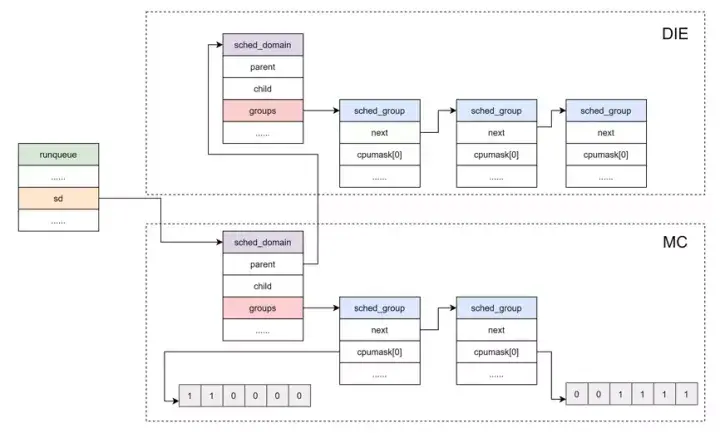
所以,可運行進程隊列與調度域和調度組的關係如下圖所示:
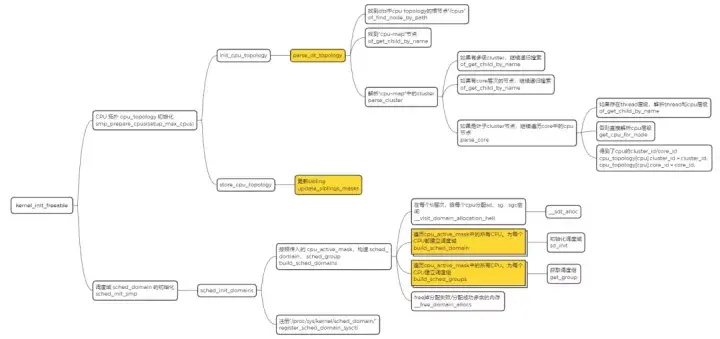
總結
這裏用一張圖來總結下 CPU 拓撲,調度域初始化的過程,如下所示:
根據已經生成的 CPU 拓撲,調度域和調度組,最終可以生成如下圖所示的關係圖。
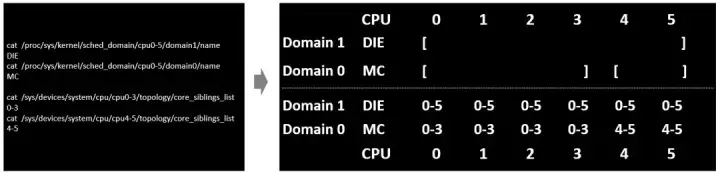
在上面的結構中,頂層的 DIE domain 覆蓋了系統中所有的 CPU,4 個 A53 是 Cluster 0,共享 L2 cache,兩外 2 個 A72 是 Cluster 1,共享 L2 cache。那麼每個 Cluster 可以認為是一個 MC 調度域,左邊的 MC 調度域中有 4 個調度組,右邊的 MC 調度域中有 2 個調度組,每個調度組中只有 1 個 CPU。整個 SOC 可以認為是高一級別的 DIE 調度域,其中有兩個調度組,Cluster 0 屬於一個調度組,Cluster 1 屬於另一個調度組。跨 Cluster 的負載均衡是需要清除 L2 cache 的,開銷是很大的,因此 SOC 級別的 DIE 調度域進行負載均衡的開銷比 MC 調度域更大一些。
到目前為止,我們已經將內核的調度域構建起來了,CFS 可以利用 sched_domain 來完成多核間的負載均衡了。
何時做負載均衡?
CFS 任務的負載均衡器有兩種:
一種是針對 busy CPU 的 periodic balancer,用於進程在 busy CPU 上的均衡
一種是針對 idle CPU 的 idle balancer,用於把 busy CPU 上的進程均衡到 idle CPU 上來。
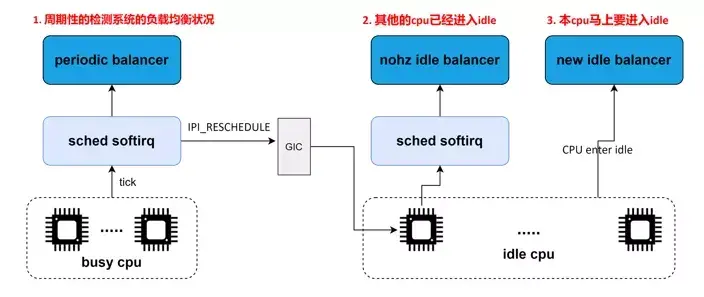
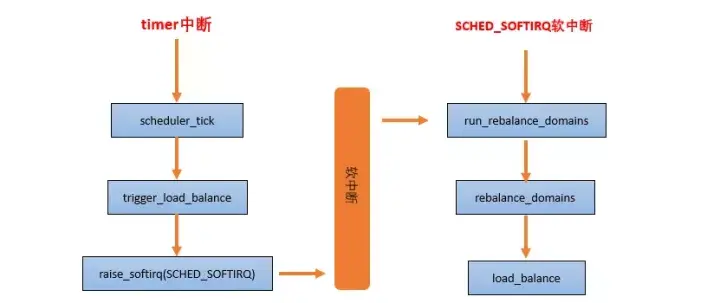
periodic balancer:週期性負載均衡是在時鐘中斷 scheduler_tick 中,找到該 domain 中最繁忙的 sched group 和 CPU runqueue,將其上的任務 pull 到本 CPU,以便讓系統的負載處於均衡的狀態。
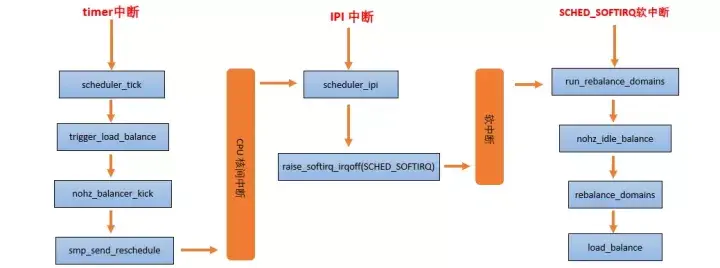
nohz idle balancer:當其他的 CPU 已經進入 idle,本 CPU 任務太重,需要通過 IPI 將其他 idle 的 CPU 喚醒來進行負載均衡。
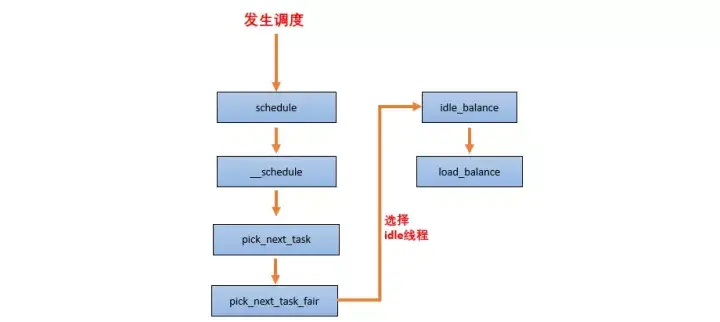
new idle balancer:本 CPU 上沒有任務執行,馬上要進入 idle 狀態的時候,看看其他 CPU 是否需要幫忙,來從 busy cpu 上 pull 任務,讓整個系統的負載處於均衡狀態。
負載均衡的基本過程
當一個 CPU 上進行負載均衡的時候,總是從 base domain 開始,檢查其所屬 sched group 之間的負載均衡情況,如果有不均衡情況,那麼會在該 CPU 所屬 Cluster 之間進行遷移,以便維護 Cluster 內各個CPU 的任務負載均衡。
load_balance 是處理負載均衡的核心函數,它的處理單元是一個調度域,其中會包含對調度組的處理。
static int load_balance(int this_cpu, struct rq *this_rq,
                        struct sched_domain *sd, enum cpu_idle_type idle,
                        int *continue_balancing)
{
        ......
redo:
        if (!should_we_balance(&env)) {
                *continue_balancing = 0;
                goto out_balanced;
        }

        group = find_busiest_group(&env);           ------(1)
        if (!group) {
                schedstat_inc(sd->lb_nobusyg[idle]);
                goto out_balanced;
        }

        busiest = find_busiest_queue(&env, group);  ------(2)
        if (!busiest) {
                schedstat_inc(sd->lb_nobusyq[idle]);
                goto out_balanced;
        }

        BUG_ON(busiest == env.dst_rq);

        schedstat_add(sd->lb_imbalance[idle], env.imbalance);

        env.src_cpu = busiest->cpu;
        env.src_rq = busiest;

        ld_moved = 0;
        if (busiest->nr_running > 1) {
                env.flags |= LBF_ALL_PINNED;
                env.loop_max  = min(sysctl_sched_nr_migrate, busiest->nr_running);

more_balance:
                rq_lock_irqsave(busiest, &rf);
                update_rq_clock(busiest);

                cur_ld_moved = detach_tasks(&env);  ------(3)

                rq_unlock(busiest, &rf);

                if (cur_ld_moved) {
                        attach_tasks(&env);         ------(4)
                        ld_moved += cur_ld_moved;
                }

                local_irq_restore(rf.flags);

                if (env.flags & LBF_NEED_BREAK) {
                        env.flags &= ~LBF_NEED_BREAK;
                        goto more_balance;
                }
                ......
        }
        ......
out:
        return ld_moved;
}
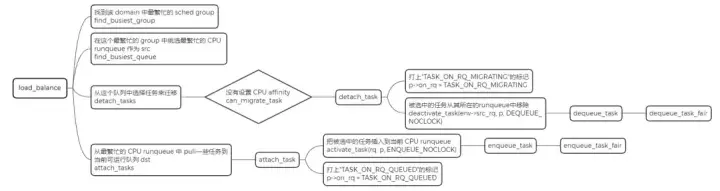
找到該 domain 中最繁忙的 sched group
在這個最繁忙的 group 中挑選最繁忙的 CPU runqueue, 作為 src
從這個隊列中選擇任務來遷移,然後把被選中的任務從其所在的 runqueue 中移除
從最繁忙的 CPU runqueue 中 pull 一些任務到當前可運行隊列 dst